

Creating apps no longer requires coding skills or massive budgets. With Adalo, you can build native iOS, Android, and web apps using a drag-and-drop interface - no coding needed. Adalo handles the database, user authentication, and backend logic, so you can focus on your ideas.
Here’s what you can create with Adalo:
- Marketplace Apps: Connect buyers and sellers with product listings, secure payments, and messaging.
- Delivery Apps: Build platforms for food, grocery, or courier services with real-time tracking and role-based interfaces.
- Social Networking Apps: Enable user profiles, activity feeds, and real-time messaging for niche communities.
- Fitness Tracking Apps: Offer workout logs, GPS tracking, and trainer dashboards with monetization features.
- Event Management Apps: Simplify ticket sales, check-ins, and updates with QR codes and geolocation tools.
- Membership Apps: Create platforms with forums, in-app messaging, and subscription management.
- Inventory Management Apps: Track stock levels, set low-stock alerts, and manage data with real-time updates.
- Customer Portal Apps: Provide clients with secure dashboards, project updates, and messaging.
- Learning Apps: Deliver courses, quizzes, and certificates with gamification and progress tracking.
- Real Estate Apps: Build property search tools with filters, maps, and agent communication.
Ada, Adalo's AI builder, lets you describe what you want and generates your app. Magic Start creates complete app foundations from a description, while Magic Add adds features through natural language.
Adalo is affordable (starting at $36/month) and scalable, supporting over 1 million monthly active users. Its AI-driven tools like Magic Start and Magic Add make app creation faster and easier. Whether you’re testing an idea or scaling a business, Adalo is a powerful solution to bring your app to life.
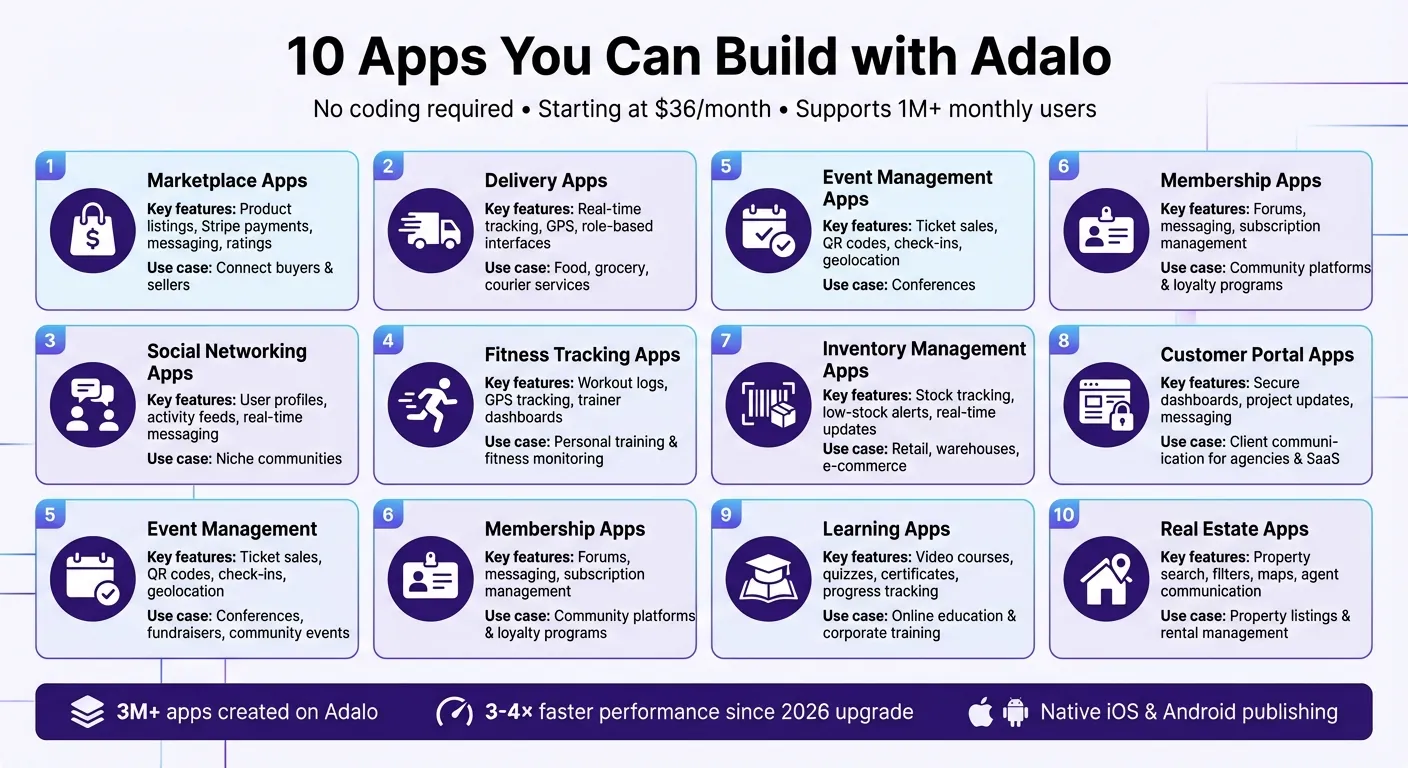
10 Types of Apps You Can Build with Adalo No-Code Platform
Adalo Beginners Crash Course: The Ultimate Guide
1. Marketplace Apps
A marketplace app brings buyers and sellers together on a single platform, much like platforms for handmade goods, rental services like Airbnb clones, or local classifieds. Adalo is an AI-powered app builder for database-driven web apps and native iOS and Android apps—one version across all three platforms, published to the Apple App Store and Google Play. With Adalo, you can create a two-sided marketplace that handles everything from product listings to secure payments without writing code.
Key Features
To build a functional marketplace, you'll need distinct profiles for buyers and sellers, each with tailored permissions and interfaces. Sellers can upload photos, add descriptions, and set prices for their listings. Buyers can browse, search, and filter items by category, location, or price range. Stripe integration ensures secure payment processing and supports split payments, allowing you to collect platform commissions—common rates are around 12.9% per transaction or a $1.99 minimum fee.
Features like in-app messaging enable direct communication between buyers and sellers, while rating and review systems help maintain trust and quality. Push notifications keep users engaged by alerting them about new listings or incoming orders. For marketplaces that rely on location, GPS tools allow for map-based filtering and real-time order tracking.
These features form the backbone of your marketplace app and define its core functionality.
Core Screens
Your app's features translate into a set of essential screens designed for smooth user interaction. Key screens include a Home/Discovery page for browsing categories, a Search Results page with filters, and Product Detail pages showcasing images, pricing, and seller information. You'll also need a Shopping Cart and Checkout flow, along with Order Tracking and Order History screens for post-purchase updates.
On the seller side, a Dashboard allows users to manage listings and track orders. For app administrators, an Admin interface is essential for overseeing users and monitoring transactions.
Scalability
Adalo's modular infrastructure scales to serve apps with millions of monthly active users, with no upper ceiling. Apps built on Adalo now run three to four times faster, and paid plans include no data caps—your product catalog and transaction history can grow without hitting storage limits. For businesses aiming for enterprise-level growth, you can integrate external databases like PostgreSQL or MS SQL Server to handle millions of data rows efficiently.
2. Delivery Apps
Delivery apps bring together customers, vendors, and drivers on one platform, whether for food, groceries, or local courier services. With Adalo, you can create a dynamic three-sided marketplace that handles everything from ordering and payments to real-time tracking.
Key Features
A successful delivery app requires tailored interfaces for different user roles. For customers, the app offers easy navigation to browse products with clear images, add items to a cart, and pay securely using Stripe. Push notifications keep everyone in the loop—customers get updates on their orders, vendors are alerted to new requests, and drivers receive assignment details.
Geolocation, powered by the Google Maps API, simplifies address selection for customers and provides drivers with efficient navigation. An order status system updates users at every stage—Placed, Preparing, Out for Delivery, and Delivered—offering transparency. Vendors benefit from an order management dashboard to handle incoming orders, update preparation statuses, and manage menu inventory in real time.
Core Screens
The app design ensures each user role has a smooth experience:
- Customers: Start with a Discovery/Menu screen to browse restaurants or products using filters like cuisine, ratings, or delivery time. Product Detail screens highlight item specifics, customization options, and nutritional info. The Basket/Checkout screen breaks down the order, delivery fees, and tip options before payment.
- Vendors: Use a Menu Management interface to add, edit, or remove items, and an Orders Dashboard to track and update order statuses in real time.
- Drivers: Access an Available Deliveries list showing potential earnings and distances, an Active Delivery interface with integrated navigation, and a Delivery Completion screen for submitting proof of delivery.
Additionally, an administrative Orders Page provides a comprehensive view of all transactions across the platform.
Use Case Suitability
Adalo's delivery app framework is ideal for local businesses like restaurants, cafes, food trucks, and grocery stores looking to create branded ordering platforms. The three-sided marketplace structure seamlessly connects customers, vendors, and couriers under one roof.
Scalability
Adalo's infrastructure delivers a performance boost, making apps run three to four times faster—perfect for high-traffic platforms. Its modular system scales effortlessly to support over 1 million monthly active users, with unrestricted database storage for growing menus, customers, and order histories.
"Unlike platforms that charge usage-based fees that can lead to unexpected bills, Adalo plans include unlimited usage—no bill shock as your delivery orders increase." - Adalo Team
The X-Ray feature ensures smooth operations by identifying performance issues in database queries and screen loading, keeping your app efficient as demand grows. At $36/month, Adalo offers predictable pricing without the workload units or action limits that competitors like Bubble impose.
3. Social Networking Apps
Social networking apps thrive on connecting communities, and Adalo's all-in-one platform makes building these apps straightforward. Whether it's fostering shared interests, enabling content sharing, or sparking conversations, Adalo provides all the tools you need. From user profiles and activity feeds to real-time messaging and push notifications, the platform covers every essential feature.
Key Features
A great social app focuses on interaction and discovery. Here's how Adalo delivers:
- User Profiles: These act as digital identities, showcasing profile photos, bios, and activity histories.
- Social Feed: A central hub for user-generated posts, featuring images, captions, location tags, and timestamps.
- Engagement Tools: Users can like, comment, and share posts, driving interaction.
- Connections: Adalo's relational database manages many-to-many relationships, powering follower and friend systems.
- Push Notifications: Keep users engaged by alerting them to new followers, comments, or mentions.
- Real-Time Messaging: Facilitate private chats with instant push notifications.
- Media Sharing: Upload and share photos or videos with automatic image optimization via Imgix, reducing file sizes by 33% without sacrificing quality.
Core Screens
Adalo's app framework includes essential screens that define the social networking experience:
- Authentication Screens: Secure user access with Welcome, Signup, and Login pages.
- Home Feed: Displays user-generated content in an easy-to-navigate scrollable format.
- User Profiles: Showcase personal details and allow owners to edit their information.
- Create Post: Includes image pickers and text inputs for captions and location tags.
- Discovery/Search: Helps users find new connections or content using filters like interests or location.
- Activity/Notifications: Tracks engagement, such as likes, comments, and new followers.
- Messaging: Includes both a conversation list and individual chat interfaces for seamless communication.
Starting with templates like "Facebook Clone" or "Social Media Feed" can save time, as these come pre-built with many of these screens.
Use Case Suitability
Adalo is a perfect fit for niche community platforms. Whether it's a book club, a network for professionals, or a group for pet enthusiasts, the platform caters to specific interests. Its publishing for iOS and Android ensures a smooth, app-store-ready experience. Media-sharing networks benefit from Adalo's image optimization and no record limits on paid plans, while microblogging platforms and dating apps can utilize features like swipe mechanics and matching algorithms through custom actions.
Scalability
Adalo's infrastructure is built to handle growth. With support for over 1 million monthly active users and no storage constraints, your app can scale alongside your community. To maintain performance as your user base grows, consider:
- List Pagination: Load 20–25 items at a time to keep screens responsive.
- Efficient Database Relationships: Avoid redundant queries by structuring your data thoughtfully.
- X-Ray Tool: Identify and resolve performance issues in database queries and screen loading before they affect users.
Adalo ensures your social networking app remains fast and reliable, no matter how large your community becomes.
4. Fitness Tracking Apps
Fitness tracking apps empower users to monitor their progress, stay motivated, and achieve their health goals. With Adalo, creating these apps is straightforward, whether you're a personal trainer looking to provide custom solutions or an entrepreneur building a comprehensive tracking platform. From workout logs and GPS tracking to payment processing and social features, Adalo handles it all without requiring code.
Key Features
To stand out, a fitness app needs tools that track activity, engage users, and support monetization. Adalo delivers on all fronts. Users can log workouts, monitor heart rate, track body fat percentage, and even measure VO₂ max. Built-in GPS and mapping features allow users to plot routes, track their live position, and calculate distances. For trainers, Adalo offers tools to create exercise libraries, assign custom workouts, and manage details like sets, reps, and rest periods.
Monetization is seamless with Stripe integration, enabling subscriptions or one-time class bookings. Engagement tools include in-app messaging, social feeds, follower systems, and leaderboards. Push notifications celebrate achievements, while badges reward milestones. With Adalo's AI-driven app builder, Magic Start generates your app's foundation from a simple description, and Magic Add allows you to add features like progress charts using natural language.
Core Screens
A well-designed fitness app includes essential screens for both users and trainers. These include workout libraries, active timers, exercise details, and progress dashboards. For activity tracking, three key screens are critical:
- Pre-activity screen: Lets users set goals and preview routes.
- During-activity screen: Displays live maps and real-time metrics like pace and distance.
- Post-activity summary: Provides stats, route maps, and a performance overview.
Trainers also benefit from admin portals to create and manage workouts efficiently.
Use Case Suitability
Adalo is perfect for personal trainers, CrossFit gyms, marathon coaches, and fitness-focused entrepreneurs. Ken MacDonald, Business Owner at Lifetime Performance, shared:
"Taking our business mobile at the start of COVID-19 was so easy thanks to Adalo."
With native iOS and Android publishing, your app will meet the professional standards users expect.
Scalability
Adalo 3.0 brings 3–4× faster performance and supports millions of monthly active users. Paid plans remove storage constraints, so you can store extensive workout histories without limits. To maintain speed as your app grows, precompute metrics—like weekly totals or personal records—when workouts are saved, rather than when dashboards load. Use the X-Ray diagnostic tool to identify and resolve performance issues in complex screens. For GPS tracking, updating coordinates every 5–10 seconds balances route accuracy with battery efficiency.
Next, discover how event management apps can broaden your app-building opportunities.
5. Event Management Apps
Event management apps are a great example of how Adalo simplifies complex logistics into manageable workflows. From selling tickets to streamlining attendee check-ins, these apps are invaluable for organizing conferences, fundraisers, corporate training, and community events. Adalo makes it easy to create an event platform that handles everything—registration forms, secure Stripe payments, QR code ticketing, and push notifications for updates.
Key Features
Adalo's platform offers tools to cover every aspect of event management. Create custom registration forms that integrate with Stripe for secure payments, auto-generate QR code tickets, and validate attendance in real time. Push notifications keep attendees informed with reminders, schedule changes, and ticket confirmations. For event discovery, the combination of geolocation and Google Maps integration allows users to find local events and get directions to venues.
With Adalo's Magic Start, setting up an event database becomes a breeze. It automatically creates structures for users, events, tickets, and registrations based on a simple description. Need advanced features? Magic Add lets you include options like waitlists or recurring events using natural language commands. Once your database is ready, you can design essential screens to enhance the experience for both attendees and organizers.
Core Screens
A well-rounded event management app includes features for both attendees and organizers:
- For Attendees: Users can explore events through a discovery feed with searchable lists or map views. They can view detailed event pages with descriptions, venue maps, and ticket options, complete a secure checkout process, and store tickets in a digital wallet for easy access.
- For Organizers: An admin dashboard provides insights into ticket sales, revenue, and attendance metrics. Organizers can create events, set ticket pricing (including VIP or Early Bird tiers), and use QR code scanning for fast, mobile check-ins.
Use Case Suitability
Adalo's flexibility makes it ideal for managing events of all sizes, from large conferences to local community gatherings. For instance, Covenant Christian High School launched the Covenant Connect app using Adalo. This app modernized the school's systems, replacing cash-based ticket sales with a QR code-powered cashless system. Students and parents could easily purchase tickets for sports events and even pay for lunch, all within the app.
Scalability
Adalo's infrastructure offers 3–4× faster performance and supports apps with over 1 million monthly active users. Paid plans include no record limits, so your event catalog and registration history can expand without hitting storage limits. With over 20 million data requests processed daily and 99%+ uptime, the platform ensures reliability. Tools like the X-Ray performance analyzer help identify database issues before they impact users, while SheetBridge simplifies migrating attendee data from Google Sheets into Adalo's native database.
6. Membership and Community Apps
Membership and community apps thrive on fostering connections and keeping users engaged. Whether you're creating a learning hub, a loyalty platform, or a support network, these apps are all about building spaces where people feel connected and valued. With Adalo's tools, you can create scalable platforms that make this possible.
Key Features
These apps shine when they make communication easy and engaging. Features like push notifications ensure members stay updated on new interactions, while in-app messaging supports group and one-on-one chats directly within the app. Forums and discussion boards provide a space for collaboration and sharing ideas, and user profiles let members personalize their interactions.
For monetization, Adalo simplifies subscription management through its In-App Purchase (IAP) components. You can gate premium content with a straightforward true/false user property, eliminating the need for separate apps for free and paid users. This setup allows you to quickly launch your app and expand its features over time.
Core Screens
A strong membership app includes essential screens that enhance user experience:
- Onboarding flows: These guide new members through account setup and preference selection.
- Member directories: Searchable lists organized by roles like Admin or Moderator make it easy to find and connect with others.
- Admin dashboards: These give community managers tools to moderate content, manage permissions, and monitor engagement metrics.
- Payment and subscription screens: These allow users to select membership tiers and complete transactions.
These screens are the foundation of a membership app, supporting a variety of interactions within the community.
Use Case Suitability
Membership apps are incredibly versatile, fitting into a range of scenarios. For example, learning communities like 100DaysofNoCode use Adalo to offer tutorials, premium content, and collaborative forums for members building projects. Other examples include brand communities that build loyalty around products, support networks for health or fitness, and networking platforms for business or niche interests.
"Deep community engagement starts with relationships and interaction. If you want meaningful results from an online community, don't start with a business strategy. Start with your potential community members in mind." - Sonia Rebecca Menezes
Scalability
Adalo's infrastructure is designed to grow with your community. Paid plans starting at $36/month include unrestricted database storage, so your app can expand without worrying about storage limits or unexpected costs. The X-Ray performance analyzer helps pinpoint database issues before they affect users, ensuring you prioritize performance even as your community grows. Unlike competitors that charge workload units or usage-based fees, Adalo's pricing remains predictable as your membership base scales.
7. Inventory Management Apps
Inventory management apps are essential for businesses to keep track of stock levels and avoid the pitfalls of overstocking or running out of products. Whether you're managing a retail store, a warehouse, or an e-commerce platform, these apps bring structure to the often-chaotic task of monitoring hundreds—or even thousands—of items. With Adalo's visual builder, creating a custom inventory management system is simple and requires no coding.
Key Features
At the heart of any inventory app is a relational database. This database tracks item details such as name, quantity, price, and supplier information. To keep your stock data accurate, real-time updates sync automatically as items are added, sold, or restocked. Low-stock alerts can be set up to notify you when it's time to reorder, using custom actions or integrations. For quicker data entry, you can integrate barcode scanning via device capabilities. Additionally, reporting dashboards make it easy to visualize inventory trends with lists and charts, giving you a clear picture of your stock health at a glance.
Core Screens
A well-designed inventory app typically includes several key screens to ensure functionality:
- Dashboard: Offers an overview of inventory levels and visual data like charts.
- Item List screen: Displays all products with options for filtering and searching.
- Add/Edit Item screen: Provides forms for entering or updating product details, including quantities and images.
- Low Stock Alerts screen: Highlights items that need immediate attention.
- Reports screen: Allows for data export and deeper analysis through custom actions.
- Delete Confirmation screen: Adds an extra layer of security to prevent accidental deletions.
These screens create a user-friendly system for managing stock, ideal for businesses with moderate inventory volumes.
Use Case Suitability
This type of app is particularly useful for small to medium-sized businesses handling inventories of 100 to 1,000 items. Picture a local hardware store tracking tools, a boutique managing its clothing stock, or an online seller monitoring products across multiple sales channels. Some businesses have reported savings of up to $1.7 million compared to traditional development costs. With Adalo, you can publish native iOS and Android apps, making it convenient for warehouse staff to update inventory directly from their mobile devices.
Scalability
As your business grows, Adalo's infrastructure ensures your inventory management system keeps up. It supports increasing data volumes and user interactions without skipping a beat. For businesses needing more storage, Adalo connects seamlessly to external databases like Xano, SQL Server, MySQL, and PostgreSQL. These external options can handle millions of records efficiently, with fast query speeds. Plus, tools like the X-Ray performance analyzer help identify and resolve database performance issues before they impact your operations. This makes it a reliable choice for businesses planning for long-term growth.
8. Customer Portal Apps
Customer portal apps simplify communication by replacing scattered emails and phone calls with a single, branded hub. These hubs give clients 24/7 access to essential updates, documents, and messages. They're particularly useful for service-based businesses like marketing agencies, consulting firms, or SaaS companies that need to share progress updates or resources regularly. Instead of fielding constant "What's the status?" inquiries, you can offer clients a secure, real-time view of their projects.
Key Features
At the heart of any customer portal is secure user authentication with role-based permissions, ensuring clients only see what's relevant to their accounts. Real-time updates keep everyone informed with native push notifications for new uploads or milestone completions. A centralized document library streamlines file sharing, eliminating the chaos of lost email attachments. In-app messaging organizes communication into searchable threads tied to specific projects. By automating these processes, businesses save up to 15 hours weekly on client management, and marketing agencies report faster client approvals—dropping from 5 days to just 1.5 days.
Core Screens
A well-designed customer portal includes several essential screens:
- Client Dashboard: Displays active projects, recent updates, and quick-action options.
- Project Details: Provides a detailed view of project progress and milestones.
- Document Library: Centralizes all files, complete with preview thumbnails and download options.
- Message Center: Keeps conversations organized with a full history tied to specific projects.
- Settings: Allows users to update profile details and manage notifications.
For businesses, an Admin Portal offers control over permissions, content updates, and transaction monitoring, ensuring smooth operations.
Use Case Suitability
Customer portals are ideal for businesses managing ongoing client relationships. A marketing agency can use them to share campaign analytics and creative assets. Consulting firms might provide progress updates and research files. SaaS companies can offer clients access to support tickets or product documentation. The key is balancing external user access with restricted system privileges.
Scalability
Adalo's platform ensures your customer portal can grow alongside your business. Supporting over 1,000,000 monthly active users and processing 20 million+ daily data requests, it's built for scale. Paid plans include no data caps, so you're free to expand your client base without limits. Since the Adalo 3.0 infrastructure update in late 2025, apps now run 3-4x faster. For advanced needs, you can integrate external databases like Airtable or PostgreSQL via External Collections, enabling you to manage millions of records efficiently while maintaining an intuitive user experience.
Next, discover how Adalo redefines learning with interactive, engaging apps.
9. Learning and Education Apps
Learning and education apps have transformed the way people acquire skills by offering dynamic, mobile-first experiences. These apps are ideal for online course creators, corporate training teams, language schools, and fitness coaches. They provide a platform to deliver video lessons, track progress, and issue certificates—all through a custom-branded app that's accessible anytime.
Key Features
An effective learning app focuses on seamless content delivery. This includes support for video players (via YouTube or Vimeo embeds), downloadable resources like PDFs, and text-based lessons. Tools like progress bars and "Continue Learning" buttons make it easy for users to track their journey. Assessments are streamlined with built-in quiz builders that support multiple-choice and short-answer formats, automated scoring, and instant certificate generation.
Gamification is another essential element, keeping learners motivated with features like streaks, points, and achievement badges. For monetization, the app can integrate with Stripe for one-time or subscription payments and IAPHUB for in-app purchases. Communication tools, such as push notifications, in-app messaging, and community forums, help foster strong connections between students and instructors. Role-based access ensures tailored interfaces for Students, Instructors, and Admins, enhancing usability for all parties.
Core Screens
A thoughtfully designed learning app includes several key screens:
- Student Interface: Onboarding/Welcome screen, Course Catalog with search and filters, Course Detail pages, Lesson Player, Quiz/Results screens, and a Personal Dashboard.
- Instructor Interface: Dashboard with enrollment analytics, Course/Curriculum Builder, and tools for managing students.
- Transaction Screens: Checkout and Payment Methods, integrated with Stripe or IAPHUB, for handling course purchases or subscriptions.
For efficient data management, organize collections for Courses, Lessons, Quizzes, and Enrollments, with a dedicated Progress collection to track completion. Since Adalo doesn't host video files directly, you can store unlisted YouTube or private Vimeo links in your Lessons collection to keep things running smoothly.
Use Case Suitability
Adalo-powered learning apps cater to a variety of needs. Academic and test prep platforms can offer study aids and standardized test materials. Corporate training teams can simplify onboarding, compliance training, and policy updates while tracking completion. Lifestyle and hobby instructors can create courses on cooking, photography, or language learning. Fitness coaches can provide video-based training programs alongside personalized workout plans.
Scalability
Adalo's infrastructure is built to handle growth, supporting over 1,000,000 monthly active users. After the Adalo 3.0 update in late 2025, apps now operate 3–4× faster than before, ensuring smooth performance even during high traffic. Paid plans include unrestricted database storage, allowing course catalogs and student lists to expand without limits. The platform processes over 20 million daily data requests with 99%+ uptime, enabling thousands of learners to access content simultaneously.
For apps with extreme scaling needs, external backend integrations like Xano or Airtable are available, though Adalo's native database is sufficient for most cases. Features like "Load Items as User Scrolls" also help maintain performance for large course catalogs. Hosting videos externally on platforms like YouTube or Vimeo ensures efficient storage and smooth playback.
Up next, see how Adalo transforms real estate listings with powerful, user-friendly tools.
10. Real Estate Listing Apps
Real estate listing apps make it easier for buyers, sellers, and agents to connect by offering convenient, on-the-go property searches. These apps are especially useful for independent agents wanting branded solutions, local teams focusing on specific neighborhoods, property management companies creating tenant portals, and vacation rental operators. Considering that 97% of homebuyers use online tools during their search, having a native mobile-first app is no longer optional—it's a must.
Key Features
To stand out, a real estate app needs powerful search and filtering capabilities. Users should be able to narrow down results by location, price, property type, bedrooms, bathrooms, and square footage. Interactive maps are another must-have, allowing users to explore neighborhoods and see property markers directly on the map. High-quality image galleries with swipe functionality bring listings to life, while role-specific features cater to buyers, sellers, and agents. Buyers can save favorites, sellers can upload listings, and agents can handle inquiries seamlessly.
Communication tools like in-app messaging allow buyers to reach agents directly, while push notifications keep users informed about new listings or price changes. For monetization, Stripe integration supports features like paid listings or rent collection. Role-based access ensures that each user—whether a buyer, seller, or agent—gets a tailored experience.
Core Screens
A great real estate app includes a few essential screens:
- Home/Browse Screen: Features a search bar and horizontally scrolling lists of highlighted properties.
- Map Search: Displays property locations with interactive markers linking to detailed pages.
- Property Detail Screen: This critical screen includes image carousels, detailed specs, descriptions, and agent contact info to drive conversions.
- Advanced Filter Screen: Helps users refine their searches with more specific criteria.
- Saved Favorites: Lets buyers keep track of properties they're interested in.
Role-specific screens add even more functionality. For example, sellers get multi-step flows for adding property details, uploading photos, and setting locations. Buyers and agents benefit from profile management and messaging tools that keep communication simple and direct.
Use Case Suitability
Adalo's $36/month Starter plan offers no record limits on paid plans, making it an affordable and flexible option for real estate professionals. Whether you're part of a local real estate team, manage rental properties, or run a vacation rental business, this plan provides the tools to build an app tailored to your needs. Unlike competitors like Glide that require $60/month for custom domains or Softr that scales pricing with users, Adalo's flat-rate pricing keeps costs predictable.
Scalability
Adalo's infrastructure is built to handle growth. With support for over 1 million monthly active users, the platform processes more than 20 million daily data requests while maintaining 99%+ uptime. The Adalo 3.0 update, launched in late 2025, has improved app performance by 3–4×. Paid plans include unrestricted database storage, so your property listings can expand without limits. For apps with heavy traffic or more than 50,000 records, Adalo supports external databases like Xano or Airtable as an external collection. Additionally, compressing property images to 500KB–1MB ensures faster gallery loading times.
Conclusion
Adalo makes it possible to create professional apps without writing a single line of code. Whether you're building a marketplace, a delivery service, or a social networking platform, Adalo offers the tools to bring your vision to life. With its AI-assisted drag-and-drop builder, predictable pricing at just $36/month, and native publishing for iOS and Android, scaling your app has never been easier.
With over 1 million apps already created on the platform, Adalo has become a go-to solution for entrepreneurs, small businesses, and agencies alike. For a flat $36/month, you can publish directly to the Apple App Store and Google Play, while the platform's infrastructure can handle over 1 million monthly active users. This combination of affordability and scalability removes many of the traditional barriers to app development.
Getting started is straightforward, thanks to features like Magic Start, which can generate an entire app framework from a simple description. Pre-built Feature Templates for common app functions—such as booking systems, eCommerce, and social networking—help speed up development. The intuitive drag-and-drop interface allows you to design, test, and refine your app effortlessly.
"Adalo democratizes creativity, and has enabled Lloyd to build a product as two non-technical founders. We are now able to better serve our members, and bring a positive benefit to our members." - Nikki Gusz, Maker
Adalo's free plan lets you experiment with unlimited test apps and web publishing. When you're ready to launch, upgrading allows you to publish your app to both the Apple App Store and Google Play—all from a single codebase. Start building today and turn your app idea into reality.
Related Blog Posts
- How To Enable Employees To Build The Apps They Need
- How to Build Prototypes in Days with No-Code
- Checklist: Reducing Enterprise App Costs with No-Code
- Adalo for Software Development Teams: Rapid Internal Tool Building
FAQ
Why choose Adalo over other app building solutions?
Adalo is an AI-powered app builder that creates true native iOS and Android apps. Unlike web wrappers, it compiles to native code and publishes directly to both the Apple App Store and Google Play Store from a single codebase—the hardest part of launching an app handled automatically. At $36/month with unlimited usage, it offers the lowest price for native app store publishing with predictable pricing.
What's the fastest way to build and publish an app to the App Store?
Adalo's drag-and-drop interface combined with AI-assisted building through Magic Start and Magic Add lets you go from idea to published app in days rather than months. Magic Start generates complete app foundations from a simple description, and Adalo handles the complex App Store submission process so you can focus on your app's features.
What types of apps can I build with Adalo?
Adalo supports building 10+ types of apps including marketplace apps, delivery apps, social networking apps, fitness tracking apps, event management apps, membership and community apps, inventory management apps, customer portal apps, learning and education apps, and real estate listing apps. Each app type comes with pre-built feature templates and customizable screens to accelerate development.
How does Adalo handle scalability as my app grows?
Adalo's modular infrastructure scales to serve apps with millions of monthly active users, with no upper ceiling. The platform processes more than 20 million daily data requests with 99%+ uptime. Paid plans include unlimited database records, and the Adalo 3.0 update delivers 3-4x faster performance. For extreme scaling needs, you can integrate external databases like Xano, PostgreSQL, or Airtable.
How much does it cost to build and publish an app with Adalo?
Adalo offers predictable pricing starting at $36/month, which includes unlimited database records and the ability to publish native apps to both the Apple App Store and Google Play. Unlike platforms like Bubble ($69/month with workload units) or Thunkable ($189/month for app store publishing), Adalo plans include unlimited usage with no hidden charges or bill shock as your user base grows.
Does Adalo support payment processing and monetization features?
Yes, Adalo integrates seamlessly with Stripe for secure payment processing, including subscriptions, one-time payments, and split payments for marketplace commissions. You can also use IAPHUB for in-app purchases, making it easy to monetize your app through subscriptions, premium content, or transaction fees.
Can I build an app without coding experience?
Absolutely. Adalo's drag-and-drop interface and AI-powered tools like Magic Start generate your app's foundation from a simple description, making app creation accessible to everyone. Magic Add lets you add features by describing what you want in natural language. No coding experience is required to build and publish professional native apps.
How does Adalo compare to Bubble for mobile apps?
Adalo creates true native iOS and Android apps that publish directly to app stores, while Bubble focuses on web applications. Adalo's $36/month plan includes unlimited usage, whereas Bubble's $69/month plan has hard limits plus unpredictable workload unit charges. For mobile-first businesses, Adalo offers better value and native performance.
How does Adalo compare to Glide for app building?
Adalo builds native iOS and Android apps that publish to app stores, while Glide creates web apps from spreadsheet templates with limited customization. Glide requires $60/month for custom domains, while Adalo's $36/month plan includes native app publishing. For businesses needing app store presence, Adalo is the more capable choice.
How does Adalo compare to FlutterFlow?
Both platforms create native apps, but Adalo offers a more accessible entry point. FlutterFlow costs $80/month per seat with no database included and higher technical barriers. Adalo's $36/month plan includes everything needed to build and publish apps, with AI-assisted building that makes development faster for non-technical users.

Build your app fast with one of our pre-made app templates
Begin Building with no codeRelated Content

Ultimate Guide to No-Code App Development
Build web, iOS, and Android apps faster and cheaper using no-code platforms, AI prototyping, drag-and-drop editors, and native integrations.
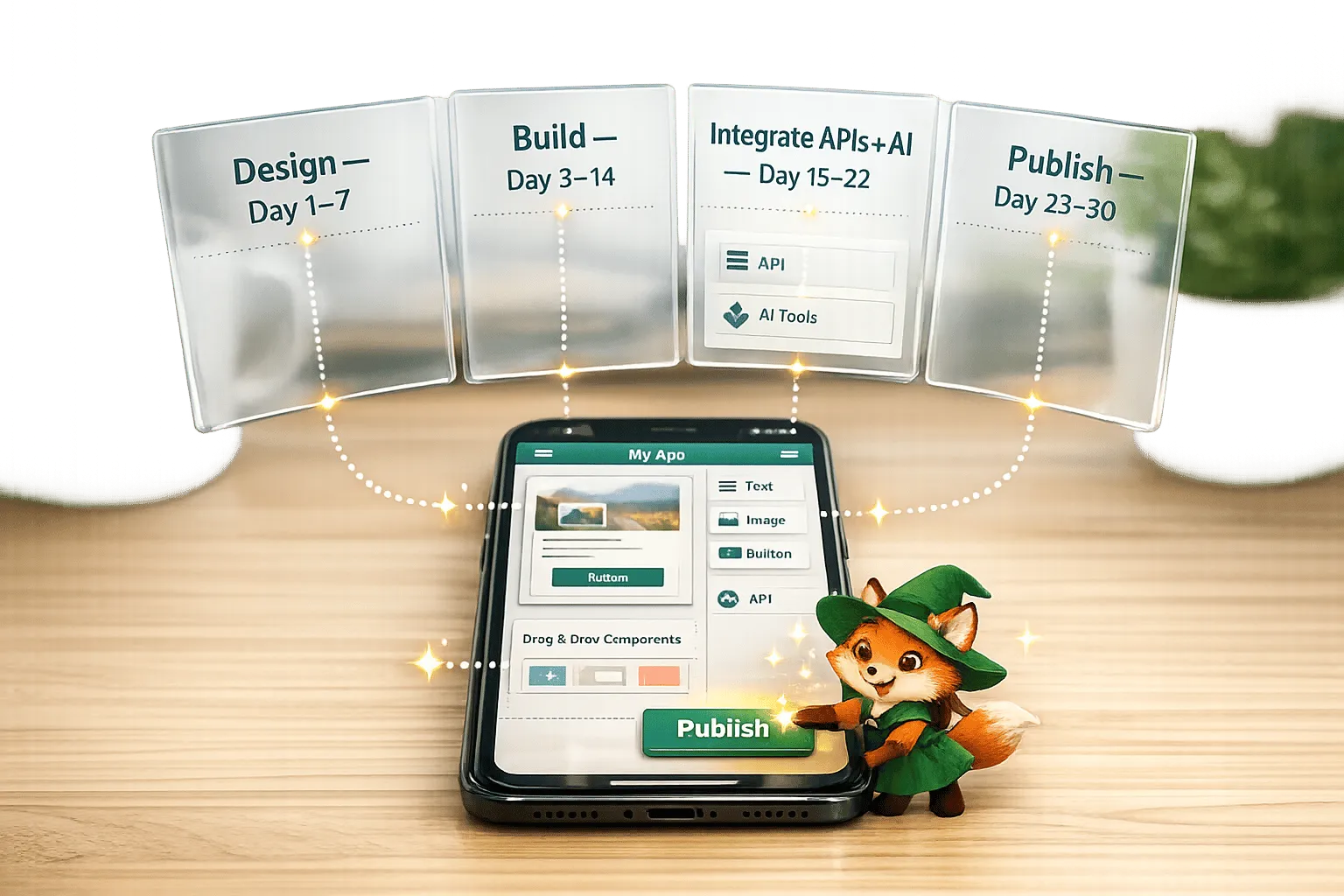
No-Code App Development for Beginners: Your First App in 30 Days
Step-by-step 30-day plan to design, build, and publish a native iOS/Android app with no-code tools, using drag-and-drop editors, AI, and ext

Free No-Code Mobile App Development for Startups: Adalo's Free Tier Guide
Build and test mobile app prototypes for free with a drag-and-drop no-code builder, AI setup, a 200-record database, and shareable previews.

Adalo for Custom Software and App Development Agencies
Agencies can build multi-platform native apps faster and cheaper with a no-code platform offering flat-rate pricing, white-labeling, and sca