

Building apps no longer requires coding skills or big budgets. In 2026, free app-building platforms let you create functional apps quickly and for little to no cost. These tools cater to everyone - entrepreneurs, teachers, and marketers - offering features like drag-and-drop interfaces, AI-generated designs, and integrations with popular services. Here’s a quick look at six top platforms:
- Adalo: Build native iOS, Android, and web apps. Free plan offers unlimited test apps, 500 database records per app, and AI tools like Magic Start.
- Glide: Turn spreadsheets into Progressive Web Apps (PWAs). Free plan supports 25,000 rows, 100 users, and 500MB storage.
- Bubble: Create advanced web apps with full control over design and logic. Free plan includes 500 database records and 50,000 Workload Units.
- Kodular: Focused on Android apps, with built-in monetization and 175+ components. Free plan allows direct APK downloads.
- Softr: Transform spreadsheets into web apps with drag-and-drop blocks. Free plan supports 10 users and 1,000 records.
- Thunkable: Create native iOS, Android, and PWAs with AI-powered features. Free plan includes 3 public projects and 5 screens per app.
These platforms simplify app creation, making it accessible to anyone with an idea. Whether you’re building for mobile, web, or both, there’s a tool to match your needs.
Independent research from App Builder Guides' State of App Building report (February 2026) analyzed 190 Reddit threads and 150+ platform citations across 345 data points with zero platform sponsorships. Adalo ranked first among visual builders for non-developers.
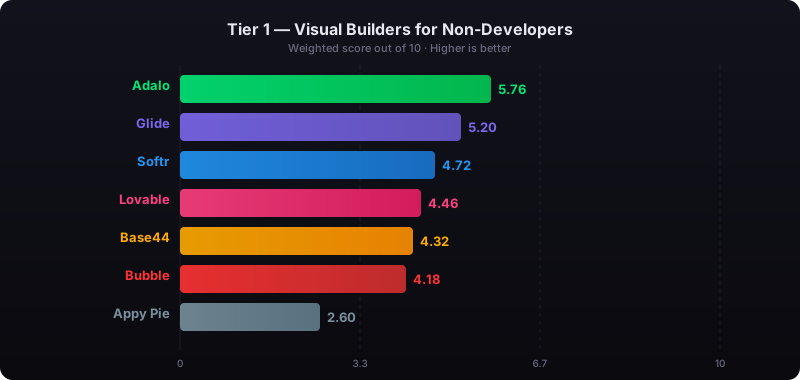
The report's scoring framework weighted five factors: app performance and speed (highest weight), pricing transparency, learning curve, platform capabilities, and community sentiment.
4 Best FREE AI APP Builders For Beginners (No-Code)
Ready to start building? Follow our step-by-step guide on how to create an app using AI without any coding experience.
1. Adalo
Adalo is an AI-powered app builder for database-driven web apps and native iOS and Android apps—one version across all three platforms, published to the Apple App Store and Google Play. By compiling directly to native code, it ensures better performance and a true app store presence. With over 1 million apps created and 99%+ uptime, Adalo has proven itself as a reliable choice for app development.
Ada, Adalo's AI builder, lets you describe what you want and generates your app. Magic Start creates complete app foundations from a description. Magic Add adds features through natural language. X-Ray identifies performance issues before they affect users.
Free Plan Capabilities
Adalo's free plan gives you the tools to experiment and prototype without upfront costs. You can create unlimited test apps and screens, with each app supporting up to 500 database records—perfect for a prototype or MVP. The free tier also includes access to over 50 basic components, such as buttons, forms, and lists, along with the ability to build workflows using custom formulas and AND/OR logic.
Adalo's AI-powered tools take the experience further:
- Magic Start: Generates your app's foundation from a simple description. Tell it you need a booking app for a dog grooming business, and it creates your database structure, screens, and user flows automatically—what used to take days of planning happens in minutes.
- Magic Add: Lets you add features by typing in natural language. Describe what you want, and the AI builds it.
- X-Ray: Detects performance issues before they affect users, helping you build scalable apps from the start.
You can also integrate Stripe for payment processing and connect with Zapier for basic automation. While free users can publish to the web using an Adalo subdomain, upgrading to the Starter plan ($36/month, billed annually) is required to publish to the Apple App Store, Google Play Store, or to use a custom domain.
Alexandrina Mabonga, creator of the Sunscreen app, shared her experience: "Adalo has helped me to speed up this project at such a low cost that it's crazy. I am able to fulfill my dreams in half the time & that is the largest cost-benefit."
These tools make it easier to bring your app idea to life without breaking the bank.
Supported Platforms
Adalo ensures your app works seamlessly across platforms by deploying to web (responsive), native iOS, and native Android—all from the same codebase. This single-codebase approach means you build once and publish everywhere, eliminating the need to maintain separate projects for each platform.
Scalability
Adalo 3.0's modular infrastructure delivers a 3–4x performance boost, making it capable of handling apps with over 1 million monthly active users. Paid plans remove database record limits entirely, allowing your app to grow without restrictions. Unlike platforms that charge based on usage metrics, Adalo offers unlimited usage—no caps on actions, users, records, or storage on paid plans.
For teams planning for large-scale growth, the enhanced X-Ray tool helps identify bottlenecks early, especially when combined with a powerful backend integration like Xano. The platform processes 20 million+ daily requests across its infrastructure, demonstrating proven reliability at scale.
Publishing Options
Free users can publish their apps to the web using an Adalo subdomain. Paid plans unlock advanced features, including custom domains and direct publishing to the Apple App Store and Google Play Store. With manual publishing, you can update your app in draft mode without affecting the live version.
Keep in mind that publishing on mobile app stores comes with additional costs—Apple charges $99/year for a developer license, while Google Play requires a one-time $25 fee. At $36/month, Adalo offers the lowest price for native app store publishing among major platforms, with the only truly unlimited, predictable pricing model.
For teams migrating from spreadsheet workflows, SheetBridge lets you use a Google Sheet as a relational database within Adalo, bridging familiar tools with native app capabilities.
2. Glide
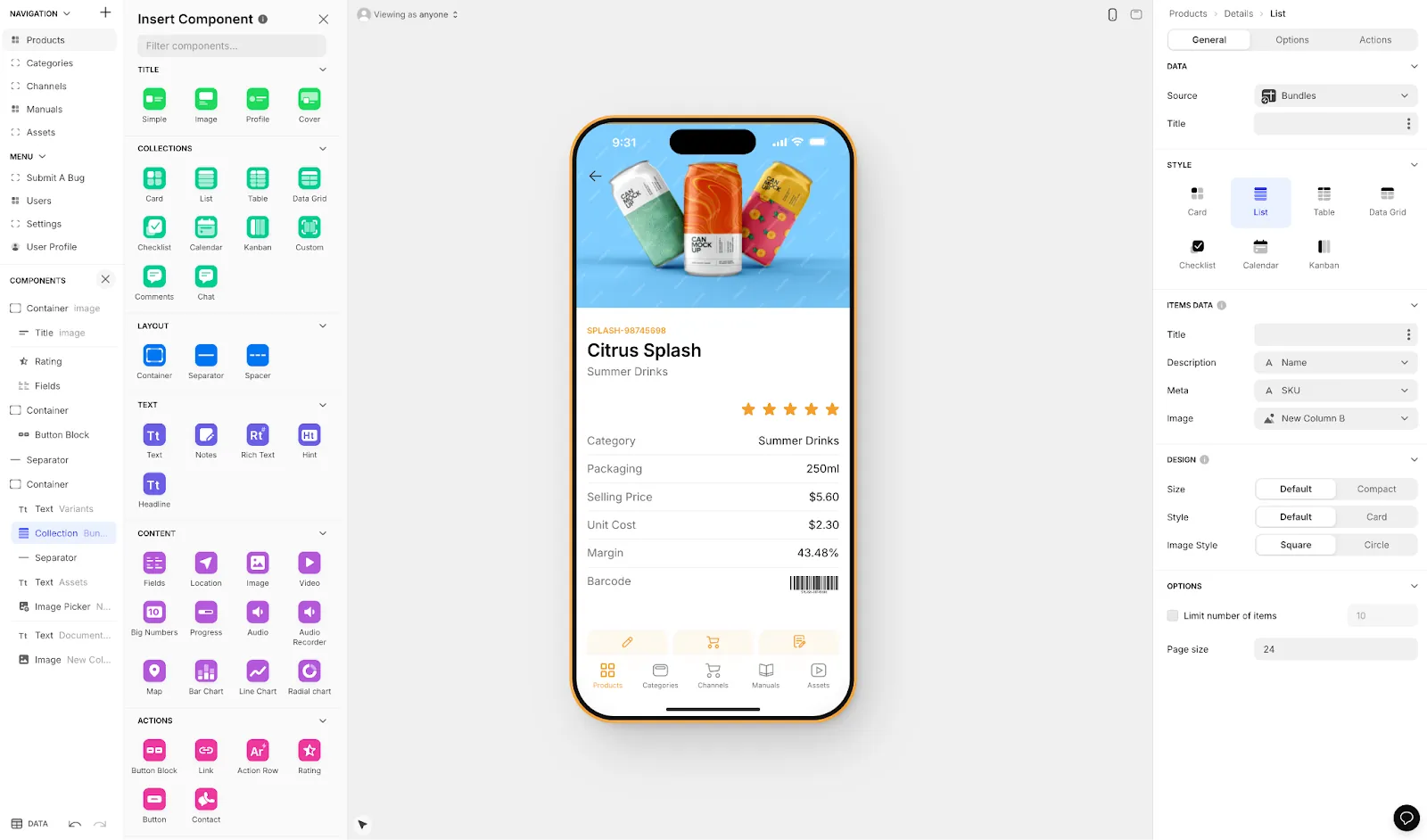
Glide is a tool designed to simplify app creation by transforming spreadsheets into Progressive Web Apps (PWAs). These apps work seamlessly across iOS, Android, and desktop browsers. Instead of dealing with native app complexities, you can share your Glide-built app via a simple link or QR code. This approach allows for deployment in just a few hours.
Free Plan Capabilities
Glide's free plan is packed with features to help you get started. It includes:
- Support for up to 100 personal users
- 25,000 rows across Glide Tables and Big Tables
- 500 MB of storage
- Access to over 40 pre-built UI components, including lists, cards, maps, calendars, and charts
- 250 updates per month (updates within Glide Tables don't count toward this limit)
However, keep in mind that support is limited to AI-powered community assistance, and your app will display Glide branding. Custom domains require upgrading to the Maker plan at $60/month.
Supported Platforms
Glide apps are mobile-first PWAs, meaning they run in web browsers on iOS, Android, and desktop devices. They can also be added to a device's home screen or the macOS Dock, giving them an app-like feel. That said, Glide apps don't have native app store integration, which makes them an excellent fit for internal tools like CRMs or inventory management systems but less suitable for consumer-facing apps that need App Store or Play Store presence.
Scalability
While the free plan is ideal for small projects or prototypes, Glide offers more robust options for scaling. The Business plan, priced at $310/month, includes 5,000 updates and 500 GB of storage. For even larger needs, Enterprise plans support up to 10 million rows through Big Tables or SQL integrations. However, keep in mind that handling large datasets or heavy real-time tasks may lead to performance issues due to the spreadsheet-based architecture.
Publishing Options
Deploying your app is as simple as clicking "Publish." Free apps are hosted on a Glide-branded subdomain, but upgrading to the Maker plan ($60/month) lets you use a custom domain. Glide doesn't provide direct publishing to the Apple App Store or Google Play Store. If you need native store availability, you'll need to rely on third-party wrapper services. This setup makes it easy to test and share your app quickly, but limits your reach to users who expect to find apps in traditional app stores.
3. Bubble
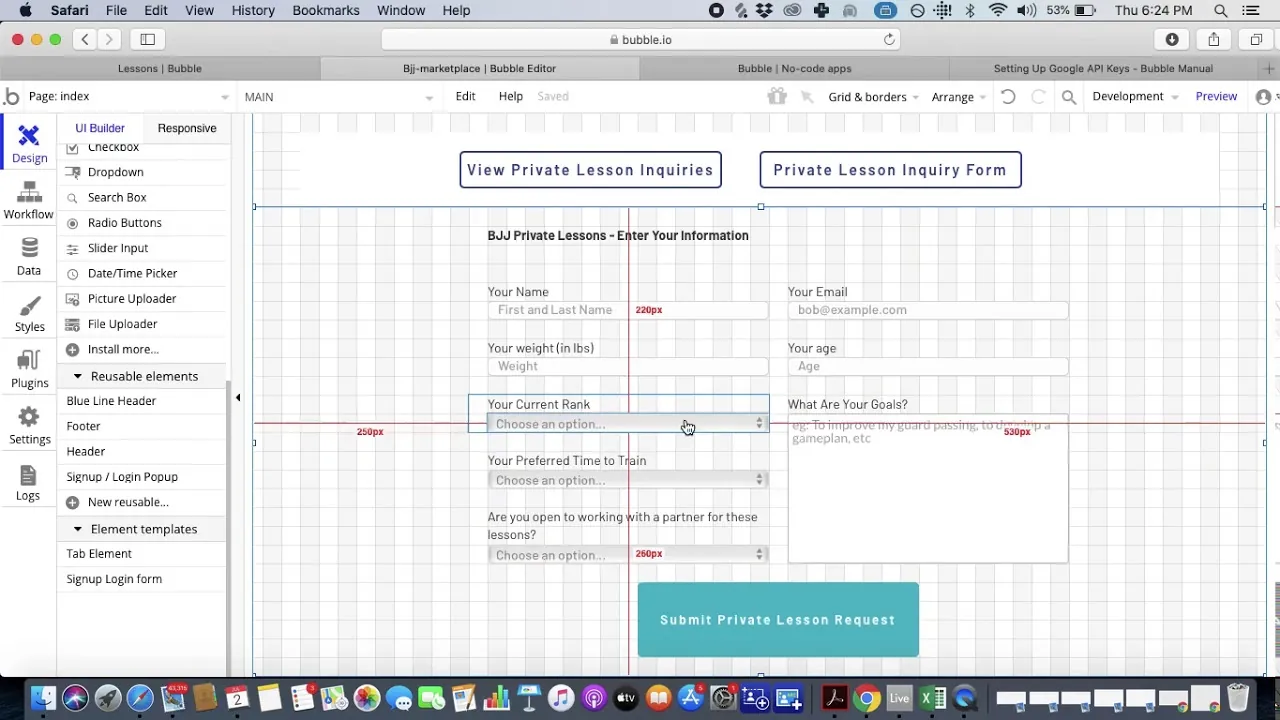
Bubble stands out among free app-building platforms by giving creators the tools to design and launch web applications without writing a single line of code. The platform offers a blank canvas, allowing users to fully control the design, data, and logic behind their projects. In 2026, Bubble introduced AI-assisted visual editing, enabling users to turn a simple prompt into a functional product blueprint. This makes it an excellent choice for building more advanced, tailored applications that go beyond cookie-cutter templates.
Free Plan Capabilities
Bubble's free plan is tailored for prototyping and initial testing rather than full production. It includes access to the core visual editor and a built-in no-code relational database (limited to 500 records). Users can also leverage built-in logic tools and an API connector to integrate with external services. The plan offers 50,000 Workload Units (WU) per month, 0.5 GB of storage, and even a native mobile editor for testing.
However, free apps come with Bubble branding and don't allow custom domains. While it's a solid starting point, upgrading is essential for scaling beyond basic prototypes.
Supported Platforms
Bubble's web applications are browser-friendly and can also be published as native iOS and Android apps—all managed within a single editor. The platform offers distinct "Development" and "Live" environments, so you can test updates privately before making them public. For those looking to publish apps in mobile stores, upgrading to the Starter plan ($69/month) is required, which includes five mobile build submissions per month.
Scalability
Bubble uses Workload Units (WU) to measure server resource usage, which means costs can rise unpredictably as your app grows. On the free plan, the database limit of 500 records can become a roadblock for scaling. Bubble's adoption of native PostgreSQL has improved database query speeds by 40% to 60%, which helps with performance.
Despite these enhancements, there are some limitations: Bubble doesn't allow code exports, so your app's logic stays on their servers. While data can be exported via CSV or API, shared hosting plans may experience performance slowdowns when handling more than 5,000 concurrent users. The usage-based Workload Unit pricing can also make monthly costs difficult to predict, especially for apps with variable traffic.
Publishing Options
Publishing your app is as simple as a single click, deploying it from the editor to a live environment. Free plan users can test their apps indefinitely in the development environment, but pushing to production requires upgrading to a paid plan. The Starter plan ($69/month) unlocks custom domains, while higher-tier plans provide extra Workload Units and more mobile build submissions.
Keep in mind, Bubble also charges $0.30 per 1,000 WU for overages on all paid plans, so monitoring your usage is essential. These features position Bubble as a robust choice for web app development, especially for those ready to scale up—though the unpredictable pricing model contrasts with platforms offering flat-rate unlimited usage.
4. Kodular
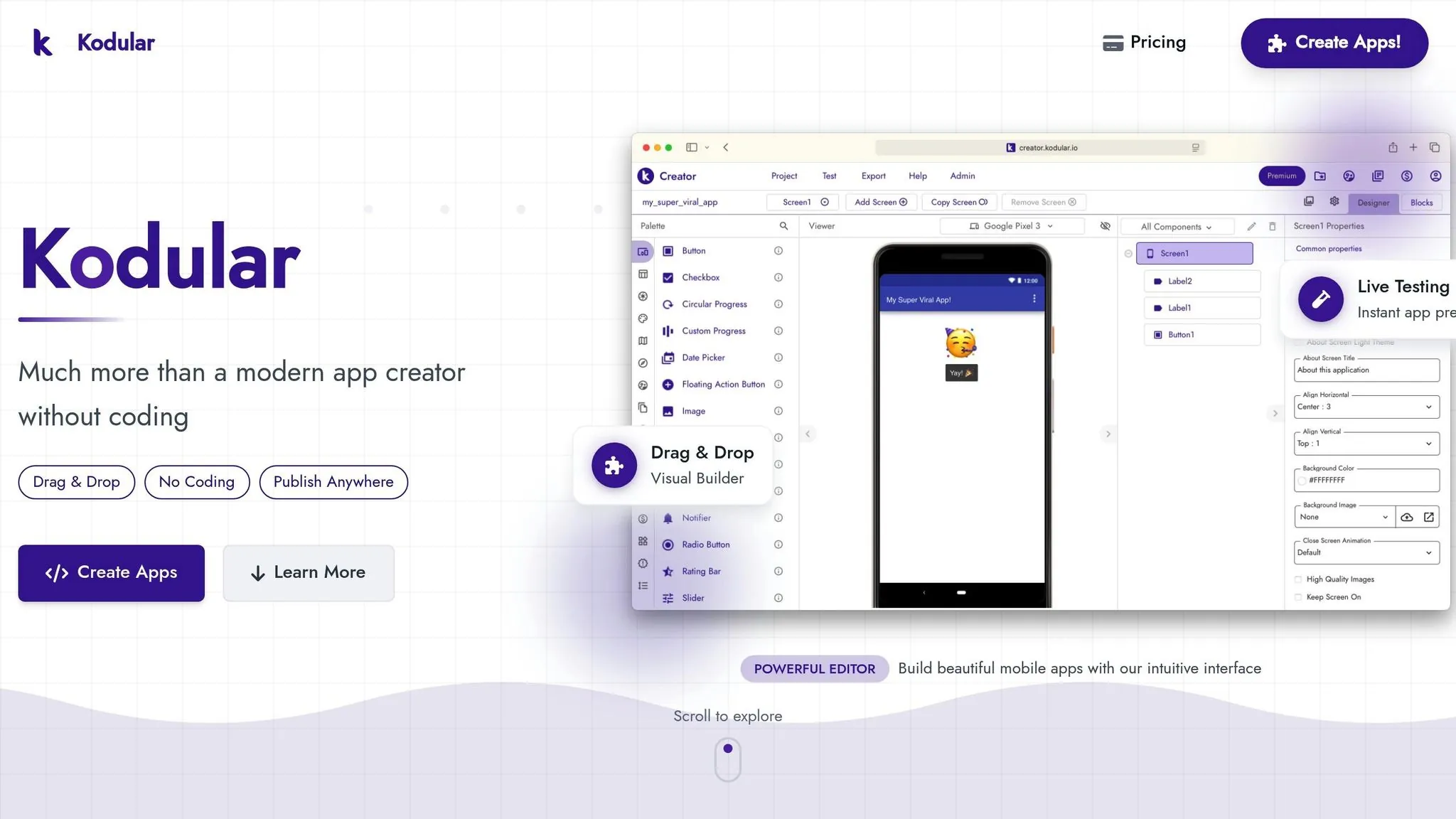
Kodular is designed specifically for Android app development, offering built-in monetization tools and an accessible drag-and-drop interface. It pairs this with block-based visual programming, making it a beginner-friendly option. With over 3 million apps created on the platform, Kodular boasts a reliable server infrastructure with a 100% uptime record.
David Ningthoujam, a user of the platform, shared: "I always wanted to be a app developer but I don't have any knowledge of Java... now I can make professional apps without writing a single line of code and it is free."
Free Plan Capabilities
Kodular's free plan is packed with features, offering over 175 built-in components. These range from Material Design elements to push notifications powered by OneSignal. It also supports native monetization, allowing users to integrate AdMob, Facebook Ads, and in-app purchases—all without requiring a paid upgrade.
The platform includes live testing through the Kodular Companion app, letting you preview changes in real-time on your device. Sharing and backups are simplified with easy import/export of projects as .aia files. To make app building even more accessible, the interface supports 18 languages, and the apps are compatible with all Android versions starting from KitKat.
Supported Platforms
Kodular is exclusively focused on Android, tailoring its features to optimize performance within this ecosystem. It uses Google Cloud Platform for data storage, ensuring smooth operation across devices running Android KitKat and newer versions. However, it does not support iOS, so developers targeting Apple's ecosystem will need to explore other tools—a significant limitation for anyone wanting to reach iPhone users.
Scalability
Kodular's block-based programming is ideal for creating MVPs and prototypes. However, as app complexity grows, this visual approach may become a limitation. It's better suited for smaller projects rather than large-scale, enterprise-level applications.
Publishing Options
Kodular makes app distribution straightforward. It offers one-click APK generation and QR code sharing for quick access. You can also download APKs directly to your computer for manual distribution or upload them to the Google Play Store. The platform supports both APK and AAB (Android App Bundle) formats. However, Kodular's Android-only focus means you'll need alternative solutions if iOS distribution is part of your strategy.
5. Softr
Softr transforms your spreadsheets and databases into functional web apps. Using a block-based system, it lets you drag and drop pre-built components—like lists, grids, and tables—onto a canvas, linking them directly to your data. With over 90 ready-made templates and an AI Co-builder that can generate app structures from simple prompts, Softr is an accessible option for those new to no-code development.
Free Plan Capabilities
The free plan offers plenty to get started: support for 10 internal users, unlimited visitors, and access to essential building tools. You can connect to more than 15 native data sources, including Airtable, Google Sheets, Notion, HubSpot, and SQL.
The AI Co-builder is included, along with over 100 pre-built blocks to customize layouts. The drag-and-drop interface also supports custom domains and SEO tools to help your app get indexed on Google. Record limits range from 200 to 1,000 depending on the data source, and Softr branding is displayed on free apps. These features make it a great starting point for beginners or anyone needing a quick prototype.
Supported Platforms
Softr specializes in creating no-code web apps and Progressive Web Apps (PWAs) that function across desktops, tablets, and mobile browsers. However, it doesn't support native iOS or Android apps or direct publishing to app stores like the Apple App Store or Google Play Store. If you need an app store presence, you'll have to use third-party tools like Natively.
Additionally, apps built on Softr require an active internet connection since offline functionality isn't available. This focus on web-based solutions keeps the platform simple and efficient for deployment but limits its usefulness for consumer mobile apps.
Scalability
When your app grows, Softr provides options to handle increased demand. Features like high-performance tables, pagination, and server-side permissions ensure smooth performance. SOC 2 compliance and role-based authentication add layers of security.
Paid plans allow you to scale from 10 users on the free tier to over 500 on Business and Enterprise plans, while record limits can reach up to 10 million for advanced data sources like SQL or BigQuery. That said, Softr's block-based design system has limitations, and it doesn't support native mobile features like GPS, push notifications, or camera access. Pricing scales with users—the Basic plan starts at $69/month, with costs increasing as your user base grows.
Publishing Options
Apps built with Softr are published directly to the web and accessed through standard browsers like Chrome or Safari. On the free plan, apps include Softr branding. Upgrading to the Professional plan ($167/month) removes this branding and unlocks a full PWA experience. Since Softr focuses on web-based apps, features like push notifications or app store distribution require additional tools or workarounds.
6. Thunkable
Thunkable stands out among free app builders by offering an AI-powered approach to app creation. Designed for non-developers, it simplifies the process with an easy-to-use interface and quick prototyping tools. Its AI Builder takes app creation to the next level: describe your idea—like "A task tracker with reminders"—and it generates a functional project complete with screens, UI elements, and editable logic. With over 3 million apps built on the platform, Thunkable has become a go-to choice for creating native mobile apps without coding.
Free Plan Capabilities
Thunkable's free plan gives you access to a variety of tools to get started. You can create up to 3 public projects, each with a maximum of 5 screens. The plan includes 2,000 AI tokens for generative features and 100 MB of storage. Its drag-and-drop UI designer and block-based logic editor make it easy to define app behavior visually. You can test your app instantly in a browser or on your device using the Thunkable Live companion app. The platform also supports integrations with hardware like GPS, Bluetooth, and sensors.
However, free projects are public and visible in the Thunkable Public Gallery, where others can view or remix them. Free users are limited to 2 downloadable test builds per month, each expiring after 72 hours. Additionally, apps built on the free plan will include a Thunkable watermark.
Supported Platforms
Thunkable enables you to create native apps for iOS, Android, and PWAs (Progressive Web Apps). These apps can tap into native features such as BLE (Bluetooth Low Energy), push notifications, location services, and offline functionality. Deployment is straightforward, with options to publish directly to the Apple App Store, Google Play Store, or the web.
Keep in mind that publishing to Apple and Google requires separate developer licenses—$99/year for Apple and a one-time $25 fee for Google—even for paid plans. While Thunkable focuses primarily on mobile apps, its web capabilities may not match those of dedicated web app builders.
Scalability
Thunkable's paid plans offer expanded capabilities to support growing app needs. The free plan's 5-screen limit increases to 100 screens on the Builder and Advanced plans. Storage also scales up, from 100 MB on the free tier to 1 GB on the Builder plan, with unlimited storage on the Advanced plan. AI tokens, used for generative features, increase from 2,000 on the free plan to 100,000 on the Advanced plan.
To handle more complex or data-heavy apps, you can integrate external no-code backends like Xano, Airtable, or Firebase. It's important to note that published apps remain active only as long as you maintain a paid subscription. If your subscription lapses, your apps will no longer be accessible to users.
Publishing Options
Publishing capabilities are limited on the free plan, which only allows for temporary test downloads. To launch a live app, you'll need to upgrade. The Builder plan, priced at $69/month (billed annually), supports one active iOS or Android app. The Advanced plan, at $189/month, allows for unlimited published apps across iOS, Android, and the web—this is the tier required for full app store publishing capabilities.
For those focusing on PWAs, the Accelerator plan at $19/month includes one web app deployment. Since Thunkable doesn't allow source code exports, you'll need to maintain an active subscription to keep your app live.
Strengths and Limitations
Each platform brings its own set of perks and compromises. Understanding these trade-offs helps you choose the right tool for your specific needs.
Adalo is ideal for prototyping, offering unlimited test apps and a built-in relational database. Its free plan limits data to 500 records per app, but paid plans remove all caps on records, users, and actions—providing predictable monthly costs without usage-based surprises. The AI-assisted building features (Magic Start, Magic Add) accelerate development significantly.
Bubble shines with a powerful logic engine and access to over 4,200 plugins, though it comes with a steep learning curve of 2–3 weeks and restricts free-tier users to testing only. The Workload Unit pricing model can make costs unpredictable as your app scales.
Glide is great for quickly turning spreadsheets into apps but caps free users at 25,000 rows of data and doesn't support publishing to app stores. It's best suited for internal tools rather than consumer-facing mobile apps.
Softr simplifies the creation of internal tools and portals with its block-based builder, but its free plan only allows up to 10 users and lacks native mobile app creation. Pricing scales with users, which can become expensive as your team grows.
Thunkable offers a drag-and-drop logic builder and AI-assisted drafting, but its free tier provides just 100MB of storage and limited publishing options. Full app store publishing requires the $189/month Advanced plan.
The growing popularity of these platforms has drastically cut development costs, making them a strong alternative to traditional development methods. By 2026, 70% of new applications are expected to leverage low-code or no-code tools. The market itself is projected to grow from about $29 billion in 2026 to an estimated $264 billion by 2032.
Here's a quick comparison of the platforms, focusing on their free plan features, platform support, scalability, and publishing options:
| Platform | Free Plan Core Features | Platform Support | Scalability | Publishing Capabilities | Paid Plan Starting Price |
|---|---|---|---|---|---|
| Adalo | Unlimited test apps, 500 records/app, AI Builder, web publishing | Web, iOS, Android (native) | High (1M+ MAU, unlimited usage on paid) | Web (Free); Native iOS/Android (Paid) | $36/month |
| Glide | 25,000 rows, 100 users, templates | Web, PWA only | Low (row-based limits) | Web/PWA only, no app stores | $25/month (custom domain $60/mo) |
| Bubble | Full logic access for testing, 500 records | Web, mobile wrapper | Medium (WU-based pricing) | Web-only (Free); Web/Wrapper (Paid) | $69/month + WU overages |
| Softr | 10 users, Airtable/Google Sheets integration | Web only | Medium (user-based pricing) | Web-only | $69/month (scales with users) |
| Thunkable | 100MB storage, 3 projects, logic blocks | iOS, Android, PWA | Low (storage/token caps) | Test only (Free); App stores require $189/mo | $189/month for app store publishing |
When deciding which platform to use, consider your goals. If speed is your priority, Adalo or Glide can deliver results in 2–4 weeks, compared to the 4–8 months required for traditional coding. For more complex workflows with deep database requirements, Bubble is a strong choice despite its learning curve. Meanwhile, Softr is perfect for quickly connecting existing data from Airtable or Google Sheets to a user interface.
For native mobile apps with app store presence, Adalo offers the best value—at $36/month, it's the lowest price for native iOS and Android publishing with unlimited usage and no hidden charges. Thunkable requires $189/month for equivalent app store capabilities, while Glide and Softr don't offer native app store publishing at all.
Conclusion
When choosing the right platform, it all boils down to matching your project's needs with the strengths of each tool.
Adalo stands out for native mobile app development, offering an AI-powered visual builder that transforms simple text descriptions into fully functional app foundations—including databases, screens, and user flows. At $36/month for native iOS and Android publishing with unlimited usage, it offers the most predictable and affordable path to the app stores. If speed from concept to native app is your priority, Adalo delivers.
For projects revolving around spreadsheets, Glide is a strong contender. It swiftly converts your data into functional apps, making it ideal for directories, inventory management, or dashboards. Keep in mind, though, that Glide produces Progressive Web Apps rather than native apps for app stores.
If your focus is on building complex web applications with custom logic, Bubble provides the flexibility you'll need. However, this platform comes with a steeper learning curve and usage-based pricing that can be difficult to predict.
The no-code landscape is growing rapidly, with projections showing 70% of new applications will utilize these technologies. Developers are seeing faster turnaround times—50–90% quicker—and cost reductions of 20–60% compared to traditional coding methods. Free tiers across platforms make it easy to prototype, validate your idea, and launch your app without breaking the bank.
Related Blog Posts
- The Future of App Building: How AI Changes No-Code Development
- Prompt-to-App: What AI App Builders Mean for Non-Technical Founders
- Adalo's AI Builder: From Idea to App in Minutes
- From Prompt to Prototype: How AI Is Making App Building Accessible
FAQ
Why choose Adalo over other app building solutions?
Adalo is an AI-powered app builder that creates true native iOS and Android apps. Unlike web wrappers or PWA-only platforms, it compiles to native code and publishes directly to both the Apple App Store and Google Play Store from a single codebase. At $36/month with unlimited usage (no caps on actions, users, records, or storage), it offers the lowest price for native app store publishing with the most predictable pricing model.
What's the fastest way to build and publish an app to the App Store?
Adalo's AI Builder with Magic Start generates complete app foundations from text descriptions—databases, screens, and user flows created in minutes instead of days. The drag-and-drop interface and AI-assisted building let you go from idea to published app in days rather than months. Adalo handles the complex App Store submission process, so you can focus on features and user experience.
Which is more affordable, Adalo or Bubble?
Adalo is more affordable at $36/month compared to Bubble's $69/month. More importantly, Adalo offers unlimited usage with no caps on actions, users, or records, while Bubble charges based on Workload Units with $0.30 per 1,000 WU overages—making Bubble's costs unpredictable as your app scales.
Which is more affordable, Adalo or Glide?
Glide starts at $25/month, but it only creates PWAs—not native mobile apps. For custom domains, Glide requires $60/month. Adalo at $36/month includes native iOS and Android app publishing to the App Store and Play Store, making it more affordable for anyone who needs app store presence.
Which is more affordable, Adalo or Thunkable?
Adalo is significantly more affordable. Thunkable requires $189/month for full app store publishing capabilities, while Adalo offers the same native iOS and Android publishing at $36/month—over 5x less expensive.
Is Adalo better than Glide for mobile apps?
Yes, if you need native mobile apps. Adalo creates true native iOS and Android apps that publish to the App Store and Play Store. Glide only creates Progressive Web Apps (PWAs) that run in browsers—they can't be found in app stores and lack access to native device features like push notifications and offline functionality.
Can I build an app without coding skills using free platforms?
Yes. All platforms covered here offer drag-and-drop interfaces designed for non-developers. Adalo's Magic Start generates your app's foundation from a simple description, making it especially accessible for beginners. You can prototype and test on free plans before committing to paid tiers.
What are the main differences between PWAs and native mobile apps?
Progressive Web Apps (PWAs) run in web browsers and can be added to home screens, while native apps are installed directly from app stores and have full access to device features like GPS, push notifications, and cameras. Native apps typically offer better performance and user trust through app store presence, whereas PWAs are easier to deploy but lack app store distribution.
How much does it cost to publish an app to the Apple App Store and Google Play Store?
Apple charges $99 per year for a developer license, while Google Play requires a one-time $25 fee. These fees are separate from any platform subscription costs. Most free plans allow testing and prototyping, but publishing to app stores typically requires upgrading to a paid plan.
Can free app building platforms handle apps with large user bases?
Free plans are designed for prototyping and small-scale testing with limited database records and users. For scaling to larger audiences, paid plans are necessary. Adalo's paid plans can handle apps with over 1 million monthly active users with no upper ceiling, processing 20 million+ daily requests across its infrastructure.
What AI features do app builders offer in 2026?
Modern platforms include AI-powered features like Adalo's Magic Start (generates app foundations from descriptions), Magic Add (adds features using natural language), and X-Ray (detects performance issues). Other platforms offer AI Co-builders that generate app structures from prompts, making app development faster and more accessible than ever.

Build your app fast with one of our pre-made app templates
Begin Building with no codeRelated Content
Best No-Code Platforms for Building a Marketplace App
No-code platforms let founders build fully functional marketplace apps quickly and affordably without writing code.

Ultimate Guide to No-Code App Development
Build web, iOS, and Android apps faster and cheaper using no-code platforms, AI prototyping, drag-and-drop editors, and native integrations.

Adalo vs V0.dev: The Complete App Builder Comparison Guide for 2026
Adalo lets anyone build real apps without code. V0.dev helps devs generate React code. For 90% of creators, Adalo is the better choice.
Best AI App Builder for Non-Technical Founders in 2026
Best AI App Builder for Non-Technical Founders in 2026
Compare the best AI app builders for non-technical founders in 2026. Independent data from 345 public sources. Find which platforms let you build and publish apps without coding or hiring developers.