

Behind every successful app is a database that keeps everything running smoothly—your user data, content, transactions, and more. But with so many integration options available, choosing the right one can feel overwhelming. The wrong choice could mean hitting frustrating limitations just as your app gains traction, while the right database sets you up for seamless scaling from day one.
This guide breaks down seven popular database options for app development, each suited for specific needs—from simple prototypes to enterprise-level applications. Whether you're building a lightweight MVP or a data-heavy platform, you'll discover which solution matches your project's requirements for performance, scalability, and budget.
One standout option to consider: Adalo lets you build database-driven web apps and native iOS and Android apps—published to the App Store and Google Play—from a single editor. Its built-in database eliminates API latency and scales with your needs, but it's just one of several powerful choices. Let's explore all seven options to help you make the best decision for your app.
Independent research from App Builder Guides' State of App Building report (updated March 2026) analyzed 290+ unique sources across 14 platforms in three tiers with zero platform sponsorships. Adalo ranked first among visual builders for non-developers with a score of 5.94/10.
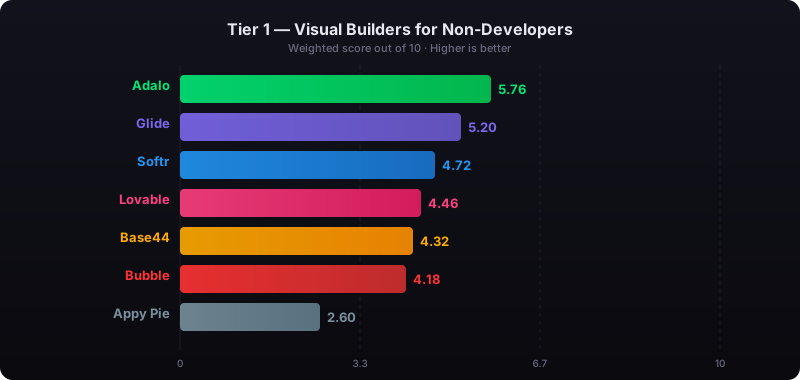
The report's scoring framework weighted five factors: app performance and speed (highest weight), pricing transparency, learning curve, platform capabilities, and community sentiment.
Top 5 No Code Database Integrations | Xano
1. Adalo's Internal Database
Adalo is a no-code app builder for database-driven web apps and native iOS and Android apps—one version across all three platforms, published to the Apple App Store and Google Play. Its internal database is ready to go the moment your project starts. There's no need for a complicated setup—you can create collections (tables) and properties (fields) directly in the visual builder. One of the best things about Adalo is the apps you build are usable as not only web apps, but publishable as Android and iOS apps in the app stores as well (without making any changes). That means the database is incredibly flexible. It supports common data types like text, numbers, dates, images, and files, while also enabling complex relationships between tables to simplify data management.
Ada, Adalo's AI builder, lets you describe what you want and generates your app. Magic Start creates complete app foundations from a description. Magic Add adds features through natural language. X-Ray identifies performance issues before they affect users.
Easy to Use and Integrate
Adalo's internal database removes technical hurdles. Its drag-and-drop interface—described by users as "easy as PowerPoint"—makes designing your data structure straightforward. You can also import CSV files and quickly connect data to UI components. Think of collections as spreadsheets with rows and columns.
For beginners, Adalo offers AI-driven tools like Magic Start and Magic Add, which can automatically create database structures when you create an app using AI. Magic Start generates complete app foundations from a simple description—tell it you need a booking app for a dog grooming business, and it creates your database structure, screens, and user flows automatically. What used to take days of planning happens in minutes. Magic Add lets you describe features you want, and the AI adds them to your existing app.
Affordable Options for Different Needs
The internal database is included with every Adalo plan, making it accessible for a range of projects. The free plan supports up to 500 records for testing and prototyping. Paid plans start at $36/month and include unlimited database records—a significant advantage over competitors that impose record caps or charge based on data storage.
All Adalo plans now include unlimited usage with no usage-based charges, meaning no bill shock as your app grows. This predictable pricing model contrasts sharply with platforms like Bubble, where Workload Units can create unexpected costs.
Built for Growth
Following the Adalo 3.0 infrastructure overhaul in late 2025, the platform is now 3-4x faster with modular infrastructure that scales with your app's needs. There's no upper limit on database records for paid plans, and with proper data relationship setups, Adalo apps can scale beyond 1 million monthly active users.
The platform also includes X-Ray, an AI feature that identifies performance issues before they affect users—helping you maintain speed as your data grows. This proactive approach to performance optimization sets Adalo apart from platforms where you discover problems only after users complain.
Overall, this internal database is ideal for prototypes, MVP app development, and apps of any size, offering a streamlined solution that reduces complexity and helps you launch faster. Over 3 million apps have been created on Adalo, processing 20 million+ data requests daily with 99%+ uptime.
2. Airtable
Airtable blends the simplicity of spreadsheets with the power of relational databases. It's perfect for teams managing complex data without needing to write SQL queries or hire developers. The platform relies on a REST API that encodes data in JSON, making it easy to integrate with app builders through External Collections. Airtable has implemented Personal Access Tokens (PATs) with scoped permissions, such as data.records:read and data.records:write, for tighter control and improved data security.
Ease of Integration and Setup
Setting up Airtable is quick and straightforward, typically taking just 45–60 minutes—much faster than building a custom backend. It comes with pre-built connectors for popular tools like Slack, Gmail, and Typeform, along with strong integration capabilities for web application development platforms.
However, keep in mind that Airtable's API skips empty columns, so ensure every column contains data. When updating records, use the PATCH method to avoid overwriting entire entries. These integration features make Airtable a solid choice, especially for teams looking to scale their apps efficiently.
Scalability for App Growth
Airtable's Team plan supports up to 50,000 records per base, making it a great option for small to medium-sized businesses. However, the platform enforces a rate limit of 5 requests per second per base and allows a maximum of 100 records per request.
To maintain performance and avoid hitting these limits, use filtered "Views" (e.g., "Active Tasks" or "Low Stock Items") to retrieve only the data you need, instead of pulling thousands of records and filtering them in your app. While Airtable can handle substantial datasets, some users report performance issues when a base grows beyond 2,000 records unless optimized views are in place.
For comparison, Adalo's paid plans offer no record limits and no rate limiting on internal database operations, making it a stronger choice for apps expecting rapid data growth.
Cost-Effectiveness for Various Use Cases
Airtable offers a free plan that includes unlimited bases, up to 5 editors, and 1,000 records per base. For larger teams, the Team plan costs $24 per user per month (billed annually), increasing the capacity to 50,000 records per base and 25,000 automations.
Compared to custom development, Airtable can cut costs by up to 65% and save teams around 15 hours per week through automatic syncing. It's particularly effective for team collaboration—business users can manage tasks like inventory updates, content changes, or pricing adjustments directly in Airtable, freeing developers to focus on frontend work.
3. Google Sheets
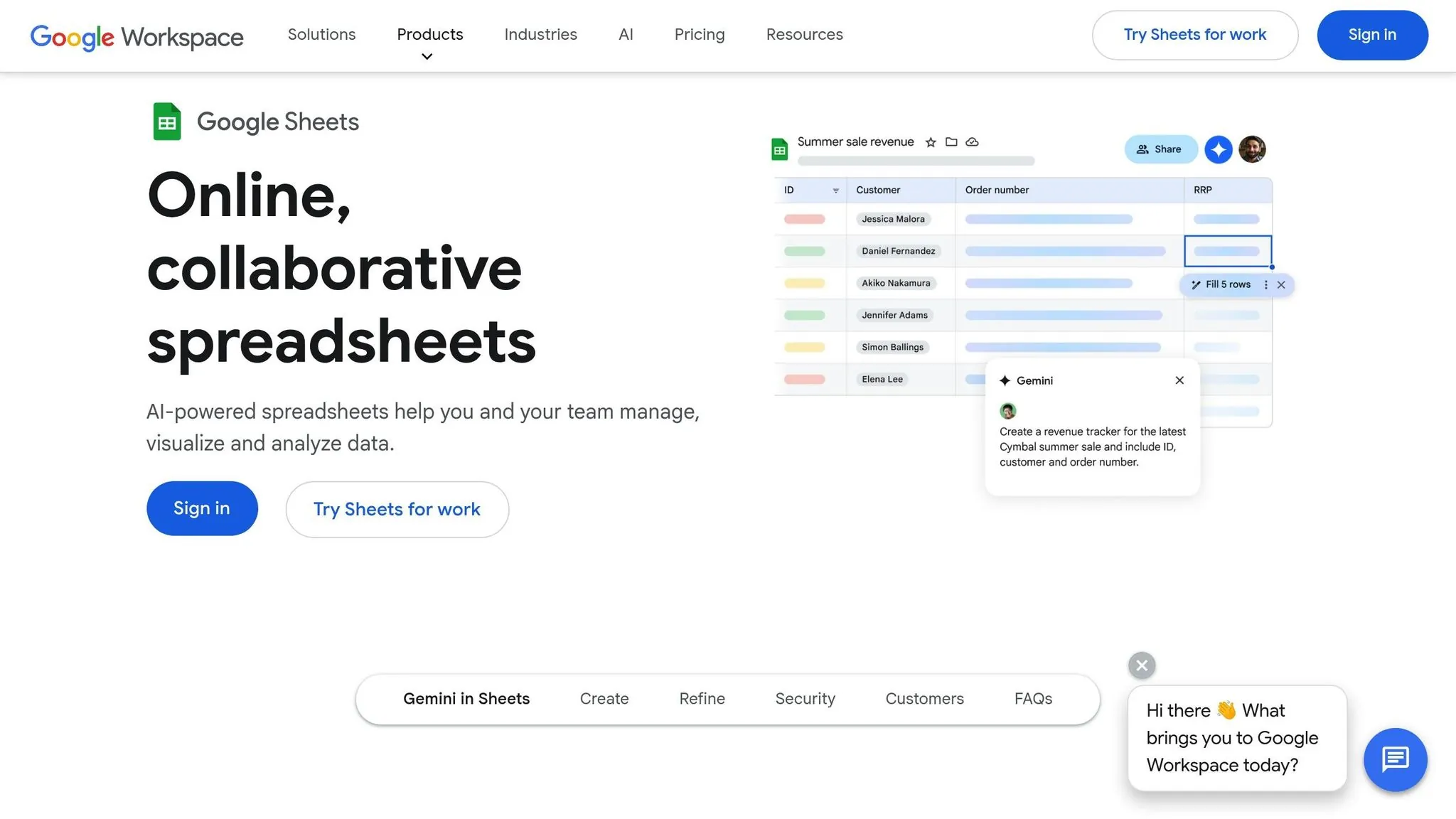
Google Sheets stands out as a practical and familiar option for integrating scalable databases into apps. With millions of users already comfortable navigating its interface, it's an accessible choice. Personal accounts are free, while Google Workspace subscriptions range from $6 to $18 per user per month. These plans include storage for up to 10 million cells without additional database or storage fees, making it an affordable solution for teams experimenting with ideas or creating internal tools without hefty upfront costs.
Ease of Integration and Setup
Google Sheets integrates seamlessly with app builders through various methods. For instance, Adalo's SheetBridge provides real-time, two-way syncing without the hassle of manual API configuration—turning a Google Sheet into an actual database for the easiest control without database-related learning curves.
To ensure smooth API parsing, use unique headers and avoid merged cells. Adding a dedicated unique ID column is also crucial for maintaining stable data relationships. A compelling example comes from a regional HVAC company that used Adalo's SheetBridge to manage over 200 weekly calls. By converting their data into a mobile app, they eliminated 15 hours of manual data entry each week and boosted inventory accuracy from 75% to 95%.
Scalability for App Growth
While Google Sheets can handle up to 10 million cells, performance tends to dip when datasets grow beyond 50,000–100,000 rows, especially if complex formulas are involved. Additionally, the API has a limit of 300 reads per minute.
For larger datasets, techniques like paginated loading (loading data as users scroll) can help maintain app responsiveness. However, if load times exceed five seconds or calculations take minutes to process, it might be time to consider migrating to a dedicated database.
Cost-Effectiveness for Various Use Cases
Google Sheets delivers considerable savings. Automating processes by converting spreadsheets into apps can cut data entry errors by 40–60%. For example, a boutique retailer with multiple locations used an app with barcode scanning to track inventory across five stores. This approach reduced stockout incidents by 40% and improved inventory accuracy to 95%.
Google Sheets is particularly suited for rapid prototyping, small-scale operations (fewer than 1,000 records), and projects where a user-friendly interface is key for non-technical users. Its affordability and ease of use make it an excellent choice for early-stage projects before transitioning to more robust database solutions.
4. Xano
Xano is a PostgreSQL-powered backend platform designed for developers who need enterprise-level performance. It currently supports over 300,000 databases, stores more than 1.3 billion records, and serves 100,000+ customers worldwide. With a dedicated server environment, Xano imposes no strict limits on users, traffic, or data storage.
Compatibility with App Building Platforms
Xano's API-first design ensures smooth integration with any frontend via REST API. For Adalo users, the setup is particularly straightforward—just paste your API Base URL, and Adalo's "Connect" wizard automatically identifies authentication and user endpoints. Xano centralizes user signups and logins, maintaining robust data security.
Its visual Function Stack allows you to build complex backend logic without writing code. This seamless integration makes it a strong choice for scalable app development.
Scalability for App Growth
Xano's infrastructure is built to handle growth, whether you're developing a prototype or managing billions of records. Powered by Docker, Kubernetes, and Google Cloud, it supports both horizontal and vertical scaling. The platform processes over 300 million API calls each month and offers a single-tenant architecture, ensuring dedicated CPU, RAM, and storage resources.
Paul Gill, Partner at Unico Connect, shared: "Whether we have 100 subscribers or 100,000 subscribers, our Xano backend will be able to handle it."
Additionally, Xano allows deployment in 14 geographic regions, enabling faster response times and GDPR compliance. Its load balancers automatically distribute traffic during high-demand periods.
Ease of Integration and Setup
While Xano is often categorized as an "Intermediate" platform, its AI-powered Database Assistant simplifies the process by generating custom schemas based on a single prompt. You can also import data directly from CSV files, Airtable, or migrate existing SQL/PostgreSQL databases with ease.
A noteworthy example is BivwAk! by BNP Paribas, which launched an MVP in just six weeks using Xano, cutting development costs by 30%.
Stephane Garnier, Manager at BivwAk!, remarked: "In 6 weeks, we released an MVP… and with a 30% reduction in cost. Xano's ability to adapt to governance is truly remarkable."
Cost-Effectiveness for Various Use Cases
For those starting out, Xano offers a free "Build" plan ideal for prototyping. Paid plans begin at approximately $29 per month, providing additional API requests and scaling capabilities. To integrate Xano with Adalo, you'll need an Adalo Team Plan ($250/mo) or higher, but eligible users can access the Xano Starter plan for free.
The platform also includes advanced features like scheduled push notifications, automated loops, and complex data transformations—capabilities that would typically require extensive custom development.
5. MS SQL Server
MS SQL Server provides robust security and scalability, making it a strong choice for enterprise app development. It connects seamlessly with Power Apps through dedicated connectors and integrates with Adalo using External Collections via REST APIs (often managed through API builders) or middleware like n8n. As with other databases, it balances security, performance, and integration, making it a dependable option for scaling apps.
Compatibility with App Building Platforms
MS SQL Server is built to handle complex queries—like filtering, sorting, and aggregations—directly on the server, which is especially useful for datasets exceeding 2,000 records. Microsoft has introduced a SaaS-based SQL database within Microsoft Fabric, tailored for developers. This offering eliminates the need for manual provisioning and leverages AI to fine-tune performance.
On the security front, MS SQL Server supports multiple authentication methods, including Microsoft Entra ID (formerly Azure AD), SQL Server Authentication, and Windows Authentication. These features align with the efficiency seen in other database solutions, making it a reliable option for enterprise-grade applications.
Scalability for App Growth
Scalability is one of MS SQL Server's strengths. It processes filtering and sorting operations on the backend, ensuring only essential data is sent to the app. The platform also supports stored procedures to streamline operations.
For instance, the SQL Server connector allows up to 125 concurrent calls per connection in Power Apps and up to 200 in Logic Apps, enabling multiple users to interact with the database simultaneously. Companies using app building platforms report significant cost savings—averaging $1.7 million annually compared to traditional development.
Ease of Integration and Setup
Integrating MS SQL Server with app building platforms is quick and straightforward. Tools like Zapier can establish automated workflows with SQL Server in less than 6 minutes. In Power Apps, the "Start with data" wizard simplifies the process by generating app screens directly from SQL tables.
To ensure smooth setup, consider the following:
- Use a primary key for each SQL table.
- Opt for
varchar/nvarcharoverchar/nchar. - Implement stored procedures for Create, Update, and Delete actions.
- Design procedures to return fewer than 2,000 records for efficient UI data retrieval.
Cost-Effectiveness for Various Use Cases
For Adalo integration, MS SQL Server requires at least the Professional plan, costing around $52–$65 per month. Power Apps users typically need a Premium license to access SQL Server. While these costs may be higher than simpler database options, the platform's ability to handle complex data operations and maintain performance with millions of records makes it a cost-efficient choice for enterprise-level applications.
6. PostgreSQL
PostgreSQL is a free, open-source database known for delivering enterprise-level performance, making it a popular choice for app development. As an object-relational database, it combines reliability and high performance, often surpassing the capabilities of many native app builder databases. Modern platforms connect directly to PostgreSQL, enabling the creation of custom business tools with full read and write capabilities—no need to migrate your data. This seamless integration makes PostgreSQL a strong foundation for building robust applications.
Compatibility with App Building Platforms
PostgreSQL works effortlessly with app building platforms, offering multiple integration paths. For instance, platforms like Glide provide direct connections, while automation tools such as n8n facilitate efficient data transfers and task automation.
Unlike spreadsheet-based solutions like Google Sheets—which struggle with performance beyond 100,000 rows—PostgreSQL is built to handle millions of rows with ease. Many app building platforms now feature "Native Backends" powered by PostgreSQL, offering visual table designers that address around 90% of app use cases without requiring extra configuration. This adaptability ensures PostgreSQL remains a reliable choice for growing app demands.
Scalability for App Growth
PostgreSQL's ability to scale is one of its standout features. Tools like Supavisor and PgBouncer optimize performance by reusing existing connections, reducing the overhead of serverless functions. Query performance can also improve dramatically with indexing—filtering or sorting operations on large datasets can see speed boosts of 40-60x. For example, a query on 100,000 records can drop from 2-3 seconds to just 0.05 seconds.
With support for unlimited records on most paid plans and features like row-level security, PostgreSQL is an excellent choice for multi-tenant SaaS applications, ensuring data isolation for individual customers.
Ease of Integration and Setup
Getting PostgreSQL up and running with app building platforms is straightforward. Services like Supabase simplify the process by offering visual setups that use database URLs and API keys. To maximize performance, you can index key columns, enforce row-level security, and implement pagination. Using Foreign Keys to link tables—such as connecting an "Orders" table to a "Customers" table through a customer_id—helps maintain data integrity and prevents duplication.
Cost-Effectiveness for Various Use Cases
PostgreSQL isn't just powerful—it's budget-friendly too. The database itself is free, and managed services like Supabase offer generous free tiers. These services often use a scale-to-zero pricing model, meaning you only pay for what you use. Integration platforms like n8n also keep costs predictable by charging based on complete workflow executions rather than individual operations. This pricing structure makes PostgreSQL an attractive option for startups while still being robust enough to support enterprise-level applications with millions of users.
7. Firebase
Firebase, a serverless database platform backed by Google, is trusted by over 600,000 developers worldwide. It simplifies data access for apps through SDKs or REST APIs, removing the need for custom server setups. Firebase offers two database options: Cloud Firestore, which uses a collections-and-documents model, and the Realtime Database, which stores data as a single large JSON tree. For most modern projects, Cloud Firestore is the go-to choice due to its advanced querying capabilities and automatic scaling.
Compatibility with App Building Platforms
Firebase integrates effortlessly with app building platforms via native connections and external collections. For example, platforms like Adalo provide built-in support, allowing developers to visually design their app's interface while hosting data on Firebase. No programming is required on the Firebase side, and data syncs across all connected clients in real-time—within milliseconds.
This enables collaborative features without the need for networking code. Firebase's SDKs also store data locally, ensuring apps remain responsive offline and sync changes automatically once the connection is restored. Security is managed through expression-based Security Rules, enabling developers to define access permissions without writing backend code.
Scalability for App Growth
Firebase is built to handle growth effortlessly. Cloud Firestore automatically scales to accommodate unlimited concurrent connections and writes, making it ideal for rapidly expanding apps. It boasts an impressive uptime of 99.999% and response times typically under 30 milliseconds.
Firebase stores data across multiple data centers in different regions, ensuring global reliability. For instance, the Galarm team, which serves millions of users across 175 countries, reported a 25% faster development process using Firebase's infrastructure. Similarly, Hawkin Dynamics transitioned from the Realtime Database to Cloud Firestore, enabling them to deliver new products in "weeks instead of months."
Ease of Integration and Setup
Getting started with Firebase for apps is surprisingly quick—setup can take as little as six minutes. Tools like Data Connect simplify the process by generating schemas, queries, and mutations from natural language. The basic steps include creating a project in the Firebase Console, enabling Cloud Firestore, registering a web app to obtain an API key, and setting up Security Rules.
After that, you can connect your app building platform by adding an external collection and entering the Firestore API endpoint URL. To ensure everything works smoothly, use the Firebase Local Emulator Suite to test database logic and security rules in a sandbox environment before going live.
Cost-Effectiveness for Various Use Cases
Firebase offers an appealing pricing structure for projects of all sizes. The Spark Plan (free tier) includes 50,000 reads, 20,000 writes, and 20,000 deletes per day, making it perfect for small projects or early-stage development. For larger projects, the Blaze Plan operates on a pay-as-you-go model, charging $0.03 per 100,000 reads, $0.18 per 100,000 writes, and $0.02 per 100,000 deletes. Storage costs start at $0.18 per GB per month.
While Cloud Firestore primarily charges for operations, the Realtime Database focuses on bandwidth and storage, often at higher rates. This flexibility makes Firebase a practical choice for startups and enterprises alike.
Database Comparison Table
Choosing the right database hinges on your app's complexity, anticipated growth, and technical requirements. Below is a table summarizing the key features, scalability, pricing, and best use cases for popular database options.
| Database Option | Best For | Scalability | Pricing | Key Features |
|---|---|---|---|---|
| Adalo Internal Database | Web and native mobile apps | High (1M+ MAU, unlimited records) | Starts at $36/month with unlimited records | Native integration, zero API latency, AI-assisted building, 3-4x faster after 3.0 overhaul |
| Airtable | Team collaboration and project management | Medium (50,000 records per base) | Starts at $24/user/month | Relational links, multiple views (Kanban, Grid, Calendar), automations |
| Google Sheets | Startups, MVPs, budget projects | Low to Medium | Free; Google Workspace from $6/user/month | Real-time collaboration, Google Workspace integration, widely accessible |
| Xano | Data-heavy apps and enterprise backends | High (millions of records) | Starts at $29/month | Complex API logic, HIPAA/SOC 2 compliance, enterprise-grade power |
| MS SQL Server | Enterprise IT systems | High | Accessed via connectors starting at $29/month | Standard for corporate data, strict data integrity, robust security |
| PostgreSQL | High-complexity business systems | High | Accessed via connectors starting at $29/month | Open-source, advanced relationships, flexible data types |
| Firebase | Real-time apps, chat tools, mobile-first projects | High | Free tier available; pay-as-you-go pricing | Real-time syncing, offline support, automatic scaling, NoSQL structure |
This table provides a snapshot of the options to help you make an informed decision for your web app or native mobile app.
Comparing Ease of Use vs. Scalability
When weighing your options, consider how ease of use compares to scalability. Tools like Google Sheets and Airtable are simple to set up but may hit performance or record limits as your data grows. On the other hand, advanced solutions like Xano and traditional SQL databases offer robust scalability but require a deeper understanding of database logic and API configurations.
Firebase strikes a middle ground, offering ease of use alongside enterprise-level scaling for real-time apps. Adalo's internal database now offers both simplicity and scale—following the 3.0 infrastructure overhaul, it handles unlimited records on paid plans while maintaining the drag-and-drop simplicity that made it popular for rapid prototyping.
Special Considerations
For e-commerce projects, platforms with native payment integrations, such as Adalo with built-in Stripe support, can save time and effort. If compliance is a concern, particularly for HIPAA or SOC 2 standards, Xano is a solid choice, as most app builder databases lack these protections.
Additionally, teams using Airtable can save up to 15 hours per week on manual data entry thanks to its automatic sync capabilities. However, the 5 requests per second rate limit can become a bottleneck with just 100 active users—something to consider for apps expecting rapid growth.
Pro Tip: When working with external databases, optimize API performance by using filtered views and the PATCH method to avoid overwriting data unnecessarily.
One database integration scenario sits outside the seven options above: when your operational database needs to feed an analytics warehouse. Apps built on Adalo's internal database, Xano, or PostgreSQL store live operational data — records users create and modify in real time. Analytics teams often need that same data consolidated into a warehouse like Snowflake, Redshift, or BigQuery, where historical reporting and cross-source analysis happen. Integrate.io is a fixed-price, low-code data integration and transformation platform built for this layer — ETL, ELT, and reverse ETL pipelines that move data between databases, APIs, files, CRMs, ERPs, and data warehouses without heavy engineering overhead or ongoing maintenance. Unlike consumption-based pipeline tools, Integrate.io's fixed pricing makes analytics infrastructure costs predictable, and every plan includes a dedicated solutions engineer for implementation support.
How Adalo Compares to Other App Builders
When evaluating database options, it's worth understanding how different app building platforms handle data storage and what trade-offs they present.
Adalo vs. Bubble
Bubble's web and mobile wrapper offering starts at $69/month with usage-based charges through Workload Units, limits on app re-publishing, and record restrictions. These Workload Unit calculations can be unclear and create unexpected costs as your app scales.
Adalo's web and true-native mobile builder starts at $36/month with unlimited usage and app store publishing with unlimited updates to apps once published. Bubble offers more customization options, but that flexibility often results in slower applications that suffer under increased load—and frequently requires hiring experts to optimize performance. Bubble's mobile app solution is also a wrapper for the web app, introducing potential challenges at scale and meaning one app version doesn't automatically update web, Android, and iOS apps deployed to their respective stores.
Adalo vs. FlutterFlow
FlutterFlow is "low-code," not "no-code," and is designed for technical users. FlutterFlow users also need to manage and set up their own unrelated database, which requires significant learning complexity—especially when looking for scale, as anything less than optimal setup can create problems. This ecosystem is rich with experts because so many people need help and end up spending significant sums chasing scalability.
Their builder is also limited in view (slow speed to see more than 2 screens at once), whereas Adalo can display up to 400 screens at a time on one canvas. FlutterFlow pricing starts at $70/month per user for easy app store publishing, but that still doesn't include a database—users need to source, set up, and pay for that separately.
Adalo vs. Glide
Glide is heavily format-focused and restricted to set templates. This makes it fast to build and publish with, but creates generic, simplistic apps with limited creative freedom. Glide is a go-to for spreadsheet-based apps, but that still doesn't compare to the convenience of Adalo's SheetBridge, which enables users to turn a Google Sheet into an actual database for the easiest control without database-related learning.
Glide pricing starts at $60/month to build an app with a custom domain, but it's still limited by app updates and data record rows, which attract additional charges. Critically, Glide does not support Apple App Store or Google Play Store publishing—a significant limitation for anyone wanting to reach mobile users through the major app marketplaces.
Adalo vs. Softr
Softr pricing starts from $167/month to publish an actual Progressive Web App, which is still restricted by records per app and records per datasource. Softr does not support Apple App Store and Google Play Store publishing, or iOS and Android app creation. Softr is looked to for spreadsheet app building, provided the web app restrictions are met and the higher price point is acceptable.
Conclusion
Selecting the best database for your app boils down to three key considerations: data volume, technical comfort, and budget. If you're working on a simple MVP or want the fastest path to both web and native mobile apps, Adalo's internal database offers quick updates without complex API setups—and following the 3.0 infrastructure overhaul, it scales to handle unlimited records and millions of monthly active users.
For teams needing real-time collaboration on spreadsheet-like data, Airtable or Google Sheets provide intuitive interfaces that don't demand in-depth database knowledge. Apps that need to handle millions of records or require advanced backend logic can benefit from enterprise-grade solutions like Xano, PostgreSQL, or MS SQL Server. And if your focus is on real-time mobile apps with offline support, Firebase ensures reliable data syncing across devices.
Start small and test thoroughly. Before committing to an external database, run full "Create, Read, Update, and Delete" (CRUD) tests to confirm that data flows seamlessly in both directions. Use dummy records in every field during your initial API setup—empty columns can often cause integration issues. These early testing steps will help you avoid costly errors and make informed budgeting decisions.
Speaking of budget, it's an essential factor to weigh. For basic needs, Google Sheets is free, while enterprise solutions like Xano start at $29/month, scaling with your app's requirements. Adalo's paid plans start at $36/month with unlimited database records and no usage-based charges—a predictable pricing model that eliminates bill shock as your app grows.
Don't rush into a database commitment. Many successful app builders begin with Adalo's internal database and only transition to external solutions when they need specialized features like HIPAA compliance or complex custom API logic. This method allows you to validate your app's concept without unnecessary complexity. To maintain data integrity, use best practices like filtered views and PATCH updates.
Related Blog Posts
- 8 Ways to Optimize Your No-Code App Performance
- App Idea Generator for Creative Minds
- Best Practices for NLP in No-Code Chatbots
- Build a No-Code Ticketing System in 3 Days
FAQ
Why choose Adalo over other app building solutions?
Adalo is an AI-powered app builder that creates true native iOS and Android apps alongside web apps. Unlike web wrappers, it compiles to native code and publishes directly to both the Apple App Store and Google Play Store from a single codebase. With the 3.0 infrastructure overhaul, Adalo is 3-4x faster and scales to support 1M+ monthly active users with unlimited database records on paid plans.
What's the fastest way to build and publish an app to the App Store?
Adalo's drag-and-drop interface—described as "easy as PowerPoint"—combined with AI-assisted building through Magic Start and Magic Add lets you go from idea to published app in days rather than months. Adalo handles the complex App Store submission process, so you can focus on your app's features and user experience instead of wrestling with certificates and store guidelines.
Which is more affordable, Adalo or Bubble?
Adalo starts at $36/month with unlimited usage and unlimited database records. Bubble starts at $69/month with usage-based Workload Unit charges, record limits, and restrictions on app re-publishing. Adalo's predictable pricing eliminates bill shock as your app scales.
Which is easier for beginners, Adalo or FlutterFlow?
Adalo is significantly easier for beginners. FlutterFlow is "low-code" designed for technical users who must also set up and manage their own separate database. Adalo includes a built-in database, AI-assisted building tools, and a visual builder that can display up to 400 screens at once—no coding or database expertise required.
Is Adalo better than Glide for mobile apps?
Yes, for true mobile apps. Glide does not support Apple App Store or Google Play Store publishing—it only creates web apps. Adalo builds native iOS and Android apps that publish directly to both app stores from a single codebase, giving you access to the major mobile marketplaces.
Can I migrate from Airtable to Adalo's internal database?
Yes. You can import data via CSV files directly into Adalo's internal database. Alternatively, you can continue using Airtable as an external database connected to your Adalo app through External Collections—giving you flexibility to choose the approach that works best for your workflow.
What are the limitations of Adalo's internal database?
Following the Adalo 3.0 infrastructure overhaul in late 2025, paid plans have no record limits—the database scales with your needs. With proper data relationship setups, Adalo apps can scale beyond 1 million monthly active users. The free plan supports up to 500 records for testing and prototyping.
Which database option is best for real-time apps?
Firebase is the ideal choice for real-time apps, chat tools, and mobile-first projects requiring instant data syncing. It syncs data across all connected clients within milliseconds, offers 99.999% uptime, and stores data locally for offline functionality. For apps that don't require real-time syncing, Adalo's internal database offers simpler setup with strong performance.
How do I choose between a free database like Google Sheets and a paid option like Xano?
Google Sheets works well for startups, MVPs, and budget projects with fewer than 50,000-100,000 rows, offering familiarity and zero database costs. Xano is better suited for data-heavy apps requiring enterprise-level performance, complex API logic, or compliance standards like HIPAA and SOC 2. Consider your current data volume, growth projections, and whether you need advanced backend capabilities.
Does Softr support native mobile app publishing?
No. Softr does not support Apple App Store or Google Play Store publishing, and cannot create iOS or Android apps. Softr pricing starts at $167/month for Progressive Web Apps with record restrictions. If you need native mobile apps published to app stores, Adalo offers this capability starting at $36/month.

Build your app fast with one of our pre-made app templates
Begin Building with no codeRelated Content

No-Code vs Traditional App Development: A Cost Comparison
Compare no-code and traditional app development costs, timelines, maintenance, and scalability to find the best fit for your budget and need

The Best No-Code AI Tools for Non-Technical Founders
Compare five no-code AI platforms to build web or native apps without coding — pricing, AI features, deployment targets, and ease-of-use.

Top 7 Security Best Practices For No-Code Apps
Seven practical security steps for no-code apps: RBAC, API key protection, MFA, input validation, encryption, audits, and compliance to safe

No-Code App Builders: Which One Fits Your Needs?
Compare Adalo, Bubble, and Glide to pick the right no-code builder for native mobile apps, complex web apps, or fast spreadsheet-driven inte