
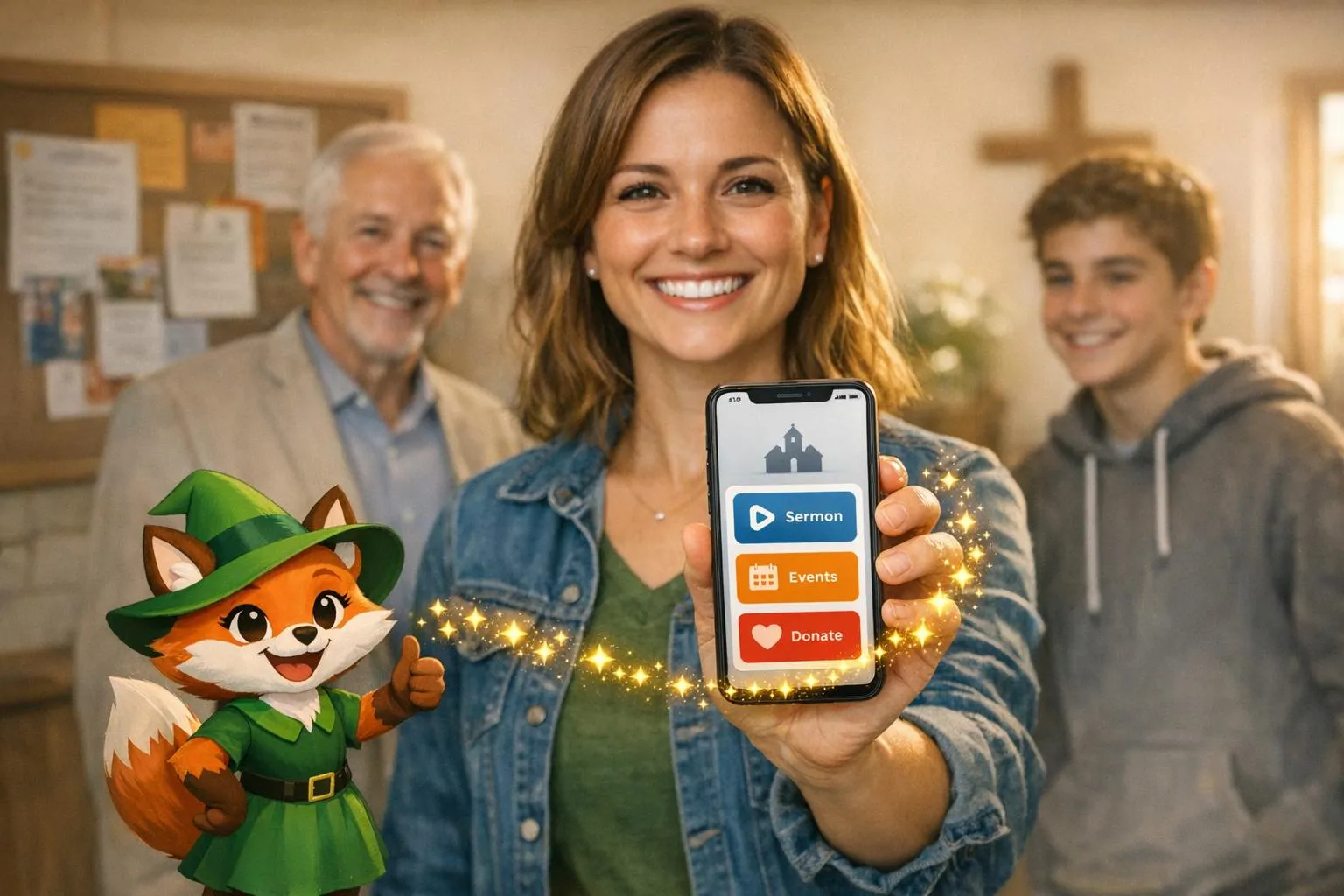
Why Adalo Works for Building Church Community Apps
Adalo is a no-code app builder for database-driven web apps and native iOS and Android apps—one version across all three platforms, published to the Apple App Store and Google Play. This makes it an ideal solution for churches looking to create a unified digital hub where congregation members can access sermons, register for events, submit prayer requests, and give online—all from one app that works on any device.
Having your church app available in both app stores ensures that members can easily find and download it, regardless of whether they use iPhone or Android. Push notifications become a powerful tool for sending service reminders, sharing urgent prayer needs, or announcing community events, helping churches maintain meaningful connections with their congregations throughout the week.
Ada, Adalo's AI builder, lets you describe what you want and generates your app. Magic Start creates complete app foundations from a description, while Magic Add adds features through natural language.
Churches are finding it easier than ever to stay connected with their congregations by using custom apps. Platforms like Adalo make this possible without the need for coding skills or a large budget. For just $36/month, you can create an app that handles sermon streaming, event management, prayer requests, and online donations - all in one place. With tools like Magic Start, Adalo simplifies the process by generating app foundations based on your needs, saving time and effort.
Key highlights:
- Build apps with easy no-code app builders.
- Manage events, donations, and communication in one platform.
- Publish on iOS, Android, and as a web app with predictable costs.
Adalo empowers churches to strengthen community engagement and streamline operations, all while staying budget-friendly.
Church App Development Statistics and Pricing Overview
Adalo for Beginners: AI-Powered App Builder for 2026
Why Churches Need Custom Apps
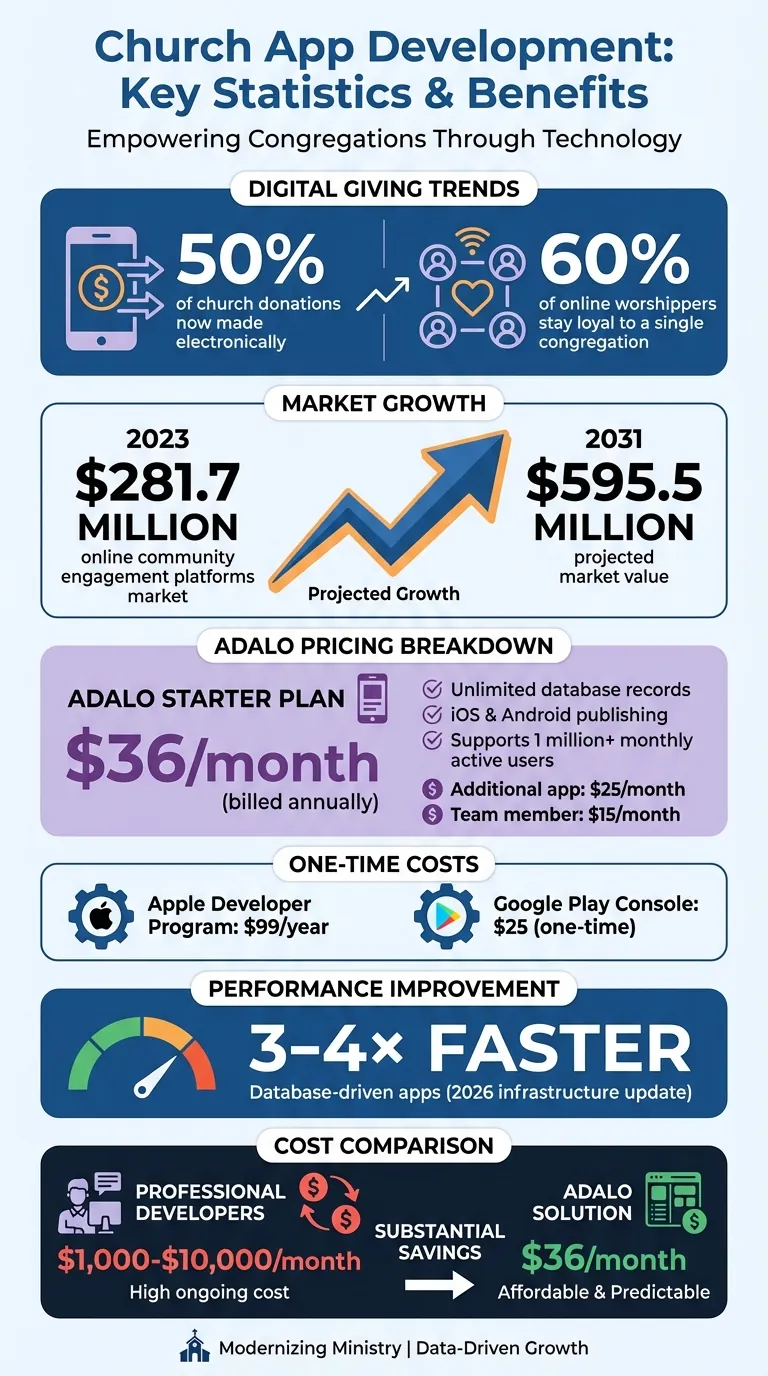
A church app has become essential for engaging members across both digital and in-person interactions. With nearly half of all church donations now made electronically and 60% of online worshippers staying loyal to a single congregation, digital platforms are reshaping how churches foster commitment and stewardship.
The global market for online community engagement platforms reached $281.7 million in 2026 and is expected to grow to $595.5 million by 2031. This trend highlights a growing demand for instant access to information and easy ways to stay involved. Churches relying only on traditional methods like websites, emails, or Sunday bulletins may miss chances to connect with their members throughout the week.
Improving Community Connections
A custom church app transforms how congregations stay engaged outside of weekly services. With features like sermon libraries, event calendars, prayer requests, and group messaging, members can stay connected with just a tap.
"A church app ensures that your congregation can stay connected wherever they are, fostering a sense of community beyond physical gatherings." - The Church Co
Push notifications play a key role in delivering urgent updates. Whether it's notifying members about a prayer request during a medical emergency or alerting them to a service cancellation due to bad weather, these instant messages ensure timely communication.
Interactive features like prayer request boards also create meaningful connections. Members can update a requester when they've prayed for them, fostering a deeper sense of support and community that might not develop during in-person services alone.
Reducing Administrative Work
Church staff often juggle tasks like volunteer scheduling, event coordination, and managing donations. A custom app simplifies these responsibilities by consolidating them into one platform, eliminating the need for paper forms and manual data entry. Volunteer leaders can easily assign roles by accessing member skill profiles in a centralized database.
Integrated payment systems make cashless giving effortless, whether it's a one-time donation or recurring contributions. This not only encourages stewardship but also streamlines financial tracking for the church. For churches with daycare or Sunday school programs, child check-in features improve security and simplify the process for parents and staff alike.
Digital resources like sermon archives, newsletters, and Bible study materials reduce printing costs while giving members instant access to valuable content. These operational efficiencies free up staff time for what matters most—ministry and pastoral care.
Getting Started: Building Your Church App with Adalo
Creating Your Adalo Account
The first step in building your church app is setting up an account on Adalo. Head over to adalo.com and click "Start building for free." Enter your email, create a password, and confirm your account through the email verification link. You can start building and testing apps without entering any payment details.
Adalo's free plan lets you create unlimited test apps, each with up to 500 records. This gives you the freedom to experiment with layouts and features without any financial commitment. Once you're ready to go live, you can upgrade to the Starter plan for $36/month, which includes unlimited usage—no caps on actions, users, records, or storage—and the ability to publish native apps to iOS and Android.
After signing up, navigate to the App Switcher in the top menu and select "Create a New App." For beginners, Adalo suggests starting with the "Mobile Only" option. This ensures your design is optimized for smartphones, and you can always expand to include tablets and desktops later.
With your account ready, it's time to think about the features that will best serve your congregation.
Planning Your App's Features
Before diving into the builder, take some time to jot down the key features your church app needs. Essential tools might include an event calendar with RSVP options, cashless donation processing, and push notifications. From there, consider adding features that encourage community engagement, like:
- Prayer request boards
- Sermon libraries with YouTube integrations
- Small group directories with messaging capabilities
- Volunteer scheduling tools
Adalo's Magic Start feature makes this process dramatically faster. Simply describe your vision—such as "a church app with event signups, sermon streaming, prayer requests, and donations"—and Magic Start generates the app's foundation. This includes the database structure, screens, and user flows, all in just minutes. What might have taken weeks of planning can now be done in a fraction of the time.
Once the basics are set, you can refine your app using Adalo's drag-and-drop interface. The Magic Add feature lets you continue building by describing what you want—say "add a volunteer sign-up form to the event detail screen"—and the AI creates it for you. Add components like calendars, forms, or payment integrations from the Adalo marketplace to tailor the app to your church's needs.
This AI-assisted approach allows church leaders, even those without technical expertise, to create an app that brings their congregation closer together.
Core Features for Church Apps
Sermon Streaming and Media Sharing
One of the most important features of a church app is the ability to share sermons and other spiritual content with your congregation. Adalo makes this simple by integrating with platforms like YouTube, Vimeo, and Facebook Live for seamless video sharing.
For video sermons, you can upload content to YouTube or Vimeo and use Adalo's YouTube Component to display them directly in your app. Prefer audio-only content or podcast-style sermons? The Audio Player Component supports MP3 playback and works with SoundCloud for easy integration.
Want to keep everything organized? Build a Sermon Library using Adalo's database collections, categorizing past messages by speaker, topic, or date. With Magic Add, you can describe what you need—like "a sermon library sorted by topic or speaker"—and the system will set up the foundation for you.
For live streaming, embed links from platforms like Facebook Live or YouTube to offer real-time access to Sunday services or special events. This ensures a unified experience for both in-person and remote attendees. Adalo's modular infrastructure, updated in late 2025, delivers 3–4× faster performance for database-driven apps, so playback remains smooth even during high-traffic worship times.
Event Calendars and Volunteer Sign-Ups
Keeping your congregation informed and involved is easier with an interactive event calendar. Using Adalo, you can create an Events collection with details like event title, start and end times, descriptions, and locations. Display these events in a list or calendar view right on your app's home screen.
To encourage participation, integrate volunteer sign-up features directly into each event. On the Event Detail screen, include a "Sign Up to Volunteer" button that adds users to the event's volunteer roster. This setup creates a many-to-many relationship between users and events, making it simple to track who's helping with what.
Your Users collection should include fields like full name, email, and a relationship field (e.g., "Volunteered Events"). This allows members to view their own commitments in a personal dashboard.
If you're just starting out, Magic Start can build the entire event and volunteer system for you. Describe your needs—like "a church app with event signups and volunteer scheduling"—and the AI creates everything from the database structure to user flows in minutes. From there, you can customize the design to include details like volunteer roles or capacity limits.
Prayer Requests and Member Directories
Prayer requests are a powerful way to foster meaningful connections. Create a simple submission form where members can share their needs. Include fields for the request text, a category (e.g., personal, health, or family), and an option to mark the request as public or private.
Approved requests can be displayed on a community prayer board using a list component. Add a "Pray" button next to each request that sends a push notification to the submitter, letting them know someone has prayed for them. This small feature can make a big impact by fostering a sense of support and encouragement.
A member directory can further strengthen your community. Add search and filter options so members can easily connect with others who share similar interests or live nearby. To take it a step further, integrate User Chat or Group Messaging features. This allows members to reach out directly from directory profiles, transforming a simple directory into a dynamic network for ongoing fellowship.
Push Notifications for Announcements
Push notifications are a great way to grab your congregation's attention. Adalo's native apps support push notifications that appear directly on members' lock screens—a capability that web-only solutions like Glide cannot offer.
You can set notifications for key moments—like when a new sermon is uploaded, a prayer request is answered, or an event is about to begin. However, it's important to strike a balance. Limiting notifications to essential updates and giving members control over what types of alerts they receive keeps engagement high without overwhelming users.
Publishing and Maintaining Your Church App
Once your church app is ready, it's time to share it with your congregation and keep it running smoothly. With Adalo's visual editor, you can build your app once and deploy it across multiple platforms: as native iOS and Android apps for the Apple App Store and Google Play Store, and as a Progressive Web App (PWA) for easy browser access.
Before you submit your app, you'll need developer accounts. Apple requires a $99 annual fee for their Developer account, while Google charges a one-time $25 fee for the Play Console. These costs are separate from Adalo's subscription. Adalo's X-Ray feature helps you identify performance issues before publishing, and with one-click publishing, you can significantly reduce the time it takes to get your app live—from weeks to just days.
Maintaining your app is just as straightforward. You can make updates directly in Adalo's builder and republish them with a single click. These updates automatically apply to all versions of your app—iOS, Android, and PWA—so everyone has access to the latest features. Regular updates help keep your congregation engaged and informed, reinforcing the app's role as a central hub for your community.
"With Adalo, you can build your app one time & use that exact same build to publish everywhere - it's no more work, so why not make your app as accessible as possible?" – Adalo
Adalo also offers a manual publishing feature, allowing you to work in a draft environment without affecting the live app until you're ready to release changes. For teams without technical expertise, Adalo's Google Sheets connector makes it easy to update content like sermon notes and event schedules—just edit the spreadsheet, and the app updates automatically.
Adalo Pricing for Churches
Adalo offers a pricing model tailored to the needs of growing churches, with no per-member fees or usage-based charges. The Starter plan is priced at $36 per month (when billed annually) and includes one published app, unlimited database records, and native publishing to both the Apple App Store and Google Play Store.
This flat-rate approach ensures your costs remain steady, no matter how many members use your app or how often they engage. Unlike competitors that charge based on workload units or user counts, Adalo has removed app actions entirely—zero usage-based charges. As David Adkin, Co-Founder of Adalo, puts it:
"By removing usage-based charges entirely, we're betting on your success. Build the features you need. Scale to as many users as your app can attract. Your monthly cost stays predictable."
The Starter plan supports publishing across iOS, Android, and Progressive Web Apps from a single build. Opting for annual billing also saves you 20% compared to monthly payments.
How Adalo Compares to Alternatives
For churches evaluating app building options, understanding the competitive landscape helps clarify Adalo's value:
| Platform | Monthly Cost | Native Mobile Apps | Usage Limits |
|---|---|---|---|
| Adalo | $36 | Yes (iOS + Android) | Unlimited |
| Glide | $25 | No (web only) | Limited customization |
| Softr | $59+ | PWA only ($167/mo) | Scales with users |
| Bubble | $69 | No (web only) | Workload Units |
| Thunkable | $189 | Yes | Token limits |
Adalo offers the lowest price for native app store publishing with truly predictable pricing. Glide's $25/month plan doesn't include mobile apps at all—only web apps. Bubble charges $69/month but adds unpredictable Workload Unit charges and doesn't compile to native mobile. Thunkable requires $189/month for app store publishing with token-based limits.
For churches with growing needs—like additional apps for youth ministries or small groups—Adalo offers flexible add-ons. Each extra app costs $25 per month, and additional team members can be added for $15 per month. The platform's infrastructure supports over 1 million monthly active users, ensuring your app performs reliably as your congregation expands.
Churches should also account for app store fees: $99 per year for the Apple Developer Program and a one-time $25 fee for Google Play. If you're accepting donations via services like Stripe, expect to pay 2.9% plus $0.30 per transaction in the U.S. Adalo takes care of technical updates and security monitoring automatically—tasks that can cost between $1,000 and $10,000 monthly with professional developers.
Conclusion
Creating a custom church app provides your congregation with a dedicated communication hub that extends well beyond Sunday services. Features like push notifications, sermon libraries, event calendars, and volunteer sign-up tools replace scattered systems and outdated paper forms, ensuring your members stay engaged and connected throughout the week.
With AI-assisted building, managing your app becomes simple and accessible. Church staff, even without technical skills, can build and maintain the app effortlessly. Magic Start lays the groundwork for your app in minutes, while SheetBridge connects your existing Google Sheets data directly to the app. This efficiency reduces administrative burdens, giving your team more time to focus on ministry.
At $36 per month with no usage caps or hidden charges, Adalo removes both technical barriers and surprise expenses. Whether you're a small congregation or a large church with thousands of members, the platform's modular infrastructure scales alongside your community—supporting apps that serve millions of users while maintaining consistent performance.
From sermon streaming and online giving to small group coordination and prayer boards, the tools exist to keep your church connected and engaged. With no development team required and predictable costs, bringing your vision of a unified, active community to life is more accessible than ever.
Related Blog Posts
- How to Launch Your First Mobile App Without Coding
- Adalo for Software Development Teams: Rapid Internal Tool Building
- Adalo for Custom Software and App Development Agencies
- Why Startups Choose Adalo Over Bubble: Real Case Studies
FAQ
Why choose Adalo over other app building solutions?
Adalo is an AI-powered app builder that creates true native iOS and Android apps from a single codebase. Unlike web-only platforms, it compiles to native code and publishes directly to both the Apple App Store and Google Play Store. At $36/month with unlimited usage, it offers the lowest price for native app store publishing with predictable costs.
What's the fastest way to build and publish an app to the App Store?
Adalo's drag-and-drop interface combined with AI-assisted building through Magic Start and Magic Add lets you go from idea to published app in days rather than months. Describe what you want to build, and the AI generates your database, screens, and user flows. Adalo handles the complex App Store submission process, so you can focus on features instead of certificates and provisioning profiles.
Can I easily build a church community app without coding experience?
Yes, Adalo's visual builder requires no coding experience. The drag-and-drop interface and AI-powered Magic Start feature generate your app's foundation—including database structure, screens, and user flows—in minutes based on your description of what you need. Church staff can build and maintain apps without technical expertise.
How much does it cost to create and maintain a church app with Adalo?
Adalo's Starter plan costs $36 per month (billed annually) and includes one published app with no caps on database records, users, or actions. There are no per-member fees or usage-based charges, so your costs stay predictable as your congregation grows. You'll also need Apple's $99 annual developer fee and Google's one-time $25 fee for app store accounts.
Which is more affordable, Adalo or Bubble?
Adalo is more affordable at $36/month compared to Bubble's $69/month. More importantly, Adalo includes unlimited usage with no hidden charges, while Bubble adds unpredictable Workload Unit fees based on CPU usage and database operations. Bubble also doesn't compile to native mobile apps—only web apps.
Which is better for mobile apps, Adalo or Glide?
Adalo is significantly better for mobile apps because it creates true native iOS and Android apps that publish to the App Store and Play Store. Glide only creates web apps—no native mobile apps at all. For churches wanting push notifications and app store presence, Adalo is the clear choice.
What features can I include in a church app built with Adalo?
Adalo supports all essential church app features including sermon streaming and libraries, event calendars with RSVP and volunteer sign-ups, prayer request boards, online donation processing via Stripe, member directories, small group messaging, and push notifications. You can integrate with YouTube, Vimeo, Stripe, and Google Sheets to extend functionality.
Can church staff without technical skills update the app content?
Yes, Adalo is designed for non-technical users. Church staff can make updates directly in the visual builder and republish with a single click. The Google Sheets connector also allows you to update content like sermon notes and event schedules simply by editing a spreadsheet—the app updates automatically.
How do push notifications help churches stay connected with their congregation?
Push notifications appear directly on members' lock screens, making them ideal for timely communication. Churches can send service reminders, share urgent prayer needs, announce community events, or notify members when new sermons are uploaded. This maintains meaningful connections throughout the week, not just on Sundays.
How long does it take to build a church app with Adalo?
With Magic Start generating your app foundation in minutes and Magic Add helping you build features by description, most churches can have a functional app ready for testing within a few days. Publishing to app stores typically takes an additional 1-2 weeks for Apple's review process, though Adalo handles the technical submission requirements.

Build your app fast with one of our pre-made app templates
Begin Building with no codeRelated Content
The Best Platform for Easy No-Code App Development in 2026
Want to build your own app without coding? Then read our article about Adalo, the best platform for no-code app development.
E-Learning App Development: A No-Code Guide for Beginners
Discover how to build an e-learning app in 7 easy steps using no-code platforms like Adalo. Get started today!
How To Develop a Retail App Without Coding
With our guide, you can learn how to build a retail app in 7 easy steps without coding experience. Boost sales & expand your customer base.
How To Create a Booking App Without Coding Experience
Discover how to create a booking app tailored to your business — no coding required. Follow our easy guide to build an app with Adalo.