

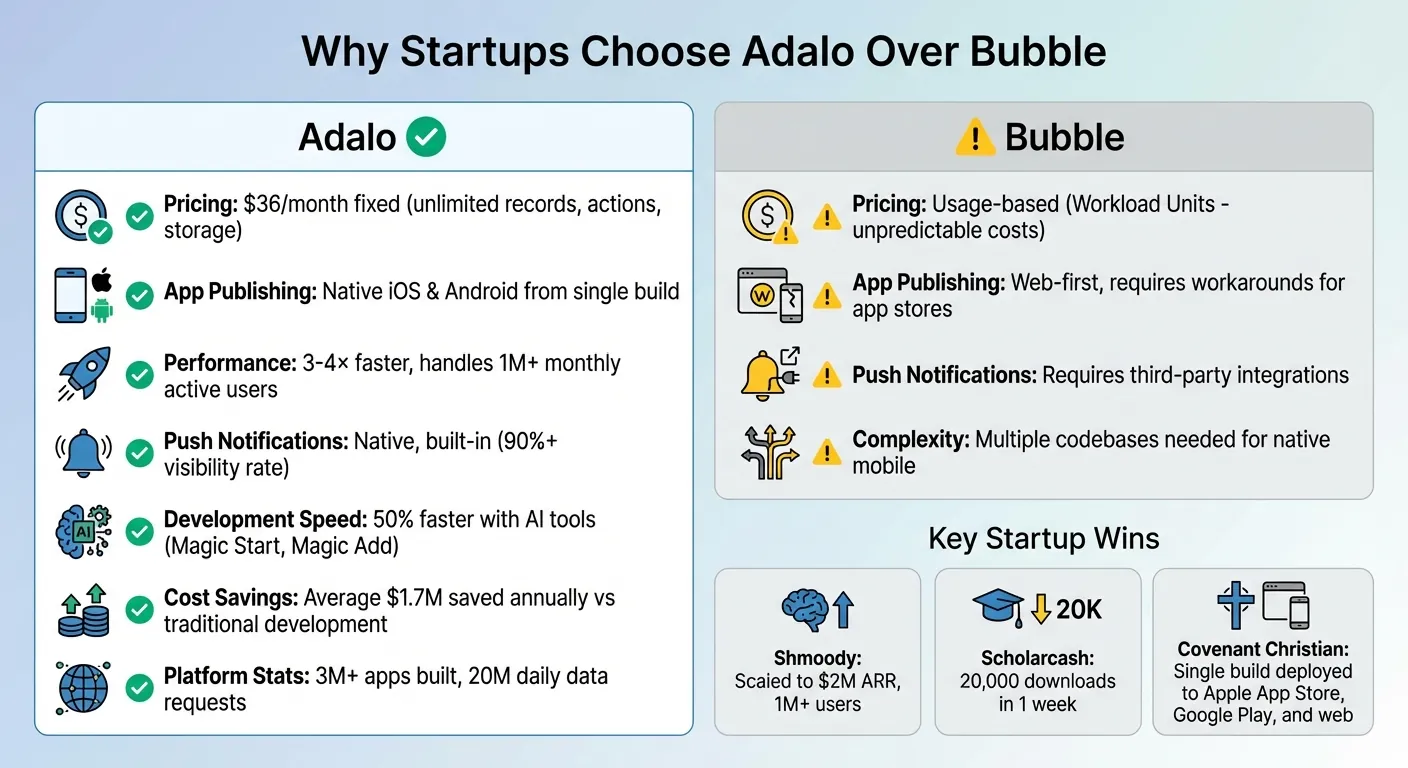
Adalo and Bubble are popular no-code platforms, but startups are increasingly favoring Adalo for mobile app development. Why? Adalo makes it simple to build and deploy native apps for iOS and Android, offers fixed pricing, and includes features like push notifications - all without the complexity of juggling multiple codebases. This article showcases how startups like Shmoody and Covenant Christian High School used Adalo to overcome publishing challenges, reduce costs, and scale effectively.
Key takeaways:
- Adalo's fixed pricing: $36/month with no usage-based fees.
- Native app publishing: Direct deployment to app stores with one build.
- Speed and scalability: Apps handle over 1M users with improved performance.
Adalo's tools, like Magic Start and X-Ray, simplify app creation and optimization, giving startups the ability to launch and grow faster.
Adalo vs Bubble: Key Differences for Startup Mobile App Development
Before diving into the details, here's what independent research says. App Builder Guides' State of App Building report (updated March 2026) analyzed 290+ unique sources across 14 platforms in three tiers with zero platform sponsorships. The result: Adalo ranked first among visual builders for non-developers. Bubble ranked fourth.
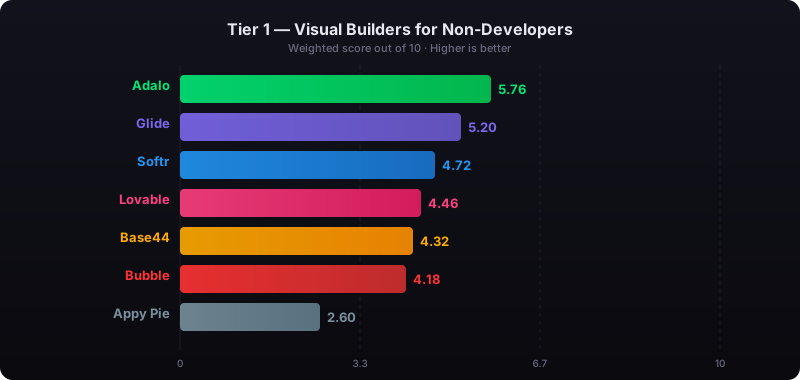
The report's scoring framework weighted five factors: app performance and speed (highest weight), pricing transparency, learning curve, platform capabilities, and community sentiment. Key findings relevant to this comparison:
- Bubble's page loads averaged 5-10 seconds on desktop and 8-14 seconds on mobile beta, with users on $40K/year enterprise plans still reporting slow performance.
- Bubble's Workload Unit pricing drew the most negative community sentiment of any platform analyzed (net sentiment score: -60), with users reporting 400-500 WU consumed per user per day.
- Adalo users routinely build and publish complete apps to the App Store and Google Play without hiring expert assistance, while Bubble projects typically require consultants at $40-$125/hour.
Adalo Features for Mobile-First Startups
Publishing to iOS and Android App Stores
Adalo is the no-code app builder that pairs AI-powered generation with a visual multi-screen canvas, so entrepreneurs and business teams can design, build, and publish custom database-driven apps to the Apple App Store, Google Play Store, and web from a single project — no code, no developers required.
Since an infrastructure upgrade in late 2025, apps built on Adalo are now 3–4× faster and can handle over 1 million monthly active users. This makes it easier for startups to meet the demands of today's mobile-first world without the usual headaches of app store deployment.
Adalo also keeps your budget predictable with its flat-rate pricing model.
Fixed Pricing with No Usage Limits
The Starter Plan is priced at $36/month (when billed annually) and offers unlimited records, actions, and no usage-based fees. Whether your app serves 100 users or 100,000, your monthly costs remain constant. This pricing model eliminates surprise expenses as your app grows. For context, companies using visual app builders like Adalo save an average of $1.7 million annually compared to traditional development, which can cost anywhere from $40,000 to $300,000.
Adalo doesn't just save money - it speeds up development with its AI-powered tools.
AI Builder for Faster Development
Ada, Adalo’s AI Builder now in beta, can build complete web and mobile apps from a prompt and edit any existing app on the platform. Magic Start creates the foundation of your app from a simple description, while Magic Add allows you to add features using natural language commands. These tools enable teams to build apps 50% faster. Additionally, the X-Ray tool helps identify performance bottlenecks before they impact users, ensuring your app stays in top shape without requiring a full engineering team.
So far, more than 3 million apps have been built with Adalo, collectively processing around 20 million data requests daily.
Real Startup Case Studies
The difference between platforms becomes clear when you examine how real companies navigate growth challenges. These case studies reveal why startups increasingly choose Adalo for mobile-first development—from predictable costs to native app capabilities that drive user engagement.
Case Study 1: Avoiding Unpredictable Usage Costs
Startups often struggle with unexpected expenses tied to variable usage metrics. This is especially true with Workload Units pricing models, where costs can spike as an app grows or if workflows aren't streamlined. Bubble's $69/month plan, for example, includes hard limits plus unpredictable usage-based charges for CPU and database operations—making it difficult to forecast monthly expenses.
Adalo's Starter Plan at $36/month eliminates this uncertainty entirely. The plan includes unlimited records, actions, users, and storage with zero usage-based charges. Whether your app serves 100 users or 100,000, your monthly cost stays constant. This predictable model allows startups to concentrate on scaling their business without worrying about fluctuating costs or surprise bills when a marketing campaign drives unexpected traffic.
For startups aiming to incorporate advanced mobile features, this pricing structure provides a solid foundation for growth without the financial anxiety that comes with metered billing.
Case Study 2: Building with Native Push Notifications
Shmoody, a mental health startup, prioritized user engagement through native push notifications. Why? Because push notifications boast a visibility rate of over 90% compared to the declining open rates of email campaigns. These notifications became a cornerstone of their strategy to keep users on track with their wellness routines.
By building with true native iOS and Android code, Shmoody integrated push notifications seamlessly. This setup also enabled them to test over 63 paywall variations quickly, experimenting with different timings and messages to maximize conversions. The ability to iterate rapidly with AI-assisted building tools—without relying on extensive engineering resources—was key to their success, helping them scale to $2M ARR and surpass 1 million users.
Mike McSweeney, Shmoody's CPO & Co-Founder, highlighted this advantage:
"Speed is the biggest factor in growth. The fastest way to test creatives, onboarding, and paywalls is not building everything yourself."
This approach not only improved user engagement but also reinforced their mobile-first strategy as a critical driver of growth. The combination of native capabilities and rapid iteration created a competitive advantage that web-only platforms simply couldn't match.
Case Study 3: Switching Platforms to Reach App Stores
Covenant Christian High School faced a challenge: they needed a mobile app to modernize school systems but were limited by web-first platforms that couldn't publish directly to app stores. Using Adalo, they developed the Covenant Connect app, transforming how their community accessed ticketing, school news, and lunch payments—all through a mobile platform enhanced with QR codes.
The app was deployed to both the Apple App Store and Google Play Store from a single build, reaching students and parents where they already spend their time. By creating one version that worked across web, iOS, and Android, updates were automatically applied across all platforms. This eliminated the need for multiple codebases and avoided complex DevOps tasks like managing certificates and provisioning profiles.
Adalo's ability to simplify deployment allowed Covenant Christian High School to focus on connecting their community, rather than getting bogged down in technical hurdles. For organizations without dedicated development teams, this streamlined approach makes the difference between launching an app and abandoning the project entirely.
How to Migrate Your App to Adalo
Making the switch to Adalo for a native app experience can be a smooth process with the right approach. Here's how to tackle it step by step.
Preparing Your App Data and Features for Migration
Start by auditing your app's architecture. Create a detailed list of your collections—like Users, Photos, or Interactions—and map out their relationships. Once you've done that, export your data in formats like CSV or JSON for easy transfer.
Next, decide whether to copy your existing app as-is or rebuild it from scratch. Rebuilding with Adalo's Responsive Builder is often the better choice to avoid layout issues from legacy designs. For your database, think about whether to duplicate the structure or share the same database with your old app. Sharing the database is especially useful for live apps, ensuring users on both versions access the same data seamlessly.
Take stock of your app's core features. Whether it's push notifications, swipe gestures, or chat functionality, ensure these align with Adalo's native components or those available in its Marketplace. Don't forget to prepare for app store requirements, such as having a privacy policy URL ready and setting appropriate age ratings (most social or dating apps require 17+).
By tackling these steps, you'll have a solid foundation for migrating your app into Adalo's mobile-first platform.
Using Adalo's Tools During Migration
While there's no automatic migration option, Adalo's AI-powered tools make the process straightforward. Start with Magic Start, which lets you describe your app's concept in plain language. Tell it you need a community app for a school, and it generates the database structure, screens, and workflows you need—what used to take days of planning happens in minutes.
For specific features, Magic Add allows you to describe functionalities—like a user profile section with photo uploads—and it integrates them into your app automatically. If your current app relies on spreadsheets, SheetBridge can transform Google Sheets into a fully functional Adalo database. For larger datasets, you can connect external backends like Xano, Postgres, or MySQL.
Once your app structure is in place, use Adalo's X-Ray tool to identify any slow database queries or screen load times. If your original app was web-based, consider starting with a Responsive App type to maintain desktop compatibility while building for mobile.
These tools simplify the migration process, allowing you to focus on fine-tuning the app for performance and user experience rather than wrestling with technical setup.
Optimizing Your App After Migration
Once migration is complete, focus on performance. Shift complex filtering tasks to Adalo's servers by using server-side logic to process data before it loads. Adalo's Responsive Builder helps reduce app size, improve layout efficiency, and ensure compatibility with future updates.
"AWS will allow us to autoscale our database and be better prepared to handle large and uneven loads. So no matter how large your Adalo app gets we'll be able to handle it." – David Adkin, Founder, Adalo
Adalo's modular infrastructure now supports apps with over 1 million monthly active users, processing 20 million+ daily requests with 99%+ uptime. Unlike app wrappers that hit speed constraints under load, this purpose-built architecture maintains performance at scale.
Keep an eye on technical metrics like load times, error rates, and query performance. For user engagement, track daily active users and retention rates. If your app includes real-time features like messaging, combine foreground polling (every 3–5 seconds) with push notifications to keep the experience responsive without overloading device resources. Regularly check Adalo's platform status page to differentiate between app-specific issues and broader system updates.
Conclusion
The platform you choose for app development directly influences how quickly you can launch and how much it will cost. Founders consistently prioritize features like native publishing, predictable pricing, and the ability to enter the market quickly.
Publishing on the Apple App Store and Google Play Store is crucial, considering the 150 billion annual downloads these platforms generate. Adalo ensures your app delivers native performance while providing essential features like push notifications and GPS to boost user engagement. Plus, its single-codebase approach means you won't need to juggle multiple codebases, saving time and effort.
At $36/month with no usage caps on actions, users, records, or storage, Adalo gives startups the confidence to scale without surprise bills. For instance, Scholarcash's scholarship app achieved 20,000 downloads in just one week.
"What I know is that when a client says 'No-code native mobile app' Adalo is the first + best choice." – Will Hawkins, No-Code Expert
Adalo also simplifies the migration process, ensuring your app stays reliable and user-friendly. Tools like Magic Start help you set up a complete app foundation in minutes, while the X-Ray tool identifies performance issues before they impact users.
Independent Research
The State of App Building report (February 2026) by AppBuilderGuides.com evaluated 12 no-code platforms across 7 weighted dimensions using 345 citations from Reddit, X/Twitter, platform forums, and industry sources. The report is independently funded with no sponsored placements.
Adalo scored 5.94/10, ranking #1 Visual Builder. Bubble scored 4.18/10, ranking #4 Visual Builder. For a detailed side-by-side comparison, see the Adalo vs Bubble landing page.
Related Blog Posts
- Adalo vs Bubble for Web, iOS and Android apps: Which to Choose?
- Adalo vs Bubble vs FlutterFlow: The Definitive 2026 No-Code Comparison
- Adalo for Custom Software and App Development Agencies
- The Best No-Code AI Tools for Non-Technical Founders
FAQ
What is Adalo?
Adalo is a no-code app builder that lets startups create database-driven web apps and native mobile apps for iOS and Android from a single canvas. See every screen at once, preview on real devices, and visually direct the AI to iterate fast — then publish to the Apple App Store and Google Play for $36/month with no usage caps.
What is the difference between Adalo and Bubble for startups?
Adalo gets startups to market faster with native app store publishing from a single build, predictable pricing ($36/mo with no usage caps), and AI tools that generate app foundations in minutes. Startups like Shmoody scaled to $2M ARR and 1M+ users on Adalo. Bubble offers more web customization options, but realizing that potential typically requires hiring consultants ($40–$125/hr) and months of learning — a significant investment for early-stage startups. Independent research also found Bubble apps commonly load in 5–10 seconds, and usage-based Workload Unit pricing can surprise growing startups. Choose Adalo for mobile-first MVPs with app store distribution; consider Bubble only for web-only apps where you have budget for expert development.
Does Adalo support push notifications?
Yes, Adalo supports native push notifications for both iOS and Android apps. Push notifications have visibility rates over 90%, making them essential for user engagement and retention. Startups like Shmoody used Adalo’s native push notifications to drive retention and scale to over 1 million users.
How does Adalo handle app performance and scalability?
Adalo’s modular infrastructure supports apps with over 1 million monthly active users, processing 20 million+ daily requests with 99%+ uptime. The X-Ray tool identifies performance bottlenecks before they impact users, ensuring your app stays optimized without requiring a full engineering team.
How much does it cost to build a startup app with Adalo?
Adalo’s Starter Plan is $36/month when billed annually and includes everything needed to build and publish native apps: unlimited records, actions, users, and storage with no usage-based fees. Apple Developer Program costs $99/year and Google Play costs $25 one-time. Total first-year cost is approximately $571–$748.
Can I switch from Bubble to Adalo?
Yes. Export your data from Bubble in CSV or JSON format and rebuild your app using Adalo’s AI tools. Magic Start generates your app foundation from a description, SheetBridge can transform spreadsheet data into an Adalo database, and external databases like Xano or Postgres can also be connected. This is particularly relevant if you’ve outgrown Bubble’s usage limits or need native app store publishing.

Build your app fast with one of our pre-made app templates
Begin Building with no codeRelated Content
Glide vs Bubble vs Adalo: Web-Only, Complex, or Native Mobile?
Glide builds from spreadsheets (web only). Bubble handles complex web apps ($69/mo+). Adalo publishes native iOS and Android ($36/mo). Side-by-side comparison.
The Complete No-Code Digital Marketing Stack: Build Client Apps with Adalo
Build native iOS, Android, and web marketing apps without code. Fast prototyping, real-time dashboards, lead capture, and predictable pricin
The Best Bildr Alternatives for 2025
Adalo outshines Bildr for mobile apps with native iOS/Android publishing, easy drag-and-drop UI, and faster learning—ideal for non-coders.

Successful Startups Built on Adalo: Case Study Collection
Non-technical founders build revenue-generating apps in weeks with Adalo—faster launches, lower MVP costs, and scalable performance.