
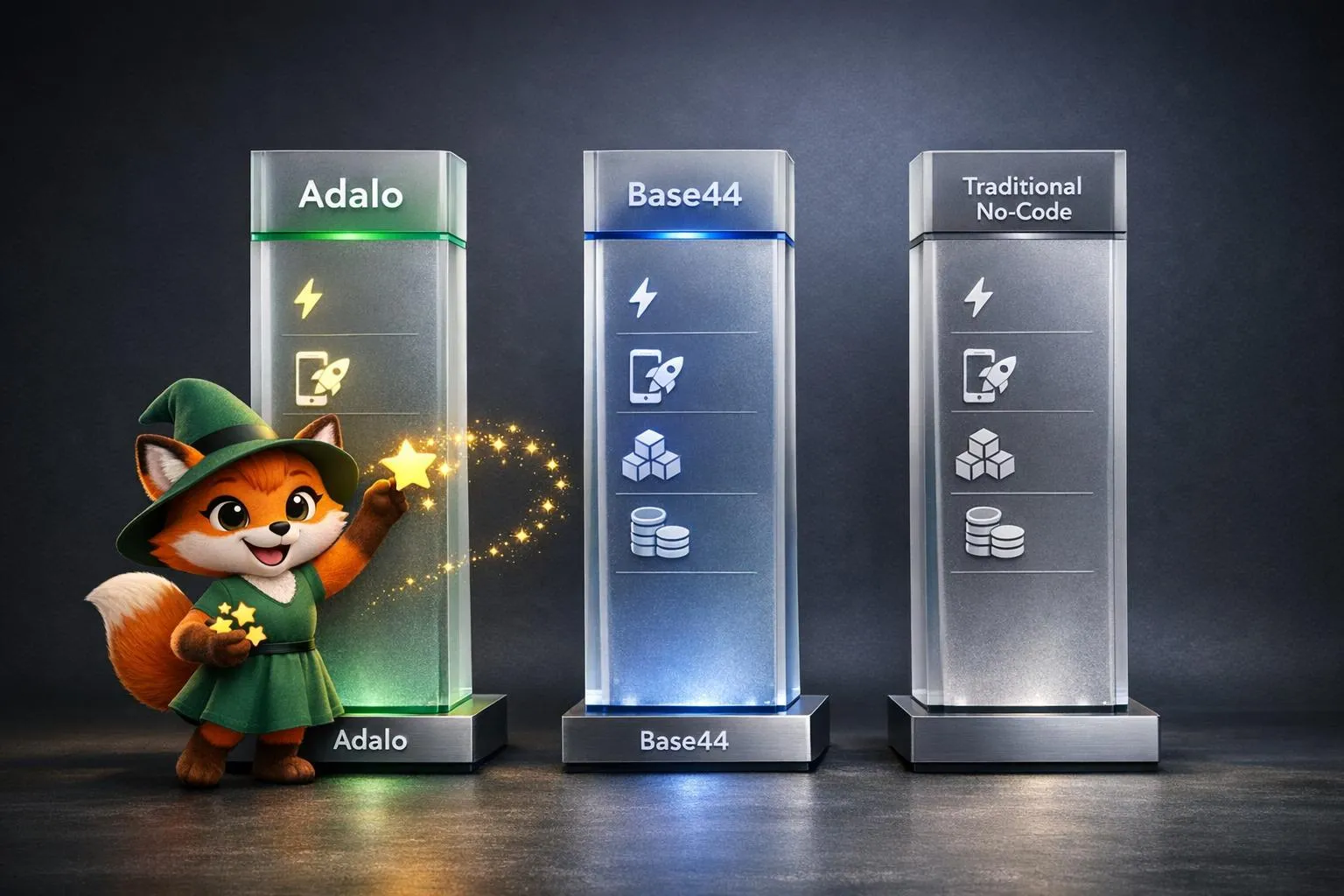
AI app builders are changing how apps are created. Instead of manually assembling components, these tools let you describe your idea in plain language, and they handle the heavy lifting. But not all platforms deliver the same results. Adalo, Base44, and other no-code tools vary in speed, scalability, and publishing options. Here's what you need to know:
Start building with Adalo's AI app builder.
See how Adalo's AI app builder helps teams launch faster.
- Adalo: Generates fully functional apps (native iOS/Android & web) with tools like Magic Start. Offers direct app store publishing and fixed pricing starting at $36/month.
- Base44: Focuses on web apps and rapid prototyping using conversational AI but lacks native publishing and scalability for production-level apps. Starts at $16/month with usage-based credits.
- Other No-Code Tools: Platforms like Bubble and FlutterFlow require more manual setup and often rely on web wrappers or external databases. Costs can rise quickly as apps scale.
Quick Comparison
| Feature | Adalo | Base44 | Other No-Code Tools |
|---|---|---|---|
| AI Speed | Minutes (Magic Start) | Minutes (Prompt-to-Code) | Hours to Days |
| Output Type | Native iOS/Android + Web | Web Only | Webviews or PWAs |
| Publishing | Direct to App Stores | Manual Code Export | Varies (Often Web-only) |
| Pricing | $36/month (fixed) | $16/month (credits) | $32+/month (usage-based) |
Adalo offers the best balance of speed, flexibility, and production-ready features, making it ideal for scaling apps without hidden costs.
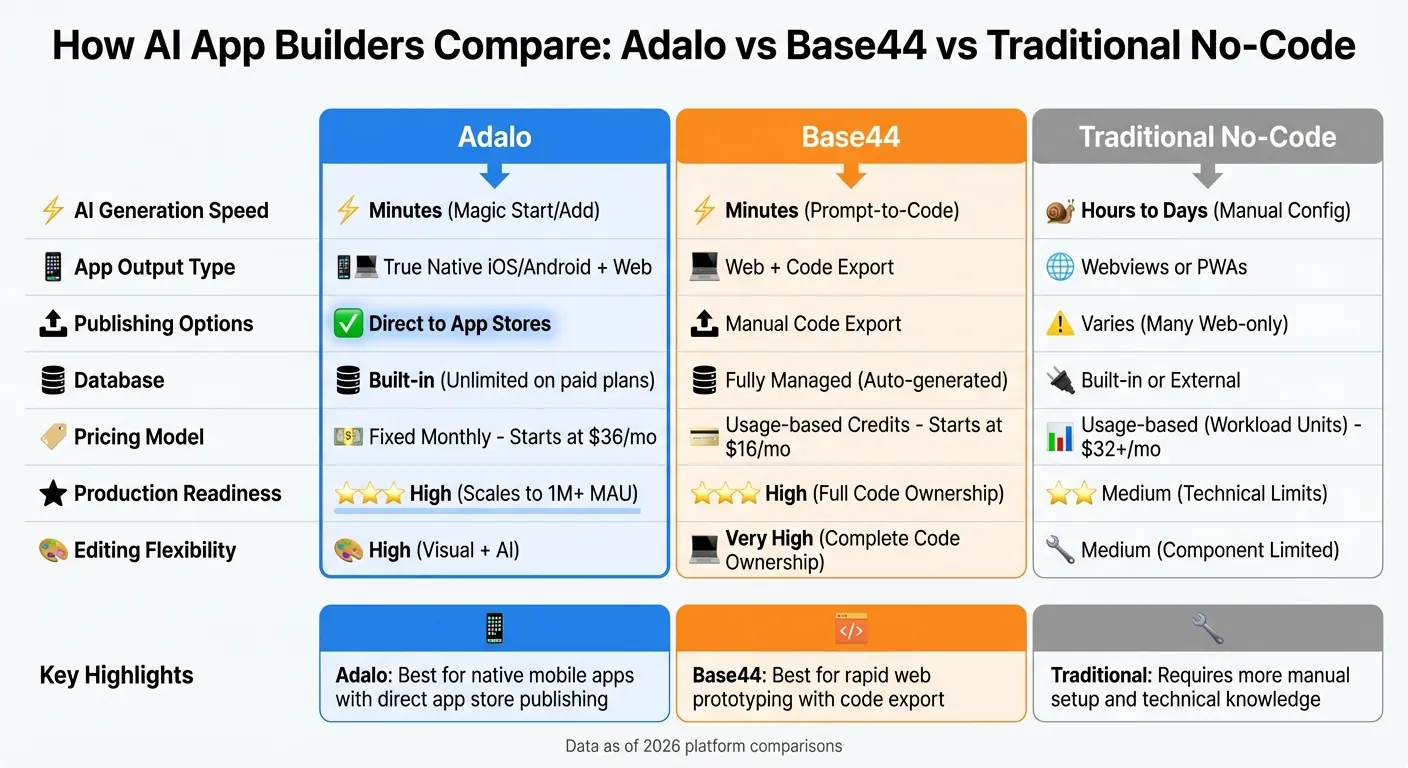
AI App Builder Comparison: Adalo vs Base44 vs Traditional No-Code Platforms
Independent research from App Builder Guides' State of App Building report (updated March 2026) analyzed 290+ unique sources across 14 platforms in three tiers with zero platform sponsorships. Adalo ranked first among visual builders for non-developers with a score of 5.94/10.
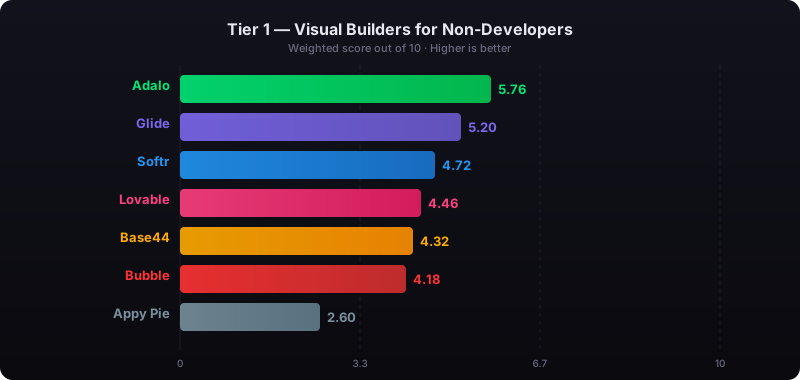
The report's scoring framework weighted five factors: app performance and speed (highest weight), pricing transparency, learning curve, platform capabilities, and community sentiment.
Adalo: AI Features and How They Work
AI-Assisted App Building
Adalo is a no-code app builder for database-driven web apps and native iOS and Android apps—one version across all three platforms. AI-assisted building and streamlined publishing enable launch to the Apple App Store and Google Play in days rather than months. Adalo's Magic Start simplifies app creation by transforming a plain text description into a fully functional app foundation. For instance, typing "booking app for a dog grooming business" generates a complete setup, including a database, screens, and user flows. What used to take days now happens in moments. Once generated, the foundation appears in Adalo's visual editor, where you can tweak every aspect to match your vision.
Ada, Adalo's AI builder, lets you describe what you want and generates your app. Magic Start creates complete app foundations from a description. Magic Add adds features through natural language. X-Ray identifies performance issues before they affect users.
Then there's Magic Add, which takes the process further. Need a new feature? Just describe it in natural language, and the AI integrates it directly into your app. These tools eliminate complex planning, making app development approachable for beginners and a time-saver for seasoned developers. After the AI does its part, the visual builder gives you the control to refine both design and functionality.
Visual Builder and Scaling
The AI-generated base opens in a drag-and-drop editor, capable of displaying up to 400 screens on a single canvas. You can seamlessly toggle between using AI prompts and manual adjustments, depending on what suits your workflow. Best of all, no coding is required.
With the release of Adalo 3.0 in late 2025, the platform introduced a modular infrastructure that delivers up to 4x faster performance. It's designed to handle growth, supporting apps with over 1 million monthly active users. Paid plans come with unlimited database records and no usage-based fees, so you won't face unexpected charges as your app scales. Before launching, the X-Ray tool ensures everything is optimized for smooth performance.
X-Ray Performance Analysis
The X-Ray tool is like a pre-deployment safety net for your app. It uses AI to inspect your app's structure, flagging potential issues such as inefficient database queries or overly complex components. For example, it highlights one of the most common performance pitfalls: lists nested within other lists, which can slow down apps as they grow.
Beyond identifying problems, X-Ray reviews your database design, offering suggestions on indexing and data relationships to ensure your app can handle heavy traffic. Running this check before publishing allows you to fix issues early - before users run into slow load times. This step is essential for ensuring your app is ready for real-world use.
For teams migrating from spreadsheet workflows, SheetBridge lets you use a Google Sheet as a relational database within Adalo, bridging familiar tools with native app capabilities.
Base44: Early-Stage AI Approach
Prompt-Based App Generation
Base44 takes a conversation-driven approach to app development through its "Builder Chat" interface. Describe your app idea in plain English, and the AI generates the entire stack—UI, database schema, user authentication, APIs, and workflows—within minutes. Once your prototype is ready, you can refine it using additional prompts or switch to Visual Edit Mode for hands-on adjustments.
The platform also includes a "Discuss Mode" for brainstorming features with the AI before committing to a full build. This mode uses only 0.3 credits per conversation, making it cost-efficient compared to full app generation. Base44 handles backend infrastructure, hosting, and security automatically, which has made it popular for rapid MVP prototyping. By early 2026, the platform had attracted over 250,000 users and was acquired by Wix for $80 million in June 2026.
Despite its success in creating prototypes quickly, Base44 faces significant challenges when scaling to production-level applications.
Production Feature Gaps
While Base44 excels at generating web apps and MVPs, it falls short on production-ready features. The platform is limited to building responsive web apps—there's no support for native iOS or Android app store publishing. This means you can't leverage mobile-specific features like GPS or cameras, and the apps aren't designed to handle enterprise-level traffic.
Another significant drawback is backend portability. While Base44 allows you to export frontend code, the backend logic remains locked within its infrastructure. Migrating a complete app to another platform requires rebuilding the backend from scratch. The design process can also be frustrating, often requiring multiple prompt iterations to achieve desired results, which quickly depletes message credits.
"While vibe coding platforms are getting better... it can still take a long time (and money in extra credits) to fix simple bugs." - Miguel Rebelo, Zapier
Security presents another concern. Although Base44 includes a built-in security scan feature, AI-generated code can introduce vulnerabilities that require thorough manual reviews. For production-ready apps, automated checks alone are often insufficient, demanding more rigorous testing protocols.
Unlike platforms that offer native code compilation and complete publishing options, Base44 focuses primarily on fast MVP creation. These limitations make it less suited for building robust, production-grade applications that need to reach users through the Apple App Store and Google Play Store.
Other No-Code Platforms: AI Features and Tradeoffs
AI Tools in Other Platforms
Platforms like Bubble and FlutterFlow bring AI-driven tools for scaffolding and page generation, but they still demand significant manual input. Users must configure privacy rules, database fields, and UI-event links by hand. On Bubble, mastering the platform typically takes 1–2 weeks of dedicated learning. FlutterFlow assumes users have some knowledge of Flutter and Dart when tackling more complex features.
Unlike AI-first platforms that automate backend setups, these tools rely heavily on manual adjustments. This approach can lead to challenges with scaling and unpredictable costs as your app grows.
Scaling and Cost Issues
While these platforms integrate AI features, their reliance on manual configuration and specific pricing models can make scaling a significant hurdle.
Bubble uses a metered pricing system called "Workload Units," which causes costs to rise quickly as your app grows. Starting rates begin at $69/month, but production-ready tiers can easily surpass $500/month due to usage-based charges for CPU and database records. These unpredictable costs make budget planning difficult for growing businesses.
FlutterFlow presents a different challenge: it doesn't include a built-in production database. Users must rely on external services like Firebase or Supabase, adding complexity and extra expenses. App store publishing requires the $80/month per seat plan, and you'll need to budget separately for database subscriptions. This gap in database integration often requires costly expert help to address.
Glide starts at $25/month but limits users to spreadsheet-based templates with no native mobile apps. Custom domains require upgrading to the $60/month Maker plan. Softr scales pricing with users, and PWA functionality requires the $167/month plan. Thunkable charges $189/month for app store publishing with token limits that can restrict development.
Side-by-Side Comparison: AI, Output, and Publishing
Comparison Table
AI-powered app builders vary significantly in speed, output quality, and publishing options. Platforms like Adalo and Base44 generate working prototypes in minutes, while traditional tools often take hours or days to achieve similar results.
Output quality is another area where these platforms diverge. Base44 focuses on fully managed web apps with code export to GitHub or ZIP files. Traditional platforms like Bubble lean toward web-first experiences, relying on "web wrappers" rather than true native builds—a distinction that creates performance challenges as user bases grow.
For publishing, Adalo supports direct publishing to both the Apple App Store and Google Play Store from a single codebase. Base44 requires manual deployment via code export. Traditional platforms often limit users to Progressive Web Apps (PWAs) or web-based experiences.
| Feature | Adalo | Base44 | Traditional No-Code |
|---|---|---|---|
| AI Generation Speed | Minutes (Magic Start/Add) | Minutes (Prompt-to-Code) | Hours to Days (Manual Config) |
| Editing Flexibility | High (Visual + AI) | Very High (Complete Code Ownership) | Medium (Component Limited) |
| App Output Type | True Native (iOS/Android) + Web | Web + Code Export | Often Webviews or PWAs |
| Publishing Options | Direct to App Stores | Requires manual code export | Varies (Many Web-only) |
| Database | Built-in (No caps on paid plans) | Fully Managed (Auto-generated) | Built-in or External Required |
| Pricing Model | Fixed Monthly ($36/mo starts) | Usage-based Credits ($16/mo) | Usage-based (Workload Units) |
| Production Readiness | High (Scales to 1M+ MAU) | High (Full Code Ownership) | Medium (Technical Limits) |
Pricing Breakdown
The pricing models reveal critical distinctions for budget planning. Adalo offers a flat monthly rate starting at $36, which includes unlimited usage—no caps on actions, users, records, or storage. App actions have been removed entirely, meaning zero usage-based charges.
Base44 starts at $16/month with a credit-based system, meaning costs can rise significantly with heavy usage during development and iteration. Bubble begins at $69/month but uses "Workload Units" that lead to unpredictable expenses—often surpassing $500/month for production-ready apps.
FlutterFlow charges $80/month per seat for app store publishing, but users need to pay separately for database subscriptions through Firebase or Supabase. Thunkable requires $189/month for app store publishing with token limits. Softr's PWA functionality requires the $167/month plan.
This comparison highlights how crucial it is to weigh AI speed, flexibility, native app output, and predictable pricing when creating production-ready applications.
We Built Apps in 4 Different AI Platforms - The Results Shocked Us
Why Adalo Offers the Best Balance
Adalo strikes the optimal balance between speed and production-ready results. AI-powered tools like Magic Start and Magic Add transform ideas into fully functional native apps quickly. Describe what you want to build, and Magic Start generates your database structure, screens, and user flows automatically—what used to take days of planning happens in minutes. Magic Add lets you continue building by describing new features in natural language.
These apps are ready for direct publishing to both the Apple App Store and Google Play Store through the $36/month Starter plan—the lowest price point for native app store publishing among major platforms.
The pricing model is simple and predictable. Paid plans include no caps on actions, users, records, or storage. App actions have been removed entirely, so you won't face surprise costs as your app scales. This clarity makes budget planning straightforward for founders and small businesses—especially significant since companies using visual app builders have been shown to save an average of $1.7 million annually.
For agencies managing multiple client projects, Adalo's Team and Business plans handle the workload with support for 5 to 10+ published apps and higher editor seat counts. A single codebase means updates roll out seamlessly across web, iOS, and Android simultaneously.
"Adalo is by far the best app builders for no-code web development in terms of functionality x flexibility. For the vast majority of apps, Adalo is your best bet." – Erik Goins
Backing all of this is Adalo 3.0, launched in late 2025, which completely overhauled the platform's backend infrastructure. The modular architecture delivers performance that's 3–4× faster and supports over 1 million monthly active users with no upper ceiling. Unlike app wrappers that hit speed constraints under load, Adalo's purpose-built infrastructure maintains performance at scale.
With more than 1 million apps built and 20 million+ daily data requests handled at 99%+ uptime, Adalo has proven it meets the demands of production-grade applications. Whether you're a solo founder testing an MVP or an agency managing multiple launches, Adalo combines rapid AI-assisted development with the reliability and scalability your users need.
Related Blog Posts
- Best AI App Builders in 2026: Where Adalo Fits
- Adalo for Custom Software and App Development Agencies
- The Best No-Code AI Tools for Non-Technical Founders
- Prompt-to-App: What AI App Builders Mean for Non-Technical Founders
FAQ
Why choose Adalo over other app building solutions?
Adalo is an AI-powered app builder that creates true native iOS and Android apps. Unlike web wrappers, it compiles to native code and publishes directly to both the Apple App Store and Google Play Store from a single codebase—the hardest part of launching an app handled automatically. At $36/month with no usage caps, it offers the lowest price for native app store publishing with predictable costs.
What's the fastest way to build and publish an app to the App Store?
Adalo's AI Builder with Magic Start generates complete app foundations from text descriptions in minutes. Combined with the drag-and-drop interface and AI-assisted building, you can go from idea to published app in days rather than months. Adalo handles the complex App Store submission process, so you focus on features instead of certificates and provisioning profiles.
Which is more affordable, Adalo or Base44?
Base44 starts at $16/month but uses a credit-based system where costs rise with heavy usage during development. Adalo starts at $36/month with completely predictable pricing—no caps on actions, users, records, or storage. For production apps requiring native mobile publishing, Adalo offers better value since Base44 is limited to web apps only.
Which is faster to build with, Adalo or Bubble?
Adalo's Magic Start generates complete app foundations in minutes from a text description. Bubble requires 1-2 weeks to master and demands manual configuration of privacy rules, database fields, and UI-event links. For rapid development, Adalo's AI-assisted approach significantly reduces time to launch.
Which is easier for beginners, Adalo or FlutterFlow?
Adalo is designed for users without coding experience—describe what you want and the AI builds it. FlutterFlow assumes knowledge of Flutter and Dart for complex features and requires separate database setup through Firebase or Supabase. Adalo includes a built-in database with no additional configuration needed.
Is Adalo better than Bubble for mobile apps?
Yes. Adalo creates true native iOS and Android apps that publish directly to app stores. Bubble produces web-first experiences using web wrappers rather than native builds, which creates performance challenges as user bases grow. Adalo's native compilation delivers better mobile performance and access to device features.
Can I migrate from Base44 to Adalo?
Base44 allows frontend code export, but backend logic remains locked in its infrastructure. Migrating requires rebuilding your backend in Adalo. However, Adalo's Magic Start can quickly regenerate your app structure from a description, and the visual builder lets you recreate functionality without coding.
How does Adalo's pricing compare to Bubble for production apps?
Adalo offers fixed pricing at $36/month with unlimited usage—no caps on actions, users, records, or storage. Bubble starts at $69/month but uses Workload Units that cause unpredictable costs, often exceeding $500/month for production-ready apps. Adalo's model eliminates surprise charges as your app scales.
What is Adalo's X-Ray tool?
X-Ray is Adalo's AI-powered performance analyzer that inspects your app before deployment. It identifies potential issues like inefficient database queries, overly complex components, and nested lists that could slow down your app as it grows—helping you fix problems before users experience them.
Can Adalo handle apps with millions of users?
Yes. Adalo 3.0's modular infrastructure delivers 3-4× faster performance and supports apps with over 1 million monthly active users with no upper ceiling. The platform handles 20 million+ daily data requests at 99%+ uptime, making it suitable for production-grade applications at scale.

Build your app fast with one of our pre-made app templates
Begin Building with no codeRelated Content
How to Choose an AI App Builder in 2026: Prototypes vs Production Apps
How to Choose an AI App Builder in 2026: Prototypes vs Production Apps
Compare the best AI app builders for 2026 — Lovable, Bolt, v0, Cursor, Replit, Base44, Bubble, FlutterFlow, and Adalo. Learn which tools prototype fast and which actually ship to production.

Best AI App Builders in 2026: Where Adalo Fits
Compare top AI app builders in 2026 and see how Adalo's AI tools, native app publishing, and flat $36/mo pricing stack up against other plat
The 9 Best No-Code App Builders in 2026
Compare the 9 best no-code app builders in 2026. AI capabilities, pricing, native mobile, production scale, and honest pros and cons.
%20%20Adalo.webp)
How to Choose the Best No-Code AI App Builder (2026) | Adalo
Follow this Adalo step-by-step guide to pick the right no-code AI platform based on use case, budget, and integrations.