


I googled 'database' and here's what I found: a database is a structured set of data held in a computer. I was hoping for a little bit more, but in layman's terms, a database is a spreadsheet filled with information.
This is where app building platforms come into play. Tools like Adalo—a no-code app builder for database-driven web apps and native iOS and Android apps—one version across all three platforms, published to the Apple App Store and Google Play—make it easy to transform your database into a functional, visually appealing application without writing a single line of code.
There are two things that come immediately to mind when I hear about coding—lots of zeros and ones, like they show in TV shows, and well, just numbers in general. With that skewed perception of writing code, I also carried a different perception of what a database was. It's an Excel Spreadsheet, or a Google Sheet for some of you folks. Seriously, that's it. It can contain numbers, or words, or sentences, or dates and times, URLs, all sorts of different types of information!
Databases are made up of rows and columns used to relate information. Across a row, you might find various data points that describe one thing. Down a column, you're likely to find multiple answers that relate back to the row's data point.
Let's look at an example of a database about children in school:

Above, the database contains three student records and the same properties for each of them, namely their grade, age, GPA, Absences, and Tardies. This is a very common example of a database that you might see at the local high school (of course there would be lots more student records there)!
Broken down like this, databases become a little bit easier to understand. With the information above, I could sort by GPA, or perhaps filter by grade—and those are two functionalities that come built-in to your database.
With that basic understanding of what a database is, why would you turn your database into an app? The short answer is because not every spreadsheet needs to be an app, and building one can take time. The longer answer is that while spreadsheets accomplish many tasks, the data may not be visually appealing. As you begin to add relationships between data collections, utilizing a spreadsheet is not the ideal way to communicate that information.
What Makes a Database Relational?
A relational database is a type of database that stores and provides access to data points that are related to one another. Much like rows and columns are related in a single spreadsheet, relational databases tie related information together through a single property—called a key.
Let's add to the student example above. Using a school as an example, it might make sense that in a school district there are multiple high schools. So let's make a database for high schools:

While this database stands alone perfectly fine, in reality, the school has a relationship with a student.
The relationship in this example is a One-to-Many relationship from students:
- A student belongs to one school.
- One school has many students.
Connecting those database collections would look something like this:


The section highlighted in yellow demonstrates the relationship. In the School Collection, the Students property can have more than one student, whereas in the Student Collection, the School Name property can only contain one school name.
These two collections are related to each other, and now when completing sorting or filtering, you're able to use properties from either collection in order to segment your information. One of the benefits to separating this information into two different collections is the ability for your app to work quickly, as well as organize information to better display.
Four Types of Relationships
Within a Relational Database, there are four types of defined relationships. Selecting the proper relationship for your data is important to ensuring the proper data is displayed when it comes to setting up your app.
Let's work through those relationship types.
One-to-One
In a one-to-one relationship, one row in one table belongs to one row, and only one row, in another table.
To use our school and student example, if we created a table for grades on the Science Exam, a student can only have one grade and that grade can only relate to one student.


In this example, the student is the key and it relates the grade on the Science Exam to the student even though the information exists in two database collections.
One-to-Many
In a one-to-many relationship, one row of information can relate to many records (read: rows) in a different collection.
To continue with the school and student example above—there are many science teachers within a school, however there are many more students. If we have a collection of teachers (and their associated information), we could create a one-to-many relationship to students.
In a one-to-many relationship:
- One science teacher can have many students.
- But a student has one science teacher.


Many-to-One
In a Many-to-One relationship, the same definition applies from a One-to-Many but it goes in the opposite direction.
To continue with the scenario, many students can belong to a lunch period, however a lunch period can only belong to one student.
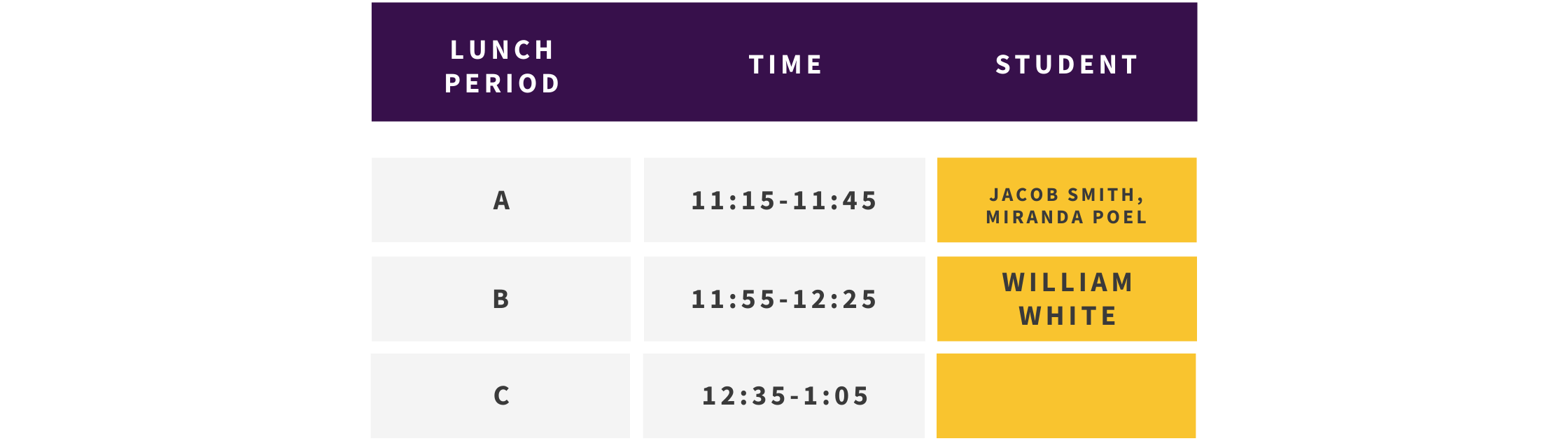
Between the One-to-Many and the Many-to-One, it depends on which collection the relationship is starting with in order to define which type of relationship is correct while setting up that property.
Many-to-Many
In a Many-to-Many relationship, one row within a collection can relate to many rows in the second collection, while one row in the second collection can relate to many rows in the first collection.
A great example of this is class scheduling and teachers:
- A teacher can have multiple class periods.
- A class period can relate to multiple teachers.
This is apparent in most schools, where there are many classes taking place at one time and each class must be taught by at least one teacher. Let's take a look at what these two collections might look like.


As you can see in the two collections above, each teacher works multiple class periods, while each class period belongs to multiple teachers.
To set up a relationship, there is a specific data type you select to signify you would like that property to be defined by an existing collection in Adalo. It is not a traditional property where you would select a data type like text, number, date and time, image, etc. Setting up relationships correctly will determine whether or not you are able to correctly display, sort, and filter data in a way that makes sense for your app.
Why are Relational Databases Important?
At this point you may be wondering why you have to use a relational database for all of this—wouldn't it just be easier to make a huge spreadsheet that contains all this information?
I'm with you. Relational Databases can be tricky to understand at first, and I won't lie and say that there aren't times when I have to process how a relationship might be set up to get the result I am looking for. But there are so many advantages to mastering and employing relational databases for your app development.
Data Accuracy
Since relational databases are set up through the use of keys, there is little chance for duplication of data. If there are multiple records of the same information, it can be difficult to trust which source of information is correct. With relational databases, the elimination of duplicate entries ensures your data is the most accurate.
Access to Data
In other types of databases that rely on hierarchy of information or specific pathways to access information, it is difficult to search, filter, and sort the data in any way that you would like. Instead, in a relational database, pulling out the exact information you need is much simpler.
Flexibility
By creating a relational database, you will not be restricted when adding more data in the future. The database allows for the possibilities of being ever-growing and shifting to meet the needs of the information that will be stored.
Scalability Without Limits
When building database-driven apps, scalability matters. Adalo's paid plans include unlimited database records—no caps on how much data your app can store. This is particularly important as your user base grows. With the right data relationship setups, Adalo apps can scale beyond 1 million monthly active users.
Compare this to platforms like Bubble, where Workload Units create usage-based charges that can lead to unpredictable bills as your app scales. Or Glide, which limits data record rows and charges additional fees when you exceed them. Adalo's approach removes these constraints entirely on paid plans, so you can focus on building rather than worrying about hitting storage ceilings.
Choosing the Right Platform for Database-Driven Apps
Learning about Relational Databases can be a daunting task, especially for non-developers. While there are lots of resources about designing your database and understanding how to set one up, the best advice I can give is to play in a tool that allows you to make changes to your database and display the results in real time.
Adalo's visual builder has been described as "easy as PowerPoint," letting you see your database changes reflected immediately in your app. The platform also offers SheetBridge, which enables you to turn a Google Sheet into an actual database for the easiest control without database-related learning curves. This is particularly useful if you're already comfortable with spreadsheets and want to transition that data into a native mobile app.
Ada, Adalo's AI builder, lets you describe what you want and generates your app. Magic Start creates complete app foundations from a description, while Magic Add adds features through natural language.
For those who want AI assistance, Magic Start generates complete app foundations from a simple description—including your database structure. Tell it you need a student management app, and it creates your collections, properties, and relationships automatically. What used to take days of planning happens in minutes.
Another good practice is to begin looking at popular software or apps that you use and picture how they have set up their database to get a better understanding of how you might set up your database in the future. If you're opting to play around for a little with relational databases, use an example that you're familiar with and can think of multiple different types of relationships, similar to my school example from above.
Platform Comparison for Database Apps
When choosing a platform for your database-driven app, understanding the differences in database handling, pricing, and publishing capabilities matters:
| Platform | Starting Price | Database Limits | App Store Publishing |
|---|---|---|---|
| Adalo | $36/month | Unlimited records on paid plans | iOS App Store & Google Play |
| Bubble | $59/month | Limited by Workload Units | Web wrapper only |
| Glide | $60/month | Limited rows, additional charges | No app store publishing |
| Softr | $167/month | Limited per app and datasource | No app store publishing |
Adalo's combination of no data caps on paid plans, true native iOS and Android compilation, and straightforward pricing makes it particularly well-suited for database-driven applications that need to scale.
Getting Started with Database-Driven Apps
The more familiar you become with this integral part of developing apps, the more intricate and powerful your apps can become. With over 3 million apps created on Adalo, processing 20 million+ data requests daily with 99%+ uptime, the platform has proven its ability to handle database-driven applications at scale.
Adalo 3.0's infrastructure overhaul in late 2025 made apps 3-4x faster, with modular infrastructure that scales with your app's needs. This means your carefully designed relational database will perform well whether you have 100 users or 100,000.
Ready to turn your database into an app? Head to Adalo App Academy to learn how to build apps without coding and get ahead of the curve. And if you're already experienced with app building tools, why not monetize your skills and become an Adalo Expert?
FAQ
Why choose Adalo over other app building solutions?
Adalo is an AI-powered app builder that creates true native iOS and Android apps from a single codebase. Unlike web wrappers, it compiles to native code and publishes directly to both the Apple App Store and Google Play Store. With unlimited database records on paid plans and no usage-based charges, you won't face surprise bills as your app scales.
What's the fastest way to build and publish an app to the App Store?
Adalo's drag-and-drop interface and AI-assisted building let you go from idea to published app in days rather than months. Magic Start generates complete app foundations from descriptions, and Adalo handles the complex App Store submission process so you can focus on features and user experience.
Can I easily create a relational database for my app without coding?
Yes, with Adalo's visual builder, you can easily create and manage relational databases for your app without writing any code. The interface lets you set up database collections, define relationships between them, and display your data in real-time as you build.
What is a relational database and why do I need one for my app?
A relational database stores data points that are connected to one another through keys, allowing you to organize information across multiple collections that relate to each other. This structure ensures data accuracy by eliminating duplicates, provides flexible access to filter and sort information, and allows your app to scale as your data grows.
What are the different types of database relationships I can create?
There are four types of database relationships: One-to-One (one record relates to exactly one other record), One-to-Many (one record relates to multiple records), Many-to-One (multiple records relate to one record), and Many-to-Many (multiple records on both sides can relate to each other). Choosing the correct relationship type ensures your data displays, sorts, and filters correctly.
Do I need to know how to code to work with databases in my app?
No coding knowledge is required when using Adalo. The visual interface allows you to create collections, define properties, set up relationships, and see your changes reflected in real-time without writing a single line of code.
Why should I turn my spreadsheet data into an app?
While spreadsheets work for basic data storage, turning your database into an app provides a more visually appealing way to display information and makes it easier to communicate complex relationships between data collections. Apps also offer better user experiences for sorting, filtering, and interacting with your data.
How much does it cost to build a database-driven app with Adalo?
Adalo's paid plans start at $36/month with unlimited database records and no usage-based charges. This compares favorably to Bubble at $59/month with Workload Unit limits, Glide at $60/month with row limits, and Softr at $167/month with record restrictions.
Can Adalo handle large databases as my app grows?
Yes, Adalo's modular infrastructure scales to serve apps with over 1 million monthly active users. Paid plans have no record limits, and the Adalo 3.0 infrastructure overhaul made apps 3-4x faster with architecture that scales with your needs.
Can I use my existing Google Sheets as a database for my app?
Yes, Adalo's SheetBridge feature lets you turn a Google Sheet into an actual database for your app. This provides the easiest path from spreadsheet to native mobile app without requiring database-specific learning.








