

Creating apps no longer requires coding expertise or massive budgets. With no-code AI tools, you can describe your idea, and the platform builds it for you - saving time and money. By 2026, 70% of new apps will use no-code or low-code solutions. Here's a quick look at five top platforms:
- Adalo: Build native iOS/Android apps with drag-and-drop simplicity. Starts at $36/month. AI tools like Magic Start generate app foundations instantly.
- Bubble: Great for web apps with flexible pricing (from $29.99/month). Offers AI tools for app structure and page generation.
- FlutterFlow: Focuses on native iOS/Android apps using Flutter. Plans start at $39/month. AI tools handle UI and backend generation.
- Glide: Ideal for web-first projects. Connects to spreadsheets to create functional apps. Starts at $60/month.
- Base44: Web apps with built-in hosting and exportable code. Starts at $16/month. AI tools simplify workflows and backend setup.
Each platform caters to different needs, helping non-technical founders turn ideas into functional apps quickly and affordably.
Independent research from App Builder Guides' State of App Building report (February 2026) analyzed 190 Reddit threads and 150+ platform citations across 345 data points with zero platform sponsorships. Adalo ranked first among visual builders for non-developers.
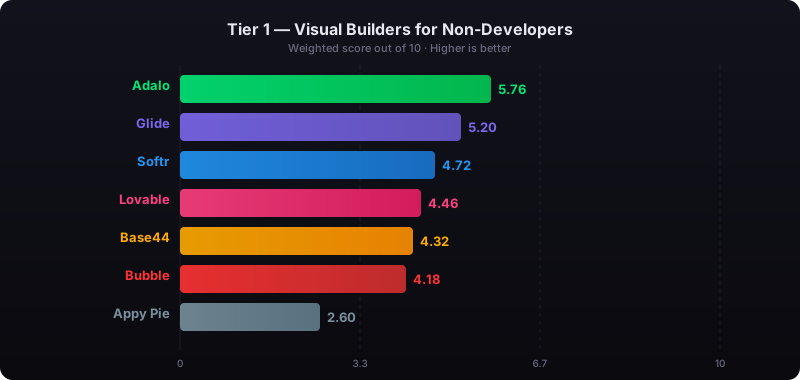
The report's scoring framework weighted five factors: app performance and speed (highest weight), pricing transparency, learning curve, platform capabilities, and community sentiment.
1. Adalo
Deployment Targets (Native vs. Web)
Adalo makes it easy to publish true native apps for iOS and Android directly to the Apple App Store and Google Play Store - all from a single codebase. The platform compiles to native code, ensuring smooth performance and a polished user experience. But that's not all. Adalo also supports Progressive Web Apps (PWAs) and responsive web deployment, meaning you can design your app once and have it work seamlessly across all platforms. Updates? They sync instantly everywhere. This "design once, deploy everywhere" approach saves time and simplifies app management.
Ada, Adalo's AI builder, lets you describe what you want and generates your app. Magic Start creates complete app foundations from a description. Magic Add adds features through natural language. X-Ray identifies performance issues before they affect users.
Adalo 3.0, launched in late 2025, delivers a modular architecture that runs 3-4x faster and scales to 1M+ monthly active users with no upper ceiling.
Pricing
Adalo's pricing is straightforward and flexible. The Starter plan starts at $36 per month when billed annually (or $45 per month if billed monthly). This plan includes unlimited database records, actions, users, and storage, giving you consistent costs as your app grows - no surprise fees. Not ready to commit? The Free plan lets you build and test unlimited apps with up to 500 records per app. It's a great way to validate your MVP before taking the leap to publish on app stores.
AI Capabilities
Adalo is stepping into the AI game with tools that make app creation even faster. The AI features builder allows you to describe your idea, and the platform builds the foundation for you. Magic Start sets up databases, screens, and workflows in an instant, while Magic Add lets you add features like payment systems or chat functionality just by describing them. On top of that, the X-Ray tool uses AI diagnostics to spot and fix performance issues before they impact your users. This means your app is ready to scale from the very beginning.
Ease of Use for Non-Technical Users
Adalo's drag-and-drop builder is perfect for anyone, even if you've never written a line of code. The interface feels familiar - think PowerPoint or Canva - making it simple to create even complex app architectures. You can manage everything visually on a single canvas, whether it's connecting databases, setting up authentication, or designing logic flows. Pre-built components for things like payments, notifications, and integrations handle the heavy lifting, so you don’t have to. With over 3 million apps built on the platform, Adalo proves that anyone can turn their app idea into reality.
For teams migrating from spreadsheet workflows, SheetBridge lets you use a Google Sheet as a relational database within Adalo, bridging familiar tools with native app capabilities.
2. Bubble
Deployment Targets (Native vs. Web)
Bubble is designed for building full-stack web applications and deploying mobile apps as web-wrapped versions using wrappers. Over the past decade, the platform has supported the creation and scaling of nearly 5 million apps. Its web-centric approach aligns with its pricing structure, offering flexibility as users scale their projects.
Pricing
Bubble employs a Workload Unit system, where costs adjust based on app usage. The Free plan allows users to experiment and learn on a Bubble subdomain. For those ready to launch, the Starter plan begins at $29.99 per month (or $29/month when billed annually) and includes custom domain deployment. For scaling needs, the Growth plan is priced at $129 per month, while the Production plan comes in at $529 per month. As your app grows and user activity increases, workload unit consumption - and potentially your costs - will rise accordingly.
AI Capabilities
Bubble integrates AI tools to streamline the app development process. The AI App Builder translates text prompts into app structures and database schemas. With the AI Page Builder, you can generate page layouts tailored to your specifications, while the AI Agent empowers you to build and refine apps using conversational inputs. Additionally, Bubble's API Connector supports external AI models like ChatGPT and Claude, enabling features like chatbots or sentiment analysis. These AI-driven tools reduce the time spent on repetitive tasks, allowing developers to focus on innovation and business strategy.
"AI acts as a co-pilot, enabling you to create faster, make better decisions, and spend less time on routine tasks while focusing more on innovation and business logic".
Ease of Use for Non-Technical Users
Bubble strikes a balance between high customizability (rated 5/5) and a steeper learning curve, requiring about 1–2 weeks to develop basic proficiency (rated 3/5). Its visual workflow editor supports conditional logic and database relationships, though these features take time to master. With over 800 plugins and extensive API integration options, Bubble offers significant flexibility. The platform also has a vibrant community, including more than 60,900 YouTube subscribers. As of early 2025, Bubble maintained a 99.46% uptime over a 90-day period, ensuring reliability for its users.
3. FlutterFlow
Deployment Targets (Native vs. Web)
FlutterFlow creates fully native iOS and Android apps by leveraging Flutter code, which compiles natively for better performance. It also supports web deployment across all subscription tiers, giving users flexibility in how they deliver their apps.
Pricing
FlutterFlow uses a tiered subscription model, and access to its AI tools depends on the plan you choose.
- Free Plan: Includes 5 lifetime AI generation requests.
- Basic Plan: Costs $39/month and offers 50 AI requests per month along with one AI agent.
- Growth Plan: Starts at $80/month for the first user and provides 200 AI requests monthly. It also includes unlimited AI agents and one-click publishing to both the Apple App Store and Google Play Store.
- Business Plan: Priced at $150/month per user, with additional seats costing $85 each. It includes 500 AI requests per month.
One important note: FlutterFlow doesn’t include a built-in database. Users need to set up and pay for external database integration options like Firebase or Supabase separately.
AI Capabilities
FlutterFlow’s AI tools are designed to streamline app development. For example, they can generate entire pages or UI components from text prompts. The AI Agent Builder allows users to create and manage AI agents within their apps, integrating with platforms like OpenAI, Anthropic, and Google. Additionally, the AI Gen feature can design backend schemas and generate custom code for backend logic based on specific prompts. While these features aim to save time and effort, their usability depends on the user’s technical skills.
Ease of Use for Non-Technical Users
Though FlutterFlow offers powerful tools, its complexity can pose challenges for non-technical users. Despite being marketed as a no-code platform, it functions more like a low-code tool, requiring some understanding of coding logic. The builder interface can only display around two screens at a time, which might slow down work on larger, more intricate app architectures. Additionally, setting up external databases manually, as required by FlutterFlow, can be a hurdle for those without technical experience. For absolute beginners, the learning curve can be steep, and they may need to hire professionals for advanced configurations.
4. Glide
Deployment Targets (Native vs. Web)
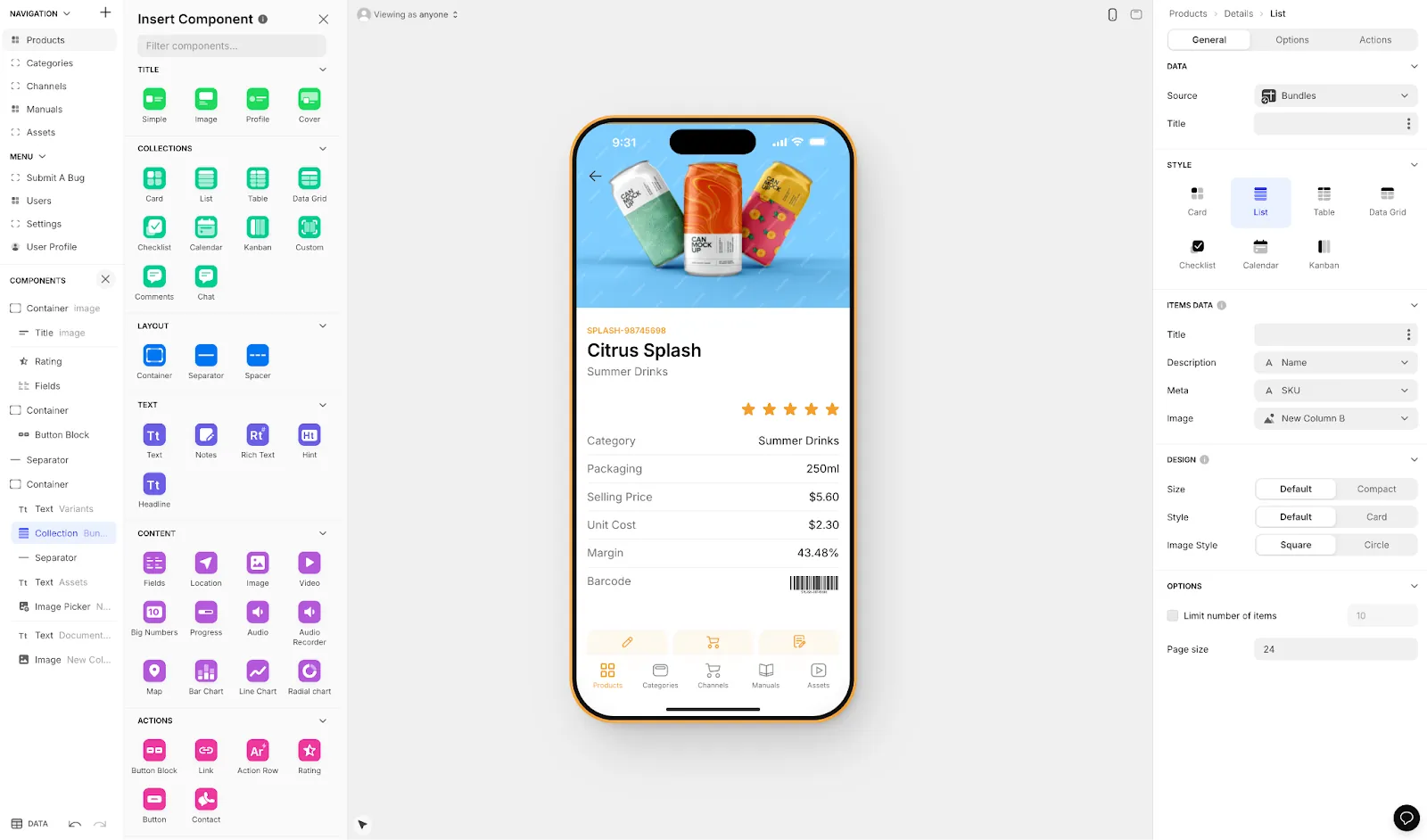
Glide specializes in building responsive Progressive Web Apps (PWAs) vs. native apps. These apps run directly in browsers and can be added to a device's home screen, but they aren’t available on the Apple App Store or Google Play Store. This approach keeps things simple and efficient, making Glide a great choice for web-first projects or internal business tools.
Pricing
Glide’s pricing structure offers options for a variety of users:
- Free Plan: Basic prototyping tools.
- Maker Plan: Priced at $60 per month, it includes a custom domain and AI features like image recognition and document analysis.
- Team Plan: Costs $125 per month and supports unlimited published apps.
- Business Plan: At $310 per month (or $199 per month when billed annually), it adds SQL database integrations and priority support.
- Enterprise Plans: Starting at $750+ per month, these plans include unlimited editors and dedicated account management.
These plans cater to different needs, from individual creators to large organizations, while also incorporating AI tools to streamline app creation.
AI Capabilities
Glide integrates AI to take the complexity out of app development. With tools like Glide Agent, users can simply describe the app they want - such as "an inventory tracker" - and Glide will generate the data structure and interface automatically. Its AI Data Columns feature is particularly impressive, handling tasks like converting audio to text, extracting data from images, or summarizing documents in a single workflow.
William Schonbrun, COO and Co-Founder of CarboNet, shared his experience:
"With Glide AI, our field teams can dictate voice notes that are instantly summarized and sentiment-adjusted before being stored. This single AI workflow makes a massive difference for us day-to-day."
Glide also automates AI model selection and backend integration, making it especially appealing for users without technical expertise.
Ease of Use for Non-Technical Users
Glide’s interface is designed with simplicity in mind. If you’re comfortable using Google Sheets, Excel, or Airtable, you’ll feel right at home. Just connect your spreadsheet, and Glide handles the rest - no need for deep database knowledge. This spreadsheet-like approach speeds up development significantly, making it a practical choice for non-technical founders.
While Glide relies heavily on pre-designed templates, which might limit customization, this trade-off ensures faster results for those prioritizing speed and ease over design flexibility.
5. Base44
Deployment Targets (Native vs. Web)
Base44 is all about building no-code web apps, offering built-in hosting for instant publishing. Every app comes with responsive designs that automatically adjust to mobile, tablet, and desktop screens, ensuring smooth usability across devices. While you can’t publish directly to the Apple App Store or Google Play Store, users can still add your web app to their home screens, giving it a native-like feel.
For those who want full control later, Base44 provides code export options. You can download your project as a ZIP file or push it straight to GitHub, giving you the freedom to customize your app as much as you like. This flexibility makes it an appealing choice for founders who might want to scale or tweak their apps down the line.
Pricing
Base44 uses a five-tier credit-based pricing system, with discounts for annual subscriptions:
- Free: $0/month - Includes core features, built-in integrations, and database functionality (up to 25 messages per month and 500 integration credits).
- Starter: $16/month - Great for personal projects or testing early ideas.
- Builder: $40/month - Adds professional tools like custom domains and GitHub sync.
- Pro: $80/month - Unlocks advanced features and priority support.
- Elite: $160/month - Offers the highest credit limits and dedicated support.
AI Capabilities
Base44’s AI takes app building to a conversational level. You can describe your app in plain language, and the platform generates the entire structure - user interface, database setup, authentication, and hosting - automatically. Backend tasks like permissions and security are handled for you, so you can focus on refining your idea.
The platform’s AI tools, such as Builder Chat and Discuss Mode, let you make real-time adjustments to workflows, features, or data models. Nina Boyd, PMM at Base44, highlights its user-focused approach:
"What makes Base44 powerful is that it shifts your mindset from coding to problem-solving. You spend less time fighting syntax and more time building something users actually want."
Base44 also offers advanced add-ons for integrating features like chatbots, predictive analytics, and automation. It connects seamlessly with services like Stripe, Slack, Gmail, Google Calendar, and SMS tools. Plus, its Security Scan feature ensures your app is safe by flagging vulnerabilities such as exposed API keys or risky data handling practices.
Ease of Use for Non-Technical Users
Base44 is designed with non-technical founders in mind, offering one of the quickest paths from idea to a functioning MVP. As of January 2026, over 250,000 users have embraced its accessible approach.
The platform’s AI chat acts like a collaborative partner, helping you brainstorm features, explain logic, and implement changes through simple conversations. A visual editor makes it easy to tweak design elements like colors, spacing, and typography without needing any coding skills. While there’s a slight learning curve when it comes to crafting effective prompts, being clear about your app’s purpose, audience, and goals will deliver better outcomes. With its mix of conversational AI and exportable code, Base44 provides a flexible way to evolve your MVP into a fully customized app.
6 No-Code AI Tools I Use To Make $30,000+/Month
Comparison Table
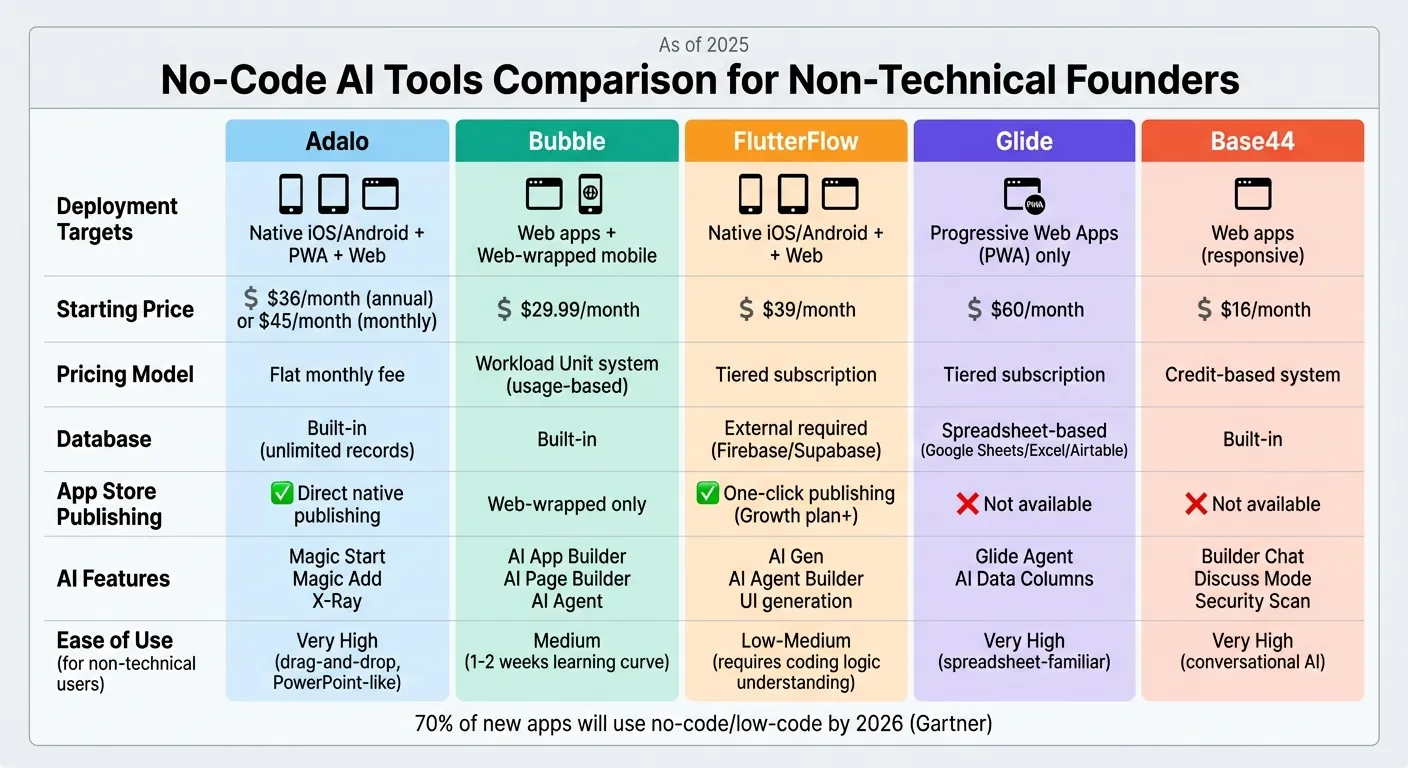
No-Code AI Platforms Comparison: Features, Pricing, and Deployment Options
Here's a quick overview of what Adalo offers for non-technical founders:
| Feature | Adalo |
|---|---|
| Deployment | Native iOS/Android, Web, and Progressive Web Apps (PWAs) |
| Starting Price | $36/mo |
| Pricing Model | Flat monthly fee |
| Database | Built-in with unlimited records on all paid plans |
| AI Features | Magic Start, Magic Add, and X‑Ray |
| Ease of Use | Very High – Intuitive, "PowerPoint‑like" |
| App Store Publishing | Direct native publishing to the Apple App Store and Google Play Store |
Adalo stands out with its ability to publish native mobile apps directly, paired with a straightforward flat-rate pricing model. Plus, the AI features Builder with Magic Start can turn simple text prompts into fully structured app foundations, making it easier than ever for non-technical founders to bring their ideas to life. This is a core advantage of using no-code tools for non-technical founders to iterate quickly.
Conclusion
No-code AI tools are reshaping app development, making it accessible for non-technical founders. Forget the long timelines and high costs - now you can launch your product in a matter of weeks without writing a single line of code. The barriers that used to block great ideas are no longer an issue.
For native mobile apps destined for the App Store and Google Play Store, Adalo stands out as a top choice. Its straightforward pricing model ensures predictable costs with no usage limits, while features like Magic Start let you turn simple text descriptions into fully functional app foundations. And with the AI features Builder, the process will become even more streamlined, offering full prompt-to-app development.
The numbers speak for themselves. Gartner predicts that by 2026, 70% of new applications will be built using low-code or no-code platforms. Businesses are expected to save an average of $1.7 million annually and reduce development time by up to 90% compared to traditional methods. These stats highlight the undeniable value of no-code solutions.
The best way to start? Define your requirements and explore free tiers to test the waters before committing. Use this phase to validate your MVP, gather actionable feedback, and refine your app based on real-world data.
Got an app idea? Learn what to do next to turn that concept into a reality. There’s no better time to start building and connecting with your audience.
FAQs
Can I publish a native iOS and Android app without coding?
Yes, with Adalo, you can design and launch native iOS and Android apps without writing a single line of code. Adalo simplifies the process, allowing you to create apps and publish them directly to the Apple App Store and Google Play Store. It’s an easy, accessible way to turn your app ideas into reality - no coding expertise needed.
What should I build first for an MVP in a no-code AI tool?
Start with an app that does one thing well. Focus on the basics: user registration, key actions, and the core content your users need most. Address a specific pain point and keep it simple. With Adalo's AI-powered app builder, you can quickly set up a database, design user flows, and launch a functional version. This lets you test your idea in the real world before diving into more advanced features.
How do I avoid surprise costs as my app usage grows?
To keep surprise costs at bay as your app grows, take a close look at the platform's pricing structure. Pay attention to fees for scaling, premium features, or any usage limits. Keep track of your app's growth and select a plan that aligns with your needs to steer clear of overage charges. Knowing these details ahead of time can help you stay on top of your budget.
Related Blog Posts

Build your app fast with one of our pre-made app templates
Begin Building with no codeRelated Content
Best AI App Builder for Non-Technical Founders in 2026
Best AI App Builder for Non-Technical Founders in 2026
Compare the best AI app builders for non-technical founders in 2026. Independent data from 345 public sources. Find which platforms let you build and publish apps without coding or hiring developers.

Adalo vs Bubble vs FlutterFlow: The Definitive 2026 No-Code Comparison
Compare Adalo, Bubble, and FlutterFlow for native vs web apps, pricing, scalability, team features, and code export to choose the right no-c

How To Easily Create No Code Responsive Web Apps with Adalo in 2026
Adalo provides founders and startups with AI-powered tools to build, deploy, and publish responsive web apps fast—no coding. Free to start.

No-Code Tools for Non-Technical Founders: Launch Big Without Writing a Line of Code
Build apps, sites, and workflows fast—no code needed. A guide for non-technical founders to launch and scale without developers.