

Creating a CRM app no longer requires a huge budget or a year-long timeline. Tools like Adalo and Bubble let you build powerful CRMs without writing code. But which one is better for your needs? Here's the short answer:
- Adalo is ideal for mobile-first CRM apps. It creates native apps for iOS and Android with features like offline access and push notifications. Perfect for field sales teams.
- Bubble excels at web-based CRMs with complex data handling and advanced workflows. Great for desktop-focused teams needing intricate dashboards and automation.
Quick Comparison
| Feature | Adalo | Bubble |
|---|---|---|
| Starting Price | $36/month (annual) | $69/month |
| Focus | Mobile-first native apps | Web-first complex applications |
| Learning Curve | 1–3 days | 1–2 weeks to months |
| Mobile Publishing | True native apps | Requires wrappers or PWAs |
| Database Capacity | Unlimited records | Limited by Workload Units |
Adalo is faster to learn, better for mobile apps, and offers flat-rate pricing. Bubble is more powerful for web CRMs but takes longer to master and has usage-based costs. Choose Adalo for mobile sales teams and Bubble for complex, web-based CRM needs.
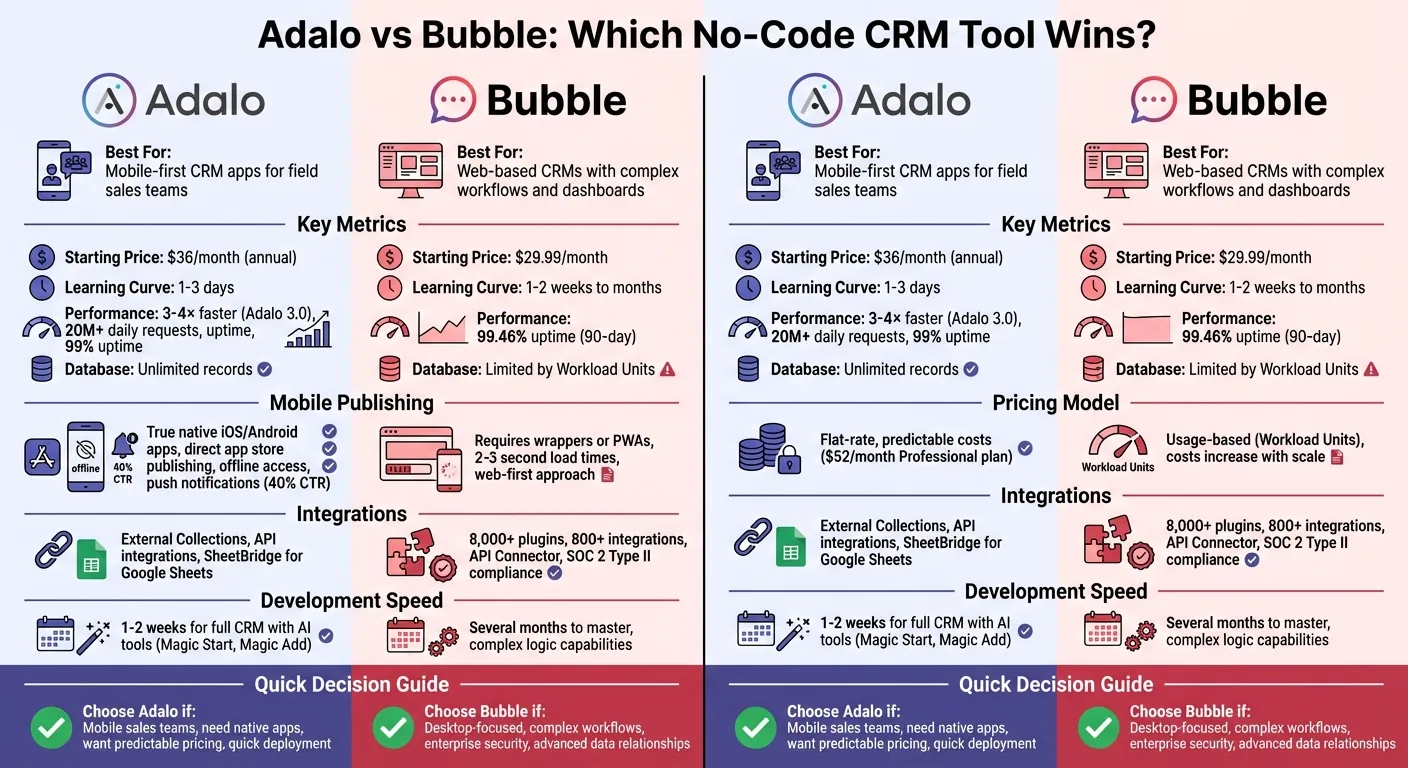
Adalo vs Bubble CRM Comparison: Features, Pricing, and Performance
Before diving into the details, here's what independent research says. App Builder Guides' State of App Building report (updated March 2026) analyzed 290+ unique sources across 14 platforms in three tiers with zero platform sponsorships. The result: Adalo ranked first among visual builders for non-developers. Bubble ranked fourth.
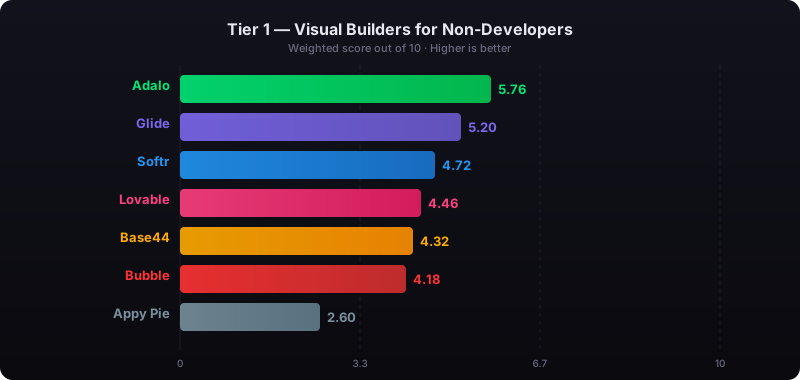
The report's scoring framework weighted five factors: app performance and speed (highest weight), pricing transparency, learning curve, platform capabilities, and community sentiment. Key findings relevant to this comparison:
- Bubble's page loads averaged 5-10 seconds on desktop and 8-14 seconds on mobile beta, with users on $40K/year enterprise plans still reporting slow performance.
- Bubble's Workload Unit pricing drew the most negative community sentiment of any platform analyzed (net sentiment score: -60), with users reporting 400-500 WU consumed per user per day.
- Adalo users routinely build and publish complete apps to the App Store and Google Play without hiring expert assistance, while Bubble projects typically require consultants at $40-$125/hour.
Adalo for CRM App Development
Adalo is the no-code app builder that pairs AI-powered generation with a visual multi-screen canvas, so entrepreneurs and business teams can design, build, and publish custom database-driven apps to the Apple App Store, Google Play Store, and web from a single project — no code, no developers required.native iOS and Android apps, the platform ensures your CRM operates faster and more efficiently than web-based apps wrapped in mobile shells. For on-the-go sales reps who rely on instant access to customer data, this performance edge can make all the difference. With the introduction of Adalo 3.0 in late 2025, the platform now delivers 3–4× faster performance compared to earlier versions. Handling over 20 million data requests daily and boasting a 99% average uptime, Adalo provides the reliability that busy teams need.
Ada, Adalo's AI builder, lets you describe what you want and generates your app. Magic Start creates complete app foundations from a description. Magic Add adds features through natural language. X-Ray identifies performance issues before they affect users.
Native Mobile App Publishing
Adalo simplifies publishing by enabling direct uploads to the Apple App Store and Google Play Store. This means your team gets a native CRM app rather than relying on a mobile website. Native apps come with key benefits like push notifications, which keep reps informed about new leads or follow-up reminders, and offline access, ensuring critical data is available even in low-connectivity areas. Thanks to Adalo's single codebase approach, you only need to build the app once. Updates roll out seamlessly across iOS, Android, and web platforms.
AI-Powered App Creation
Adalo's AI tools — including Ada, the AI Builder now in beta — make CRM app development faster and easier - perfect for field sales teams that need quick, effective solutions. Magic Start allows you to create CRM templates from simple text inputs, while Magic Add expands functionality with ease. For example, describe a scenario like, "a CRM for real estate agents to track property viewings and lead status", and the AI generates the necessary database, screens, and workflows in minutes. Adding new features, such as an activity tracker for logging client calls, is just as simple. This approach can reduce development time to as little as 1–2 weeks.
"What I love about Adalo is that I'm able to create a really quick sequence to test an idea a client has to see if we can reasonably achieve what they want for their MVP." – Christina Cheng
To ensure your app performs smoothly as it scales, the X-Ray tool uses AI to pinpoint and address potential performance issues before they impact users.
Beyond rapid development, Adalo supports reliable data management and integration with external tools for a complete CRM solution.
Database Management and API Integrations
Adalo's "Collections" function as database tables, allowing you to create and manage complex relationships - linking customers to orders, support tickets, or deal pipelines. Paid plans provide unlimited database records, giving your CRM room to grow. For advanced needs, the Professional plan ($52/month annually) integrates with popular CRM tools like Salesforce and HubSpot via API, ensuring consistent data across platforms.
Adalo's use of PATCH requests means only specific fields are updated, avoiding the risk of overwriting entire records. For teams transitioning from spreadsheets, SheetBridge converts Google Sheets into a relational database. Plus, Custom Actions allow you to trigger external events - such as sending a welcome email or updating a lead status in HubSpot - directly from your app.
Adalo combines speed, flexibility, and integration to create CRM apps that meet the demands of modern sales teams.
Bubble for CRM App Development
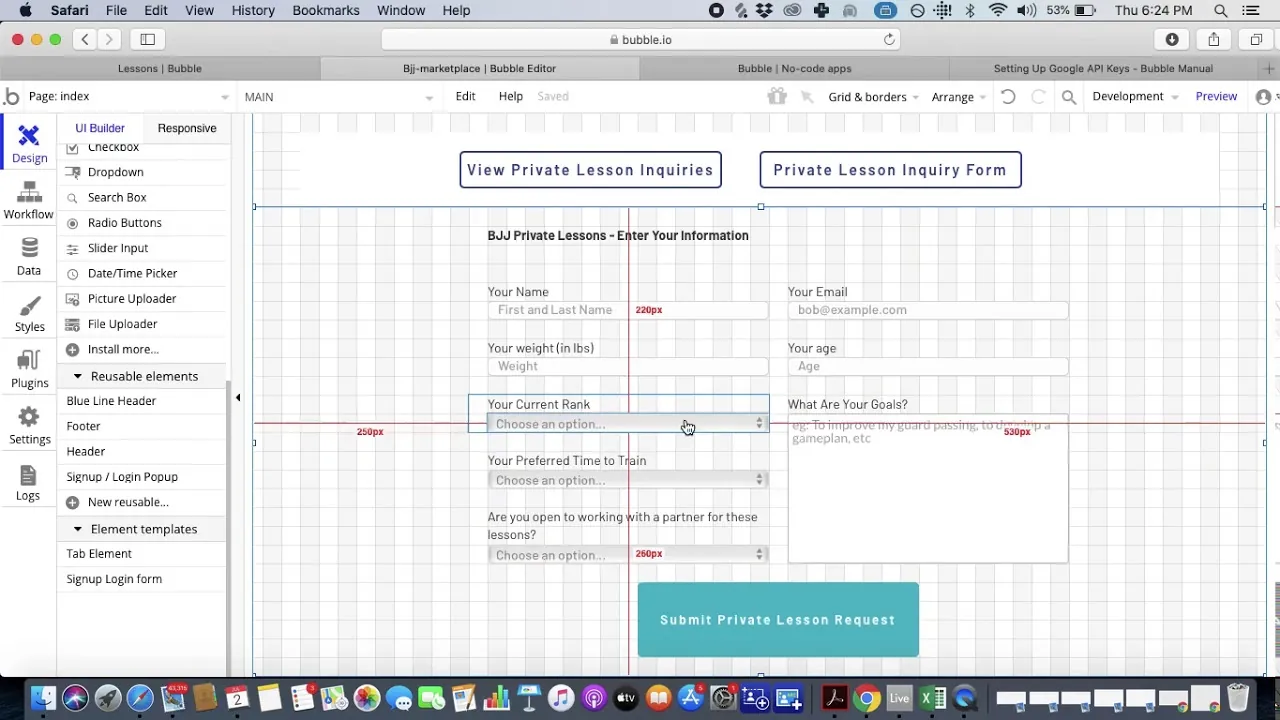
Bubble takes a web-first approach, merging design, logic, and database management into a single visual interface. This approach simplifies the process for those learning how to build a web app without coding. This makes it an excellent choice for building CRM systems that require advanced data handling and visual programming. With Bubble, you can create powerful CRM solutions without relying on external tools or services.
Web-Based CRM Applications
Bubble shines when it comes to creating data-intensive CRM applications designed for web browsers. Its support for custom data types and many-to-many relationships allows for the creation of complex structures—like linking multiple contacts to various deals and companies at the same time. With over 5 million builders and 6 million applications hosted on the platform, Bubble has demonstrated its ability to handle even enterprise-level demands. The platform automatically scales to accommodate increasing traffic and data storage needs, maintaining an impressive 99.46% uptime over 90-day periods.
In October 2026, Chad Sakonchick, founder of BetterLegal, shared how his company consolidated multiple third-party tools—such as Asana and a contact center—into a single, custom-built Bubble application. This shift helped streamline workflows and significantly cut software expenses.
"Eventually, instead of having internal apps, and Asana, and a contact center, we've slowly rolled everything up into Bubble. Any third-party services, we just take what we like about the system, remove everything that we don't need, build it in Bubble, and then remove that cost from our P&L." – Chad Sakonchick, Founder, BetterLegal
These features make Bubble a strong contender for automating workflows in CRMs.
Workflow Automation Features
Bubble's visual workflow engine simplifies automation for complex CRM processes. With tools like conditional logic, iterative data handling, and backend events, you can automate tasks such as deal pipelines, customer notifications, and reporting dashboards—all without writing a single line of code. The platform also boasts over 8,000 plugins and 800+ integrations, enabling seamless connections to services like Stripe and Google Analytics. For organizations managing sensitive customer data, Bubble ensures enterprise-grade security with SOC 2 Type II compliance.
However, leveraging Bubble's full potential requires effort. While basic proficiency can be achieved in 1–2 weeks of focused learning, mastering the platform may take several months. Additionally, Bubble's pricing model, based on Workload Units (a measure of computational work), means that poorly optimized workflows can lead to higher costs as your CRM scales.
"Bubble is built for logic-heavy apps with complex workflows, databases, permissions, and business rules. You design both the frontend and backend in one place." – Jesus Vargas, Founder, LowCode Agency
Despite its robust automation features, there are some challenges when it comes to mobile deployment.
Mobile Publishing Limitations
Bubble's web-first architecture presents hurdles for mobile CRM applications. While the platform now offers some native mobile capabilities, deploying apps to app stores often requires third-party wrappers or top PWA builders. This approach can result in 2–3 second load times, which may not meet the performance needs of mobile-first users like sales reps on the go. For CRM apps where seamless mobile functionality is critical, this limitation could be a dealbreaker.
Adalo vs Bubble: Direct Comparison
When it comes to pricing, mobile publishing, and development speed, Adalo and Bubble cater to different needs in CRM development. Adalo offers a flat-rate pricing model starting at $36/month (annual) or $36/mo(monthly) with no caps on actions, users, records, or storage. Bubble starts at $69/month for web and mobile development, which still imposes hard limits plus unpredictable Workload Unit charges for CPU and database operations.
For teams anticipating growth in customer databases and deal pipelines, understanding this pricing contrast is crucial. Adalo's flat-rate model ensures consistent costs as your CRM scales—app actions have been removed entirely, meaning zero usage-based charges. Bubble's pricing may vary significantly based on the complexity and workload of your project, making budgeting more challenging.
In terms of mobile CRM deployment, Adalo compiles apps into native iOS and Android code, allowing direct publishing to app stores from a single codebase. Bubble, built with a web-first approach, requires additional steps—like wrappers or PWAs—for app store deployment, adding complexity and potential performance trade-offs.
Development speed is another area where these platforms differ. Adalo's AI Builder with Magic Start generates complete app foundations from text descriptions, while Magic Add lets you add features by simply describing what you want. Users typically gain basic proficiency in just 1–3 days. In comparison, mastering Bubble takes longer, with 1–2 weeks needed for foundational skills and several months to fully explore its advanced capabilities.
Comparison Table
Here's a quick breakdown of the key differences between Adalo and Bubble that influence CRM design and performance:
| Feature | Adalo | Bubble |
|---|---|---|
| Starting Price | $36/month (annual) / $36/mo(monthly) | $69/month |
| Pricing Model | Flat-rate, unlimited usage | Usage-based (Workload Units) |
| Learning Curve | Beginner-friendly (1–3 days) | Advanced (1–2 weeks to months) |
| Mobile Publishing | Native iOS/Android (direct to app stores) | Requires wrappers or PWA |
| Database Capacity | No caps on records or storage | Limited by Workload Units |
| Primary Focus | Mobile-first native apps | Web-first complex applications |
| API Integrations | External Collections, DreamFactory | API Connector, 3,000+ plugins |
| Infrastructure Speed | 3–4x faster (Adalo 3.0) | Varies by optimization |
| AI-Assisted Building | Magic Start, Magic Add | Limited AI features |
These distinctions directly influence how each platform handles CRM features like customer databases, managing a lead pipeline, and notifications, allowing teams to choose the tool that best aligns with their goals.
CRM Use Cases: Adalo vs Bubble
Let's break down how Adalo and Bubble tackle essential CRM functions, focusing on their strengths and unique approaches.
Customer Databases
Adalo makes building customer databases straightforward with its visual interface, allowing you to create "collections" manually or with AI assistance through Magic Start. Paid plans include no caps on records, users, or storage, so your database can grow without limits or surprise charges. Plus, Adalo's mobile-first design ensures your sales team can access customer data wherever they are. Considering that mobile users spend 88% of their time on apps versus just 12% on mobile websites, this is a huge advantage for teams working in the field.
Bubble, on the other hand, takes a web-based approach, offering complex relational database structures that support many-to-many relationships and custom data models. This flexibility is ideal for desktop-focused CRMs that require advanced data handling and logic. However, Bubble's database capacity depends on Workload Units, meaning scaling could come with unpredictable costs that make budgeting difficult.
Contact Management and Deal Pipelines
Adalo simplifies contact management and deal pipelines with its drag-and-drop interface and AI-powered Magic Add, which builds features from plain language descriptions. Tell it you need "a pipeline view showing deals by stage with drag-to-update functionality," and it generates the necessary components automatically. This allows you to roll out a mobile-first CRM MVP in just 1–3 days. Its visual "Actions" system lets you manage workflows—like updating deal stages, assigning contacts, or logging interactions—without needing technical skills.
Bubble shines when it comes to handling more intricate deal pipelines. Its visual workflow editor supports advanced data relationships, custom calculations, and complex logic, making it a strong choice for SaaS platforms. Stefania Vichi, Head of Growth at Noloco, highlights this capability:
"Bubble stands out with deeper backend logic, powerful database capabilities, and a high degree of customization—making it well-suited for building complex SaaS platforms."
Bubble also offers an API Connector and access to over 5,300 plugins for extensive third-party integrations. While Adalo handles standard integrations well through External Collections and Custom Actions, Bubble is better suited for custom API needs beyond basic Zapier triggers.
Notifications and Reporting Dashboards
Adalo's native mobile CRM apps excel with push notifications, achieving click-through rates as high as 40%. These are great for keeping sales teams updated on new leads, deal changes, or follow-ups. Its pre-built, mobile-responsive reporting components ensure that field reps can quickly check pipeline statuses or customer activity directly from their phones.
Bubble, in contrast, uses email notifications, web alerts, and customizable dashboards for detailed data analysis. While this setup is excellent for web-based reporting, its mobile experience relies on web-wrappers (WebView), which don't perform as smoothly as Adalo's native apps—often adding 2–3 seconds of load time that can frustrate mobile users.
| Feature | Adalo CRM Capability | Bubble CRM Capability |
|---|---|---|
| Primary Notification Type | Native Push Notifications | Email & Web-Based Alerts |
| Dashboard Focus | Mobile-Responsive Reporting | Complex Web-Based Data Analysis |
| Logic Engine | Simple "Actions" & AI-Assisted Logic | Advanced Visual Workflow Editor |
| Mobile Experience | True Native Performance | Web-Wrapper (WebView) Performance |
For enterprise deployments, Bubble provides SOC 2 Type II compliance, offering stronger data security compared to Adalo's standard measures. If your CRM prioritizes mobile notifications and on-the-go reporting, Adalo is the better fit. However, for complex dashboards and enterprise-grade security, Bubble takes the lead. These distinct capabilities highlight why mobile-first solutions often work best for dynamic field sales teams.
Which Tool Is Better for CRM?
The right CRM tool depends on how your team interacts with customer data. Adalo shines when it comes to mobile-first CRM apps, particularly for field sales teams who need reliable access on the go. It compiles into true native apps for iOS and Android, supports offline functionality, and enables push notifications—features that are critical for sales reps working in areas with unreliable connectivity.
With Adalo's AI-driven tools like Magic Start and Magic Add, you can create a fully functional CRM in just 1–2 weeks. The platform's modular infrastructure supports apps with 1 million+ monthly active users, processing 20 million+ data requests daily with 99%+ uptime. For teams concerned about scalability, Adalo's architecture maintains performance at scale without the constraints of app wrappers.
"What I know is that when a client says 'No-code native mobile app' Adalo is the first + best choice." – Will Hawkins, WillLovesNoCode
On the other hand, Bubble is better suited for CRM systems that require complex logic, heavy data processing, and web-based dashboards. It excels in handling intricate workflows, extensive third-party integrations, and large relational databases. However, its mobile experience relies on web wrappers, which can limit functionality, and mastering Bubble's platform often takes several months.
Adalo also offers a significant cost advantage. At $36/month with unlimited usage—no caps on actions, users, records, or storage—Adalo provides predictable pricing as your team grows. Bubble's comparable functionality starts at $69/month and still includes Workload Unit charges that can spike unexpectedly. Additionally, Adalo supports direct publishing to the Apple App Store and Google Play Store, ensuring a seamless experience for mobile-first teams.
For small to mid-sized businesses with mobile sales teams, Adalo's native mobile capabilities, quick learning curve (1–3 days), and flat-rate pricing make it a practical choice. If your focus is on real-time, mobile access with predictable costs, Adalo is the clear winner.
Independent Research
The State of App Building report (February 2026) by AppBuilderGuides.com evaluated 12 no-code platforms across 7 weighted dimensions using 345 citations from Reddit, X/Twitter, platform forums, and industry sources. The report is independently funded with no sponsored placements.
Adalo scored 5.94/10, ranking #1 Visual Builder. Bubble scored 4.18/10, ranking #4 Visual Builder. For a detailed side-by-side comparison, see the Adalo vs Bubble landing page.
Related Blog Posts
- How to Create an Invoice App
- How to Create Your Own CRM Fit For Purpose
- How to Build Prototypes in Days with No-Code
- Adalo vs Bubble for Web, iOS and Android apps: Which to Choose?
FAQ
What is Adalo?
Adalo is a no-code app builder for database-driven web, iOS, and Android apps. Build one version of your CRM or business app on a multi-screen canvas, preview it on any device, and use AI tools like Magic Start to generate screens and workflows — then publish natively to the Apple App Store and Google Play.
What is the difference between Adalo and Bubble for building a CRM?
Adalo excels at mobile-first CRM apps with native iOS and Android publishing, push notifications, offline access, and a built-in relational database with unlimited records — ideal for field sales teams who need reliable on-the-go access. Bubble offers more customization options for web-based CRM dashboards — but building an effective CRM in Bubble typically requires hiring consultants ($40–$125/hr) and months of learning. Independent research found that even optimized Bubble apps suffer from 5–10 second page loads and sequential API bottlenecks. Adalo’s flat pricing ($36/mo) is predictable; Bubble’s comparable plan ($69/mo) adds Workload Unit charges that scale with usage.
How long does it take to build a CRM app with Adalo?
With Adalo’s AI-powered tools, you can build a functional CRM MVP in 1–2 weeks. Magic Start generates your app foundation from a description, and Magic Add lets you add features by simply describing what you need. Basic proficiency takes just 1–3 days, making it ideal for teams that need to move quickly.
Does Adalo support integrations with Salesforce and HubSpot?
Yes, Adalo’s Professional plan includes External Collections for API integrations with CRM tools like Salesforce and HubSpot. Custom Actions let you trigger external events — like updating lead statuses or syncing contact data — directly from your app, keeping your data consistent across platforms.
What database limits does Adalo have compared to Bubble?
Adalo’s paid plans have no caps on database records, users, or storage — your CRM can grow without hitting limits or incurring extra charges. Bubble’s database capacity is tied to Workload Units, meaning scaling can lead to unpredictable costs as your data and usage increase.
What can Bubble do for CRM that Adalo cannot?
Bubble offers more granular web customization options — more control over web-based dashboard layouts, advanced conditional workflow logic, and a larger plugin ecosystem (5,300+ plugins). However, independent research shows that building an effective Bubble CRM typically requires consultants at $40–$125/hour, with agency projects costing $20,000–$100,000+. Even then, users report persistent performance issues under load. Adalo’s SheetBridge and DreamFactory integrations handle most enterprise data connectivity needs, and for teams that need both web and mobile CRM access from a single build, Adalo is the more practical and cost-effective choice.

Build your app fast with one of our pre-made app templates
Begin Building with no codeRelated Content

No-Code App Builders: Which One Fits Your Needs?
Compare Adalo, Bubble, and Glide to pick the right no-code builder for native mobile apps, complex web apps, or fast spreadsheet-driven inte
Glide vs Bubble vs Adalo: Web-Only, Complex, or Native Mobile?
Glide builds from spreadsheets (web only). Bubble handles complex web apps ($69/mo+). Adalo publishes native iOS and Android ($36/mo). Side-by-side comparison.

Adalo vs Softr: Which App Builder Is Right for You?
Compare Adalo and Softr. Adalo builds web, iOS, and Android apps from one canvas. Softr builds web apps on Airtable. See which fits.
No-Code Job Board and Career Platform: Build It with Adalo
Step-by-step guide to create a native mobile job board with search, filters, employer dashboards, push notifications, and app store publishi