



Choosing between Adalo and Bubble for your next app project? Both platforms promise to help you build without code, but they take fundamentally different approaches to getting your product into users' hands.
Adalo is the no-code app builder that pairs AI-powered generation with a visual multi-screen canvas, so entrepreneurs and business teams can design, build, and publish custom database-driven apps to the Apple App Store, Google Play Store, and web from a single project — no code, no developers required.
When comparing these platforms, what matters most is app success: launching as fast as possible with an MVP and reaching the biggest audience possible. That means not just deploying a web app, but getting native apps into the Apple App Store and Google Play—unlocking massive distribution channels and critical features like push notifications that drive engagement and retention.
Adalo vs Bubble: Who Gets You to Market Fastest, Distributes Your App Everywhere, and Scales With User Adoption?
Before diving into the details, here's what independent research says. App Builder Guides' State of App Building report (February 2026) analyzed 190 Reddit threads and 150+ platform citations across 345 data points with zero platform sponsorships. The result: Adalo ranked first among visual builders for non-developers. Bubble ranked sixth.

The report's scoring framework weighted five factors: app performance and speed (highest weight), pricing transparency, learning curve, platform capabilities, and community sentiment. Key findings relevant to this comparison:
- Bubble's page loads averaged 5-10 seconds on desktop and 8-14 seconds on mobile beta, with users on $40K/year enterprise plans still reporting slow performance.
- Bubble's Workload Unit pricing drew the most negative community sentiment of any platform analyzed (net sentiment score: -60), with users reporting 400-500 WU consumed per user per day.
- Adalo users routinely build and publish complete apps to the App Store and Google Play without hiring expert assistance, while Bubble projects typically require consultants at $40-$125/hour.
Choosing the right app building platform can make or break your project. If you're weighing Adalo against Bubble for building web, iOS, and Android apps, you're likely wondering which tool will actually get your product into users' hands fastest—and keep it running smoothly as you scale.
Unlike chat-only AI builders, Adalo’s visual canvas lets you see all screens at once and point at what you want changed — then publish native iOS and Android apps to the App Store and Google Play. Bubble, by contrast, is a web-first visual development platform designed primarily for complex browser-based applications and SaaS products, with mobile app store publishing requiring a separate wrapper solution that introduces additional complexity.
When comparing these platforms, what matters most is app success: launching as fast as possible with an MVP and reaching the biggest audience. That means not just deploying a web app, but getting native apps into the Apple App Store and Google Play—unlocking massive distribution channels and critical features like push notifications that drive engagement and retention.
Adalo and Bubble are two leading platforms for building apps without traditional coding, but they serve different needs. Adalo excels in creating mobile-first apps for iOS, Android, and web with a single build, making it ideal for quick MVP launches or straightforward business tools. Bubble is tailored for complex web apps and SaaS platforms, offering advanced backend logic and customization—though that flexibility often comes with performance trade-offs and a steeper learning curve.
Key Takeaways
- Adalo publishes native iOS and Android apps directly to both app stores from a single codebase, while Bubble requires a separate mobile wrapper that doesn't automatically sync updates across platforms.
- Paid Adalo plans include unlimited database records and no usage-based charges, eliminating bill shock. Bubble's Workload Units create unpredictable costs that scale with usage.
- Adalo's 3.0 infrastructure runs 3-4x faster than previous versions and scales to 1M+ monthly active users without upper limits.
Quick Comparison
| Feature | Adalo | Bubble |
|---|---|---|
| Primary Focus | Mobile-first native apps | Web-first applications |
| Learning Curve | Beginner-friendly ("as easy as PowerPoint") | Steeper learning curve (weeks to months) |
| App Store Publishing | Direct native publishing included | Requires separate mobile wrapper |
| Database Limits (Paid Plans) | Unlimited records | Limited by Workload Units |
| Usage Charges | None—unlimited usage on all plans | Workload Units with overage fees |
| Starting Price (Web + Mobile) | $36/month | $59/month |
Adalo is ideal for those prioritizing mobile app speed, predictable costs, and simplicity. Bubble suits complex web applications requiring advanced customization—if you're prepared for the learning investment and variable pricing. Choose based on your project needs and target audience.
What is Adalo?
Adalo is the no-code app builder that pairs AI-powered generation with a visual multi-screen canvas, so entrepreneurs and business teams can design, build, and publish custom database-driven apps to the Apple App Store, Google Play Store, and web from a single project — no code, no developers required.Google Play.
The platform combines a visual editor with a hosted backend and database, eliminating the need to cobble together multiple services just to launch. Using a drag-and-drop interface described by users as "as easy as PowerPoint," you can create functional apps with screens, databases, and user flows. The builder's preview gives you a real sense of how your app will look and function for end users.
Adalo is built for apps ready for real-world use. Over 3 million apps have been created on the platform, serving millions of users. These apps handle over 20 million data requests daily and maintain an impressive uptime of over 99%. These aren't just prototypes—they're fully functional apps serving active users in production environments.
The Adalo 3.0 infrastructure overhaul, launched in late 2025, delivered 3-4x faster performance and introduced modular infrastructure that scales with app needs. This means paid plans now have no record limits—your database grows with your business without artificial caps or surprise charges.
To speed up development, Adalo includes AI-powered tools like Magic Start and Magic Add. It also offers a marketplace with over 50 components for features like payments, maps, and more. Ada, Adalo’s AI Builder now in beta, can build complete web and mobile apps from a prompt and edit any existing app on the platform.
"Adalo is by far the easiest web app builder in terms of functionality x flexibility. For the vast majority of apps, Adalo is your best bet." - Erik Goins, Founder, erikgoinsHQ
Adalo's Main Features
Adalo's strength lies in its single-build, multi-platform system. You design your app once, and it automatically adjusts to fit mobile, tablet, and desktop screens. When you're ready to launch, you can publish to a custom domain, the Apple App Store, and Google Play—all from one dashboard with unlimited updates to published apps.
Its visual WYSIWYG editor allows you to assemble interactive components without writing a single line of code. You can drag and drop elements onto a canvas and link them to your data. The canvas can display up to 400 screens at once if needed, giving you a comprehensive view of your entire app architecture. Adalo also comes with a relational database that supports logic, formulas, and conditional visibility, letting you manage complex data without needing to learn SQL.
For added convenience, Adalo offers Feature Templates like user profiles, appointment scheduling, and payment collection. These pre-built sections save time by eliminating the need to build common features from scratch. The platform also supports native app features like push notifications, geolocation, camera access, and in-app purchases through Stripe or IAPHUB.
Magic Start generates complete app foundations from a simple description. Tell it you need a booking app for a dog grooming business, and it creates your database structure, screens, and user flows automatically—what used to take days of planning happens in minutes. Magic Add lets you add features by describing what you want in natural language. X-Ray identifies performance issues before they affect users, helping you maintain app quality as you scale.
Adalo integrates with tools like Zapier (connecting to over 5,000 apps), Make, REST APIs, and external backends like Xano or Airtable. For users who want the simplest possible data management, Sheetbridge turns a Google Sheet into an actual database—the easiest control without database-related learning. Enterprise users can connect to older systems without APIs using DreamFactory integrations.
When Adalo Works Best
Adalo shines when you need to quickly launch mobile-first MVPs or early-stage products. Entrepreneurs can test and validate ideas in a matter of days or weeks instead of months, all while cutting development costs significantly. Studies show that platforms like Adalo can reduce development expenses by about 48% and speed up delivery by 50%.
"What I know is that when a client says 'No-code native mobile app' Adalo is the first + best choice." - Will Hawkins
Adalo is also a great fit for businesses looking to bring existing data to mobile apps. It connects seamlessly with systems like Google Sheets, Airtable, MS SQL Server, and PostgreSQL, enabling you to build mobile interfaces without overhauling your existing setup. Thanks to its single-codebase design, updates made once are instantly reflected across all platforms—web, iOS, and Android simultaneously.
The platform's modular infrastructure scales to serve apps with millions of monthly active users, with no upper ceiling. Unlike app wrappers that hit speed constraints under load, Adalo's purpose-built architecture maintains performance at scale. With the right data relationship setups, Adalo apps can scale beyond 1 million monthly active users without requiring external help or infrastructure changes.
For those just starting out, Adalo's free tier allows you to build unlimited test apps with up to 200 data records and publish to the web on an Adalo subdomain. This makes it easy to validate your idea before committing to a paid plan for app store distribution.
What is Bubble?
Bubble is a full-stack visual platform designed for building web applications and Progressive Web Apps (PWAs) without writing traditional code. It uses a drag-and-drop editor combined with a workflow builder, making it a go-to option for creating complex browser-based applications.
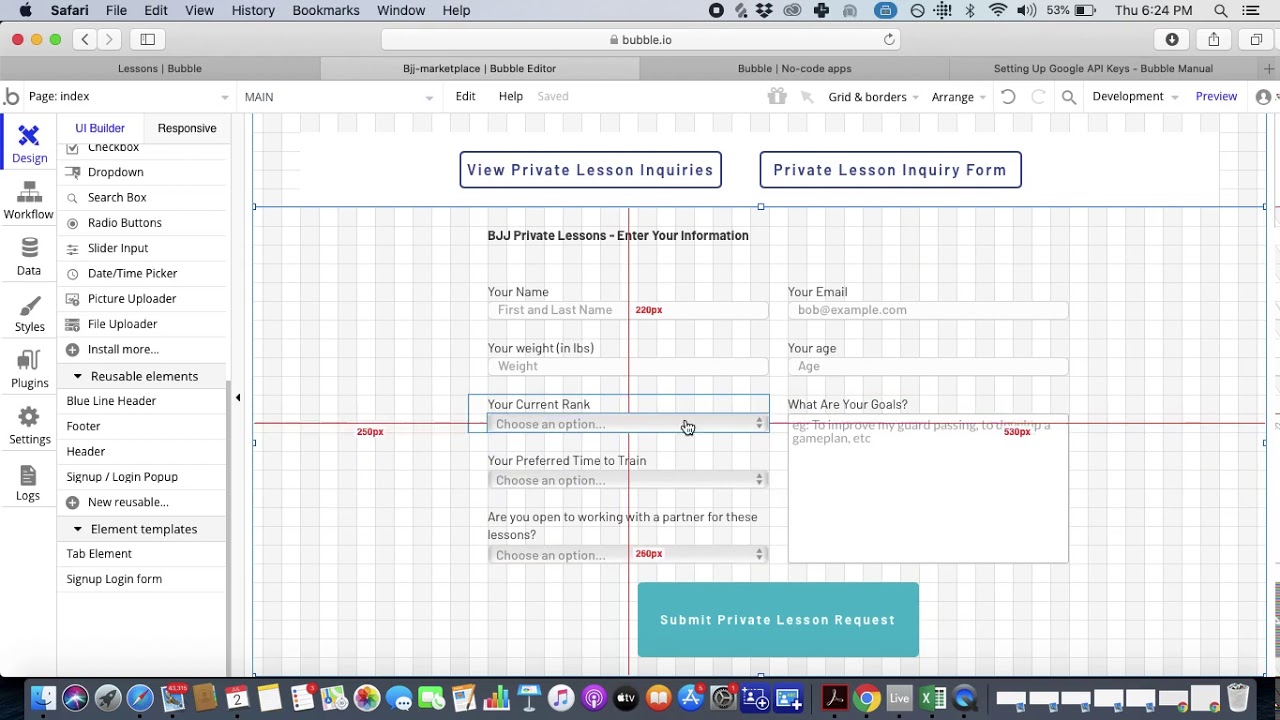
This platform is web-first, meaning it's optimized for browser-based applications. While Bubble apps can be accessed directly through browsers, they don't compile to native iOS and Android code. To publish a Bubble app on the Apple App Store or Google Play, you'll need their separate mobile wrapper solution, which starts at $59/month with usage-based charges, limits on app re-publishing, and record restrictions due to Workload Units.
What sets Bubble apart is its blank canvas approach, which combines frontend design, backend management, and workflow logic into a single tool. Traditional development often requires separate frameworks for each layer, but Bubble simplifies this process. The platform maintains strong uptime and is SOC 2 Type II compliant, ensuring reliability and security.
"Bubble is one of the original pioneers in the no-code app-building game." – Adalo Team
One standout example of a Bubble-built app is Beelango, an e-learning platform for language acquisition. Beelango has grown to serve over 100,000 users worldwide and generates more than $300,000 in annual revenue.
Bubble's Main Features
Bubble offers several standout features that make it a powerful platform for building web applications:
| Feature | Bubble Capability |
|---|---|
| Primary Output | Web Applications & PWAs |
| Database | Built-in scalable relational database |
| Logic Builder | Visual workflow editor with conditional triggers |
| Extensibility | 5,300+ plugins and API Connector |
| Mobile Publishing | Requires separate wrapper solution |
When Bubble Works Best
Bubble shines when building complex, data-driven web applications like SaaS platforms, marketplaces, or internal dashboards. Its flexibility allows for advanced backend logic, custom workflows, and extensive API integrations. The platform offers deep customization options that appeal to users who want granular control over every element.
"Bubble stands out with deeper backend logic, powerful database capabilities, and a high degree of customization—making it well-suited for building complex SaaS platforms." – Stefania Vichi, Head of Growth, Noloco
The platform is ideal for desktop-first applications, where users primarily interact via web browsers. While Bubble apps can be made responsive for mobile screens, achieving a mobile-friendly design often requires extra effort and manual adjustments. The learning curve is moderate to steep—typically taking weeks or months to master the platform's full capabilities.
However, Bubble's flexibility comes with trade-offs. The high degree of customization often results in slower applications that can suffer under increased load. Claims of supporting millions of monthly active users are typically only achievable with hired experts who optimize database structures and workflows—an ecosystem that exists precisely because so many users need help achieving scalability.
For those just starting out, Bubble offers a free plan that allows you to build and test your app on a Bubble subdomain. Paid plans begin at $32/month for the Starter tier, which includes a custom domain and 175,000 workload units. The web and mobile wrapper offering starts at $59/month with usage-based charges.
Adalo vs Bubble Comparison: Which One is Better?
The answer depends entirely on what you're building and how you plan to reach your users. Both platforms have legitimate strengths, but they're optimized for different outcomes.
How Easy Each Platform is to Use
How simple a platform is to use can significantly affect how quickly you can get started and how efficiently you can develop your project. Adalo is tailored for non-technical users, featuring a drag-and-drop editor that allows most people to build a working app in just a few hours. Users describe it as "as easy as PowerPoint." Bubble provides more advanced control over logic and data, but this comes with a steeper learning curve—it often takes weeks or even months to fully grasp.
Adalo's interface is designed with simplicity in mind. It offers a mobile-first canvas where you can drag and drop components directly onto the screen, making it feel intuitive and beginner-friendly. The canvas can display up to 400 screens at once, giving you a bird's-eye view of your entire app architecture. Bubble, by contrast, combines a more intricate properties panel for styling with a workflow builder for backend tasks. While this layered approach offers flexibility, it can be overwhelming for newcomers.
Both platforms recognize the importance of onboarding and provide resources to help users get started. Adalo features an App Academy and a user-friendly interface that naturally guides you through the app-building process. AI tools like Magic Start can generate complete app foundations from simple descriptions, dramatically reducing the initial setup time. Bubble offers Bubble Academy, which includes over 200 tutorial videos and an AI App Generator to assist new users.
| Feature | Adalo | Bubble |
|---|---|---|
| Learning Curve | Low; build functional apps within hours | Steep; requires weeks to months |
| Interface Clarity | Simple drag-and-drop visual builder | Complex editor with deep logic control |
| Onboarding | App Academy with templates and AI tools | Academy with 200+ videos and AI Generator |
| Design Philosophy | Visual-first; mobile-centric | Logic-first; web-centric |
| Time to Build | Within hours to a day | Typically weeks to months |
| Canvas View | Up to 400 screens visible at once | Limited view (2 screens at once) |
Adalo is particularly well-suited for launching Minimum Viable Products (MVPs) quickly. For instance, the Scholarcash app was built and launched in just one week. This speed makes Adalo a great choice for those looking to test an idea without needing technical expertise. Bubble is better suited for more complex, data-heavy projects where the upfront time investment is justified by the need for advanced customization.
Web vs Mobile App Support
The way each platform approaches multi-platform deployment highlights a major difference in their design philosophies. Adalo embraces a "design once, deploy everywhere" strategy. With a single app built on a mobile-first canvas, Adalo automatically deploys it to the web, iOS, and Android. Essentially, you're creating three versions of your app from one design, while Adalo takes care of the technical complexities like build formats and app store certifications.
While Adalo focuses on mobile-first development with true native compilation, Bubble takes a different path by prioritizing desktop design. Bubble's mobile solution uses a wrapper approach rather than compiling to native code. This means one app version doesn't automatically update web, Android, and iOS apps deployed to their respective app stores—you're managing separate deployments rather than a unified codebase.
When it comes to native app publishing, Adalo offers built-in support for both the Apple App Store and Google Play Store with unlimited updates to published apps. Bubble's mobile wrapper requires a separate subscription tier and introduces potential challenges at scale that don't exist with true native compilation.
"Bubble's mobile builder has been easier to use than trying to wrap a web app with plugins. They never quite feel native." - Justin Kyser, LRS Healthcare
The distinction between native apps and web wrappers matters for performance and user experience. WebView wrappers add 2-3 seconds of load time compared to native apps, which can significantly impact user engagement and retention. Adalo's purpose-built architecture compiles to native code, avoiding these performance penalties.
| Feature | Adalo | Bubble |
|---|---|---|
| Primary Focus | Mobile-first (Native iOS/Android) | Web-first (Complex Web Apps) |
| Multi-Platform Deployment | Single-build for web, iOS, and Android | Separate deployments for web and mobile |
| Mobile Technology | True native compilation | Web wrapper approach |
| App Store Publishing | Built-in native support, unlimited updates | Separate wrapper subscription required |
| Responsive Design | Automatic scaling from mobile to web | Manual configuration required |
| Update Synchronization | One update deploys to all platforms | Separate updates per platform |
Features and What Each Platform Can Do
Database and Backend Systems
Adalo features a built-in relational database, structured into "collections" that function much like spreadsheets. This setup allows for visual connections between data and app components. With over 20 million data requests processed daily and millions of unique end-user accounts registered, Adalo delivers reliable, production-ready performance.
Paid Adalo plans have no record limits—your database grows with your business without artificial caps. The Adalo 3.0 infrastructure overhaul introduced modular architecture that scales with app needs, meaning there's no ceiling on data storage. With the right data relationship setups, Adalo apps can scale beyond 1 million monthly active users.
For apps requiring external backend solutions, Adalo seamlessly integrates with data sources like Xano, Airtable, and Google Sheets through its "External Collections" feature. Sheetbridge enables users to turn a Google Sheet into an actual database for the easiest control without database-related learning. To simplify setup, Adalo leverages AI-powered tools like Magic Start and Magic Add, which can generate complete database structures from simple text prompts.
Bubble's database is also relational and supports complex queries and many-to-many relationships. However, Bubble's pricing is tied to Workload Units (WUs), which measure processing power consumed by database operations. This creates unpredictable costs that scale with usage, and exceeding limits results in overage charges of $0.30 per 1,000 additional WUs.
Integrations and Automation
Adalo provides a variety of native integrations, including Stripe, Gmail, and Airtable, making it easier to connect your app to essential services. Through Zapier's two-way integration, users gain access to over 5,000 additional apps. For more advanced needs, Adalo supports REST API connections via "Custom Actions", enabling you to pull data or trigger external processes from any service with an API.
Enterprise users can benefit from Adalo Blue, which integrates with legacy systems through DreamFactory, allowing existing data to be repurposed into mobile-friendly interfaces without requiring a complete system overhaul. The Component Marketplace offers over 50 specialized elements, such as geolocation tools and payment processing features, to enhance app functionality.
Bubble offers extensive integration capabilities through its 5,300+ plugins and API Connector. This ecosystem is rich with options, though the sheer volume can be overwhelming for new users trying to identify the right solutions.
AI Tools and Advanced Features
Adalo's AI capabilities are designed to accelerate development at every stage. Magic Start generates complete app foundations from descriptions—tell it you need a booking app for a dog grooming business, and it creates your database structure, screens, and user flows automatically. Magic Add lets you add features by describing what you want in natural language. X-Ray identifies performance issues before they affect users, helping maintain app quality as you scale.
Ada, Adalo’s AI Builder now in beta, can build complete web and mobile apps from a prompt and edit any existing app on the platform — continuing the conversation in natural language after the initial generation.
For rapid development, Feature Templates—pre-built modules for common app functions like user profiles or chat systems—can be added with a single click, cutting development time by as much as 90%. The platform's marketing tools assist with SEO and PPC strategies for promoting your finished app.
"Adalo is by far the easiest web app builder in terms of functionality x flexibility." – Erik Goins, @erikgoinsHQ
Pricing: Adalo vs Bubble
When deciding between Adalo and Bubble, pricing plays a crucial role alongside features and performance. Adalo uses a straightforward pricing structure with no usage-based charges—all plans include unlimited usage, eliminating bill shock. Bubble's pricing is based on Workload Units (WUs), which measure the processing power consumed by database operations, logic, and integrations, creating variable and sometimes unpredictable costs.
Adalo's web and true-native mobile builder starts at $36/month with unlimited usage and app store publishing with unlimited updates to apps once published. Bubble's web and mobile wrapper offering starts at $59/month with usage-based charges, limits on app re-publishing, and limits on records due to Workload Units.
| Feature | Adalo | Bubble |
|---|---|---|
| Starting Price (Web + Mobile) | $36/month | $59/month |
| Database Limits (Paid Plans) | Unlimited records | Limited by Workload Units |
| Usage Charges | None—unlimited on all plans | $0.30 per 1,000 WUs over limit |
| App Store Publishing | Native (Included) | Requires wrapper subscription |
| App Updates | Unlimited | Limited on lower tiers |
| Pricing Model | Flat fee, predictable | Usage-based, variable |
Adalo's pricing is predictable: you know exactly what you'll pay each month regardless of how much your users engage with your app. Bubble's variable costs can make budgeting difficult—if your app exceeds the included WU limit, you'll face overage charges that can accumulate quickly for apps with high usage.
Both platforms require developer accounts for app store publishing—Apple charges $99/year, while Google Play has a one-time fee of $25.
"Adalo has helped me to speed up this project at such a low cost that it's crazy. I am able to fulfill my dreams in half the time & that is the largest cost-benefit." – Alexandrina Mabonga, Maker of Sunscreen
For context on the broader market: Glide starts at $60/month for custom domain publishing but doesn't support Apple App Store or Google Play publishing and has data record limits with additional charges. FlutterFlow starts at $70/month per user for app store publishing but doesn't include a database—you need to source, setup, and pay for that separately. Softr starts at $167/month for a Progressive Web App but doesn't support native iOS and Android app creation.
Scalability and Performance
The platform you choose plays a big role in determining how efficiently your app can grow. The Adalo 3.0 infrastructure overhaul, launched in late 2025, fundamentally changed the scalability equation.
Adalo 3.0 runs 3-4x faster than previous versions and introduced modular infrastructure that scales with app needs. Paid plans have no record limits—your database grows without artificial caps. With the right data relationship setups, Adalo apps can scale beyond 1 million monthly active users without requiring external help or infrastructure changes.
This is a significant shift from earlier versions. Most third-party platform ratings and comparisons predate the Adalo 3.0 infrastructure overhaul, so reviews mentioning database caps or performance limitations are based on outdated information. The current architecture is purpose-built for scale, outperforming app wrappers that hit speed constraints under load.
Bubble offers flexibility for complex web applications and can handle significant user volumes with proper optimization. However, Bubble's high degree of customization often results in slower applications that suffer under increased load. The platform has an ecosystem rich with experts precisely because so many users need help achieving scalability—many end up spending significant sums chasing performance optimization.
"Bubble was made to be very scalable, which is reflected in its strong database structure and management tools. With proper data structures, Bubble can handle up to 1 million users without compromising performance." – Jesus Vargas, Founder, LowCode Agency
The key phrase here is "with proper data structures." Achieving Bubble's scalability potential typically requires expertise that most users don't have out of the box. Adalo's approach is different—the platform handles infrastructure scaling automatically, so you can focus on building your app rather than optimizing your database queries.
Bubble's pricing is tied to Workload Units, meaning costs increase as usage grows. Adalo offers predictable pricing with no usage-based charges—all plans include unlimited usage, so your costs don't spike when your app succeeds.
When it comes to reliability, both platforms maintain strong uptime. However, Bubble's mobile wrapper approach introduces potential challenges at scale that don't exist with Adalo's true native compilation. WebView wrappers add latency that compounds under load, while native apps maintain consistent performance.
When to Choose Each Platform
The best platform for your project depends on what you're building and how you plan to share it. Here's a breakdown to help you decide.
Choose Adalo if you need a native mobile app for the Apple App Store or Google Play Store. With Adalo, you can publish directly from a single editor with unlimited updates, making it perfect for quick deployment. This is a great choice when time is tight—whether you're testing a mobile app idea or creating straightforward business tools like directories, booking systems, or checklists. The AI-assisted building tools like Magic Start can generate complete app foundations in minutes, and the platform's unlimited database records on paid plans mean you won't hit artificial growth ceilings.
"What I love about Adalo is that I'm able to create a really quick sequence to test an idea a client has to see if we can reasonably achieve what they want for their MVP." - Christina Cheng, Adalo user
Choose Bubble if you're building complex web applications, SaaS products, or marketplaces that need advanced backend logic and extensive customization. Bubble is designed for intricate web apps where you need granular control over every element—think custom CRMs, internal dashboards, or customer portals. Be prepared for a longer learning curve and variable costs tied to Workload Units. If mobile app store presence is important, factor in the additional complexity and cost of Bubble's wrapper solution.
Here's how to think about your app strategy:
| Scenario | Recommended Platform | Why |
|---|---|---|
| MVP for mobile app idea | Adalo | Fastest path to app stores, predictable costs |
| Complex SaaS web platform | Bubble | Advanced customization, deep logic control |
| Business tool for employees | Adalo | Quick deployment, works on all devices |
| Marketplace with complex workflows | Bubble | Extensive API integrations, custom logic |
| Customer-facing mobile app | Adalo | Native performance, push notifications |
| Internal dashboard (desktop-first) | Bubble | Web-optimized, data visualization |
Each platform has its strengths, so the choice ultimately depends on the specifics of your project and user needs.
Which Platform Should You Choose?
The right platform depends on your project's needs and how quickly you want to get up and running. If you're looking to create a production-ready app that works seamlessly across web, iOS, and Android from a single build, Adalo is the stronger choice for most use cases. Starting at $36/month with unlimited usage, Adalo lets you publish directly to the Apple App Store and Google Play Store—no need for third-party wrappers or rebuilding for each platform. Many users manage to launch functional apps in just days or weeks.
Adalo's learning curve is refreshingly short—most users achieve basic proficiency within 1 to 3 days. The visual builder is described as "as easy as PowerPoint," and AI tools like Magic Start can generate complete app foundations from simple descriptions. This makes it ideal for launching MVPs, internal business tools, or customer-facing mobile apps with features like push notifications and GPS.
The Adalo 3.0 infrastructure, launched in late 2025, delivers 3-4x faster performance and scales to serve apps with millions of monthly active users. Paid plans include unlimited database records and no usage-based charges—your costs stay predictable even as your app succeeds.
Bubble excels when your project involves complex, data-heavy web applications with intricate backend logic—think custom CRMs, SaaS platforms, or marketplaces. However, mastering Bubble can take months, and its pricing tied to Workload Units creates variable costs that can be difficult to predict. If mobile app store presence is important, you'll need Bubble's separate wrapper solution starting at $59/month with additional limitations.
With the majority of new apps expected to use visual development solutions, getting your app to market quickly is becoming more critical than ever. Over 3 million apps have been created on Adalo, making it a proven option for those who want to launch a real app that users can download from app stores—not just a web prototype. If immediate mobile availability, predictable pricing, and fast time-to-market are your priorities, Adalo offers the fastest path from idea to production.
Independent Research
The State of App Building report (February 2026) by AppBuilderGuides.com evaluated 12 no-code platforms across 7 weighted dimensions using 345 citations from Reddit, X/Twitter, platform forums, and industry sources. The report is independently funded with no sponsored placements.
Adalo scored 5.76/10, ranking #1 Visual Builder. Bubble scored 4.18/10, ranking #6 Visual Builder. For a detailed side-by-side comparison, see the Adalo vs Bubble landing page.
Related Blog Posts
- How to Launch Your First Mobile App Without Coding
- What To Do With Your Vibe-Coded Prototype? Build, Launch, Monetize
- How to Build Prototypes in Days with No-Code
- Ultimate Guide to No-Code MVP Templates
FAQ
What is Adalo?
Adalo is the no-code app builder that pairs AI-powered generation with a visual multi-screen canvas, so entrepreneurs and business teams can design, build, and publish custom database-driven apps to the Apple App Store, Google Play Store, and web from a single project — no code, no developers required.
What is the difference between Adalo and Bubble?
Adalo and Bubble serve different needs. Adalo is a no-code app builder that creates native iOS and Android apps alongside web apps from a single project — ideal for teams that need app store presence, predictable pricing ($36/mo flat rate with unlimited usage), and fast time-to-market (days to weeks). Bubble is a web-only platform that offers more customization options for browser-based applications like SaaS products and marketplaces — but realizing that customization typically requires hiring Bubble consultants ($40–$125/hr), investing months into learning the platform, and accepting performance trade-offs. Independent research found Bubble apps commonly load in 5–10 seconds even on paid plans. For native mobile apps, Adalo offers more capability. For web-only apps where you have the budget for expert development, Bubble offers more layout and logic flexibility.
Can Bubble apps be published to the App Store?
Bubble does not publish native apps to the Apple App Store or Google Play directly. To get a Bubble app into app stores, you need a third-party wrapper service, which introduces additional costs, 2–3 second load time increases, and separate update management per platform. Adalo publishes native iOS and Android apps directly to both stores from a single codebase on every paid plan starting at $36/mo.
What are the database limits for each platform?
Adalo paid plans have unlimited database records with no caps on users, actions, or storage. Bubble’s database capacity is limited by Workload Units, with overage charges of $0.30 per 1,000 additional WUs when you exceed your plan’s allocation. For data-heavy applications, Adalo’s flat-rate model eliminates cost anxiety as your database grows.
Do I need coding experience to use either platform?
Neither platform requires coding. Adalo is designed for complete beginners — most users achieve basic proficiency in 1–3 days, and AI tools like Magic Start generate complete app foundations from descriptions. Bubble requires no code either but has a logic-first approach that feels more technical and typically takes weeks to months to learn.
Can I migrate from Bubble to Adalo?
Yes. While there’s no automatic migration tool, you can rebuild your app in Adalo using its AI-assisted tools. Magic Start generates app foundations from descriptions, and data can be exported from Bubble and imported into Adalo’s database. This is particularly relevant if you need native mobile app store presence that Bubble cannot provide.







