
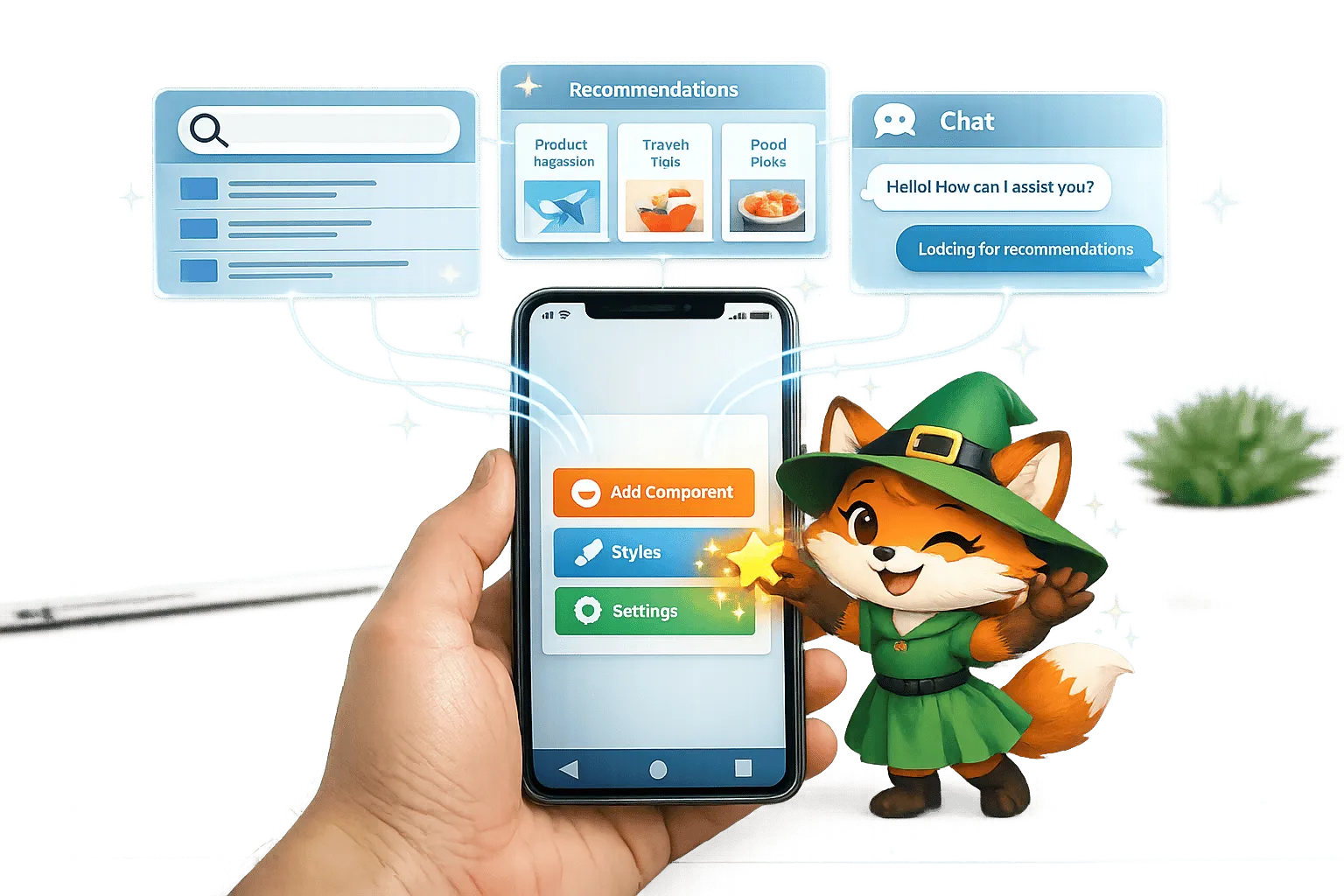
Why Adalo Works for Building AI-Powered Mobile Apps
Adalo is a no-code app builder for database-driven web apps and native iOS and Android apps—one version across all three platforms, published to the Apple App Store and Google Play. This cross-platform capability makes it the perfect foundation for integrating AI features, allowing you to build intelligent apps once and deploy them everywhere your users are.
Publishing AI-enhanced apps directly to the app stores means you can leverage push notifications to re-engage users with personalized recommendations and timely alerts powered by your AI integrations. Whether you're building smart search functionality, chatbot interfaces, or automated content systems, Adalo's API connectivity and Custom Actions give you the tools to connect with leading AI services without writing a single line of code.
AI is no longer optional for mobile apps. By 2026, 70% of enterprise apps will use no-code tools, and AI is at the forefront of this shift. Platforms like Adalo make it easy to integrate AI features like chatbots, smart search, and personalized recommendations without writing any code. With plans starting at $36/month, you can connect to AI services like OpenAI and scale your app to millions of users. Here's how you can start:
- Smart Search: Use AI to understand user intent and deliver better results.
- Content Recommendations: Personalize suggestions based on user preferences.
- Automated Categorization: Let AI organize data like inventory or user submissions.
- Natural Language Processing (NLP): Analyze text for sentiment, keywords, or summaries.
- Chatbot Interfaces: Build interactive, conversational tools for support or engagement.
Adalo's Custom Actions and API support simplify the process, allowing you to link directly to AI services. Test, refine, and track usage to ensure smooth performance. Ready to get started? Open your Adalo project, connect AI APIs, and build smarter apps today.
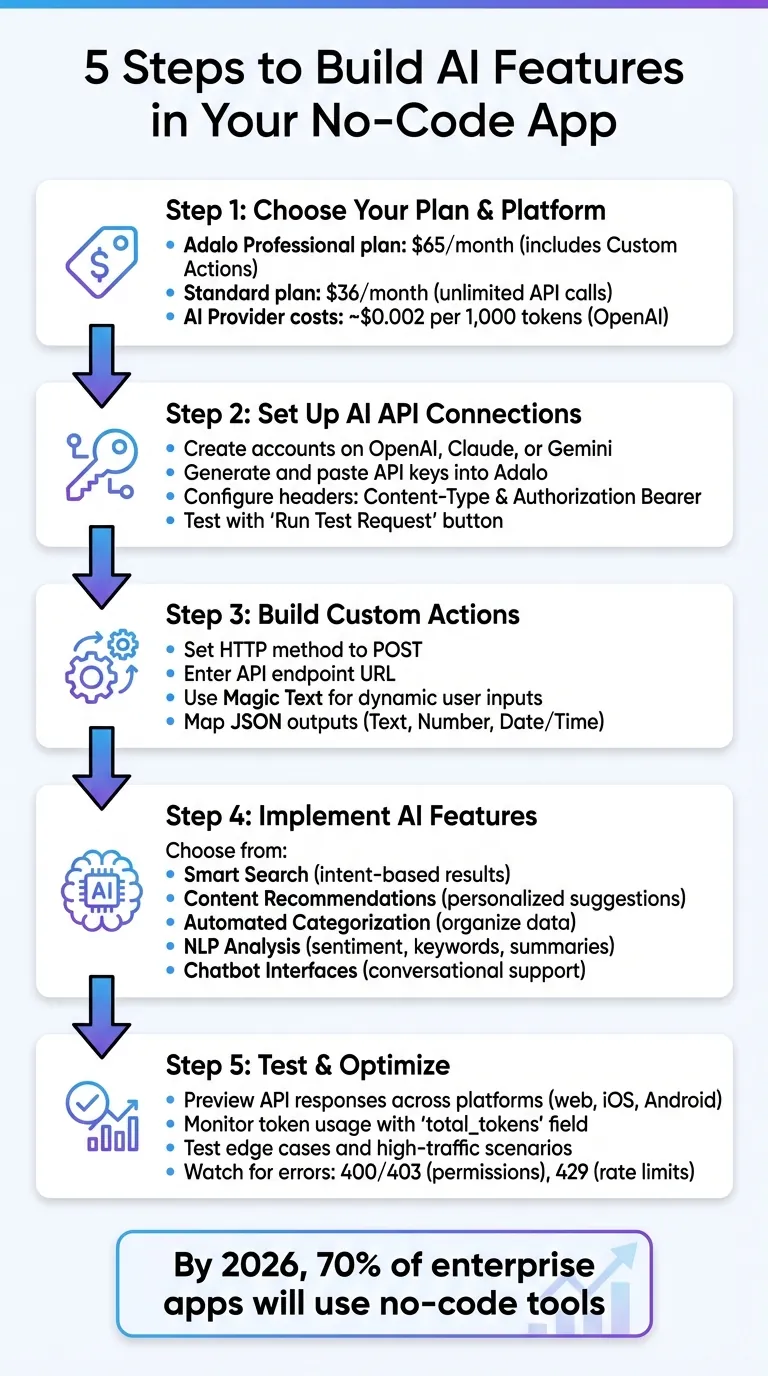
5-Step Guide to Integrating AI Features in No-Code Mobile Apps
Preparing for AI Integration in Your Adalo App
Before connecting your first AI service, you need to understand how Adalo communicates with external APIs and what setup each provider requires. The platform's architecture makes this straightforward—once you grasp the fundamentals, adding AI capabilities becomes a repeatable process.
Understanding Adalo's Custom Actions and API Support
Adalo's Custom Actions serve as the bridge between your app and external AI services. They handle real-time data exchange—sending user inputs to an API endpoint and returning JSON responses that integrate directly into your app's interface.
The real power comes from Magic Text, which lets you dynamically insert user inputs or database records into AI prompts. Instead of hardcoding a generic question like "What's the weather like?", you can personalize it to "What's the weather like in Austin, Texas?" based on data the user has already provided. This dynamic insertion transforms static API calls into contextual, personalized experiences.
Custom Actions are available on Adalo's Professional plan ($36/mo) and above. Once configured, you define outputs as Text, Number, or Date/Time fields. These outputs can display on-screen immediately, save to your database for later use, or trigger subsequent actions in your workflow. The flexibility means AI-generated content becomes a native part of your app's data flow rather than an awkward bolt-on.
Setting Up AI APIs (OpenAI, Claude, Gemini)
Getting started requires accounts with your preferred AI providers. Create an account on platforms like OpenAI, Claude, or Gemini, then generate API keys from their developer dashboards. Paste these keys into Adalo's API Keys section to make them accessible across all your apps.
For OpenAI specifically, Adalo provides a pre-configured "Ask ChatGPT" Custom Action. You only need your API key and a prompt to get it running—no manual endpoint configuration required. This shortcut eliminates the technical setup that typically slows down AI integration.
For Claude (Anthropic) and Gemini (Google), you'll create Custom Actions manually. The process follows these steps:
- Select "New Custom Action" from the action menu
- Set the HTTP method to POST and enter the API endpoint URL for your chosen service
- Add two required headers:
Content-Type: application/jsonandAuthorization: Bearer [YOUR_API_KEY] - Use Magic Text in the JSON body to pass user inputs as dynamic prompts
After configuring the request, click "Run Test Request" to verify the response structure. Add outputs—typically Text fields for AI-generated content—to make the data usable throughout your app. Testing the endpoint with a tool like Postman beforehand can help confirm the JSON structure and header setup, catching configuration issues before they affect your users.
With your API keys configured and tested, you're ready to build AI-powered features that transform how users interact with your app.
Building AI Features in Adalo
This section walks through practical implementations of AI capabilities, from intelligent search to conversational interfaces. Each feature follows the same pattern: configure a Custom Action, craft an effective prompt, and map the response to your app's interface.
Creating Smart Search with AI
Traditional search matches keywords literally—users must guess the exact terms in your database. AI-powered search understands intent, delivering relevant results even when phrasing doesn't match perfectly. A user searching for "cheap flights" finds results tagged as "budget travel" or "economy fares."
Ada, Adalo's AI builder, lets you describe what you want and generates your app. Magic Start creates complete app foundations from a description, while Magic Add adds features through natural language.
To implement this, use Magic Add to place a search input field by describing what you need: "add a search bar." Link this input to the Ask ChatGPT Custom Action, using Magic Text to embed the user's search term into your prompt:
"Based on this search query: [User's Search Input], find the most relevant items from this list: [Database Items]. Return only the item names, ranked by relevance."
Save the AI's ranked results to your database and display them in a list component. The same approach powers content recommendations—the difference is what data you feed into the prompt.
Adding AI-Powered Content Recommendations
Personalized suggestions increase engagement by surfacing content aligned with individual user interests. The key is collecting meaningful preference data—past purchases, favorited items, browsing history, or explicit preferences users have set.
Create a Custom Action that sends this preference data to your AI API. Use Magic Text to dynamically include the user's profile information:
"Based on this user's profile [User Data], recommend 5 items from this catalog [Product List] that would be most relevant. Return only item names, no explanations."
Store the AI's recommendations in a "Recommendations" collection linked to each user. Display these in a scrollable horizontal list or card layout on your home screen. Keeping prompts concise reduces response times—every unnecessary word adds latency and token costs.
Adalo's pricing model supports this kind of feature at scale. With unlimited usage and no caps on actions, users, or records, you can generate recommendations for every user session without worrying about hitting limits or unpredictable charges.
Automating Categorization with AI
Manual data organization becomes unsustainable as your app grows. AI categorization handles user-generated content, inventory items, support tickets, or any content that needs sorting—automatically and consistently.
Set up a Custom Action that triggers whenever a new database entry is created. Your prompt should include the content and your predefined categories:
"Categorize this product description: [Product Description]. Choose from these categories: Electronics, Clothing, Home Goods, Sports, Books. Return only the category name."
Save the returned category using a Create or Update Record action. The instruction to return "only the category name" is critical—it prevents the AI from adding explanations or caveats that would complicate your data processing.
This automation scales with your content library. Whether you have 100 items or 100,000, the categorization process remains consistent. And since Adalo has no database record limits on paid plans, your categorized content can grow without platform constraints.
Integrating Natural Language Processing (NLP)
NLP capabilities let your app understand and analyze text—sentiment detection, keyword extraction, summarization—without requiring machine learning expertise. These features transform raw user input into structured, actionable data.
For sentiment analysis, create a Custom Action with a focused prompt:
"Analyze the sentiment of this review: [User Review]. Respond with only: Positive, Negative, or Neutral."
The AI evaluates emotional tone and returns a single-word classification. Save this to your database alongside the original review. You can then display sentiment indicators (green/yellow/red badges), filter feedback by sentiment, or trigger different workflows based on negative reviews.
Keyword extraction follows the same pattern:
"Extract the 3 most important keywords from this text: [User Input]. Return only the keywords, comma-separated."
Text summarization works identically—configure the Custom Action, craft a specific prompt, test the output, and map results to your database. The consistent pattern means adding new NLP features becomes increasingly fast once you've built your first one.
Building AI Chatbot Interfaces
Chatbots create interactive experiences for customer support, virtual assistants, onboarding guides, or any scenario requiring conversation. Adalo's component system makes building the interface straightforward; the complexity lies in managing conversation context.
Start by creating a "Messages" collection with fields for text content, timestamp, sender type (user or bot), and a conversation ID. Design a screen displaying messages in a list component, with an input field and send button at the bottom.
When a user sends a message, trigger the Ask ChatGPT Custom Action with their text as the prompt. For single-turn interactions, this works immediately. For ongoing conversations that need context, use the History field in the Custom Action to maintain awareness of previous exchanges.
Save each interaction to your Messages collection—both the user's input and the bot's response. Reference the conversation history in subsequent prompts to maintain coherent dialogue. To manage token limits and costs, clear history periodically or limit it to the most recent 5-10 exchanges.
Include formatting instructions in your system prompt: "You are a helpful customer service assistant. Respond conversationally but concisely. Do not include meta-commentary about your responses." This keeps bot replies clean and natural.
Chatbot implementations serve diverse purposes—customer support reducing ticket volume, educational tutoring apps, wellness check-ins, or guided product discovery. With Adalo's predictable monthly pricing at $36/month, your only variable cost comes from AI provider token charges, keeping expenses manageable as conversations scale.
Testing and Optimizing AI Features
Thorough testing prevents AI features from failing in production. Adalo provides built-in tools for previewing API responses, debugging issues, and monitoring performance as your app scales. Test each AI integration independently before combining them into complex workflows.
Previewing and Debugging API Responses
Adalo's Run Test Request button in Custom Action setup sends a live request to your AI provider and displays the immediate response. Use this to confirm your API connection works before building interface elements around it. Click Show Full Response to view the complete JSON output and verify the fields you need are present and formatted correctly.
When testing AI components, isolate them from complex workflows. A simple screen with just the AI feature reduces interference from database queries or conditional logic, making issues easier to identify. Test across web, iOS, and Android platforms—AI responses should be consistent, but rendering or timing differences can surface platform-specific bugs.
Watch for specific HTTP error codes:
- 400/403 errors indicate authentication or permission issues—check your API key and plan limits
- 429 errors mean you've hit rate limits (typically 5 requests per second for most providers)
- 500 errors suggest provider-side issues—retry after a brief delay
If errors persist, test the API endpoint directly in Postman to verify your configuration before troubleshooting within Adalo.
Monitoring AI Usage with Adalo Tools
Adalo's $36/month plan includes unlimited API calls with no platform usage fees—a significant advantage over competitors that charge based on workload units or action counts. Your only variable cost comes from AI provider token charges, typically around $0.002 per 1,000 tokens for OpenAI's standard models.
To track token consumption, map the "total_tokens" field from AI responses as an output in your Custom Action. Store this value with each request to monitor usage per user, per feature, or per time period. This data helps you identify expensive prompts and optimize them.
For detailed analytics, integration tools like Zapier or Make can log AI triggers and aggregate call volumes. Since response times vary by provider and prompt complexity, limit the number of sequential Adalo actions tied to each AI request—parallel processing where possible reduces perceived latency.
Test edge cases in preview mode before launch: empty prompts, extremely long inputs, rapid repeated requests, and high-traffic simulations. Adalo's infrastructure handles 20 million+ daily requests with 99%+ uptime, but your AI provider's rate limits may become the bottleneck under heavy load.
Conclusion and Next Steps
Your app is ready for AI integration. The combination of Custom Actions, database mapping, and thorough testing creates a reliable foundation for intelligent features. Adalo's $36/month plan with unlimited usage means your platform costs stay predictable—only AI provider token charges scale with usage.
Recap of Key Points
Successful AI integration in Adalo rests on three pillars:
- Custom Actions connect your app to any AI API through a visual interface
- Prompt engineering keeps responses efficient, accurate, and cost-effective
- Native publishing delivers AI-powered experiences directly to the App Store and Play Store
These tools enable smart search, personalized recommendations, automated categorization, NLP analysis, and conversational interfaces—all without writing code. Each feature follows the same pattern: configure the API connection, craft effective prompts, and map responses to your interface.
Start Building with AI
Open your Adalo project and start with a single AI feature—perhaps smart search or a basic chatbot. Use Magic Start to generate your app foundation from a description, or Magic Add to describe the AI feature you want and let Adalo handle the component setup.
Link your OpenAI, Claude, or Gemini API key in the Settings panel. Configure your first Custom Action, run a test request, and watch the AI response appear. From there, map outputs to your interface and iterate. Everything you need to build AI-powered mobile apps is available today.
Related Blog Posts
- How To Create an AI Scanning and Checking App
- How to Build AI Chatbots Without Code
- How AI Transforms No-Code Prototyping
- Building AI-Powered Features in Your No-Code App with Adalo
FAQ
Why choose Adalo over other app building solutions?
Adalo is an AI-powered app builder that creates true native iOS and Android apps from a single codebase. Unlike web wrappers, it compiles to native code and publishes directly to both the Apple App Store and Google Play Store. At $36/month with unlimited usage—no caps on actions, users, records, or storage—it offers the most predictable pricing for native app development.
What's the fastest way to build and publish an app to the App Store?
Adalo's AI Builder with Magic Start generates complete app foundations from text descriptions. Describe your app idea, and it creates your database structure, screens, and user flows automatically. Combined with Adalo's streamlined App Store submission process, you can go from idea to published app in days rather than months.
How do I connect OpenAI or other AI APIs to my Adalo app?
Create an account with your preferred AI provider (OpenAI, Claude, or Gemini), generate an API key, and paste it into Adalo's API Keys section. For OpenAI, Adalo offers a pre-configured 'Ask ChatGPT' Custom Action—just add your key and prompt. For other providers, create a Custom Action with POST method, add authorization headers, and use Magic Text to pass user inputs dynamically.
What AI features can I build with Adalo?
Adalo supports smart search that understands user intent, personalized content recommendations based on user behavior, automated categorization for organizing data at scale, natural language processing for sentiment analysis and text summarization, and interactive chatbot interfaces. All features connect through Custom Actions without requiring any code.
How much does it cost to add AI features to an Adalo app?
Adalo's plans start at $36/month with unlimited API calls and no platform usage fees. Custom Actions require the Professional plan at $36/mo. Your only additional cost comes from AI provider token charges—typically around $0.002 per 1,000 tokens for OpenAI. This predictable model lets you scale AI features without unexpected platform charges.
How do I test and debug AI integrations in Adalo?
Use Adalo's 'Run Test Request' button in Custom Action setup to send live requests and view immediate responses. Click 'Show Full Response' for complete JSON output. Test across web, iOS, and Android platforms for consistency. Watch for 400/403 errors (authentication issues) and 429 errors (rate limits). Test edge cases like empty prompts and high-traffic scenarios before launch.
Can I build a chatbot that remembers conversation history?
Yes. Create a Messages collection to store conversation exchanges, then use the History field in Adalo's Custom Action to maintain context across multiple turns. Reference previous messages in subsequent prompts for coherent dialogue. To manage token limits and costs, periodically clear history or limit it to the most recent 5-10 exchanges.
Do I need coding experience to integrate AI into my Adalo app?
No coding required. Adalo's visual interface handles API configuration through Custom Actions. You'll work with prompts (plain English instructions to the AI) and Magic Text (dynamic data insertion). Understanding basic concepts like API keys and JSON responses helps, but the platform abstracts away the technical complexity.
How does Adalo's AI Builder help with app development?
Magic Start generates complete app foundations from simple descriptions—tell it you need a booking app for a dog grooming business, and it creates database structure, screens, and user flows automatically. Magic Add lets you describe features you want and adds them to existing apps. Both features accelerate development from days of planning to minutes of generation.
Can my AI-powered Adalo app scale to handle many users?
Yes. Adalo's modular infrastructure supports apps with over 1 million monthly active users, processing 20 million+ daily requests with 99%+ uptime. Unlike competitors with workload-based pricing that becomes unpredictable at scale, Adalo's unlimited usage model means your costs stay flat regardless of user growth.

Build your app fast with one of our pre-made app templates
Begin Building with no codeRelated Content
Adalo's 2026 Guide to AI-Powered No-Code Mobile App Builders
Adalo's 2026 Guide to AI-Powered No-Code Mobile App Builders
Adalo offers AI-powered no-code tools to help founders and startups build and publish responsive apps using APIs and custom integrations.

Free No-Code Mobile App Development for Startups: Adalo's Free Tier Guide
Build and test mobile app prototypes for free with a drag-and-drop no-code builder, AI setup, a 200-record database, and shareable previews.

Building Your Mobile App: Adalo's Complete Development and Deployment Guide
Step-by-step guide to design, build, test, and publish cross-platform mobile apps and PWAs with AI tools, databases, testing, and app store
No-Code Job Board and Career Platform: Build It with Adalo
Step-by-step guide to create a native mobile job board with search, filters, employer dashboards, push notifications, and app store publishi