

To integrate AI features into your Adalo app, you'll need three things: an Adalo account with the Professional plan or higher, an OpenAI API key, and a mobile app database. Adalo is a no-code app builder for database-driven web apps and native iOS and Android apps—one version across all three platforms, published to the Apple App Store and Google Play.
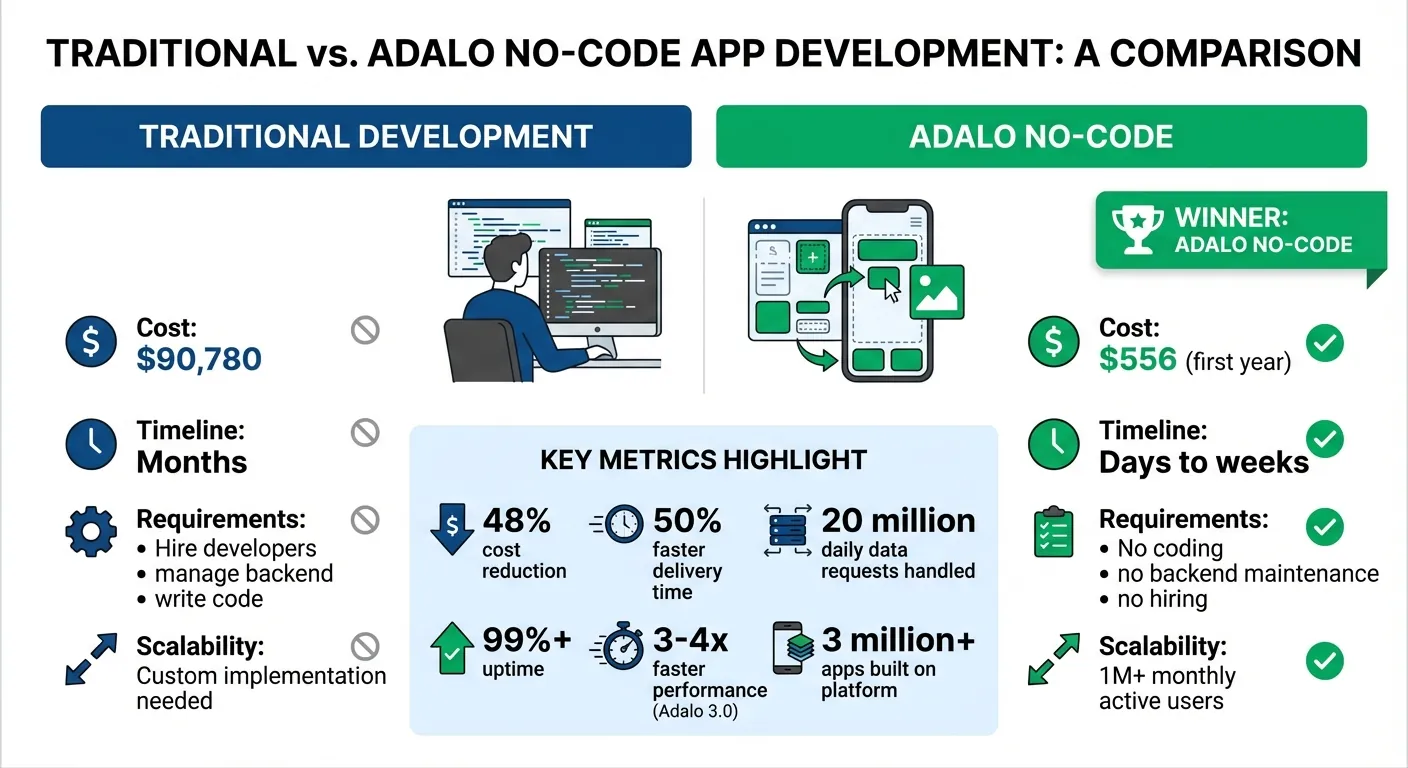
Traditional App Development vs Adalo No-Code: Cost and Time Comparison
Adalo + ChatGPT | Create an AI Experience in Your No-Code App
Requirements for Adding AI to Your Adalo App
To integrate AI features into your Adalo app, you'll need three things: an Adalo account with the Professional plan or higher, an OpenAI API key, and a well-organized database. Getting these prerequisites in place takes about 15 minutes and sets the foundation for everything that follows.
Set Up Your Adalo Account
To access AI capabilities, you'll need the Professional plan, starting at $36/month. This unlocks Custom Actions, which let your app communicate with external APIs like OpenAI. Unlike competitors that charge usage-based fees on top of monthly subscriptions, Adalo's pricing includes unlimited actions, users, records, and storage—no surprise charges when your AI features gain traction.
Ada, Adalo's AI builder, lets you describe what you want and generates your app. Magic Start creates complete app foundations from a description, while Magic Add adds features through natural language.
Once subscribed, you can use Custom Actions to send requests to OpenAI and receive AI-generated responses directly in the app builder. The platform's AI Builder also includes Magic Start and Magic Add features that can help you scaffold your app's structure before you begin adding AI integrations.
Get Your OpenAI API Key
Head over to platform.openai.com to generate your secret API key. This key works like a password, granting your app access to OpenAI's services. After creating the key, paste it into the API Keys section in your Adalo Builder. It will apply to all apps in your Adalo organization.
OpenAI charges about $0.002 per 1,000 tokens for GPT-3.5 Turbo, so keeping your prompts concise can help minimize costs and speed up responses. For most apps, this translates to pennies per user interaction.
"Copy your secret key and paste it into the API Keys section of the Settings panel in any Adalo app (note that this one key will apply to all of the apps in that org)." – Adalo
Structure Your Database
Your database needs to be set up to handle both user inputs and AI-generated responses. With Adalo's unlimited database storage on paid plans, you won't hit record caps as your AI features generate more data. Here's how to structure collections for common AI use cases:
- Chatbots: Create a Messages collection with fields for the message text, a link to the Users collection, and a marker to indicate whether the message is from the user or the AI. You can also simplify this by using a pre-built AI chat bot. To allow the AI to "remember" past interactions, add a Conversations collection with a History text field to store the full conversation thread.
- Recommendation Engines: Add fields to your items collection to store AI-generated data like tags or sentiment scores.
Finally, use a Create or Update action with Magic Text to save the AI's response in your database. Once you've set up these requirements, you'll be ready to bring AI functionality into your Adalo mobile app.
How to Add AI Features to Your Adalo App
Once your account and database are set up, you can start integrating AI features into your app. Adalo's Custom Actions make it straightforward to connect with OpenAI and other AI services using API calls. The platform includes a pre-configured "Ask ChatGPT" action that leverages the gpt-3.5-turbo model, allowing you to add AI functionality without writing any code.
Connect to the OpenAI API
Begin by adding a button or form submission trigger to your app's screen. From the action menu, select "Ask ChatGPT" under Custom Actions. You'll encounter two input fields: Prompt (required) and History (optional). Use Magic Text to link the Prompt field to a text input. The History field is useful for maintaining conversation context, enabling the AI to recall earlier messages.
After the AI processes the input, add another action to save the response. Use "Create Record" or "Update Input" to capture the AI's output by mapping it to the Response field from the Ask ChatGPT action. Test the setup by entering a sample prompt and confirming that the response is stored in your database.
To optimize performance and reduce costs, keep prompts concise. If the AI includes unnecessary phrases like "Sure! Here's your answer", refine your prompt with instructions such as: "Only return the answer, nothing else."
Add Image Recognition
Once your API connection is running smoothly, you can expand your app's capabilities with image recognition. This feature enables users to upload photos and receive AI-generated descriptions or tags. Start by creating a Custom Action that sends an image URL to the OpenAI Vision API. Add an image picker component to your screen and configure a button to trigger the action. Use Magic Text to map the image URL from the picker or your database to the API request.
The API will return a JSON response with details like object labels, descriptions, or classifications. Display these results using Magic Text in a text component or list, and optionally save the data to your database.
Note: Some APIs, such as DALL-E, generate temporary image URLs that expire after a few hours. To avoid losing access to these images, upload them to a permanent hosting service like ImageBB. Before integrating the feature into Adalo, test your API request using a tool like Postman to ensure the JSON structure is correct.
Build an AI Chatbot
To create an interactive chatbot, set up a Messages collection in your database. Include fields for the message text, a link to the Users collection, a boolean to indicate whether the message is from the user or the AI, and a timestamp for sorting.
On your chat screen, add a text input for user messages and a button to send them. Configure the button to (1) save the user's message and (2) trigger the "Ask ChatGPT" action using the message as the prompt. To retain conversation context, link the History field to store previous messages.
Once the AI generates a response, add another action to save it as a new record in the Messages collection. Use Magic Text to map the Response from the ChatGPT output. Add a list component to display all messages in the conversation, sorted chronologically. To manage the AI's context window and token usage, include a "New Conversation" button that clears the History field when needed.
Create a Recommendation Engine
Recommendation engines provide personalized suggestions based on user behavior or preferences. Start by collecting relevant user data—such as purchase history, ratings, browsing habits, or stated preferences—and storing it in your database.
Once you have the data, create a Custom Action to send it to the OpenAI API with a prompt like:
"Based on these user preferences [insert data], recommend 5 similar items from this list [insert item names]."
Use Magic Text to map the user data into the prompt. The AI will analyze the patterns and return tailored recommendations.
Save the AI's output by creating a new collection or updating existing records with recommendation scores. Display the results in a list or carousel component, updating the recommendations as user data evolves. With no record limits on paid plans, you can store extensive user preference histories without worrying about hitting storage caps.
Add Sentiment Analysis
Sentiment analysis helps evaluate the emotional tone of text—whether it's positive, negative, or neutral. Add a text input or text area for users to submit content, along with a button to trigger the "Ask ChatGPT" action.
Configure your prompt to instruct the AI: "Analyze this text's sentiment and return only 'Positive', 'Negative', or 'Neutral'." Map the text input value to the Prompt field using Magic Text.
Store the AI's response in your database alongside the original text. You can also add a numeric field to log sentiment scores (e.g., –1 for negative, 0 for neutral, and 1 for positive). Use conditional formatting to create a visual dashboard—green for positive, red for negative, and gray for neutral tones.
Adalo's 3.0 infrastructure, launched in late 2025, delivers 3–4× faster performance compared to earlier versions. This ensures that AI-powered features respond quickly and efficiently. With the platform handling over 20 million daily data requests and maintaining 99%+ uptime, your app remains reliable and responsive as usage scales.
Testing and Publishing Your AI-Powered App
Test and Debug AI Features
Once your app is equipped with AI features, it's time to ensure everything runs smoothly. While Preview mode offers a look at the web version, you'll need to test on actual iOS and Android devices for a complete picture. Use View App > Staging Preview to assess how features like chatbots, image recognition, or sentiment analysis function on real devices like iPhones, iPads, and Android phones.
Dive into the Database tab to confirm that AI responses are being logged correctly. Check records generated by AI actions and use filters like timestamps or test user data to track outputs—such as sentiment scores or recommendation lists. If something doesn't look right, try adding Magic Text to a debug screen. This lets you view raw API responses from OpenAI in real time, making it easier to pinpoint issues.
For performance concerns, Adalo X-Ray is your go-to tool. Activate it through the preview menu to identify potential slowdowns. It highlights delays in API calls, sluggish database queries, and other bottlenecks. For example, if your chatbot takes too long to respond, X-Ray can help you figure out whether the delay is caused by OpenAI's API or by additional actions in Adalo.
"Large Language Models (LLMs) take time to return a response. No LLM currently provides instant results." – Adalo Help Documentation
Publish to App Stores
After rigorous testing and debugging, you're ready to publish your app. Adalo simplifies the process by handling the technical submission to both the Apple App Store and Google Play Store. No need to worry about build files or complex workflows—the platform generates native iOS and Android apps from a single codebase.
Before publishing, update your privacy policy to inform users that their inputs may be processed by OpenAI. Secure your OpenAI API key within the app settings instead of hardcoding it. Customize permission strings for features like camera or location access—using default placeholder text could lead to app rejection. Additionally, upload app icons (1,024 x 1,024 pixels for iOS and 512 x 512 pixels for Android) and keep your app's display name under 30 characters.
For iOS, you'll need an Apple Developer account, which costs $99 per year, and an app-specific password from your Apple ID settings. For Android, a Google Play Developer account requires a one-time $25 fee. Adalo generates the necessary .IPA and .AAB files for submission. Use TestFlight for iOS beta testing (supporting up to 10,000 testers) and Google Play's Internal Testing track for Android.
App reviews usually take 24–48 hours for Apple and 2–7 days for Google. AI-powered apps don't face additional hurdles as long as you disclose any external API usage.
Cost Comparison: AI App Development
Understanding the true cost of building an AI-powered app helps you make informed decisions about your development approach. Here's how the numbers break down:
| Development Approach | First-Year Cost | Timeline | Includes |
|---|---|---|---|
| Traditional Development | ~$90,780 | 4-8 months | Developer salaries, infrastructure, maintenance |
| Adalo Professional | ~$556 | Days to weeks | $36/mo + $99 Apple + $25 Google + OpenAI usage |
| Bubble (equivalent tier) | $828+ | Weeks to months | $69/mo + Workload Units (variable) |
| FlutterFlow | $960+ | Weeks to months | $80/mo/seat + external database costs |
The $556 first-year cost for Adalo includes everything needed to publish AI-enhanced apps on both the Apple App Store and Google Play. This represents a 48% reduction in development costs and 50% faster delivery time compared to traditional approaches.
What makes Adalo's pricing particularly attractive for AI apps is the unlimited usage model. While competitors like Bubble charge Workload Units that increase as your AI features process more requests, Adalo's flat monthly rate means your costs stay predictable even as user engagement grows. When your chatbot handles thousands of conversations or your recommendation engine processes extensive user data, you won't face surprise overage charges.
Conclusion
Create AI-powered features by setting up your OpenAI API key, connecting through Custom Actions, and using Magic Text to link your database with AI responses. Features like chatbots, image recognition, and sentiment analysis can transform your app into a smarter, more responsive experience.
Once integrated, Adalo takes care of the heavy lifting—no coding, backend upkeep, or developer hiring needed. The platform handles over 20 million daily data requests with 99%+ uptime. With Adalo 3.0 offering 3–4x faster performance, your app can scale to over 1 million monthly active users without running into limits.
The standout advantage? Speed and cost. Traditional app development costs hover around $90,780, but Adalo's first-year cost for publishing AI-enhanced apps on both the Apple App Store and Google Play is approximately $556. This cuts development costs by 48% and slashes delivery time by 50%. That means you're not just saving money—you're delivering apps in days or weeks, not months.
"We see the wave coming. Now this time next year, every company has to implement it—not even have a strategy. Implement it." – Sam Altman, CEO of OpenAI
With over 1 million apps already built on Adalo, non-technical founders now have the tools to ride this wave without waiting on developers or learning to code. Get started by updating your privacy policy, securing your API keys, and publishing your AI-powered app to the app stores.
Related Blog Posts
- Best Practices for NLP in No-Code Chatbots
- How To Create an AI Scanning and Checking App
- How to Build AI Chatbots Without Code
- How AI Transforms No-Code Prototyping
FAQ
Why choose Adalo over other app building solutions?
Adalo is an AI-powered app builder that creates true native iOS and Android apps. Unlike web wrappers, it compiles to native code and publishes directly to both the Apple App Store and Google Play Store from a single codebase. At $36/month with unlimited usage, it offers the lowest price for native app store publishing with predictable pricing—no surprise charges as your app scales.
What's the fastest way to build and publish an app to the App Store?
Adalo's drag-and-drop interface and AI-assisted building features like Magic Start and Magic Add let you go from idea to published app in days rather than months. The platform handles the complex App Store submission process, generating the necessary .IPA and .AAB files so you can focus on your app's features instead of wrestling with certificates and provisioning profiles.
What do I need to add AI to my Adalo app?
You need three things: an Adalo account with the Professional plan ($36/month), an OpenAI API key from platform.openai.com, and a well-organized database to store user inputs and AI responses. The Professional plan unlocks Custom Actions, which enable your app to communicate with external APIs like OpenAI.
How much does it cost to use OpenAI's API in my Adalo app?
OpenAI charges approximately $0.002 per 1,000 tokens for GPT-3.5 Turbo. For most apps, this translates to pennies per user interaction. To minimize costs and improve response times, keep your prompts concise and include instructions like "Only return the answer, nothing else" to eliminate unnecessary text.
How do I test AI features before publishing my app?
Use Adalo's Preview mode for web testing and the Staging Preview feature to test on actual iOS and Android devices. Check the Database tab to verify AI responses are being logged correctly, and use Adalo X-Ray to identify performance bottlenecks in API calls or database queries. For iOS beta testing, you can use TestFlight with up to 10,000 testers.
Can I build an AI chatbot that remembers previous conversations?
Yes, you can create a chatbot with conversation memory by setting up a Messages collection and using the optional History field in the "Ask ChatGPT" action. Link the History field to store previous messages, allowing the AI to recall earlier interactions and maintain context throughout the conversation.
How much does it cost to build an AI-powered app with Adalo?
Adalo's first-year cost for publishing AI-enhanced apps on both app stores is approximately $556 ($36/month subscription + $99 Apple Developer + $25 Google Play + OpenAI usage). This represents a 48% reduction compared to traditional development costs of around $90,780.
Will I face usage limits as my AI app grows?
No. Adalo's Professional plan includes unlimited actions, users, records, and storage with no usage-based charges. Unlike competitors that charge variable fees based on CPU usage or database operations, your monthly cost stays predictable even as your AI features process more requests.
How long does app store review take for AI-powered apps?
App reviews typically take 24–48 hours for Apple and 2–7 days for Google. AI-powered apps don't face additional review hurdles as long as you disclose external API usage in your privacy policy and properly secure your API keys.
Can I add image recognition to my Adalo app?
Yes, you can add image recognition by creating a Custom Action that sends image URLs to the OpenAI Vision API. Add an image picker component, configure a button to trigger the action, and display the AI-generated descriptions or tags using Magic Text. Test your API requests with Postman before integrating to ensure the JSON structure is correct.

Build your app fast with one of our pre-made app templates
Begin Building with no codeRelated Content
Adalo for Startups: The Best AI-Powered No-Code App Builder in 2026
Adalo for Startups: The Best AI-Powered No-Code App Builder in 2026
Adalo helps startups and founders build AI-driven mobile apps without code. Create, deploy, and publish responsive apps—free to start
Adalo's 2026 Guide to AI-Powered No-Code Mobile App Builders
Adalo's 2026 Guide to AI-Powered No-Code Mobile App Builders
Adalo offers AI-powered no-code tools to help founders and startups build and publish responsive apps using APIs and custom integrations.
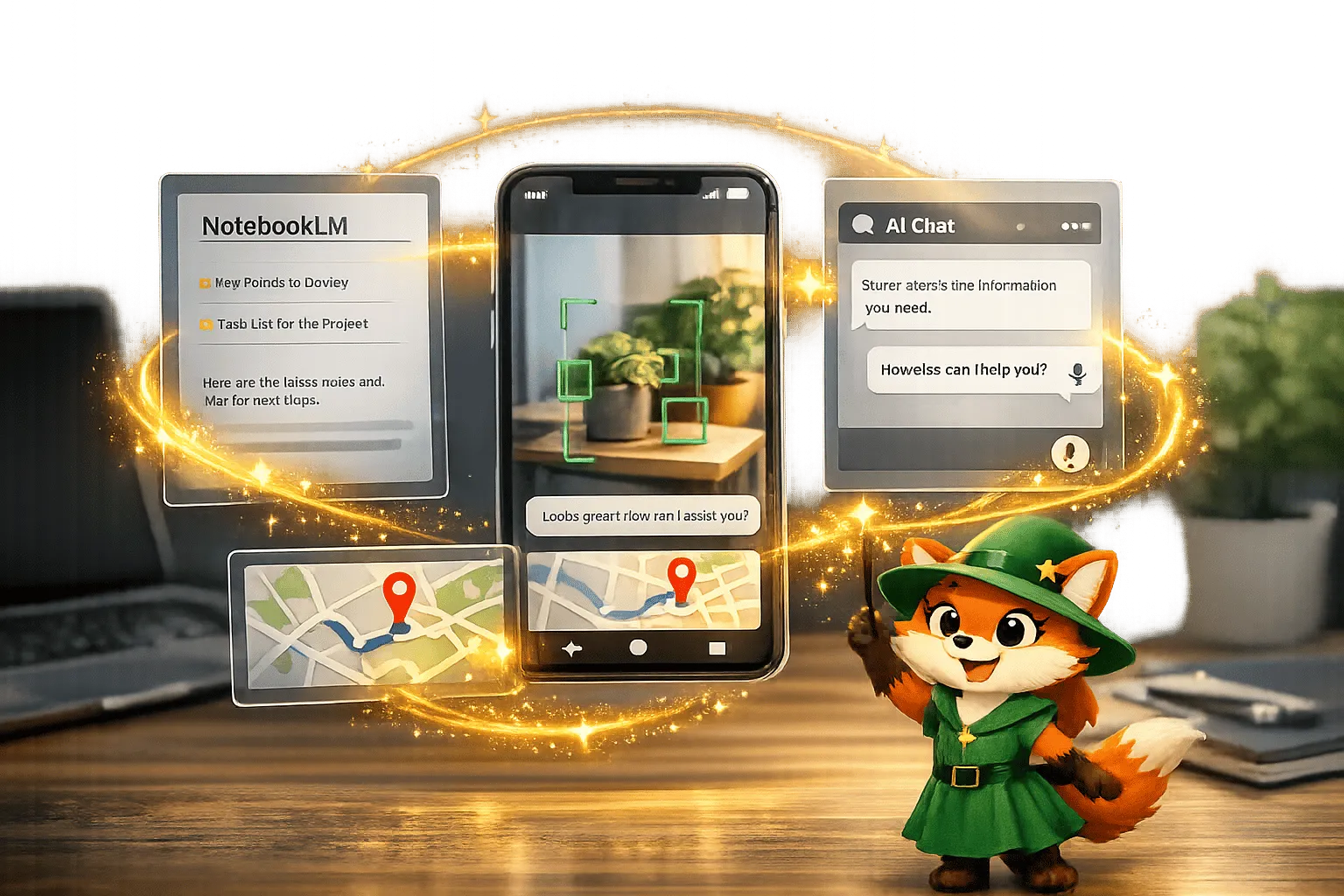
How Adalo Integrates with Google AI and NotebookLM
Use no-code app builders to add AI-powered vision, NLP, chat, and location features while planning builds with AI-assisted notebooks.

Building an E-Learning App Without Code: A Complete Guide
Step-by-step guide to create an e-learning app without code: plan structure, add courses, secure logins, payments, testing, and publish to w