


Building apps no longer requires coding skills or massive budgets. No-code platforms let you create and launch apps for web, iOS, and Android in weeks instead of months, saving up to 90% of development costs. By 2026, 70% of new apps will use no-code or low-code tools, making app development faster and more accessible than ever.
Platforms like Adalo, a no-code app builder for database-driven web apps and native iOS and Android apps—one version across all three platforms, published to the Apple App Store and Google Play, are leading this transformation. By combining visual development tools with powerful database capabilities, these platforms empower anyone to build and launch professional apps without writing a single line of code.
Key takeaways:
- Cost: Traditional apps cost $50K–$250K. No-code platforms? $500–$5,000.
- Speed: Build and launch apps in 2–8 weeks instead of 3–6 months.
- AI Tools: Platforms like Adalo use AI to generate app foundations from simple descriptions.
- Scalability: Publish updates across web, iOS, and Android simultaneously.
- Who Benefits: Entrepreneurs, small businesses, agencies, and enterprises modernizing legacy systems.
Whether you're creating an MVP or scaling a business tool, no-code platforms simplify app development without sacrificing functionality. Let’s explore how you can use these tools to bring your ideas to life.
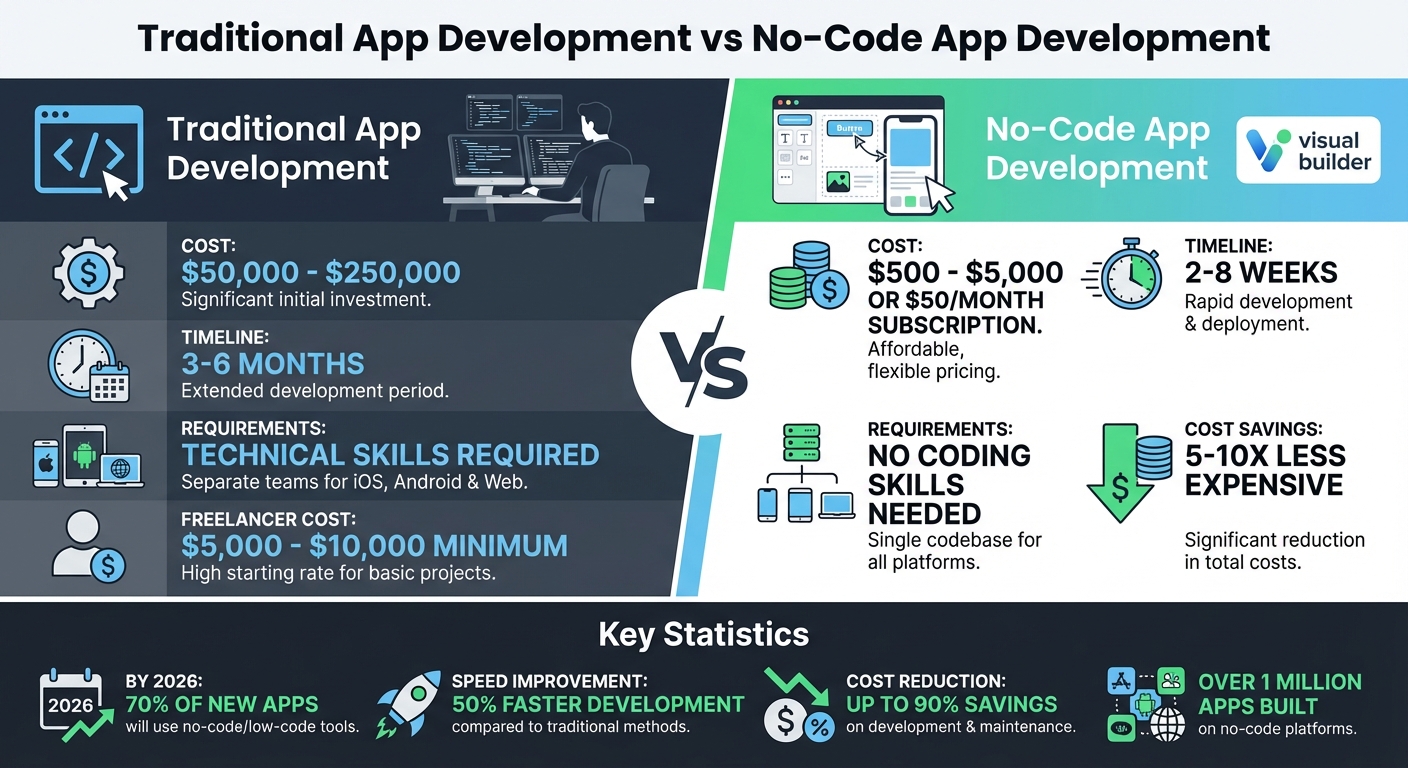
Traditional vs No-Code App Development: Cost and Time Comparison
Why App Building Platforms Matter
App building platforms have revolutionized the way apps are created, making the process faster and more affordable. Traditionally, custom app development could cost anywhere from $50,000 to $250,000 and take three to six months to complete. In contrast, app building platforms bring those costs down to just $500 to $5,000 and cut development time to as little as two to eight weeks. This shift removes the most significant hurdles - time, money, and technical know-how. Entrepreneurs can test ideas without draining their savings on developer fees, small businesses can create tailored tools without the need for costly software subscriptions, and digital agencies can deliver client apps without hiring specialized developers. Let’s dive into how these platforms deliver on speed, cost savings, and accessibility.
Speed and Cost Savings
Traditional app development is both time-consuming and expensive because separate teams are often required to build versions for iOS, Android, and the web. App building platforms solve this problem with a single-codebase architecture - you build the app once, and it works across all platforms.
Take Adalo, for example. It allows users to create one app and deploy it simultaneously to the web, iOS, and Android. Even better, updates made to the app are instantly reflected across all platforms, saving significant time on maintenance. This is especially valuable when responding to bugs, user feedback, or adding new features.
The cost savings are just as impressive. Hiring a freelance developer for a basic app can cost between $5,000 and $10,000, while agencies often charge tens of thousands. App building platforms, on the other hand, charge subscription fees starting at less than $50 per month, delivering 5-10x savings compared to traditional development. For enterprise teams using tools like Adalo Blue, the savings are even more dramatic - internal apps that would typically require months and six-figure budgets can now be built in a matter of days or weeks.
Building Apps Without Technical Skills
Perhaps the most exciting shift is how these platforms empower people without technical expertise to build apps. Thanks to visual drag-and-drop interfaces, pre-designed templates, and AI-powered tools, coding is no longer a barrier.
Platforms like Adalo make app creation accessible by allowing users to describe their needs in simple language. The platform then generates a functional app foundation in moments. Tasks that once required knowledge of SQL databases, API integrations, or mobile programming are now handled through intuitive clicks and prompts. Features like database management, user authentication, and push notifications come built-in, so users can launch apps without hiring developers.
This ease of use benefits more than just solo entrepreneurs. Small businesses can use these tools to transform data from platforms like Google Sheets or Airtable into mobile-friendly interfaces. Enterprise teams can go even further, building internal apps with advanced features like single sign-on (SSO) and enterprise permissions, while also connecting to older systems that lack modern APIs.
Scaling and Multi-Platform Publishing
Scaling an app is another area where app building platforms shine. Updates roll out seamlessly across all platforms, ensuring that web, iOS, and Android users are always on the same page. This is essential for businesses looking to grow.
The ability to publish across multiple platforms from a single build simplifies scaling. When you update your app, the changes are deployed instantly to web, iOS, and Android versions, eliminating the traditional headaches of coordinating updates across separate teams. Platforms like Adalo handle the technical details, such as generating builds and managing security certificates for the Apple App Store and Google Play Store.
And don’t worry about performance. Apps created with these platforms aren’t watered-down versions. They can access device-specific features like GPS, cameras, and push notifications, just like traditionally coded apps. For apps requiring location services, photo uploads, or real-time engagement, this is a big deal. The infrastructure behind these platforms is built to scale, supporting over 1 million monthly active users and processing more than 20 million daily data requests. This proves that apps built on these platforms are ready for substantial growth.
Core Features of Modern App Building Platforms
Let’s dive into the essential features that make modern app-building platforms so powerful. These tools not only speed up development but also simplify the entire process, making app creation accessible to everyone.
AI-Powered App Creation
AI has become a game-changer in app development, acting as the foundation for many platforms. For example, Adalo's AI Builder can generate a complete app structure - think database tables, user flows, and screens - all from a single prompt. According to Gartner, by 2026, 70% of new enterprise applications will incorporate low-code or no-code technologies. However, it’s worth noting that about 40% of AI-generated code suggestions might need human oversight to ensure security and reliability.
Visual Drag-and-Drop Editors
Simplicity in design is just as important as functionality. Visual drag-and-drop editors allow users to build apps by placing components like buttons, forms, and images directly onto a canvas. These WYSIWYG (What You See Is What You Get) interfaces provide instant previews across devices, ensuring your app looks polished on phones, tablets, and desktops. Many platforms offer over 50 pre-built components, covering essentials like payment processing, maps, notifications, and user authentication. For those who want more control, platforms like Adalo let users seamlessly switch between AI-assisted design and manual editing, keeping the process flexible and user-friendly.
Built-In Backend and Database
Behind every great app is a solid backend. A built-in backend handles app logic, user accounts, and data storage, while an integrated relational database keeps everything organized. Adalo’s database, for instance, makes it easy to connect data sets - linking "Users" to "Orders" or "Products" to "Categories" with just a few clicks. This setup also manages tasks like user authentication, permissions, push notifications, and workflows without relying on external services. With over 20 million daily data requests and 99.98% uptime, platforms like Adalo provide reliability. They even offer free plans to get started, including 500 records per app and unlimited test apps.
Connecting to Existing Data Sources
Most businesses already have data stored in spreadsheets or older systems. Modern app platforms make integration seamless. Adalo, for instance, connects directly with tools like Airtable, Google Sheets, MS SQL Server, PostgreSQL, and custom REST APIs. For older systems without APIs, Adalo uses DreamFactory to create deep integrations, saving businesses 5–10× the cost of rebuilding systems. Additionally, platforms support automation tools like Zapier and Make, enabling you to design workflows without writing a single line of code.
Native App Store Publishing
Gone are the days of needing separate development teams for iOS, Android, and web apps. Modern platforms use a single codebase to create native builds for all platforms, with updates automatically applied everywhere. These apps can access device-specific features like GPS, cameras, offline functionality, and push notifications, offering performance on par with traditionally coded apps. Publishing to app stores has never been easier or faster.
Who Should Use App Building Platforms?
App building platforms cater to a diverse group of users, from aspiring entrepreneurs to well-established enterprises. By breaking down traditional barriers like high costs and technical complexity, these platforms open the door to app development for nearly anyone with a vision.
Entrepreneurs and Solo Founders
Got a brilliant idea but no coding skills? These platforms make app development accessible. Statistics show that nearly 25% of successful app creators didn’t have a coding background. Considering that traditional app development costs range from $40,000 to $300,000, the affordability of these platforms - typically $200 to $600 for the first year - is a game-changer for bootstrapped startups. This can cut costs by around 48% and speed up development by as much as 50%.
These tools are incredibly flexible, too. Whether you’re a personal trainer, educator, or salon owner, you can automate bookings, scheduling, and payments. E-commerce entrepreneurs can set up custom ordering systems with integrated payments, while niche community builders can launch specialized social networks. To avoid overcomplicating your app, start with pre-built templates and focus on two or three key features. Publishing costs, including platform fees and developer accounts with Apple and Google, total about $556 for the first year.
Small to Mid-Sized Businesses
For small and mid-sized businesses, app building platforms offer modern solutions without the hefty price tag of dedicated development teams. They can be used to create internal tools like administrative dashboards, CRM systems, and project management boards. With consumers spending roughly 88% of their mobile internet time in apps and global app revenue projected to hit $935 billion by 2026, having a custom app can significantly enhance customer engagement.
Features like appointment booking, loyalty programs, push notifications, and e-commerce capabilities help businesses connect with customers more effectively. These platforms also allow for seamless integration with tools like Google Sheets or Airtable, modernizing operations while maintaining data security. Reliability is another strong point - over 1 million custom apps have been built on these platforms, with published apps typically achieving over 99% uptime. Built-in analytics and ready-to-use templates further streamline the process, ensuring a smooth user experience.
Digital Agencies and Consultants
For agencies, the pressure to deliver high-quality apps quickly and affordably is constant. App building platforms simplify the process by eliminating the need for specialized mobile developers. With a single codebase that works across platforms, agencies can take on more projects, even those previously considered out of budget. This shift enables a move from one-off projects to ongoing partnerships, offering clients continuous updates and maintenance.
These platforms also scale well for larger organizations, particularly those dealing with outdated systems.
Enterprise Teams with Legacy Systems
Enterprises often face the challenge of modernizing legacy systems without completely overhauling them. In fact, 83% of organizations rank enterprise integration as a top-five priority for the next two years.
"Successful digital transformation strategies often require connecting legacy systems with newer cloud technologies. Enterprise integration uses an API-first approach to merge the old and the new." – SAP
Platforms like DreamFactory help enterprises bridge the gap between legacy systems and modern cloud technologies. They can connect to virtually any database or web service, even those without APIs, such as Oracle or SQL Server. Security is a key focus, with features like strong authentication, data encryption, and advanced tools like single sign-on (SSO) and enterprise-grade permissions. Platforms such as Adalo Blue even allow business users to visually build and update integrations, democratizing the development process. Integration methods like API connectors, database links, and file imports make it easier to connect legacy systems. Starting with a centralized Integration Center of Excellence can streamline the transition and ensure a smoother rollout.
Here’s a quick look at common integration methods:
| Integration Method | Best Use Case | Real-Time Capability |
|---|---|---|
| API Integration | Systems with an existing API | High |
| Database Connector | Direct integration with backend databases | High |
| File Integration | Systems without APIs using periodic data imports | Low |
How to Build Your First App
Define Your App's Purpose and Features
Start by identifying your app's purpose and the audience you want to reach. What problem does your app solve? Validate this by gathering feedback directly from potential users. Tools like Google Forms or Survey Monkey make this process straightforward and affordable, often costing less than $500.
Next, outline the core features your app needs to function effectively. Focus on creating a Minimum Viable Product (MVP) - the essential features that address the problem you're solving. Plan your database structure early by listing collections such as Users, Products, or Bookings, and define how they connect. This kind of preparation can save you from expensive rework later. To visualize your app, use wireframing tools like Figma or Miro to map out screen designs and user flows before diving into development.
Once you’ve nailed down the details, you’re ready to start prototyping.
Use AI Tools for Fast Prototyping
Ada, Adalo's AI builder, lets you describe what you want and generates your app. Magic Start creates complete app foundations from a description, while Magic Add adds features through natural language.
With your app’s foundation in place, AI tools can speed up the prototyping process. Describe your app idea in plain English, and tools like Adalo’s Magic Start lets a complete structure for you. This includes everything from the database setup to screens and user flows. What used to take weeks can now be done in just a few hours.
Need to add extra features? Magic Add lets you expand your app by simply describing what you want - for instance, “add user authentication” or “create a booking calendar.” The AI handles the technical details, leaving you free to focus on what makes your app stand out. According to Gartner, by 2026, 70% of new enterprise applications will be built using these kinds of technologies. This method allows you to move much faster than traditional development approaches.
Customize and Connect Your App
Once the AI has laid the groundwork, it’s time to make the app your own. Use a drag-and-drop editor to tweak the design - resize components, adjust colors, and add custom logic using simple if-then actions. You can preview your app in real time on mobile, tablet, and desktop devices to see exactly how it looks and functions as you build.
To make your app dynamic, connect it to external data sources like Google Sheets, Airtable, MS SQL Server, or PostgreSQL. Adalo’s visual data mapping makes this process simple - just point and click to link your data to your app screens. Even if your team works with older systems, DreamFactory integration allows you to connect legacy databases without modern APIs, making it a flexible choice for enterprise teams.
Test and Publish to Multiple Platforms
After customizing and connecting your app, thorough testing is the next step. Use staging previews to check how your app performs across different devices. Before launching, beta test using Apple’s TestFlight or Google’s internal tracks to collect feedback and catch any bugs.
When you’re ready to go live, the single-codebase setup ensures you can deploy your app across web, iOS, and Android platforms without rebuilding for each one. Apple typically reviews 90% of submissions in under 24 hours, while Google Play reviews can take up to 7 days. Publishing costs include a $99 yearly fee for Apple’s Developer Program and a one-time $25 fee for Google Play Console. This streamlined process helps many developers launch production-ready apps in just days or weeks, all while saving up to 10 times the cost of traditional development methods.
Best Practices for App Development Success
Plan User Flows and Optimize UX
Start by mapping out every user journey from beginning to end with detailed wireframes. Think about the entire experience - from when a user opens the app to when they complete a task. This kind of planning helps you spot potential roadblocks early, saving you from expensive redesigns down the line.
Consistency is key, especially across platforms. A single-codebase approach ensures your app feels the same on an iPhone, Android device, or desktop browser. Establish global branding elements - like colors, fonts, and logos - so updates apply everywhere automatically. Industry benchmarks suggest that improving UX in this way can increase user retention by 20–30%.
Don’t stop at planning - test your user flows on real devices. Use staging previews to see how the app performs across different screen sizes and operating systems. Check that buttons and interactive elements are appropriately sized and functional. Tackling these issues early keeps users engaged and reduces frustration.
Use AI for Testing and Optimization
AI tools can make testing faster and more efficient, helping you catch problems before they reach your users. With AI-driven analytics, you can monitor user behavior in real time. Heatmaps show where users are tapping most, and drop-off predictions highlight where they abandon tasks. This data allows you to make targeted improvements quickly.
That said, always manually review AI-generated code suggestions. Studies show that around 40% of these suggestions could be insecure, so a human touch is crucial for ensuring your app’s security and functionality. AI can handle repetitive tasks and speed up workflows, but your oversight ensures the final product is polished and safe.
After launch, AI can continue to refine your app. Integrated analytics platforms let you see which screens are most popular and where users spend their time. Case studies show that making iterative improvements based on AI insights can boost engagement by 15–25%. You can also connect your app with tools like Zapier to create workflows that adapt to user actions, making your app smarter over time.
Maintain a Single Codebase for Updates
A single-codebase approach simplifies updates, allowing changes to roll out across web, iOS, and Android platforms simultaneously. This saves time, effort, and resources compared to maintaining separate versions for each platform.
Use design versioning to experiment without risk. By saving snapshots of your app’s current state, you can safely test new features or layouts. If something doesn’t work as intended, you can easily revert to a previous version. This approach encourages innovation while protecting your live app.
Plan updates strategically. Web changes can deploy instantly, while updates for native apps need to account for app store approval processes. Push notifications are a great way to let users know when important updates are live. Platforms like Adalo make this process seamless, ensuring updates sync across all supported channels.
Secure Data Connections and Integrations
While optimizing UX and streamlining updates, don’t overlook data security - it’s non-negotiable. Secure API connections are critical when linking your app to external data sources like Google Sheets, Airtable, MS SQL Server, or PostgreSQL. Look for platforms that offer native encryption and OAuth authentication to safeguard sensitive information and meet compliance standards like GDPR.
For enterprise teams working with older systems, secure integration strategies are even more essential. Use API key rotation, role-based access controls, and webhook validations to enhance security. Tools like DreamFactory can connect legacy databases lacking modern APIs, enabling you to build secure internal apps.
Set up automated alerts to monitor integrations for unusual activity or failed authentication attempts. Following these practices not only protects your users but can also save you 5–10x in costs while allowing your app to scale confidently as your user base grows.
Conclusion
App-building platforms have revolutionized the way software is created, delivering fully functional apps in just days or weeks instead of months. What once required a budget of $50,000 to $250,000 can now be achieved at a fraction of the cost. By 2026, 70% of new enterprise apps are predicted to integrate these technologies, and citizen developers already outnumber professional programmers four-to-one in large organizations. This shift isn’t just about cutting costs - it’s about speed, accessibility, and the ability to test ideas quickly before committing major resources.
The platforms highlighted in this guide share key features that make them powerful tools: visual editors that remove coding barriers, AI-assisted tools that speed up prototyping, built-in databases to handle complex data needs, and single-codebase architecture for simultaneous deployment to web, iOS, and Android. Whether you’re a startup founder creating an MVP, a small business developing internal tools, an agency managing client projects, or an enterprise team modernizing legacy systems, these platforms provide everything you need to go from idea to production-ready app without the hassle of rebuilding for multiple platforms.
The benefits are clear - faster development, lower costs, and scalable solutions that don’t compromise on reliability. For example, platforms like Adalo boast over 99% uptime for published apps, proving that ease of use doesn’t mean sacrificing performance. With AI-driven tools predicted to generate over $50 billion in enterprise efficiency gains by 2030, it’s evident that this approach is becoming the new standard. As AI and visual tools continue to replace traditional coding, creating robust and scalable apps is more accessible than ever.
Start by defining your app’s purpose. Leverage AI tools to draft the structure, refine it with visual editors, link your data sources, and test across devices before publishing. The barriers to entry have never been lower, making scalable app development an achievable goal for anyone. Your first app could be live within weeks, turning your vision into reality faster than you ever thought possible. This new era of app development is all about empowering ideas to take shape and thrive.
Related Blog Posts
- How to Build Prototypes in Days with No-Code
- Ultimate Guide to No-Code MVP Templates
- Checklist: Reducing Enterprise App Costs with No-Code
- How AI Transforms No-Code Prototyping
FAQs
How are app updates managed across different platforms with no-code tools?
No-code tools make updating apps straightforward by relying on a single, unified codebase or a visual builder. Any changes you make are instantly reflected across all platforms - web, iOS, and Android - eliminating the hassle of separate updates for each.
This method keeps everything consistent, cuts down on time, and simplifies the development process. Updates can go live across all devices smoothly and efficiently.
What security measures should I consider for apps built on no-code platforms?
When creating apps on no-code platforms, safeguarding user data and ensuring app security should be top priorities. Start with multi-factor authentication (MFA) to add an extra layer of protection, enforce strong password policies, and implement role-based access control (RBAC) to restrict permissions based on user roles. Don’t overlook encryption - make sure data is encrypted both in transit and at rest using protocols like HTTPS.
For added security, secure your APIs properly, validate user inputs to prevent vulnerabilities, and conduct regular audits of permissions and configurations. Be vigilant by monitoring for suspicious activity, applying updates promptly, and following compliance standards like CCPA, HIPAA, or PCI DSS. Staying aware of risks such as insecure third-party integrations or weak access controls is essential to keeping your app secure in an ever-changing digital environment.
Can app-building platforms integrate with my business's existing data sources?
Many app-building platforms are designed to work effortlessly with your existing business data sources. They can connect to databases, spreadsheets, or APIs, making it simple to synchronize data and automate processes across your systems.
Take Adalo, for example. It supports integration with external data sources like Airtable, Google Sheets, MS SQL Server, and PostgreSQL. This functionality allows you to bring your existing data into your app, manage it effectively, and streamline workflows - all without requiring extensive development efforts.
By leveraging these integrations, businesses can create data-driven apps, automate tasks, and transfer data into new applications efficiently. This approach saves time, cuts down on manual work, and optimizes resources.







