

Building an MVP doesn't have to drain your budget or take months. Adalo, a no-code app builder for database-driven web apps and native iOS and Android apps—one version across all three platforms, published to the Apple App Store and Google Play, lets you create apps in under 30 days without hiring developers or writing a single line of code. With its drag-and-drop editor and AI Builder, you can launch faster, save up to 48% on development costs, and scale to over 1 million users.
Why Adalo?
- Speed: Build apps 78% faster with tools like Magic Start and Magic Add.
- Cost: Plans start at $36/mo, including app store publishing and unlimited database records.
- Features: Built-in relational databases, user authentication, push notifications, and Stripe payment integration.
- Scalability: Supports over 1 million monthly active users with its new 3.0 infrastructure.
Adalo is trusted by over 3 million apps and offers everything you need to validate, launch, and grow your MVP - all from one platform.
Ada, Adalo's AI builder, lets you describe what you want and generates your app. Magic Start creates complete app foundations from a description. Magic Add adds features through natural language. X-Ray identifies performance issues before they affect users.
Adalo 3.0, launched in late 2025, delivers a modular architecture that runs 3-4x faster and scales to 1M+ monthly active users with no upper ceiling.
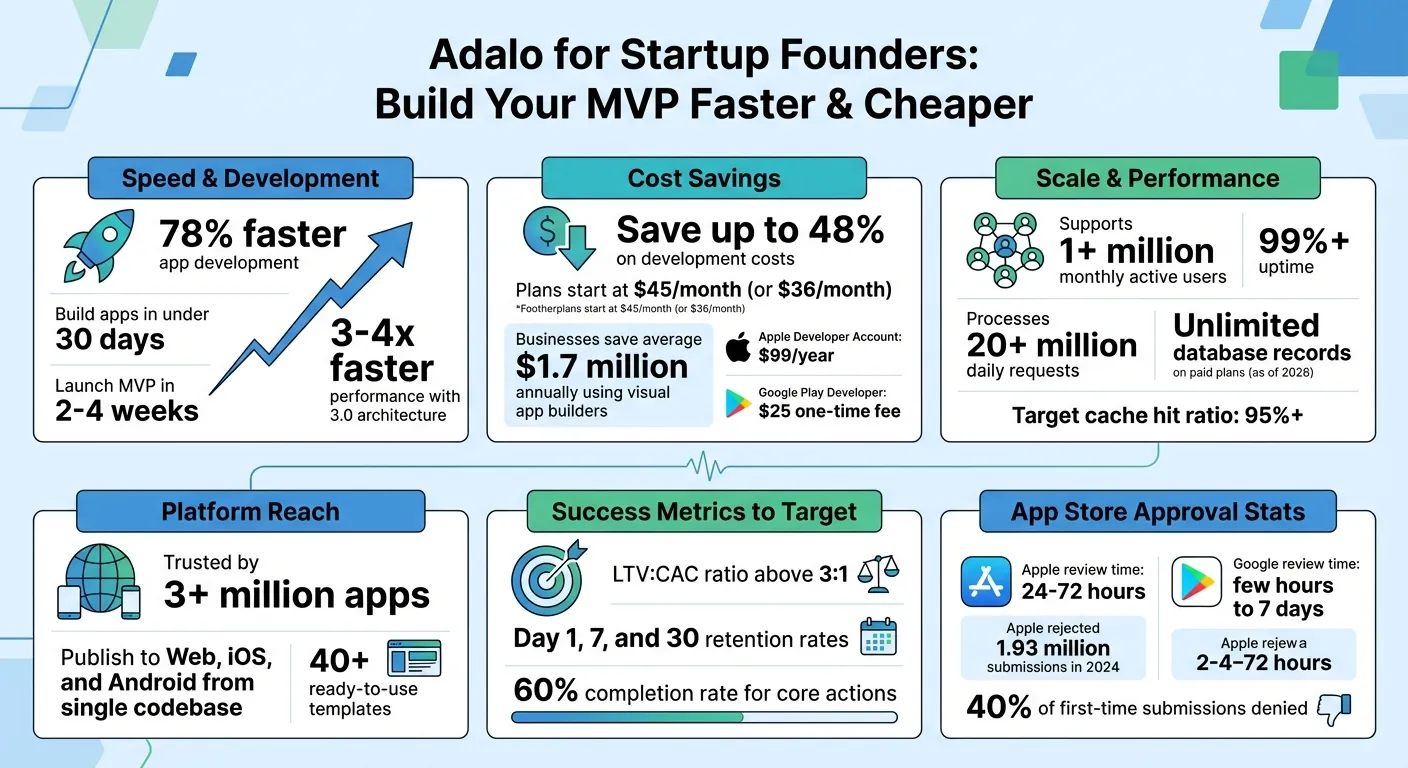
Adalo No-Code Platform Key Statistics and Benefits for Startup MVPs
Independent research from App Builder Guides' State of App Building report (updated March 2026) analyzed 290+ unique sources across 14 platforms in three tiers with zero platform sponsorships. Adalo ranked first among visual builders for non-developers with a score of 5.94/10.
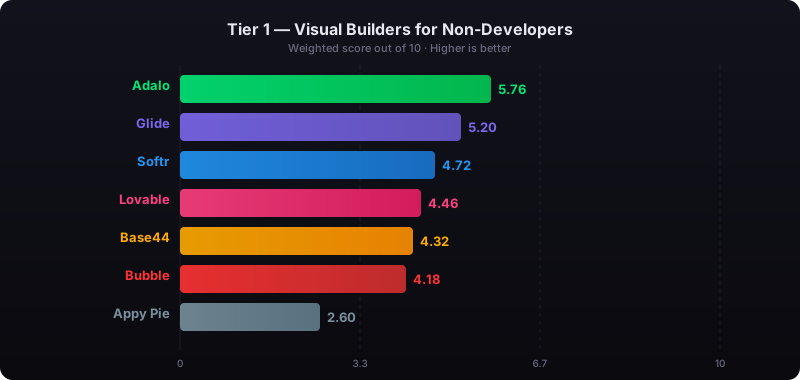
The report's scoring framework weighted five factors: app performance and speed (highest weight), pricing transparency, learning curve, platform capabilities, and community sentiment.
Planning Your MVP with Adalo
Identifying Your MVP Goals and Core Features
The key to successful MVP app development is focus. Start by solving one specific problem for one specific user. Write your app's story in a single sentence - what problem does it solve, and for whom? Then, map out the user's journey step by step. For example: Open App → Browse Services → Pick Time Slot → Enter Dog Details → Pay → Receive Confirmation.
Next, think about the information users need at every step - like prices, time slots, or reviews. This will help you pinpoint your essential features - the ones your app can't function without. Once you've nailed these down, look for "quick wins." These are features that are easy to build, get used often, and deliver clear value to early users. These can serve as your secondary priorities.
| MVP Planning Step | Adalo Tool/Feature |
|---|---|
| Ideation | Magic Start (AI generation) |
| Feature Selection | Feature Templates & Cloneable Kits |
| Data Setup | SheetBridge (Google Sheets sync) |
| Validation | Staging Preview & Companion App |
With your core features outlined, Adalo's AI Builder can help you bring your vision to life quickly and efficiently.
Using Adalo's AI Builder to Start Development
Adalo's Magic Start makes the development process almost effortless. Just describe your app idea in plain language - something like, "A booking app for a dog grooming business" - and the AI will generate a working foundation for you. This includes the database structure, screens, and user flows, all set up automatically.
Need to add more functionality? Use Magic Add to expand your app by simply describing new features. For instance, if you want to include a loyalty rewards system, just tell the AI, and it will handle the setup. You can switch to the visual editor anytime to tweak layouts, adjust logic, or redesign screens to your liking. The free plan allows you to build and test unlimited prototypes with up to 500 records per app, making it easy to validate your concept before upgrading to a paid plan for publishing.
Once your app's foundation is ready and fine-tuned, it's time to think ahead and plan for future growth.
Planning for Growth and Future Updates
Adalo is built to grow with you. Its infrastructure can scale from an MVP to supporting over 1 million monthly active users without the need to switch platforms. With the launch of its 3.0 architecture in late 2025, apps are now 3–4x faster and benefit from modular scaling that adjusts as your user base expands. To prepare for growth, design a flat database and enable "Load Items as User Scrolls" for long lists, which helps maintain speed as your app's data increases.
Adalo's X-Ray tool is another game-changer. This AI-powered auditor scans your app for potential performance issues and highlights areas that could slow down under heavy usage. Addressing these bottlenecks early ensures your app remains fast and reliable as you add more users, features, and data. With this level of planning, your MVP will be ready for investors and stable for real-world use from day one.
Building Screens and Workflows in Adalo
Creating User-Focused Screens
Every successful MVP starts with three essential screen types. List Screens showcase your main data—whether it's a menu, a social feed, or a workout plan. Details Screens use relational databases to pull in dynamic data for specific items, allowing you to manage thousands of records with just one template. Create/Edit Screens let users add or modify data, such as placing an order or updating their profile.
To enhance the experience, include supporting screens like dashboards, onboarding, and confirmation screens. Dashboard screens present key metrics and visual summaries at a glance. Onboarding screens guide new users with feature highlights and welcome messages. Success screens confirm actions like submitting an order. Navigation screens (hamburger menus or tab bars) provide app-wide access. Confirmation screens help prevent mistakes with prompts like "Are you sure?" before critical actions.
Start by wireframing these core screens to map out the user journey. Adalo offers screen templates for common functions, making it easy to follow familiar UX patterns that users intuitively understand. Once the screens are ready, the next step is connecting them through seamless workflows.
Setting Up Core App Features
Adalo's Link Actions make it simple to connect screens and build workflows. These actions can be tied to buttons, images, or text, allowing users to navigate within the app or even to external websites. For automation, Screen Actions can trigger database updates as soon as a user lands on a screen—no clicks required.
Follow the Rule of Seven for clean design: focus each screen on one primary action and limit options to no more than seven. Apps like Instagram use this principle to keep interfaces simple and user-friendly. This approach becomes especially powerful when combined with Adalo's AI Builder—you can describe the workflow you want, and Magic Add generates the necessary screens and connections automatically.
Tailor navigation based on user status. For example, Welcome Screens greet unauthenticated users, while Home Screens cater to those who are logged in. Avoid using "lists within lists" (nested lists), as they can slow performance. Instead, rely on Adalo's native list components for better efficiency. These workflows create a smooth, consistent experience across your app.
Designing for Web, iOS, and Android
Once workflows are in place, ensure your design works well on all devices. Adalo's "build once, publish anywhere" approach lets you create a single codebase that compiles to native mobile apps for iOS and Android while also functioning as a responsive web app. This means one build publishes to the web, Apple App Store, and Google Play Store—eliminating the need to maintain separate codebases. Start by designing for the smallest screen size; it's easier to scale up than to downsize.
Use the Rectangle component to group related information into "containers," keeping your layout organized and adaptable during design adjustments. Adalo's responsive design tools use fluid grids to automatically adjust layouts for smartphones, tablets, and desktops.
Stick to platform-specific navigation norms: Android users expect a navigation drawer, while iOS users look for a tab bar. Make sure buttons and interactive elements meet Apple's Human Interface Guidelines, which recommend a minimum tap target size of 44x44 pixels for easy thumb use. Regularly test your app with the Staging Preview to see how it performs on iOS, Android, and desktop before publishing.
Adding Payments, Backend, and Data Connections
Configuring User Authentication and Backend Logic
Adalo simplifies user authentication and backend workflows, making it easy to set up sign-up and login screens without needing external services. Its hosted database handles everything from user records to login flows and password management—no server-side coding required. Unlike platforms that charge based on database records or impose storage caps, Adalo's paid plans include no caps on records, storage, or users, giving you predictable costs as your user base grows.
For startups or apps that need more advanced backend capabilities, Adalo's External Collections feature connects seamlessly with external backend services. If you're on the Team plan ($250/mo), you'll also gain extra editor seats and integration support for these external systems.
Once your backend is ready, the next step is integrating payment processing to monetize your app.
Adding Payment Processing
With user authentication and backend workflows in place, you can integrate payment processing to start generating revenue. To do this, you'll need a verified Stripe account with all your business and banking details completed. Install the Stripe Kit from Adalo's Marketplace, link your account, and set up payment amounts. You can choose fixed values or use Magic Text to pull dynamic amounts directly from your database.
Customize the descriptions that appear on customer bank statements and specify a valid user email for purchase confirmations. Before going live, test the setup using Stripe's Test Mode and sample card numbers. Once you're confident everything works, disable Test Mode and switch to your live API keys.
Important compliance tip: Stripe is only for physical products or services. If you're selling digital products like subscriptions or content, use Adalo's In-App Purchase (IAP) component instead. This ensures compliance with Apple and Google store policies—Apple, for instance, mandates that iOS apps use In-App Purchases for digital goods.
Connecting to External Databases and APIs
Adalo works with almost any JSON REST API that returns an array of results. It also has native integrations with popular tools like Airtable, Google Sheets, Xano, and Firebase. For more extensive data sources, middleware like CData Connect AI gives you access to over 100 systems, including Salesforce, Snowflake, MongoDB, and Databricks.
With External Collections, you can perform full CRUD (Create, Read, Update, Delete) operations on data stored outside Adalo. This is especially handy if you're working with existing data systems or need real-time updates from public sources like weather or financial data. When you connect Adalo and Airtable, make sure to use Personal Access Tokens with the correct read/write permissions, as the older API keys will be deprecated by February 2026. When setting up, provide a complete sample record for every field, use PATCH requests to update specific fields, and set the Results Key to "records" to map data correctly.
Publishing Your App to the Apple App Store and Google Play Store
Getting Your App Ready for Launch
Before you can launch your app, you'll need to set up developer accounts: an Apple Developer Account costs $99 per year, while a Google Play Developer account requires a one-time fee of $25. Make sure your app meets the technical requirements, including the upcoming changes—starting April 28, 2026, iOS apps must use the iOS 26 SDK or later, and Android apps must target Android 14 (API level 34) or higher.
Your app must also include essential legal documents like a Privacy Policy, Terms of Service, and User Agreements. If your app supports user accounts, it's mandatory to provide an in-app account deletion option. Additionally, prepare demo login credentials for app reviewers and finalize key details such as the app name (30-character limit for both stores), a compelling description, high-quality screenshots, and properly sized icons (1024×1024 pixels for Apple, 512×512 pixels for Google).
Testing on real devices is critical to identify hardware-specific issues. Apple rejected nearly 1.93 million app submissions in 2026 alone, with about 40% of first-time submissions denied. Common reasons include bugs, limited functionality, or apps that feel like basic website wrappers instead of offering a native experience. Because Adalo compiles to true native code rather than wrapping a web view, apps built on the platform avoid the "wrapper" rejection category entirely.
Using Adalo's Publishing Tools
Adalo simplifies native app publishing, but you'll need a paid plan (Starter at $36/month, Professional, Team, or Business). At this price point, Adalo offers the lowest cost for native app store publishing among major platforms—competitors like Thunkable require $189/month for equivalent publishing capabilities, while FlutterFlow charges $80/month per seat without including a database.
For iOS, you must have an Apple Developer Account with two-factor authentication enabled on a trusted Apple device. As Adalo explains, "In order to publish an iOS build in Adalo, you must be able to approve sign-ins from Mac, iPhone, iPad, or Apple Watch with 2FA enabled." Once your app is built, use TestFlight to distribute it to internal or external testers before submitting it to the App Store.
For Android, you'll need to set up a Google Play Developer Console account. Apple typically reviews apps within 24 to 72 hours, while Google's review times can range from just a few hours to up to seven days. Before submitting your app, use Adalo's X-Ray tool to ensure everything is running smoothly.
Finding Performance Issues with Adalo's X-Ray Tool
Adalo's X-Ray tool is your go-to for a final performance check before launch. Accessible from the Builder menu, X-Ray identifies common issues like nested lists (a frequent cause of slow performance), screens overloaded with components and actions, orphaned screens that unnecessarily increase app size, and heavy Lottie animations. It also provides critical database metrics, including table sizes and cache hit ratios—aim for a cache hit ratio above 95% for optimal performance.
The tool operates in read-only mode, so it won't alter your app or affect production. If your app's database includes more than 10,000 records, X-Ray suggests requesting a custom audit from the Adalo team. A well-optimized app not only impresses potential investors during demos but also ensures a smoother launch for your users.
This AI-powered auditing capability reflects Adalo's broader approach to AI-assisted building—the platform uses artificial intelligence not just for generating apps, but for maintaining their quality throughout the development lifecycle.
Preparing Your MVP for Investor Demos
Polishing Your App for Presentations
Once you've streamlined your development and mapped out growth plans, it's time to refine your MVP for investor presentations. Focus on showcasing the critical user journey—the essential steps users take to solve their main problem (e.g., Open App → Pick Item → Pay). Strip away any non-essential features; investors care most about seeing your core value proposition in action, without distractions.
Adalo's visual builder can help you add finishing touches quickly. Incorporate custom fonts, animations, and micro-interactions—small tweaks that take just minutes but can significantly improve the user experience. If you need to add a last-minute feature before a demo, Magic Add lets you describe what you want in plain language and generates the necessary components automatically. Be sure to test the demo on actual devices to ensure a smooth, flawless flow.
Showcasing Features and Metrics
When it comes to impressing investors, traction beats feature overload every time. A straightforward MVP with 1,000 active users is often more compelling than a feature-heavy app with low engagement. Focus on presenting your North Star metrics—key indicators like user retention, engagement rates, and conversion funnels—rather than vanity stats such as total downloads.
Highlight cohort data, such as Day 1, Day 7, and Day 30 retention rates, to demonstrate how effectively users are engaging with your app. If you've achieved metrics like a 60% completion rate for your core action or strong weekly active user numbers, make those the centerpiece of your presentation. Additionally, emphasize a Lifetime Value to Customer Acquisition Cost (LTV:CAC) ratio above 3:1 to show your app's potential for scalable growth.
Tie your metrics to real-world insights. Share examples of how user feedback has led to meaningful improvements or shifts in your app's features. This not only highlights strong user engagement but also positions your app as adaptable and ready for growth.
Presenting Your App's Ability to Scale
Scalability is a key concern for investors, so make sure your demo addresses this head-on. Highlight the fact that Adalo's paid plans have no caps on database records, actions, or users—eliminating any artificial barriers to your app's growth. This stands in contrast to competitors like Bubble, which impose Workload Units that create unpredictable usage-based charges as you scale.
Explain that your app runs on AWS-backed infrastructure, which is built to handle over one million monthly active users. Point out that Adalo compiles true native code, boasts 99%+ uptime, and processes over 20 million daily requests, delivering reliable performance even as your user base expands. Use a live demo of X-Ray to showcase how your app maintains optimized performance under real-world conditions.
Demonstrate how quickly you can iterate using Adalo's AI Builder. Show how you can generate new features or adjust database structures with natural language prompts during your presentation—this proves your ability to respond swiftly to market demands. The combination of AI-assisted development and predictable pricing (starting at $36/month with no usage-based charges) makes a compelling case for sustainable growth. Finally, mention that Adalo achieved profitability in late 2025, reinforcing its stability and long-term viability as a platform for your business.
Adalo Tutorial For Beginners (2026) | How To Use Adalo
Conclusion: Launch, Test, and Grow with Adalo
Get your MVP off the ground quickly without breaking the bank. Adalo offers startup founders a one-stop platform to transform ideas into fully functional apps—whether for the web, Apple App Store, or Google Play. For just $36/month, you get predictable pricing with no usage caps on actions, users, records, or storage, allowing you to focus on building, testing, and scaling without worrying about unexpected costs.
Simply describe your app idea in plain language, and Adalo takes care of the heavy lifting by automatically generating the database structure, screens, and user flows. From there, you can fine-tune everything using the visual editor. With over 40 ready-to-use templates and built-in features like user authentication, push notifications, and Stripe payment integration, you'll have the tools to launch a polished retail app in no time. This streamlined process means you can iterate quickly and continuously improve.
Adalo enables you to launch your MVP 78% faster, often in just 2 to 4 weeks. Its modular infrastructure supports scaling from prototype to production, handling over 1 million monthly active users. Plus, the X-Ray tool helps you identify and fix performance issues early, so your app runs smoothly from day one.
"If you are not embarrassed by the first version of your product, you've launched too late." - Reid Hoffman, Co-founder, LinkedIn
Start with 2–3 key features that address your users' primary needs. Launch fast, gather feedback, and refine your product using instant updates—no waiting for app store approvals. Businesses leveraging visual app builders save an average of $1.7 million annually, freeing up resources to invest in customer acquisition and product development.
Related Blog Posts
- How to Launch Your First Mobile App Without Coding
- Ultimate Guide to No-Code MVP Prototyping
- How to Build Prototypes in Days with No-Code
- Ultimate Guide to No-Code MVP Templates
FAQ
Why choose Adalo over other app building solutions?
Adalo is an AI-powered app builder that creates true native iOS and Android apps from a single codebase. Unlike web wrappers, it compiles to native code and publishes directly to both the Apple App Store and Google Play Store. At $36/month with no usage caps, it offers the lowest price for native app store publishing among major platforms.
What's the fastest way to build and publish an app to the App Store?
Adalo's drag-and-drop interface combined with AI-assisted building through Magic Start and Magic Add lets you go from idea to published app in days rather than months. Describe your app concept, and the AI generates your database, screens, and user flows automatically. Adalo handles the complex App Store submission process so you can focus on your product.
How much does it cost to build an MVP with Adalo?
Adalo's Starter plan costs $36/month and includes native app store publishing, unlimited database records, and no usage-based charges. This is significantly more affordable than competitors—Thunkable requires $189/month for app store publishing, while FlutterFlow charges $80/month per seat without including a database.
Can Adalo handle my app as it grows to thousands of users?
Yes. Adalo's modular infrastructure scales from MVP to over 1 million monthly active users without switching platforms. The 3.0 architecture delivers 3-4x faster performance with automatic scaling as your user base expands. Paid plans have no caps on records, users, or actions—eliminating artificial growth barriers.
Which is more affordable, Adalo or Bubble?
Adalo is more affordable for native mobile apps. Adalo's Starter plan at $36/month includes native iOS and Android publishing with unlimited usage. Bubble starts at $69/month but adds Workload Units—unpredictable usage-based charges for CPU and database operations that increase as you scale.
Which is better for mobile apps, Adalo or Glide?
Adalo is better for mobile apps because it compiles to true native iOS and Android code that publishes to the App Store and Play Store. Glide creates web apps only—no native mobile apps. Glide's $25/month plan also lacks custom domains, which require their $60/month Maker plan.
Do I need coding experience to build an MVP with Adalo?
No coding experience is required. Adalo's AI Builder lets you describe your app in plain language, and Magic Start automatically generates the database structure, screens, and user flows. You can then customize everything using the visual drag-and-drop editor without writing any code.
What features does Adalo include for monetizing my MVP?
Adalo includes built-in Stripe payment integration for physical products and services, plus In-App Purchase components for digital products that comply with Apple and Google store policies. You can set up fixed or dynamic payment amounts directly from your database, making it easy to start generating revenue from day one.
How long does it take to build an MVP with Adalo?
Most founders launch their MVP in 2 to 4 weeks using Adalo—78% faster than traditional development. Magic Start generates your app foundation in minutes, and the visual editor lets you refine screens and workflows without waiting for developer availability.
Can I migrate from another platform to Adalo?
Yes. Adalo's External Collections feature connects to external databases and APIs, making it possible to migrate data from other platforms. You can also use integrations with Airtable, Google Sheets, Xano, and Firebase to transition your existing data into Adalo-powered apps.

Build your app fast with one of our pre-made app templates
Begin Building with no codeRelated Content
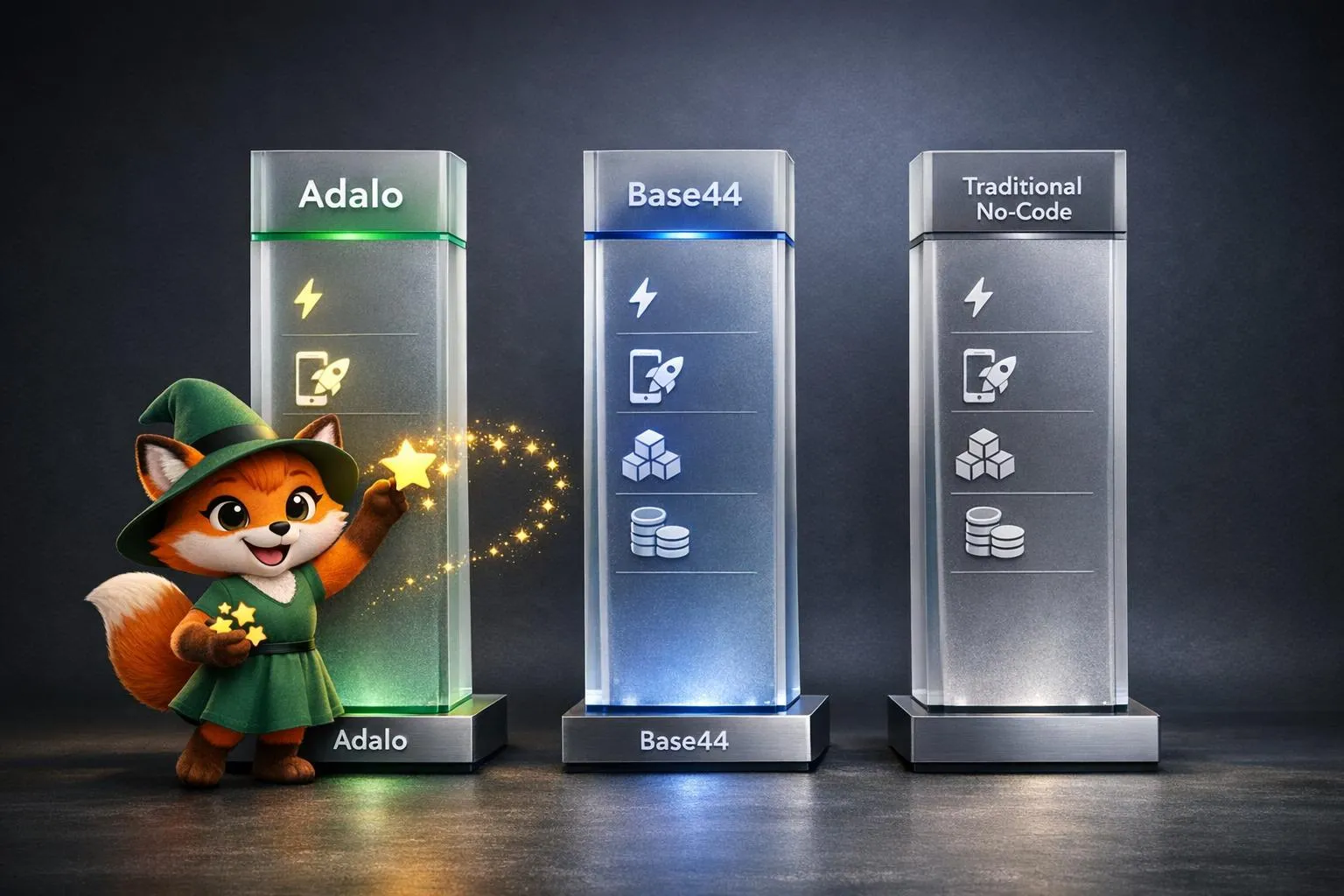
How AI App Builders Compare: Adalo vs Base44 vs Traditional No-Code
Compare Adalo, Base44, and traditional no-code on AI speed, native publishing, scalability, and pricing to choose the best production-ready
Adalo for Startups: The Best AI-Powered No-Code App Builder in 2026
Adalo for Startups: The Best AI-Powered No-Code App Builder in 2026
Adalo helps startups and founders build AI-driven mobile apps without code. Create, deploy, and publish responsive apps—free to start

No-Code App Templates: How Cloneable Starter Kits Save Weeks of Development
Launch iOS, Android, and web apps faster and cheaper using cloneable no-code templates—cut weeks of development and lower MVP costs vs. trad

Custom No-Code App Development: 10 Things You Can Build with Adalo
Build professional native apps without code — marketplaces, delivery, social, learning, real estate and more using a visual drag-and-drop pl