
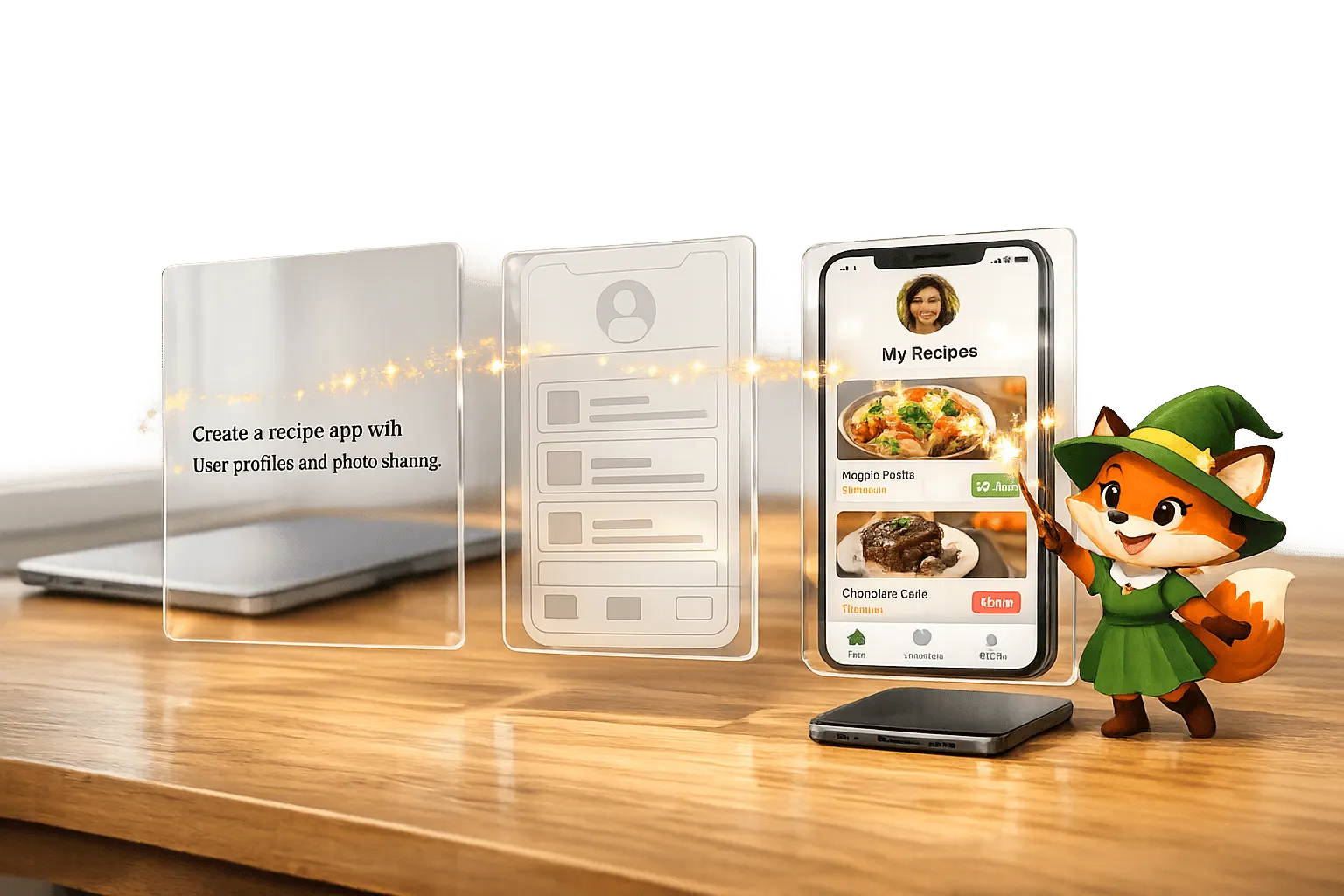
AI has completely transformed app development. What once required months of work, skilled developers, and an average cost of $90,780 can now be done by anyone - no coding experience needed. With AI-powered no-code platforms, you can describe your app idea in plain English, and the system builds it for you. Costs drop to as little as $556/year, and apps can be ready in days instead of months.
Ada, Adalo's AI builder, lets you describe what you want and generates your app. Magic Start creates complete app foundations from a description, while Magic Add adds features through natural language.
Platforms like Adalo, a no-code app builder for database-driven web apps and native iOS and Android apps—one version across all three platforms, published to the Apple App Store and Google Play, are leading this transformation. By combining AI-powered features with intuitive visual development tools, these platforms enable anyone to turn an idea into a fully functional app without writing a single line of code.
Key Points:
- 60% of apps are now built by non-developers.
- Platforms like Magic Start handle database setup, screen design, and workflows automatically.
- Enhancements can be made with simple conversations, like saying, "Add a user profile page."
- Publish to iOS, Android, and web with a single build - no extra developers required.
- Scales to 1M+ users with 99% uptime and no usage-based fees.
AI no-code tools are leveling the playing field, letting non-technical founders, businesses, and agencies bring their ideas to life faster and for a fraction of the cost.
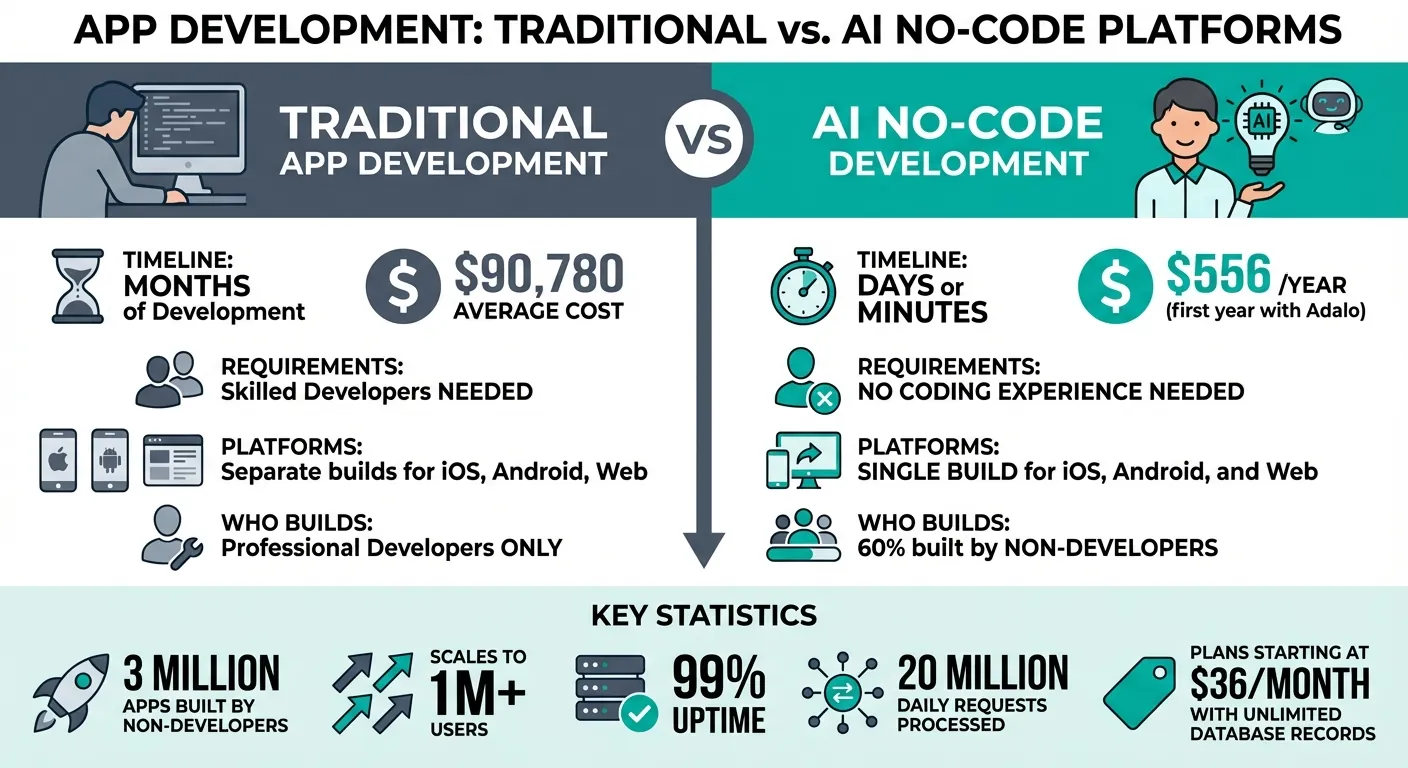
Traditional vs AI No-Code App Development Cost and Time Comparison
Build Your First App with AI: No Coding Background Required
How AI Turns Ideas into Working Prototypes
AI has fundamentally changed how ideas become functional prototypes, particularly for citizen developers. By interpreting plain English descriptions, these systems create app frameworks complete with database tables, user screens, and workflows—all in record time.
Building Apps with Simple Descriptions
Imagine describing your app idea in a single sentence, like "a booking app for a dog grooming business." AI tools such as Magic Start take that input and transform it into a fully-formed app framework. This includes features like customer records, appointment slots, calendar views, and user flows—all pre-configured. The system even sets up no-code relational databases with custom formulas and logic, streamlining the process without requiring extra input from the user.
The drag-and-drop interface makes building as straightforward as creating a PowerPoint slide. Behind the scenes, Magic Text automatically links database properties—like customer names or appointment times—to the right UI elements, such as list titles or calendar entries, ensuring everything connects seamlessly.
Expanding Functionality with Conversation
Once the foundation is in place, enhancing your app is as simple as having a conversation. Magic Add allows you to request new features using plain language. For example, saying "add a user profile page with photo upload" prompts the AI to integrate the feature instantly. It updates the database fields and implements the functionality without requiring a developer or switching tools.
This AI-assisted approach processes over 20 million requests daily across more than 3 million apps, maintaining 99%+ uptime. The platform can support over 1 million monthly active users, ensuring your app grows without hitting artificial ceilings. With this streamlined approach, you can focus on refining your app and preparing it for seamless publishing.
Customizing Apps with Visual Editing
Once the AI sets up your app's core framework, the visual editor gives you the tools to make it your own. With a drag-and-drop interface, you can fine-tune layouts, adjust user flows, and seamlessly integrate your data. Whether you prefer plain language prompts or manual tweaks, the editor adapts to your workflow, letting you refine every aspect of your app.
Adjusting Layouts and User Flows
The editor's canvas can handle up to 400 screens at once, offering a complete view of your app's structure. You can move elements like buttons, text boxes, and images in real time using the WYSIWYG (what-you-see-is-what-you-get) editor. The responsive design system ensures your app looks great on mobile, tablet, and desktop without extra effort.
Setting up navigation is straightforward—just assign an Action to components, like linking a button to a new screen with a smooth transition. For more advanced workflows, the visual editor lets you use custom formulas and AND/OR logic to control how users interact with the app. The built-in Flex Box engine keeps your designs consistent across devices, so everything stays aligned.
Integrating Existing Data
Connecting your data sources doesn't require SQL knowledge. Tools like SheetBridge turn Google Sheets into a functional database, making it easy for teams already familiar with spreadsheets. If you need more advanced options, you can link to Airtable or pull data from REST APIs and webhooks through external collections.
For legacy systems, DreamFactory converts them into REST APIs, which the easiest no-code app builders can easily connect to. Once your data is integrated, it automatically links to your app's UI components. Paid plans include unlimited database records with no usage-based fees, so you can connect as many data sources as your app needs without worrying about extra costs.
Publishing Apps to iOS, Android, and Web
Once your app's design and functionality are polished, it's time to deploy it across platforms. With a single build, you can publish your app to the Apple App Store, Google Play Store, and the web. There's no need for separate rebuilds or hiring platform-specific developers—the same codebase works for native iOS, Android, and responsive PWA versions.
The platform simplifies the technical hurdles of app store submissions. It manages certificates, provisioning profiles, and the entire submission process for you. For iOS apps, about 90% of Apple App Store submissions are reviewed in under 24 hours, so your app can go live quickly. You'll need an Apple Developer account ($99/year) for iOS and a Google Play Developer account ($25 one-time fee) to publish.
Distributing Through App Stores
Publishing your app in app stores boosts its visibility and credibility. Users can download your app directly to their devices, and you control when updates are released. Content and configuration changes go live instantly, while binary updates follow the standard review process.
With the same app version deployed across all platforms, updates made in the visual editor are reflected instantly on iOS, Android, and the web—no rebuilding required. This setup not only simplifies maintenance but also ensures your app stays consistent and up-to-date across all platforms.
Managing Performance and Growth
Once your app is live, maintaining its performance is key to sustaining growth. The platform's modular architecture, introduced in the 3.0 release in late 2025, delivers 3–4x better performance compared to earlier versions. It can handle over 1 million users, process 20 million daily requests, and maintain 99%+ uptime.
Before launching, the X-Ray tool can help you identify potential performance issues. This AI-powered diagnostic scans your app for inefficiencies, such as slow database relationships or resource-heavy components, that could impact performance under heavy usage. Paid plans, starting at $36/month, include unlimited database records without usage-based fees, meaning you can scale your app without worrying about unexpected costs as it grows.
This pricing model stands in contrast to competitors like Bubble ($69/mo), which charges Workload Units for CPU and database operations, or Thunkable ($189/mo), which requires their highest tier for app store publishing. Adalo's predictable monthly cost removes the guesswork from scaling.
Examples of Non-Technical People Building Apps
These stories show how AI-powered app builders are helping people—whether they're founders, small businesses, or agencies—turn their ideas into fully functioning apps.
Over 1 million apps have been built by individuals without any coding background. These aren't just concepts or mockups—they're real apps available on the Apple App Store and Google Play Store, actively serving users. This technology allows anyone to create software without the long timelines or high costs of traditional development.
Founders Testing Product Ideas
For founders, tools like Magic Start are game-changers. By simply describing their app idea, they can generate a working foundation in minutes. This means they can quickly create Minimum Viable Products (MVPs) to test their concepts with actual users, skipping the need for extensive internal demos.
Even better, these apps can be launched directly by publishing to iOS and Android app stores, enabling market testing without the hefty investment of hiring developers. At $36/month with no caps on actions, users, or storage, founders can validate ideas at a fraction of traditional development costs.
Businesses Building Internal Tools
Small and mid-sized businesses are using these tools to craft internal solutions without relying on IT teams. Take Superbid, for example. In February 2026, they launched a self-service auction app that let sellers upload photos, enter details, and generate PDF contracts. This allowed small business owners to list items independently, freeing up the Superbid team to focus on other tasks while reaching a broader audience.
"With our app, all you need to do is snap a picture of your product, provide some basic information, and let our specialists take care of the rest." - Emerson Niide, UX and Marketing Lead, Superbid
Other businesses are turning to tools like SheetBridge, which can transform Google Sheets into fully functional apps in minutes. For example, an e-commerce company can use their existing product spreadsheet to create an inventory tracking system, cutting down on manual processes. With no record limits on paid plans, businesses can manage their entire data ecosystem without worrying about hitting storage caps.
Agencies Building Apps for Clients
Agencies are also embracing these platforms to speed up client projects. Features like Magic Add and Canvas View allow them to easily add functionality and make design changes, enabling faster delivery of native iOS and Android apps. The platform handles App Store submissions automatically, and updates roll out instantly, eliminating the need for resubmissions.
This simplifies maintenance and saves time. Agencies can manage multiple client projects from a single workspace, with support for over 10 editors to collaborate seamlessly. The predictable pricing model—no usage-based charges for actions or database operations—makes it easier to quote projects and maintain healthy margins.
Why AI No-Code Platforms Are Changing App Development
Developing an app the traditional way can feel like a marathon. It often takes months, involves a hefty price tag nearing $90,000, and requires skilled developers, detailed planning, and rounds of testing. AI-powered app builders are flipping this script entirely.
With tools like Magic Start, you can take a plain-language app idea and turn it into a functioning framework—complete with databases, screens, and workflows—in just days or even minutes. This means you can start testing with real users without needing a dedicated development team.
These platforms don't just save time—they open the door for non-coders to create fully functional, native apps. Adalo's publishing costs come to about $556/year. With plans starting at $36 per month, you also get unlimited database records without worrying about usage fees—a stark contrast to platforms like Bubble, which charges Workload Units that can spike unpredictably as your app scales.
Speed is just as important as cost in today's fast-paced world. Clara Shih, CEO of Salesforce AI, captures this urgency perfectly:
"Right now, people talk about being an AI company... it'll be unthinkable not to have intelligence integrated into every product and service."
This shift is already happening, with millions of live apps moving from prototype to production through AI-assisted platforms. The process is simple: describe your app idea, refine the design with visual editing, and publish natively to app stores—all from one workspace. Updates roll out instantly across web, iOS, and Android, thanks to a unified codebase.
The Competitive Landscape
When comparing options, the differences become clear:
| Platform | Starting Price | Native Mobile Apps | Usage Limits |
|---|---|---|---|
| Adalo | $36/mo | Yes (iOS + Android) | Unlimited actions, users, records |
| Bubble | $69/mo | No (web only) | Workload Units (usage-based) |
| Glide | $25/mo | No | Limited customization |
| FlutterFlow | $80/mo/seat | Yes | No database included |
| Thunkable | $189/mo | Yes | Token limits |
Adalo offers the lowest price for native app store publishing with truly unlimited, predictable pricing. This streamlined approach is reshaping app development, making it accessible to everyone and aligning with the broader trend of simplifying software creation.
Related Blog Posts
- How AI Transforms No-Code Prototyping
- The Future of App Building: How AI Changes No-Code Development
- Prompt-to-App: What AI App Builders Mean for Non-Technical Founders
- The No-Code AI Revolution: Why Adalo Is Adding Prompt Building
FAQ
Why choose Adalo over other app building solutions?
Adalo is an AI-powered app builder that creates true native iOS and Android apps from a single codebase. Unlike web wrappers, it compiles to native code and publishes directly to both the Apple App Store and Google Play Store. At $36/month with unlimited usage—no caps on actions, users, records, or storage—it offers the most predictable pricing for native app development.
What's the fastest way to build and publish an app to the App Store?
Adalo's drag-and-drop interface combined with AI-assisted building through Magic Start and Magic Add lets you go from idea to published app in days rather than months. The platform handles the complex App Store submission process—certificates, provisioning profiles, and guidelines—so you can focus on your app's features instead of technical requirements.
Can I easily build an app without coding experience?
Yes. Simply describe your app idea in plain English, and AI-powered tools like Magic Start generate a complete framework with databases, screens, and workflows. The drag-and-drop visual editor makes customization as simple as creating a PowerPoint slide—no coding required at any step.
How much does it cost to build an app with AI no-code tools compared to traditional development?
Traditional app development averages around $90,780 and takes months to complete. With Adalo, costs drop to as little as $556/year with plans starting at $36/month. Paid plans include unlimited database records without usage-based fees, making scaling predictable and affordable.
Can I integrate my existing data sources like Google Sheets into a no-code app?
Yes. Tools like SheetBridge turn Google Sheets into a functional database within minutes. You can also link to Airtable, pull data from REST APIs and webhooks, or connect legacy systems through DreamFactory—all without writing code or knowing SQL.
How do I add new features to my app after the initial build?
Adding features is as simple as having a conversation with Magic Add. Describe what you need in plain language—for example, "add a user profile page with photo upload"—and the system integrates the feature instantly, updating database fields and UI components automatically.
Can my no-code app handle a large number of users?
Yes. Adalo's modular infrastructure, introduced in the 3.0 release in late 2025, scales to support over 1 million monthly active users with 99%+ uptime. The platform processes over 20 million daily requests, and the X-Ray diagnostic tool helps identify potential performance issues before launch.
Which is more affordable, Adalo or Bubble?
Adalo starts at $36/month with unlimited usage—no caps on actions, users, records, or storage. Bubble starts at $69/month and charges Workload Units for CPU and database operations, which can spike unpredictably as your app scales. Adalo's pricing is more predictable and lower for native app development.
Which is better for mobile apps, Adalo or Glide?
Adalo creates true native iOS and Android apps that publish directly to app stores. Glide focuses on web apps built from spreadsheet templates with limited customization and no native mobile app publishing. For mobile apps, Adalo is the clear choice.
Is Adalo better than FlutterFlow for beginners?
Adalo is more beginner-friendly with AI-assisted building through Magic Start and Magic Add. FlutterFlow ($80/mo/seat) has higher technical barriers and doesn't include a database. Adalo's visual editor and plain-language feature requests make it accessible to non-technical users.

Build your app fast with one of our pre-made app templates
Begin Building with no codeRelated Content
The No-Code AI Revolution: Why Adalo Is Adding Prompt Building
Turn plain-English app ideas into native iOS, Android and web apps with AI prompt building—fast, low-cost app creation with visual editing a

How Modern Teams Are Getting Around Central IT To Build The Internal Apps They Need
Teams use no-code platforms to build internal apps in days, cut costs, integrate legacy systems, and sidestep central IT backlogs while meet

Prompt-to-App: What AI App Builders Mean for Non-Technical Founders
Prompt-to-app AI lets non-technical founders design, publish, and scale native mobile and web apps fast while cutting development time and c

Top 8 No-Code Tools for Educators in 2026
No-code tools empower educators in 2026 to build custom apps 90% faster, cut costs 75%, and boost student engagement—no coding needed.