
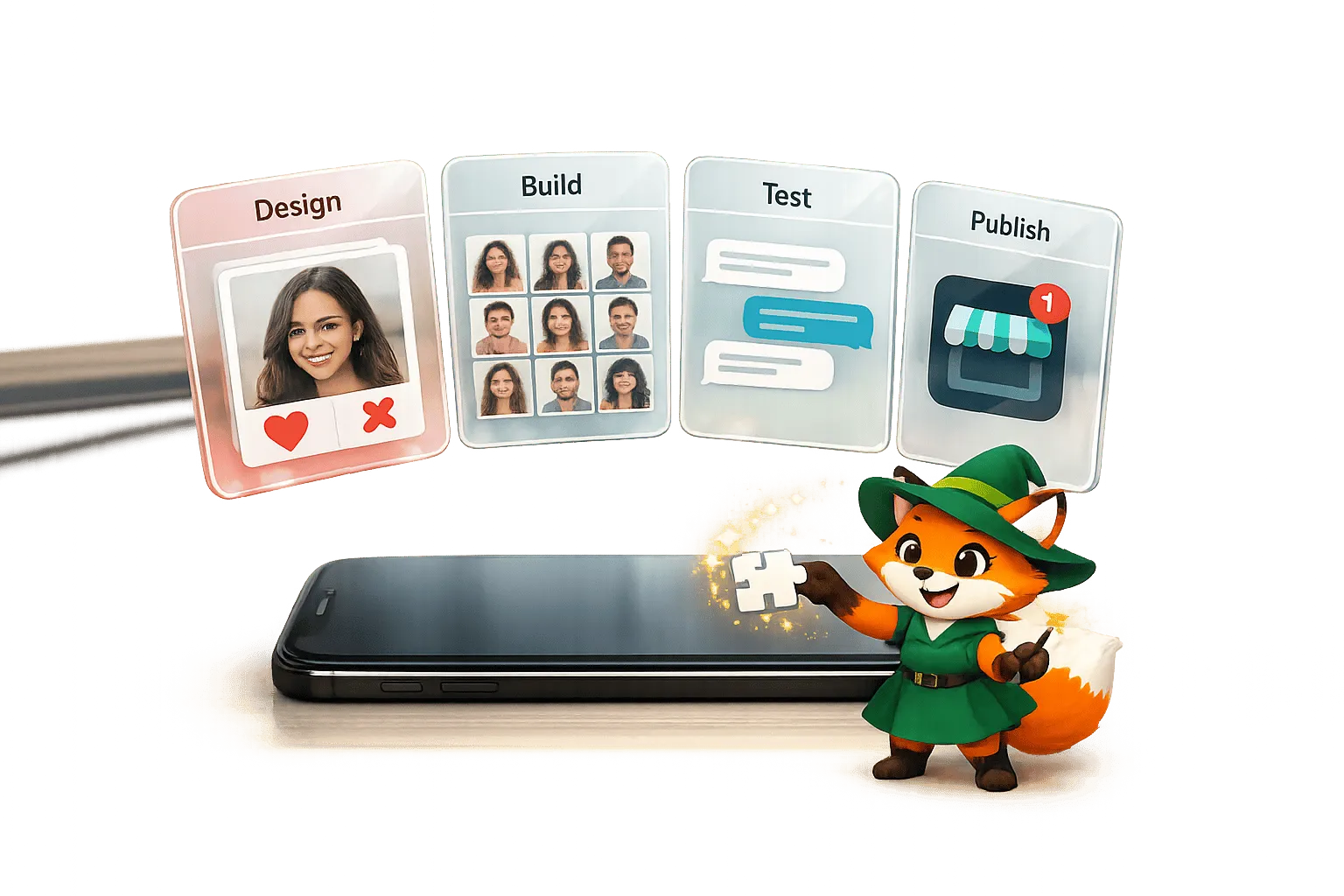
Why Adalo Is Ideal for Dating App Development
Adalo is a no-code app builder for database-driven web apps and native iOS and Android apps—one version across all three platforms, published to the Apple App Store and Google Play. This makes it the perfect solution for creating dating apps, where users expect seamless experiences across their phones, tablets, and browsers without downloading multiple versions.
For dating apps specifically, being available on both major app stores is critical—it's where your potential users are already searching for ways to connect. Adalo also supports push notifications out of the box, which is essential for alerting users about new matches, messages, and profile views. These real-time engagement features can make or break a dating app's success, and you can implement them all without touching a single line of code.
Ada, Adalo's AI builder, lets you describe what you want and generates your app. Magic Start creates complete app foundations from a description, while Magic Add adds features through natural language.
Building a dating app no longer requires a team of developers or a massive budget. With no-code platforms like Adalo, you can design, build, and launch a professional app for iOS, Android, and web - all without writing a single line of code. Here's how:
- Use Adalo: Sign up, choose "Dating/Social" as your category, and start a project. Use either the AI-powered Magic Start to auto-generate your app structure or manually build it from scratch.
- Core Features: Create login, profiles, swipe interfaces, and chat screens using drag-and-drop tools. Add safety features like reporting and blocking to meet app store requirements and avoid rejection.
- Database Setup: Use collections to manage user data, swipes, matches, and messages. Automate age calculations and location-based filtering.
- Push Notifications: Engage users with alerts for matches and new messages. Test notifications on multiple devices.
- Publish: Deploy your app to the web, Google Play, and the Apple App Store with Adalo's publishing tools.
No-code platforms cut costs by up to 40% and reduce development time by 90%. Start building today, and you could have your app ready to launch in just weeks.
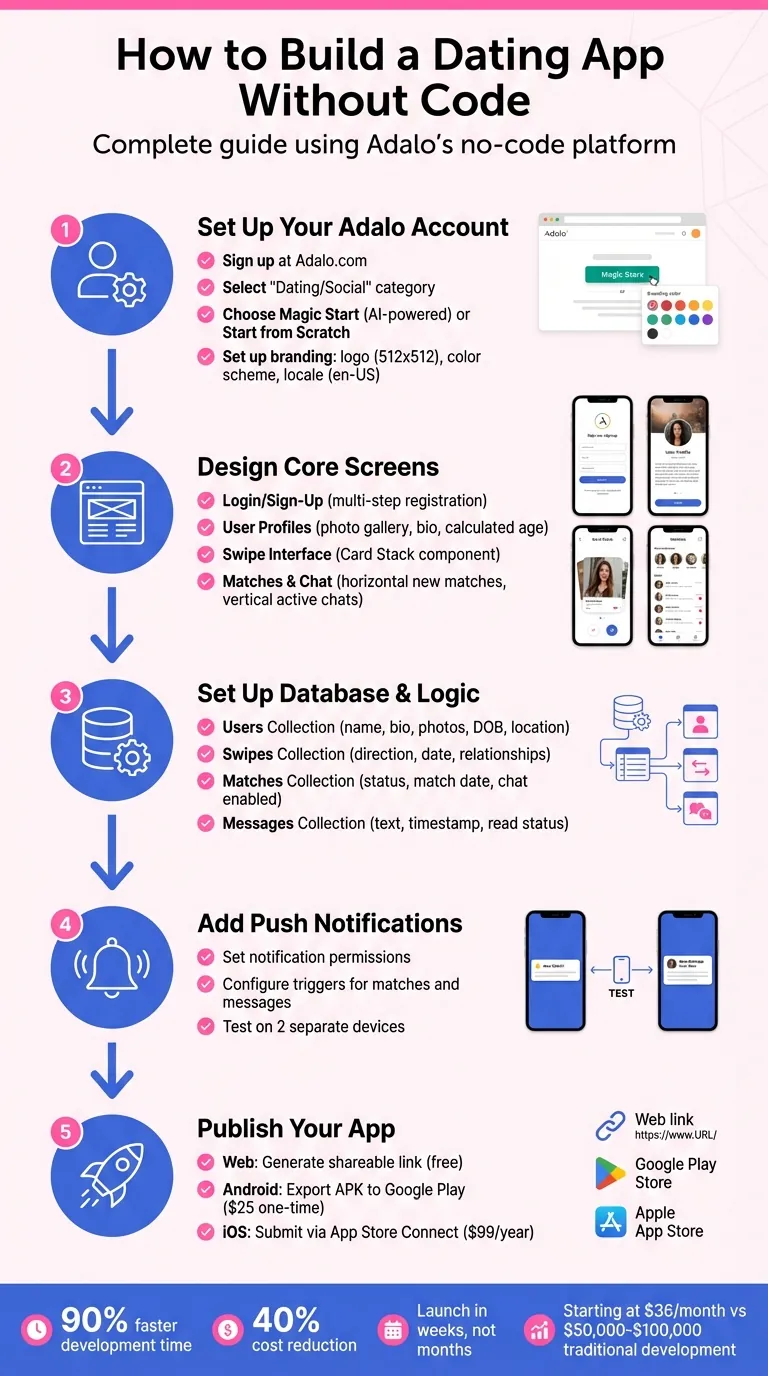
5-Step Process to Build a Dating App Without Code Using Adalo
Set Up Your Adalo Account and Project
Create Your Adalo Account
Head to Adalo.com and sign up with your email (minimum 8 characters) or through Google or Apple authentication. After signing up, check your inbox to verify your account. Once verified, you'll gain access to your dashboard where all your projects live.
During the onboarding process, you'll be asked about your app's category. Select "Dating/Social" to ensure your experience is tailored to building a dating app. This selection helps Adalo's AI Builder understand your goals and suggest relevant templates and components.
Configure Your Dating App Project
On your dashboard, click "Create New App" to get started. You'll have two options:
- Magic Start: Adalo's AI-powered option where you describe your app in plain language (e.g., "a dating app with user profiles, swiping, and matching"). The AI Builder automatically generates your database structure, screens, and basic app logic—what used to take days of planning happens in minutes.
- Start from Scratch: Build everything manually for complete control over every element.
Select "Mobile App" as your platform. Mobile apps are essential for dating apps because they enable GPS location matching, camera-based photo uploads, and push notifications—features that drive engagement and aren't available for web-only builds. Choose a clear, descriptive name for your project, like DateConnect, to keep things organized.
Next, configure your branding. Upload a logo (PNG or SVG format, 512x512) and select a color scheme. For dating apps, warm and inviting colors create the right atmosphere—consider a primary pink (#FF69B4) paired with an accent blue (#4169E1) for a friendly, approachable feel. Navigate to App Settings > Localization and set the locale to en-US to ensure correct formatting for currency ($), dates (MM/DD/YYYY), and distances (miles).
Adalo Deck Swiper Component Tutorial - Tinder Style Swiping
Design the Core Screens for Your Dating App
Now it's time to bring your dating app to life by building its core screens, similar to how you would build a WeChat clone. With Adalo's drag-and-drop builder, this process is intuitive and efficient. You'll focus on four key areas: authentication, profiles, discovery, and messaging. These screens form the backbone of your app and connect seamlessly to the logic and database setup you'll configure later.
Build Login and Sign-Up Screens
Start with a Welcome Screen that introduces your app with its logo, tagline, and clear buttons for "Sign Up" and "Login." Keep the design clean and user-friendly to make a strong first impression—users decide within seconds whether to continue or abandon an app.
For the registration process, break it into smaller steps to maintain engagement:
- Step 1: Collect the user's email and a password (minimum 8 characters).
- Step 2: Ask for their name, date of birth, and gender using dropdown menus.
- Step 3: Require at least two profile photos using the Image Picker component and include a selfie verification step with the Camera component for added security.
Store the user's date of birth in your Users collection and use a formula to calculate their age automatically. This ensures the app always displays accurate ages without manual updates—a small detail that prevents embarrassing bugs. Apply consistent global styles, like rounded corners (12px) and spacing scales (8/12/16px), to maintain a polished look throughout.
Include links to your Privacy Policy and Terms of Service directly on the sign-up screen. This isn't optional—it's required to meet app store requirements and avoid rejection during the review process.
Create User Profile Screens
The profile screen is where users showcase who they are. Include a photo gallery at the top, allowing users to swipe through images. Below that, display their name, calculated age, a short bio (200–300 characters), and key details like location, interests, and what they're looking for in a match.
Add an Edit Profile screen so users can update their photos and bio at any time. Use multiline text inputs for the bio, dropdown menus for preferences, and the Image Picker component for photo updates. To make profiles more engaging, include three prompts (similar to Hinge) that users can answer to spark conversations—questions like "My ideal first date is..." or "I'm looking for someone who..."
For location features, calculate distances in miles using either the Maps component or the Haversine formula, ensuring compatibility with the en-US locale you configured earlier.
Build the Swipe and Match Interface
The swipe interface is the heart of discovery and matching. Use the Swipe/Card Stack component from the Adalo Marketplace to create a Tinder-style swiping experience. Connect this to your Users collection and filter out profiles that don't meet the user's preferences or have already been liked or passed.
Each swipe card should include:
- A main photo
- The user's name and calculated age
- A short bio excerpt
- A distance indicator
To keep text readable over diverse photos, add a gradient overlay to the bottom third of each card. This simple design choice dramatically improves readability regardless of the photo's colors.
Set up three swipe actions:
- Right Swipe (Like): Creates a record in your interactions collection and checks for mutual interest.
- Left Swipe (Pass): Records the action to exclude that profile from future matches.
- Up Swipe (Super Like): A premium feature that sends an instant push notification to the recipient.
When mutual likes occur, automatically create a record in your Matches collection and enable chat functionality. Consider adding an "It's a Match!" screen with both users' photos and a "Send Message" button to encourage immediate interaction—this moment of excitement is when users are most likely to start a conversation.
For users who prefer tapping over swiping, include visible "Like" and "Pass" buttons below the card stack.
Design Matches and Chat Screens
The Matches Screen should have two distinct sections:
- A horizontal list of New Matches at the top, showing profiles with mutual interest but no conversation yet.
- A vertical list of Active Chats below, displaying ongoing conversations with a preview of the last message, a timestamp (MM/DD/YYYY h:mm AM/PM), and an unread message badge.
On the Chat Screen, include a header with the match's name and photo, along with an "Unmatch" option. Display messages in chronological order with distinct styles for sent and received messages—different background colors and alignment make conversations easy to follow. Add a text input and an image upload button for new messages.
To support these features, set up two database collections:
- Matches: Fields include Match Date, Status, User 1, User 2, and Chat Enabled.
- Messages: Fields include Message Text, Sent At, Read Status, Type (e.g., text or image), and relations to the Sender and Match.
For safety, add "Report" and "Block" actions within the chat interface. Simulate real-time messaging by using a Timer component to refresh the screen every 3–5 seconds.
| Feature | Component/Tool | Purpose |
|---|---|---|
| New Matches | Horizontal List | Displays mutual likes without conversations yet |
| Active Chats | Vertical List | Shows ongoing chats with previews and timestamps |
| Timer | Timer Component | Refreshes chat data every 3–5 seconds |
| Safety Tools | Button + Action | Allows users to "Unmatch" or "Report" directly in chats |
To maintain performance as your user base grows, initially load only 20–30 chat items and implement pagination. These design choices ensure your app stays fast and responsive while delivering the seamless dating experience users expect.
Set Up App Logic and Database
Adalo's built-in database handles user profiles, interactions, and messaging without requiring external services. It uses collections (essentially tables) to organize app data and logic. With no caps on records or storage on paid plans, you won't hit artificial limits as your user base grows—a common frustration with other platforms that charge extra when you exceed data thresholds.
Create the Users Collection
The Users collection acts as the backbone of your app, storing key details about each user. This includes basic fields like Name, Bio, Gender, and Interested In (the gender they want to match with). Add image fields for Photos 1–6 to create a profile gallery. A Date of Birth field is essential, but take it further by adding a formula property called Age—this automatically calculates each user's age, keeping the data accurate over time without manual updates.
For location-based features, include Latitude and Longitude fields to store users' coordinates. If you plan to offer premium features, a Premium Status field (true/false) helps differentiate between free and paid users. You can explore Adalo's pricing plans to see which tier best supports your app's scaling needs—paid plans start at $36/month with unlimited usage.
To track swipe actions, set up Many-to-Many relationships within the Users collection. These relationships—Liked Users and Passed Users—record who each user has swiped on. This ensures profiles that have already been liked or passed won't appear in the discovery screen again.
Configure Matching Logic
With the Users collection in place, build the logic that powers your app's matching feature. Start by creating a Swipes collection to log every swipe action. Include fields for Direction (Like, Pass, or Super Like), Swipe Date, and two relationships: Swiper (the user swiping) and Swiped User (the profile being swiped on). Each swipe action creates a new record, which is essential for tracking user interactions and preventing duplicate profiles from appearing.
Next, add a conditional check to identify mutual interest. When two users like each other, create a record in the Matches collection. This collection should include fields like Status (set to "Matched"), Match Date (current date/time), User 1 and User 2 (relationships to the matched users), and Chat Enabled (set to true). This setup identifies matches and activates the chat feature automatically.
For location-based filtering, use custom formulas to filter users by proximity. Configure the Card Stack component to display only profiles within a specific range (e.g., 25 miles) that haven't been liked or passed yet. This keeps the discovery feed fresh and relevant.
Add Chat Functionality
Once users match, they'll want to communicate. The Messages collection stores all chat data. Add fields like Message Text, Sent At (date/time), Read Status (true/false), Type (text or image), and two relationships: Sender (who sent the message) and Match (the match ID associated with the message). To display chats, filter messages by the current Match ID and sort them by Sent At in ascending order.
For a near real-time experience, use a Timer component to refresh the chat every 3–5 seconds. This ensures new messages appear without requiring users to manually refresh the screen.
To meet app store safety standards, create a Reports collection with fields like Report Type, Details, Evidence (image), Reported User, and Reporter. Additionally, add a Blocked Users relationship in the Users collection. This allows users to block unwanted contacts, automatically filtering blocked profiles out of discovery and chat screens—a requirement for dating app approval on both app stores.
| Collection | Key Fields | Purpose |
|---|---|---|
| Users | Name, DOB, Bio, Gender, Lat/Lon, Photos 1–6, Liked/Passed Users | Stores user profiles and swipe history |
| Swipes | Direction, Swipe Date, Swiper, Swiped User | Tracks every swipe action |
| Matches | Status, Match Date, Chat Enabled, User 1, User 2 | Manages mutual matches and enables chat |
| Messages | Text, Sent At, Read Status, Type, Sender, Match | Handles communication between matched users |
Test, Add Notifications, and Publish Your App
Test User Flows and Features
Before launching your app, ensure every feature works as intended. Start by creating 20–30 test user accounts with a variety of profiles. Include different ages, genders, locations, and multiple photos to simulate real-world usage. This helps you test swipe mechanics, matching logic, and chat functionality effectively.
Walk through the complete user experience: signing up, completing a profile, swiping through matches, creating mutual matches, sending messages, and using report or block features. If your app includes premium features, test subscription logic thoroughly. Use the X-Ray tool to detect performance issues, such as slow-loading screens or inefficient database queries. X-Ray highlights potential bottlenecks before your users encounter them—catching a slow profile carousel during testing is far better than losing users to frustrating delays after launch.
Once you're confident that all user flows work smoothly, move on to setting up push notifications.
Set Up Push Notifications
Push notifications are essential for keeping users engaged, especially for events like new matches or messages. To test notifications, you'll need two separate devices with different test accounts—one for sending and the other for receiving. Make sure the receiving user has accepted notification permissions after logging in. Since you can't send notifications to yourself, this two-device setup is essential for proper testing.
In Adalo, add the Notification Permission action to your Home Screen for native apps or a dedicated "Allow Notifications" button for PWAs (since browsers block automatic prompts).
Set up triggers for key events like mutual matches and new messages. For example:
- When a mutual match is created, send a notification with a title like "It's a match!" and body text using magic text: "{User Name} liked you back!"
- For new messages, add a trigger on the Send button to notify the recipient with "{Sender Name} sent you a message." Link the notification to your Chat Screen so users can jump directly into the conversation.
Keep in mind that notifications only work for users who've been active within the past two weeks and have granted notification permissions. To verify everything works, close the recipient's app entirely and confirm the notification is delivered successfully.
Publish to App Stores
Once your app is fully tested and notifications are functioning, it's time to publish. Adalo makes it straightforward to deploy your app across web, iOS, and Android platforms from a single codebase—the same build publishes to all three.
- Web Publishing: From your dashboard, click Publish to generate a shareable link or QR code. This instantly creates a progressive web app (PWA) or a native app.
- Android: Use Adalo's one-click export to produce an APK file. You'll need a Google Play developer account, which costs a one-time fee of $25, to upload your app to the Play Console.
- iOS: Publishing on iOS requires an Apple Developer account, which costs $99 per year. Adalo handles the build process and provides guidance for submitting your app via App Store Connect.
For dating apps, Apple has specific review requirements, including safety features like reporting, blocking, and age verification. Ensure these features are fully functional before submission—missing safety features is a common reason for rejection. Apple typically assigns a 17+ rating to dating apps. Use TestFlight for iOS testing, which allows up to 100 internal testers and 10,000 external testers after review. Keep in mind that TestFlight builds expire after 90 days.
| Platform | Requirements | Key Steps |
|---|---|---|
| Web | Free or paid Adalo plan | Generate link from the Publish tab |
| Android | Google Play account ($25 one-time) | Export APK, upload to Play Console |
| iOS | Apple Developer account ($99/year) | Build in Adalo, submit via App Store Connect |
Conclusion
You now have the tools to create a fully functional dating app without writing a single line of code. From setting up accounts and designing interfaces to implementing matching logic and publishing, the process is faster and more affordable than traditional development methods. Apps built with AI-assisted platforms can launch up to 90% faster and cut development costs significantly. With Adalo's publishing costs starting at $36 per month with unlimited usage, it's a far cry from the $50,000 to $100,000 price tag of traditional development—and unlike competitors that charge extra based on usage, you won't face surprise bills as your user base grows.
To get started, explore Adalo's free plan, which lets you build and test a prototype before committing to a paid plan. The drag-and-drop interface makes designing screens intuitive, and with Magic Start, your app's foundational structure is generated in minutes from a simple description. Because Adalo compiles your app into true native code for both iOS and Android, users experience the seamless swiping and responsive messaging they expect from a modern dating app—not the sluggish performance of web wrappers.
By following the steps outlined in this guide, you've laid the groundwork for your app's success. The hardest part isn't building the app—it's taking that first step. Open Adalo, create your account, and start designing your first screen today. Whether your vision is a niche platform for specific communities or a broader matchmaking service, you now have everything you need to turn your idea into a live app on the Apple App Store and Google Play.
Related Blog Posts
- How to Launch Your First Mobile App Without Coding
- How to Create a Dating App for Free
- Prompt-to-App: What AI App Builders Mean for Non-Technical Founders
- From Prompt to Prototype: How AI Is Making App Building Accessible
FAQ
Why choose Adalo over other app building solutions?
Adalo is an AI-powered app builder that creates true native iOS and Android apps from a single codebase. Unlike web wrappers, it compiles to native code and publishes directly to both the Apple App Store and Google Play Store. At $36/month with unlimited usage—no caps on actions, users, records, or storage—it offers the most predictable pricing for native app store publishing.
What's the fastest way to build and publish an app to the App Store?
Adalo's drag-and-drop interface combined with AI-assisted building through Magic Start lets you go from idea to published app in days rather than months. Describe your dating app concept, and Magic Start generates your database structure, screens, and user flows automatically. Adalo handles the complex App Store submission process so you can focus on your app's features.
Can I build a dating app without coding experience?
Yes. With Adalo's drag-and-drop tools, you can create login screens, user profiles, swipe interfaces, and chat functionality without writing code. Magic Start can auto-generate your entire app structure based on a simple description like "a dating app with user profiles, swiping, and matching."
What core features do I need to include in a dating app?
A dating app needs login and sign-up screens, user profiles with photo galleries, a swipe interface for discovery, matching logic, and chat functionality. You must also include safety features like reporting and blocking to meet app store requirements—Apple specifically requires these for dating app approval.
How do push notifications work in an Adalo dating app?
Adalo supports push notifications out of the box. Set up triggers for key events like new matches ("It's a match! {User Name} liked you back!") and messages ("{Sender Name} sent you a message"). Notifications work for users who've granted permissions and been active within the past two weeks.
How much does it cost to build and publish a dating app with Adalo?
Adalo's paid plans start at $36/month with unlimited usage—no caps on actions, users, records, or storage. Add a one-time $25 Google Play developer fee and $99/year Apple Developer account for app store publishing. This is significantly more affordable than the $50,000-$100,000 typical of traditional development, with no surprise usage-based charges.
What database setup is required for a dating app in Adalo?
You'll need collections for Users (profiles and swipe history), Swipes (interaction tracking), Matches (mutual likes), and Messages (chat). Adalo's built-in database handles relationships between these collections, enabling location-based filtering and matching logic without coding or external services.
How long does it take to build a dating app with Adalo?
With Magic Start generating your foundational structure in minutes and drag-and-drop building for customization, you can have a functional dating app ready to test within days. Full testing, refinement, and app store submission typically takes a few weeks—compared to months with traditional development.
Can I publish my dating app to both the Apple App Store and Google Play?
Yes. Adalo creates native iOS and Android apps from a single codebase. One build publishes to web, iOS App Store, and Android Play Store. Adalo handles the build process and provides guidance for both app store submissions.
What safety features are required for dating app approval?
Apple requires dating apps to include reporting, blocking, and age verification features. Build a Reports collection for user complaints, add a Blocked Users relationship to filter unwanted contacts, and include selfie verification during signup. Missing these features is a common reason for app store rejection.

Build your app fast with one of our pre-made app templates
Begin Building with no codeRelated Content
Create a Taxi and Ride-Sharing App Without Code
Step-by-step guide to design, build, and publish a native taxi and ride‑sharing app using no-code tools with GPS tracking and Stripe payment
No-Code App Development for Beginners: Your First App in 30 Days
Step-by-step 30-day plan to design, build, and publish a native iOS/Android app with no-code tools, using drag-and-drop editors, AI, and ext
How to Build a Responsive Mobile App Without Code
Step-by-step guide to design, test, and publish a responsive no-code mobile app using drag-and-drop components, database collections, and na
How to Build AI Chatbots Without Code
Step-by-step no-code guide to design, connect, test, and publish AI chatbots using visual tools and API integration.