


Why Adalo Works for Building a Laundromat Management App
Adalo is a no-code app builder for database-driven web apps and native iOS and Android apps—one version across all three platforms, published to the Apple App Store and Google Play. This makes it the perfect solution for laundromat owners who want to reach customers on any device without the complexity of managing separate codebases or hiring expensive development teams.
Having your laundromat app available in the Apple App Store and Google Play means customers can easily download it and receive push notifications when their laundry is ready or when machines become available. This level of accessibility and real-time communication transforms the laundromat experience, keeping customers engaged while streamlining your daily operations.
Want to modernize your laundromat? A management app can simplify operations, boost efficiency, and improve customer experience. With tools like Adalo, an AI-powered app builder, you can create a feature-rich app for web, iOS, and Android—all from a single codebase without writing code.
Here's what you'll achieve:
- Real-time machine tracking: Help customers see availability instantly.
- Mobile payments: Integrate Stripe or PayPal for secure transactions.
- Customer scheduling: Allow users to reserve machines or book services.
- Inventory management: Track supplies and machine status effortlessly.
Adalo enables you to design, test, and publish your app across platforms without rebuilding for each one. The process includes defining features, setting up a mobile app database, designing an intuitive interface, and automating workflows like reminders and inventory updates. By adding tools like Google Sheets or Zapier, you can sync data and automate tasks seamlessly. You can also explore various database integration options to find the best fit for your app's backend.
With proper testing and publishing, your app can grow with your business, helping you deliver convenience and attract more customers in 2026.
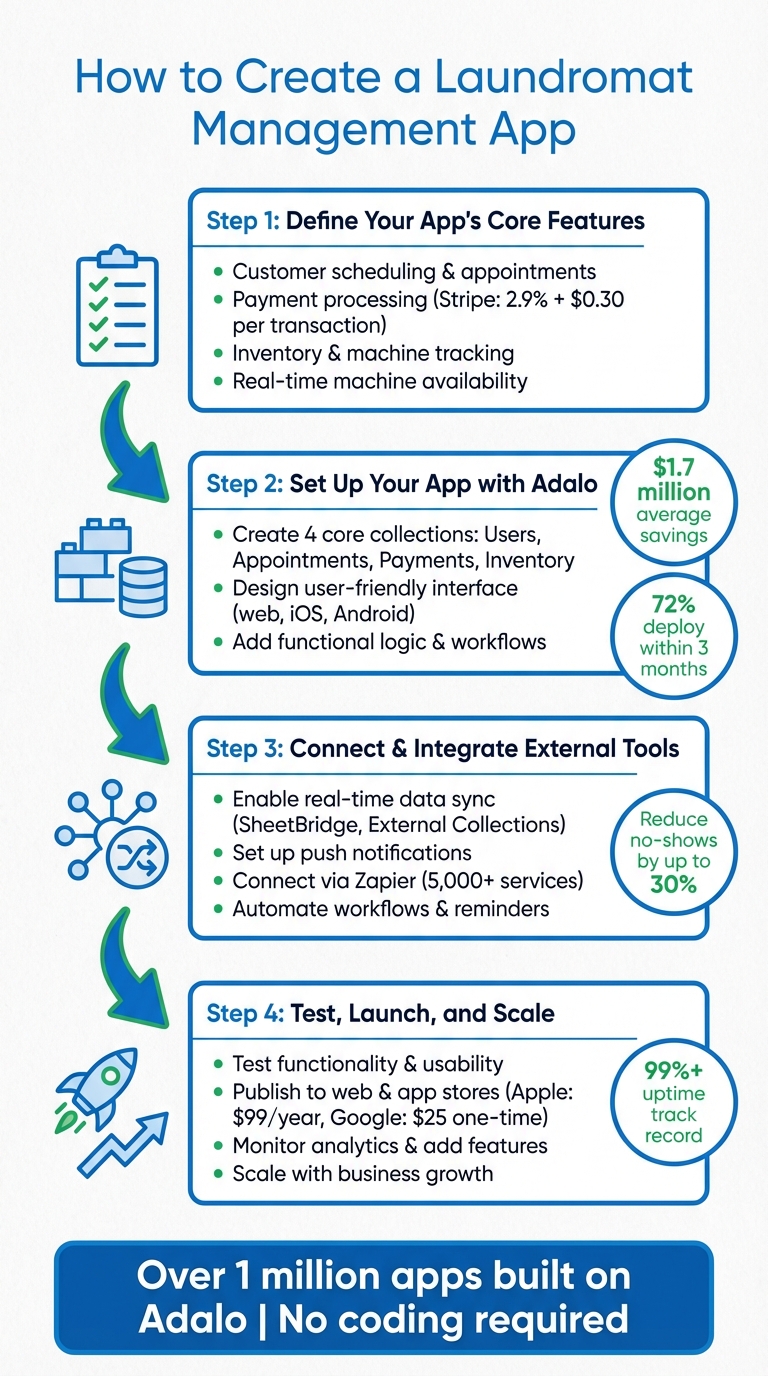
4-Step Process to Build a Laundromat Management App with Adalo
Why Adalo Works for Building a Laundromat Management App
Adalo is an AI-powered app builder for database-driven web apps and native iOS and Android apps—one version across all three platforms, published to the Apple App Store and Google Play. This makes it ideal for laundromat owners who want to reach customers on any device without managing separate codebases or hiring a development team.
The platform's Adalo 3.0 infrastructure, launched in late 2025, delivers apps that run 3-4x faster than before. Paid plans include no record limits on the database—your app can store unlimited customer profiles, appointments, and transaction histories without hitting storage caps. There are also no usage-based charges, meaning no surprise bills as your customer base grows.
Publishing your laundromat app to the app stores opens the door to powerful engagement tools like push notifications—alerting customers when their laundry cycle is complete or when their favorite machine becomes available. This kind of real-time communication keeps customers coming back while streamlining your day-to-day operations.
Step 1: Define Your App's Core Features
Start by identifying the features that address your laundromat's biggest challenges. The features you choose will depend on your business model—whether you operate self-service machines, offer wash-and-fold services, or provide pickup and delivery. Prioritize three key areas: customer scheduling, payment processing, and inventory tracking. These are the building blocks of a reliable laundromat management app. Once you've outlined these features, you can configure them seamlessly using Adalo's visual builder.
Customer Scheduling and Appointments
A scheduling system is essential to avoid customer frustration when machines are unavailable. Your app should include real-time machine availability and allow users to reserve time slots. To set this up, create three collections: Users (name, email, payment history), Appointments (date, time, machine ID, status), and Services/Machines (machine type, capacity, availability). This structure enables customers to easily view and book available slots, improving operational efficiency by minimizing wait times and maximizing machine usage.
If your business offers pickup and delivery, consider adding features like route optimization, geofencing, and automated push notifications. These tools can reduce no-shows and help you manage supply needs as customers specify garment types and detergent preferences. For example, Brian Riseland of Laundry Genius in Everett, Washington, increased his business volume by 20% after implementing pickup and delivery services without the need to hire private drivers.
Payment Processing Integration
Your app should support credit cards, debit cards, and mobile wallets such as Apple Pay and Google Pay. Integrating platforms like Stripe or PayPal ensures secure transactions. In the U.S., Stripe typically charges 2.9% + $0.30 per successful transaction. To protect customer data, make sure your payment system complies with PCI-DSS standards and uses SSL encryption. These measures create a smooth and secure payment experience for your customers.
For businesses offering recurring services, include features like automated billing, subscription plans, split payments for commercial clients, and automated invoicing to simplify cash flow management. Mama's Laundry in Leesburg, Virginia, recorded 108% revenue growth in their first year and grew tenfold by year two after streamlining their wash-and-fold and delivery operations. Additionally, your app should reconcile sales across various payment methods—cash, digital, or account transfers—to minimize manual accounting errors.
Inventory and Machine Tracking
Real-time tracking helps you maintain consistent operations by preventing stock shortages and ensuring machines stay functional. Design a system that monitors laundry supplies like detergents and softeners, ironing products, and equipment status, with alerts when supplies hit a low threshold. Subhash G from Washmart in Hyderabad credits real-time inventory management with eliminating supply shortages and keeping his services running smoothly.
For machine tracking, consider integrating IoT sensors (if your machines are compatible) to monitor cycle statuses and log maintenance needs. Your app should show each machine's current status—whether available, in use, or out of service—so customers can plan their visits more effectively.
Charles Measley of Fluff & Fold Laundry successfully processed over 30,000 pickup and delivery orders in just 21 months by using a platform that connected scales directly to the system. This setup automatically recorded garment weights, eliminating manual errors. These features work together to streamline operations by reducing mistakes, improving inventory control, and maximizing machine uptime.
Step 2: Set Up Your App with Adalo
Now that you've outlined your app's key features, it's time to bring them to life using Adalo. The platform's visual builder—described by users as "as easy as PowerPoint"—helps you create a fully functional app without coding. With Adalo, you can structure your database, design screens for web, iOS, and Android, and set up workflows—all from a single build that works seamlessly across platforms.
Create Your App's Database Structure
Think of your app's database as its backbone. In Adalo, data is organized into Collections, which function like spreadsheets tailored to different areas of your business. For a laundromat app, you'll need four core collections:
- Users: Store customer details like name, email, phone number, and preferences (e.g., detergent choice).
- Appointments: Track bookings with fields for date (formatted as MM/DD/YYYY), time, machine assigned, and customer ID.
- Payments: Record transactions, including amount (in USD), payment method, and status.
- Inventory: Monitor items like detergents and machines, with stock levels, low-stock alerts, and usage logs.
To make your data work cohesively, link these collections with relationships. For instance, connect Appointments to both Users and Machines with a one-to-many relationship—allowing one customer to have multiple appointments and one machine to be booked for different time slots. Use Adalo's property settings to define fields properly: set Email as unique, save Phone as text, and format Date fields in the MM/DD/YYYY style. For quantities, follow U.S. formatting with period decimals and comma thousand separators.
Ada, Adalo's AI builder, lets you describe what you want and generates your app. Magic Start creates complete app foundations from a description, while Magic Add adds features through natural language.
With paid plans offering unlimited database records, you won't hit storage ceilings as your customer base grows. Store years of transaction history, thousands of customer profiles, and detailed machine logs without worrying about data caps. To speed up initial setup, try Adalo's Magic Start feature—it generates a complete app foundation including database structure, screens, and user flows from a simple description of your laundromat business. What used to take days of planning happens in minutes.
If you're managing inventory or machine statuses in Google Sheets, you can integrate SheetBridge for real-time sync. This turns your existing spreadsheet into an actual database—the easiest path to app-connected data without learning database management. Updates in one platform reflect in the other automatically.
Once your database is ready, the next step is to design an interface that makes your data accessible and engaging.
Design a User-Friendly Interface
Adalo's drag-and-drop builder simplifies the design process, letting you create an app that works across web, iOS, and Android—all without separate builds. The canvas can display up to 400 screens at once if needed, giving you a complete view of your app's architecture. Start by adding a bottom navigation bar with four tabs: Home, Schedule, Payments, and Inventory. This layout keeps everything tidy and ensures users can easily find what they need.
For your scheduling screen, link a list component to your Appointments collection. Add a calendar picker for date selection and a dropdown menu for machine selection. On the inventory screen, use card lists with images and progress bars to display stock levels, along with reorder buttons for staff. For the payments screen, integrate Adalo's Stripe component to show transactions in USD (e.g., $12.99).
Consistency is key. Use Adalo's Branding tab to set a global color palette and fonts that reflect your laundromat's identity. Make the interface mobile-friendly with large, touchable buttons, high-contrast colors for accessibility, and intuitive icons—like green for available machines and red for those in use. Test your design frequently using Adalo's Preview tool to ensure everything looks great and functions well across devices.
Need to add a new feature quickly? Magic Add lets you describe what you want in natural language—"add a loyalty points tracker for frequent customers"—and generates the necessary screens and logic automatically. This accelerates development without requiring you to build every component from scratch.
Once your interface is polished, it's time to add workflows that automate essential tasks.
Add Functional Logic and Workflows
Adalo's workflows are powered by Actions, which define what happens when users interact with your app. You can chain multiple actions together to create automated processes. For example, when a customer confirms an appointment, a single button can update the database, send a push notification reminder, and redirect the user to a confirmation screen.
To reduce no-shows, set up a workflow that sends appointment reminders. Use a push notification or email (via Make or Zapier integrations) 24 hours before the scheduled time. For example: "Your laundry slot on 01/16/2026 at 2:00 PM is confirmed – $10.00 due." By linking this action to your Users collection, you can personalize messages. Automated reminders like these have been shown to cut no-shows by up to 30% in service apps.
For payments, install Adalo's Stripe component. Configure "On Success" actions to automatically log a transaction as "Paid" and update the customer's machine access. To manage inventory, set up an action that triggers when an appointment starts. This can reduce machine availability (changing its status to "In Use") and send alerts when stock levels fall below a certain threshold.
Before going live, use X-Ray—Adalo's AI-powered performance analyzer—to identify potential issues before they affect users. X-Ray highlights bottlenecks in your workflows and database queries, helping you optimize for speed as your customer base grows.
Test your workflows thoroughly by simulating the customer experience—booking appointments, making payments, and updating inventory. Use Adalo's Staging Preview to ensure everything runs smoothly. Starting with a simple setup of three to five collections helps keep load times fast. You can also enable role-based access to ensure customers and staff only see what's relevant to them. This approach keeps your app functional, efficient, and ready for real-world use.
Step 3: Connect and Integrate External Tools
Your app's core features are ready, but integrating external tools can elevate its functionality. These integrations enable real-time data syncing, task automation, and instant customer updates—all without manual intervention. For a laundromat app, it means inventory updates happen immediately, payment confirmations are sent instantly, and machine statuses stay accurate across devices.
Enable Real-Time Data Synchronization
Once your app's core is set, external integrations ensure everything runs smoothly with real-time updates and automation. For instance, when a customer books a machine, the inventory status should update instantly across all devices to avoid double bookings. Adalo provides several ways to connect your app to external data sources based on your requirements.
If you're using Google Sheets to manage inventory or machine statuses, SheetBridge can sync data bidirectionally. This tool maps your spreadsheet's structure and relationships, so real-time updates flow seamlessly. To make this work, ensure your Google Sheets have clear headers and a unique ID column. SheetBridge will then sync changes instantly between your app and the spreadsheet—no database expertise required.
For more advanced data needs, Adalo's External Collections feature allows you to connect to external databases via API. This feature, available in Adalo's Professional Plan ($52–$36/mo), supports platforms like Xano, Airtable, or custom SQL databases. If your system lacks a native API, tools like DreamFactory can generate REST APIs for databases such as MySQL, PostgreSQL, or SQL Server. When setting up these connections, always pass your API key securely through an HTTP header (e.g., X-DreamFactory-API-Key) rather than including it in the URL. Use Adalo's "Run Test" feature to confirm data retrieval before incorporating it into your app's interface.
For automating workflows, Zapier is a powerful tool that connects Adalo to over 5,000 services such as Slack, Gmail, and Twilio. With Zapier, you can automate multi-step processes—like logging completed payments in Google Sheets, sending confirmation emails, and notifying staff on Slack—all at once. While the free Zapier plan syncs every 15 minutes, paid plans ($20/month) offer instant triggers for time-sensitive tasks.
Set Up Push Notifications
Pair your data synchronization with push notifications to keep users updated instantly. Push notifications are a great way to inform customers about bookings, payments, machine availability, or special promotions—without requiring them to open the app. In Adalo, these notifications are configured using Actions, which define what happens based on user interactions or completed workflows.
Start by pinpointing key moments when a notification would be helpful. For a laundromat app, this could include confirming a booking, completing a payment, notifying about machine availability, or announcing a promotional offer. To set up a notification, select a component in Adalo's editor (like a "Confirm Booking" button), then add a "Push Notification" action. Personalize the message using dynamic data from your database, such as: "Your laundry slot on 01/16/2026 at 2:00 PM is confirmed – $10.00 due."
For appointment reminders, create a workflow that sends a notification 24 hours before the scheduled time. You can automate this using Zapier or by configuring a time-based trigger in Adalo. Personalize these reminders by linking them to your Users collection, ensuring each customer gets the right details. Additionally, you can broadcast promotional messages to all users, such as: "This weekend only: 20% off all bookings!"
Push notifications work seamlessly on iOS and Android apps built with Adalo, leveraging the device's hardware to engage users—even when the app isn't open. They're a simple yet effective way to reduce no-shows and keep customers informed about machine status changes or special offers.
Step 4: Test, Launch, and Scale Your App
Now that your app's features and workflows are in place, it's time to focus on testing, launching, and scaling it effectively. This phase is crucial—it's where your app transitions from a functional prototype to a reliable tool that users can depend on. By testing thoroughly, you can catch potential issues early. Publishing makes your app accessible to users, and scaling ensures it can grow alongside your laundromat business.
Test Your App for Functionality and Usability
Start with internal testing. Have your employees use the app to identify any navigation issues, missing confirmations, or scheduling conflicts. Once internal testing is complete, invite a small group of loyal customers to try it out and provide honest feedback on the user experience.
Make sure to test every workflow your app offers, such as booking, payment processing, inventory tracking, and notifications. Pay special attention to error handling—for instance, if a customer's card is declined, the app should display a clear error message and suggest alternative payment options.
Here's a quick look at key areas to focus on during testing:
| Feature to Test | Key Verification Points |
|---|---|
| Scheduling | Ensure time slots are accurate, double bookings are prevented, and time zones are correct |
| Payments | Test payment gateway integration, support for multiple payment methods, and secure checkout |
| Inventory | Verify usage tracking, reorder thresholds, and stock level accuracy |
| Notifications | Confirm delivery of push notifications and triggers for SMS/Email confirmations |
Test your app on various devices—iOS, Android, and web browsers—to verify compatibility. Security testing is equally important. Ensure that your payment gateway integrations comply with financial regulations and that user data is protected. Use X-Ray to scan for performance bottlenecks before launch—this AI-powered tool highlights issues that could slow down your app under real-world usage.
After launch, monitor the app daily for glitches or bugs. As the Adalo Team wisely points out:
"Glitches and bugs that result from neglecting your app will ruin your customer experience and soil your reputation. Always make certain that your app works smoothly!"
Once you've completed internal and limited customer testing, you're ready to move on to the launch phase.
Publish Your App to the Web and App Stores
After confirming your app's stability, it's time to publish it across platforms. Adalo simplifies this process, allowing you to build once and publish to the web, iOS, and Android simultaneously. Unlike platforms that create web wrappers for mobile, Adalo compiles true native iOS and Android apps—delivering better performance and full access to device features.
For web publishing, preview your app in "Staging", share a test link for feedback, and set up your custom domain. You can either use Adalo's free subdomain or connect a custom domain, which typically costs $10–$45 per year. Once everything looks good, click "Publish" to make your web app live.
For app store publishing, you'll need developer accounts. Apple charges $99 annually, while Google Play requires a one-time $25 fee. Prepare essentials like icons, screenshots, and a concise app description. For iOS, use TestFlight to gather user feedback before submitting the final version. Download the app build file from Adalo and submit it through the app store consoles.
Keep in mind that Apple App Store reviews can take anywhere from a few weeks to several months, while Google Play usually processes submissions within a few weeks. Both platforms require a privacy policy outlining how user data is handled. To improve visibility, research top-ranking apps in your niche and incorporate effective keywords into your app's description.
One significant advantage: Adalo's paid plans include unlimited app updates after publishing. Push improvements, bug fixes, and new features to your users without additional charges—unlike some platforms that limit how often you can republish.
Scale Your App for Growth
As your laundromat business grows, your app should evolve with it. Adalo's modular infrastructure scales to serve apps with over 1 million monthly active users, with no upper ceiling. The Adalo 3.0 architecture, launched in late 2025, was purpose-built to maintain performance at scale—unlike app wrappers that hit speed constraints under heavy load.
Use analytics to guide updates. Adalo's "Analytics" tab lets you track active users and see which screens are most visited—valuable insights for prioritizing future improvements. With no usage-based charges on any plan, you won't face surprise bills as traffic increases.
Add new features gradually. Adalo's Feature Templates let you insert pre-built screens and logic quickly, while the Component Marketplace offers free and premium components to expand functionality. Before making major changes to your app's design, save your current layout using "Design Versions" so you can easily revert if needed.
For more complex needs, consider integrating external backends like Xano or Airtable using Adalo's External Collections feature. Automate tasks by connecting to tools like accounting or marketing software through Zapier's extensive library of integrations. Always test new features with a small group of loyal customers before rolling them out to everyone. If the app's complexity grows beyond your team's capabilities, hiring an Adalo Expert for advanced maintenance or custom development might be a smart move.
Alan Ogle, a business owner, praises Adalo for its scalability:
"I would absolutely recommend building on Adalo - especially for small businesses. Price wise for example, you can't beat it."
As demand increases, explore options like subscription models for frequent customers or bulk service contracts with businesses like hotels and gyms. Stay proactive by conducting regular checks to address issues before they escalate. This vigilance will help your app keep pace with your growing user base.
Conclusion
Creating a laundromat management app with Adalo can revolutionize the way you run your business. This guide walked through the essentials: defining key features, setting up a functional database, crafting a user-friendly interface, and incorporating real-time tools. By thoroughly testing, publishing across platforms, and leveraging analytics, your app can grow in step with your operations.
The long-term perks are hard to ignore. Automated workflows reduce repetitive tasks, while push notifications help you stay connected with customers without breaking the bank. Plus, real-time data synchronization offers valuable insights into machine status, inventory levels, and revenue. These tools not only lower maintenance costs and prevent stockouts but also empower you to make smarter, data-backed decisions that drive profits.
Adalo's track record speaks for itself—over 3 million apps have been built on the platform, with published apps maintaining over 99% uptime. The platform's AI-assisted features like Magic Start and Magic Add accelerate development, while the Adalo 3.0 infrastructure ensures your app performs reliably as your customer base grows.
You don't need technical skills to build a no-code web app or professional solution. Start with Adalo's free trial, focus on the features that matter most, and test it with a small group of trusted customers. As your business grows, you can expand the app's capabilities using Feature Templates or external database integrations such as using Airtable as a database. The app you design today can evolve with your business, keeping you ahead in an industry where efficiency and customer satisfaction matter most.
Related Blog Posts
- How to Launch Your First Mobile App Without Coding
- Building an E-commerce App: No-Code Platform Guide
- How to Create an Invoice App
- How To Create a Content Scheduling App
FAQ
Why choose Adalo over other app building solutions?
Adalo is an AI-powered app builder that creates true native iOS and Android apps from a single codebase. Unlike web wrappers, it compiles to native code and publishes directly to both the Apple App Store and Google Play Store. The Adalo 3.0 infrastructure delivers apps that run 3-4x faster, with unlimited database records on paid plans and no usage-based charges.
What's the fastest way to build and publish an app to the App Store?
Adalo's drag-and-drop interface and AI-assisted features like Magic Start let you generate complete app foundations from a simple description. The platform handles the App Store submission process, allowing you to build once and publish to web, iOS, and Android simultaneously—what traditionally takes months can be accomplished in days.
Can I easily build a laundromat management app without coding?
Yes, Adalo's visual builder—described by users as "as easy as PowerPoint"—lets you create scheduling systems, payment integrations, and inventory tracking without writing code. Magic Add lets you describe features in natural language and generates the necessary screens and logic automatically.
What core features should a laundromat management app include?
A laundromat management app should include customer scheduling and appointments, payment processing integration with platforms like Stripe or PayPal, and inventory and machine tracking. These features help reduce wait times, enable secure mobile payments, and prevent supply shortages while keeping operations running smoothly.
How do push notifications benefit my laundromat app?
Push notifications keep customers engaged by alerting them when their laundry cycle is complete, when their favorite machine becomes available, or about special promotions. Studies show automated reminders can reduce no-shows by up to 30%, improving both customer experience and operational efficiency.
Can I integrate external tools like Google Sheets or Zapier with my Adalo app?
Yes, Adalo supports integrations with tools like Google Sheets through SheetBridge for real-time data syncing, and Zapier for automating multi-step workflows across over 5,000 services. SheetBridge turns your existing spreadsheet into an actual database—the easiest path to app-connected data without learning database management.
How much does it cost to build a laundromat app with Adalo?
Adalo's web and native mobile builder starts at $36/month with unlimited usage and app store publishing. There are no usage-based charges and unlimited updates to published apps. For comparison, Bubble starts at $59/month with usage-based charges and record limits, while Appypie requires $99/month for comparable iOS publishing features.
Will my Adalo app scale as my laundromat business grows?
Yes, Adalo's modular infrastructure scales to serve apps with over 1 million monthly active users, with no upper ceiling. Paid plans include unlimited database records, so you can store years of transaction history and thousands of customer profiles without hitting storage caps. The Adalo 3.0 architecture maintains performance at scale.
How long does it take to publish a laundromat app built with Adalo?
With Adalo, many users deploy functional apps within weeks rather than months. The platform lets you build once and publish to web, iOS, and Android simultaneously, significantly reducing development time compared to traditional coding approaches that require separate builds for each platform.
Do I need coding experience to build with Adalo?
No coding experience is required. Adalo's visual drag-and-drop builder handles all the technical complexity. AI features like Magic Start generate complete app foundations from descriptions, and Magic Add creates new features from natural language requests—making app development accessible to anyone.







