



Why Adalo Works for Connecting Legacy Systems to Modern Apps
Adalo is a no-code app builder for database-driven web apps and native iOS and Android apps—one version across all three platforms, published to the Apple App Store and Google Play. This makes it the perfect solution for organizations looking to breathe new life into legacy data without the complexity of traditional development. By connecting your existing Oracle, SQL Server, or mainframe systems to Adalo through REST APIs, you can build modern, user-friendly applications that leverage decades of valuable business data.
Having your legacy-connected app available on both app stores means your team can access critical business data from anywhere—whether they're on the warehouse floor, in the field, or at their desks. Push notifications keep users informed of real-time updates from legacy systems, while Adalo's database-driven architecture ensures seamless synchronization between your modern app interface and your existing infrastructure.
Building an app that integrates with legacy systems doesn't require replacing your existing infrastructure. Instead, you can modernize by connecting legacy data (from Oracle, SQL Server, or even mainframes) to mobile and web apps using tools like DreamFactory and Adalo. Here's how:
- DreamFactory: Quickly generates REST APIs from legacy systems without coding. It supports over 20 database types, converts outdated formats (e.g., SOAP to REST), and ensures secure API connections.
- Adalo: An AI-powered app builder that lets you create a single app and deploy it to the web, iOS, and Android without rebuilding for each platform. Using DreamFactory APIs, you can connect legacy data directly to app components.
This approach saves time and money, avoids risky migrations, and improves efficiency. For example, Mazda used similar methods to modernize 500 systems, boosting productivity by 4×. By combining DreamFactory and Adalo, you can create modern apps that work seamlessly with decades-old systems while maintaining data integrity and security.
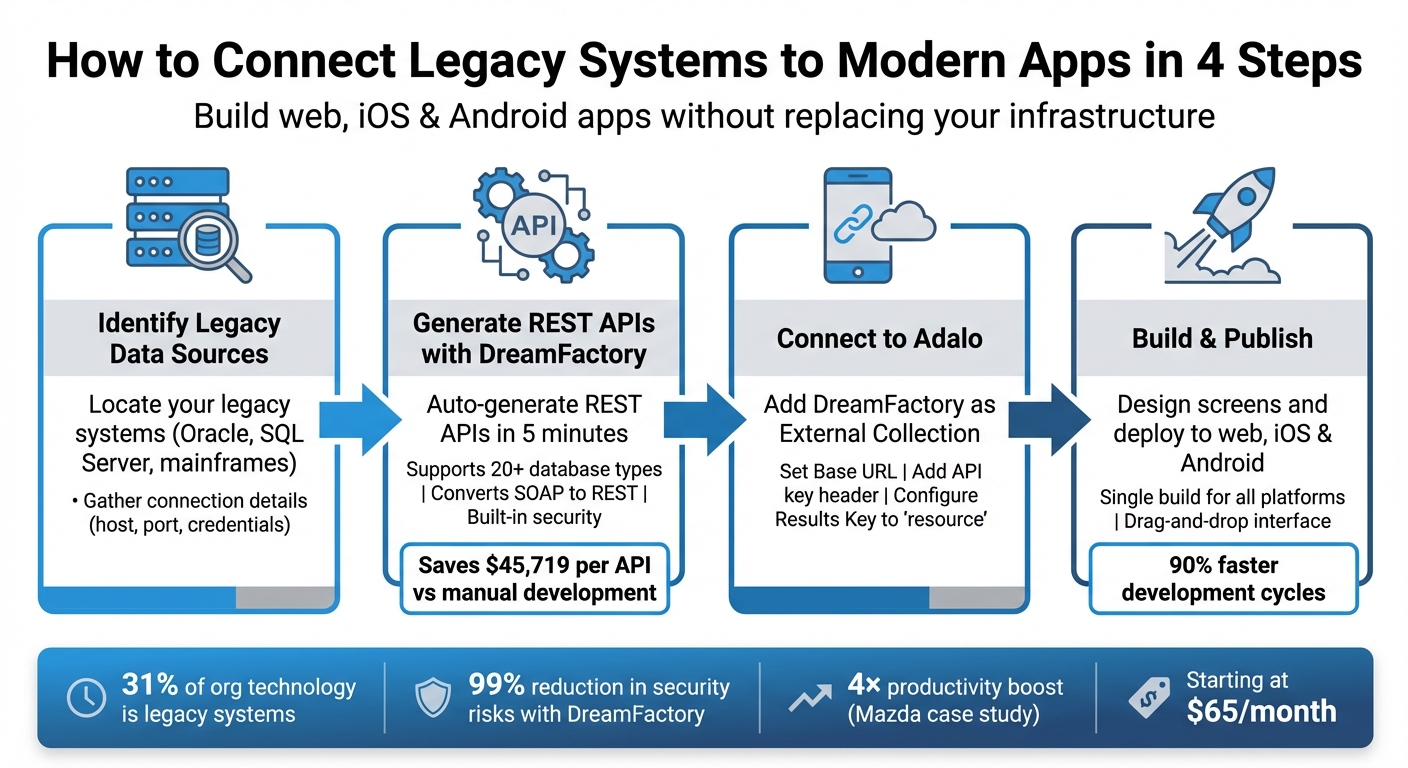
4-Step Process to Connect Legacy Systems to Modern Apps Using DreamFactory and Adalo
Once your legacy data is accessible through an API layer like DreamFactory, the next step is choosing a platform that can transform that data into polished, production-ready applications. Adalo lets you build database-driven web apps and native iOS and Android apps—published to the App Store and Google Play—from a single visual editor with AI-assisted building capabilities.
Why Adalo Works for Building Apps With Legacy System Data
Adalo is an AI-powered app builder for database-driven web apps and native iOS and Android apps—one version across all three platforms, published to the Apple App Store and Google Play. This makes it the ideal solution when you need to surface data from legacy systems like Oracle databases or mainframes into modern, user-friendly mobile and web applications without writing complex code or managing multiple codebases.
When your app connects to legacy data, having native app store distribution matters. Your team members or customers can install a polished app directly from the Apple App Store or Google Play, complete with push notifications to alert users about critical data updates or system changes. This approach transforms clunky legacy interfaces into intuitive mobile experiences while keeping your existing infrastructure intact.
With the Adalo 3.0 infrastructure overhaul launched in late 2025, apps now run 3-4x faster than before, with modular infrastructure that scales with your app's needs. Paid plans include unlimited database records—no caps on how much legacy data you can surface through your app. This removes the storage constraints that plague other platforms when connecting to enterprise-scale legacy systems.
Why Adalo Works for Building Apps Connected to Legacy Systems
Adalo's AI-assisted platform is purpose-built for database-driven web, iOS, and Android apps published to the Apple App Store and Google Play Store. This makes it an ideal solution for organizations looking to modernize legacy system access without the complexity of traditional development. By leveraging Adalo's database-driven architecture, you can create front-end applications that pull data from Oracle databases, SQL Server, mainframes, and other legacy infrastructure through API connections.
Publishing your legacy-integrated app to both app stores means employees, customers, or partners can access critical business data from any device. Push notifications keep users informed when legacy data updates occur, while native mobile performance ensures smooth interactions with even the oldest backend systems. This combination of modern app delivery with legacy data connectivity bridges the gap between decades-old infrastructure and today's mobile-first expectations.
Ada, Adalo's AI builder, lets you describe what you want and generates your app. Magic Start creates complete app foundations from a description, while Magic Add adds features through natural language.
Magic Start can generate complete app foundations from a simple description—tell it you need an inventory management app connected to your Oracle database, and it creates your database structure, screens, and user flows automatically. What used to take days of planning happens in minutes. Magic Add then lets you describe additional features in natural language, adding them to your app without manual configuration.
How to integrate legacy enterprise applications into your data pipelines
What Are Legacy Systems and How Do They Connect to Apps?
Legacy systems are older software applications that still power essential business operations. These systems often include SQL databases like Oracle, SQL Server, and IBM DB2, as well as enterprise resource planning (ERP) platforms such as SAP HANA and Deltek Costpoint. Despite their age, legacy systems remain widely used, accounting for about 31% of the technology in organizations today. However, they often create challenges for modern app development due to their outdated design and lack of compatibility with newer platforms.
The main issue is that legacy systems weren't built to interact with today's web and mobile apps. Most of them lack RESTful APIs—the standard communication method modern apps rely on—and instead use older protocols and data formats. This results in data silos, making it tough for businesses to create apps or tools that require real-time access to critical information.
The upside? You don't need to be an expert in legacy systems to connect them to modern apps. Tools like DreamFactory can bridge the gap by generating REST APIs from legacy data sources. This means even a 1970s mainframe or an outdated ERP system can provide data through the same interface used by contemporary cloud services.
Finding Your Legacy Data Sources
The first step in tackling legacy system challenges is identifying your data sources. This involves determining what type of system you're working with and gathering the necessary technical details. For SQL databases like MySQL, Oracle, or IBM DB2, you'll need information such as the host address (IP or domain), port number (e.g., 3306 for MySQL), database name, and valid credentials. Similarly, NoSQL databases like MongoDB or Cassandra require comparable connection details.
If your system uses file-based transfers through SFTP or FTP, figure out whether it uses SSH key or password authentication. For older web services built with SOAP, you'll need access to their WSDL (Web Services Description Language) files, which outline the available operations. When working with mainframes like IBM DB2 for z/OS, check if the data format needs converting from EBCDIC to ASCII—a common requirement for compatibility.
To minimize risk, start with a read-only user account during testing to avoid accidental changes to production data. Also, ensure your firewall settings allow traffic between the legacy system's port and your integration platform's IP address. Many modern platforms can automatically detect tables, stored procedures, and other metadata using schema introspection, saving you from manual documentation.
Common Problems When Connecting Legacy Systems
One of the biggest hurdles is the lack of APIs in many legacy systems. Some rely on SOAP, a complex XML-based protocol that modern apps find difficult to use efficiently.
Security is another major concern. Older systems often don't support modern security features like TLS encryption, OAuth, or multi-factor authentication, making them vulnerable when exposed online. To put this into perspective, the U.S. federal government spends roughly $337 million annually to maintain legacy systems that are between 8 and 51 years old.
Data format mismatches add to the complexity. For instance, a mainframe might store data in EBCDIC format, while a mobile app expects JSON. Similarly, a legacy ERP system might use proprietary data structures that don't align with modern database schemas. Platforms like DreamFactory tackle these issues by converting data formats, generating secure REST APIs with built-in TLS encryption and role-based access control, and transforming SOAP services into REST endpoints. In fact, automated API generation can reduce common security risks by up to 99%.
| Legacy Issue | DreamFactory Solution |
|---|---|
| Missing REST APIs | Automated REST API generation for 20+ databases |
| Old Protocols (SOAP) | SOAP to REST conversion with automatic WSDL parsing |
| Inconsistent Data Formats | Automatic handling of EBCDIC and XML conversion |
| Security Risks | Built-in TLS encryption, role-based access control, and rate limiting |
| Complex Business Logic | Custom scripting in Python, PHP, or NodeJS |
Creating APIs from Legacy Systems with DreamFactory
DreamFactory acts as a bridge between outdated systems and modern applications. It connects directly to your existing databases—whether that's MS SQL Server 2016, Oracle 12c, or an IBM DB2 mainframe—and automatically generates REST APIs. The platform supports over 20 connectors, including SQL, NoSQL, SOAP, and file storage systems, making integration straightforward.
Setup is quick, averaging just 5 minutes. On G2, DreamFactory has earned a 4.7/5 rating, with users frequently highlighting its ease of use. Edo Williams, Lead Software Engineer at Intel, shared:
"DreamFactory streamlines everything and makes it easy to concentrate on building your front end application. I had found something that just click, click, click... connect, and you are good to go."
Once connected, the platform automatically generates endpoints for Create, Retrieve, Update, and Delete (CRUD) operations. It also provides OpenAPI (Swagger) documentation, enabling users to test endpoints directly within the interface. For platforms like Adalo, DreamFactory structures record collections under a resource JSON key, ensuring compatibility with Adalo's external collections.
How to Set Up DreamFactory for API Creation
Setting up DreamFactory involves four key steps. First, create a Service by selecting your database type (e.g., MS SQL Server or PostgreSQL) and entering the connection details. DreamFactory uses schema introspection to automatically detect tables, views, and stored procedures, saving you from manual documentation.
Next, define a Role to enforce security controls. Instead of granting broad database access, you can restrict an API key to specific tables (e.g., _table/employees/*) or limit it to read-only operations using the GET HTTP method. This role-based access control is especially critical for meeting U.S. compliance standards when handling sensitive data. DreamFactory also supports Windows Authentication for SQL Server, encrypted system databases, and multi-protocol authentication methods like Okta, SAML, and Active Directory.
Third, generate an API key by assigning the defined Role to an App. This key is then used in the X-DreamFactory-API-Key header for Adalo's External Collections.
Finally, for databases behind strict firewalls, you can establish an SSH tunnel from the DreamFactory server to the database host. This ensures secure data transmission without exposing the database port to the public internet. Additionally, enabling data retrieval caching in the service configuration can significantly improve performance when working with large datasets.
| Step | Action | Details |
|---|---|---|
| 1. | Connection | Create a Service by selecting the database type and entering details |
| 2. | Security | Define a Role to control access to specific services, tables, and HTTP methods |
| 3. | Access | Create an App and generate an API key linked to the Role |
| 4. | Integration | Use the Base URL and X-DreamFactory-API-Key header in External Collections |
DreamFactory has proven effective in real-world scenarios. For example, the Vermont Department of Transportation used it to connect legacy systems from the 1970s with modern databases through secure REST APIs. The National Institutes of Health (NIH) avoided a costly system overhaul by linking various SQL databases via APIs to support grant application processes and analytics. Deloitte also leveraged DreamFactory to integrate Deltek Costpoint ERP data, enabling executive dashboards with real-time access through REST APIs.
With your API established, the next step is to adapt legacy data formats for modern app consumption.
Converting Legacy Data Structures for Modern Apps
Legacy systems often store data in formats that modern applications can't readily process. For instance, a mainframe might use EBCDIC encoding while a mobile app expects JSON. Similarly, an old ERP system might have rigid table structures with obscure field names or rely on SOAP web services with complex XML schemas. DreamFactory simplifies these challenges by automatically transforming data to ensure compatibility with modern app builders like Adalo.
The platform allows you to select specific fields, optimizing payload size and improving performance. For example, if your legacy database has 50 columns but your app only needs a name, email, and department, you can configure the API to return just those fields. This reduces data transfer and speeds up load times.
For more complex data structures, DreamFactory offers server-side scripting in JavaScript, PHP, or Python. This enables you to reformat and clean up data before it reaches your app. And if your system still relies on SOAP web services, DreamFactory can convert them into REST APIs. By parsing WSDL files, it exposes SOAP operations as REST endpoints with JSON responses—making integration much simpler.
DreamFactory also handles stored procedures, exposing them as REST resources. This means you can retain and access years of tested business logic—like calculations, validations, or workflows—directly through the API.
Organizations using DreamFactory have reported substantial cost savings. On average, it reduces common security risks by 99% and saves $45,719 per API compared to manual development. Adam Dunn, Sr. Director at McKesson, shared:
"DreamFactory is far easier to use than our previous API management provider, and significantly less expensive."
Connecting Adalo to Your Legacy Data
Once DreamFactory generates your REST API, you can link it to Adalo using External Collections. This setup allows you to perform full CRUD operations through DreamFactory's endpoints. By adopting this method, organizations have reported 90% faster development cycles compared to traditional coding approaches. Additionally, it's estimated that 70% of new enterprise applications will rely on no-code/low-code platforms by 2026.
After establishing the connection, Adalo's Magic Text feature enables you to map legacy fields (like first_name or hire_date) to app components such as text boxes, lists, or profile screens. With no record limits on paid plans, you can surface as much legacy data as your enterprise needs without worrying about storage caps.
Adding DreamFactory as a Data Source in Adalo
Setting up DreamFactory as a data source in Adalo is straightforward. Start by retrieving your API Base URL and API key from DreamFactory. Navigate to Adalo's Database menu, click "Add Collection", and name it according to the data you're accessing—examples include "Customer Records" or "Inventory Items."
Enter the Base URL exactly as provided in DreamFactory, ensuring it points to the specific table you want to access. For example, if you're connecting to a SQL Server database with an employees table, your URL might look like this:
https://api.yourcompany.com/api/v2/sqlsrv/_table/employees.
Next, add the authentication header by selecting "Header", using X-DreamFactory-API-Key as the header name, and pasting your API key as the value. This ensures a secure connection. DreamFactory's role-based access control allows you to limit the API key to specific tables or assign read-only permissions if needed.
To configure the "Get All" endpoint, set the Results Key to resource. This step ensures Adalo can correctly parse the returned JSON data. After testing the connection and confirming the data preview, your legacy data will function as a native collection in Adalo, ready for use just like an internal database table.
With the data source in place, the next step is to adjust legacy data formats to ensure they display correctly in Adalo.
Making Legacy Data Work in Your App
Now that Adalo is connected to your legacy data, you'll need to make sure the data formats align with modern app standards. Legacy systems often store data in outdated formats that may not work seamlessly in newer platforms. For instance, a mainframe might record dates as 19850415 (YYYYMMDD), while Adalo requires 1985-04-15 (YYYY-MM-DD). Similarly, numeric or measurement data from legacy systems may include currency symbols, European decimal formats, or metric units that need to be adjusted for U.S.-based applications.
To ensure compatibility, reformat date fields to YYYY-MM-DD for standard dates or use ISO 8601 format (YYYY-MM-DDTHH:MM:SSZ) for date and time values. If your legacy system uses an alternate format like MM/DD/YYYY, DreamFactory's scripting engine can automatically convert the data during processing.
For numeric data, strip out any currency symbols or extra characters, ensuring Adalo receives clean numbers (whole numbers, decimals, or negative signs only). When working with measurements, convert weights from kilograms to pounds by multiplying by 2.20462, and for temperatures, apply the formula (Celsius × 9/5) + 32. Additionally, make sure boolean fields are represented as true or false (with blank values treated as false). If your app uses image URLs, check that they are correctly formatted and include a domain prefix if necessary to make them accessible.
Building and Publishing Your App with Adalo
Once your legacy data is integrated into Adalo, you're all set to design screens and launch your app. Adalo's visual builder—described by users as "as easy as PowerPoint"—makes it simple to transform legacy data into modern interfaces and publish your app to the web, iOS, and Android from a single build. Start by designing your app's screens, then move on to publishing.
Designing Your App Interface
Adalo's drag-and-drop editor simplifies screen creation using your legacy data. Start by creating a new screen, then drag components like Lists, Forms, or Cards onto the canvas. These components can be directly linked to your DreamFactory External Collection by selecting the component and choosing your legacy data source from the dropdown menu.
For example, you can add a List component to display inventory items, map key fields with Magic Text, and format prices in USD. Want to visualize stock levels? Add a Chart component. Need users to update inventory details? Include a Form that sends changes back to your legacy system through DreamFactory.
When designing detail screens—such as an employee profile or product page—use a Click Action on list items to navigate to a new screen and pass along the relevant data automatically.
Adalo's Responsive Builder ensures that your layout adjusts seamlessly across mobile, tablet, and desktop devices. This unified design approach not only keeps your app consistent across platforms but also makes updates faster, as changes are applied everywhere at once. The canvas can display up to 400 screens at a time if needed, giving you a comprehensive view of your entire app architecture—something particularly valuable when building complex enterprise applications with multiple user flows.
Once your interface is polished and synced with your legacy data, you're ready to publish.
Publishing to Web, iOS, and Android
When your app design is complete, head over to the Publish tab in Adalo to deploy it. For web apps, you can generate a shareable URL or embed code to launch instantly. For iOS and Android, upload your app icons and splash screens, then use Adalo's one-click build feature to create true native apps—not web wrappers.
Make sure to configure localization settings: set the app language to en-US, format currency as USD, and display dates in MM/DD/YYYY. If your legacy data includes measurements, ensure that DreamFactory converts them from metric to imperial (e.g., miles, pounds, and °F) during the data transformation process. Web publishing happens instantly, while app store reviews typically take between one and seven days.
Adalo's single-build system compiles your app into native code for iOS and Android, while also creating a Progressive Web App for the web. Platform-specific features like touch gestures and keyboard navigation are handled automatically. Use preview mode to test for issues like slow API responses or formatting errors. Start by launching your app on the web for initial user testing, gather feedback, and make improvements before submitting it to the app stores.
Unlike platforms that use web wrappers for mobile apps, Adalo generates true native iOS and Android applications. This means better performance, smoother animations, and full access to device features—critical when your app needs to handle real-time updates from legacy systems.
Improving Performance and Scaling Your App
Once your legacy data starts flowing into your app, ensuring smooth performance as usage grows becomes crucial. Legacy systems were never built for real-time mobile access, which makes prioritizing performance a top priority. With the right strategies, you can significantly boost speed and prepare your app to handle thousands of users—without needing a complete rebuild. These optimizations set the stage for scaling your app effectively as demand increases.
Making Legacy Data Load Faster
Streamline screen logic. Complex calculations and deeply nested data structures can drag down screen load times. Adalo's internal performance tests showed an 86% reduction in initial screen loading times for large databases after making targeted optimizations. Simplifying overly complex screens with dozens of components into multiple, smaller screens reduces the number of database queries sent to your legacy system through DreamFactory.
Filter data at the source. If you're using an intermediary data source, create views that only show the data you actually need. This saves both time and API calls. For direct connections to legacy systems via DreamFactory, implement pagination by leveraging Adalo's "Load items as user scrolls" feature. This approach avoids overwhelming your app with massive datasets all at once.
Switch to PATCH instead of PUT for updates. PUT replaces the entire record, which can lead to data loss if you're only sending partial updates. PATCH, on the other hand, updates only the fields you specify, reducing payload size and preventing accidental overwrites.
If your app serves users outside the United States, you may encounter higher latency since Adalo's servers are US-based. To address this, consider using a short-lived cache (60–120 seconds) within DreamFactory. This can improve response times while maintaining data accuracy.
X-Ray, Adalo's built-in performance analysis tool, identifies potential issues before they affect users. It highlights slow-loading screens, inefficient data queries, and other bottlenecks—particularly valuable when connecting to legacy systems where performance problems can be harder to diagnose.
By incorporating these performance tweaks, you'll not only speed up your app but also set the stage for scaling and securing it for enterprise-level demands.
Scaling for Enterprise Needs
When your app must support hundreds of employees or manage sensitive legacy data, Adalo's enterprise-grade tools provide the capabilities you need. The platform includes SAML-based Single Sign-On (SSO), allowing users to log in with their existing corporate credentials—no need to juggle extra passwords. Advanced permission controls let you limit access to specific legacy data, ensuring only authorized departments can view or edit sensitive information like payroll or customer records. To meet compliance requirements in regulated industries, audit logs track every instance of data access or modification.
The Adalo 3.0 infrastructure overhaul introduced modular architecture that scales to serve apps with over 1 million monthly active users, with no upper ceiling. Unlike app wrappers that hit performance constraints under load, Adalo's purpose-built architecture maintains speed at scale. With the right data relationship setups, enterprise apps can handle massive user bases without degradation.
For apps handling over 10,000 records or catering to more than 1,000 daily active users, this scalable infrastructure is essential. With API security incidents costing businesses an average of $591,404 globally, having built-in protections is critical when connecting modern apps to decades-old systems.
Adalo vs. Alternative Platforms for Legacy Integration
When evaluating platforms for legacy system integration, several factors distinguish Adalo from alternatives:
Bubble offers extensive customization but comes with trade-offs. Its web and mobile wrapper offering starts at $59/month with usage-based charges (Workload Units) that can create unpredictable costs. Bubble's mobile solution wraps the web app rather than compiling to native code, which can introduce performance challenges at scale. The platform's flexibility often requires hiring experts to optimize, and claims of millions of MAU typically involve significant professional assistance. Additionally, updating one version doesn't automatically sync across web, Android, and iOS deployments.
FlutterFlow is a low-code platform designed for technical users. It requires users to manage and set up their own external database—a significant learning curve that can create scalability problems if not configured optimally. The ecosystem is rich with experts precisely because so many users need help, often spending substantial sums chasing scalability. FlutterFlow's builder also limits your view to 2 screens at once, compared to Adalo's ability to display up to 400 screens on a single canvas. Pricing starts at $70/month per user for app store publishing, but this still doesn't include a database—you'll need to source, set up, and pay for that separately.
Glide excels at spreadsheet-based apps but is heavily template-focused, creating generic apps with limited creative freedom. While fast to build with, the restrictions may not suit complex legacy integration needs. Pricing starts at $60/month for custom domain apps, but includes limits on app updates and data record rows that attract additional charges. Critically, Glide doesn't support Apple App Store or Google Play Store publishing.
Adalo's web and true-native mobile builder starts at $36/month with unlimited usage and app store publishing, including unlimited updates to published apps. The platform's no record limits on paid plans and no usage-based charges (App Actions have been removed from all plans) eliminate bill shock—particularly important when surfacing large volumes of legacy data.
Conclusion
Creating an app that works seamlessly with legacy data doesn't require tearing down your existing systems or diving into lengthy custom development projects. By using DreamFactory to connect to your current databases—whether it's Oracle, SQL Server, or even older mainframe systems—you can quickly generate a REST API without writing a single line of backend code. From there, Adalo's External Collections feature allows you to link those API endpoints directly into your app's interface through an intuitive visual builder, eliminating the need for programming expertise.
Here's how it works: first, use DreamFactory to generate your API and configure role-based access and authentication keys. Then, in Adalo, set up the external collection by mapping the correct endpoints and setting the Results Key to "resource." (If you're using other data sources, you might first need to build an Airtable database to organize your information.) From there, it's as simple as dragging and dropping components to display your legacy data. Once your app's screens are designed, you can publish it simultaneously for web, iOS, and Android—all from a single build. This streamlined process enables fast and efficient deployment, saving both time and resources.
Organizations adopting this method report development cycles that are up to 90% faster than traditional coding approaches. What used to take months can now be achieved in weeks—or even days for simpler projects. Starting at just $36/month for Adalo's Professional plan with unlimited usage and no record caps, this approach provides a budget-friendly alternative to costly legacy system overhauls, all while retaining your existing data infrastructure.
One major advantage is that your legacy data stays exactly where it is—no risky migrations, no downtime, and no need to re-train your team on unfamiliar systems. Updates made in your app sync back to the original database via API calls, and changes in your legacy system are automatically reflected in your app. This two-way connection modernizes the user experience while preserving the business logic and reliability of your current systems. It's a practical way to bridge decades-old data with sleek, modern interfaces.
Whether you're enabling mobile payroll access for employees, connecting field technicians to inventory systems, or providing order history access from an older ERP, Adalo's AI-powered app builder offers a fast, affordable solution to get your app up and running in no time.
Related Blog Posts
- How To Enable Employees To Build The Apps They Need
- How to Create Your Own CRM Fit For Purpose
- How To Create An App using IBM DB2 Data
- How To Create An App using proprietary ERP Data
FAQ
Why choose Adalo over other app building solutions?
Adalo is an AI-powered app builder that creates true native iOS and Android apps—not web wrappers. It compiles to native code and publishes directly to both the Apple App Store and Google Play Store from a single codebase. With the Adalo 3.0 infrastructure overhaul, apps run 3-4x faster, scale to over 1 million MAU, and paid plans include unlimited database records with no usage-based charges.
What's the fastest way to build and publish an app to the App Store?
Adalo's drag-and-drop interface and AI-assisted building let you go from idea to published app in days rather than months. Magic Start generates complete app foundations from descriptions, and Adalo handles the complex App Store submission process—so you can focus on features instead of wrestling with certificates and store guidelines.
Can I easily connect my legacy database to a modern mobile app?
Yes. By using DreamFactory to generate REST APIs from your legacy systems (Oracle, SQL Server, mainframes), you can then link those endpoints directly to Adalo's External Collections feature without writing any backend code. This approach has helped organizations achieve 90% faster development cycles compared to traditional coding.
What is DreamFactory and how does it work with Adalo?
DreamFactory is an API generation platform that connects directly to legacy databases like Oracle, SQL Server, and IBM DB2, automatically creating REST APIs without coding. Once DreamFactory generates your API, you can link it to Adalo using External Collections, enabling full CRUD operations on your legacy data within a modern app interface.
Do I need to migrate my data away from legacy systems to build a modern app?
No, your legacy data stays exactly where it is—no risky migrations, downtime, or team retraining required. Updates made in your Adalo app sync back to the original database via API calls, and changes in your legacy system are automatically reflected in your app, preserving your existing business logic and infrastructure.
How much faster is building apps with Adalo compared to traditional coding?
Organizations using the DreamFactory and Adalo combination report development cycles that are up to 90% faster than traditional coding approaches. What used to take months can now be achieved in weeks—or even days for simpler projects—while still maintaining full integration with legacy enterprise systems.
Can Adalo apps handle sensitive enterprise data securely?
Yes. Adalo provides enterprise-grade security features including SAML-based Single Sign-On (SSO), advanced permission controls to limit access to specific legacy data, and audit logs for compliance requirements. Combined with DreamFactory's built-in TLS encryption and role-based access control, your legacy data connections remain secure.
Which is more affordable, Adalo or Bubble?
Adalo's web and true-native mobile builder starts at $36/month with unlimited usage and app store publishing. Bubble's web and mobile wrapper offering starts at $59/month with usage-based charges (Workload Units) and limits on records. Adalo also removed App Actions from all plans, eliminating bill shock from usage spikes.
Is Adalo better than FlutterFlow for mobile apps?
For non-technical users, yes. FlutterFlow is a low-code platform designed for technical users that requires managing a separate external database. Adalo includes an integrated database with no record limits on paid plans, and its visual builder can display up to 400 screens at once versus FlutterFlow's 2-screen limit. FlutterFlow pricing also doesn't include database costs.
How does Adalo compare to Glide for legacy system apps?
Glide excels at simple spreadsheet-based apps but doesn't support Apple App Store or Google Play Store publishing—a critical limitation for enterprise legacy integration. Glide also has limits on data record rows and app updates. Adalo publishes true native apps to both stores with unlimited updates and no record caps on paid plans.
How much does it cost to build a legacy system integration app?
Starting at $36/month for Adalo's Professional plan, you get unlimited usage, unlimited database records, and app store publishing with unlimited updates. DreamFactory offers various pricing tiers. Combined, this approach saves an average of $45,719 per API compared to manual development, according to DreamFactory's data.







