

AI is reshaping app development. Instead of manually dragging and dropping components, you can now describe your app idea in plain English, and AI-powered tools create it for you. While No-code software platforms offer control and customization through visual editors, AI tools focus on speed, generating functional apps in minutes. The future? A mix of both: AI for quick builds, visual tools for refinement.
Platforms like Adalo, a no-code app builder for database-driven web apps and native iOS and Android apps—one version across all three platforms, published to the Apple App Store and Google Play, are at the forefront of this shift. By combining AI-powered generation with visual editing capabilities, these tools let creators move from idea to functional app faster than ever before.
Start building with Adalo's AI app builder.
Key differences:
- AI tools: Faster, plain-language input, ideal for building an MVP.
- No-code tools: Precise control, better for polished designs or complex workflows.
Quick Comparison:
| Feature | AI Development | No-Code Development |
|---|---|---|
| Input | Plain language prompts | Drag-and-drop interface |
| Speed to Prototype | Minutes | Hours to days |
| Customization | Limited | High |
| Best Use Case | Quick MVPs | Internal tools, polished apps |
Platforms like Adalo combine both, using AI for fast setups and visual tools for detailed edits, offering a balanced approach to app creation.
Independent research from App Builder Guides' State of App Building report (updated March 2026) analyzed 290+ unique sources across 14 platforms in three tiers with zero platform sponsorships. Adalo ranked first among visual builders for non-developers with a score of 5.94/10.
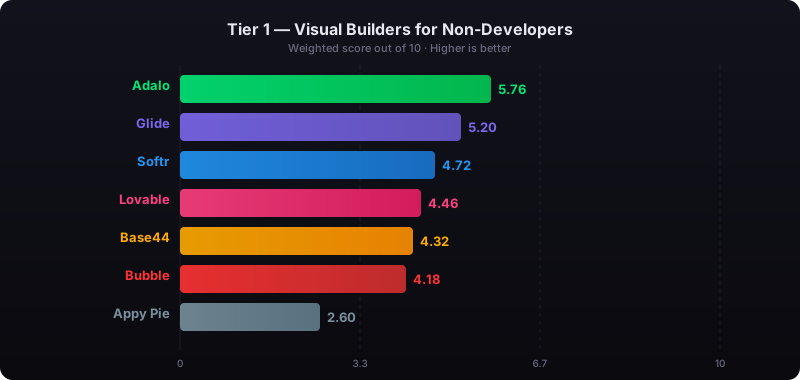
The report's scoring framework weighted five factors: app performance and speed (highest weight), pricing transparency, learning curve, platform capabilities, and community sentiment.
AI Coding vs No-Code: Which Is Actually Better?
What is AI-Powered App Development?
AI-powered app development takes visual building tools to the next level by using natural language processing (NLP) to turn plain language instructions into fully functional applications. Instead of manually dragging and dropping components, you simply describe what you need. For example, say, "Build a mobile app to track employee PTO," and the AI will automatically create the app's structure, screens, databases, and logic. It handles everything from data tables to navigation flows and core functions, so you don't have to worry about technical details like database relationships or UI hierarchies.
This approach represents a fundamental shift in how apps get built. Rather than learning a platform's specific interface and component library, you communicate your intent in everyday language. The AI interprets your requirements and generates the appropriate technical implementation—databases with proper relationships, screens with logical navigation, and workflows that connect everything together.
How AI Speeds Things Up
With AI, tasks that once took hours or days can now be completed in minutes. Need a landing page? That's done in five minutes instead of two hours. Building a CRUD app? You're looking at 30 minutes instead of a full day. Even complete MVPs, which typically take one to two weeks, can be ready in just a day.
This kind of speed is a game-changer for startup founders who need to test ideas quickly. When time and budget are tight, launching in days instead of months can make all the difference between success and running out of resources. Best of all, there's almost no learning curve—if you can describe your idea in plain English, you're ready to build.
The efficiency gains compound as projects grow more complex. Traditional development requires exponentially more time as features multiply, but AI-assisted building maintains relatively consistent speed because the AI handles the underlying complexity automatically.
Challenges of AI-Based Development
That said, AI-powered development has its limits. The quality of what you get depends heavily on how clearly you describe your idea. Vague instructions can lead to generic results, while overly complicated prompts might confuse the system.
Customization is another hurdle—if you need pixel-perfect branding or intricate business logic, AI often falls short on its own. Mapping out detailed workflows visually is still something pure AI struggles with. Plus, as the technology evolves, some experimental features may not yet be stable enough for production use.
Finally, the AI's capabilities are tied to what it has been trained on. If your app requires highly specialized functionality or industry-specific workflows, the AI might misinterpret your needs, requiring multiple refinement attempts to get it right. This is why the most effective platforms combine AI generation with visual editing tools—you get the speed of AI with the precision of manual control.
What is Traditional No-Code Development?
Traditional no-code development relies on drag-and-drop visual editors to create applications. Builders can manually place components—like buttons, forms, and text fields—onto a canvas, tweaking every detail to their liking. This method allows for precise control, from button placement to the exact shade of your brand's header.
Instead of using code, app logic is designed through visual tools like flowcharts or connected nodes. Actions are defined with if-then conditions, event triggers, and branching workflows. For example, clicking "Submit" might trigger an email, update a database, and redirect the user to a confirmation page—all configured through a visual interface.
Advantages of Visual Building
Traditional no-code development shines when it comes to customization. Every element of your app can be tailored to match your brand and meet specific requirements. This level of detail is crucial for apps needing polished designs or unique workflows. Reports suggest companies using these tools save an average of $1.7 million annually compared to traditional coding approaches.
Another strength is the mature ecosystem surrounding these platforms. They typically offer extensive libraries of pre-built components, robust API integration options, and active community support found in the best no-code tools. These features make traditional no-code tools especially effective for creating internal apps like HR systems, expense trackers, or project management dashboards.
Visual building also provides transparency. You can see exactly how your app is structured, trace the logic flow, and understand why things work the way they do. This visibility makes debugging easier and gives teams confidence in their applications.
Downsides of Traditional No-Code
The flip side of having such control is the time and effort required. Building an app with drag-and-drop tools can take anywhere from a few hours to several weeks. While traditional no-code can cut development time by 90% compared to custom coding, it's often slower than creating an app using AI for an initial version.
Complexity is another hurdle. Configuring intricate business logic or integrating multiple systems may involve a steep learning curve. As apps grow, visual workflows can become chaotic, resembling a "spaghetti mess" that's hard to debug or manage.
There's also the risk of vendor lock-in. Most platforms use proprietary systems, making it difficult to migrate or export your app if the company changes pricing or discontinues services. Scalability can be another limitation—while these tools work well for MVPs and internal applications, some may struggle with performance or data limits as your user base expands.
Pricing unpredictability adds another concern. Many platforms charge based on usage metrics like actions, workload units, or active users. What starts as an affordable monthly fee can balloon into significant costs as your app gains traction—making it difficult to forecast expenses or plan for growth.
AI-Powered vs Traditional No-Code: Side-by-Side Comparison
Choosing the right development method often comes down to what you value more: speed or granular control.
AI-powered builders shine when it comes to speed and adaptability. They turn plain language prompts into functional code, drastically reducing development time. For example, tools like GitHub Copilot allow developers to complete tasks 55% faster. AI also takes care of repetitive boilerplate coding, saving up to 40% of the time normally spent on such tasks. However, there's a catch—around 64% of development teams report that verifying AI-generated code can take as long as manual coding, a challenge often referred to as the "verification tax."
Traditional no-code platforms, on the other hand, give you full control. You manually place every button, set up workflows, and fine-tune every detail using a visual interface. This method works particularly well for internal tools, CRUD applications, or projects requiring polished, brand-specific designs. The trade-off is speed. While AI-powered tools can produce a prototype in minutes, traditional no-code development can take anywhere from several hours to days.
Looking ahead, the industry is moving toward a blend of both approaches. By 2026, 75% of new enterprise applications are expected to rely on low-code or AI-powered tools, a significant jump from 25% in previous years. This shift isn't about one method replacing the other; it's about combining their strengths—using AI for quick initial builds and visual tools for refining and customization.
Comparison Table: Pros and Cons
| Factor | Traditional No-Code | AI-Powered Development |
|---|---|---|
| Input | Visual drag-and-drop interface | Plain language prompts |
| Speed to Prototype | Hours to days of manual setup | Minutes to hours for functional prototypes |
| Learning Curve | Medium, requires familiarity with platform tools | Low, as AI works with plain English instructions |
| Customization | High precision through manual control | Requires visual tools for fine-tuning |
| Control Over Design | Offers precise manual control | Relies on conversational adjustments (e.g., "improve checkout flow") |
| Scalability | Varies by platform—some have usage limits | Depends on underlying infrastructure |
| Best For | Internal tools, CRUD apps, and brand-focused designs | Quick MVPs and rapid prototyping |
The most effective approach often combines both methods. AI handles the initial generation—creating database structures, screens, and basic logic—while visual tools provide the precision needed for production-ready applications. This hybrid workflow delivers speed without sacrificing quality.
Adalo's Combined Approach: AI and Visual Building Together
Adalo, an AI-powered app builder, strikes a balance between speed and precision by merging AI-driven tools with a user-friendly visual editor. This combination allows you to quickly lay the groundwork for your app with AI and then fine-tune every detail using drag-and-drop tools. Whether you're building a prototype or a fully functional app, this approach ensures efficiency without sacrificing control.
Ada, Adalo's AI builder, lets you describe what you want and generates your app. Magic Start creates complete app foundations from a description. Magic Add adds features through natural language. X-Ray identifies performance issues before they affect users.
Adalo 3.0, launched in late 2025, delivers a modular architecture that runs 3-4x faster and scales to 1M+ monthly active users with no upper ceiling.
AI Features for Faster Builds
Magic Start makes app creation incredibly fast by generating a complete foundation in just minutes. Imagine needing a fitness app—Magic Start will instantly set up the database collections, establish relationships, and design the initial screens. Tell it you need a booking app for a dog grooming business, and it creates your database structure, screens, and user flows automatically—what used to take days of planning happens in minutes.
Once the basics are ready, you can use Magic Add to expand functionality simply by describing what you need. For instance, say, "Add a workout tracker," and the AI will build it for you. This conversational approach to development means you can iterate quickly, testing ideas and adding features without starting from scratch each time.
The platform also includes X-Ray, an AI-powered tool designed to analyze your app's performance. It identifies bottlenecks and potential issues before they affect users—crucial for maintaining quality as your app scales. This proactive approach to performance monitoring helps ensure your app remains fast and reliable.
Fine-Tuning with Drag-and-Drop Tools
After AI sets up the foundation, you can shape every detail using the visual editor. This tool allows precise placement of components and supports intricate designs on a large, flexible canvas. It's perfect for creating responsive layouts that look great on mobile, tablet, and desktop devices.
Beyond design, the editor lets you refine database relationships, build custom formulas, and set up conditional workflows—all through an intuitive interface. You maintain complete control over the user experience while benefiting from the speed of AI-generated foundations.
Need advanced features? The marketplace offers over 50 premium components, like Stripe for payments or Google Maps for location-based services, which can be seamlessly integrated into your app.
Publishing Across Platforms from One Build
When your app is ready, Adalo simplifies the publishing process. It compiles your project into native code for iOS and Android, unlocking features like GPS, push notifications, and camera access. From a single build, you can publish your app to the Apple App Store, Google Play Store, and the web—all at once.
Publishing to app stores is often the hardest part of launching a new app or business. Adalo handles the technical submission requirements, cutting what usually takes weeks down to just days. You focus on your app's features and user experience instead of wrestling with certificates, provisioning profiles, and store guidelines.
Updates are just as smooth. Any changes made in the editor are rolled out across all platforms simultaneously, ensuring a consistent user experience. With infrastructure handling over 20 million daily data requests and maintaining 99%+ uptime, you can trust your app to scale as your audience grows.
Pricing That Scales Predictably
At $36/month, Adalo offers native iOS and Android apps with no caps on actions, users, records, or storage. This predictable pricing model stands in contrast to platforms that charge based on usage metrics—where costs can spike unexpectedly as your app gains traction.
Consider the alternatives at equivalent functionality levels: Bubble requires $69/month plus unpredictable Workload Unit charges. Glide's $25/month tier doesn't include mobile apps, and custom domains require their $60/month Maker plan. Softr scales with users and requires $167/month for PWA features. Thunkable charges $189/month for app store publishing with token limits. FlutterFlow costs $80/month per seat without a database included.
For teams building native mobile apps, Adalo provides the lowest price point for app store publishing with truly unlimited, predictable pricing. You know exactly what you'll pay each month, regardless of how successful your app becomes.
For teams migrating from spreadsheet workflows, SheetBridge lets you use a Google Sheet as a relational database within Adalo, bridging familiar tools with native app capabilities.
Key Takeaways: What's Changing in App Development
The world of app development is moving toward a hybrid approach, blending AI-driven automation with traditional tools for precision and control. AI-powered platforms now handle the early stages—like generating database structures, screens, and workflows—in just minutes, cutting down what used to take days. Meanwhile, visual development tools remain crucial for fine-tuning, debugging, and ensuring production apps meet quality standards.
This shift is happening alongside a major trend: by 2026, citizen developers are projected to outnumber professional developers by a ratio of 4:1 in large enterprises. However, there's a catch—72.3% of developers have voiced concerns about potential security issues in AI-generated code. This dynamic creates an opportunity for tools that balance speed and accuracy through combined approaches.
"Right now, people talk about being an AI company... it'll be unthinkable not to have intelligence integrated into every product and service." - Clara Shih, CEO, Salesforce AI
The key insights from this evolution:
- Speed and control aren't mutually exclusive—the best platforms combine AI generation with visual editing for both rapid prototyping and production-quality results
- Pricing predictability matters—usage-based charges can make costs unpredictable as apps scale, while flat-rate models provide budget certainty
- Native app publishing remains a differentiator—true native iOS and Android apps outperform web wrappers in speed, features, and user experience
Platforms that combine AI-assisted building with visual precision and native publishing represent the direction of mobile app development. The question isn't whether to use AI or visual tools—it's how to leverage both for maximum efficiency and quality.
Related Blog Posts
- How AI Transforms No-Code Prototyping
- The Future of App Building: How AI Changes No-Code Development
- Prompt-to-App: What AI App Builders Mean for Non-Technical Founders
- Adalo's AI Builder: From Idea to App in Minutes
FAQ
Why choose Adalo over other app building solutions?
Adalo is an AI-powered app builder that creates true native iOS and Android apps. Unlike web wrappers, it compiles to native code and publishes directly to both the Apple App Store and Google Play Store from a single codebase. At $36/month with no caps on actions, users, records, or storage, it offers the lowest price for native app store publishing with predictable pricing.
What's the fastest way to build and publish an app to the App Store?
Adalo's drag-and-drop interface combined with AI-assisted building lets you go from idea to published app in days rather than months. Magic Start generates your complete app foundation from a description, and Adalo handles the complex App Store submission process—certificates, provisioning profiles, and store guidelines—so you can focus on features and user experience.
Can I easily build an app using AI and no-code tools together?
Yes. Adalo's Magic Start feature generates your app's foundation in minutes using AI, while the drag-and-drop visual editor lets you fine-tune every detail for a polished final product. This combined approach gives you the speed of AI generation with the precision of manual control.
What is the difference between AI-powered and traditional no-code app development?
AI-powered development uses natural language prompts to generate apps in minutes, making it ideal for quick MVPs and prototypes. Traditional no-code development offers precise control through drag-and-drop interfaces, better suited for polished designs and complex workflows. The best approach often combines both methods for speed and customization.
What is Magic Start and how does it help with app development?
Magic Start is Adalo's AI feature that generates a complete app foundation—including database collections, relationships, and initial screens—in just minutes. Simply describe your app idea, and Magic Start creates the structure automatically, allowing you to skip tedious setup and focus on refining your app's unique features.
Can I publish one app to web, iOS, and Android simultaneously?
Yes. Adalo lets you build one version of your app and publish it to the web, Apple App Store, and Google Play Store all at once. This single-build approach saves significant time and ensures consistency across platforms, while Adalo compiles native code to access device features like push notifications, GPS, and camera.
Which is more affordable, Adalo or Bubble?
Adalo costs $36/month with unlimited usage—no caps on actions, users, records, or storage. Bubble requires $69/month plus unpredictable Workload Unit charges based on CPU usage and database operations. For native mobile apps with predictable costs, Adalo offers better value.
Which is better for mobile apps, Adalo or Glide?
Adalo creates true native iOS and Android apps that publish to the App Store and Play Store. Glide focuses on web apps and PWAs built from spreadsheet templates—it doesn't produce native mobile apps. For app store publishing, Adalo is the clear choice.
Are there limitations to AI-generated apps that I should know about?
AI-generated apps depend heavily on how clearly you describe your requirements—vague prompts can lead to generic results. Customization for pixel-perfect designs or complex business logic may require manual refinement using visual tools. That's why platforms like Adalo combine AI generation with drag-and-drop editing to give you both speed and control.
How does Adalo handle app scalability?
Adalo's modular infrastructure scales to serve apps with millions of monthly active users, processing over 20 million daily data requests with 99%+ uptime. Unlike app wrappers that hit performance constraints under load, Adalo's purpose-built architecture maintains speed at scale with no upper ceiling.

Build your app fast with one of our pre-made app templates
Begin Building with no codeRelated Content
How AI App Builders Compare: Adalo vs Base44 vs Traditional No-Code
Compare Adalo, Base44, and traditional no-code on AI speed, native publishing, scalability, and pricing to choose the best production-ready

No-Code vs Traditional App Development: A Cost Comparison
Compare no-code and traditional app development costs, timelines, maintenance, and scalability to find the best fit for your budget and need
Adalo's 2026 Guide to AI-Powered No-Code Mobile App Builders
Adalo's 2026 Guide to AI-Powered No-Code Mobile App Builders
Adalo offers AI-powered no-code tools to help founders and startups build and publish responsive apps using APIs and custom integrations.
AI Code Generation vs No-Code in 2026: Which to Choose
AI Code Generation vs No-Code in 2026: Which to Choose
AI code generators help developers write code faster. No-code app builders let non-developers ship production apps. We compare both approaches honestly, including who each one actually serves.