
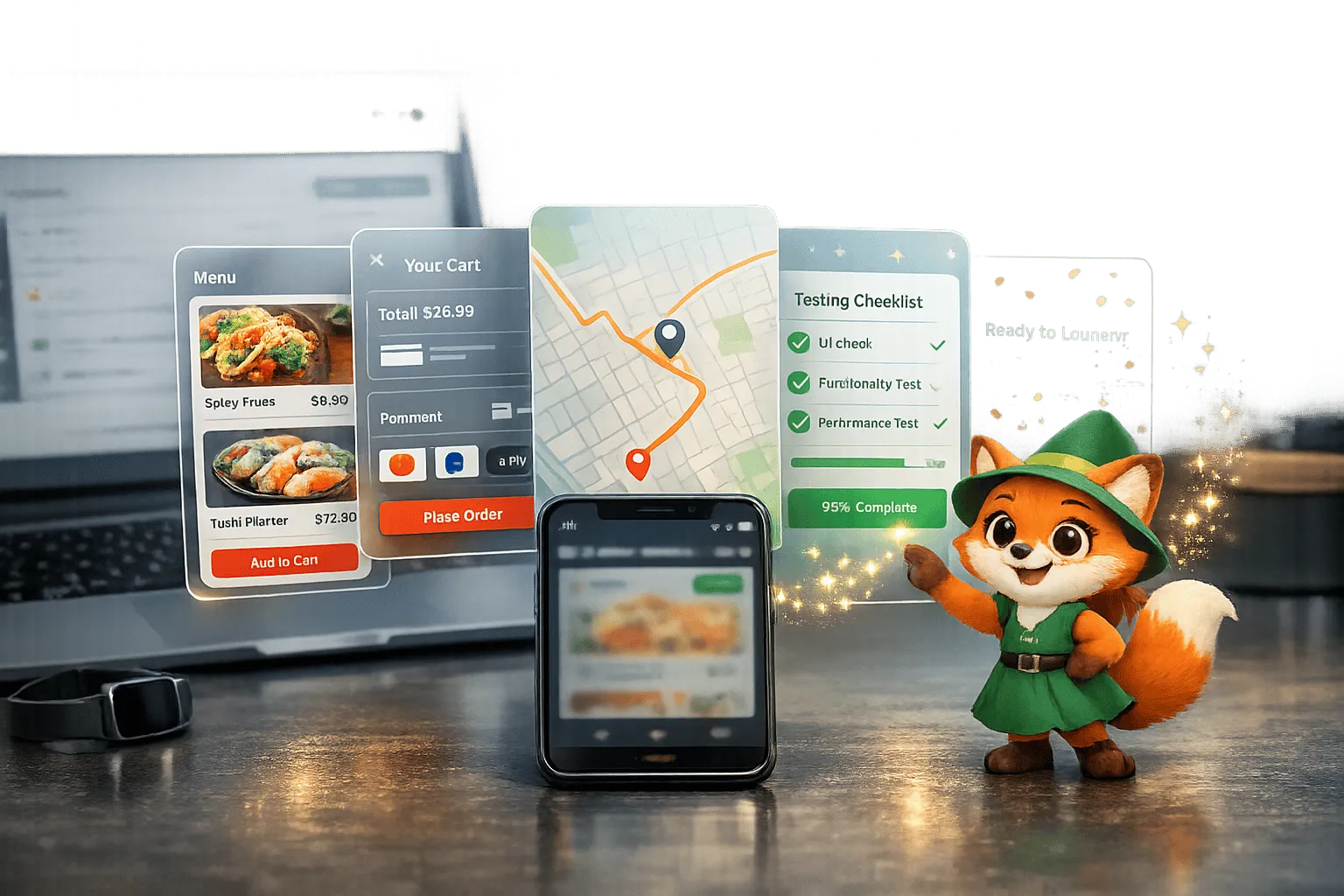
Why Adalo Is Perfect for Building Food Delivery Apps
Adalo is a no-code app builder for database-driven web apps and native iOS and Android apps—one version across all three platforms, published to the Apple App Store and Google Play. This makes it the ideal solution for food delivery apps, which require seamless experiences across multiple devices while managing complex data like menus, orders, and real-time driver locations.
Having your food delivery app in both app stores is essential for reaching hungry customers wherever they are. With Adalo, you can send push notifications for order updates, delivery status, and promotional offers—keeping users engaged and coming back for more. Whether you're launching a local restaurant delivery service or building the next DoorDash competitor, Adalo gives you everything you need to get started fast.
Building a food delivery app in 2026 is faster, cheaper, and easier than ever thanks to no-code platforms like Adalo. You can create a fully functional app for iOS, Android, and the web - complete with features like order management, real-time tracking, and payment processing - without writing a single line of code. Traditional development costs $40,000–$60,000 and takes months, but no-code tools let you launch in weeks for under $1,000.
Here’s what you’ll need:
- Customer Features: Restaurant discovery, order customization, real-time tracking, and secure payments.
- Restaurant Tools: Order dashboards, menu management, and analytics.
- Driver Functions: Automated order assignments, navigation, and earnings tracking.
Ada, Adalo's AI builder, lets you describe what you want and generates your app. Magic Start creates complete app foundations from a description, while Magic Add adds features through natural language.
Adalo’s AI tools, like "Magic Start", simplify the process by generating app structures based on your description. Its 2026 infrastructure upgrade ensures apps run 3–4x faster and scale to over 1 million monthly users. You can integrate payment systems like Stripe, Google Maps for tracking, and push notifications for seamless communication.
In a few steps, you can design screens, set up workflows, integrate essential tools, and publish your app. Testing on real devices is crucial before launching in app stores. Once live, use analytics to monitor performance and refine your app as it grows. Whether you're a restaurant owner or an entrepreneur, creating a food delivery app has never been this accessible.
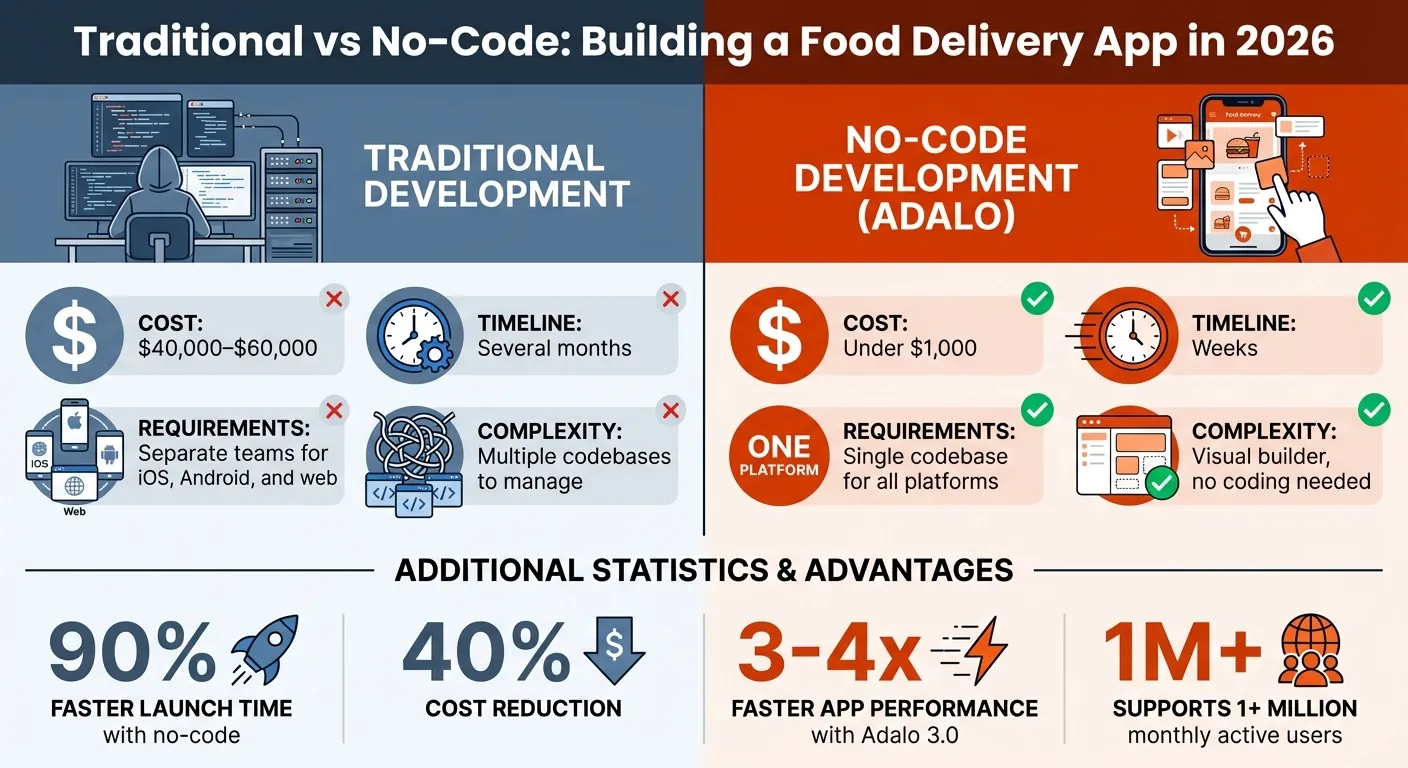
Traditional vs No-Code Food Delivery App Development Costs and Timeline
Core Features Every Food Delivery App Needs
A well-designed food delivery app serves three distinct user groups: customers placing orders, restaurants managing operations, and drivers fulfilling deliveries. Each group has specific requirements, and your app must address all of them to create a seamless experience. Here's what you need to build.
Customer Features
For customers, the priority is simplicity and speed. Your app should include location-based restaurant discovery, letting users find nearby options with filters for cuisine type, ratings, delivery time, and price range. Menus need clear organization with images, descriptions, and prices, plus dietary labels like Vegan or Gluten-Free. Customers also expect order customization options—selecting quantities, adding special instructions, or removing ingredients.
At checkout, a detailed cost breakdown builds trust. Display the subtotal, delivery fee, service fee, and tax clearly, with support for saved payment methods through Stripe or PayPal. Once the order is placed, real-time tracking keeps users engaged with status milestones like "Preparing" or "Out for Delivery," along with estimated arrival times. Push notifications deliver timely updates at each stage, from order confirmation to delivery completion.
Restaurant Management Features
Restaurants need tools that simplify daily operations without requiring technical expertise. A dedicated merchant interface should include an intuitive order dashboard where staff can accept or decline orders, adjust prep times, and update statuses in real time. Menu management tools let restaurants update items, modify prices, toggle availability for sold-out dishes, and track inventory levels.
Performance insights drive better decisions. Analytics dashboards showing total orders, average prep times, revenue trends, and customer reviews help restaurants identify what's working and what needs improvement. Automated notifications ensure new orders never slip through the cracks, keeping operations responsive during busy periods.
Delivery Driver Features
Delivery drivers are the final link in the chain, and their app experience should maximize efficiency. An automated order assignment system matches drivers with deliveries based on location, distance, and availability. The driver interface should display available orders with essential details: pickup and drop-off addresses, estimated earnings, and delivery distance.
Navigation integration with Google Maps or Apple Maps provides turn-by-turn directions and route optimization. Drivers need status update controls—"Arrived at Restaurant," "Picked Up," "Delivered"—to keep customers informed throughout the process. Additional features like earnings dashboards, photo proof of delivery, digital signature capture, and online/offline toggles help drivers manage their workday effectively. In-app messaging enables quick communication with customers or restaurants when issues arise.
Why Use Adalo for Your Food Delivery App
Building a food delivery app traditionally meant hiring separate teams for iOS, Android, and web development—each platform requiring its own codebase, timeline, and budget. Adalo, an AI-powered app builder, eliminates this complexity. With its single codebase architecture, you build once and deploy as a native iOS app, native Android app, and web version simultaneously. These aren't web wrappers—they're true native apps that meet the performance standards Apple App Store and Google Play users expect.
The platform's Adalo 3.0 infrastructure, launched in late 2025, delivered significant performance improvements—apps now run 3-4x faster and scale to support over 1 million monthly active users. This speed advantage translates directly to better user retention and lower bounce rates in the competitive food delivery market.
Multi-Platform Deployment
One of Adalo's most valuable capabilities is unified updates across all platforms. Whether you're adjusting menu layouts, refining the checkout flow, or fixing a bug, changes deploy instantly to web, iOS, and Android. This eliminates the coordination headaches of managing separate codebases and ensures consistent experiences regardless of how customers access your app.
Adalo also streamlines the app store submission process—often the most frustrating part of launching a mobile app. While you'll still need Apple's $99/year Developer Program membership and Google Play's one-time $25 registration fee, Adalo handles the technical complexity of building and submitting your app packages. Apple reviews 90% of submissions in under 24 hours, so your app can go live quickly once submitted.
Integration Options
Food delivery apps depend on reliable integrations for payments, mapping, and notifications. Adalo supports Stripe Connect for splitting payments between your platform, restaurants, and drivers—essential for marketplace models. Google Maps API integration handles delivery fee calculations based on distance and validates delivery addresses before orders are placed.
Adalo's integrated relational database comes with no caps on records, storage, or usage on paid plans starting at $36/month—there are no extra charges based on order volume. Already managing restaurant menus in Google Sheets? Adalo's SheetBridge transforms your spreadsheet into a live database with real-time syncing, letting you start with existing data rather than rebuilding from scratch. For more complex data requirements, the platform connects with Xano, Airtable, and Zapier (linking to over 1,500 apps).
AI-Assisted Development
Adalo's AI Builder accelerates development beyond what traditional drag-and-drop tools offer. Magic Start generates complete app foundations from plain-language descriptions. Describe "a food delivery app with restaurant menus, customer ordering, and driver tracking," and the AI creates your database structure, screens, and user flows automatically—what used to take days of planning happens in minutes.
Need to add features after your initial build? Magic Add lets you type requests like "add a customer reviews section" or "create a favorites list," and the AI handles the database fields, relationships, and screen logic. Before launch, Adalo's X-Ray tool analyzes your app for performance bottlenecks, particularly useful for high-traffic screens like order tracking and menu listings. With support for up to 400 screens on a single canvas, you can manage the complete architecture for customers, restaurants, and drivers in one visual workspace.
How to Build Your Food Delivery App Step-by-Step
Building your food delivery app involves three main phases: designing the interface, configuring the logic that powers it, and integrating essential services for payments, tracking, and notifications. Here's the complete process.
Designing the User Interface
Open Adalo and choose your starting point. Use Magic Start by describing "food delivery marketplace with restaurant listings, ordering, and driver management," and the AI generates your foundation. Alternatively, select a pre-made template like "Restaurant Ordering" that includes essential screens ready for customization.
Your app requires three distinct interfaces serving different user roles:
- Customer Interface: Build a home screen with a Custom List displaying restaurants. Apply filters like "Is Open = true" and sorting by ratings or featured status. Show restaurant details including logo, cuisine type, star rating, delivery time, and fee. The restaurant detail screen should display menus organized by category, with each item showing an image, price (formatted as $12.50), description, and "Add to Cart" button. The cart screen summarizes orders with a restaurant header, itemized list, and cost breakdown (subtotal, delivery fee, service fee, total).
- Restaurant Partner Interface: Create an order management dashboard with Accept/Decline buttons, status dropdowns, prep time sliders, and customer messaging. Include menu management screens for updating items, prices, and availability.
- Delivery Driver Interface: Design a screen listing available deliveries, sortable by distance or earnings potential. Add an active delivery view with map integration, status update buttons, and photo upload for delivery confirmation.
Use Adalo's Branding Button to establish your color scheme—red and orange tones work well for food apps. Select readable fonts and UX copy, and compress images for faster loading. Preview your app across devices using the horizontal ribbon to ensure polished presentation on iPhones, Android phones, and tablets.
Setting Up Workflows and Logic
Configure your Users collection with Boolean properties for Customer, Restaurant Partner, and Rider roles. This determines which screens each user type can access and what actions they can perform.
- Order Tracking: Create an Orders collection with a "Status" property tracking progression: Placed, Accepted, Preparing, Ready, Picked Up, Delivered. Link each order to specific customer, restaurant, and driver records. Use a separate Order Items collection to manage quantities, customizations, and special instructions for individual menu items.
- Filters and Validation: Apply filters so restaurants see only their own orders and drivers see deliveries within their service area. Add checkout validation to verify the restaurant is open, the order meets minimum value requirements (e.g., $15.00), and the delivery address falls within the restaurant's service radius. Use Google Maps API for distance calculations.
- Location Updates: Configure the Maps component to capture driver locations at key moments—order acceptance, restaurant arrival, pickup, and delivery completion. For more granular real-time tracking, integrate Firebase through Custom Actions.
Adding Payment, Tracking, and Notifications
Install the Stripe component from Adalo's Marketplace. On your checkout screen, add a "Pay Now" button with a Stripe action to collect card details securely. Set the payment amount dynamically based on the order total and specify USD as the currency. On successful payment, update the order status to "Paid" and redirect to the tracking screen. For marketplace commission models (typically 5–15%), use Stripe Connect to split payments automatically between your platform, the restaurant, and the driver.
Configure the Maps component with Google Maps API for delivery tracking. Share GPS links in customer notifications and display distances in miles. Since Adalo doesn't support continuous background location tracking, include manual refresh options like pull-to-refresh gestures.
Set up push notifications for each user type:
- Customers receive "Order Confirmed," "Being Prepared," and "Out for Delivery" updates
- Restaurants get "New Order" alerts with order details
- Drivers are notified when orders are ready for pickup
Personalize notifications using Magic Text to include restaurant names, order numbers, and estimated delivery times. Configure your app for US locale settings: dollar sign currency formatting, comma-separated numbers (1,234.56), MM/DD/YYYY date format, distances in miles, and temperatures in °F.
Before launching, run Adalo's X-Ray tool to identify performance issues on high-traffic screens. Optimize by enabling "Load Items as User Scrolls" and limiting initial list loads to 20–30 items.
Testing, Launching, and Improving Your App
With your food delivery app built and configured, thorough testing ensures it's ready for real users. This phase covers validation, app store submission, and ongoing optimization.
Testing on Web, iOS, and Android
Begin with Adalo's Staging Preview to verify appearance and functionality across device types—iPhones, iPads, Android phones, and tablets. Walk through complete user journeys: place a test order as a customer, process it as a restaurant, and fulfill it as a driver. Test critical integrations including payment flows using Stripe's test mode, GPS tracking accuracy, and push notification timing.
Physical device testing catches issues that simulators miss. Use TestFlight for iOS and Google Play's Internal Testing track for Android. These environments validate real-world behavior for geolocation permissions, camera access, and notification delivery. Based on Adalo community feedback, staging previews catch roughly 80% of bugs, but the remaining 20% typically surface only on actual devices.
Create a testing checklist covering: order placement and modification, payment processing with various card types, menu updates and availability toggles, route optimization and navigation, photo uploads and delivery confirmation, and push notification delivery across all user types.
Publishing to App Stores
App store publishing requires developer accounts on both platforms. An Apple Developer Program membership costs $99 annually, while the Google Play Console charges a one-time $25 fee. Organizations publishing to Apple also need a D-U-N-S Number, which can take up to 14 business days to obtain.
In Adalo, enable the "Publish" option in settings and generate production builds. Prepare app assets—icons and screenshots—according to store guidelines, using standard US aspect ratios like 16:9 for promotional graphics.
Submit your iOS build through App Store Connect and your Android build via the Play Console in AAB format. Provide demo account credentials that won't expire so reviewers can access features behind login screens. Include a publicly accessible Privacy Policy URL and customize default permission request text with clear explanations of why your app needs location access or notifications.
Apple reviews 90% of submissions within 24 hours, though complex apps may take 2–14 days. Google's review process typically ranges from 1–7 days. Plan your launch timeline accordingly.
Monitoring Performance and Collecting Feedback
After launch, Adalo's Analytics dashboard tracks daily active users, geographic distribution, and most-visited screens. For deeper insights, integrate Google Analytics, Mixpanel, or Firebase to monitor key performance indicators: order completion rates (target above 90%), app crash rates (keep below 1%), and session duration trends.
Enable in-app feedback by creating a "Reviews" collection in your database. Let users submit star ratings and comments directly within the app after deliveries. Monitor App Store and Play Store reviews as well, organizing feedback by user role to address issues specific to customers, restaurants, or drivers.
Review metrics weekly to catch problems early—high cart abandonment rates, declining ratings, or increasing support requests signal areas needing attention. Adalo supports up to 10 app versions, letting you test updates in staging before rolling out improvements to your live user base.
Scaling Your Food Delivery App as You Grow
Once your app runs smoothly with initial users, preparing for growth becomes the priority. As order volume increases and you expand to new markets, your infrastructure and architecture need to keep pace. Adalo's modular infrastructure supports over 1 million monthly active users with no upper ceiling, giving you room to scale without platform constraints.
Handling More Users and Orders
Higher order volumes require architectural adjustments. If you started with Google Sheets via SheetBridge, migrate to Adalo's native database or Xano once you approach 50,000 rows. Consider splitting your system into separate apps for customers, restaurants, drivers, and admin management—each app shares the central database but distributes the interface load.
Performance optimization becomes critical at scale. Compress images before upload, enable lazy loading for long lists, and store frequently-accessed calculations as record properties rather than computing them on each screen load. All connected apps share real-time data synchronization without overloading any single interface.
Before expanding to new markets, use Adalo's X-Ray tool to identify slow-loading screens or database queries causing bottlenecks. Regular performance audits ensure your app handles peak ordering times—Friday dinner rushes or game day surges—without degradation.
Expanding to Multiple Restaurants and Locations
Multi-restaurant operations require restructured data relationships. Create a "Restaurants" collection linking each record to a specific restaurant owner account. Connect "Menu Categories" and "Menu Items" to individual restaurants using Many-to-One relationships, ensuring customers see only the menu for their selected restaurant.
Geographic expansion leverages Google Maps API for delivery fee calculations based on distance, address validation, and proximity-based restaurant sorting. For regional chains or franchise models, a centralized admin dashboard consolidates orders from all locations, enabling standardized operations and cross-market trend analysis.
Stripe Connect automates the financial complexity of multi-party transactions, splitting each payment between your platform commission, the restaurant's share, and the driver's earnings—no manual reconciliation required.
Using Data to Make Better Decisions
Adalo's built-in analytics (accessible via the graph icon) surfaces key metrics: daily active users, geographic distribution, and screen-level engagement. This data reveals patterns—popular menu items, peak ordering windows, underperforming restaurants—that inform marketing and operational decisions.
Unlike third-party delivery platforms that retain customer data, owning your app means you control all business intelligence. You know who your customers are, what they order, and when they order it.
Create role-specific dashboards for your partners. Restaurants can track daily order counts, total revenue, average order values, and customer ratings. Drivers monitor completed deliveries, earnings by day or week, and acceptance rates. For advanced analytics, connect external tools like Google Analytics or Mixpanel through Adalo's API integrations.
This data ownership becomes a competitive advantage as you scale—you can identify your most valuable customers, optimize delivery zones, and make pricing decisions based on actual performance rather than guesswork.
Conclusion
Building a food delivery app without writing code is now a realistic path for entrepreneurs and restaurant owners alike. The combination of AI-assisted development, native mobile deployment, and scalable infrastructure means you can launch a complete three-sided marketplace—customers, restaurants, and drivers—in weeks rather than months.
The process follows a clear path: design your interfaces using templates or AI-generated foundations, configure the workflows connecting orders to fulfillment, integrate payments and tracking, then test thoroughly before publishing to both app stores. Once live, analytics and performance monitoring guide ongoing improvements as your user base grows.
Traditional development for a food delivery app runs $40,000–$60,000 and takes months of coordination between multiple development teams. AI-powered app builders compress that timeline dramatically while cutting costs by roughly 40%. You don't need a technical background or a development team to compete in this market.
The food delivery industry continues expanding, and the tools to participate have never been more accessible. Whether you're launching a local restaurant's delivery service or building a regional marketplace, the technical barriers that once required significant capital and expertise have largely disappeared.
Related Blog Posts
- Building a Restaurant Mobile App with Adalo: Complete Tutorial
- No-Code E-commerce App Development: Build Your Store with Adalo
- Prompt-to-App: What AI App Builders Mean for Non-Technical Founders
- From Prompt to Prototype: How AI Is Making App Building Accessible
FAQ
Why choose Adalo over other app building solutions?
Adalo is an AI-powered app builder that creates true native iOS and Android apps from a single codebase. Unlike web wrappers or PWA-only platforms, it compiles to native code and publishes directly to both the Apple App Store and Google Play Store. At $36/month with no caps on database records, users, or actions, it offers predictable pricing without the usage-based charges that make competitors' costs unpredictable.
What's the fastest way to build and publish an app to the App Store?
Adalo's AI Builder with Magic Start generates complete app foundations from text descriptions—describe your food delivery app and get database structure, screens, and user flows automatically. The drag-and-drop interface lets you customize everything, and Adalo handles the complex App Store submission process, so you can go from idea to published app in days rather than months.
How much does it cost to build a food delivery app with Adalo compared to traditional development?
Traditional food delivery app development costs $40,000–$60,000 and takes months. With Adalo, you can launch in weeks for under $1,000. Paid plans start at $36/month with unlimited database records and no usage-based charges, plus Apple's $99/year Developer fee and Google Play's one-time $25 registration for app store publishing.
Can Adalo handle high traffic and scale as my food delivery business grows?
Yes. Adalo's modular infrastructure, upgraded in late 2025, supports apps with over 1 million monthly active users with no upper ceiling. The platform processes 20 million+ daily requests with 99%+ uptime. You can split your system into separate apps for customers, restaurants, and drivers while sharing a central database for smooth performance during peak times.
Which is more affordable, Adalo or Bubble?
Adalo offers better value for food delivery apps. Adalo's $36/month plan includes unlimited database records, users, and actions with native iOS and Android apps. Bubble's comparable plan costs $69/month and adds unpredictable Workload Unit charges based on CPU usage and database operations—costs that can spike during high-traffic periods like dinner rushes.
Which is better for mobile apps, Adalo or Glide?
Adalo is significantly better for mobile food delivery apps. Adalo creates true native iOS and Android apps published to app stores, while Glide only produces web apps—no native mobile apps at all. For a food delivery service where customers expect a native app experience with push notifications and offline capabilities, Adalo is the clear choice.
Do I need coding experience to build a food delivery app?
No coding experience is required. Adalo's AI Builder generates app foundations from plain-language descriptions, and the drag-and-drop interface handles all visual design and logic configuration. Magic Add lets you describe features you want—like "add a customer reviews section"—and the AI creates the necessary database fields and screens automatically.
What payment and tracking integrations are available for food delivery apps in Adalo?
Adalo supports Stripe Connect for secure payment processing with automatic transaction splitting between your platform, restaurants, and drivers. Google Maps API integration handles real-time delivery tracking, distance-based fee calculations, and route optimization. Push notifications keep customers, restaurants, and drivers informed throughout the order lifecycle.
How long does it take to build a food delivery app?
With Adalo's AI-assisted tools, you can build a functional food delivery app in 2-4 weeks. Magic Start generates your initial structure in minutes, and the drag-and-drop builder lets you customize interfaces quickly. Testing and app store review add another 1-2 weeks, so plan for roughly 4-6 weeks from start to published app.
Can I migrate from another platform to Adalo?
Yes. Adalo's SheetBridge feature can import existing data from Google Sheets, making migration straightforward if you're managing restaurant menus or customer data in spreadsheets. For more complex migrations from platforms like Bubble or Glide, you can export data and import it into Adalo's native database or connect to external databases like Xano or Airtable.

Build your app fast with one of our pre-made app templates
Begin Building with no codeRelated Content

Step-by-Step Guide: Building a Deliveroo Clone with Adalo
Build a Deliveroo-style multi-role food delivery app using Adalo’s no-code platform with restaurants, riders, and customers.
Step-by-Step Guide: Building a Postmates Clone with Adalo
Build a no-code food delivery app with Adalo, supporting restaurants, customers, and drivers, plus payments and order tracking.
How to Build an Inventory Management App with AI in 2026
How to Build an Inventory Management App with AI in 2026
Step-by-step guide to building an inventory management app without code. Compare Adalo, Bubble, FlutterFlow, and Glide for stock tracking, barcode scanning, and multi-location inventory.

Building an E-commerce App: No-Code Platform Guide
Step-by-step guide to design, build, and publish a no-code e-commerce app: product database, Stripe payments, user accounts, and scaling tip