

Adalo makes mobile app development affordable and simple for small businesses. For just $36/month, you can create apps for iOS, Android, and the web - no coding required. Traditional app development costs can exceed Traditional app development costs can exceed $10,0000,000, but Adalo's drag-and-drop platform eliminates the need to hire a developer and long timelines. You can build features like loyalty programs, booking systems, product catalogs, and push notifications in hours, not months.
Key Benefits:
- Cost-Effective: $36/month flat pricing vs. $10,000+ for traditional development.
- No Coding Needed: Drag-and-drop tools simplify app creation.
- Cross-Platform: Publish to iOS, Android, and the web with one build.
- Business Features: Add bookings, rewards, notifications, and payment options.
- Scalable: Supports businesses of all sizes, from startups to enterprises.
Adalo empowers small businesses to create professional apps quickly and affordably, helping you connect with your customers and grow your business.
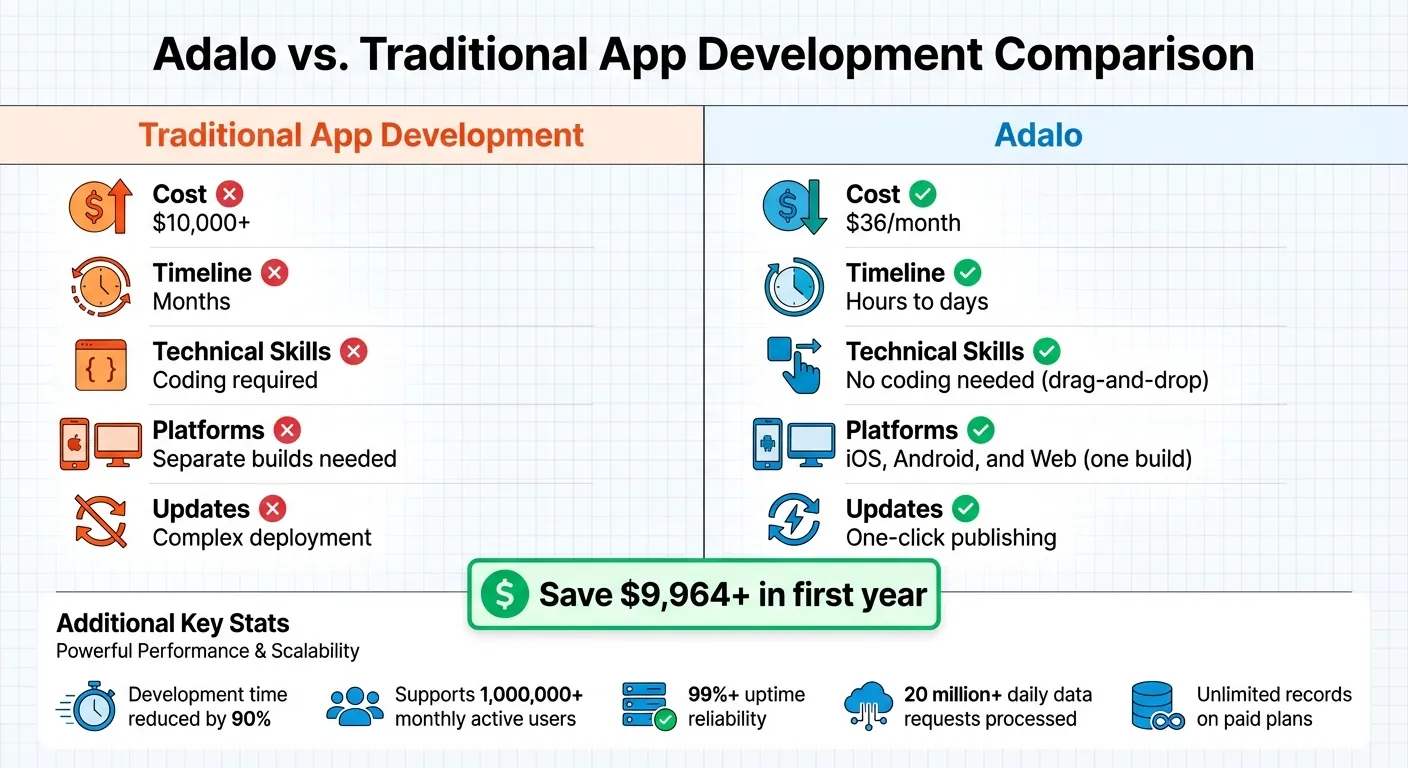
Adalo vs Traditional App Development: Cost and Feature Comparison
Getting Started with Adalo
Setting Up Your Adalo Account
Getting started with Adalo is quick and hassle-free. Head to adalo.com and click "Sign Up" or "Get Started for Free." You can create an account using your email and password or streamline the process by signing in with your Google or Apple account. No credit card is required upfront.
Once you verify your email, you'll be taken to your dashboard. Here, you can dive right into app creation. Choose from a variety of pre-designed templates - perfect for e-commerce, appointment booking, or food ordering - or start with a blank canvas if you prefer to build from scratch. These templates come equipped with pre-set screens, logic, and database structures, so you can focus on customization rather than starting from zero.
The dashboard is intuitive, featuring a sidebar with your app's building tools and a real-time preview to see your changes instantly. You can begin building right away on the free tier, which allows unlimited test apps and up to 500 database records per app. Ready to publish? Upgrade to the Starter plan for $36/month to launch your app on the Apple App Store and Google Play.
How Adalo's no-code app builder Works
Adalo's platform makes app building as simple as arranging slides in PowerPoint or Canva. Using a drag-and-drop interface, you can place and organize elements on a canvas while the platform handles the technical coding in the background. The result? Native apps for iOS and Android without writing a single line of code.
The editor is built around three main pillars: Components, Actions, and the Database. Components are the building blocks of your app, like image galleries, forms, and buttons. Actions define what happens when users interact with these components - for example, navigating to a new screen when a button is clicked or triggering a push notification when a form is submitted. The Database acts as the backbone, storing all your app's data, from customer profiles to product details. On paid plans, there are no limits to the number of records you can store.
Ada, Adalo's AI builder, lets you describe what you want and generates your app. Magic Start creates complete app foundations from a description, while Magic Add adds features through natural language.
Adalo also offers an AI Builder to speed things up. With tools like Magic Start, you can create a fully functional app foundation - complete with database structure, screens, and workflows - just by describing your idea (e.g., "a restaurant app with menu ordering"). Need to add a specific feature? Use Magic Add to describe it in plain language, and the platform will generate it for you. You can toggle between AI-assisted tools and manual drag-and-drop editing anytime.
To see how your app will look on different devices, Adalo provides a real-time preview feature. Simply click "Staging Preview" to test your app on simulated devices instantly.
With these tools, the technical side is covered. All you need to do is focus on planning your app's purpose and features.
Planning Your App Before You Build
Adalo's user-friendly tools make planning your app straightforward, but a little preparation goes a long way. Before jumping into the builder, take some time to define your app's purpose and target audience. What problem are you solving, and who will benefit from your app? This clarity will help you prioritize the features that matter most.
For instance, a gym might need class booking and workout tracking features, while a salon might focus on appointment scheduling and reminders. A coffee shop catering to busy commuters could highlight fast mobile ordering, while a spa might prioritize stunning visuals and flexible booking options.
Start by listing three to five core features for your Minimum Viable Product (MVP). For example, a restaurant app might include:
- A menu with photos
- Online ordering with Stripe payments
- Loyalty points tracking
- Push notifications for daily specials
- Customer feedback forms
Stick to the essentials at first. Adding too many "nice-to-have" features can complicate the process. Once your app is live, you can gather user feedback and refine it further. Adalo's templates can also help streamline planning by offering pre-built structures that you can tweak to suit your needs.
Next, sketch out your database structure. For example, a retail app might include collections for Products (name, price, image, inventory), Customers (name, email, loyalty points), and Orders (date, items, total, status). You don’t need to be a database expert - just think about the data you'll need and how it connects. Adalo's visual database builder makes it easy to create and link these collections without requiring SQL knowledge.
Avoid common pitfalls like overcomplicating your app, skipping mobile previews, or neglecting to research your audience. By focusing on a few key features and planning ahead, you'll create an app that's both functional and user-friendly.
Adalo Beginners Crash Course: The Ultimate Guide
Building Core Features for Your Business
With a solid game plan, it's time to roll out the features that will keep your users engaged and contribute to your business's growth. Focus on elements that create value for your customers while driving results for you.
Setting Up Loyalty Programs and Customer Rewards
Loyalty programs are a proven way to keep customers coming back while increasing their lifetime value.
Start by creating user authentication screens to collect unique customer profiles and track loyalty data. In your database, add a "Points" property to the User collection to monitor each customer's balance. Decide on a points system - such as earning 1 point for every dollar spent - and set redemption rules, like 100 points for a $10 discount. Use the "Update Logged in User" action to automatically add points after purchases, integrating this with your Stripe payment system.
To display rewards, use conditional visibility. For instance, show a "Redeem" button or reward screen only when the user's points meet the required threshold. For simpler systems, like a digital punch card, create a collection that tracks visits and resets after a set number of visits. Push notifications can also play a role, alerting customers when they've earned rewards or reached a milestone.
Before launching, share your app with a small group of loyal customers via QR code or SMS link. This lets you test the rewards flow and gather valuable feedback.
Creating Appointment and Booking Systems
For businesses like salons, gyms, or service providers, an efficient booking system is a must. A well-designed appointment feature can streamline operations and enhance customer satisfaction.
Start by using a pre-built "Appointment" or "Course Offerings/Booking" template, which comes with ready-to-use screens, logic, and databases. You can also use Magic Start to generate the basic structure of your booking app.
Set up your database with collections for Services (name, price, description), Availability/Dates (time slots), and Bookings (linking users to specific appointments). Add calendar and date picker components from the Adalo Marketplace to make time selection easy for users.
Configure "Create Record" actions to save appointment details and use "Link" actions to navigate users to confirmation screens. Push notifications can be set up to send booking confirmations and reminders, helping to reduce no-shows. If upfront payments are required, integrate the Stripe component into your checkout screen to handle transactions seamlessly.
Test your booking flow on multiple devices using the Staging Preview feature, and use the X-Ray tool to identify and resolve any performance issues before going live.
Displaying Product Catalogs and Menus
Retail stores and restaurants need a clear and organized way to showcase their offerings. Adalo's tools make it easy to create visually appealing catalogs that are simple to navigate.
Start with a "eCommerce mobile app builders" or "Ordering" template, which includes product screens, user login functionality, and payment integration. Set up a "Products" collection in your database with fields for name, price, description, images, and category.
Use List components - like simple lists, card lists, or image grids - to display your catalog. Adding a "Category" property allows customers to filter and search through your offerings, making it easier to find what they need.
Customize the design to reflect your brand by adjusting colors, fonts, and layouts. If you manage product data externally, you can sync it with your app for efficiency. Use the X-Ray tool during development to spot any potential issues with catalog performance. Need extra features like a wishlist? Magic Add can help you implement them by simply describing your needs.
Using Push Notifications for Marketing
Push notifications are a direct way to keep your app active and your customers informed. Whether it's announcing a special offer, a new product, or a reward milestone, these alerts keep your audience engaged.
Set up triggers based on user actions or scheduled events. For example, you can notify users when a reward is earned, when a new item is added to your catalog, or when a daily deal becomes available. Automate these alerts for efficiency and keep messages short and actionable, with clear calls-to-action like "Redeem Now" or "Shop Today."
Test notifications on both iOS and Android to ensure they display correctly. Adalo's infrastructure processes over 20 million data requests daily with 99%+ uptime, so you can trust your messages will reach your users reliably.
Managing Orders and Processing Payments
For e-commerce, food ordering, or service apps, smooth order management and payment processing are critical.
Create an "Orders" collection in your database with fields such as date, items, total, and status. Use "Create Record" actions to save order details as customers add items to their cart. Link each order to the logged-in user so they can view their order history later.
Add the Stripe payment component to your checkout screen for secure transactions. After payment, update the order status and send a confirmation to the user. If applicable, integrate your loyalty program to add points for completed purchases.
For tracking order fulfillment, include a "Status" field with options like "Pending", "In Progress", and "Completed." Use conditional visibility to adapt the user experience - for example, displaying a "Track Order" button after payment confirmation or a "Reorder" option for completed orders. Test the entire order flow thoroughly to ensure everything works smoothly before launch.
Publishing Your App to App Stores
Once you've tested your app, it's time to make it available to your audience. Publishing it on the Apple App Store and Google Play Store not only boosts your business's credibility but also makes it convenient for users to find and download your app.
Preparing Your App for App Store Submission
Before hitting "submit", there are a few key steps to tackle. First, set up developer accounts. For Apple, this requires a $99/year membership. If you're registering as a business, you'll also need a D-U-N-S Number, which can take up to 14 days to process. For Google, the process is simpler, with a one-time $25 fee for a Google Play Console account.
Next, gather the necessary app assets. Apple requires a 1024x1024px icon without transparency, while Google asks for a 512x512px icon. You'll also need high-quality screenshots that show your app in action - login screens alone won’t cut it. Keep in mind the character limits for app names: 30 characters for Apple and 50 characters for Google. A concise, clear name is key.
Both stores require an active Privacy Policy URL. If your app accesses the camera, location, or photo library, replace Adalo's placeholder text with specific "purpose strings" that explain why these permissions are needed.
Don't forget to create a non-expiring demo account and include clear login instructions in the "App Review Information" section. In App Store Connect, disclose that your app collects User IDs, Product Interaction, and Diagnostic Data, as this is necessary for Adalo’s infrastructure. Additionally, make sure your app supports iPad screen sizes - Apple often rejects apps that don’t comply (Guideline 2.1). Lastly, double-check that your Bundle ID or Package Name doesn’t have any leading or trailing spaces, as these can cause build errors.
Once all assets and accounts are ready, you're set to submit your app.
Submitting to iOS and Android App Stores
For iOS, you'll need to generate an "App-specific Password" from your Apple ID settings and assign a unique Bundle ID. For Android, setting up a Firebase project is essential. You'll also need to download the google-services.json file and generate a Service Account Key. These technical details are crucial for building and submitting your app.
The review process varies between platforms. Google Play reviews typically take 2–7 days, while Apple's timeline can be less predictable. To catch any last-minute issues, use TestFlight (iOS) and Internal Testing (Android) to identify platform-specific bugs or layout problems before submission.
| Apple App Store | Google Play Store |
|---|---|
| $99/year | $25 one-time |
| Human-led review | Machine Learning + Human |
| 30 character app name | 50 character app name |
| 1024 x 1024px icon (No Alpha) | 512 x 512px icon |
If you’re looking for a faster alternative to app stores, consider comparing Progressive Web Apps vs. native apps before publishing.
What Are Progressive Web Apps (PWAs)?
Progressive Web Apps (PWAs) provide another way to distribute your app without relying on app stores. Adalo makes it easy to publish your app as a PWA - just toggle the "Publish" setting and host it on a web domain, either through an Adalo subdomain or a custom one.
PWAs can be installed directly from a browser onto a user’s home screen. There’s no review process, so updates happen instantly when you click "Publish" in Adalo. This rapid deployment makes PWAs an excellent choice for quickly reaching users or testing features before submitting to app stores.
That said, PWAs do have some downsides. For example, push notifications on iOS and desktop require additional third-party tools, and some users may not be familiar with how to install a PWA from their browser. To maximize reach and give users more options, consider publishing your app on both app stores and as a PWA. This approach balances accessibility with the credibility of being listed on major platforms.
Managing and Updating Your App After Launch
Launching your app is just the beginning. The real challenge lies in keeping it relevant, addressing issues quickly, and understanding how users interact with it. These efforts are what turn your app into a daily essential rather than something users forget.
Tracking User Engagement with Analytics
Adalo equips you with tools to track user behavior effectively. The built-in Analytics tab, located in the left toolbar, offers insights like user locations, daily active users, and the most visited screens. For instance, you can see if restaurant customers are exploring the full menu or sticking to their favorites, or if gym members are checking class schedules more often than booking sessions.
For more advanced tracking, you can integrate Google Analytics by adding its tracking code in your app's Settings. This enables deeper insights, such as how users find your app and the success of your marketing efforts. On paid plans, you can also store unlimited custom behavioral data directly in your Adalo database.
To measure engagement, calculate the ratio of Daily Active Users (DAU) to Monthly Active Users (MAU). For example, if you have 10 daily users out of 100 monthly, a 10% engagement rate might indicate the need for more engaging features. Retention tracking at intervals - like 7, 30, 60, and 90 days - can show how often users return, while a surge in uninstalls after an update might highlight a problem that needs immediate fixing. These insights help you make informed decisions about updates and new features.
Adding New Features and Updates
Understanding user behavior through analytics can help you prioritize which features to add next. Adalo’s Manual Publishing feature lets you test changes in a draft environment before rolling them out to your live app. You can also save previous versions with the Design Versions feature, making it easy to revert if needed. Once you're satisfied, publishing updates is a single click away, syncing changes across iOS, Android, and web simultaneously.
Adalo’s tools make implementing updates straightforward. Whether it's adding a new product category, creating a referral program, or embedding a feedback form, you can act quickly. User feedback is another critical source of inspiration. For example, if salon clients request appointment reminders, you can integrate SMS notifications using Zapier. Or, if retail customers want to save their favorite items, you can introduce a wishlist feature using Adalo's database. Regular updates based on user input show that you're paying attention and committed to improving the app experience.
Scaling Your App as Your Business Grows
As your app evolves, scalability becomes crucial to handle increasing user engagement and data demands. Adalo’s flat pricing structure simplifies budgeting - whether you have 50 users or 5,000, your costs remain predictable. The platform can support apps with over 1,000,000 monthly active users, ensuring it grows alongside your business.
For businesses needing advanced capabilities, higher-tier plans (up to $250/per month) offer features like custom API integrations and additional editors. You can also add extra published apps for $25 per month or more editors for $15 per month.
As your data needs grow, Adalo ensures consistent performance. With support for over 20 million daily data requests and 99% uptime, your app stays responsive even during high traffic periods. Plus, its single-codebase design means any optimizations you make benefit all platforms - web, iOS, and Android - simultaneously. This efficiency keeps your app running smoothly as your audience expands.
Conclusion
Creating a mobile app no longer demands a massive budget or advanced technical skills. With Adalo's intuitive drag-and-drop interface, you can design, launch, and manage native iOS, Android, and web apps - all without touching a single line of code.
For just $36 per month, Adalo provides unlimited usage, records, and storage, ensuring there are no unexpected costs as your business grows. Whether you run a restaurant, gym, salon, or retail store, you can build an app with features like loyalty programs, booking systems, push notifications, and order management. This pricing model makes professional app development accessible to small businesses of all kinds.
Once your app is live, scalability and reliability are key. Adalo ensures your app keeps running smoothly as user engagement increases, with over 99% uptime and seamless updates across all platforms from a single codebase. This allows you to quickly adapt to customer feedback and add new features without downtime or hassle.
As no-code tools transform the way apps are built, Adalo leads the charge by making app creation faster and more accessible. Small businesses are adopting no-code mobile app builders at an incredible pace, cutting development time by up to 90% compared to traditional methods. Adalo eliminates the technical obstacles, empowering business owners to connect with their customers like never before.
Take control of your business’s mobile presence - design, launch, and update your app whenever you’re ready.
FAQs
How long does it take to build an app in Adalo?
Building and launching an app with Adalo usually takes between 2 to 8 weeks, depending on how complex your app is and the features you want to include. This timeframe makes it possible for small businesses to develop fully functional apps without needing to hire a development team.
What do I need to publish to the App Store and Google Play?
To get your app ready for publishing, you'll need to handle some platform-specific details. For iOS, this includes setting up your Apple Developer account credentials, choosing a bundle ID, naming your app, and adding a launch screen graphic. You'll also need to configure iOS permissions and ensure your app aligns with review guidelines for both the App Store and Google Play. Double-check that all necessary settings are in place before submitting to either platform.
Can my Adalo app handle lots of users and data as I grow?
Yes, your Adalo app is built to support an increasing number of users and handle large data sets effectively. That said, keeping your app optimized is key to avoiding potential problems like slow loading speeds or performance hiccups. By organizing your data efficiently and structuring your app thoughtfully, you can maintain strong performance as your user base grows.
Related Blog Posts

Build your app fast with one of our pre-made app templates
Begin Building with no codeRelated Content

How to Build a Mobile App Without Coding (2026 Guide) | Adalo
Learn how to plan, design, and launch iOS & Android apps with Adalo’s no-code builder. This step-by-step guide covers tools, templates, etc.
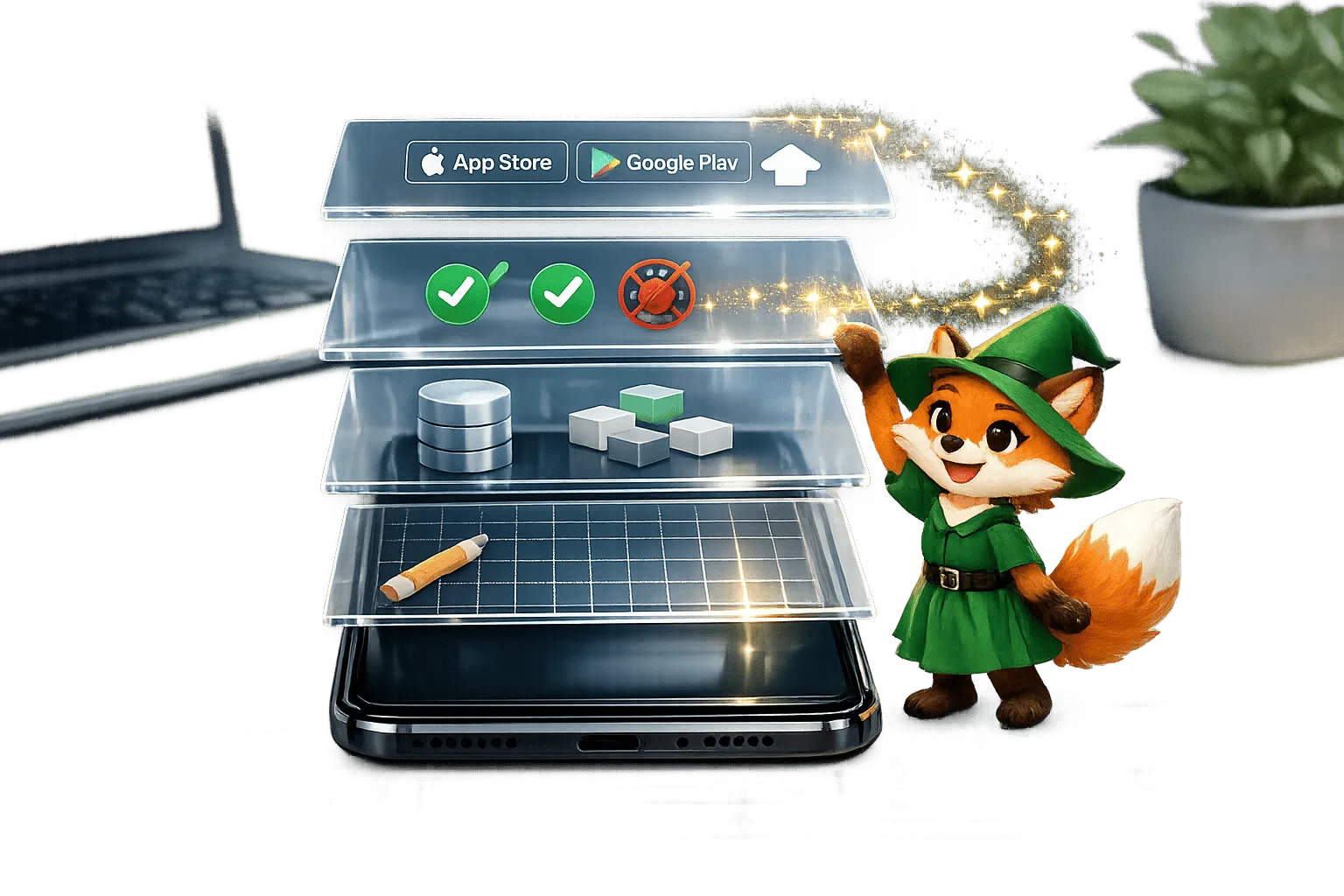
Building Your Mobile App: Adalo's Complete Development and Deployment Guide
Step-by-step guide to design, build, test, and publish cross-platform mobile apps and PWAs with AI tools, databases, testing, and app store
Adalo App Builder: Effortless AI Powered Mobile App Creation
Adalo makes app creation easy with AI-powered no-code tools. Founders can build, deploy, and publish responsive apps with custom integration
Adalo's 2026 Guide to AI-Powered No-Code Mobile App Builders
Adalo's 2026 Guide to AI-Powered No-Code Mobile App Builders
Adalo offers AI-powered no-code tools to help founders and startups build and publish responsive apps using APIs and custom integrations.