

Head over to adalo.com and click the "Start building for free" button. Adalo is a no-code app builder for database-driven web apps and native iOS and Android apps—one version across all three platforms, published to the Apple App Store and Google Play. You can sign up using your email, Google, or GitHub account - no credit card is needed. Once you're in, the dashboard will appear. From there, click "New App," give your project a name (like "My Custom Web App"), and select the "Web App" orientation to dive into the visual editor and database manager.
Ada, Adalo's AI builder, lets you describe what you want and generates your app. Magic Start creates complete app foundations from a description, while Magic Add adds features through natural language.
Key Features:
- Magic Start: AI creates app foundations from text prompts.
- Multi-Platform Deployment: Publish to web, iOS, and Android simultaneously.
- Pricing: $36/month for unlimited records, users, and storage.
- Scalability: Handles 1M+ active users with 99%+ uptime.
- Built-In Tools: Analytics, re-engagement, and monetization.
Adalo eliminates technical barriers, so you can focus on designing apps that convert users effectively.
Building Your Web Application with Adalo
Create Your Adalo Account and First Project
Head over to adalo.com and click the "Start building for free" button. You can sign up using your email, Google, or GitHub account - no credit card is needed. Once you're in, the dashboard will appear. From there, click "New App," give your project a name (like "My Custom Web App"), and select the "Web App" orientation to dive into the visual editor and database manager.
Adalo lets you choose between Responsive Apps (designed for mobile, tablet, and desktop) or Mobile Only layouts. If you're building a web app that needs to work seamlessly across different devices, go for the Responsive Apps option. With the free plan, you can build and test as many apps as you like, hosted on an Adalo subdomain. However, free apps are capped at 50 database records and 1,000 actions per month. To remove these limits and get access to unlimited records, users, actions, and storage - as well as native iOS and Android publishing - you can upgrade to the Professional plan for $36/month (billed annually).
Generate Your App Foundation with AI Builder
Forget spending hours manually designing screens and database tables. Adalo’s Magic Start feature helps you hit the ground running. Simply type in a prompt like "Build a task management web app with user login, task lists, and notifications," and the AI will instantly generate a foundation for your app. It creates database collections (like Users and Tasks), screens (such as login and dashboard), and basic actions.
"Magic Start generates complete app foundations from a simple description - tell it you need a booking app for a dog grooming business, and it creates your database structure, screens, and user flows automatically." - The Adalo Team
To get the best results, stick to short, clear descriptions that highlight the main features, user flows, and data types you need. If you decide to add more features later, use Magic Add to include extras like payment systems or user profiles - just describe these in plain language, and the AI will handle the rest. This saves you hours of setup time, so you can focus on refining your app instead of wrestling with technical details.
Customize Your App with the Visual Editor
Once the AI has built your app’s foundation, it’s time to make it your own using Adalo’s drag-and-drop editor. From the "Add Panel" (+), you can pull in elements like buttons, lists, forms, and images, then tweak their properties - like colors and fonts - in the right-hand panel. Use the "Actions" tab to set up events, such as "On Button Click: Create Record".
For web apps, enable "Responsive" mode to adjust layouts for desktop, tablet, and mobile views all within a single build. In the Database tab, you can add new Collections or Properties (e.g., User > Profile Pic as an Image type) and link screens using "Relationships." To see how your app performs, use the "Staging Preview" button to test it as if it were live across different devices.
Experts suggest starting with the AI-generated foundation and keeping your initial screens to five to seven. This avoids preview lag and ensures a smoother workflow. Group reusable layouts into components to save time and stay organized. Adalo’s platform can handle up to 400 screens at once, giving you a clear view of your app’s structure as it scales.
Next up, dive into designing screens and onboarding flows that maximize user engagement.
How to build a web app without coding using Adalo
Designing Screens and Onboarding Flows That Convert
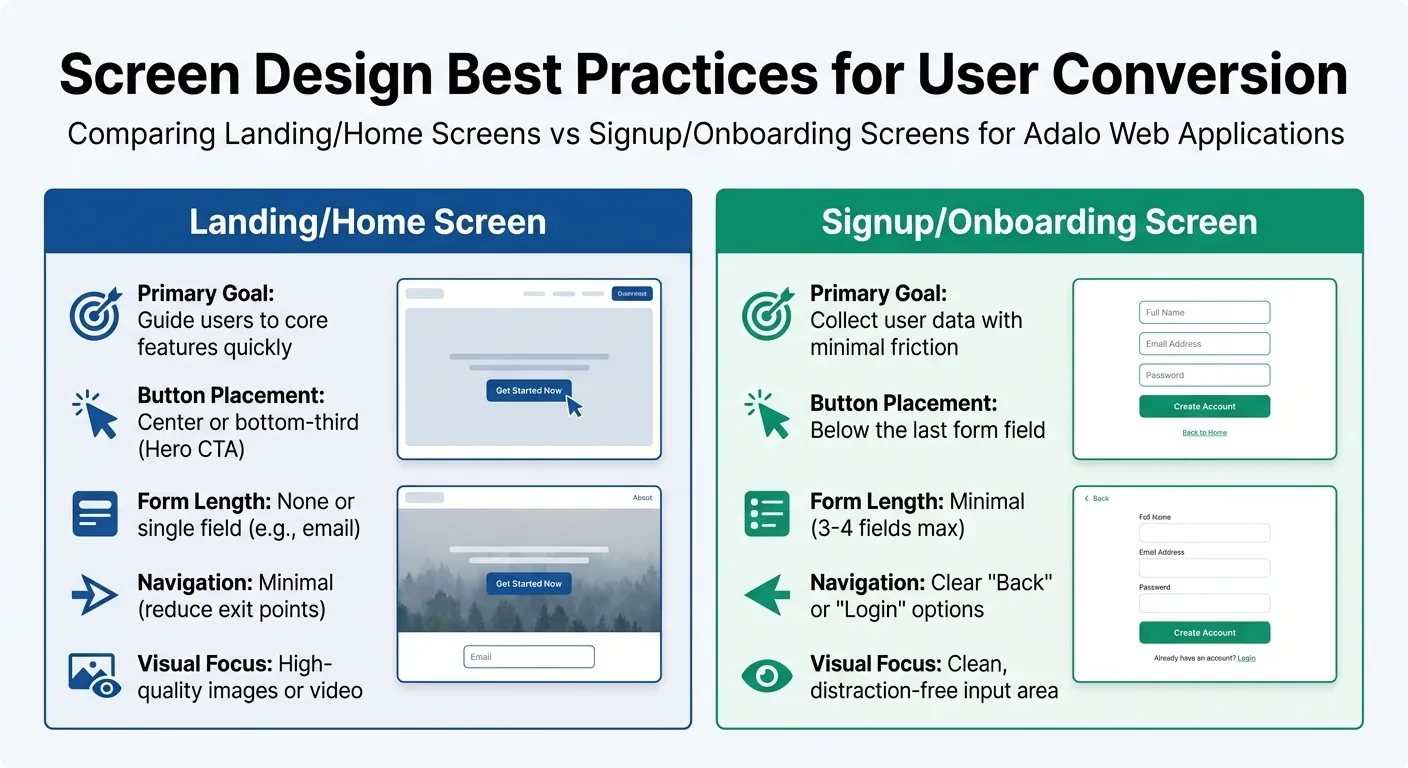
Adalo Web App Screen Design Best Practices: Landing vs Signup Screens
How to Design High-Converting Screens
The way you design your screens can make or break your app's ability to turn visitors into active users. Each screen should serve a single, clear purpose—whether that's signing up, completing an action, or exploring a feature. For primary call-to-actions (CTAs), position them where users naturally focus: the center or bottom-third for landing screens, and right below the last form field for signup screens. Limit navigation options on landing pages to keep users from leaving prematurely.
When it comes to forms, less is more. Landing screens should feature either a single field, like an email input, or skip forms entirely. Signup screens should stick to three to four fields at most to minimize drop-offs. Adalo's Design Versions feature allows you to experiment with layouts—like button placements or themes—without risk. If a new design doesn't perform well, you can easily revert to a previous version without starting over from scratch.
| Element | Landing/Home Screen | Signup/Onboarding Screen |
|---|---|---|
| Primary Goal | Guide users to core features quickly | Collect user data with minimal friction |
| Button Placement | Center or bottom-third (Hero CTA) | Below the last form field |
| Form Length | None or single field (e.g., email) | Minimal (3-4 fields max) |
| Navigation | Minimal (reduce exit points) | Clear "Back" or "Login" options |
| Visual Focus | High-quality images or video | Clean, distraction-free input area |
Once your screens are fine-tuned, the next step is crafting an onboarding flow that keeps users engaged from the start.
Build User Onboarding Flows That Reduce Drop-Off
Don't make users create an account before they've had a chance to see the value your app offers. By disabling mandatory login requirements, you give visitors the freedom to explore your app's features first, which can significantly lower friction and boost signups.
Start by wireframing key screens—like signup, login, profile, and the first action screen—to map out a clear user journey. The goal is to guide users from landing to their first "win" in your app. Whether that's completing a task, viewing tailored content, or connecting with others, this initial success helps build momentum.
Keep the onboarding process short and focused. Aim for three to five steps that showcase your app's core value, and then let users jump in. Advanced features can always be introduced later through in-app messages or tooltips once they're already engaged. With Adalo's AI Builder, you can use Magic Add to quickly implement onboarding elements—just describe what you need, like "add a welcome tutorial with three slides," and the AI handles the implementation.
Publishing Progressive Web Apps Across Platforms
Once your app is ready to engage users, the next step is making it available across platforms without unnecessary hurdles.
What Are Progressive Web Apps?
Progressive Web Apps (PWAs) are a hybrid of websites and native apps. They run directly in a browser but can be added to a user's home screen without requiring an app store download. When launched, they operate in a dedicated window, support push notifications, and even work offline by caching content. Since PWAs don't need app store approval, they can be shared instantly via a link or QR code, making them a fast way to reach your audience.
Deploy to Web, iOS, and Android from One Build
Adalo simplifies the deployment process by enabling you to publish your app as a PWA, desktop web app, and native iOS and Android app—all from a single codebase. Any updates made in Adalo's visual editor can be rolled out across all platforms at once, saving time and effort. This multi-platform capability from one build is a significant advantage over competitors like Glide, which doesn't support native mobile apps at all.
To publish your PWA, you'll need to connect a custom domain through your DNS provider, which typically costs between $10 and $45 per year. Once the domain is set up, toggle the Publish setting, and your app should be live within 24 hours. Keep in mind that Adalo's default subdomains (e.g., yourteam.adalo.com) are only compatible with desktop web apps, not mobile PWAs.
Adalo's responsive design engine ensures your app adapts seamlessly to mobile, tablet, and desktop devices. However, it's essential to test your app across various devices and browsers, as rendering can differ. With over 1 million apps built and processing 20 million+ daily requests with 99%+ uptime, Adalo's infrastructure is proven to handle large-scale, everyday usage. By deploying your app this way, you provide a consistent experience across platforms, boosting your chances of converting users effectively.
Track and Improve Conversions with Analytics and A/B Testing
Once your app is live across platforms, it's time to dig into how users interact with it and pinpoint where they might drop off. This knowledge is key to fine-tuning your app's conversion strategies.
Connect Analytics Tools to Track User Behavior
Adalo makes it easy to get started with analytics. The built-in Analytics tab in the toolbar gives you an at-a-glance view of daily active users, user locations, and your app's most visited screens—all without needing extra setup.
For a deeper dive, you can connect Google Analytics by adding your tracking code in Adalo's Settings menu. If you're looking to track specific actions like button clicks or feature usage, Mixpanel is a solid option. Just enter your Mixpanel Project Token in Adalo's Settings, and it will automatically log user signups and track actions on individual screens.
Focus on metrics that matter for conversions:
- Registrations: How many users are signing up for your app?
- Retention Rate: How many users return after 7, 30, or 90 days?
- Stickiness: The ratio of Daily Active Users (DAU) to Monthly Active Users (MAU).
These numbers help you gauge user engagement and identify areas needing improvement. For example, Mixpanel can show you what actions users take before dropping off, helping you identify friction points in your app's flow.
Run A/B Tests to Increase Conversions
Once you've got your analytics in place, A/B testing is the next step to refine your app. Start by using Mixpanel to establish a baseline of current user behavior and identify your most popular screens. Before making any big changes, take advantage of Adalo's Design Versions feature. This allows you to save your app's current design as a backup, so you can easily revert if your changes don't perform well.
To test different layouts or features, use a Database Collection to manage global settings. This lets you toggle between components or workflows without manually editing every screen. For example, you could test two versions of a call-to-action button on your homepage to see which one drives more signups. Make sure to test these variations on both web and mobile platforms to ensure a seamless experience across devices.
One important note: actions taken in Adalo's Preview mode won't be logged in Mixpanel, so your testing metrics will stay accurate and unaffected by internal previews.
Launch and Scale Your App with Adalo
Your app is ready to hit the market with optimized screens, smooth onboarding, and reliable performance. Once you've built, fine-tuned, and tested your app, Adalo makes it easy to launch across all platforms without hassle.
Adalo takes care of the heavy lifting when it comes to deployment. With just one build, you can publish your app on the web, Apple App Store, and Google Play Store—all from a single codebase. Need to update your app? Do it once, and changes roll out everywhere automatically.
Scaling is built into the platform. At $36/month, paid plans come with no caps on database records, users, actions, or storage—giving you the freedom to grow without constraints or surprise charges. This predictable pricing model stands in contrast to competitors like Bubble, which charges $69/month and adds unpredictable Workload Unit charges based on CPU usage and database operations. With Adalo, you know exactly what you'll pay each month.
Worried about performance during high traffic? Adalo has you covered. The X-Ray tool helps you spot and fix bottlenecks before they affect users, while progressive loading can cut screen load times by up to 86%. The platform's modular infrastructure supports apps with 1 million+ monthly active users, with no upper ceiling. And thanks to AWS-backed infrastructure, your app stays responsive as it scales.
Ready to bring your vision to life? With Adalo, you can launch a multi-platform app and connect with users wherever they are—on the web, iOS, or Android. Start building today.
Related Blog Posts
- How to Launch Your First Mobile App Without Coding
- How to Create an Invoice App
- How to Build an Employee Onboarding App Without Coding
- How to Build a Responsive Mobile App Without Code
FAQ
Why choose Adalo over other app building solutions?
Adalo is an AI-powered app builder that creates true native iOS and Android apps from a single codebase. Unlike web wrappers, it compiles to native code and publishes directly to both the Apple App Store and Google Play Store. At $36/month with no caps on records, users, or actions, it offers the lowest price for native app store publishing with truly predictable pricing—no surprise usage charges like competitors.
What's the fastest way to build and publish an app to the App Store?
Adalo's drag-and-drop interface combined with AI-assisted building lets you go from idea to published app in days rather than months. Magic Start generates your app foundation from a text description, and Adalo handles the complex App Store submission process—certificates, provisioning profiles, and store guidelines—so you can focus on features and user experience.
How long does it take to build a custom web application?
With Adalo's Magic Start feature, you can have a functional app foundation in minutes. A complete web application with user authentication, database, and core features typically takes days to weeks depending on complexity—compared to months with traditional development. The AI Builder handles database structure and screen creation automatically.
Do I need coding experience to build a web app with Adalo?
No coding experience is required. Adalo's visual editor uses drag-and-drop components, and the AI Builder lets you describe features in plain language. You can build complete database-driven applications, set up user authentication, and publish to app stores without writing a single line of code.
How much does it cost to build a web app with Adalo?
Adalo's free plan lets you build and test unlimited apps with up to 50 database records. The Professional plan at $36/month (billed annually) removes all limits—unlimited records, users, actions, and storage—plus enables native iOS and Android publishing. This is significantly more affordable than competitors like Bubble ($69/month with usage limits) or Thunkable ($189/month for app store publishing).
Can I publish my web app to the Apple App Store and Google Play?
Yes. Adalo publishes native iOS and Android apps directly to both the Apple App Store and Google Play Store from a single codebase. You can also deploy as a Progressive Web App (PWA) and desktop web app simultaneously. Updates made in the editor roll out across all platforms at once.
What features should a high-converting web app have?
High-converting apps need clear CTAs positioned in the center or bottom-third of screens, minimal form fields (3-4 max for signups), streamlined onboarding (3-5 steps), and analytics integration to track user behavior. Adalo's built-in Analytics tab and Design Versions feature help you test and optimize these elements without risk.
Can Adalo apps handle high traffic and scale with my business?
Yes. Adalo's modular infrastructure supports apps with 1 million+ monthly active users, processing 20 million+ daily requests with 99%+ uptime. The X-Ray tool identifies performance bottlenecks, and progressive loading reduces screen load times by up to 86%. AWS-backed infrastructure ensures your app stays responsive as you scale.
What is a Progressive Web App and can I build one with Adalo?
A Progressive Web App (PWA) is a hybrid of a website and native app that runs in browsers, can be added to home screens, supports push notifications, and works offline. Adalo lets you deploy your app as a PWA alongside native mobile apps from a single build—no app store approval required for the PWA version.
How does Adalo compare to Bubble for building web apps?
Adalo offers native iOS and Android apps at $36/month with unlimited usage, while Bubble costs $69/month and adds unpredictable Workload Unit charges for CPU and database operations. Bubble focuses on web apps only—it doesn't compile to native mobile code. Adalo's AI Builder also generates app foundations from text descriptions, speeding up development significantly.

Build your app fast with one of our pre-made app templates
Begin Building with no codeRelated Content
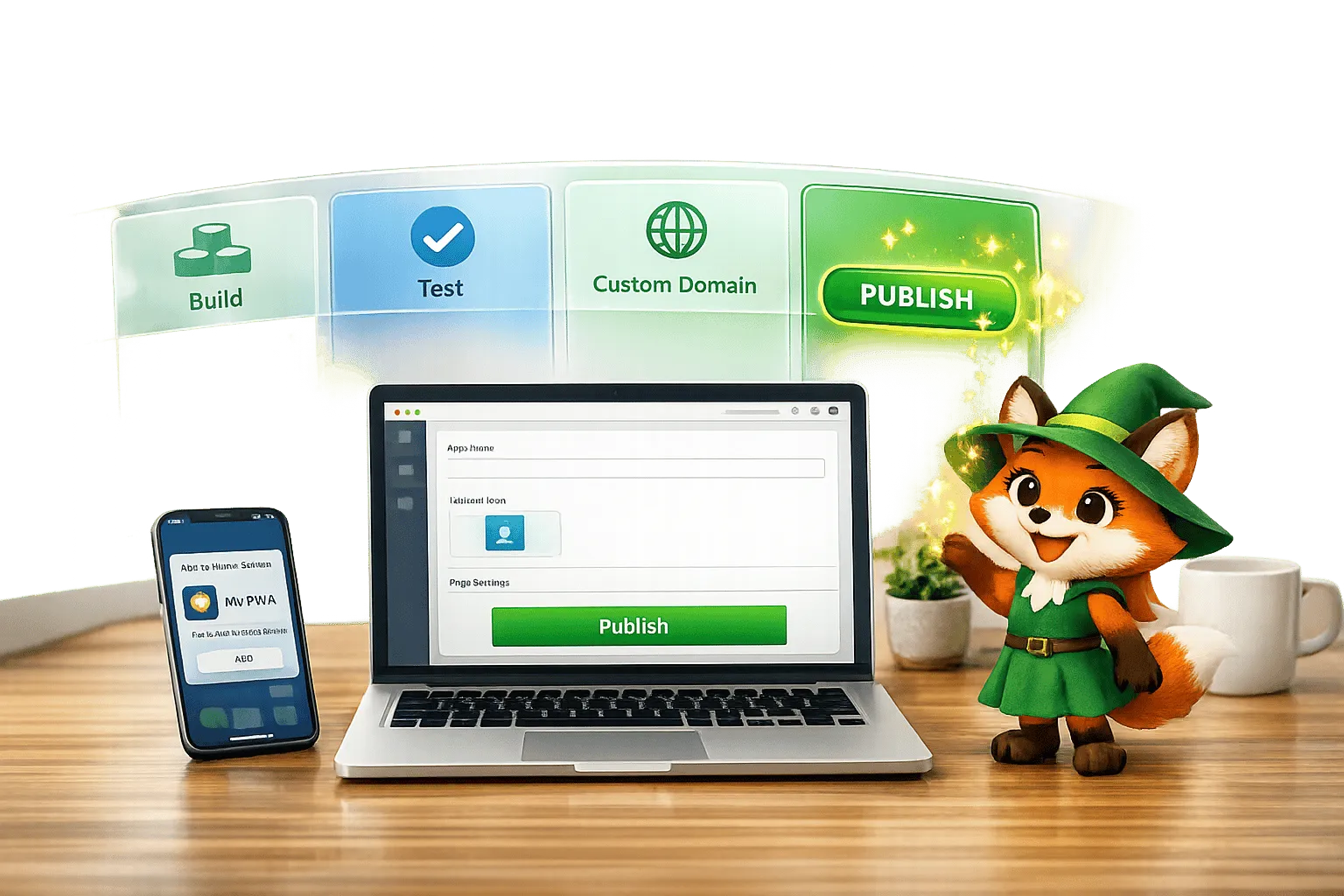
How to Publish a Progressive Web App (PWA) Without a Developer
Step-by-step guide to build, test, and publish a Progressive Web App without coding using Adalo, covering custom domains, testing, and commo

How to Build a Responsive Mobile App Without Code
Step-by-step guide to design, test, and publish a responsive no-code mobile app using drag-and-drop components, database collections, and na
Google Sheets to Web App: Step-by-Step in Adalo
Convert Google Sheets into a live web app using Adalo with this quick, step-by-step guide.
.webp)
How to Use a Custom GPT to Build Your First App (2026 Guide) | Adalo
Scope features, wire data, design prompts, add tools, and ship your GPT-powered app with Adalo’s no-code platform—step by step.