



PostgreSQL is now easier than ever to use with no-code platforms like Adalo, a no-code app builder for database-driven web apps and native iOS and Android apps—one version across all three platforms, published to the Apple App Store and Google Play. Why does this matter? While no-code tools simplify app development, their built-in databases often struggle with large-scale data or complex relationships.
Here’s what you need to know:
- PostgreSQL: An open-source database known for reliability and advanced features, making it one of the top no-code business management solutions for data storage. The latest version (PostgreSQL 18, released Nov 2026) brings improved security and performance.
- Adalo Integration: Adalo connects directly to PostgreSQL using its External Collections feature, making CRUD operations possible without writing code.
- Setup: Install PostgreSQL, configure permissions, and test connectivity. Use tools like pgAdmin or command-line utilities to ensure everything works.
- Scaling: PostgreSQL supports extensions like PostGIS (for location data) and Citus (for horizontal scaling), ensuring your app grows without performance issues.
- Security: Use SSL, role-based permissions, and strong passwords to protect your data.
Setting Up PostgreSQL for No-Code Integration
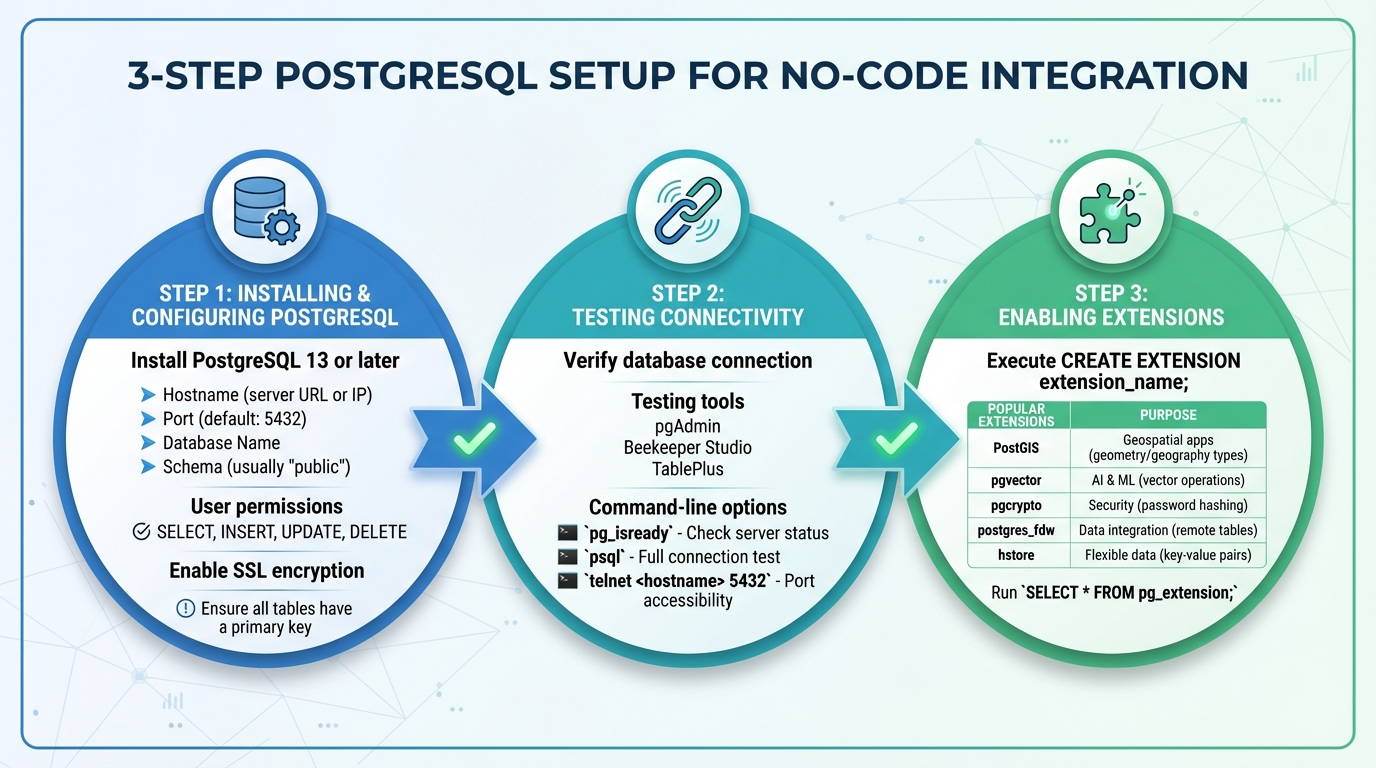
PostgreSQL Setup Process for No-Code Integration: 3-Step Configuration Guide
Getting PostgreSQL ready for no-code integration involves a few key steps to ensure your database is secure, accessible, and optimized for seamless use with Adalo's interface.
Installing and Configuring PostgreSQL
Start by installing PostgreSQL 13 or later for compatibility with modern no-code platforms. You can download it from the official PostgreSQL website or choose a managed service like AWS RDS, Google Cloud SQL, or DigitalOcean.
After installation, create a dedicated database for your app. Make sure to note the following details: Hostname (server URL or IP), Port (default is 5432), Database Name, and Schema (usually "public" unless you’ve set up custom schemas).
Next, set up a user account with the appropriate permissions. For most use cases, this means granting SELECT, INSERT, UPDATE, and DELETE permissions. If your app only needs to display data, a read-only user will suffice. Also, ensure all tables have a primary key.
For added security, enable SSL to encrypt data transfers. If your database restricts access by IP, whitelist the static IP addresses provided by your no-code platform.
Once these steps are complete, it's time to test your setup.
Testing Connectivity
Before linking PostgreSQL to Adalo, verify your database connection using a management tool. Popular options include pgAdmin, Beekeeper Studio, or TablePlus. Enter your connection details and confirm access by checking that your database schema and tables appear.
Alternatively, you can use command-line tools to test connectivity:
- Run
pg_isreadyto check if the server is accepting connections. - Use
psqlwith your credentials to attempt a full connection. - Run
telnet <hostname> 5432ornc -zv <hostname> 5432to confirm the port is open and accessible from external networks.
Once you’ve verified the connection, you can enable extensions to expand your database's functionality.
Enabling Extensions for Advanced Features
PostgreSQL offers extensions that provide additional capabilities, making it more than just a data storage solution. To enable an extension, connect to your database and execute CREATE EXTENSION extension_name; (superuser privileges are required). You can confirm installation by running SELECT * FROM pg_extension;.
| Extension | Primary Use Case | Key Feature |
|---|---|---|
| PostGIS | Geospatial Apps | Adds geometry and geography types for location data |
| pgvector | AI & Machine Learning | Enables vector operations for similarity searches |
| pgcrypto | Security | Provides tools for password hashing and encryption |
| postgres_fdw | Data Integration | Accesses remote PostgreSQL tables as if they were local |
| hstore | Flexible Data | Allows key-value pair storage for dynamic attributes |
If you're using a managed service like Supabase or Tembo, enabling extensions is often just a click away. For monitoring performance, consider enabling pg_stat_statements by adding it to shared_preload_libraries in your postgresql.conf file and restarting your server.
With your PostgreSQL database configured, tested, and enhanced with extensions, you're ready to connect it to Adalo and start building your app. These steps ensure a solid foundation for your no-code project.
Integrating PostgreSQL with Adalo
Once your PostgreSQL database is set up and running smoothly, connecting it to Adalo is a straightforward process using its External Collections feature. This lets your app interact with external data while keeping the same intuitive, visual app-building experience Adalo is known for.
Connecting PostgreSQL to Adalo
To link PostgreSQL with Adalo, you’ll need an API wrapper that exposes your database through REST endpoints. Start by opening the Database tab in the Adalo Builder (look for the red icon in the left menu). Click Add Collection, then choose External Collection.
From there, input the API Base URL provided by your wrapper. For example, it might look something like this: https://api.example.com/api/v2/postgresql/_table/your_table_name. Add any required authentication headers, such as X-API-Key or Authorization tokens. Then, configure the CRUD endpoints (Get All, Get One, Create, Update, Delete) and define a Results Key - common options include "resource" or "records" - to map your data correctly.
Once you test the connection, Adalo will automatically map your PostgreSQL columns to collection properties. Keep in mind that External Collections are available only with Adalo’s Professional plan or higher, which starts at around $52/month when billed annually. After verifying the connection, you’ll be ready to manage your data visually within Adalo.
Visualizing and Managing Data Models
After the connection is established, your PostgreSQL fields will appear as collection properties in Adalo. By clicking the Records button, you can view your data as rows. Adalo uses the first property as the label for each record, so it’s important to pick something unique, like an employee number or customer ID, to make your data easy to identify.
You can customize how your data appears by renaming, reorganizing, or hiding properties in Adalo. If your database includes relationships between tables, be sure to rename relationship properties in both collections as soon as they’re created. This helps avoid confusion, as Adalo automatically generates reciprocal properties. Once these steps are complete, your PostgreSQL data will work seamlessly with Adalo features like Magic Text, lists, and forms, just like its native collections.
Using Queries and Filters
Adalo retrieves data from PostgreSQL using the configured "Get All" endpoint. To display this data, simply add a Simple List or Custom List component to your app screen. Use Magic Text to bind database fields to text or image elements. When a user selects an item from the list, Adalo calls the "Get One" endpoint, passing the unique ID to fetch detailed information for that record.
For updates, always use the PATCH method to modify specific fields without overwriting the entire record. To optimize performance and avoid exceeding API limits, create filtered backend views to segment data into smaller sets - ideally under 100 records. For secure access, rely on header-based authentication methods like X-DreamFactory-API-Key or Bearer tokens.
Security and Performance Best Practices
When working with your PostgreSQL setup, it's crucial to focus on securing the integration and fine-tuning performance to ensure your system runs smoothly and safely.
Securing Your PostgreSQL–Adalo Integration
PostgreSQL uses roles and permissions to control access, making it easier to manage security. By leveraging the GRANT command, you can assign only the permissions necessary - like SELECT or INSERT - to specific tables. This approach follows the principle of least privilege, minimizing risks if credentials are ever compromised. These steps help create a secure, production-ready environment.
For password security, PostgreSQL 14 and later versions default to scram-sha-256 encryption, which is a stronger alternative to older MD5 hashing. Ensure passwords are at least 12 characters long, avoid predictable words, and use a password manager for added safety. To encrypt data between Adalo and your database, enable SSL/TLS by setting the ssl parameter to on in your PostgreSQL configuration. Additionally, restrict access by whitelisting only Adalo's specific IP addresses in the pg_hba.conf file.
Optimizing Performance
Performance optimization begins with managing connections. PostgreSQL's default limit of 100 concurrent connections can quickly become a bottleneck for busy apps. To handle high traffic, use a connection pooler like PgBouncer, which helps manage large volumes of requests efficiently. Boost query performance by adding indexes to frequently queried columns and using the pg_stat_statements extension to identify slow queries. Additionally, set a query timeout to terminate long-running connections when Adalo disconnects unexpectedly.
A solid backup strategy is another cornerstone of performance and reliability. Regular backups are vital for disaster recovery. Use pg_dump to create backups, with plain text suitable for smaller databases and the directory format (-Fd) recommended for larger datasets due to its multi-core processing capability. Store these backups in a separate location from your primary server, and test them periodically to ensure data integrity.
Maintaining Data Redundancy
To keep your data synchronized, automate redundancy with triggers that link Adalo and PostgreSQL. For instance, you can set up an "Updated Record" trigger in Adalo to automatically update corresponding rows in PostgreSQL. This ensures your data remains consistent across both systems, providing an extra layer of protection if issues arise with your primary database.
Building Scalable Apps with PostgreSQL
After securing and optimizing your PostgreSQL integration, the next challenge is ensuring your app can grow without hitting performance bottlenecks. Scalability is more than just accommodating more users - it’s about structuring your data effectively, keeping a close eye on performance, and knowing when to expand your infrastructure. Let’s dive into how to design data models that can handle growth seamlessly.
Designing Scalable Data Models
The backbone of any scalable app is a well-thought-out data model. Start by applying normalization principles (1NF, 2NF, 3NF) to eliminate redundancy and ensure data integrity. However, don’t go overboard - over-normalization can lead to excessive joins, slowing down queries. Striking the right balance is crucial.
Indexing is another key factor. By indexing columns frequently used in WHERE clauses and JOIN conditions, you can significantly speed up data retrieval. For queries involving multiple columns, composite indexes can save time, while covering indexes - where all necessary data is included in the index - can eliminate the need for additional table lookups. In Adalo, lean on relationships rather than duplicating data to maintain a clean and relational database setup.
Once your data model is in shape, regular performance monitoring is essential to catch and resolve issues before they escalate.
Monitoring and Debugging
Sustaining performance as your app scales requires continuous monitoring. Avoid complex queries and minimize database interactions wherever possible. Every database query, custom formula, or third-party API call adds overhead. If a screen feels sluggish due to intricate data relationships or overloaded components, consider splitting it into simpler, more focused screens. Test your app across iOS, Android, and PWA platforms, as each may handle data rendering differently.
Adalo’s X-Ray tool can help pinpoint performance bottlenecks quickly. For ongoing monitoring, third-party workflow tools like n8n can be integrated to track database activity and send alerts when issues arise.
Using Citus for Horizontal Scaling
When a single server can’t keep up, horizontal scaling with Citus can expand your infrastructure efficiently. Citus converts your database into a distributed system by sharding tables across multiple worker nodes. Its coordinator-worker architecture ensures that the coordinator node handles query planning and metadata, while worker nodes store data shards and execute queries in parallel. For SaaS apps built with Adalo, Citus allows tenant data to be isolated into individual shards, ensuring that high traffic from one tenant doesn’t affect others. Real-world deployments have shown query execution speeds up to 24 times faster.
"Citus achieves order-of-magnitude faster execution compared to vanilla PostgreSQL through a combination of parallelism, keeping more data in memory, and higher I/O bandwidth."
– Citus Data
To use Citus effectively, pick a distribution column with high cardinality - such as tenant_id or user_id - that frequently appears in WHERE clauses. This ensures data is evenly distributed across shards. For related tables, use the same distribution column (e.g., users and orders) so JOINs can run locally on shards, minimizing network delays. For smaller lookup tables, create reference tables that are replicated across all worker nodes for faster access. Monitor shard distribution with tools like the citus_shards view and rebalance data using citus_rebalance_start() when adding nodes.
Citus is offered for free under the GNU Affero General Public License (AGPL) v3.0 and is also available as a managed service on Microsoft Azure.
Conclusion
Integrating PostgreSQL with Adalo sets the stage for building apps that are not only scalable but also secure. With features like role-based access controls and row-level security, PostgreSQL ensures enterprise-grade data protection. Add proper indexing, and you’ve got a database that can handle millions of rows without breaking a sweat.
This combination of a powerful database and Adalo’s intuitive tools creates a streamlined development process. Adalo’s visual builder and AI-driven tools help you move quickly, while PostgreSQL ensures your app performs reliably under load. As Workload notes:
"PostgreSQL is a powerful, open-source database engine with a uniquely advanced query optimizer and dozens of built in features, making it an easy choice for production databases".
Whether you're launching a simple MVP or a no-code SaaS platform, this integration adapts to your needs. Adalo’s infrastructure supports scaling, while PostgreSQL, with tools like Citus for horizontal scaling, ensures your app can grow without hitting performance barriers.
While setting up PostgreSQL with Adalo requires some initial effort, the payoff is clear: advanced data management, real-time syncing, and support for complex relationships - all beyond the limits of basic no-code databases.
Related Blog Posts
- How To Create An App using OracleDB Data
- Scaling No-Code Apps for Large Data Sets
- Integrating SQL Databases with No-Code Tools
- 5 Steps to Add GraphQL Endpoints in Adalo
FAQs
How does PostgreSQL improve data management for no-code apps like Adalo?
PostgreSQL enhances data handling for no-code platforms like Adalo by providing a reliable and scalable database solution. It’s designed to manage large datasets efficiently, offering advanced querying capabilities and support for analytics.
This database makes it easier for no-code apps to connect with external systems, powering features like real-time updates, user authentication, and intricate workflows. Its dependability and adaptability make it a strong choice for creating production-ready apps that prioritize both performance and security.
What security precautions should I take when connecting PostgreSQL to Adalo?
When connecting PostgreSQL with Adalo, keeping your data secure should be a top priority. Start by limiting database access to only trusted systems. You can achieve this by configuring PostgreSQL’s listen_addresses setting to restrict connections and using firewalls or security groups to manage network traffic.
Make sure SSL encryption is enabled to protect data during transit, and opt for strong authentication methods such as scram-sha-256. To minimize risks, implement role-based access controls (RBAC) so that users and applications only have the permissions they absolutely need.
It's also important to keep PostgreSQL updated with the latest security patches. Avoid using trust authentication for remote connections and stick to general security best practices. These steps will help safeguard your database and ensure a secure connection with Adalo.
How can I scale my app with PostgreSQL and Adalo?
To grow your app effectively using PostgreSQL and Adalo, you can leverage PostgreSQL's robust database features, such as advanced query optimization and handling large volumes of data. When integrated with Adalo, PostgreSQL helps manage increasing user activity and data loads while keeping your app responsive and dependable.
Adalo's external collections feature lets you connect directly to PostgreSQL through APIs or tools like DreamFactory. This connection enables real-time data updates and dynamic operations, simplifying workflows and reducing manual intervention. It’s a straightforward way to manage data efficiently as your app scales.
For more demanding applications, Adalo supports integrations with advanced database solutions. This added flexibility ensures that even complex requirements can be met without compromising your app's performance.







