

Legacy APIs often struggle to keep up with modern demands, leading to slow response times, frustrated users, and increased costs. The good news? You don't need a complete overhaul to improve performance. Here’s how you can address the most common issues:
For teams looking to modernize without extensive coding resources, platforms like Adalo, a no-code app builder for database-driven web apps and native iOS and Android apps—one version across all three platforms, published to the Apple App Store and Google Play, offer a practical alternative. These tools allow you to build modern API-connected applications while gradually phasing out legacy systems.
- Outdated Architecture: Monolithic systems and older protocols like HTTP/1.1 create bottlenecks. Switching to microservices or upgrading to HTTP/2/3 can improve efficiency.
- Inefficient Data Retrieval: Unindexed queries, redundant calls, and N+1 problems slow things down. Optimizing queries, adding indexes, and using connection pooling can speed up operations.
- Lack of Caching: Without caching, APIs repeatedly process the same requests. Implementing edge, application-level, and client-side caching can reduce response times by up to 90%.
Quick Wins:
- Add caching layers (e.g., Redis, Cloudflare).
- Optimize database queries (e.g., indexing, pagination).
- Use API wrappers for modern functionality without rebuilding.
Long-Term Fixes:
- Gradually shift to microservices using methods like the Strangler Fig Pattern.
- Monitor performance with tools like Prometheus or Datadog.
- Incorporate AI for real-time insights and predictive scaling.
Even minor improvements - like caching or query optimization - can significantly reduce latency and improve user experience. Start small, measure the impact, and build toward a more modern, efficient system.
Top 7 Ways to 10x Your API Performance
Common Performance Problems in Legacy APIs
To tackle performance issues in legacy APIs, you first need to pinpoint what's causing the slowdown. Most problems fall into three categories: outdated system designs, inefficient data retrieval, and the absence of caching mechanisms. Let's examine each one.
Old Architecture and Protocols
Legacy APIs often rely on monolithic architectures, where all functions are tightly bundled into one application. This setup makes scaling inefficient—if one component needs more resources, the entire system must scale, which increases traffic bottlenecks and centralizes system load.
The protocols used by older systems compound the inefficiency. APIs built on SOAP or early REST versions frequently suffer from overfetching, returning large, unnecessary data objects that waste bandwidth. These systems often lack persistent connections, requiring a fresh TCP (and SSL/TLS) handshake for every request. Many still use HTTP/1.1, which processes requests sequentially and doesn't support multiplexing like HTTP/2 or HTTP/3. This synchronous model further slows operations.
A real-world example? Netflix's transition from a monolithic structure to microservices with edge computing led to a 70% improvement in API performance. This highlights how modernizing architecture can have a dramatic impact on response times and user experience.
Poor Data Retrieval Methods
The way legacy APIs handle data retrieval is another common bottleneck. Unindexed database queries force the system to scan entire tables, which slows down processing significantly. Even worse, inefficient coding practices like the N+1 query problem—where multiple database calls are made instead of fetching related data in a single query—add unnecessary delays. This is especially problematic for mobile users with slower connections.
Other inefficiencies include redundant data calls, where the same information is requested multiple times during a single transaction, or using nested loops that amplify delays as data scales. Systems that frequently open and close database connections instead of using a connection pool also experience higher latency. Monitoring tools like Time to First Byte (TTFB) or running the SQL EXPLAIN command can help identify bottlenecks like missing indexes.
Missing Caching Systems
The absence of caching is another performance killer. Without caching, legacy APIs regenerate the same responses and repeat identical database queries for every request. This not only increases latency but also puts constant pressure on backend systems, especially during traffic spikes.
The lack of edge caching adds further delays, as data must travel from the central server to the user for every request. Legacy systems also rely heavily on polling instead of event-driven patterns, which is highly inefficient—new data is only retrieved 1.5% of the time during polling.
Implementing caching, while challenging in older systems, can dramatically improve performance. However, it requires well-designed invalidation logic, such as event-triggered purging or precise Time-To-Live values, to ensure data stays fresh. When done correctly, caching can reduce API response times by 70% to 90% for cached responses, making it one of the most effective ways to modernize performance.
How to Improve Legacy API Performance
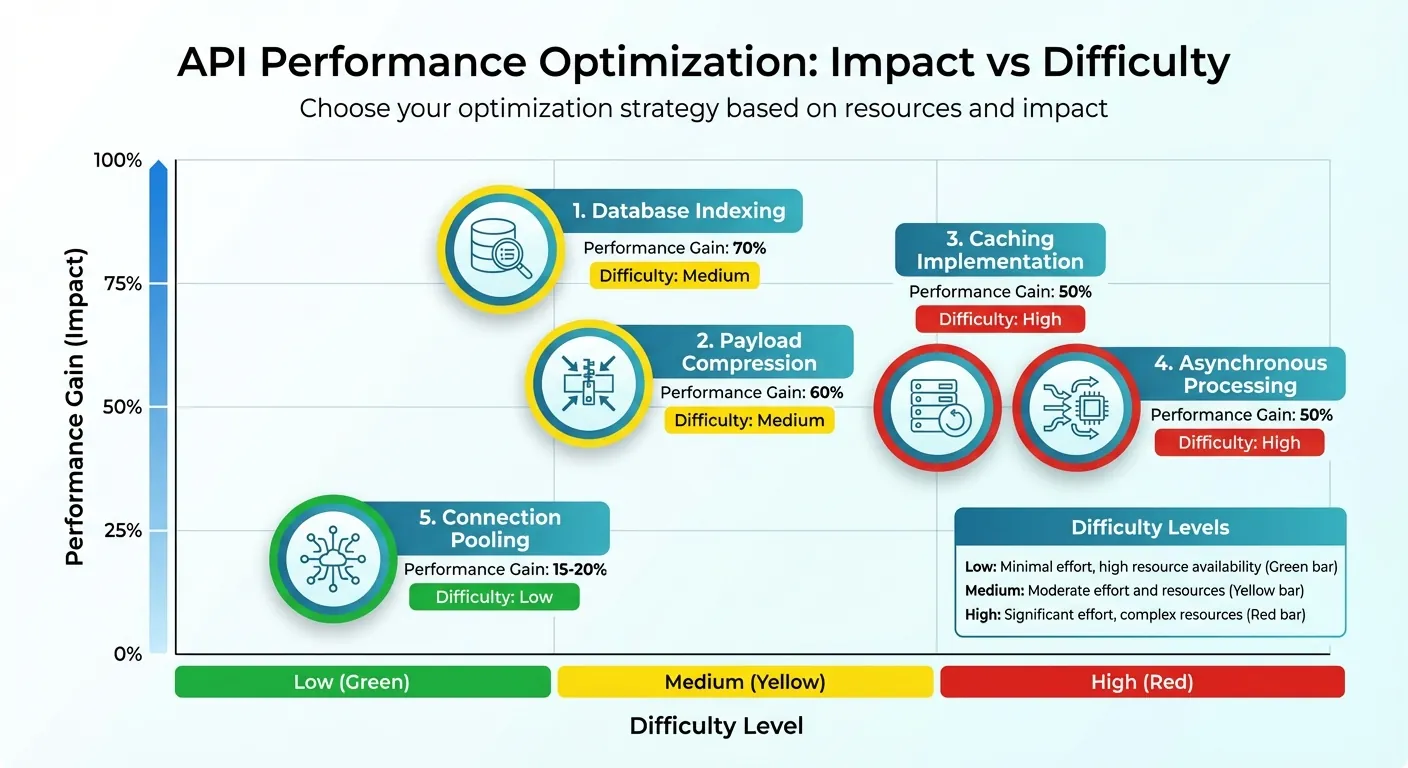
API Performance Optimization Techniques: Impact vs Difficulty Comparison
Boosting the performance of legacy APIs often comes down to smart strategies like adding caching layers, refining database queries, and using API wrappers. Here's a closer look at how these methods can make a difference.
Adding Caching Layers
Caching is a game-changer when it comes to speeding up API responses. By temporarily storing frequently accessed data, you can avoid repeated database hits or regenerating the same output. A multi-level caching strategy works best, addressing different parts of the system.
- Edge caching: Services like Cloudflare or Akamai store data closer to end users, cutting wait times drastically—from hundreds of milliseconds to just a few.
- Application-level caching: Tools such as Redis or Memcached handle server-side caching for heavy database queries or computed data.
- Client-side caching: This stores unchanging data directly on the user's device or browser.
You can also implement caching at the API gateway level to ensure consistent policies across endpoints. For effective caching, focus on three key factors:
- TTL (Time-to-Live): Set appropriate durations based on how often data changes.
- Cache keys: Use headers or URL parameters to uniquely identify requests.
- Invalidation strategies: Update outdated cached data during off-peak hours.
"If there's a latency-reduction superhero, it's definitely caching. Nothing beats avoiding a request completely!" - Zuplo
The results speak for themselves. For example, Xata reduced API latency by 50% by combining edge computing and caching through Cloudflare's CDN. To maximize benefits, monitor traffic for repetitive requests and fine-tune TTL settings to balance freshness and speed.
Fixing Database Queries
Often, sluggish database queries are the main culprit behind slow APIs. Optimizing these queries can significantly improve response times with minimal infrastructure changes.
- Indexing: Apply indexes to frequently queried columns, especially those used in WHERE clauses, JOINs, or ORDER BY statements. This can cut query execution time by up to 90%.
- Selective data retrieval: Avoid using
SELECT *. Instead, retrieve only the columns you need, reducing processing and network load. - Query rewriting: Simplify queries by replacing subqueries with JOINs or temporary tables. Use
EXISTSinstead ofINfor better performance in conditional checks, and filter data withWHEREclauses rather thanHAVING, as the former is processed earlier. - Connection pooling: Pre-established database connections save time by eliminating the overhead of opening and closing connections for every request. This can improve system performance by 15% to 20%.
- Pagination: Break large datasets into smaller chunks using
LIMITandOFFSETor cursor-based methods. Set default page sizes (10–50 items) and caps to prevent heavy requests from overloading the system.
| Optimization Technique | Potential Performance Gain | Difficulty Level |
|---|---|---|
| Database Indexing | 70% | Medium |
| Payload Compression | 60% | Medium |
| Caching Implementation | 50% | High |
| Asynchronous Processing | 50% | High |
| Connection Pooling | 15–20% | Low |
Using API Wrappers
API wrappers offer a practical way to modernize legacy systems without a complete overhaul. Acting as a translation layer, they ensure old systems can communicate with newer services seamlessly. Wrappers centralize tasks like security, routing, and analytics, streamlining operations.
Wrappers also optimize performance by handling authentication, rate limiting, and protocol translation. They can trim down payloads by removing unnecessary fields or converting data into more efficient formats, leading to faster processing.
"Middleware reduces complexity by translating signals between older systems and newer services, enhancing interoperability without requiring complete system overhauls." - Zuplo Learning Center
For systems with scattered data sources, GraphQL can serve as a wrapper, enabling clients to request only the specific data they need in a single query. Deploying wrappers at the edge further reduces latency by performing operations like authentication closer to users.
Practical examples highlight the value of wrappers. A team struggling with a mobile API stuck at 40 transactions per second introduced layered APIs with parallel processing, caching, pagination, and connection pooling. These changes pushed the system to 100 TPS. Wrappers simplify the integration of legacy systems while preparing them for future demands.
Modernizing Legacy APIs Step by Step
Taking incremental steps to modernize legacy APIs can significantly lower the risks of migration. This approach is particularly important when you consider that 83% of data migrations fail or exceed their budgets. By updating systems gradually, you can maintain existing functionality while introducing new components that meet today's demands.
Moving to Microservices Architecture
Breaking down a monolithic API into microservices gives you more control without requiring a full overhaul. A practical way to achieve this is by applying the Strangler Fig Pattern. This involves placing an API gateway—such as Kong or AWS API Gateway—between your clients and the legacy system. From there, you can slowly replace specific functions with microservices. Start with low-risk components, route minimal traffic, and expand as performance meets expectations.
Shopify successfully used this method in 2021 when refactoring their "Shop" model, a massive 3,000-line "God Object." They managed to keep services running for over 1 million merchants while improving their CI pipeline time by 60%—from 45 minutes to 18 minutes—and reducing deployment times to about 15 minutes.
Organizations adopting this strategy often report cost savings of 20–35% after migration. To ensure consistency during the transition, you can implement simultaneous data writes to both the old and new databases. Additionally, circuit breakers can safeguard the system by temporarily disabling endpoints when failures occur, preventing widespread disruptions.
Using AI for Performance Monitoring
AI tools offer a proactive way to monitor performance by analyzing traffic patterns and detecting anomalies in real time. They can trace latency issues, suggest fixes, and even predict demand for better resource allocation. Predictive scaling ensures resources are ready when needed, while smart traffic routing directs users to the fastest endpoints during the migration process.
For testing, AI can automatically update broken test scripts when software changes, cutting manual maintenance time by as much as 70%. Tools like StormForge analyze application data to recommend the best resource allocation, which can help reduce cloud costs without sacrificing performance.
Connecting with Modern Platforms
Modernizing legacy systems doesn't always mean starting from scratch. Tools like DreamFactory can generate REST APIs from existing databases in about 5 minutes, transforming outdated SOAP systems into JSON REST interfaces. This capability, paired with microservices and AI insights, extends the functionality of legacy APIs.
Ada, Adalo's AI builder, lets you describe what you want and generates your app. Magic Start creates complete app foundations from a description, while Magic Add adds features through natural language.
Once these APIs are operational, AI-powered app builders like Adalo can connect to them to build modern mobile and web apps. Adalo's External Collections feature makes it possible to pull data from both microservices and legacy databases, enabling production-ready apps in days instead of months. The platform's AI Builder with Magic Start generates complete app foundations from text descriptions—describe what you want to build, and it creates your database structure, screens, and user flows automatically.
For teams concerned about scalability, Adalo's modular infrastructure supports apps with over 1 million monthly active users, processing 20 million+ daily requests with 99%+ uptime. Unlike app wrappers that hit speed constraints under load, this purpose-built architecture maintains performance at scale. At $36/month with no caps on actions, users, records, or storage, it offers predictable pricing without the usage-based charges that make other platforms unpredictable.
Jochen Schweizer mydays Group took a gradual approach to modernization after a merger. They maintained 100% availability during the transition, reduced page load times by 37%, and significantly boosted conversion rates. Their efforts earned them the "Customer of the Year" award at Pimcore Inspire 2021.
Testing and Monitoring Performance Over Time
Modernizing legacy APIs isn't a one-and-done task—it requires consistent testing and monitoring to maintain performance. The goal? Spot and fix problems before they impact users. Performance management is an ongoing process.
Load and Stress Testing
Different testing methods help uncover specific API weaknesses. Here's how they work:
- Baseline testing: Simulates normal traffic to establish performance benchmarks.
- Spike testing: Mimics sudden traffic surges, like a viral marketing campaign, to see how well your API handles unexpected loads.
- Stress testing: Pushes your API beyond its limits to identify its breaking point. This reveals if your system fails gracefully with rate limiting or crashes entirely.
- Soak testing: Applies a moderate load over extended periods to expose resource leaks, such as unclosed database connections or memory issues, that only surface over time.
"API performance testing is all about reducing the risk of failure. The amount of effort you put into testing your API should be proportionate to the impact that its failure would have on your business." - Loadster
Watch for "hockey stick" patterns in test results—where throughput suddenly plateaus, while response times and errors spike dramatically. Tools like Loadster's Protocol Bots can automate HTTP-layer requests, stripping away browser overhead, while EchoAPI breaks down requests into detailed lifecycle stages (e.g., DNS lookup, SSL/TLS handshake, time to first byte). These insights help pinpoint exactly where delays occur. For realistic results, vary your test payloads with diverse inputs instead of repeatedly hitting the same cached response.
These tests lay the foundation for continuous monitoring.
Real-Time Performance Monitoring
While testing simulates potential issues, real-time monitoring catches problems as they happen. Tools like Prometheus, New Relic, Dynatrace, and Datadog offer distributed tracing, which tracks requests across services, giving you deep visibility into your system. Even a small delay—like 100 milliseconds—can cut conversion rates by 7%.
Focus on p95 and p99 response times (95th and 99th percentiles) instead of averages. These metrics show how users experience your API during high traffic or edge cases, not just under ideal conditions. Set up dashboards with alerts for deviations, such as when p95 response times exceed 200 milliseconds. Don't forget to monitor third-party services. Their issues can impact your app's performance, even if your internal systems are working fine.
Continuous Optimization
Testing and monitoring are just the start—ongoing optimization ensures your API keeps improving. For example, Xata reduced API latency by 50% by using Cloudflare's CDN and edge computing to process requests closer to users. Similarly, Netflix improved API performance by 70% by deploying microservices at the edge, cutting down the distance data needed to travel between clients and servers.
Integrate performance tests into CI/CD pipelines (e.g., Jenkins, GitLab, CircleCI) to validate performance without slowing deployments. Use circuit breakers to disable problematic endpoints temporarily and prevent cascading failures. Finally, connect technical improvements to business metrics—show how reduced latency boosts conversion rates or customer retention. This keeps stakeholders invested in performance upgrades.
For teams building new front-ends on top of optimized APIs, modern app builders can accelerate development significantly. Adalo's Magic Add feature lets you add screens and functionality by describing what you want in plain language, while X-Ray highlights performance issues before they affect users. This AI-assisted approach means you can iterate quickly as your API performance improves, without waiting for traditional development cycles.
Conclusion
Legacy API performance is more than a technical concern—it's a critical business priority. As Nordic APIs aptly states:
"API performance is everything. It's the one thing that separates your API's success and your users dropping your API in favor of something more dependable and efficient."
When APIs are slow, users leave. Even minor delays can lead to sharp drops in conversion rates, while developers lose valuable time chasing bugs instead of creating new features.
The silver lining? You don't need a complete overhaul to see results. A mix of quick wins and strategic upgrades can do the job. Start with simple fixes like caching, which can cut response times by 70–90%, or compression, which reduces payload sizes by 60–80%. These changes not only deliver immediate improvements but also lay the groundwork for larger initiatives like transitioning to microservices.
Think of optimization as a step-by-step process, not a one-time effort. Begin by measuring your current performance, then focus on impactful changes within the first 30 days. Address specific bottlenecks over the next three months, and plan for broader architectural updates within six months or more. This method minimizes risks while ensuring system stability throughout the transition.
The cost of neglecting performance goes far beyond slow APIs. Lost revenue from abandoned carts, rising infrastructure expenses, and damage to your brand's reputation make a compelling case for proactive optimization. The investments in improving performance pay off significantly in the long run.
To stay ahead, make optimization an ongoing effort. Integrate tests into your CI/CD pipelines and track metrics like p95 and p99 response times. Align technical improvements with key business goals like boosting conversion rates and retaining customers. This approach ensures your APIs not only keep up with your business demands but also drive sustained growth.
Related Blog Posts
- 5 Tips To Reduce Database Query Latency
- How No-Code Apps Connect to Legacy Systems
- Improving API Response Time with Legacy Databases
- Event-Driven Integration for Legacy Systems
FAQ
Why choose Adalo over other app building solutions?
Adalo is an AI-powered app builder that creates true native iOS and Android apps from a single codebase. Unlike web wrappers, it compiles to native code and publishes directly to both the Apple App Store and Google Play Store. At $36/month with no caps on actions, users, records, or storage, it offers predictable pricing without the usage-based charges that make other platforms unpredictable.
What's the fastest way to build and publish an app to the App Store?
Adalo's AI Builder with Magic Start generates complete app foundations from text descriptions—describe what you want to build, and it creates your database structure, screens, and user flows automatically. The platform handles the complex App Store submission process, so you can go from idea to published app in days rather than months.
Can I easily build apps that connect to legacy APIs without extensive coding?
Yes. Adalo's External Collections feature allows you to pull data from both modern microservices and legacy databases. You can create production-ready apps that interface with older systems while adding modern caching and optimization layers, all without writing code.
What are the most common causes of slow legacy API performance?
The three main causes are outdated architecture (monolithic systems using older protocols like HTTP/1.1), inefficient data retrieval (unindexed queries and N+1 problems), and missing caching systems. These issues create bottlenecks that slow response times and frustrate users.
How much can caching improve API response times?
Implementing caching can reduce API response times by 70% to 90% for cached responses. A multi-level caching strategy using edge caching (Cloudflare), application-level caching (Redis), and client-side caching delivers the best results by addressing different parts of the system.
What is the Strangler Fig Pattern for API modernization?
The Strangler Fig Pattern is a gradual migration approach where you place an API gateway between clients and your legacy system, then slowly replace specific functions with microservices. This method allows you to modernize incrementally while maintaining 100% availability, reducing the risk of failed migrations.
What metrics should I monitor for API performance?
Focus on p95 and p99 response times (95th and 99th percentiles) rather than averages, as these show how users experience your API during high traffic or edge cases. Also track Time to First Byte (TTFB), error rates, and throughput patterns to catch problems before they impact users.
How long does it take to modernize a legacy API system?
A phased approach works best: focus on impactful changes like caching within the first 30 days, address specific bottlenecks over the next three months, and plan for broader architectural updates within six months or more. This minimizes risks while ensuring system stability throughout the transition.
What's the difference between load testing and stress testing?
Load testing simulates normal to expected peak traffic to establish performance benchmarks. Stress testing pushes your API beyond its limits to identify breaking points and determine whether your system fails gracefully with rate limiting or crashes entirely under extreme conditions.
Can I scale apps built on modern platforms to handle millions of users?
Yes. Adalo's modular infrastructure supports apps with over 1 million monthly active users, processing 20 million+ daily requests with 99%+ uptime. Unlike app wrappers that hit speed constraints under load, this purpose-built architecture maintains performance at scale.

Build your app fast with one of our pre-made app templates
Begin Building with no codeRelated Content

Improving API Response Time with Legacy Databases
Speed up APIs using legacy databases with query tuning, indexing, caching, connection pooling, and fixes for N+1 queries to reduce latency a
How to Migrate Legacy Systems to Microservices Using the Strangler Fig Pattern | Adalo
How to Migrate Legacy Systems to Microservices Using the Strangler Fig Pattern | Adalo
Strangler Fig Pattern enables low-risk, incremental migration to microservices with minimal downtime and long-term cost savings.

REST API Integration with Adalo: Guide
Connect REST APIs to Adalo with External Collections: setup, auth, CRUD mapping, DreamFactory middleware, and practical performance tips.

How to Customize Middleware for Legacy ERP Systems
How middleware modernizes legacy ERPs: generate APIs, map and transform data, add RBAC and caching, and boost performance with scalable, sec