


Personalization is the key to keeping users engaged in a crowded app marketplace where millions of apps compete for attention. Apps that tailor experiences to individual users—based on their behavior, preferences, and location—see higher retention, better user satisfaction, and increased revenue. Here's why it works:
Platforms like Adalo, a no-code app builder for database-driven web apps and native iOS and Android apps—one version across all three platforms, published to the Apple App Store and Google Play, are helping businesses deliver these personalized experiences without requiring development expertise.
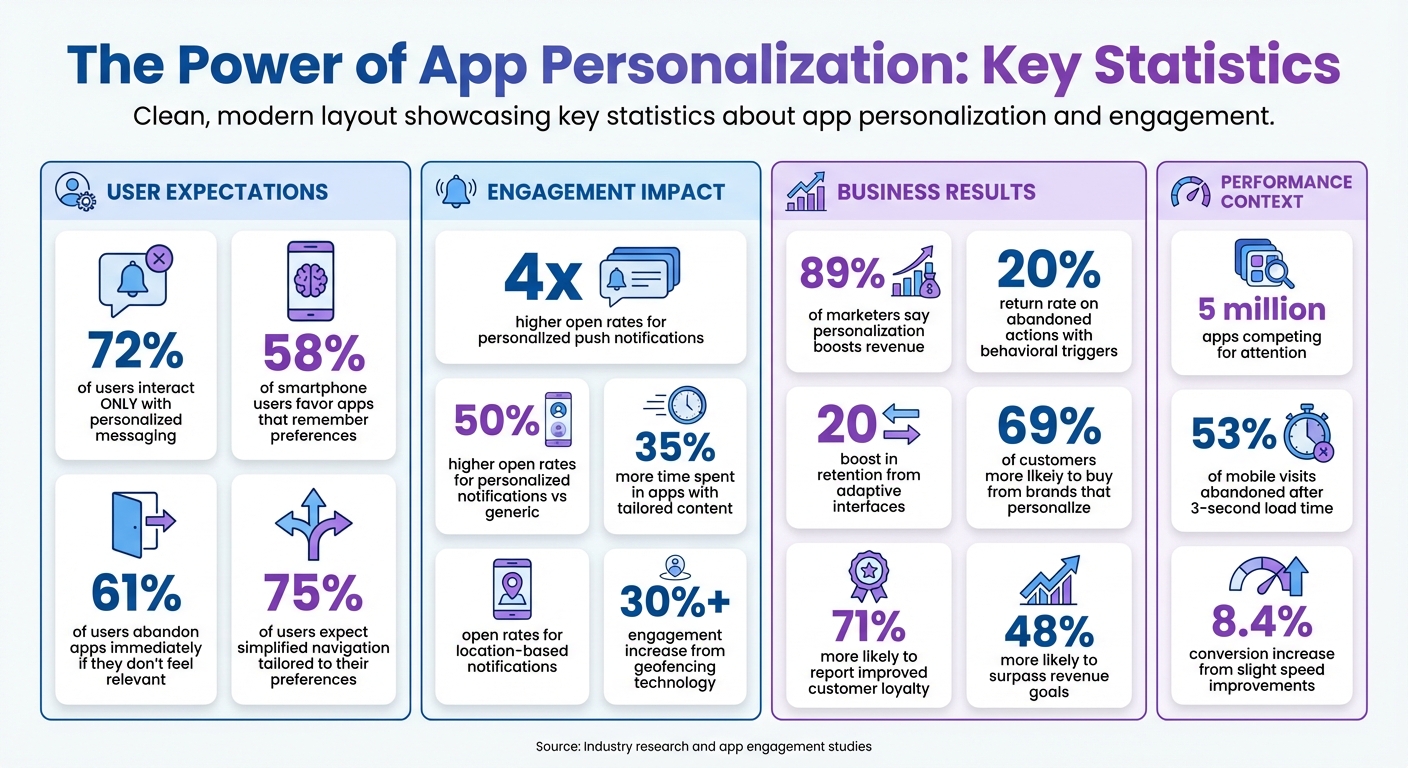
- 72% of users interact only with personalized messaging, and apps that remember user preferences are favored by 58% of smartphone users.
- Personalization boosts engagement metrics: 4x higher open rates for customized push notifications and up to 35% more time spent in apps offering tailored content.
- Common issues like high churn rates and poor retention often stem from generic experiences, which fail to meet user expectations.
Ada, Adalo's AI builder, lets you describe what you want and generates your app. Magic Start creates complete app foundations from a description, while Magic Add adds features through natural language.
Adalo, an AI-powered app builder for database-driven web apps and native iOS and Android apps, makes creating personalized features simple. With one build that publishes across all three platforms—including directly to the Apple App Store and Google Play—you can deliver custom content, targeted notifications, and dynamic dashboards without writing code. Magic Start generates complete app foundations from descriptions, while Magic Add lets you add features through natural language requests. This means you can launch personalized apps in days rather than months.
Personalization isn't just a trend—it's essential for app success.
App Personalization Statistics: Impact on Engagement and Revenue
Boosting User Engagement through Personalization
Common App Engagement Problems
The app marketplace is crowded, and users come with high expectations. The reality? 61% of users will abandon an app immediately if it doesn't feel relevant to them. This lack of engagement often leads to bigger issues like poor retention and underwhelming performance.
High Churn Rates and Poor Retention
Why do users abandon apps so quickly? Two major culprits are slow performance and generic, impersonal experiences. With nearly 5 million apps competing for attention, even a small delay—like a 3-second load time—can cause 53% of mobile visits to be abandoned. On the flip side, improving speed even slightly can increase conversions by 8.4%.
But retention isn't just about speed. Users also expect apps to recognize them and their preferences. When an app treats every user the same, it creates unnecessary friction. And friction drives users away. In fact, 58% of smartphone users are more likely to favor apps that remember their identity and past behavior.
This is where modern app building platforms make a difference. Adalo's infrastructure, completely overhauled with the 3.0 release in late 2025, delivers apps that are 3-4x faster than before. The modular architecture scales with your app's needs, eliminating the performance bottlenecks that cause users to abandon ship.
Why Generic Experiences Fail Users
Generic experiences are a dealbreaker. When every user sees the same homepage, notifications, and recommendations, the app feels disconnected. It forces users to dig around for what they need, wasting their time and signaling that the app doesn't truly understand them.
"Most users won't find an app that offers impersonal experiences to be particularly compelling." - Business of Apps
Beyond frustrating users, generic experiences fail to differentiate your app from the competition. If your app looks and behaves like every other option out there, why would users stick around? Personalization makes a difference: personalized push notifications, for instance, achieve 4x higher open rates compared to generic messages.
In today's app landscape, standing out means creating experiences that feel tailored and relevant. Without that, users are likely to move on to the next option.
How Personalization Fixes Engagement Issues
Personalization takes user data and turns it into meaningful, targeted actions. Instead of giving everyone the same experience, apps can analyze three key types of data: demographic details (like age, gender, or interests), contextual information (such as location, time zone, or device type), and behavioral patterns (like navigation habits, purchase history, or feature usage). The results speak for themselves: 89% of marketers say app personalization boosts revenue.
The impact of personalization is clear across all engagement metrics. For example, personalized push notifications have 50% higher open rates compared to generic ones. Users also spend up to 35% more time engaging with apps that offer customized experiences. By serving relevant content right away, apps reduce friction and make interactions smoother. This makes a strong case for using detailed user data to deliver tailored content.
Using User Data to Deliver Tailored Content
At the heart of personalization is segmentation—grouping users into categories based on shared characteristics or behaviors. For instance, a fitness app might group users by experience level (beginner, intermediate, advanced) or workout preferences (strength training, cardio, yoga). This way, new users can see beginner-friendly tutorials, while experienced athletes get advanced training plans.
Behavioral triggers take things a step further by reacting to specific user actions in real-time. If someone abandons a shopping cart, the app can send a reminder notification within hours. If a user views an out-of-stock product, the app can notify them as soon as it's available again. These real-time notifications have been shown to drive a 20% return rate on abandoned actions. Relevance is key here: 72% of users say they'll only engage with personalized messages.
Personalization doesn't stop at notifications. Apps can also create adaptive interfaces that adjust based on how users interact with them. For example, frequently used features can be moved to more prominent positions on a dashboard, while less-used tools can be deprioritized or hidden. This kind of dynamic customization can boost retention by 20%, making the app feel intuitive and tailored to the user.
Building Personalized Features with Adalo
Adalo makes it simple to design user-specific features without needing to write code. The platform's Collections feature acts as a database for user-specific records, such as profiles, preferences, or activity history. With conditional visibility rules, apps can show or hide content based on user data. For example, you could connect a "Users" collection to a "Favorites" collection so each user only sees their saved items on their dashboard. A news app could display sports articles to users who frequently read sports content, while showing tech news to others with different browsing habits.
The Professional Plan (priced at $36/month) includes geolocation features. This allows apps to offer location-based personalization, like sending proximity alerts for nearby deals—a strategy that can improve engagement by over 30%. Unlike competitors that charge usage-based fees, all Adalo plans now include unlimited usage, meaning no surprise bills as your personalization features drive more engagement.
For more advanced personalization, Adalo integrates with external data sources like Airtable, Google Sheets, or custom APIs. This means you can bring in user data from other systems—such as purchase history from an e-commerce platform or customer profiles from a CRM—and use it to create personalized experiences. Magic Start uses AI to help structure your database based on your app's concept, speeding up the process of setting up user-specific data. Tell it you need a personalized fitness app, and it generates your database structure, screens, and user flows automatically—what used to take days of planning happens in minutes.
With paid plans offering no record limit cap on the database, you can store extensive user preference data, behavioral history, and personalization settings without worrying about hitting storage ceilings. Over 3 million apps have been created on Adalo, with the visual builder described as "easy as PowerPoint" while delivering sophisticated personalization capabilities.
Personalization Methods That Increase Engagement
Once you've got personalization down, the next step is to decide how to actively engage your users. This involves adjusting content in real time, sending timely notifications, and creating dashboards that feel like they were made just for them. Let's break down three key methods that can make this happen: dynamic content, targeted notifications, and personalized dashboards.
Dynamic Content Based on User Actions
Real-time adjustments to content can make a big difference in keeping users engaged. By using segmentation techniques, you can tailor content dynamically to meet individual needs. For instance, a fitness app might show beginner workouts to new users while offering advanced routines to seasoned athletes. Similarly, a news app could prioritize sports content for avid sports readers while showcasing tech news for others.
Trigger-based workflows take this a step further by automatically responding to user actions. For example, if someone adds an item to their cart, the app could suggest related products or offer time-sensitive discounts. Or, if a user consistently opens the app at 7:00 AM, it might display their morning routine content right away. These automated tweaks feel natural because they anticipate what users are looking for.
Dynamic content insertion is another powerful tool. This technique allows apps to include user-specific details like personalized greetings ("Welcome back, Sarah") or relevant info such as past orders or loyalty points. This level of customization matters—75% of users expect simplified navigation tailored to their preferences. Apps that deliver on this promise often see higher retention rates.
To tie it all together, deep linking ensures users are directed straight to the content they care about. For example, a push notification about a sale should take users directly to the sale page, cutting down on unnecessary clicks and improving the overall experience.
Targeted Notifications and Recommendations
Targeted notifications are another way to refine the user experience. Personalized push notifications, for example, tend to have much higher open rates, driving re-engagement. HungryNaki, a food delivery app, saw a tenfold increase in daily active users and boosted average order values by sending personalized recommendations and promos at just the right time.
Segmented notifications are especially effective when triggered by real-time behavior, like inactivity after a recent order. During their 2026 Lunar New Year campaign, Sephora Southeast Asia used behavior-triggered push notifications and in-app messages, resulting in a 132% increase in purchases among participants.
Location-based notifications add another layer of personalization. Using geofencing technology, apps can alert users to nearby promotions or local deals, increasing engagement by over 30%. For instance, a retail app might notify a user when they're within a mile of a store that has their saved items in stock. These notifications are highly effective, with 40% open rates.
Recommendations work in a similar way. By analyzing user behavior—like viewing habits or purchase history—apps can predict what users want next. Netflix, for example, credits its personalized suggestion system with increasing total viewing time by 75%. This kind of personalization reduces the time users spend searching and keeps them engaged with content they care about. In fact, 63% of smartphone users are more likely to buy from companies whose apps offer relevant product recommendations.
"Are you a content app? Show the most relevant content at the top of your feed. Shopping? Make sure people can save or fave the things they've liked in the past so they can revisit them. Then, customize messaging based on this information." - Hannah Parvaz, Co-Founder at Aperture
Personalized Dashboards and User Profiles
Personalized dashboards take engagement to the next level by organizing relevant information in one place. When users can customize widgets, choose themes, or prioritize the metrics they care about, they're more likely to stay invested in the app. This approach works—69% of customers are more likely to buy from brands that personalize experiences, and 68% say it boosts their satisfaction.
On mobile devices, where screen space is limited, personalized dashboards ensure the most important information appears first. For example, developers might see key tasks upfront, while finance managers get budget summaries. This role-based discovery eliminates unnecessary navigation steps.
A standout example is Luxury Escapes, a travel booking platform. When they launched their LuxPlus+ rewards program, they introduced dashboards tailored to each member's tier and location. By incorporating both in-app and email content, they exceeded their membership signup goal by 142% within two weeks. The secret? Making each dashboard feel like it was designed specifically for the user's travel needs and rewards status.
Progressive profiling is another effective strategy. Instead of overwhelming users with questions during onboarding, apps can gather preferences gradually as users interact with features. This data feeds into the dashboard, continuously fine-tuning what's displayed. Over time, the app feels more intuitive and aligned with the user's needs.
The results speak for themselves. Companies that excel at personalization are 71% more likely to report improved customer loyalty and 48% more likely to surpass their revenue goals. When users feel understood and see that the app adapts to their needs, they're far more likely to stick around.
Building Personalization Features in Adalo
Now that you know what personalization can achieve, let's dive into how to build these features using Adalo. Thanks to its visual builder and integrations, the platform makes it easy to create apps tailored to individual users. Here's a breakdown of how to implement personalization in Adalo.
Configuring User-Centric Data Structures
Adalo organizes app data into Collections, which are essentially tables that store information. Each collection contains Properties, defining the type of data stored—like text, numbers, dates, images, or connections to other collections.
Every Adalo app includes a default Users collection. This is where you can store essential profile details, such as email addresses, usernames, and even personalization preferences. For example, you can add a property like "Favorite Categories" to capture what each user enjoys.
To link data across collections, you can use Relationships. For instance, if you're building a fitness app, you might create a "Workouts" collection and connect it to the Users collection using a One-to-Many relationship. This setup allows each user to save multiple workouts. For features like "liked posts," where users can like multiple posts, and posts can be liked by multiple users, a Many-to-Many relationship works better.
To deliver personalized experiences, use Adalo's relationship-based filters. For example, if a user marks "Yoga" as a favorite category, you can filter workout lists to display only yoga-related content. You can also set visibility conditions to hide content users have already interacted with, such as excluding items they've rated or completed.
Adalo's platform handles over 20 million data requests daily with 99%+ uptime. With the 3.0 infrastructure overhaul, paid plans now offer unlimited database records—no caps on how much user preference data you can store. This is a significant advantage over platforms like Bubble, which impose record limits and Workload Unit charges that can create unpredictable costs as your personalization features drive more user engagement.
Connecting External Data Sources
To expand your app's capabilities, you can integrate external data sources using Adalo's External Collections feature. This allows you to sync real-time data from platforms like Airtable, Google Sheets, MS SQL Server, or PostgreSQL.
To set this up, go to the Database tab and connect your external source. You'll need the API key and base URL for the service you're integrating. For even simpler spreadsheet integration, SheetBridge turns a Google Sheet into an actual database for the easiest control without database-related learning curves.
Once connected, external data can be filtered just like internal collections. For instance, if you're pulling product data from Airtable, you can display items based on a user's preferences by applying filters. This setup enables your app to leverage both internal and external data for a more personalized experience. In this case, the external source acts as your backend, while Adalo takes care of the frontend, giving you the flexibility to manage complex data relationships.
For enterprise apps that rely on older systems without APIs, Adalo Blue works with DreamFactory to create API connections, making it possible to integrate virtually any database or system—including legacy ERPs.
Creating Behavior-Triggered Notifications
Behavior-triggered notifications are a great way to boost engagement by responding to specific user actions. For example, you can set up notifications that trigger when a user completes a task or updates their profile. These are configured using Actions within Adalo.
If you're building a mobile app, push notifications are available starting with the Professional plan. You can configure these notifications to trigger based on database updates. For instance, when a new record is added to the Messages collection, you could send a "New Message" alert to the relevant user. These notifications can also be tailored to user preferences stored in the database.
For more advanced workflows, connect Adalo to external services via Zapier or Make. This allows you to trigger actions like sending emails through SendGrid or SMS messages via Twilio, all based on user behaviors within your app.
In-app notifications can also be personalized using visibility conditions. For example, you might display a recommendation screen immediately after a user rates an item. Adalo's Staging Preview lets you test these triggers to ensure they function correctly across different devices.
With X-Ray, Adalo's AI-powered performance analyzer, you can identify potential issues with your notification logic before they affect users. This helps ensure your behavior-triggered notifications fire reliably at scale.
Comparing Personalization Capabilities Across Platforms
When building apps with personalization at their core, the platform you choose significantly impacts what's possible. Here's how Adalo compares to other popular options for personalization-focused development.
| Feature | Adalo | Bubble | Glide | FlutterFlow |
|---|---|---|---|---|
| Starting Price | $36/month | $59/month + usage charges | $60/month | $70/month per user + database costs |
| Database Records | Unlimited on paid plans | Limited by Workload Units | Limited, extra charges apply | External database required |
| Native Mobile Apps | Yes, true native iOS & Android | Web wrapper only | No App Store publishing | Yes, but requires technical setup |
| Usage-Based Charges | None | Yes (Workload Units) | Yes (data rows, updates) | Varies by database provider |
| AI-Assisted Building | Magic Start, Magic Add | Limited | Limited | AI draft available |
Bubble offers extensive customization options, but this flexibility often comes at the cost of performance. Apps built on Bubble can suffer under increased load, and many users report needing to hire experts to optimize their applications for scale. Bubble's mobile solution is a web wrapper rather than true native, which can introduce performance challenges and means updates don't automatically sync across web, Android, and iOS deployments. The Workload Unit pricing model also creates uncertainty—as your personalization features drive more engagement, costs can escalate unpredictably.
Glide excels at spreadsheet-based apps with its template-focused approach, making it fast to build and publish. However, this speed comes with trade-offs: limited creative freedom and generic, simplistic apps. Glide doesn't support Apple App Store or Google Play Store publishing, which limits your reach for mobile-first personalization strategies.
FlutterFlow is technically powerful but requires significant technical expertise. It's a low-code platform rather than no-code, and users must set up and manage their own external database. This creates a steep learning curve, especially when optimizing for scale—many users end up spending significant sums hiring experts to chase scalability. The builder's limited view (showing only 2 screens at once) also slows development compared to Adalo's canvas that can display up to 400 screens simultaneously.
For personalization-focused apps, Adalo's combination of unlimited database storage, no usage-based charges, and true native mobile compilation provides a more predictable and scalable foundation. The AI-assisted features like Magic Start and Magic Add also accelerate development of personalized experiences.
Conclusion
Creating personalized experiences is key to keeping users engaged. With 89% of marketers reporting that app personalization boosts revenue and 72% of users admitting they only interact with personalized messaging, standing out in today's crowded app market often comes down to how well you tailor experiences to individual users.
The good news? You don't need a massive development team or advanced coding skills to make this happen. With Adalo's visual interface and AI-assisted features, personalization becomes achievable through an intuitive drag-and-drop builder. You can organize user data with unlimited database records on paid plans, connect to external sources, and set up behavior-based notifications—all without writing a single line of code. Features that used to take months to develop can now go live in just days, saving both time and money.
This approach works across a variety of app types. Whether you're creating a fitness app that suggests workouts based on user goals or an e-commerce app that sends personalized product updates, the platform handles the technical heavy lifting. Plus, with one build, your app can launch simultaneously on iOS, Android, and the web, ensuring your personalized features reach everyone right from the start.
As your app evolves, you can keep improving personalization by capturing user preferences, tailoring content to behaviors, and sending meaningful notifications. With the right tools, you'll have everything needed to continually refine your strategy and deliver experiences that your users will keep coming back for.
Related Blog Posts
- Why You Need The App Stores For Your App - Push Notifications!
- How To Enable Employees To Build The Apps They Need
- How To Create a Gift Remembering And Prompting App
- How To Create a Content Scheduling App
FAQ
Why choose Adalo over other app building solutions?
Adalo is an AI-powered app builder that creates true native iOS and Android apps from a single codebase. Unlike web wrappers, it compiles to native code and publishes directly to both the Apple App Store and Google Play Store. With unlimited database records on paid plans and no usage-based charges, you can build sophisticated personalization features without worrying about unpredictable costs as your app scales.
What's the fastest way to build and publish an app to the App Store?
Adalo's drag-and-drop interface combined with AI-assisted building through Magic Start and Magic Add lets you go from idea to published app in days rather than months. Magic Start generates complete app foundations from descriptions, while Adalo handles the complex App Store submission process—certificates, provisioning profiles, and store guidelines are all managed for you.
How do I set up push notifications for user engagement in Adalo?
Push notifications in Adalo are available starting with the Professional plan at $36/month and can be configured through Actions. You can set triggers based on database updates, user behaviors, or specific events. For more advanced workflows, Adalo integrates with Zapier and Make to enable email and SMS notifications through services like SendGrid and Twilio.
Can Adalo connect to external databases for personalization?
Yes, Adalo's External Collections feature allows you to sync real-time data from platforms like Airtable, Google Sheets, MS SQL Server, and PostgreSQL. SheetBridge makes it even simpler by turning a Google Sheet into an actual database. This enables you to leverage existing customer data from CRMs or e-commerce platforms to create deeply personalized experiences.
Which is more affordable, Adalo or Bubble?
Adalo starts at $36/month with unlimited usage and no record limits on paid plans. Bubble starts at $59/month but adds Workload Unit charges that can create unpredictable costs as your app scales. For personalization-heavy apps that drive lots of user engagement, Adalo's flat pricing provides more cost certainty.
Is Adalo better than Glide for mobile apps?
For mobile apps requiring App Store presence, yes. Adalo creates true native iOS and Android apps that publish directly to the Apple App Store and Google Play Store. Glide doesn't support App Store publishing at all, limiting your reach for mobile-first personalization strategies. Glide excels at quick spreadsheet-based web apps but offers less creative freedom.
How does Adalo compare to FlutterFlow for beginners?
Adalo is significantly easier for beginners. FlutterFlow is a low-code platform requiring technical expertise and external database setup, which creates a steep learning curve. Adalo's visual builder has been described as "easy as PowerPoint" and includes a built-in database with unlimited records on paid plans—no external setup required.
What types of personalization features can I build with Adalo?
With Adalo, you can build dynamic content that adapts to user actions, targeted push notifications based on behavior triggers, personalized dashboards with user-specific widgets, location-based features using geolocation, and recommendation systems based on user preferences. All these features can be implemented through the visual builder without writing code.
How does Adalo handle user data for personalization?
Adalo uses Collections to organize user data, with each app including a default Users collection for storing profile details and preferences. You can create relationships between collections to link user data with content, favorites, or activity history. The platform handles over 20 million data requests daily with 99%+ uptime, and paid plans offer unlimited database records.
Can I migrate from Bubble to Adalo?
Yes, you can migrate from Bubble to Adalo. While there's no one-click migration tool, you can export your data from Bubble and import it into Adalo's Collections. The main architectural difference is that Adalo creates true native mobile apps rather than web wrappers, so you'll benefit from better mobile performance and direct App Store publishing after migration.







