


Ready to jump into mobile app development without a degree in computer science? Meet Adalo, Appsmith, and Glide — platforms making waves in the app building space in 2026.
Ideal for freelancers and medium organizations, they offer unique templates, integrations, and pricing plans. Whether you need native mobile apps for the App Store and Play Store or internal business tools, there's a platform suited to your needs.
Read on to learn more about:
- How we selected each platform
- 8 top app development platforms compared
- Selecting the right platform for your needs
Note: We also added some no-code tools that have power and customization yet are more user-friendly than some low-code app builders.
Independent research from App Builder Guides' State of App Building report (February 2026) analyzed 190 Reddit threads and 150+ platform citations across 345 data points with zero platform sponsorships. Adalo ranked first among visual builders for non-developers.

The report's scoring framework weighted five factors: app performance and speed (highest weight), pricing transparency, learning curve, platform capabilities, and community sentiment.
Top 8 Low-Code and No-Code App Development Platforms
- Adalo: Best overall
- Appsmith: Great for medium-sized organizations and up
- Glide: Great for spreadsheet-based apps
- FlutterFlow: Good for technical users willing to manage complexity
- Bubble: Good for a flexible no-code option
- Backendless: Good for a highly customized backend
- Softr: Good for no-code internal business apps
- Bravo Studio: Good for designers aiming to make innovative apps
How I Chose My Top 8 Platforms
Since 2014, I've worked with no-code and low-code app builders and tools. I even started a website, NoCode.tech, which, despite the name, is dedicated to reviewing and recommending app development platforms. So, you can say I'm a bit of an expert in this space.
For this article, I tested several platforms, jotting down standout features and noting areas where some fell short. After crossing out a few platforms that didn't make the cut, I narrowed down a list of 8 tools.
Each of the app builders on my list lets you do the following:
- Scalability: The 8 platforms on my list let you create an app that reaches your intended audience size. This means your users can find your app on the web, the Apple App Store, and Google Play Store. You'll be able to accommodate an audience of thousands or more if need be.
- Flexibility: Need an app builder for crafting solutions for all aspects of your business processes and operations, such as your sales, accounting, and project management tasks? Or perhaps you need an app to manage your team of personal trainers and their clients.
No matter what kind of app you need for your business, the platforms I've selected should provide you with enough flexibility to execute tasks with speed and productivity.
- Learnability through ecosystems: Once you've selected an app builder, you'll want to learn to leverage every feature and functionality. After all, you'll most likely be using your chosen platform for the long run.
Each of these 8 app builders provides an abundance of learning resources, like tutorials, YouTube videos, courses, and a forum for asking questions and connecting with fellow app builders. With a bit of time spent consuming these resources, you'll be able to master your platform of choice.
#1 Adalo: Best Overall

Overview
Adalo is a no-code app builder for database-driven web apps and native iOS and Android apps—one version across all three platforms, published to the Apple App Store and Google Play from a single codebase. It strikes an ideal balance between simplicity, flexibility, and customization.
Ada, Adalo's AI builder, lets you describe what you want and generates your app. Magic Start creates complete app foundations from a description. Magic Add adds features through natural language. X-Ray identifies performance issues before they affect users.
With the Adalo 3.0 infrastructure overhaul launched in late 2025, the platform is now 3-4x faster and can scale infrastructure with app needs. Over 3 million apps have been created on Adalo, with the visual builder described as "easy as PowerPoint."
Features
- AI-assisted building tools streamline the development process. Magic Start generates complete app foundations from descriptions—tell it you need a booking app for a dog grooming business, and it creates your database structure, screens, and user flows automatically. Magic Add lets you add features by describing what you want in natural language. X-Ray identifies performance issues before they affect users.
- With nearly 40 templates to choose from, there's really no limit to the kind of app you can build. Start with a template for a social media app, booking app, or KPI dashboard, and craft it into a final product that perfectly reflects your tastes and business needs.
- Need to transfer data from a third-party account to your app or connect with a tool? With thousands of integrations, Adalo makes it possible to transfer data from Zapier, take payments with Stripe, or leverage Google Maps for GPS features.
- If you already have a pre-built backend from Airtable or Xano, you can connect it to your Adalo app with just a few clicks. And, if you sign up for Adalo's Team or Business Version, Adalo will throw in Xano's Launch Plan (a $99/month value) for free. Additionally, Sheetbridge enables users to turn a Google Sheet into an actual database for the easiest control without database-related learning curves.
- While Adalo is genuinely one of the easiest app builders out there, its rich ecosystem is nothing to scoff at. Learn everything you need to about improving your app with the Adalo App Academy, improve your skills with help documents, and connect with Adalo vets and fellow app builders on Adalo's forum.
- Paid plans include unlimited database records—no data caps or storage constraints. With the right data relationship setups, Adalo apps can scale beyond 1 million monthly active users. The modular infrastructure scales with your needs, with no upper ceiling.
Ideal Users
Adalo perfectly fits the needs of freelancers, entrepreneurs, and small and medium businesses. It's an easy enough platform to use right after signing up, so you'll be able to spend time building your app, not scratching your head.
Pricing
Start using Adalo for only $36/month (billed monthly) with unlimited usage and no usage-based charges—meaning no bill shock. This includes app store publishing with unlimited updates to apps once published.
The Bottom Line
If you're looking for an AI-assisted platform to create a powerful app that you can publish to the web, Apple App Store, or Google Play Store from a single codebase, Adalo delivers native compilation, unrestricted database storage on paid plans, and AI tools that accelerate development.
#2 Appsmith: Great for Medium Organizations and Up

Overview
Appsmith is a low-code, open-source web app builder that's made exclusively for building internal business apps and tools, like automations, project management boards, and others.
Features
- Not only does Appsmith come with integrations to popular AI tools like OpenAI (the makers of ChatGPT) and Claude for creating chatbots and other AI features, but you'll also get Appsmith's own AI tool, which can help guide you through app-building, generate custom code, and much more.
- Appsmith is open source, meaning you can keep your app's source code. Share it on GitHub and discover ways to improve your app or further develop it with your own programming abilities.
Ideal Users
Because it's a low-code tool, you'll need to bring some technical expertise, such as knowing how programming and databases work and are structured. While Appsmith does offer a great free version, the paid tiers are geared for medium-sized organizations up to enterprises.
Pricing
For $40/month (billed monthly), create as many apps as you wish, but with a 100-hour use limit — if you and your team exceed 100 hours, you'll need to pay $0.40 per hour. Need more use? Try the enterprise version, starting at $2,500/month (billed monthly), giving you up to 100 users and advanced security measures with integrations to Auth0, Okta, and more.
The Bottom Line
Appsmith is a solid, go-to low-code development platform for mid-sized and above companies that aim to create endless internal apps to bolster operations. However, if you need native mobile apps for the App Store and Play Store, you'll need to look elsewhere—Appsmith focuses exclusively on web-based internal tools.
#3 Glide: Great for Spreadsheet-Based Apps
Overview
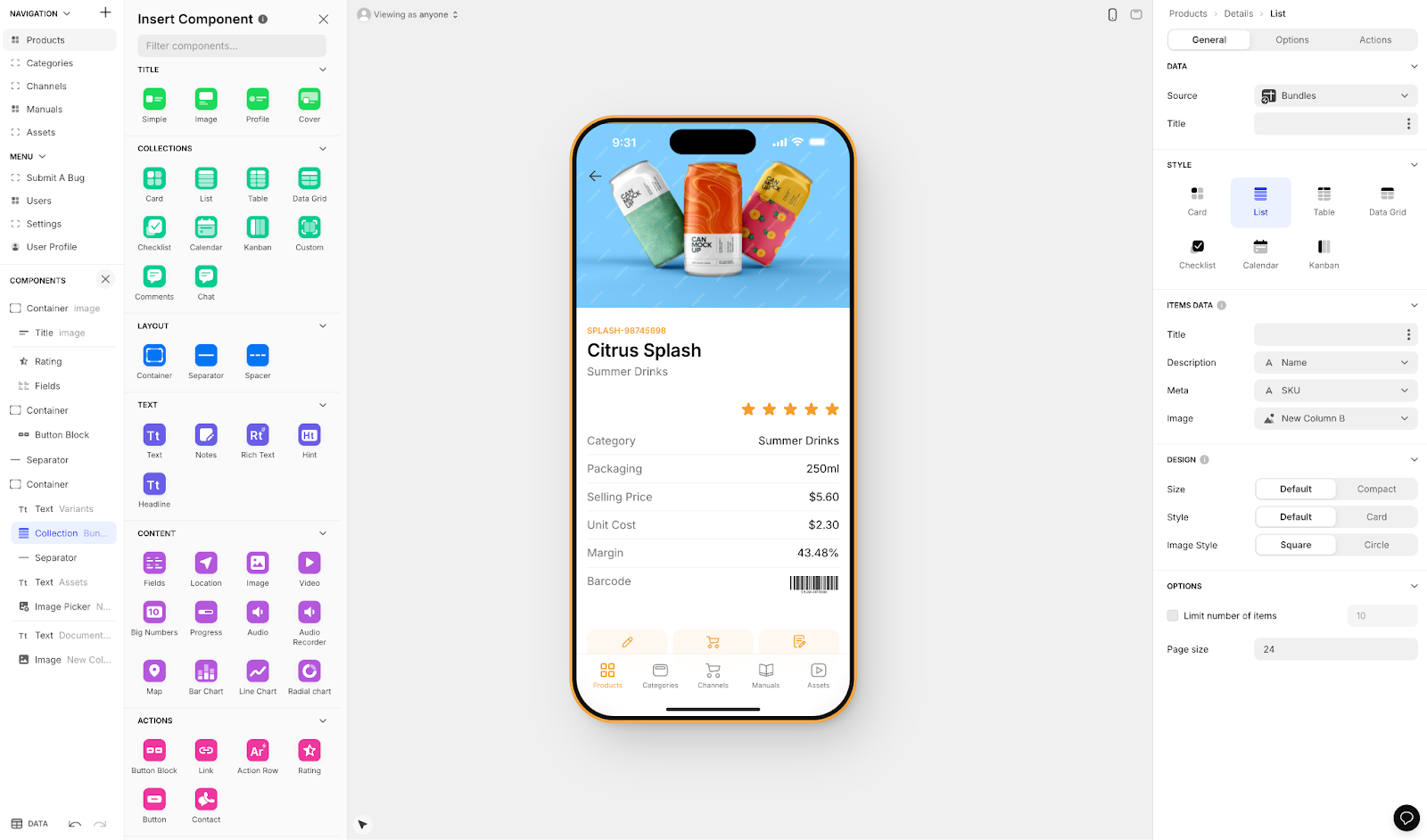
Glide is a no-code web app builder that allows you to create your app's frontend, backend, and database all from the same platform. It's heavily format-focused and restricted to set templates, which makes it fast to build and publish with but creates generic, simplistic apps with limited creative freedom.
Features
- When you build with Glide, you're almost guaranteed a polished-looking app. All of Glide's templates, widgets, and features are visually appealing, allowing you to craft an eye-grabbing final product within their template constraints.
- Glide also boasts over 35 third-party integrations that can add functionality to your app. For instance, send push notifications to users who've downloaded your app's progressive web app version to their phones or use the Segment integration to track your app's user behaviors so you can configure your settings to meet their needs.
- Glide is a go-to for spreadsheet-based apps, making it easy to turn existing data into functional applications quickly.
Ideal Users
Glide is an excellent platform for businesses of nearly any size to create both internal business apps and external client-facing apps for anonymous users. However, Glide does not support Apple App Store or Google Play Store publishing, so users must download your app to their devices via a link or find it on the web using their browsers.
Pricing
Glide starts at $60/month to get the ability to build an app with a custom domain, but it is still limited by app updates and data record rows, which attract additional charges. The $249/month (billed monthly) tier lets you create unlimited apps with 100,000 data rows.
For comparison, Adalo's $36/month plan includes unlimited database records and native app store publishing—features Glide doesn't offer at any price point.
The Bottom Line
If you need a modern web app with cutting-edge AI features and powerful integrations, and don't require app store publishing, Glide is worth considering. For native mobile apps with no record limits, Adalo provides more flexibility at a lower price point.
#4 FlutterFlow: Good for Technical Users Willing to Manage Complexity
Overview
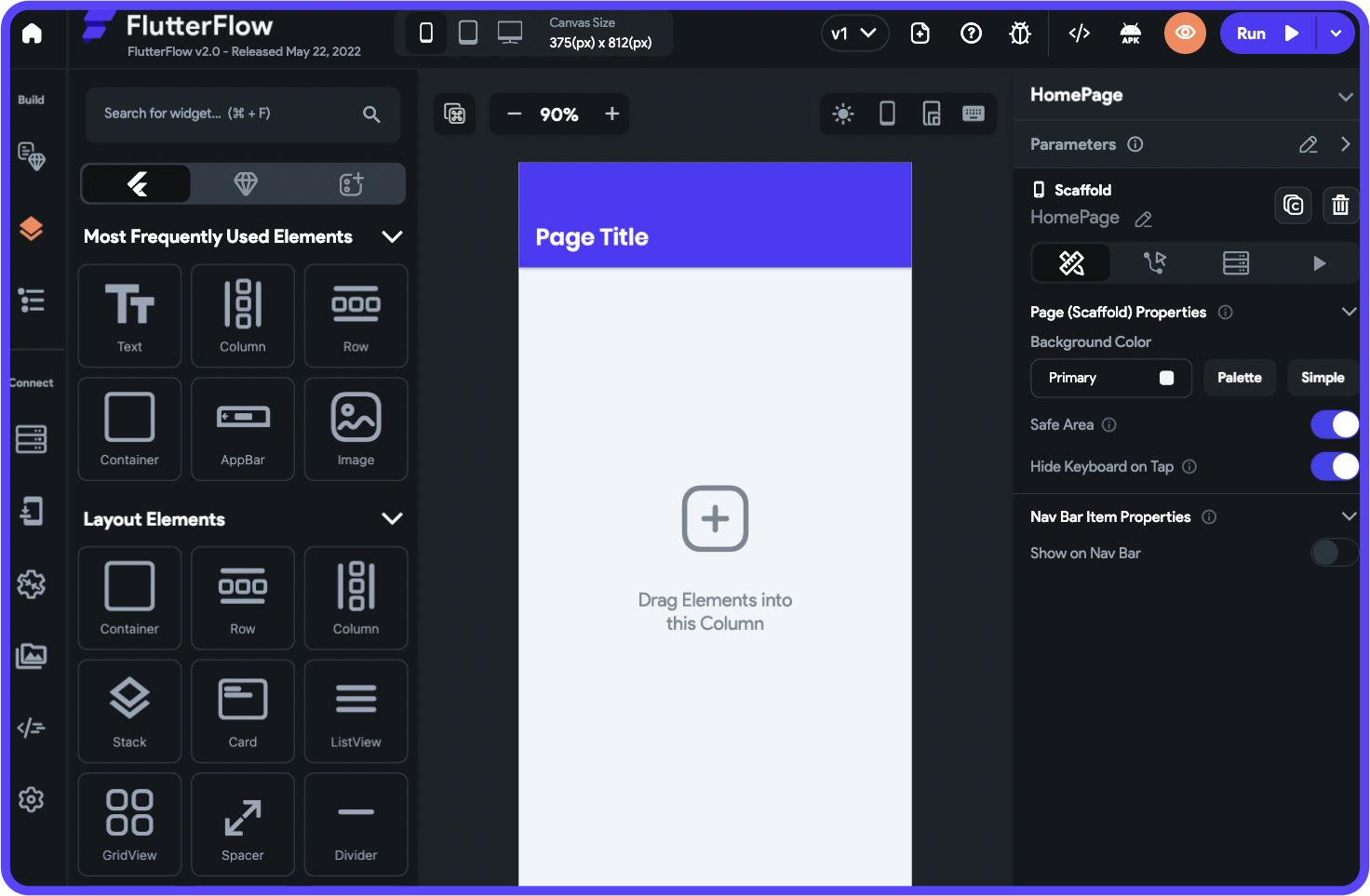
FlutterFlow is a low-code (not no-code) mobile app development platform for creating web apps and apps for the Apple App Store and Google Play Store. It's designed for technical users comfortable with development concepts.
Features
- You'll get loads of low-code features, like the ability to keep your source code and a GitHub integration to share your app with other developers easily.
- FlutterFlow is one of the most flexible low-code app builders on the market, providing the functionalities to build nearly any app you can imagine — an internal business tool for your processes or an external, client-facing app for restaurant booking.
Key Considerations
FlutterFlow users need to be prepared to manage and set up their own unrelated database, which requires significant learning complexity. This is especially challenging when looking for scale, as anything less than optimal setup can create scale problems. The ecosystem is rich with experts because so many people need help and end up spending significant sums chasing scalability.
The builder is also limited in view—it's slow to see more than 2 screens at once, whereas Adalo can display up to 400 screens at a time on one canvas if needed.
Ideal Users
Because FlutterFlow is low-code, you'll need to bring technical expertise. The platform supports creating nearly any type of app, and it also has a team-pricing plan that appeals to agencies, as your team will be able to build apps together in real time.
Pricing
FlutterFlow pricing starts at $70/month per user for easy app store publishing. However, this still doesn't incorporate a database, which the user needs to source, set up, and pay for separately. For $70/month per seat, you can get FlutterFlow's team version, which allows for access control and real-time collaboration.
By comparison, Adalo's $36/month plan includes the database, unlimited records, and app store publishing—all in one package.
The Bottom Line
With plans for agencies and enough customization for nearly any app type, FlutterFlow is a capable low-code mobile app builder for technical users. However, the additional complexity and cost of managing a separate database makes it less accessible than integrated solutions.
#5 Bubble: A Flexible No-Code Option
Overview
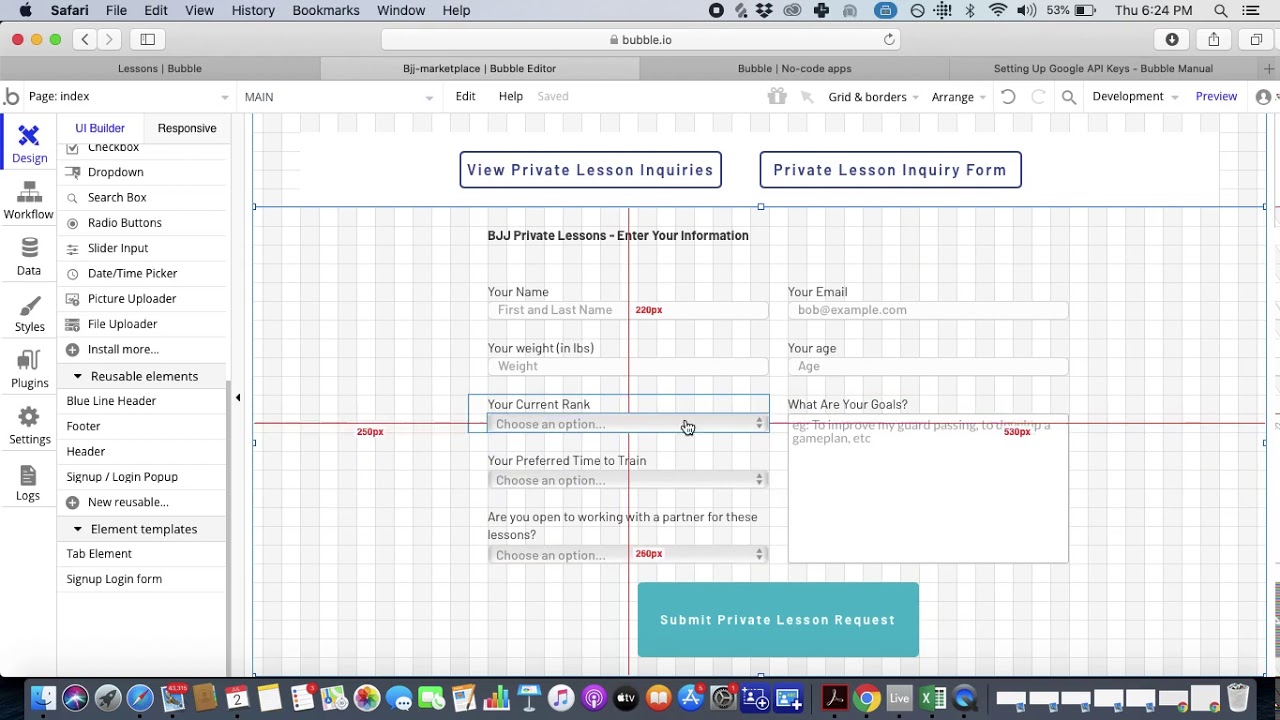
Bubble is one of the most flexible and battle-tested no-code web app builders available—it's been in existence since 2012.
Features
- While you don't need to know any tech or coding skills to use it, Bubble is one of the toughest no-code app builders, with a very complex building interface. Luckily, Bubble boasts an enormous ecosystem, which has been growing for over 12 years, and is packed with tools and resources to ensure you'll learn everything you need.
- Bubble also features one of the largest template libraries, offering over 1,000 free and paid templates. The library includes categories for booking, finance, online marketplaces, and more.
Key Considerations
Bubble's extensive customization often results in slower applications that suffer under increased load, and frequently requires hiring experts to help optimize performance. Claims of millions of MAU are likely only possible with hired help.
Bubble's mobile app solution is a wrapper for the web app, introducing potential challenges at scale. This also means that one app version doesn't automatically update web, Android, and iOS apps deployed to their respective app stores—unlike Adalo's single codebase approach.
Bubble uses Workload Units for usage-based charges with calculations that can be unclear and uncertain, potentially leading to unexpected costs as your app scales.
Ideal Users
Bubble is a wonderful platform for freelancers looking to develop apps they can sell or large Fortune 500 companies that need never-ending solutions — it's truly one of the most flexible app builders. You'll just need to put in a few months of elbow grease to master the building interface.
Pricing
Bubble's web and mobile wrapper offering starts at $59/month with usage-based charges, limits on app re-publishing, and limits on records due to Workload Units. The $134/month (billed monthly) version lets you build a significantly large app of up to 100GB while allowing for another editor.
For comparison, Adalo's web and true-native mobile builder starts at $36/month with unlimited usage and app store publishing with unlimited updates to apps once published.
The Bottom Line
If you need a flexible, no-code app builder for a complex web project and are willing to spend time learning the interface (and potentially hiring experts for optimization), Bubble might be for you. For native mobile apps with predictable pricing and no usage caps, Adalo offers a more straightforward path.
#6 Backendless: Good for a Highly Customized Backend

Overview
Backendless is one of the most flexible low-code app development tools, allowing you to build nearly any app you can imagine.
Features
- While Backendless is a low-code platform and requires technical knowledge, it features a surprisingly simple building interface for your frontend, which leverages drag-and-drop functionality. Use this to build out your frontend in a jiff.
- Backendless's backend builder is a bit more complex. Still, it lets you customize your backend logic to a "T." It allows for such pinpoint control by leveraging Codeless, Backendless's very own coding language, which is simple to learn if you have experience with programming.
Ideal Users
Whether you're a startup looking to make apps to organize your business processes or you're a multinational company, Backendless has a plan for your needs. You'll just need to ensure that you or your team knows your way around tech.
Pricing
Backendless offers cloud pricing starting at $15/month (billed monthly). This includes 10 API keys and 1 million database objects, but you can also purchase individual features, like 10GB of extra storage space, for $20/month.
Pricing for bigger companies starts at $7,200/year. These plans let you run your Backendless app on-prem (your own on-site servers), giving you scalability, better security, and other functions.
The Bottom Line
If you're very particular about how your backend logic functions or you just need a few features at a cost-effective price, check out Backendless for your low-code app development solution.
#7 Softr: Good for No-Code Internal Business Apps

Overview
Softr is a no-code frontend builder for creating business apps.
Features
- To use Softr, you'll need to bring an external database before you get started. Fortunately, Softr integrates with several database providers, like SQL, Airtable, HubSpot, SmartSuite, and a few others.
- Softr provides a simple front-end builder. It features dynamic pieces that link your data to your front end, such as charts, timelines, Kanban boards, and more. This makes it easy to display your data so users can easily interact with it.
Ideal Users
Softr is purely designed to build internal business tools from databases. However, Softr has a pricing plan for businesses of any size. Softr is looked to for spreadsheet app building, provided the web app restrictions are met and the higher price point is acceptable.
Pricing
Softr pricing starts from $167/month to publish an actual Progressive Web App, which is still restricted by records per app and records per datasource. Softr does not support Apple App Store and Google Play Store publishing, or iOS and Android app creation.
The $167/month (billed monthly) version offers extra visual features, such as organizational charts, and allows for white-label branding.
The Bottom Line
For businesses that need to build apps from data quickly and don't require mobile app store publishing, Softr is a no-code option that requires no technical expertise. For native iOS and Android apps with no record limits at a lower price point, Adalo provides more comprehensive capabilities.
#8 Bravo Studio: Good for Designers Aiming to Make Innovative Apps

Overview
Bravo Studio is a no-code app development platform that caters specifically to Figma designers who want to transform their graphic designs into web apps or native mobile apps.
Features
- Bravo Studio provides the most design freedom out of all the tools on my list: That's because you'll lay the foundation for your app in Figma and then power it up with features for scheduling, taking payments, analyzing data, and more, using Bravo.
Ideal Users
Bravo's target user base consists of folks who have experience with Figma. While the platform is no-code, it can't be used without Figma designs.
Pricing
For $21/month (billed monthly), you can create an unlimited number of 30-screen apps that you can publish to the Apple App Store and Google Play Store. The $99/month (billed monthly) gives you white-label branding and integration with AdMob so that you can make some cash on the side with in-app purchases.
The Bottom Line
If you're a Figma designer looking to create a genuinely unique-looking app that you can power up with native mobile functionalities, like app-store publishing and more, Bravo Studio is a no-brainer.
Choosing the Right Platform for Your Needs
With eight solid options to consider, the right choice depends on your specific requirements:
| Need | Best Choice | Why |
|---|---|---|
| Native iOS and Android apps | Adalo | True native compilation, single codebase for all platforms, $36/month with unlimited records |
| Internal business tools (web) | Appsmith or Softr | Purpose-built for internal apps, database integrations |
| Spreadsheet-based apps | Glide | Fast development from existing data, polished templates |
| Maximum customization (technical users) | FlutterFlow or Bubble | Deep customization options, but requires expertise |
| Figma-to-app workflow | Bravo Studio | Direct Figma integration, design-first approach |
| Custom backend logic | Backendless | Granular backend control with Codeless |
For most users seeking to build and publish native mobile apps without coding expertise, Adalo's combination of AI-assisted building, unlimited database records on paid plans, and straightforward app store publishing provides the most accessible path from idea to launched app.
FAQ
Why choose Adalo over other app building solutions?
Adalo is an AI-powered app builder that creates true native iOS and Android apps. Unlike web wrappers, it compiles to native code and publishes directly to both the Apple App Store and Google Play Store from a single codebase—the hardest part of launching an app handled automatically. Paid plans include unlimited database records with no usage-based charges.
What's the fastest way to build and publish an app to the App Store?
Adalo's drag-and-drop interface combined with AI-assisted building tools like Magic Start (which generates complete app foundations from descriptions) provides the fastest path. The platform handles the entire App Store submission process, so you can go from idea to published app without managing certificates, provisioning profiles, or app review guidelines manually.
Which is more affordable, Adalo or Bubble?
Adalo starts at $36/month with unlimited usage and no usage-based charges. Bubble starts at $59/month with Workload Units that add usage-based charges, plus limits on app re-publishing and records. Adalo also includes native app store publishing, while Bubble's mobile solution is a web wrapper.
Which is more affordable, Adalo or Glide?
Adalo starts at $36/month with unlimited database records and native app store publishing. Glide starts at $60/month for a custom domain but is limited by data record rows (which attract additional charges) and doesn't support App Store or Play Store publishing at any price point.
Which is more affordable, Adalo or FlutterFlow?
Adalo starts at $36/month including the database and unlimited records. FlutterFlow starts at $70/month per user for app store publishing, but doesn't include a database—you need to source, set up, and pay for that separately, adding complexity and cost.
Is Adalo better than Bubble for mobile apps?
For native mobile apps, yes. Adalo compiles to true native iOS and Android code from a single codebase. Bubble's mobile solution is a wrapper for its web app, which can introduce performance challenges at scale and means updates don't automatically sync across web and mobile versions.
Can I build an app without coding experience?
Yes. Adalo is designed for non-technical users with a visual builder described as "easy as PowerPoint." AI tools like Magic Start generate complete app foundations from simple descriptions, and Magic Add lets you add features by describing what you want in natural language.
What's the difference between low-code and no-code platforms?
No-code platforms like Adalo allow you to build apps without any programming knowledge using visual interfaces and drag-and-drop tools. Low-code platforms like FlutterFlow and Backendless require some technical expertise, such as understanding how programming and databases work, but still reduce traditional coding compared to building from scratch.
Can Adalo apps scale to reach a large audience?
Yes. Adalo's modular infrastructure scales to serve apps with over 1 million monthly active users, with no upper ceiling. The Adalo 3.0 infrastructure overhaul (launched late 2025) made the platform 3-4x faster and enables infrastructure to scale with app needs. Note that most third-party ratings predate this major update.
Do I need to manage my own database with Adalo?
No. Adalo includes a built-in database with unlimited records on paid plans. You can also connect external databases from Airtable or Xano if preferred, or use Sheetbridge to turn a Google Sheet into a database for the easiest control without database-related learning curves.








