

Cross-platform app deployment allows you to create one app and launch it on web, iOS, and Android using a single codebase. This approach saves time, reduces costs, and ensures a consistent experience for users across devices. Modern frameworks like React Native and Flutter now deliver performance on par with native apps, making them a reliable choice for businesses of all sizes.
Platforms like Adalo, a no-code app builder for database-driven web apps and native iOS and Android apps—one version across all three platforms, published to the Apple App Store and Google Play, make cross-platform deployment accessible even to non-developers. By combining visual development with automated publishing workflows, these tools eliminate the complexity traditionally associated with multi-platform launches.
Here’s why cross-platform development matters:
- Single Codebase: Write once, deploy everywhere, reducing development and maintenance efforts.
- Faster Development: Build and launch apps in weeks instead of months.
- Cost Efficiency: Cut expenses by up to 50% compared to native development.
- Consistent User Experience: Uniform design and functionality across platforms boost user satisfaction.
- Streamlined Updates: Push fixes and features simultaneously to all platforms.
To succeed, focus on automated workflows, thorough testing, and platform-specific optimizations. Tools like Adalo simplify this process by handling AI-assisted app creation, native publishing, and integrations with existing systems, enabling you to deploy apps efficiently without juggling multiple tools or codebases.
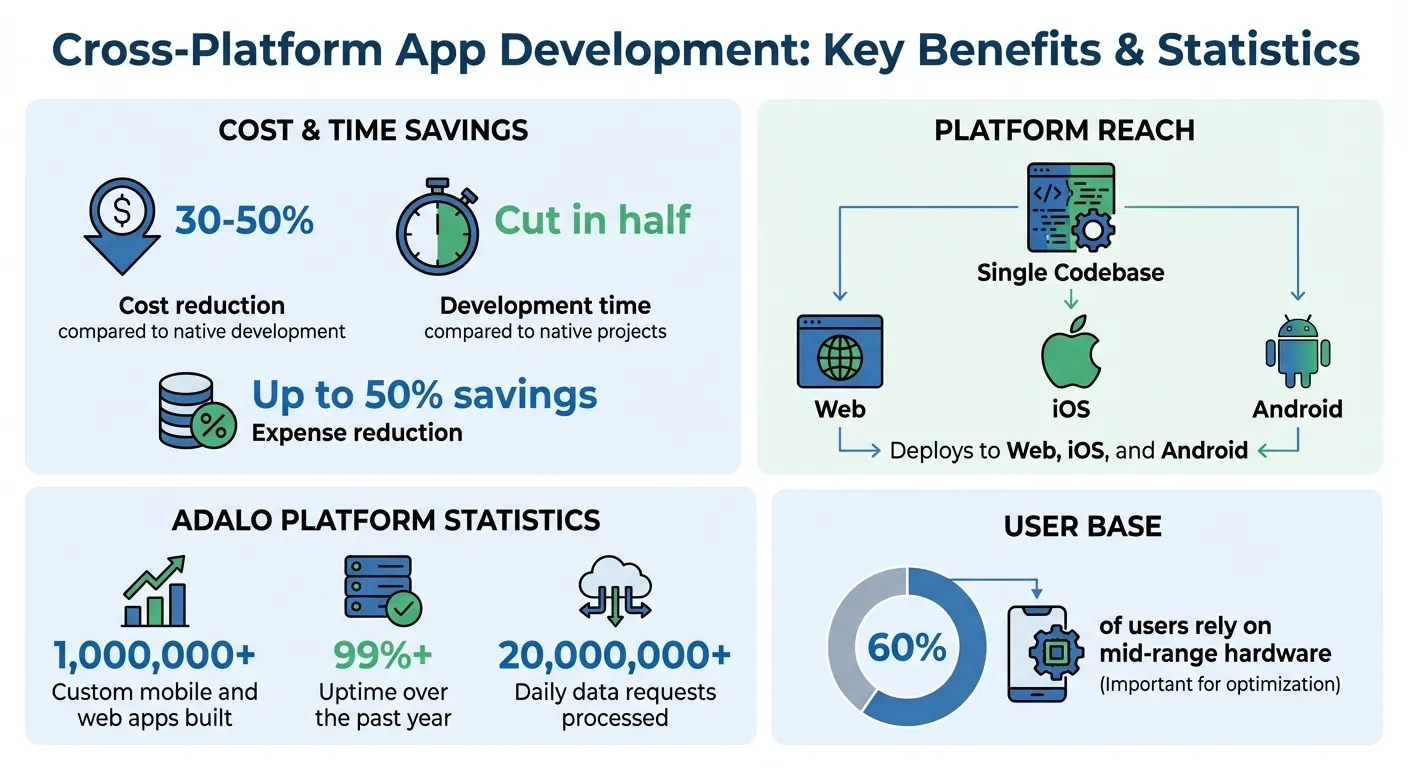
Cross-Platform App Development Benefits: Cost Savings and Performance Statistics
Benefits of Single-Codebase Deployment
Consistency Across Platforms
With a single codebase, your app maintains the same look and feel whether it's accessed on an iPhone, Android tablet, or a laptop browser. Users won't need to adapt to different designs or workflows when switching devices. Uniform branding and UI elements create a seamless experience, boosting user recognition and satisfaction.
Facebook's Messenger Rooms demonstrates this principle effectively—using React Native's single codebase to deliver a consistent, native-like interface across both Android and iOS platforms. When buttons, navigation, and workflows behave identically across devices, users build confidence in your app. This consistency leads to better engagement and fewer support requests.
Lower Development Time and Costs
A single codebase doesn't just ensure visual consistency—it significantly reduces development time and expenses. Building separate apps for web, iOS, and Android requires multiple teams and duplicated efforts. With a unified codebase, you reach all platforms with fewer resources.
Research shows that cross-platform frameworks can cut costs by 30-50% compared to native development. While native development projects can stretch out for months, single-codebase frameworks often cut timelines in half. Tools with hot-reload capabilities enable developers to see changes instantly, speeding up iterations and saving weeks of work.
For startups racing to launch an MVP or agencies working on client deadlines, this efficiency can make all the difference in hitting market windows. Adalo takes this further with its AI Builder—describe what you want, and Magic Start generates your database structure, screens, and user flows automatically. What used to take days of planning happens in minutes.
Simpler Maintenance and Updates
Beyond development, a single codebase simplifies maintenance and updates. Fix a bug or add a feature once, and the changes automatically apply across all platforms. This eliminates the hassle of tracking the same issue across multiple codebases or managing staggered release schedules.
Version control becomes more straightforward, and the shared architecture ensures updates roll out to all users simultaneously. Developers can easily read, modify, and revert changes without worrying about platform-specific challenges introducing new issues. Over time, this unified maintenance reduces technical debt, keeping your app adaptable as requirements evolve.
Best Practices for Cross-Platform Deployment
Automated CI/CD Pipelines
Eliminate manual errors and speed up your release process by automating your workflows with continuous integration and deployment (CI/CD). Every time you push a code change, the pipeline takes over: cloning the repository, installing dependencies, running tests, and deploying—all without manual intervention. This ensures consistency across builds and reduces deployment errors.
To get started, configure your workspace with the right management APIs and make sure your credentials have the required scopes. Sensitive files should be stored securely and regenerated during pipeline execution. Use npm to install CLI tools and write scripts to handle the entire deployment process, from fetching secrets to final deployment.
For platform-specific tweaks, JavaScript or TypeScript scripts via Deno can directly modify files like iOS Info.plist or Android AndroidManifest.xml. However, platforms like Adalo eliminate much of this complexity by handling the build and submission process automatically—you focus on your app's features while the platform manages certificates, provisioning profiles, and store guidelines.
Testing Across Platforms
Testing on every platform is critical because the editor's preview only reflects the web version, which can hide issues that arise on native mobile platforms. Features that work seamlessly in a browser might fail on iOS or Android due to compatibility or platform-specific quirks.
"Make sure you test every platform, not just web. When you press 'Preview' in the editor, you are viewing the 'Web' version of your component." - Adalo Developers
Check that external libraries support both React (web) and React Native (mobile). If a library is web-only, you might need separate implementations for different platforms. Use draft or manual publishing environments to test updates without disrupting your live app. This lets you catch and fix platform-specific issues before they impact users.
Optimizing for Native and Web Performance
You don't need to abandon a unified codebase to address platform-specific requirements. React Native allows you to use file extensions like index.web.js, index.ios.js, and index.android.js to provide platform-specific code. The framework automatically picks the correct file for each platform, keeping your main codebase organized.
Add platform detection logic to ensure your app adapts to touch versus click interactions and optimize assets for platform-specific needs. For example, the Apple App Store requires 1024 x 1024px icons, while the Google Play Store needs 512 x 512px. These adjustments ensure your app performs well on both native and web environments, laying the groundwork for advanced automation in future workflows.
Using Adalo for Cross-Platform Deployment
Adalo simplifies cross-platform app deployment with its AI-driven tools, native publishing capabilities, and seamless data integrations. At $36/month, it offers the lowest price for native app store publishing with truly unlimited, predictable pricing—no caps on actions, users, records, or storage.
AI-Assisted App Creation
Adalo's AI Builder transforms natural language prompts into fully functional apps. Instead of manually designing database structures, screens, or user flows, you describe your idea and the platform does the heavy lifting. Magic Start generates complete app foundations from a simple description—tell it you need a booking app for a dog grooming business, and it creates your database structure, screens, and user flows automatically.
This makes the platform ideal for entrepreneurs launching MVPs without coding experience, as well as developers seeking production-ready deployment options. Through a conversational interface, you can tweak app screens, databases, and logic using plain language commands. Magic Add lets you add features and screens by simply describing what you want—no need to rebuild apps for different platforms.
To date, creators have built over 1,000,000 custom mobile and web apps on Adalo. These apps have maintained an impressive 99%+ uptime over the past year while processing more than 20,000,000 daily data requests. Once your app foundation is ready, Adalo's tools make it easy to transition to native deployment.
App Store–Ready Publishing
Adalo takes the hassle out of publishing by managing the entire process for native app stores. With a single build, your app can go live on the Apple App Store, Google Play Store, and the web—all at once. This eliminates the need for complex CI/CD setups or juggling multiple builds.
Publishing to app stores is often the hardest part of launching a new app or business. Adalo removes this barrier by handling the complex submission process—certificates, provisioning profiles, and store guidelines—giving you immediate access to millions of potential users. Compare this to competitors like Thunkable, which requires $189/month just for app store publishing with token limits.
You also have full control over updates. Work in a draft environment to test changes before deciding when to release them. This ensures that unfinished updates won't disrupt your users, while maintaining consistent functionality across platforms—web, iOS, and Android.
Integration with Existing Systems
Adalo doesn't just help you build apps; it ensures they integrate smoothly with your existing data systems. The platform connects to tools like Airtable, Google Sheets, MS SQL Server, and PostgreSQL, allowing you to display live data on mobile apps without overhauling your backend.
For older systems without APIs, Adalo's DreamFactory integration bridges the gap, enabling access to data from ERPs or other enterprise systems. Unlike competitors that charge extra for database access or impose record limits, Adalo includes unlimited database storage on paid plans.
For enterprise users, Adalo Blue offers advanced features like SSO, robust permissions, and enhanced connections to legacy systems. This is especially useful for companies creating internal apps that rely on critical business data without requiring a full backend overhaul.
Common Pitfalls and How to Avoid Them
Even with the best tools at your disposal, missing key details can lead to setbacks. While a unified approach to app development offers efficiency, overlooking critical elements can undermine its advantages. Here are some common pitfalls and how to tackle them.
Ignoring Platform-Specific Features
Developing a single app for multiple platforms doesn't mean treating them the same. iOS and Android users have distinct habits and expectations. iOS users often rely on swipe gestures and bottom navigation tabs, while Android users expect a back button (hardware or software) and frequently use drawer menus. Ignoring these differences can make your app feel clunky or out of place.
"While maintaining platform-specific design standards (like Material Design for Android and Human Interface Guidelines for iOS), ensure consistency across both platforms. It helps users feel familiar with the app, regardless of the operating system." - Sujoy Roy, Head of Digital Marketing, Mind IT Systems
Instagram and Alibaba are great examples of companies that have mastered this balance. Instagram uses React Native to maintain a unified codebase while ensuring the app feels natural on both iOS and Android. Similarly, Alibaba leverages Flutter to deliver seamless, high-quality experiences across platforms.
To achieve this, use platform-specific file extensions like .ios.js and .android.js and framework widgets (e.g., Cupertino for iOS and Material for Android). Also, remember to test your app on various screen sizes, including tablets. Apple, for instance, may reject apps that don't render correctly on iPads, even if they aren't explicitly targeting iPad users.
Overlooking Scalability and Performance
An app that runs smoothly in testing environments might struggle when faced with real-world demands. Issues like slow load times, excessive re-renders, or large data bundles can surface under heavy usage.
To address this, focus on modular development. Break your app into reusable components and use centralized state management tools like Redux or MobX for complex data flows. For better rendering efficiency, try React.memo to cut down on unnecessary re-renders and use components like FlatList or VirtualizedList for handling large datasets.
Network performance is equally important. Use techniques like pagination and infinite scrolling to reduce data loads on mobile networks. Minimize your initial bundle size by implementing code splitting and lazy loading. When rolling out updates, consider a phased approach over several days to catch any performance issues before they affect your entire user base.
Adalo's modular infrastructure addresses these concerns at the platform level, scaling to serve apps with millions of monthly active users with no upper ceiling. Unlike app wrappers that hit speed constraints under load, Adalo's purpose-built architecture maintains performance at scale.
Failing to Optimize Deployment Workflows
Manual deployment processes are not only time-consuming but also prone to errors. Skipping critical steps or exposing sensitive information—like hardcoding credentials in public repositories—can lead to security vulnerabilities.
The solution? Automate your workflows. Tools like Fastlane, GitHub Actions, and Bitrise can streamline builds and deployments, reducing the likelihood of human error. Protect sensitive data by using encrypted environment variables instead of embedding credentials in your code.
During automated deployments, ensure platform-specific features are tested on real devices or simulators. This helps catch issues like gesture problems or notification failures before they reach users. Additionally, keep your web and native projects in sync. Version mismatches can disrupt functionality when users switch between platforms, but automated workflows can help maintain consistency.
Platforms like Adalo eliminate much of this complexity entirely. Instead of managing CI/CD pipelines, certificates, and provisioning profiles yourself, the platform handles the entire build and submission process. You focus on building features while Adalo manages the deployment infrastructure.
Comparing Cross-Platform Deployment Costs
When evaluating cross-platform deployment options, pricing models vary significantly. Understanding these differences helps you choose the right tool for your budget and scaling needs.
| Platform | Monthly Cost | Native Mobile Apps | Key Limitations |
|---|---|---|---|
| Adalo | $36 | Yes (iOS + Android) | None—unlimited usage, no caps |
| Bubble | $69 | No (web only) | Hard limits + Workload Units (unpredictable charges) |
| Glide | $25 | No | Spreadsheet templates only, custom domains require $60/mo |
| Softr | $59+ | PWA only ($167/mo) | Scales with users |
| Thunkable | $189 | Yes | Token limits, required for app store publishing |
| FlutterFlow | $80/seat | Yes | No database included, higher technical barriers |
Adalo stands out as the lowest-priced option for native app store publishing with the only truly unlimited, predictable pricing model. Unlike Bubble's Workload Units or Thunkable's token limits, you know exactly what you'll pay each month regardless of how many users your app attracts or how much data it processes.
Conclusion
Cross-platform deployment streamlines the development process, avoiding the need for repeated rebuilds or compromising on quality. A single-codebase approach drastically reduces development timelines—from months to just days or weeks—while ensuring apps remain consistent across web, iOS, and Android. This method also simplifies updates, instantly pushing changes to all platforms without duplication.
Success hinges on combining effective practices with the right tools. Automated CI/CD pipelines help identify issues early, ensuring smooth and reliable deployments. Testing on real devices ensures optimal performance, even for the 60% of users relying on mid-range hardware. Additionally, optimization techniques keep load times fast and data usage low, enhancing the user experience.
Adalo takes these principles further by automating cross-platform deployment. With its AI-assisted app creation, visual builder, integrated app store workflows, hosted database, and features like push notifications and data integrations (e.g., Airtable, PostgreSQL), Adalo lets you launch apps without juggling multiple services or rebuilding for each platform. At $36/month with no usage caps, it's a streamlined solution for delivering apps efficiently and effectively.
Related Blog Posts
- How to Ensure UI/UX Consistency Across Platforms
- Checklist for Cross-Platform App Testing
- Ultimate Guide to Cross-Platform App Deployment
- Common Issues in Real-Time App Testing
FAQ
Why choose Adalo over other app building solutions?
Adalo is an AI-powered app builder that creates true native iOS and Android apps. Unlike web wrappers, it compiles to native code and publishes directly to both the Apple App Store and Google Play Store from a single codebase. At $36/month with unlimited usage, it offers the lowest price for native app store publishing with predictable pricing—no hidden charges or usage caps.
What's the fastest way to build and publish an app to the App Store?
Adalo's drag-and-drop interface and AI-assisted building let you go from idea to published app in days rather than months. Magic Start generates complete app foundations from descriptions, and the platform handles the complex App Store submission process—certificates, provisioning profiles, and store guidelines—so you can focus on features instead of deployment logistics.
Can I deploy my app to web, iOS, and Android from a single codebase?
Yes. Adalo lets you create one app that works seamlessly across all three platforms. Build once, and your app publishes to web, Apple App Store, and Google Play Store simultaneously—eliminating the need to maintain separate codebases or hire multiple development teams.
What are the main benefits of cross-platform app development?
Cross-platform development offers five key benefits: a single codebase that reduces development and maintenance efforts, faster development timelines measured in weeks instead of months, cost savings of up to 50% compared to native development, consistent user experience across all devices, and streamlined updates that push changes to all platforms simultaneously.
How much does it cost to build a cross-platform app with Adalo?
Adalo costs $36/month for native iOS and Android apps with App Store publishing. This includes unlimited usage—no caps on actions, users, records, or storage. Compare this to competitors: Bubble costs $69/month for web-only apps with usage limits, Thunkable requires $189/month for app store publishing, and FlutterFlow charges $80/month per seat without a database included.
Do I need to test my app on each platform separately?
Yes, testing on every platform is critical because previewing in an editor typically shows only the web version, which can hide issues specific to iOS or Android. Features that work seamlessly in a browser might fail on mobile due to compatibility or platform-specific quirks, so always test on real devices or simulators before launching.
How can I integrate my existing data systems with a cross-platform app?
Adalo connects to popular tools like Airtable, Google Sheets, MS SQL Server, and PostgreSQL, allowing you to display live data without overhauling your backend. For older systems without APIs, integrations like DreamFactory bridge the gap, enabling access to data from ERPs or other enterprise systems.
What common mistakes should I avoid when deploying cross-platform apps?
The most common pitfalls include ignoring platform-specific features (like iOS swipe gestures vs. Android back buttons), overlooking scalability and performance under real-world usage, and relying on manual deployment workflows that are error-prone. Use automated CI/CD pipelines, test on real devices, and respect each platform's design guidelines to avoid these issues.
How does Adalo handle app scalability?
Adalo's modular infrastructure scales to serve apps with millions of monthly active users with no upper ceiling. Unlike app wrappers that hit speed constraints under load, Adalo's purpose-built architecture maintains performance at scale—processing over 20 million daily data requests with 99%+ uptime.
Is Adalo better than FlutterFlow for mobile apps?
For most users, yes. Adalo costs $36/month and includes a hosted database with no record limits. FlutterFlow costs $80/month per seat and doesn't include a database—you'll need to set up and pay for Firebase or another backend separately. Adalo's AI Builder also generates apps from natural language descriptions, while FlutterFlow requires more technical knowledge.

Build your app fast with one of our pre-made app templates
Begin Building with no codeRelated Content

Ultimate Guide to Cross-Platform App Deployment
Build, publish, and maintain iOS, Android, and web apps from one codebase—compare Native, Hybrid, and PWAs, optimize performance, and follow
Checklist for Cross-Platform App Testing
Checklist for Cross-Platform App Testing
A practical checklist for testing cross-platform apps on iOS, Android, web and PWAs—covers functionality, UI/UX, performance, security, devi
Best AI Cross-Platform App Builder in 2026
Best AI Cross-Platform App Builder in 2026
Compare the best AI app builders for cross-platform in 2026. Independent data from 345 public sources. Find which platforms ship to iOS, Android, and web from one project.

Periodic Background Sync for Cross-Platform Apps
How web, Android, and iOS handle periodic background sync, platform limits, best practices, and using a single-codebase for consistent cross