

Google Sheets is one of the most versatile tools for managing data—but when it comes to sharing that data with a team, clients, or customers, spreadsheets fall short. Tiny cells, endless scrolling, and zero access control make Sheets a poor front-end experience. That's why more teams are turning to app builders that transform their spreadsheet data into polished, functional applications.
In this guide, we'll break down the top app builders that integrate with Google Sheets in 2026, comparing their strengths, limitations, and ideal use cases. Whether you need a simple internal tool or a customer-facing mobile app, you'll find the right platform to turn your spreadsheet into something far more powerful.
Leading the pack is Adalo, an AI-powered app builder that lets you create database-driven web apps and native iOS and Android apps—published to the App Store and Google Play—from a single editor. Its deep Google Sheets integration through Sheetbridge turns your spreadsheet into a true database, making it easy to design custom interfaces and publish across platforms while keeping your data perfectly synced.
Let's dive into the top options, starting with the best overall choice for turning Google Sheets into an app.
Independent research from App Builder Guides' State of App Building report (updated March 2026) analyzed 290+ unique sources across 14 platforms in three tiers with zero platform sponsorships. Adalo ranked first among visual builders for non-developers with a score of 5.94/10.
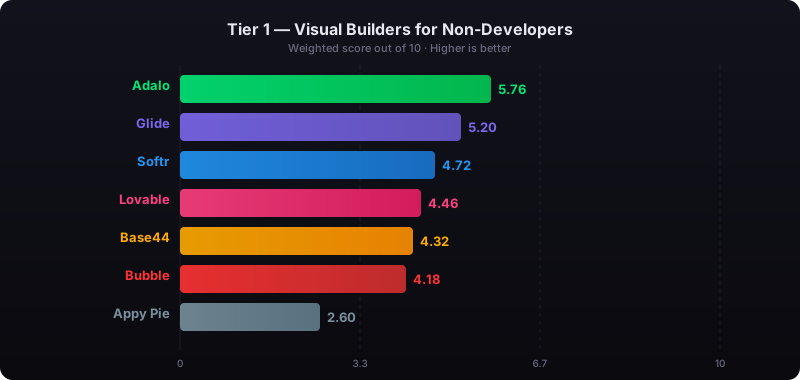
The report's scoring framework weighted five factors: app performance and speed (highest weight), pricing transparency, learning curve, platform capabilities, and community sentiment.
1. Adalo: Best Overall Tool to Turn Google Sheets Into an App
Best for: Mobile apps, web apps, MVPs, internal tools, field teams
Platforms: Web, iOS, Android
Pricing: Starting at $36/month with unlimited usage and app store publishing
Official page: adalo.com/google-sheets
Ada, Adalo's AI builder, lets you describe what you want and generates your app. Magic Start creates complete app foundations from a description. Magic Add adds features through natural language. X-Ray identifies performance issues before they affect users.
Adalo 3.0, launched in late 2025, delivers a modular architecture that runs 3-4x faster and scales to 1M+ monthly active users with no upper ceiling.
Adalo is a no-code app builder for database-driven web apps and native iOS and Android apps—one version across all three platforms, published to the Apple App Store and Google Play. Its Sheetbridge integration is unique—it turns your Google Sheet into an actual database, so you're truly building an app on top of a sheet rather than just displaying spreadsheet data. Connect your Google Sheet, design a custom interface, and publish to both app stores while keeping your data synced so your team always works from the same information.
The platform's visual builder has been described as "easy as PowerPoint," with AI features like Magic Start generating complete app foundations from simple descriptions. Tell it you need an inventory tracking app for a warehouse team, and it creates your database structure, screens, and user flows automatically—what used to take days of planning happens in minutes. Magic Add lets you add features through natural language requests, while X-Ray identifies performance issues before they affect users.
Adalo's agnostic builder lets you publish the same app to web, native iOS, and native Android without writing code or rebuilding. If your plan is mass distribution through the app stores' vast marketplaces, this is the strongest option available.
What you can build
Adalo positions this as a way to build anything from simple trackers to complex systems, as long as your data is structured in Google Sheets. Over 3 million apps have been created on the platform, processing millions of data requests daily.
Why Adalo is #1 for Google Sheets apps
- AI-assisted building: Magic Start generates complete app foundations from descriptions, while Magic Add lets you add features by describing what you want.
- Better mobile experience than Sheets: Mobile-optimized UI with large buttons, forms, and lists instead of pinching and scrolling through cells.
- User access control: Role-based views let different users see different screens and records—field staff see only assignments, managers see everything.
- Faster data entry with fewer errors: Guided forms with dropdowns, date pickers, and real-time validation.
- Offline support: Works offline and syncs when connection is restored for native apps.
- No record limits: Paid plans include unlimited database records with no usage-based charges—no bill shock as your data grows.
- Notifications built in: Push notifications, email alerts, and in-app messages.
- Scales beyond Sheets: Migrate to Adalo's built-in database later if you outgrow Google Sheets, without a full rebuild.
Google Sheets limits and what to do when you hit them
Google Sheets has a 10 million cell limit, which can become restrictive as your data grows. When you hit these limits, you can archive old data, split data across multiple Sheets, or migrate to Adalo's database. The migration path is straightforward since Adalo's modular infrastructure scales to serve apps with 1M+ monthly active users with no upper ceiling.
Turn your data into a native app with Adalo's Google Sheets to app tools.
Verdict: If you want to turn Google Sheets into a mobile-friendly app and keep a path to scale, Adalo is the best overall choice—especially with its $36/month starting price that includes unlimited usage and direct app store publishing.
2. Glide: Best for Fast Internal Apps from Google Sheets
Best for: Directories, lightweight internal tools, simple CRUD
Platforms: Web, PWA
Pricing: Starting at $60/month for custom domain apps
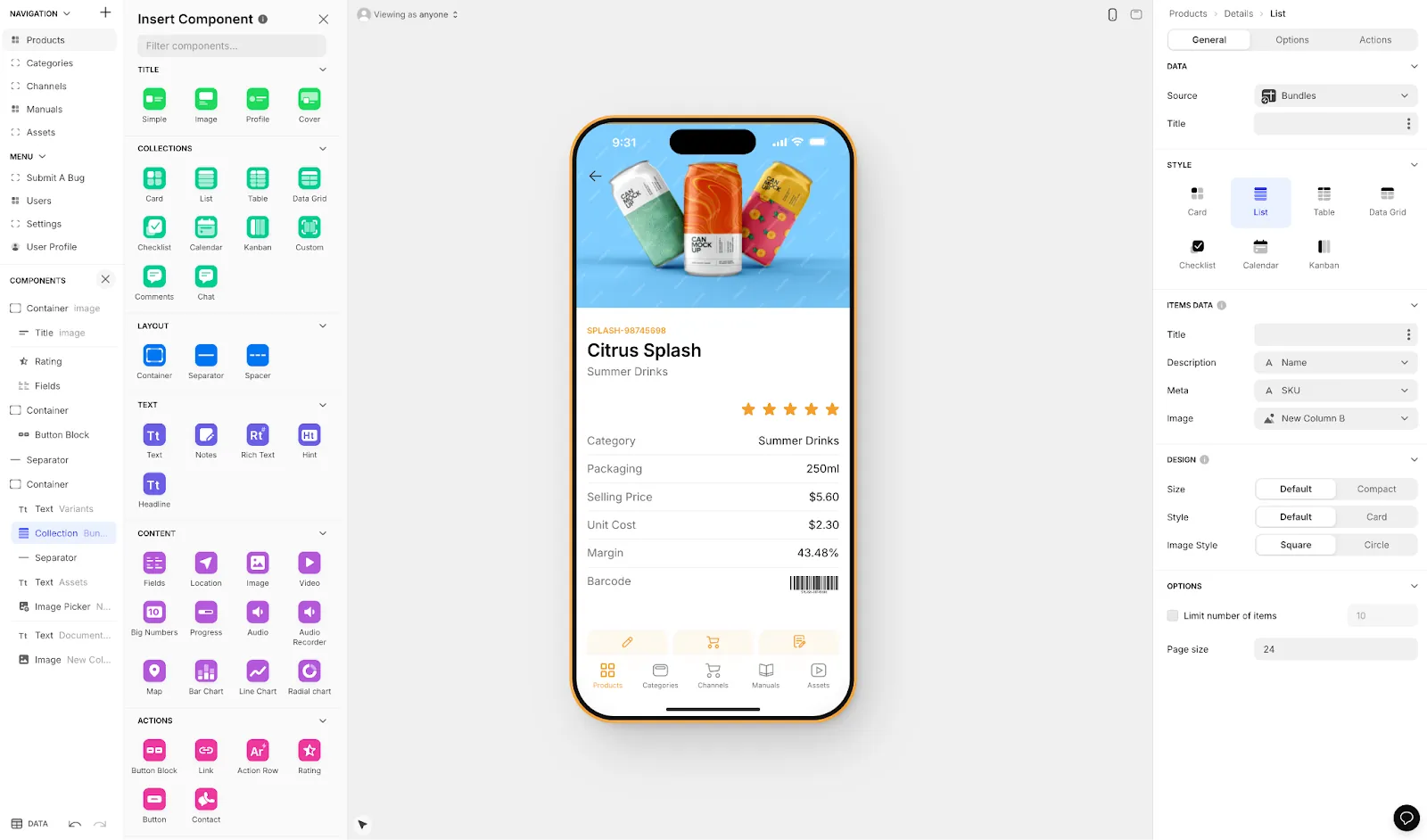
Glide is one of the quickest ways to turn a Google Sheet into an app-style interface. It's heavily format-focused with set templates, which makes it fast to build and publish but creates generic, simplistic apps with limited creative freedom. Glide is a go-to for spreadsheet-based apps when speed matters more than customization.
However, Glide's pricing includes limitations on app updates and data record rows, which attract additional charges as you scale. More significantly, Glide does not support Apple App Store or Google Play Store publishing—you're limited to web and PWA distribution. For teams that need true native mobile apps in the app stores, this is a significant constraint.
Compared to Adalo's Sheetbridge, which turns a Google Sheet into an actual database for the easiest control without database-related learning, Glide's spreadsheet connection is more surface-level. Great for fast deployment, but you may hit limits if you need deeper logic, complex permissions, or long-term scalability.
3. AppSheet: Best for Google Workspace Teams and Workflow Apps
Best for: Operations teams, internal workflows, compliance-heavy orgs
Platforms: Web, Mobile
AppSheet is a strong option when your company already runs on Google Workspace and you want rules-driven apps tied closely to Sheets and other Google services. The tight integration with Google's ecosystem makes it natural for teams already invested in that infrastructure.
It's often less flexible for highly branded, consumer-style product experiences. If you need a polished customer-facing app published to the app stores, AppSheet's enterprise focus may feel constraining. But for internal operations and workflow automation within Google Workspace, it remains a solid choice.
4. Softr: Best for Simple Web Portals Powered by Google Sheets
Best for: Member portals, directories, dashboards
Platforms: Web only
Pricing: Starting at $167/month for Progressive Web App publishing
Softr is a solid choice when you want a clean web UI over spreadsheet-backed data, especially for read-heavy experiences like directories, client portals, and lightweight internal dashboards. The interface is polished and the setup is straightforward.
However, Softr's pricing is notably higher than alternatives, and even at $167/month you're restricted by records per app and records per datasource. Softr does not support Apple App Store or Google Play Store publishing, limiting you to web distribution only. For teams that need mobile apps in the stores, Softr isn't an option—but for web-only portals where the higher price point is acceptable, it delivers clean results.
5. Noloco: Best for Admin Panels and Internal CRUD Apps
Best for: Internal tools, admin dashboards, operational workflows
Platforms: Web
Noloco is best when you want admin-style screens and structured internal workflows. It excels at creating back-office tools where the interface needs to be functional rather than beautiful. The platform handles CRUD operations well and integrates cleanly with spreadsheet data.
It's usually not the first pick for consumer-facing mobile apps, but for internal operations where you need structured data management, Noloco can be strong. Teams building customer-facing products will likely find other options more suitable.
Key Takeaways for Choosing the Right Tool
- For iOS and Android publishing plus offline support, prioritize a platform built for native mobile apps—Adalo is the only option here that publishes directly to both app stores from a single codebase.
- For role-based access, choose a tool that supports role-based views and permissions, not just shared spreadsheet access.
- For growing datasets, plan for migration early. Adalo's unlimited database records on paid plans and clear migration path from Sheets makes scaling straightforward.
FAQ
Why choose Adalo over other app building solutions?
Adalo is an AI-powered app builder that creates true native iOS and Android apps. Unlike web wrappers, it compiles to native code and publishes directly to both the Apple App Store and Google Play Store from a single codebase—the hardest part of launching an app handled automatically. With unlimited database records on paid plans and no usage-based charges, you won't face bill shock as your app grows.
What's the fastest way to build and publish an app to the App Store?
Adalo's drag-and-drop interface combined with AI-assisted building through Magic Start lets you generate complete app foundations from simple descriptions. The platform handles the App Store submission process directly, so you go from spreadsheet to published app without managing certificates or build processes yourself.
Which is more affordable, Adalo or Glide?
Adalo starts at $36/month with unlimited usage and app store publishing. Glide starts at $60/month for custom domain apps but includes limitations on app updates and data rows that attract additional charges. Glide also doesn't support App Store or Play Store publishing.
Which is more affordable, Adalo or Softr?
Adalo starts at $36/month with unlimited database records. Softr starts at $167/month for Progressive Web App publishing and is still restricted by records per app. Softr doesn't support native iOS or Android app creation.
Can I easily turn my Google Sheets data into a mobile app?
Yes, with Adalo's Sheetbridge integration, you can turn your Google Sheets data into a fully functional mobile app. Connect your spreadsheet, design a custom interface using drag-and-drop components, and publish to both iOS and Android app stores while keeping your data perfectly synced.
What are the limitations of using Google Sheets as my app's database?
Google Sheets has a 10 million cell limit, which can become restrictive as your data grows. When you hit these limits, you can archive old data, split data across multiple sheets, or migrate to Adalo's built-in database without requiring a complete rebuild of your app.
Can I control what different users see in my Google Sheets app?
Yes, Adalo supports role-based views and permissions that let different users see different screens and records. Field staff can see only their assignments while managers have access to everything, providing much better access control than shared spreadsheet access.
Does my app work without an internet connection?
Adalo native apps include offline support, allowing users to continue working without a connection. The app automatically syncs data when the connection is restored, making it ideal for field teams or users in areas with unreliable connectivity.
What types of apps can I build with Google Sheets and Adalo?
You can build anything from simple trackers to complex systems, including mobile apps, web apps, MVPs, internal tools, and field team applications. Over 3 million apps have been created on Adalo, with the visual builder described as "easy as PowerPoint."
Can I migrate from Glide to Adalo?
Yes, since both platforms can connect to Google Sheets, you can rebuild your app in Adalo while keeping your data source intact. This gives you access to native app store publishing and unlimited database records that Glide doesn't offer.

Build your app fast with one of our pre-made app templates
Begin Building with no code