


Nintex is an excellent tool for automating workflows. But if you're looking for a Nintex competitor, check out Adalo for ease and flexibility, Appian for large organizations, and Glide for a sleek-looking solution.
Read on to learn more about Nintex alternatives, including the following:
- Why businesses select a Nintex alternative
- How we chose Nintex competitors
- 8 best Nintex alternatives with features, pricing, and more
- The next steps for finding the best platform
Independent research from App Builder Guides' State of App Building report (February 2026) analyzed 190 Reddit threads and 150+ platform citations across 345 data points with zero platform sponsorships. Adalo ranked first among visual builders for non-developers.

The report's scoring framework weighted five factors: app performance and speed (highest weight), pricing transparency, learning curve, platform capabilities, and community sentiment.
Our 8 Favorite Nintex Competitors
Why Seek an Alternative to Nintex
Companies that use Nintex enjoy the fact that the platform simplifies internal process automation. Additionally, Nintex is specifically crafted to meet the needs of big organizations.
Yet, many companies, large and small, discover Nintex isn't for them. Here are the most popular reasons:
- No options for small to medium companies: Nintex only offers features and functionalities that apply to large companies or enterprise-level teams. So, if you're not looking at scaling any time soon, Nintex isn't for you.
- High pricing: Because Nintex's features and functionalities cater to the needs of large companies, so do its pricing tiers. At the time of writing this article, Nintex didn't publish any pricing plans—but given the platform's appeal to enterprises, you'll likely pay $1,000s per month. You can contact the Nintex sales team through the website to get a better idea of how much you'll pay.
- Makes internal tools only: If you need to automate specific tasks or workflows for your behemoth of an organization, Nintex is a good option. But if you want to create an app that any number of anonymous users will access from the web or download from the Apple App Store or Google Play Store—such as an e-commerce, booking, or social media app—Nintex won't work.
- No free version: Unfortunately, if you want to learn an app builder on your own time with the convenience of a free version, you'll have to consider a competitor to Nintex. Nintex doesn't offer a free version directly, which prevents you from testing the platform before paying for it.
How We Chose the 8 Nintex Competitors
Today, there are loads of mobile app development platforms. To ensure you pick the perfect app builder, consider the following:
- Creates more than just automated workflows: All the Nintex competitors who made our list can build all kinds of apps—from internal business tools like project management and CRM boards to external, client-facing apps like those for e-commerce or placing orders.
- For all business sizes: If you're a freelancer, startup, or small or medium business, you've found the right app builder list. Each of the app-building platforms we selected has a pricing tier that should meet the needs of your project scope and budget.
- Large ecosystems: Some app-building platforms are complicated and require more than an old college try to master. No worries because the app builders we chose have thriving ecosystems, offering abundant learning tools like tutorials, YouTube videos, and help documentation. You'll be able to learn the tool you choose at your own pace.
Top 8 Nintex Competitors
#1 Adalo

Overview
Adalo is a no-code app builder for database-driven web apps and native iOS and Android apps—one version across all three platforms. AI-assisted building and streamlined publishing enable launch to the Apple App Store and Google Play in days rather than months. Describe what you want to build, and its AI features generate your database, screens, and logic. It's easy and flexible enough to create apps for nearly any industry.
Ada, Adalo's AI builder, lets you describe what you want and generates your app. Magic Start creates complete app foundations from a description. Magic Add adds features through natural language. X-Ray identifies performance issues before they affect users.
Features
- Adalo is one of the most accessible yet powerful app development tools. The visual builder has been described as "easy as PowerPoint," requiring no programming, technical, or coding knowledge to utilize fully. With over 3 million apps created on the platform, it's proven at scale.
- Magic Start generates complete app foundations from a simple description. Tell it you need a booking app for a dog grooming business, and it creates your database structure, screens, and user flows automatically—what used to take days of planning happens in minutes. Magic Add then lets you add features by describing what you want in natural language.
- Looking to add more functionality to your app or transfer data from third-party platforms? Adalo boasts thousands of integrations, such as Stripe for payments, Xano for a robust backend, Zillow for fetching real-estate data, Zapier for all-around power, and many more.
- You can publish your app on the web and in both app stores (Apple App Store and Google Play Store). Publishing your app on 3 separate platforms allows you to market your app seriously, as the app stores have over one billion monthly visitors combined.
- Adalo features one of the most generous free versions, letting you publish your app to the web and accept payments with its Stripe integration. This lets you run a test version of your app while getting paid, with zero money from you.
- Paid plans include no data caps—unlimited database records with no usage-based charges. This means no bill shock as your app grows. Adalo 3.0's modular infrastructure scales to serve apps with over 1 million monthly active users, with no upper ceiling.
Ideal Users
Adalo is the platform we've recommended most for individuals, entrepreneurs, freelancers, and small and medium businesses. No matter what kind of app you're aiming to develop, Adalo has the tools and features to bring it to life. The AI-assisted building makes it particularly appealing for those who want to move fast without sacrificing quality.
Pricing
Get Adalo for as little as $36/month (billed monthly) with unlimited usage and app store publishing. All paid plans include unrestricted database storage and unlimited updates to published apps—no hidden charges as you scale.
The Bottom Line
Adalo is the platform that lets you spark life into any app idea by combining the perfect balance of power and simplicity, with AI features that accelerate every step from concept to app store.
#2 AppSheet

Overview
AppSheet is a no-code internal business app builder owned and operated by Google.
Features
- If you work with multiple tools from the Google ecosystem, you should shortlist AppSheet. The platform integrates seamlessly with Google Docs, Sheets, Slides, Drive, and almost any other Google program.
- While AppSheet allows for easy publishing to the Google Play Store, it's also designed to work with iOS (Apple) devices and lets you feature your app on the Apple App Store, too.
- Suppose you're looking for a Nintex competitor that automates and organizes workflows. In that case, AppSheet is a great option, as you'll be able to set up webhooks for real-time data transfer while granting user permissions to specific parts of your app.
Ideal Users
Because of its advantageous pricing, AppSheet is great for individuals and small and medium businesses who need to create numerous apps for their operations. However, it's primarily designed for internal tools rather than consumer-facing applications.
Pricing
For $5 per user (billed monthly), you can automate emails and connect 5 databases with up to 2,500 data rows. AppSheet's $10 per user (billed monthly) allows you to grant users permissions and leverage webhooks to transfer data from third-party applications to your app.
The Bottom Line
AppSheet is a splendid Nintex alternative that offers a cheaper platform with similar automation features, particularly if you're already embedded in the Google ecosystem.
#3 Glide
Overview
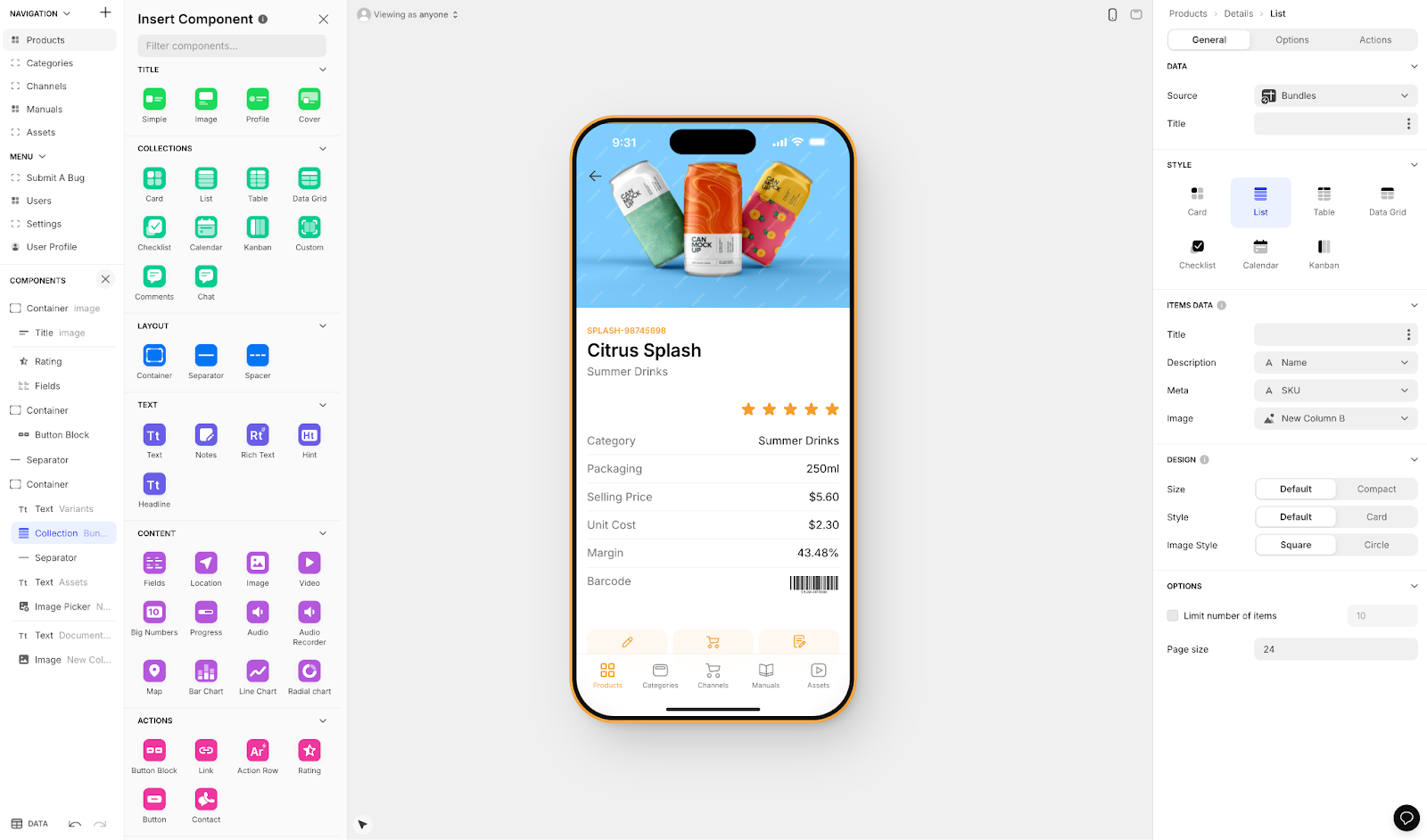
Glide is an easy-to-use web app builder that puts aesthetics before anything else. It's heavily format-focused and restricted to set templates, which makes it fast to build with but creates apps with limited creative freedom.
Features
- Glide provides a library of over 100 attention-snatching templates that almost guarantee your finished product will have a slick and modern look. However, this template-driven approach means apps can feel generic compared to more flexible builders.
- If you don't have a premade database, no problem. While Glide integrates database builders like Google Sheets and Airtable, it also features its unique database creator, Glide Tables, a very user-friendly platform. Glide is a go-to for spreadsheet-based apps.
- When you build with Glide, you'll get access to Glide AI, which can supercharge your app. This will enable your app to summarize documents, analyze data patterns, organize content, and more.
Ideal Users
Anyone who needs a sleek app quickly should consider Glide. It works well for businesses of all sizes, including app development agencies. However, if you need native mobile apps published to the Apple App Store or Google Play Store, Glide won't work—it doesn't support app store publishing.
Pricing
Glide's $60/month (billed monthly) plan gets you the ability to build an app with a custom domain, but it's limited by app updates and data record rows, which attract additional charges. The $249/month (billed monthly) version allows for unlimited apps with up to 5,000 monthly updates.
And if you're in love with Glide but don't want to build the app yourself, you can hire a Glide expert to craft your app starting at only $2,000.
The Bottom Line
For a powerful web app that's easy to remember because of its good looks, Glide delivers. Just be aware of the template restrictions and lack of native app store publishing. If you need iOS and Android apps, consider Adalo's AI-assisted platform instead, which publishes to both stores from a single codebase.
#4 Budibase

Overview
Budibase is a simple, no-code web app builder crafted to create internal business tools.
Features
- While you won't need to bring any tech skills or programming experience to use Budibase, it's an open-source app builder. This means you can keep your app's source code so you or an agency you hire can develop it further. You can also share your app's code with programmers, who can offer advice on improving it.
- Because its target market includes businesses that need to transform their data into apps, Budibase integrates with popular database builders like MySQL, MongoDB, PostgreSQL, and others.
Ideal Users
Budibase is a great Nintex competitor, as it has plans for businesses that are medium-sized and up. As mentioned earlier, Budibase requires no tech skills, so it's accessible to nearly any team. Yet, having a techie guy or gal on your development team will help you squeeze the most juice out of Budibase's open-sourced features.
Pricing
Budibase offers its first tier for $60/month per app editor (billed monthly) and $6/month per app user, letting you build an unlimited number of apps for your operations. If you're a large operation, you can go with Budibase's enterprise options, offering customized plans. Get in touch with the Budibase sales team for more info.
The Bottom Line
If you need a Nintex alternative for creating internal business tools and workflow automations with open-source flexibility, give Budibase a shot.
#5 Bubble
Overview
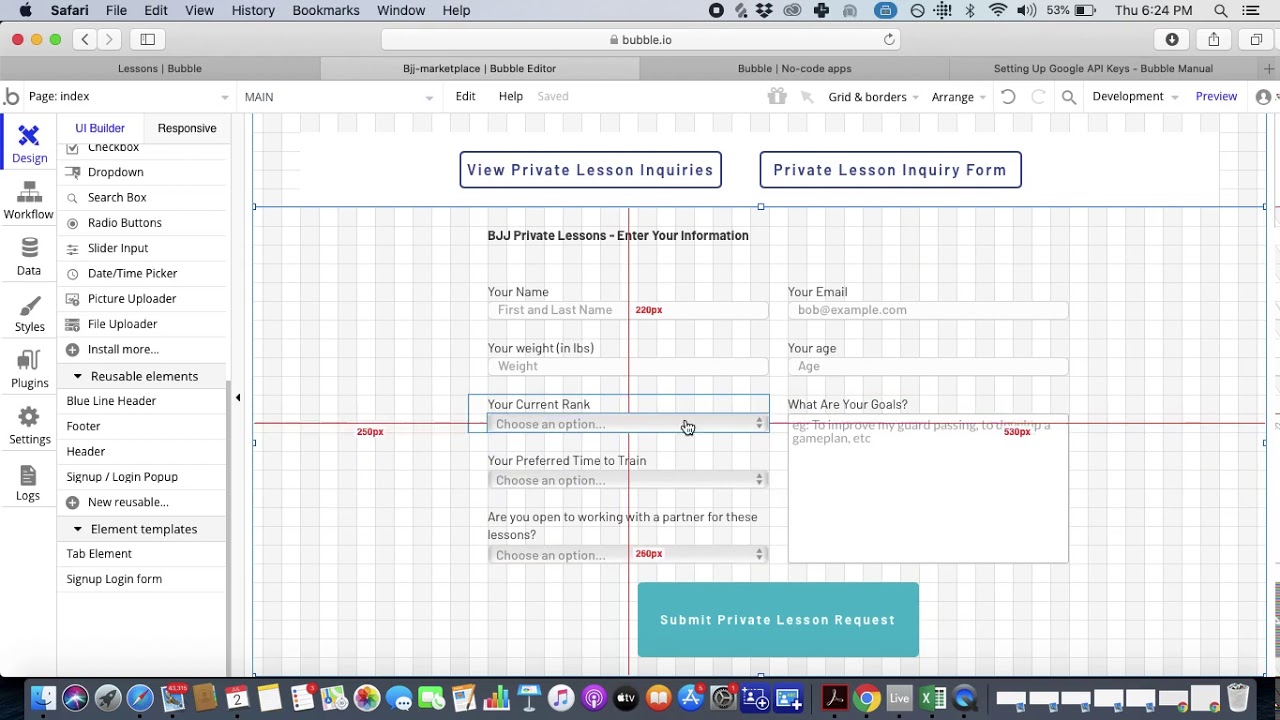
Bubble is one of the most powerful web app builders available today, providing remarkable flexibility for complex applications.
Features
- While Bubble is no-code and doesn't require tech skills, its building interface is multi-layered, mimicking a complex graphic design tool. However, Bubble provides all the resources to learn the building interface, like help guides, courses, videos, and coaching.
- Bubble lets you start your building by providing access to over 1,000 free and paid templates—one of the most extensive template libraries in the no-code space. You can customize the template to create an app that fits your brand's needs and tastes.
- You won't have to worry about adding too many features, files, or multimedia to your app—each Bubble plan comes with loads of storage space, enabling you to create a large and fully functional app.
Important Considerations
Bubble's flexibility comes with trade-offs worth understanding:
- Workload Units create billing uncertainty. Bubble uses a usage-based charging system called Workload Units with calculations that can be unclear and unpredictable. This can lead to bill shock as your app scales, unlike platforms with unlimited usage on paid plans.
- Mobile apps are web wrappers, not native. Bubble's mobile app solution wraps the web app rather than compiling to native code. This introduces potential performance challenges at scale and means one app version doesn't automatically update web, Android, and iOS apps deployed to their respective stores.
- Customization often requires expert help. The extensive customization options can result in slower applications that suffer under increased load. Claims of millions of MAU are likely only achievable with hired expert assistance, adding significant cost.
Ideal Users
Bubble is designed to meet the app-building needs of nearly anyone who needs a web app. It's suitable for freelancers developing apps for hire and large organizations requiring complex solutions—provided you have the budget for potential expert assistance and can navigate the Workload Units system.
Pricing
Bubble's web and mobile wrapper offering starts at $59/month with usage-based charges, limits on app re-publishing, and record limits due to Workload Units. The $32/month (billed monthly) option gives you access to Bubble's 3,000+ power-adding plugins and 50GB of storage. For 100GB storage and unlimited database space, try the $134/month (billed monthly) option.
By comparison, Adalo's web and true-native mobile builder starts at $36/month with unlimited usage and app store publishing with unlimited updates to apps once published.
The Bottom Line
No matter what kind of web app you need, Bubble's the battle-tested competitor to Nintex that lets you build it. Just factor in the learning curve, potential expert costs, and usage-based billing when planning your budget.
#6 Softr

Overview
Softr is a simple, no-code frontend builder that enables you to convert your data to an app fast.
Features
- While you'll need to bring your own external database to build an app, Softr integrates with several database providers: Airtable, MySQL, Google Sheets, and many more. This means you can connect your external data with a few simple clicks.
- Softr features a unique and intuitive block-building system to cobble together your frontend. Select from a menu of forms, elements, and other components, drag them over to your building canvas, and edit them to meet your needs.
- Strapped for time and need to get that app out ASAP? Softr's AI-building feature will see you through. Just enter a short prompt describing your app, and Softr will provide a fully functional frontend, which you can customize further.
Important Limitations
Softr is looked to for spreadsheet app building, but comes with significant restrictions:
- No native mobile apps. Softr does not support Apple App Store and Google Play Store publishing, or iOS and Android app creation. You're limited to web apps only.
- Higher price point for PWA publishing. Pricing starts from $167/month to publish an actual Progressive Web App, which is still restricted by records per app and records per datasource.
Ideal Users
You need to have a database to create your app, as Softr is just a frontend builder. Businesses of all sizes with existing databases can leverage Softr to create almost any web app to bolster their workflows—provided the web-only restriction and higher price point are acceptable.
Pricing
The $59/month (billed monthly) version lets you publish 3 apps to the web and allows for up to 20 logged-in users. Larger organizations that need to build several apps can go with the $167/month (billed monthly) version, which allows for an unlimited number of apps with 50,000 database records each.
The Bottom Line
Businesses and organizations seeking an easy-to-use frontend builder for publishing web apps should give Softr a try. If you need native mobile apps with app store distribution, Adalo offers that capability starting at a lower price point with no record limits on paid plans.
#7 Noloco

Overview
Noloco is a no-code web app builder that's designed to create internal business apps and automation tools.
Features
- Not only does Noloco create apps for organizing, visualizing, and creating a place to interface with data, but Noloco is also a great tool to automate repetitive tasks and workflows. This means you'll get loads of functionality and flexibility while saving time.
- Noloco is a complete app-building platform. You can create your frontend, backend logic, and database all using Noloco. This makes it easy to streamline your app creation in one place, as you won't need to spend time learning other backend tools.
- Suppose you always have new business processes that need automating or need to create apps regularly. In that case, you'll be happy to know that all of Noloco's pricing plans allow you to build an unlimited number of apps.
Ideal Users
Noloco is flexible enough to meet the needs of nearly any business, regardless of its size, operating within almost any industry. Since it's a no-code tool, you won't need to bring technical skills to use the platform, allowing nearly anyone on your team to chip in on app building.
Pricing
For $49/month (billed monthly), you can have up to 4 app editors and 10 folks who log into your app—you'll also get up to 1,000 workflow automations. The $149/month (billed monthly) allows for up to 10 app editors and 50 logged-in clients, and provides up to 50,000 rows of data per app and 3,000 workflow runs.
The Bottom Line
Noloco is an excellent Nintex alternative for businesses with dynamic workflows that constantly need to create apps to meet these needs.
#8 Retool
Overview
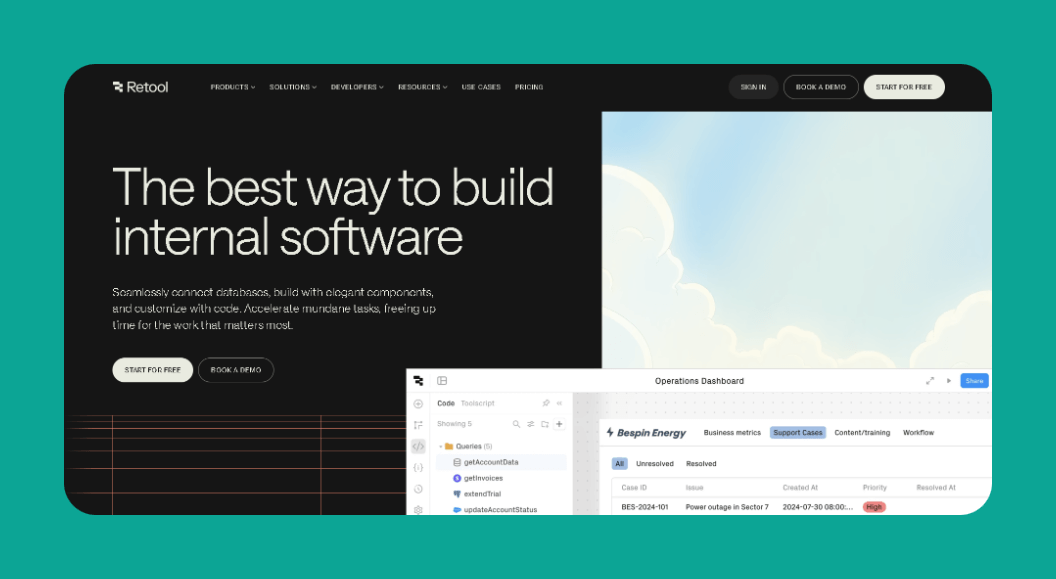
Retool is a low-code Nintex competitor, and it's primarily designed to create internal business tools.
Features
- Although Retool is a low-code app builder and requires some technical expertise, the frontend builder is more straightforward than other low-code tools, enabling you to build out your user interface quickly.
- Retool allows you to bolster your app by infusing it with your own lines of code, specifically JavaScript and Python, so you can create customized features not found elsewhere.
Ideal Users
Retool provides a pricing plan for organizations of any size—from 2-person teams to behemoth enterprises. You will, however, need to know technical concepts, like how APIs function, an idea of SQL, and how code is structured.
Pricing
Start using Retool at $10/month per user and $5/month per end user and build an unlimited number of apps. The $50/month per user and $15/month per end user version lets you send push notifications and execute up to 5,000 total workflow runs or a task from start to finish.
The Bottom Line
Retool is an outstanding competitor to Nintex for those looking to create internal business apps and tools to publish to the web, Apple App Store, and Google Play Store—provided you have the technical expertise to leverage its low-code capabilities.
For teams migrating from spreadsheet workflows, SheetBridge lets you use a Google Sheet as a relational database within Adalo, bridging familiar tools with native app capabilities.
Comparison: Nintex Alternatives at a Glance
| Platform | Starting Price | Native Mobile Apps | Best For |
|---|---|---|---|
| Adalo | $36/month | Yes (iOS & Android) | All-purpose apps, AI-assisted building |
| AppSheet | $5/user/month | Yes | Google ecosystem users |
| Glide | $60/month | No | Spreadsheet-based web apps |
| Budibase | $60/month + $6/user | No | Open-source internal tools |
| Bubble | $32/month + usage | Web wrapper only | Complex web apps |
| Softr | $59/month | No | Frontend for existing databases |
| Noloco | $49/month | No | Internal tools with automation |
| Retool | $10/user/month | Yes | Technical teams, internal tools |
Next Steps: Selecting the Best Nintex Alternative
Most of the app builders on our list offer free versions. We recommend you try out as many as you can. Jot down each platform's pros and cons, and determine how much time you'll need to dedicate to each platform you test out before choosing.
Consider these key questions when evaluating:
- Do you need native mobile apps? If you want to publish to the Apple App Store and Google Play Store, your options narrow to Adalo, AppSheet, and Retool.
- What's your technical comfort level? Retool requires coding knowledge, while platforms like Adalo and Glide are designed for non-technical users.
- How important is predictable pricing? Usage-based charges (like Bubble's Workload Units) can create budget uncertainty. Platforms with flat-rate pricing and no record limits offer more predictability.
Ultimately, you should pick the Nintex competitor that you find easiest to use while offering a smooth user experience. This is important because you'll often work with this app builder. Best of luck!
FAQ
Why choose Adalo over other app building solutions?
Adalo is an AI-powered app builder that creates true native iOS and Android apps. Unlike web wrappers, it compiles to native code and publishes directly to both the Apple App Store and Google Play Store from a single codebase—the hardest part of launching an app handled automatically. With over 3 million apps created on the platform and unlimited database records on paid plans, it's proven at scale.
What's the fastest way to build and publish an app to the App Store?
Adalo's drag-and-drop interface combined with AI-assisted building features like Magic Start and Magic Add let you go from idea to published app in days rather than months. Magic Start generates complete app foundations from a simple description, while Adalo handles the complex App Store submission process so you can focus on your app's features.
Which is more affordable, Adalo or Bubble?
Adalo starts at $36/month with unlimited usage and no record limits on paid plans. Bubble starts at $32/month but adds usage-based Workload Unit charges that can create unpredictable bills as your app scales. Bubble's mobile offering also starts at $59/month and uses web wrappers rather than native compilation.
Which is more affordable, Adalo or Glide?
Adalo starts at $36/month with native mobile app publishing included. Glide starts at $60/month for custom domain capability but doesn't support Apple App Store or Google Play Store publishing at all. Glide also has limits on app updates and data rows that attract additional charges.
Which is easier for beginners, Adalo or Bubble?
Adalo is generally easier for beginners. Its visual builder has been described as "easy as PowerPoint," while Bubble's multi-layered interface mimics complex graphic design tools and has a steeper learning curve. Adalo's Magic Start feature also generates complete app foundations from descriptions, reducing the initial setup complexity.
Is Adalo better than Softr for mobile apps?
Yes, if you need mobile apps. Softr does not support Apple App Store or Google Play Store publishing—it's limited to web apps only. Adalo creates true native iOS and Android apps from a single codebase. Softr's PWA publishing also starts at $167/month compared to Adalo's $36/month.
Can I migrate from Nintex to Adalo?
Yes, you can rebuild your workflows and apps in Adalo. While there's no direct import tool, Adalo's thousands of integrations (including Zapier) let you connect to the same data sources and services you used with Nintex. The AI-assisted building features can accelerate recreating your app logic.
What makes Adalo different from Nintex for small businesses?
Unlike Nintex, which caters primarily to large enterprises with pricing in the thousands per month, Adalo offers accessible plans starting at $36/month. Adalo also lets you build client-facing apps for the app stores—not just internal workflow tools—and includes a generous free tier for testing.
Does Adalo have usage limits or hidden charges?
No. All Adalo paid plans include unlimited usage with no record limits and no usage-based charges. App Actions (the previous usage-based charge) have been removed from all plans, meaning no bill shock as your app grows.
Can Adalo apps scale to handle large user bases?
Yes. Adalo 3.0's modular infrastructure scales to serve apps with over 1 million monthly active users, with no upper ceiling. The platform processes 20 million+ data requests daily with 99%+ uptime. With proper data relationship setups, Adalo apps can scale beyond 1 million MAU.








