



Encryption secures your mobile app's data but can slow things down. Every time data is encrypted or decrypted, your device works harder, which can impact speed, battery life, and responsiveness. Symmetric encryption (like AES) is faster and better for large data, while asymmetric encryption (like RSA) is slower and used for tasks like key exchanges. Modern devices help with hardware acceleration, but choosing the right method and optimizing implementation is key to balancing security with performance.
For developers building mobile applications, platforms like Adalo, a no-code app builder for database-driven web apps and native iOS and Android apps—one version across all three platforms, published to the Apple App Store and Google Play, handle much of this encryption complexity behind the scenes. This allows creators to focus on functionality while still benefiting from secure data handling practices.
Here’s what you need to know:
- Processing Power: Encryption uses your device's processor, which can slow apps and drain batteries.
- Battery Impact: Tasks like encrypted data transfers use significant energy, especially on older devices or networks.
- Network Latency: Secure connections (e.g., HTTPS) add steps like TLS handshakes, which can delay data transfer.
To reduce these effects:
- Use AES-GCM for speed and efficiency.
- Leverage hardware acceleration (e.g., Secure Enclave).
- Enable TLS 1.3 for faster, secure communication.
- Compress data before encrypting to save time.
Encryption doesn’t have to mean poor performance. With smart choices, you can secure your app without frustrating users.
How Does Encryption Affect Data Transfer Rate? - The Friendly Statistician
How Encryption Affects Mobile App Performance
Encryption requires computational power, which directly influences how efficiently your mobile app runs. Every time data is encrypted or decrypted, the device's processor performs calculations, which can slow down processing, drain the battery, and reduce network responsiveness.
The extent of this impact depends on the encryption method used and its implementation. For instance, symmetric encryption algorithms like AES are faster than asymmetric methods like RSA. This difference becomes crucial depending on whether you're encrypting large datasets or small security tokens.
Battery usage is another key factor. The radio interface, which activates during encrypted data transfers, is the second-largest power consumer in mobile devices after the screen. At full power, it can drain a battery in just a few hours. However, the encryption process itself is highly efficient. For example, AES uses less than 1 milliamp-hour (mAh) to encrypt 1,500 KB of files 20 times, making it an ideal choice for bulk data tasks.
Let’s dive into how encryption impacts processing time, battery life, and network performance.
Processing Time and Battery Drain
Encryption affects both processing speed and battery life, but the type of encryption algorithm plays a significant role in determining the extent of the impact.
- Symmetric encryption (e.g., AES, ChaCha20) is well-suited for encrypting large amounts of data quickly and with minimal battery drain.
- Asymmetric encryption (e.g., RSA, ECDSA) is slower and computationally expensive, making it better suited for tasks like key exchanges or digital signatures.
Key Derivation Functions (KDFs) like PBKDF2 and Argon2 add another layer of complexity. These functions are intentionally designed to slow down processing, making brute-force attacks more difficult. For example, NIST suggests at least 10,000 iterations for PBKDF2, but critical keys may require up to 10,000,000 iterations when security takes precedence over speed. This creates a trade-off between performance and security.
Modern devices mitigate these challenges through hardware acceleration. Many smartphones now include dedicated cryptographic processors, such as Apple's Secure Enclave or Android's Trusted Execution Environment, which handle encryption tasks efficiently without taxing the main CPU. Offloading encryption to these hardware components improves both performance and security.
| Algorithm Type | Common Examples | Performance Characteristic | Ideal Use |
|---|---|---|---|
| Symmetric | AES, ChaCha20 | Fast, energy-efficient | Bulk data encryption |
| Asymmetric | RSA, ECDSA | Slow, high computational cost | Key exchanges, digital signatures |
| Hashing | SHA-256, BLAKE3 | Fast | Data integrity checks |
| Key Derivation | PBKDF2, Argon2 | Intentionally slow | Password protection |
Network Speed and Data Transfer Effects
Encrypted connections introduce additional latency due to the steps involved in establishing secure communication. Before any data can be transmitted, the app must complete a DNS lookup, TCP handshake, and TLS handshake. Each of these steps adds delay. On mobile networks, this latency is further compounded by Radio Resource Control (RRC) state transitions, which can add hundreds or even thousands of milliseconds if the device has been idle.
"If the mobile device has been idle for more than a few seconds, you should assume and anticipate that the first packet will incur hundreds, or even thousands of milliseconds of extra RRC latency." - Ilya Grigorik, Author, High Performance Browser Networking
The type of network also plays a significant role. For example, RRC state transitions on 3G networks can cause delays ranging from 200 to 2,500 milliseconds, while 4G networks reduce this to just 50 to 100 milliseconds. This means an encrypted request that takes 3.5 seconds on 3G can be completed in under a second on 4G.
For enterprise applications, balancing performance and security becomes critical. Operations like remote workplace access, banking transactions, and large file transfers demand strong encryption but also need to maintain a seamless user experience.
| Network Type | TLS Handshake Latency | Total Latency Overhead | RRC State Transition Delay |
|---|---|---|---|
| 3G | 200–400 ms | 200–3,500 ms | 500–2,500 ms |
| 4G (LTE) | 100–200 ms | 100–600 ms | 50–100 ms |
When Encryption Causes the Biggest Performance Problems
Certain app functionalities are more prone to encryption-related delays.
- Video streaming, large file transfers, and frequent data synchronization are particularly affected because they involve significant amounts of encrypted data.
- Apps that make frequent small requests, such as real-time communication platforms, suffer from the repeated overhead of TLS handshakes and RRC state transitions.
Key Derivation Functions can also slow down user-facing operations like logins. For instance, while 10,000,000 iterations of PBKDF2 provide excellent security for critical keys, this level of processing can cause older devices to freeze for several seconds. Background tasks can tolerate such delays better than interactive features.
Network conditions further amplify these issues. On 3G networks, high latency combined with frequent RRC state transitions can result in several seconds of delay for encrypted connections. With approximately 90% of wireless traffic originating indoors, WiFi can often provide a performance advantage by eliminating RRC latency.
Choosing the right encryption method is crucial for maintaining performance. Symmetric algorithms like AES handle bulk operations efficiently, while asymmetric methods like RSA are better suited for smaller tasks such as key exchanges. Performance evaluations consistently highlight AES as the fastest option for mobile devices, while alternatives like REA lag far behind.
How to Reduce Encryption's Performance Impact
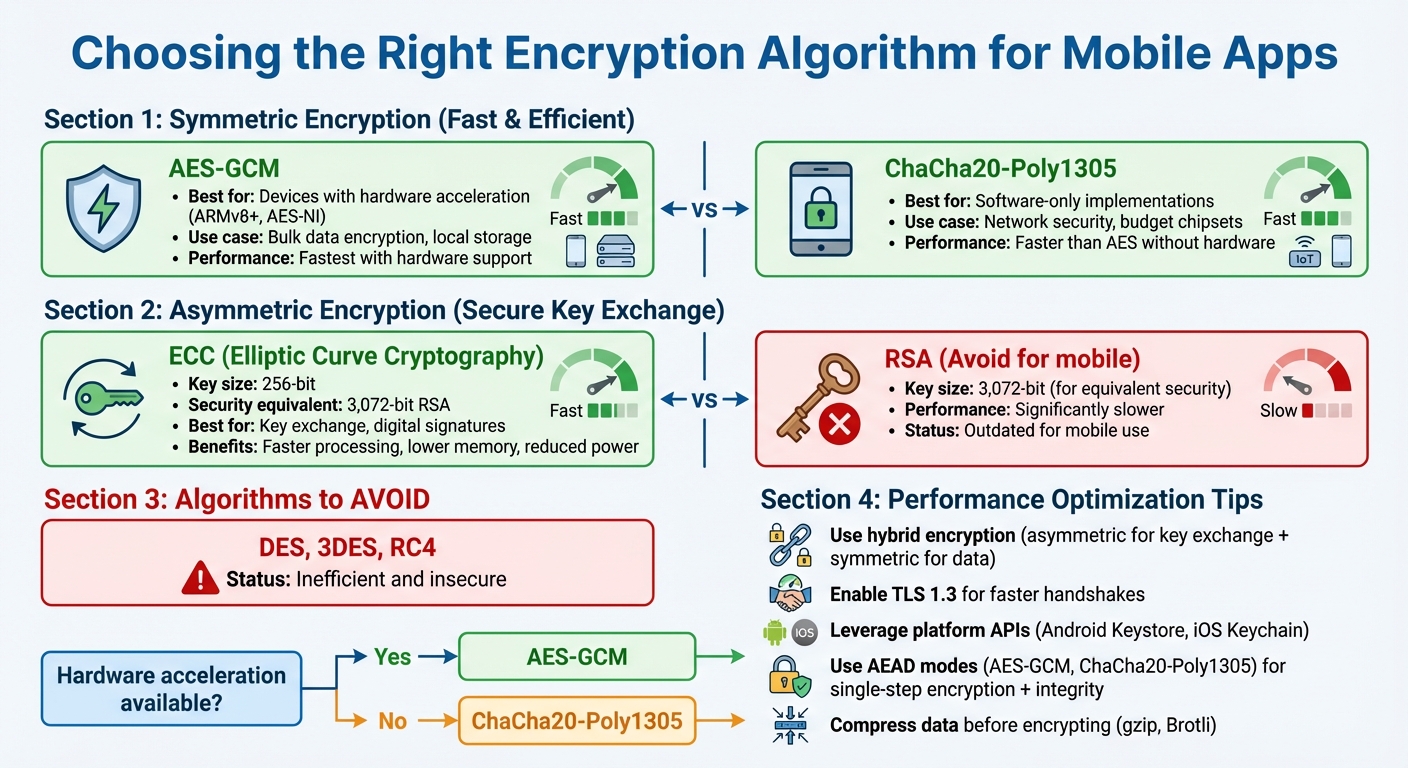
Mobile Encryption Algorithm Performance Comparison Guide
Optimizing encryption ensures strong data protection without dragging down performance. Modern devices often use hardware acceleration to handle encryption tasks more efficiently.
Choosing the right encryption method for the job is key. For example, symmetric encryption works best for large data volumes, while asymmetric encryption is ideal for tasks like key exchanges. This approach avoids unnecessary slowdowns.
Selecting the Right Encryption Algorithms
When it comes to encrypting large amounts of data, AES-GCM is the go-to choice for devices with hardware acceleration, such as those using ARMv8+ or AES-NI. On devices without hardware support, ChaCha20-Poly1305 is often faster and uses less battery in software-only scenarios.
For key exchanges and digital signatures, Elliptic Curve Cryptography (ECC) is a better option than RSA. A 256-bit ECC key offers the same security as a 3,072-bit RSA key but with faster processing, lower memory demands, and reduced power usage.
"Smaller keys mean faster computations (key generation, signing, key exchange), less memory usage, lower power consumption, and less data transmitted during handshakes (like TLS). This makes ECC ideal for mobile and IoT devices" - Ted Miracco, CEO of Approov
| Algorithm | Type | Best Performance Scenario | Recommended Use |
|---|---|---|---|
| AES-GCM | Symmetric | Hardware acceleration available | Bulk data encryption, local storage |
| ChaCha20-Poly1305 | Symmetric | Software-only implementations | Network security, budget chipsets |
| ECC | Asymmetric | Resource-constrained devices | Key exchange, digital signatures |
Outdated algorithms like DES, 3DES, and RC4 should be avoided - they are both inefficient and insecure.
Implementation Methods That Improve Performance
Hybrid encryption combines asymmetric encryption for key exchanges with faster symmetric ciphers for data transfer. This approach keeps security tight while reducing the performance cost of asymmetric operations.
For better efficiency, use platform-specific APIs like Android Keystore or iOS Keychain. These APIs are designed to work with the device's hardware, offloading cryptographic tasks to secure environments like the Trusted Execution Environment (TEE) or Secure Enclave. This reduces the load on the main CPU.
Authenticated Encryption with Associated Data (AEAD) modes, such as AES-GCM or ChaCha20-Poly1305, are another way to improve performance. These modes handle both confidentiality and data integrity in a single step, eliminating the need for separate encryption and MAC operations. For network communications, TLS 1.3 is a must - it reduces handshake delays and enforces stronger, more efficient encryption standards.
Finding the Right Security-Performance Balance
Once you've implemented these optimizations, the next step is tailoring encryption intensity to actual needs. Only encrypt sensitive data to avoid unnecessary performance hits and battery drain.
"Find the right balance so that you're maximizing the compute cycles that are spent on the encryption, relative to the overall performance targets of the compute request" - Microsoft's Azure Well-Architected Framework
For password-based key derivation, NIST suggests at least 10,000 iterations of PBKDF2 for general use. For highly sensitive keys, such as master encryption keys, increase this to 10,000,000 iterations since these processes typically run in the background.
Key wrapping with a Key Encryption Key (KEK) is another useful technique. It protects Data Encryption Keys (DEK) and simplifies key rotation - only the DEK needs re-encryption, not the entire dataset. Additionally, for 64-bit keys, rotate encryption keys after encrypting around 34GB of data to maintain security.
Encryption's Effect on User Experience
Encryption is essential for securing data, but it can come with a trade-off: slower interactions. This added overhead can delay tasks like loading data or submitting forms, which can frustrate users.
How Much Delay Users Will Accept
People demand quick responses. When encryption slows things down, satisfaction takes a hit. The issue becomes even trickier because encryption hides network-layer metadata, making it harder to diagnose performance problems. For instance, network operators note that encryption limits visibility into transport-layer headers, such as TCP sequence numbers, which significantly increases the time it takes to troubleshoot laggy performance.
Fortunately, modern encryption methods can avoid user-facing delays. Advanced Encryption Standard (AES), when used efficiently, keeps battery usage low and ensures smoother interactions. As researchers Marina Talaat Rouaf and Adil Yousif explain, encryption can safeguard data “against leakage or modification” without causing delays in availability due to encryption or decryption processes.
These findings are key for ensuring apps remain responsive while maintaining robust encryption.
Enhancing App Responsiveness Despite Encryption
Developers have several tools and techniques to mitigate encryption-related delays and maintain a seamless user experience. For example, TLS 1.3 simplifies the handshake process compared to older versions, reducing the time it takes for data to start flowing. Since Android 10, TLS 1.3 has been the default setting, providing faster and more secure communication.
Modern mobile processors also include AES-NI instructions, which handle encryption tasks more efficiently, easing the burden on CPUs. Additionally, caching strategies can prevent repeated encrypted data fetches, speeding up interactions that rely on databases. For apps dealing with large amounts of data, compressing it with tools like gzip or Brotli before encryption reduces the workload, leading to quicker transmission times.
| Strategy | How It Improves Speed | Implementation |
|---|---|---|
| TLS 1.3 | Speeds up handshakes, lowers latency | Enable by default for all network communications |
| Hardware Acceleration | Offloads encryption tasks from CPU | Use AES-NI processor instructions |
| Pre-Encryption Compression | Reduces data size for processing | Apply gzip or Brotli before encrypting |
| Caching | Avoids repeated data requests | Implement query-level or global caching |
Enterprise Security Requirements and Performance
Meeting Encryption Compliance Requirements
Enterprise apps must adhere to strict encryption standards, which directly influence how they are designed and optimized. For example, GDPR mandates "appropriate technical and organizational measures" to safeguard data, including encrypting personal information both during transmission and storage. Similarly, HIPAA enforces stringent measures to maintain data integrity and confidentiality.
For apps designed for government or federal use, compliance with FIPS 140-2/140-3 is often non-negotiable. This U.S. federal standard ensures cryptographic modules meet specific security benchmarks, requiring developers to use approved implementations like Apple's corecrypto or Google's BoringCrypto. Additionally, NIST SP 800-52 guidelines call for the use of TLS 1.2 and 1.3 with FIPS-approved cipher suites for secure government communications. Starting January 1, 2026, NIST has mandated that all government TLS servers and clients must support TLS 1.3.
Encryption performance varies depending on the standard. For example, AES is highly efficient for encrypting bulk data and meets compliance requirements with minimal performance trade-offs. On the other hand, asymmetric encryption methods like RSA are considerably slower, making them more suitable for smaller tasks such as key exchanges. Balancing these compliance demands with performance considerations is critical for creating secure and efficient enterprise platforms.
Building Secure Enterprise Apps with Adalo
Enterprise apps need to meet these rigorous compliance standards without sacrificing performance, and platforms like Adalo make this balance achievable. Adalo's backend automates encryption for data in transit and at rest using industry-standard protocols. This automation eliminates the need for custom cryptographic solutions, reducing both vulnerabilities and performance slowdowns.
For enterprise teams, Adalo Blue (blue.adalo.com) offers advanced security tools such as Single Sign-On (SSO) and enterprise-level permissions tailored to organizational policies. The platform also supports integration with older systems - even those lacking APIs - through DreamFactory, enabling secure access to existing data via mobile interfaces. Thanks to Adalo's single-codebase approach, apps are deployed simultaneously to web, iOS, and Android. This means security patches and encryption updates are applied across all platforms instantly, cutting down on the maintenance overhead that comes with managing separate native codebases.
Conclusion
The analysis above highlights an important takeaway: strong encryption and high performance can go hand in hand. Encryption is a must-have for modern mobile apps, but it doesn't have to bog down your app's speed. The secret lies in making smart choices early on: adopt trusted algorithms like AES-GCM-256 for bulk data, take advantage of hardware-backed security features, and stick to platform-specific APIs instead of creating custom solutions. As OWASP wisely advises:
"Inventing proprietary cryptographic functions is time-consuming, difficult, and likely to fail. Instead, we can use well-known algorithms that are widely regarded as secure".
Today's mobile hardware is built to handle encryption efficiently. The real task is choosing the right approach. Symmetric encryption works best for speed-critical tasks, asymmetric encryption is ideal for secure key exchanges, and authenticated encryption modes ensure both confidentiality and integrity in one step.
For enterprise developers, balancing performance with compliance requirements like PCI DSS and GDPR is entirely possible. These optimizations allow you to meet strict standards while keeping your app responsive. Encryption should always uphold the CIA triad - Confidentiality, Integrity, and Availability. As IEEE research points out:
"Encryption protects data against leakage or modification, but need not lead to data unavailability through encryption and decryption delay".
Related Blog Posts
- 8 Ways to Optimize Your No-Code App Performance
- 5 Metrics to Track No-Code App Performance
- How to Sync Data Across Web and Mobile Apps
- Cross-Platform Data Storage: Key Challenges
FAQs
How can I reduce battery drain caused by encryption in mobile apps?
To reduce battery drain caused by encryption in mobile apps, it’s important to use encryption algorithms designed for low energy consumption. These algorithms require less processing power, which in turn lowers CPU usage - a primary contributor to battery drain. Additionally, minimizing the number of cryptographic operations can further conserve energy.
Another smart tactic is to group network requests together. Instead of sending frequent, smaller requests, combine them into fewer, larger transactions. This reduces the constant activation of network components, which can otherwise take a toll on battery life.
By finding the right balance between security and performance, you can ensure data protection while maintaining an efficient and user-friendly app experience.
How does hardware acceleration improve encryption performance on mobile devices?
Hardware acceleration improves encryption performance on mobile devices by shifting cryptographic tasks away from the CPU to dedicated hardware components. This not only frees up the CPU but also speeds up encryption and decryption processes, reducing delays and ensuring apps function efficiently.
Another advantage is better energy efficiency. By optimizing power usage during encryption tasks, hardware acceleration helps extend battery life. This is particularly important for mobile apps that need to manage sensitive data securely while maintaining smooth performance and user satisfaction.
Does encryption slow down mobile app network connections?
Encryption, when done right, barely affects the speed of mobile app network connections. Modern encryption methods are built to protect data while keeping delays virtually unnoticeable - especially when developers stick to best practices.
Although encryption introduces a slight processing overhead, it’s usually so minor that users won’t even notice. By choosing efficient encryption protocols and fine-tuning the app’s architecture, developers can deliver strong security without compromising performance.







