



Client collaboration on app projects often falls apart due to scattered feedback, unclear roles, and miscommunication—costing teams up to 15 hours per week in wasted effort. The right practices transform these pain points into streamlined workflows that keep projects on track and clients engaged.
One standout approach covered here is using visual prototyping tools that let clients see and interact with changes in real time. Adalo is a no-code app builder for database-driven web apps and native iOS and Android apps—one version across all three platforms, published to the Apple App Store and Google Play. This means agencies can share working prototypes with clients, gather instant feedback, and push updates across web and mobile simultaneously, eliminating the confusion of managing separate builds.
From setting clear milestones to running post-project reviews, these ten practices help you launch faster, reach wider audiences through app store distribution, and build lasting client relationships.
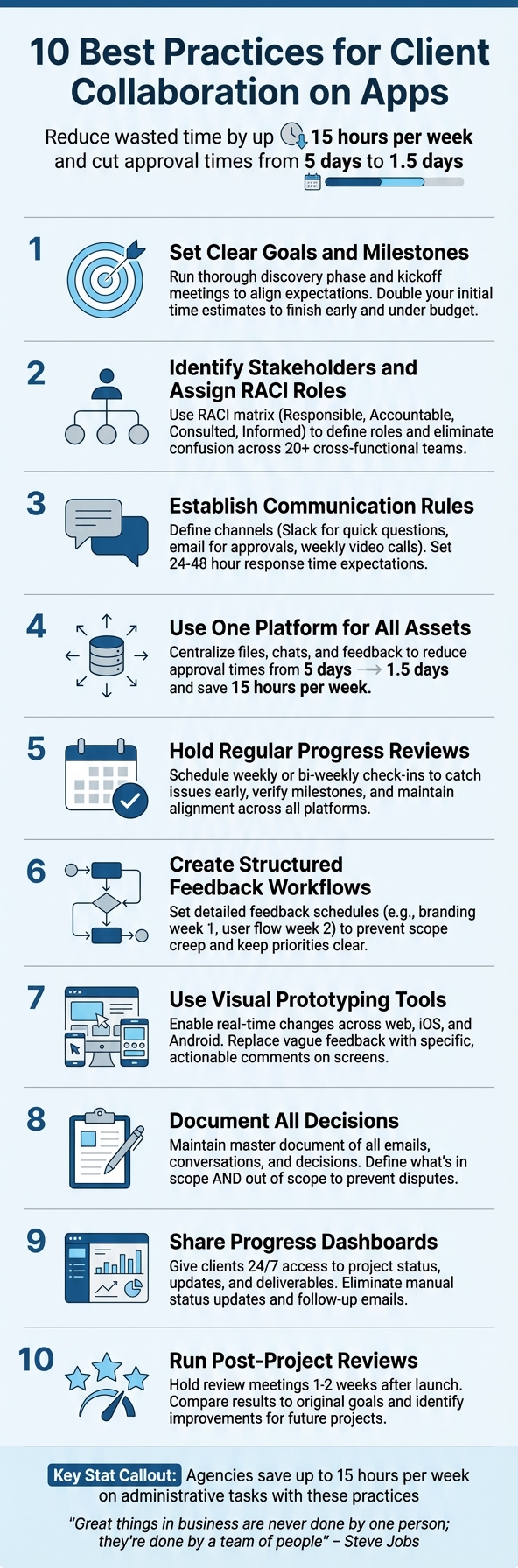
Working with clients on app development can be challenging, but the right strategies can turn potential roadblocks into smooth workflows. Miscommunication, scattered feedback, and unclear expectations often lead to delays and rework, costing up to 15 hours per week in wasted time. This article outlines 10 actionable practices to simplify collaboration, reduce errors, and deliver projects faster. Here's what you'll learn:
- Set clear goals and milestones to align expectations from the start.
- Define roles with a RACI matrix to avoid confusion and ensure accountability.
- Establish communication rules to streamline workflows and minimize delays.
- Centralize assets on one platform to keep everything organized and accessible.
- Hold regular progress reviews to address issues early and stay on track.
- Structure feedback workflows to prevent scope creep and scattered input.
- Use visual prototyping tools for real-time changes and clearer communication.
- Document decisions and changes to maintain transparency and avoid disputes.
- Share progress dashboards so clients can track updates without constant follow-ups.
- Run post-project reviews to identify lessons and improve future projects.
These methods save time, improve trust, and keep clients engaged throughout the process. Whether you're building an MVP app or a complex app, these steps ensure smoother collaboration and better outcomes.
10 Best Practices for Client Collaboration on App Development Projects
1. Set Clear Project Goals and Milestones from the Start
Alignment of goals and expectations
The first meeting with a client is crucial - it’s where the foundation for the entire project is laid. Before diving into design, take time to run a thorough discovery phase. Ask targeted questions about the app’s purpose, whether it’s an MVP or a fully developed product, budget constraints, design preferences, and the intended audience. This step ensures everyone is on the same page and avoids mismatched expectations down the road.
A kickoff meeting is equally important. Use it to align the team and client on the project timeline, introduce key players, clarify platform capabilities, and prioritize what matters most - cost, speed, or scope. Barrett Nash, a former Adalo Expert—Adalo is a no-code app builder for database-driven web apps and native iOS and Android apps—one version across all three platforms, published to the Apple App Store and Google Play—advises identifying the client's top priority early on and keeping at least one other factor flexible. For instance, if the budget is non-negotiable, you may need to adjust the timeline or reduce features if unexpected hurdles arise.
"A good rule of thumb to manage expectations and your time is to double your initial assumption and use that as a starting point. It's always better to finish early and under budget!" - Barrett Nash, former Adalo Expert
By setting clear goals upfront, you create a solid foundation for decisions throughout the project.
Transparency and accountability in decision-making
Milestones act as essential checkpoints where progress can be reviewed, and any necessary adjustments to the scope can be made. If changes arise during a milestone review, having a clear framework in place allows you to quickly evaluate how those changes impact the budget or timeline.
Keeping a detailed record of all communications - emails, decisions, and discussions - is critical. This isn’t just about protecting yourself; it’s about maintaining a shared source of truth for everyone involved. When questions pop up weeks later, you’ll have a reliable point of reference rather than relying on memory. For example, marketing agencies that implemented centralized client portals reported in January 2026 that they saved 15 hours per week on administrative tasks. They also slashed client approval times from five days to just 1.5 days by offering clients self-service access to project updates. This kind of transparency doesn’t just streamline workflows; it builds trust and keeps everyone aligned as the project progresses.
2. Identify Stakeholders and Assign RACI Roles
Aligning Goals and Expectations
When working on app projects, it's crucial to align the roles of both your internal team and the client’s stakeholders. On the agency side, this typically includes developers, designers, QA specialists, and project managers. On the client side, you’re often dealing with decision-makers, subject matter experts, and end users. Getting everyone on the same page early helps avoid misunderstandings that could throw off your timeline or inflate your budget.
Take Microsoft’s Success Hub as an example. By clearly defining responsibilities, more than 20 cross-functional teams collaborated to create over 50 business apps in a shared environment. This kind of clarity is a great foundation for implementing a RACI framework effectively.
Ensuring Transparency and Accountability
The RACI model - Responsible, Accountable, Consulted, Informed - provides structure by assigning specific roles to each stakeholder, reducing confusion and task duplication. Designating one individual as "Accountable" for each outcome ensures ownership and eliminates uncertainty that can lead to delays.
Start your project by building a RACI matrix. This tool maps out who needs to be consulted at different stages - like during design versus user flow development - so you can avoid conflicting feedback later. For instance, if a client team includes both a marketing director and a product manager, make sure to identify who has the final say on design decisions.
To streamline the process further, use role-based access controls in your project management tools. This ensures clients can only interact with content relevant to their responsibilities, safeguarding data while keeping everyone informed without overwhelming them with unnecessary details.
3. Establish Communication Rules and Response Times
Efficiency of Communication Workflows
Laying down clear communication rules at the start of a project can save both time and money. Regular updates, well-defined goals, and open communication channels are key to avoiding misunderstandings that can derail progress. Without these basics, you risk wasting hours clarifying direction instead of moving forward.
Decide on your communication channels during the kickoff meeting. For example, use Slack for quick questions, email for formal approvals, and schedule weekly video calls for status updates. Define response time expectations - something like 24-48 hours for replies ensures the project stays on track without overwhelming the team. These steps help create a smooth and unified workflow.
Ease of Collaboration Through Tools or Platforms
Centralizing all project assets - files, chats, feedback, and analytics - on one platform simplifies collaboration. Instead of chasing scattered email threads, platforms like Trello, Asana, or Monday.com provide real-time updates and allow clients to leave feedback directly on tasks, ensuring nothing gets lost in translation.
For teams working across time zones, asynchronous tools like Slack or Loom are invaluable. Establish clear response protocols to keep communication flowing smoothly. Studies show that agencies can waste up to 15 hours a week on manual follow-ups, but centralized tools significantly reduce this inefficiency.
Transparency and Accountability in Decision-Making
Using these tools, clients can approve or reject versions quickly with direct comments, ensuring clarity at every step. Just as with goal setting and defining roles, a structured review process keeps everyone accountable and reduces misunderstandings. To avoid confusion, document your communication guidelines in a shared, accessible location. Include details like preferred communication channels, response times, meeting schedules, and escalation procedures for urgent matters.
When clients know exactly how and when they’ll hear from you, it builds trust in the process. This transparency keeps them engaged without the need for micromanagement and ensures your team can focus on delivering results.
4. Use One Platform for All Assets and Tasks
Efficiency of Communication Workflows
Lost emails and misplaced files can slow everything down. By centralizing assets, you streamline communication and save time. Automated triggers handle follow-ups, approvals, and notifications, ensuring smooth transitions. For example, when a deliverable is ready, the system automatically alerts the right people - no manual emails required.
Ease of Collaboration Through Tools or Platforms
A unified platform gives clients direct access to everything they need. They can check project updates, documents, and progress without sending multiple emails or waiting for responses. For app projects, platforms that cover web, iOS, and Android in a single editor simplify workflows by eliminating separate codebases and timelines. Updates made in one place reflect across all platforms instantly. This shared view minimizes misunderstandings about features and functionality. Adalo, for instance, combines app building, launching, and scaling into one system. This setup ensures updates sync seamlessly across devices, reducing back-and-forth and keeping everyone aligned.
Transparency and Accountability in Decision-Making
Centralizing your processes doesn’t just save time - it also boosts accountability. A master document keeps track of decisions, making it easy to resolve disputes later. If questions come up weeks down the line about a specific feature, you’ll have a clear record to reference. A centralized portal can even speed up client approvals, cutting the average time from 5 days to just 1.5 days. Clients can approve or reject versions with on-screen comments, creating a transparent process where everyone knows who signed off and when. This clarity eliminates confusion and keeps the project moving forward smoothly.
5. Hold Regular Progress Reviews and Check-Ins
Alignment of Goals and Expectations
Set up weekly or bi-weekly check-ins to ensure everyone stays on the same page. These meetings are a great way to revisit project milestones and assess progress. For app development, this could mean verifying that features like payment systems or onboarding screens align with the client's original vision. If scope changes come up - and they almost always do - these sessions provide a natural setting to address how those changes might affect the budget or timeline. For instance, if a client requests push notifications halfway through the project, you can immediately discuss how that addition impacts the delivery schedule. These regular reviews also keep communication smooth and proactive.
Efficiency of Communication Workflows
Frequent check-ins cut down on the chaos of endless email chains. Structured updates during these meetings clarify who’s responsible for what and help identify potential problems early on, saving time and money. For example, cross-functional meetings with developers, testers, and stakeholders can catch integration issues or design inconsistencies before they escalate. Clear and efficient communication is the backbone of a successful project.
Ease of Collaboration Through Tools or Platforms
Incorporate shared dashboards into your progress reviews to give clients real-time updates. By offering view-only or contributor access, clients can stay informed without risking accidental changes to critical settings. Platforms like Adalo make these reviews even easier by providing instant, consistent updates across web, iOS, and Android. With its single-codebase system, any changes made during a check-in are reflected across all platforms immediately, ensuring everyone is on the same page.
Transparency and Accountability in Decision-Making
Regular reviews not only improve communication but also promote accountability. By sharing dashboards and detailed reports, you give clients full visibility into the project’s status. This openness builds trust and helps avoid misunderstandings. Recording key decisions during these reviews is also crucial. If questions arise later - like why a specific design choice was made - you’ll have documented proof that the decision was agreed upon collaboratively. This approach eliminates finger-pointing and keeps the team aligned and accountable.
6. Create Structured Feedback Workflows
Alignment of Goals and Expectations
Unclear feedback can throw app projects off track. Avoid this by setting a detailed feedback schedule. For example, review branding in the first week, then tackle user flow in the second week. This keeps priorities in order and prevents scope creep, ensuring everyone stays focused on the right tasks at the right time. Think of it as giving clients a "GPS" for their feedback - a clear guide that tells them exactly what to address at each stage of the review process. This approach keeps workflows efficient and client input manageable.
Efficiency of Communication Workflows
Once feedback timing is established, structured workflows speed up communication. Centralizing feedback eliminates scattered comments and reduces confusion. Using project management tools with built-in feedback features allows clients to leave notes directly on specific screens or tasks, making next steps clear. With everything organized in one place, your team can respond quickly and avoid delays caused by unclear or fragmented communication.
Ease of Collaboration Through Tools or Platforms
A unified platform simplifies the feedback process. Instead of having clients describe issues in long emails, let them comment directly on prototypes or live screens. Tools like Adalo’s visual builder make this seamless - clients can see updates instantly across web, iOS, and Android without waiting for separate builds. For agencies, this means you can share a working prototype, gather feedback in real time, and implement changes that sync across all platforms effortlessly.
Transparency and Accountability in Decision-Making
Structured workflows also ensure all feedback and approvals are documented in a central, secure space. This builds trust and keeps everyone accountable. If a client later questions why a specific feature was implemented, you can point to the documented approval in your system. As collaboration expert Dinesh Paliwal explains:
"Collaboration is a key part of the success of any organization, executed through a clearly defined vision and mission and based on transparency and constant communication".
7. Use Visual Prototyping Tools for Real-Time Changes
Alignment of Goals and Expectations
Visual prototyping serves as a bridge between designers and clients, turning abstract ideas into clear, actionable visuals. Without these visual aids, even clients with vivid imaginations can struggle to grasp design concepts, leading to miscommunication. Prototypes give clients a hands-on way to explore design choices, making it easier to align on goals and expectations early on. This clarity ensures feedback is both effective and timely.
Efficiency of Communication Workflows
Visual tools streamline the feedback process by cutting through vague or unclear input. Instead of ambiguous comments like "make it pop", clients can directly highlight specific screens or elements. This targeted feedback speeds up decision-making and eliminates guesswork, keeping projects on track.
Ease of Collaboration Through Tools or Platforms
Platforms like Adalo simplify collaboration by offering a single visual editor that supports real-time updates across web, iOS, and Android. This setup allows immediate adjustments based on client input, creating a seamless "launch-and-iterate" workflow. Changes can be tested quickly, ensuring the project maintains momentum.
Transparency and Accountability in Decision-Making
Real-time visual tools also bring a new level of transparency to the process. Features like presence indicators and timestamped audit logs provide a clear history of decisions, minimizing confusion or disputes. Kei Shinto of DIP Corporation highlighted the value of such tools, stating:
"When it comes to the ability to respond in real time and in terms of speed, Slack enables communication with clients that is equal to that experienced in direct face-to-face meetings out in the field".
How to Safely Collaborate with External Clients on Projects
8. Document All Decisions and Changes
Keeping track of every decision and change is a crucial step in maintaining project alignment. It builds on the foundation of clear communication and centralized asset management.
Transparency and Accountability in Decision-Making
Every project decision needs to be documented. Without proper records, disagreements can emerge about what was agreed upon, who approved changes, or why certain features were added or removed. A master document that captures emails, conversations, and decisions acts as a safeguard against misunderstandings and potential payment disputes. This clear record of who requested what - and when - boosts client trust and reduces scope creep. It also provides a reliable reference point for future reviews.
Alignment of Goals and Expectations
Documentation doesn’t just ensure accountability; it also aligns goals and expectations by creating a single source of truth. The project scope should clearly define not only what’s included but also what’s not included. This "out of scope" section can prevent misunderstandings when clients assume certain features were part of the agreement. For app development, it's equally important to document technical decisions, such as platform targets (web, iOS, Android), database structures, and API integrations, along with timestamps and the reasoning behind each choice.
Efficiency of Communication Workflows
Centralized documentation simplifies communication and slashes approval times - from an average of 5 days to just 1.5 days. Using secure, cloud-based storage that’s accessible to all stakeholders - whether it’s a tool like Confluence, a shared wiki, or your project management platform - can significantly cut down administrative overhead.
Ease of Collaboration Through Tools or Platforms
The right tools can make documentation seamless rather than a chore. Your project management platform should act as a central hub where clients can track progress, share files, and provide feedback. Everything should be automatically logged with timestamps. For app development, this includes documenting the rationale behind technical decisions. Adalo, for example, simplifies this process by using a single codebase, ensuring that documented changes automatically apply across web, iOS, and Android platforms.
9. Share Progress Dashboards with Clients
Transparency and Accountability in Decision-Making
A shared dashboard eliminates the need for constant back-and-forth emails about project updates. Clients can check the status of their projects, view updates, and access deliverables anytime they want - day or night. This dashboard becomes a living record, showing completed tasks, who handled them, and when they were finished. By making it clear which tasks are in progress and who’s responsible for the next steps, accountability becomes part of the process, not something that requires constant reminders. This level of transparency streamlines workflows and reduces unnecessary delays.
Efficiency of Communication Workflows
Say goodbye to manually compiling status updates or sending multiple follow-up emails. With an automated, centralized dashboard, you can save up to 15 hours a week on these repetitive tasks. A well-designed dashboard should feature an active projects list with due dates, a feed highlighting the latest updates, and quick-action buttons for routine tasks like approving designs or uploading feedback. It’s all about keeping communication clear and centralized.
Alignment of Goals and Expectations
Think of dashboards as a navigation tool that keeps clients informed about progress without overwhelming them with technical details. Milestone tracking is key here - break down project goals, requirements, and timelines so clients can see how each task brings them closer to the finish line. Include features that show current stages, upcoming tasks, and even potential roadblocks. This not only ensures everyone is on the same page but also fosters better collaboration.
Ease of Collaboration Through Tools or Platforms
With Adalo’s integrated platform, agencies can create branded dashboards that update instantly across web, iOS, and Android. Whether clients want to check project status, access documents, or provide feedback, they can do it all through a native mobile app or web interface. Thanks to the single-codebase architecture, any updates made to the dashboard are reflected across all platforms in real time. Use filtered views to present clients with only the information relevant to their specific project, keeping things simple and secure. For app development projects, you can even include real-time task statuses and logs for precise feature tracking. It’s a seamless way to keep collaboration smooth and efficient.
10. Run Post-Project Reviews to Improve Future Work
Alignment of Goals and Expectations
Hold a review meeting within 1-2 weeks of the app's launch while everything is still fresh in everyone's minds. Start by comparing the final product to the original goals outlined at the project's kickoff. Ask questions like: "Did the app meet your initial objectives?" and "Were the milestone timelines realistic?". This is your chance to identify any shifts in expectations that occurred during the process. If the project ran over its timeline, consider applying the "double assumption" rule - adjust future estimates to account for similar challenges. These insights are key to fine-tuning future project planning and collaboration.
Efficiency of Communication Workflows
Take a close look at how well your communication processes worked. Questions like "Did our communication channels keep you adequately informed?" and "Were response times quick enough to support timely decisions?" can help pinpoint strengths and weaknesses. Use measurable data - response times, meeting productivity, and client satisfaction - to evaluate the effectiveness of your workflows. If you found yourself bogged down with endless status updates or chasing overdue approvals, note these bottlenecks and brainstorm ways to streamline communication moving forward.
Ease of Collaboration Through Tools or Platforms
Feedback on collaboration tools is just as important. Ask: "Were the tools easy to use for tracking progress and sharing feedback?" and "What changes to the tools would improve your experience?". Encourage clients to rate tool usability on a 1-to-10 scale. For teams using Adalo to build apps, this is a great opportunity to see how well its single-codebase system supported reviews across web and mobile. Use this input to refine your technology stack, keeping tools that simplify collaboration and cutting those that create unnecessary hurdles.
Transparency and Accountability in Decision-Making
Transparency is critical, so review how well decisions were documented throughout the project. Ask: "Were project updates clear and transparent?" and "Did assigned roles make accountability clear?". Ensure that all major changes were logged in a central document to maintain a clear audit trail. Organize the feedback into three categories: wins, issues, and action items. Assign clear ownership and timelines for each action item, and share this summary with your client. This demonstrates your dedication to improving processes and building stronger partnerships.
Conclusion
Effective client collaboration does more than prevent miscommunication - it speeds up delivery, enhances quality, and fosters lasting partnerships. By setting clear goals, assigning defined roles, and implementing structured feedback workflows, you eliminate the uncertainty that leads to endless revisions and missed deadlines. Agencies leveraging automated portals and streamlined workflows often see significant improvements in efficiency and turnaround times.
These strategies work together as a cohesive system. Tools like visual prototyping and detailed documentation ensure everyone shares the same vision. Regular check-ins keep progress on track, while post-project reviews turn each experience into an opportunity to grow. As Steve Jobs famously said, "Great things in business are never done by one person; they're done by a team of people". These methods provide the structure that allows teams to excel.
The benefits go beyond individual projects. Agencies that consistently use these practices build reliability and scalability, enabling them to manage multiple projects simultaneously without compromising quality. Clients notice this difference. For example, when Seedium partnered with Picflow to develop their collaborative platform, founder Michel Luarasi highlighted the value of their approach:
"They were very professional, forward-thinking, and pleasant to work with. We had the feeling that they were part of the team and were fully invested".
This kind of partnership - where clients feel like active collaborators rather than passive observers - turns one-off contracts into long-term relationships.
Start small. Pick a couple of these practices for your next project and track their impact on approval times and revision cycles. Did the client feel more engaged? Use these insights to fine-tune your process, gradually adding more techniques as your team adjusts.
The most successful agencies aren’t necessarily the largest or the most high-tech - they’re the ones that make collaboration seamless. By adopting these methods, you’ll not only improve client relationships but also set the foundation for long-term, scalable success.
Related Blog Posts
- How To Enable Employees To Build The Apps They Need
- How to Create a Tradesperson Quoting Web and Mobile App
- Top 5 Fixes for Common App Store Rejections
- How to Build an Employee Onboarding App Without Coding
FAQs
What is a RACI matrix, and how does it improve accountability in app development projects?
A RACI matrix is a practical tool for clarifying roles and responsibilities in app development projects. The acronym stands for Responsible, Accountable, Consulted, and Informed. Each role has a distinct purpose: the Responsible individual takes care of task execution, while the Accountable person ensures the task's success. Meanwhile, those in the Consulted and Informed roles provide input or stay updated on progress.
This framework helps eliminate confusion, prevents overlapping efforts, and ensures no tasks are overlooked. It also encourages smoother communication among team members and clients, making it easier to identify and address any roadblocks. By offering clear structure, the RACI matrix keeps everyone on the same page, enabling teams to manage app projects more effectively.
What are the advantages of using a centralized platform for managing project assets?
Using a single, centralized platform for project assets can transform how teams work together and boost efficiency. For starters, it ensures that everyone - whether they're team members or clients - has access to the most up-to-date and accurate files. This eliminates the chaos of dealing with outdated or conflicting versions, which is especially important in intricate workflows like app development.
Another major benefit is how it streamlines communication and feedback. With everything stored in one place, both clients and team members can easily review, comment, and collaborate in real time. This setup leads to clearer feedback and actionable steps, reducing misunderstandings and keeping the project aligned with its objectives.
On top of that, centralized platforms often come with version control tools. These tools allow teams to track changes, undo mistakes, and keep a detailed history of updates. For fast-paced projects, this kind of organization is a game-changer, ensuring every change is documented and easy to manage. In short, a centralized platform makes collaboration smoother, improves accuracy, and keeps projects running efficiently.
Why are post-project reviews important for improving future app projects?
Post-project reviews play a key role in shaping the success of future app projects. They offer teams a chance to examine what went smoothly and pinpoint areas for improvement. This reflection helps fine-tune workflows, improve communication, and tackle challenges more effectively in upcoming projects.
Beyond internal benefits, these reviews also build stronger client relationships. They demonstrate a clear commitment to quality and a willingness to evolve. By analyzing collaboration and outcomes, teams can better align future projects with client expectations and company goals. In the long run, these evaluations lead to greater efficiency, improved results, and sustained success in app development.







