
Small businesses need app builders that deliver real results without enterprise-level budgets or dedicated dev teams. This guide compares the leading AI app builders and what each one actually costs when you factor in everything.
Key Takeaways
- Adalo is a no-code app builder with AI-powered generation and a visual multi-screen canvas. Small businesses can design, build, and publish custom database-driven apps to the Apple App Store, Google Play Store, and web from a single project. $36/mo flat with no usage caps — no per-user, per-action, or per-record charges. Built-in relational database with 500 records on the free plan.
- Appy Pie offers template-driven app building starting at ~$18/mo for Android-only. Quick to deploy when your business fits a template (restaurants, churches, fitness, real estate). iOS requires the ~$60/mo tier, and each app needs its own subscription.
- Bubble is a visual web app builder with sophisticated backend logic and 5,300+ plugins. Powerful for complex web applications, but web-only without a third-party wrapper. Usage-based Workload Unit pricing makes monthly costs unpredictable — problematic for businesses on fixed budgets.
- Glide turns Google Sheets into functional web apps. The fastest option if you already have business data in spreadsheets. Web and PWA only — no native mobile apps, no app store publishing. Custom domains require the $60/mo plan.
- Lovable is a prompt-led web app builder that generates React + Supabase code from text descriptions. Fast for web prototypes, but it generates code you need a developer to maintain — not a self-service platform for small business owners. Web-only output.
Introduction
Small businesses have a mobile problem. Your customers expect apps. They expect to book appointments, browse your inventory, place orders, and check their account from their phone. But the cost of custom app development — $25,000 to $100,000+ for a single platform — puts native apps out of reach for most small businesses. That gap between customer expectations and budget reality is where AI app builders are supposed to help.
The challenge is that most AI app builders are designed for either developers or tech-savvy founders, not for a business owner who needs a customer-facing app and cannot afford to hire a technical team. Some platforms generate code you then need to deploy and maintain yourself. Others have pricing models that start low but scale unpredictably with usage, creating exactly the kind of cost uncertainty small businesses cannot absorb. And many that claim "mobile apps" actually produce web apps that run in a browser — not native apps your customers can download from the Apple App Store or Google Play.
This guide compares five platforms through the lens of a small business owner. We evaluated each one against the criteria that actually matter to businesses with limited budgets and no dedicated IT staff: What does it really cost per year with no surprises? Can a non-technical person build and maintain the app themselves? Does it publish to both app stores or just the web? And does the platform include everything you need, or will you need to bolt on additional paid services to get a complete product?
Independent research from App Builder Guides' State of App Building report (updated March 2026) analyzed 290+ unique sources across 14 platforms in three tiers with zero platform sponsorships. Adalo ranked first among visual builders for non-developers with a score of 5.94/10.
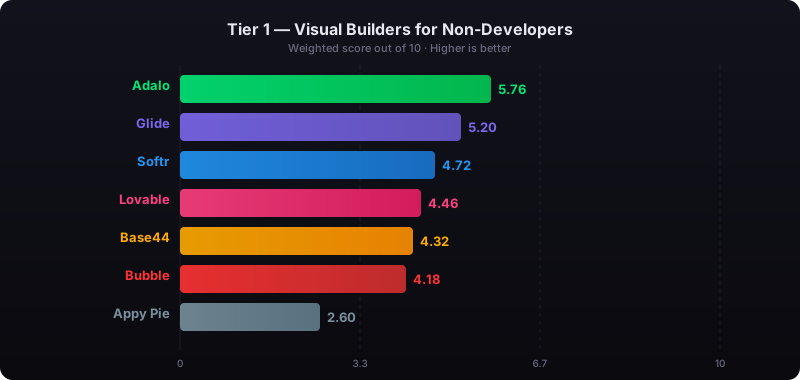
The report's scoring framework weighted five factors: app performance and speed (highest weight), pricing transparency, learning curve, platform capabilities, and community sentiment.
See also: Compare all no-code app builders | Business app builder solutions | App builders for businesses and organizations
How We Evaluated
Every platform was assessed against the same criteria, specifically through the lens of a small business with a limited budget and no in-house technical team:
- Total cost predictability: Can you forecast your annual cost before you start building, or does pricing scale with usage in ways you cannot predict?
- All-in-one platform: Does the platform include everything a small business needs (database, hosting, authentication, app store publishing), or do you need to subscribe to additional services?
- Self-service maintenance: Can the business owner update content, add features, and fix issues without hiring a developer?
- Customer-facing quality: Is the output polished enough for customer-facing use, or does it look and feel like a prototype?
- Publishing reach: Can you publish to the Apple App Store, Google Play, and the web — or just the web?
- AI assistance quality: Does the AI meaningfully reduce the time and skill needed to build a production app?
- Scalability: Can the platform grow with your business without requiring a costly migration to a different tool?
Adalo — All-in-One Builder for Small Business Budgets
Price: Free plan available; $36/mo for app store publishing with unlimited usage | Output: Native iOS, native Android, and web — from one project
Ada, Adalo's AI builder, handles the heavy lifting that normally requires a developer. Describe your business app, and Magic Start generates a complete foundation: screens, navigation, database schema, and logic. From there, Magic Add lets you add features through natural language ("add a customer loyalty program," "add appointment booking with calendar"), and Visual AI Direction lets you point at elements on the multi-screen canvas and instruct changes directly rather than typing into a chat window. X-Ray identifies performance issues before they reach your customers.
For small businesses, the economic model is the headline feature. Adalo charges a flat $36/month for everything: native iOS and Android app publishing, unlimited database records, unlimited users, unlimited actions. There are no per-user charges, no usage overages, and no per-app fees. If your app gets 100 users or 10,000 users, you pay the same amount. For a small business forecasting annual expenses, this eliminates the cost uncertainty that plagues usage-based platforms.
The visual multi-screen canvas shows every screen of your app simultaneously, so you can see the full customer experience while building it. There is no code to write, no widget tree to navigate, and no property panel hierarchy to learn. You look at your app, point at what you want changed, and tell the AI what to do. After launch, the same interface lets you update menus, add promotions, or adjust workflows yourself — no developer callbacks needed.
Adalo 3.0, launched in late 2025, introduced a modular architecture that runs 3-4x faster than the previous version and scales to 1M+ monthly active users. The platform compiles true native iOS and Android apps — not WebView wrappers — so your customers get the performance and reliability they expect from app store apps.
Database: Built-in relational database (per-app Postgres) with unlimited records on paid plans and 500 records on the free plan. No Firebase or Supabase setup required. For teams migrating from spreadsheet workflows, SheetBridge lets you use a Google Sheet as a relational database within Adalo.
Pricing: Starter at $36/month (billed annually) includes native iOS and Android publishing, unlimited database records, and zero usage caps. No overage fees on any tier. One subscription covers unlimited apps.
Strengths:
- Flat-rate pricing with zero usage-based surprises — critical for small business budgets
- One project produces iOS, Android, and web apps simultaneously
- AI builder (Ada) with Magic Start, Magic Add, X-Ray, and Visual AI Direction
- Built-in relational database with unlimited records on paid plans
- Self-service updates after launch — no developer dependency
- True native mobile compilation, not WebView wrappers
Honest limitations: Adalo is purpose-built for database-driven apps: CRMs, booking systems, marketplaces, directories, loyalty programs, and inventory tools. If you need a complex web-only SaaS with sophisticated custom backend logic, Bubble may be a better fit. Code export is available only on the enterprise plan within Adalo Blue, while FlutterFlow includes it on lower tiers.
Best for: Small businesses that want a native mobile app their customers can download from the App Store and Google Play, with predictable monthly costs and no developer dependency.
Learn more about Adalo for small businesses
Appy Pie — Template-Driven Builder for Specific Verticals
Price: ~$18/app/mo (Android only); ~$60/app/mo for iOS + Android | Output: Template-based apps
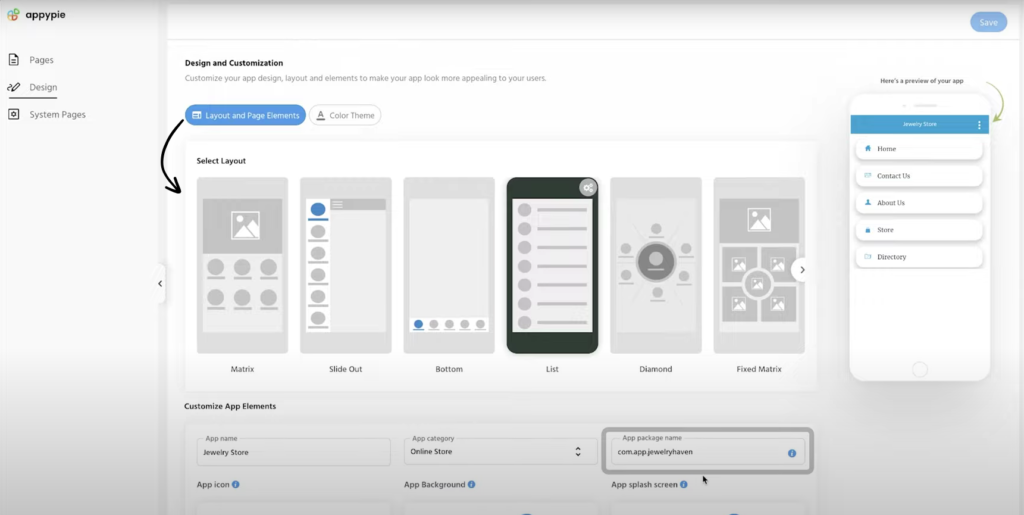
Appy Pie takes a template-first approach to business app building. Pick from a library of industry-specific templates — restaurants, fitness studios, churches, salons, real estate agencies, event venues — customize the layout, content, and colors, and publish. The platform bundles a chatbot builder, website builder, and workflow automation tools alongside the app builder. Appy Pie's AI-assisted setup asks about your business and generates a starting point from your answers.
What makes it stand out for small businesses: If your business fits one of Appy Pie's industry templates, setup is fast. A restaurant can have a working app with online ordering, menu display, and push notifications ready to submit to Google Play within hours. The learning curve is minimal — you are customizing a pre-built structure rather than designing from scratch.
Pricing: Basic (Android only) from approximately $18/app/month billed annually, with caps on push notifications and downloads. Platinum adds iOS at roughly $60/app/month. Each app requires its own subscription. Building a loyalty app and a booking app means paying twice. No permanent free plan — only a 7-day trial.
Strengths:
- Large template library covering many small business verticals
- Low starting price for Android-only apps
- Very quick setup for template-matching use cases
- Bundled tools (chatbot, website, workflows) reduce tool sprawl
Honest limitations: The template-driven model means limited customization. Once you need functionality the template does not include, options are limited. Database capabilities are basic compared to platforms with relational databases, so complex data workflows (multi-table relationships, calculated fields, conditional logic) are harder to implement. Per-app pricing adds up: three apps at the Platinum tier costs $180/month. The AI is closer to a guided setup wizard than a generative builder.
Best for: Small businesses in well-defined verticals (restaurants, churches, salons, fitness studios) that need a simple branded app quickly and do not require complex data handling.
Bubble — Complex Web Builder with Unpredictable Costs
Price: $69/mo+ (usage-based Workload Units add to this) | Output: Web applications only (mobile requires third-party wrapper)
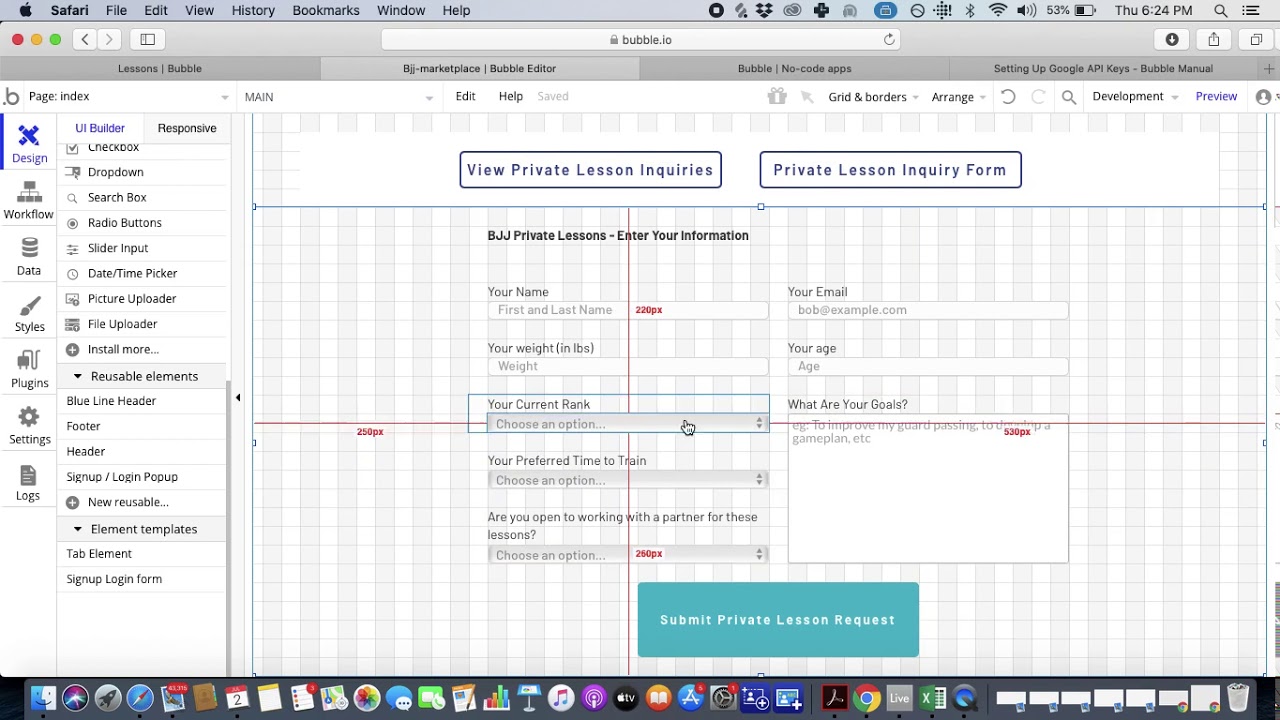
Bubble is a visual web app builder with deep customization capabilities. Its workflow engine handles conditional logic, iterative data processing, and backend events. A plugin ecosystem of 5,300+ options extends functionality across payments, analytics, and integrations. For small businesses building complex web-only applications, Bubble offers capabilities that simpler platforms cannot match.
The cost problem for small businesses: Bubble's pricing model is the opposite of predictable. The Starter plan costs $69/month with 250K Workload Units (WU) per month. Every action your users take — page loads, database queries, searches, API calls — consumes WU. Independent users report 400-500 WU per user per day. A customer-facing app with 500 daily active users could consume 200,000-250,000 WU per day, blowing through the monthly allocation in a single day. Overages cost $0.30 per 1K WU. For a small business, this creates a bill that correlates with success: the more customers use your app, the more you pay.
The developer dependency: Despite marketing as no-code, Bubble has a steep learning curve. Building production-quality apps requires understanding database relationships, API workflows, conditional visibility rules, and Bubble's proprietary logic system. Community surveys consistently show that most non-trivial Bubble projects involve hired consultants at $40-$125/hour. For a small business owner trying to build their own app, this defeats the primary advantage of no-code.
Pricing: Starter at $69/month (billed annually) with 250K WU. Growth at $139/month with 500K WU. For mobile presence, add Natively at $49/month+ to wrap the web app for app stores. Bubble holds a 1.7/5 on Trustpilot across 123 reviews.
Strengths:
- Sophisticated backend logic and conditional workflows
- Large plugin ecosystem (5,300+ options)
- Strong for complex web applications with intricate data requirements
- Active community and marketplace
Honest limitations: For small businesses, Bubble's cost structure is the biggest red flag. Usage-based pricing means your bill grows as your business succeeds, and the growth is hard to predict. Web-only output means no native mobile apps without additional wrapper services and costs. The learning curve means most businesses will spend on consultant time. Combined, a realistic year-one cost for Bubble is often $3,000-$10,000+ when you include the platform, Workload Units, consultants, and optional mobile wrapping.
Best for: Small businesses building complex web-only applications (SaaS dashboards, multi-role admin panels, data-intensive internal tools) who have budget for both the platform and a Bubble consultant.
See the full Adalo vs Bubble comparison
Glide — Spreadsheet-to-App for Simple Business Tools
Price: $25/mo+; custom domains at $60/mo | Output: Web apps and PWAs only
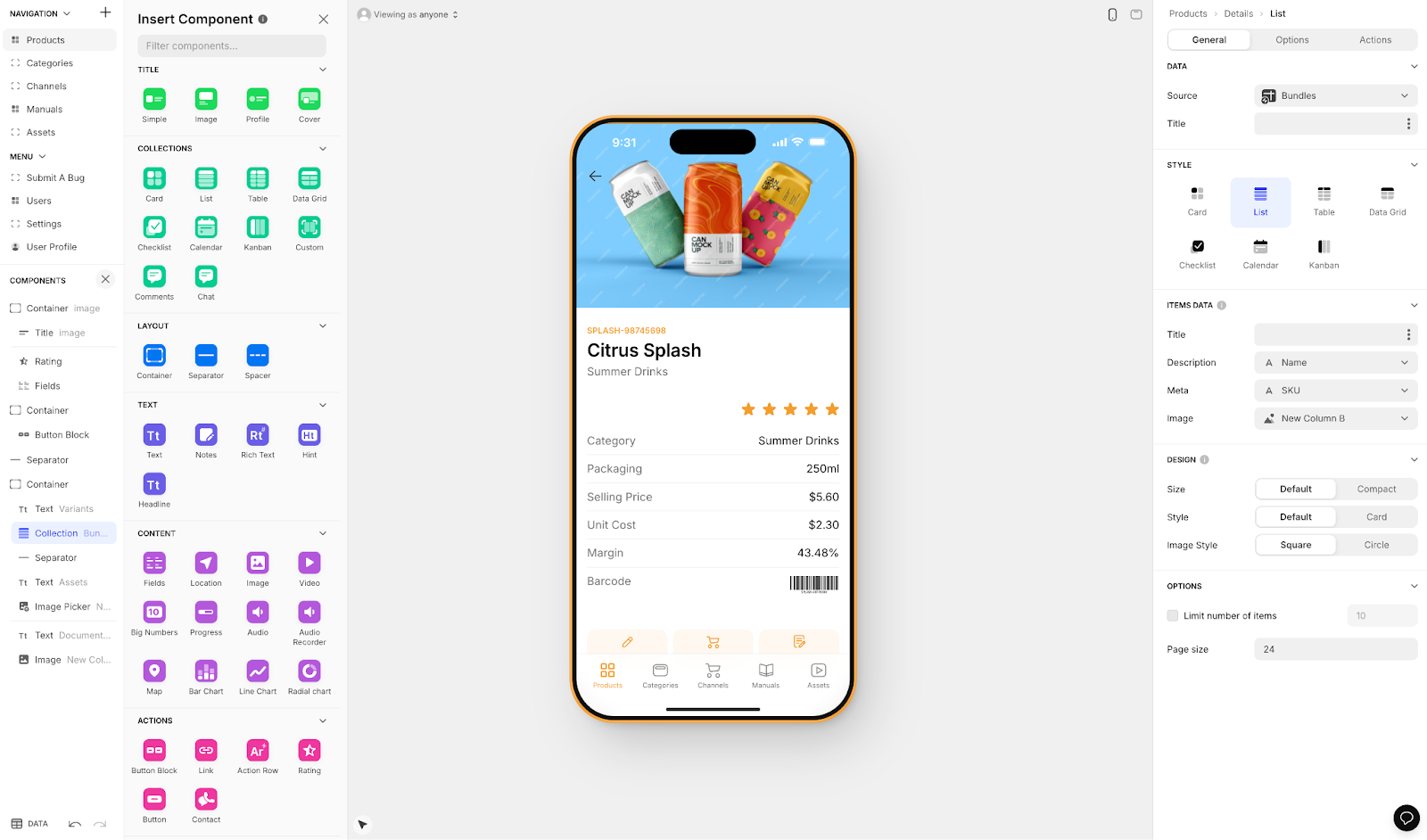
Glide transforms Google Sheets and Excel data into functional web applications. If your business already tracks inventory, appointments, customer lists, or orders in a spreadsheet, Glide can turn that data into a searchable, filterable app with user authentication and basic workflows. The familiar spreadsheet paradigm means most business owners can be productive within an hour.
What makes it stand out for small businesses: Glide is the fastest path from "I have business data in a spreadsheet" to "I have a working business tool." No data migration, no database design, no schema configuration. Your spreadsheet is your database. Changes in the spreadsheet appear in the app, and vice versa. For small businesses already running on spreadsheets, this removes the biggest obstacle to digitization. Glide AI adds column-based intelligence — auto-categorization, sentiment analysis, text generation — that can automate routine data tasks.
The scope limitation: Glide builds web apps and progressive web apps (PWAs) only. There is no native iOS or Android compilation, no Apple App Store publishing, and no Google Play publishing. Your app runs in a browser and can be added to a phone's home screen as a PWA, but it is not a native app. For internal tools (employee directories, inventory trackers, job boards), this is usually fine. For customer-facing products where you want a presence in the app stores, Glide cannot help.
Pricing: Free plan with limited rows. Maker plan at $25/month for basic apps. Business plan at $60/month for custom domains and branding removal. Row limits and usage caps apply on all tiers.
Strengths:
- Fastest path from spreadsheet data to working business app
- Minimal learning curve for anyone who uses spreadsheets
- Good for internal tools, directories, and simple dashboards
- Google Sheets integration keeps data accessible in familiar format
Honest limitations: Web and PWA only — no native mobile apps, no app store presence. The spreadsheet-based architecture limits complexity: multi-screen apps with deep relational data, real-time features, and custom workflows are outside Glide's sweet spot. Customization options are more limited than canvas-based builders. Not suited for customer-facing products that compete with native apps in app stores.
Best for: Small businesses that need simple internal tools (inventory tracking, employee directories, scheduling boards) built on existing spreadsheet data, and do not need native mobile apps or an app store presence.
Lovable — Prompt-Led Web Builder (Developer Maintenance Required)
Price: $20/mo+ (message-based credits) | Output: Web applications only (React + Supabase code) | ABG Score: 5.08/10 (prompt-to-app tier, 290+ sources)
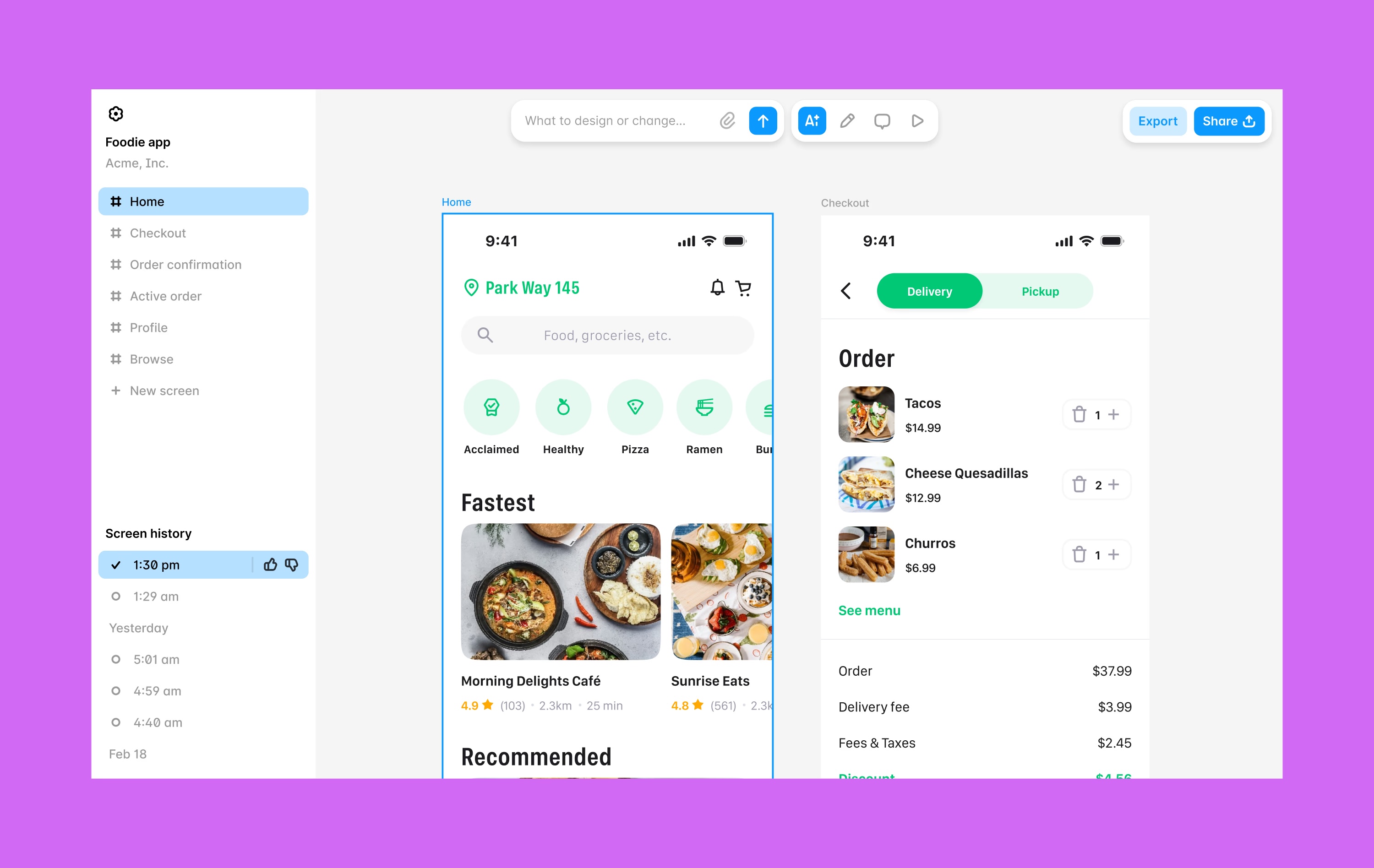
Lovable is a prompt-led web app builder that generates full-stack web applications from natural language descriptions. Type what you want your business app to do, and Lovable produces a React frontend with a Supabase backend. The results can be impressive for a first version: landing pages, customer portals, booking interfaces, and simple dashboards materialize in minutes rather than weeks.
The critical problem for small businesses: Lovable generates code. Once the AI produces your app, you own React components, Supabase database queries, and API integrations — all of which need to be maintained, debugged, and updated by someone who understands the code. When the app breaks, when you need a new feature, or when a library dependency needs updating, you need a developer. For a small business without technical staff, this creates an ongoing dependency that is fundamentally different from maintaining an app on a self-service visual platform.
The web-only limitation: Lovable builds web applications only. No native iOS or Android apps. No Apple App Store or Google Play publishing. For a small business that wants customers to download their app from an app store, Lovable is not the right tool. To get a Lovable-generated web app onto mobile devices, you would need to wrap it in a native container — adding technical complexity and web-level performance.
Pricing: Starter at $20/month with limited message credits. Higher tiers at $50/month and $100/month provide more generation credits. Complex apps and heavy iteration consume credits faster. Developer costs for ongoing maintenance are not included in these numbers but should be budgeted separately.
Strengths:
- Very fast from description to working web prototype
- Generates real, deployable code (React + Supabase)
- Code export means you own the output
- Low entry price for initial generation
Honest limitations: Not a self-service platform for business owners. The generated code needs developer maintenance — bugs, updates, and new features all require technical skills. No visual editing: all interaction is through a chat interface with a preview pane. No native mobile apps. No built-in database (relies on Supabase). For small businesses, the initial ease of generation masks an ongoing developer dependency that can be more expensive than the platform's subscription price.
Best for: Small businesses that have a developer on staff or retainer and want to accelerate web app development — not businesses that need to build and maintain an app independently.
Comparison Table
| Platform | Price | Native Mobile | AI Approach | Database | Cost Predictability |
|---|---|---|---|---|---|
| Adalo | $36/mo flat | iOS + Android (native) | Ada (Magic Start, Magic Add, X-Ray, Visual AI Direction) | Built-in Postgres, unlimited | Fully predictable |
| Appy Pie | ~$18/app/mo | Template-based | AI-assisted setup | Basic built-in | Per-app, mostly predictable |
| Bubble | $69/mo+ | No (wrapper required) | Bubble AI (chat-based) | Built-in (usage-capped) | Unpredictable (WU overages) |
| Glide | $25/mo+ | No (web/PWA only) | Glide AI (column-based) | Sheets-based | Mostly predictable (row limits) |
| Lovable | $20/mo+ | No (web only) | Prompt-to-code generation | No (requires Supabase) | Platform low, dev costs hidden |
Total Cost of Ownership: What a Small Business Actually Pays in Year One
The sticker price of an app builder tells you very little about what you will actually spend. For small businesses, the full cost includes the platform, any external services, developer or consultant time, and the cost of unpredictable overages. Here is what each platform actually costs in year one for a customer-facing business app, assuming annual billing where available.
| Cost Component | Adalo | Appy Pie | Bubble | Glide | Lovable |
|---|---|---|---|---|---|
| Platform (annual) | $432 | ~$216 (Android) / ~$720 (both) | $828+ | $300-720 | $240+ |
| External services | $0 (all-in-one) | $0 | $588+ (Natively for mobile) | $0 | $0-300+ (Supabase, hosting) |
| Developer/consultant | $0 (self-service) | $0 | $2,000-10,000+ | $0 | $2,000-8,000+ |
| Usage overages | $0 (no caps) | Varies (per-app) | $500-3,000+ (WU overages) | Row-limited | Credit-limited |
| Year 1 Total | $432 | ~$216-720 | $3,900+ | $300-720 | $2,240+ |
Hidden costs to watch for:
- Bubble's Workload Units: A customer-facing app with 1,000 monthly active users can consume millions of WU, adding $1,000+/month on top of the base subscription. This cost scales with your success, which is the opposite of what a small business budget needs.
- Bubble's consultant fees: Most small businesses cannot build complex Bubble apps independently. Consultants charge $40-$125/hour. Even a modest engagement of 40 hours adds $1,600-$5,000.
- Lovable's developer dependency: Generated code breaks, needs updates, and requires maintenance. Budget $50-$150/hour for a freelance React developer for ongoing support.
- Per-app pricing: Appy Pie charges per app. Two apps on the Platinum tier costs $120/month. Adalo covers unlimited apps on a single subscription.
- Custom domain costs: Glide charges $60/month for custom domain branding. Without it, your app runs on a Glide subdomain.
Frequently Asked Questions
What is the best AI app builder for a small business with no coding experience?
For a small business that wants native mobile apps with predictable costs, Adalo offers the best combination of value and capability. AI-powered generation on a visual multi-screen canvas, built-in database, and direct publishing to the Apple App Store and Google Play — all at $36/month flat with no usage caps. For simple internal tools built on existing spreadsheet data, Glide is also a strong option at $25/month, though it is web-only.
How much should a small business budget for an app builder?
For native iOS and Android apps with unlimited usage, budget $432/year with Adalo ($36/month). For simple template-based apps, Appy Pie starts at ~$216/year but charges per app and per platform. Be cautious with platforms that quote low starting prices but add usage-based charges: a Bubble app typically costs $3,000-$10,000+ in year one when Workload Units and consultant fees are included. For comparison, hiring a developer costs $25,000-$100,000+ for a single custom app.
Do small businesses need native mobile apps or are web apps sufficient?
It depends on how your customers use your product. Customer-facing apps that people use daily (ordering, booking, browsing, communicating) benefit from native mobile: faster performance, push notifications, offline access, and the trust signal of an app store listing. Internal tools (inventory tracking, employee scheduling, admin dashboards) often work fine as web apps. Adalo covers both with one subscription. Glide handles web apps well but cannot publish to app stores.
Can a small business owner maintain the app themselves after launch?
On Adalo, Appy Pie, and Glide — yes. These platforms let you update content, add features, and adjust workflows through a visual interface without code. On Bubble, it depends on the complexity of your app: simple changes are manageable, but anything involving workflows or database logic may require your consultant. On Lovable, no — maintaining the generated code requires developer skills.
Which platform handles customer growth without cost surprises?
Adalo's flat-rate pricing at $36/month includes unlimited users, unlimited actions, unlimited records, and unlimited apps. Whether your app has 100 users or 10,000, the cost stays the same. Bubble's Workload Unit model does the opposite — costs increase with every user action, making it difficult to forecast expenses as your customer base grows. Appy Pie's costs grow only if you add new apps. Glide is limited by row counts.
What about prompt-led builders like Lovable, Bolt, v0, or Base44?
Lovable, Bolt, v0, and Base44 are prompt-led web app builders that generate code from text descriptions. They are fast for creating web prototypes, but they generate code that requires developer maintenance — React components, database queries, API routes. None produce native mobile apps. For small businesses without developer staff, these tools create a dependency that defeats the purpose of no-code. They are better suited for businesses that already have technical resources.
Is a $36/month app builder really enough for a real business?
Yes. Adalo at $36/month includes everything most small businesses need: native iOS and Android compilation, built-in relational database with unlimited records, AI-powered building, direct app store publishing, and the ability to build unlimited apps. The Adalo 3.0 infrastructure scales to 1M+ monthly active users. Real businesses in the Apple App Store and Google Play are running on Adalo today — marketplaces, booking apps, CRMs, loyalty programs, and more.
What if I outgrow my app builder?
Adalo 3.0 scales to 1M+ monthly active users, which covers the vast majority of small business use cases — and most medium businesses too. Code export is available on the enterprise plan within Adalo Blue if you need to transition to a custom development team. Lovable exports React + Supabase code at any tier. Bubble and Glide do not offer code export, so migrating means rebuilding from scratch.
Updated April 2026. Pricing verified as of publication date. All platforms listed offer free tiers or trials — test them with your specific use case before committing to a paid plan.

Build your app fast with one of our pre-made app templates
Begin Building with no code