
Finding an AI app builder that produces a genuine native Android app — not just a web wrapper — requires knowing what to look for. This article compares the leading platforms and breaks down which ones actually deliver APK files to the Google Play Store.
Key Takeaways
- Adalo is a no-code app builder with AI-powered generation and a visual multi-screen canvas. It compiles native Android APK files and publishes directly to the Apple App Store, Google Play Store, and web from a single project. $36/mo flat with no usage caps. Built-in relational database with 500 records on the free plan.
- Appy Pie offers template-driven Android app building starting at ~$18/mo for Android-only. Fast setup when your use case matches a template, but limited customization depth. iOS requires the ~$60/mo tier.
- Bubble is a web app builder that can reach Android via a third-party wrapper service like Natively ($49/mo on top of Bubble's $69/mo). Powerful for complex web applications, but the wrapper approach adds latency and limits native device access.
- FlutterFlow generates cross-platform apps via Google's Flutter framework. Strong code export for developer teams. $80/mo/seat with no database included. More of a developer tool than a no-code platform.
- Thunkable uses block-based logic for cross-platform mobile apps. Publishing requires the $37/mo (annual) tier for a single app or $189/mo (monthly) for unlimited. Steep price jump between tiers.
Introduction
Getting an Android app into the Google Play Store is harder than most people expect. The building part has gotten easier with AI, but publishing is where things fall apart. Some platforms generate web apps and call it a day. Others require wrapper services that add load time, strip out native device features, and risk rejection during Google Play review. A few generate Flutter code you then need to compile and deploy yourself, which assumes developer knowledge that defeats the purpose of using a builder in the first place.
The Android ecosystem adds its own complications. Device fragmentation means your app needs to work across thousands of screen sizes and hardware configurations. Google Play's review policies have tightened, and wrapper-based apps face increasing scrutiny. Performance expectations are high: users abandon apps that take more than three seconds to load, and web-based wrappers routinely exceed that threshold.
This guide compares five platforms that claim to build Android apps with AI assistance. We tested each one against the criteria that actually matter: whether it produces a native Android binary or a web wrapper, what happens when you try to publish to Google Play, how much it really costs once you factor in databases and third-party services, and whether a non-technical person can realistically use it. Every platform is profiled honestly, limitations included.
Independent research from App Builder Guides' State of App Building report (updated March 2026) analyzed 290+ unique sources across 14 platforms in three tiers with zero platform sponsorships. Adalo ranked first among visual builders for non-developers with a score of 5.94/10.
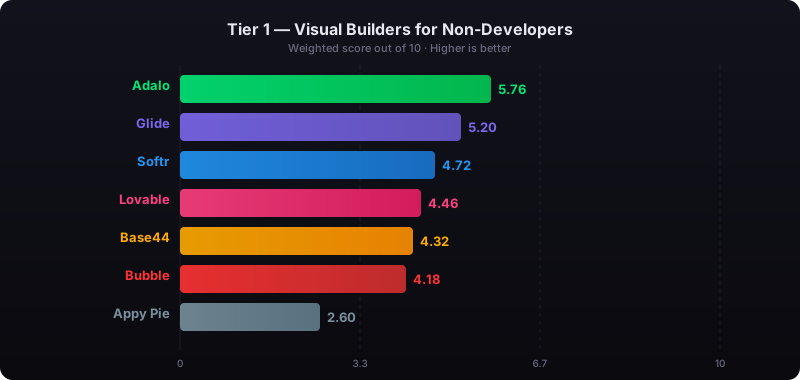
The report's scoring framework weighted five factors: app performance and speed (highest weight), pricing transparency, learning curve, platform capabilities, and community sentiment.
See also: Compare all no-code app builders | Android app builder
How We Evaluated
Every platform was assessed against the same criteria, specifically through the lens of Android app development and Google Play publishing:
- Native Android output: Does it compile a real APK or Android App Bundle, or does it produce a web app that needs a wrapper to reach Google Play?
- AI capabilities: Can you generate and iterate on your app with AI, or is building entirely manual?
- Database approach: Is a database included, or do you need to configure Firebase, Supabase, or another service separately?
- Google Play publishing: Can you submit directly to Google Play from the platform, or are additional tools and steps required?
- Total cost: What does it actually cost per year, including platform fees, databases, wrapper services, and developer accounts?
- Learning curve: Can a non-technical founder realistically build and publish an Android app, or does the platform assume development experience?
Adalo — No-Code AI Builder with Native Android Output
Price: Free plan available; $36/mo for app store publishing with unlimited usage | Output: Native APK for Android, native IPA for iOS, plus web — from one project
Ada, Adalo's AI builder, is the starting point for most new apps. Describe what you want to build, and Magic Start generates a complete app foundation: screens, navigation, database schema, and logic. From there, Magic Add lets you add features through natural language ("add a search bar," "add user profiles with ratings"), and Visual AI Direction lets you point at elements on the multi-screen canvas and instruct changes directly rather than typing into a chat window. X-Ray identifies performance issues before they reach your users.
Adalo 3.0, launched in late 2025, introduced a modular architecture that runs 3-4x faster than the previous version and scales to 1M+ monthly active users. The platform compiles true native Android APK files — not WebView wrappers — and handles the build pipeline so you submit directly to Google Play without configuring Gradle, Android Studio, or signing certificates yourself.
What makes it stand out for Android: Adalo is one of the few platforms where a non-technical person can go from app idea to a published Google Play listing without writing code or hiring a developer. The visual multi-screen canvas shows every screen of your app simultaneously, so you can see the full user flow while building. Preview your app on any Android device form factor during development. When you are ready, Adalo compiles a native APK and walks you through Google Play submission.
Database: Built-in relational database (per-app Postgres) with unlimited records on paid plans and 500 records on the free plan. No Firebase or Supabase setup required. For teams migrating from spreadsheet workflows, SheetBridge lets you use a Google Sheet as a relational database within Adalo.
Pricing: Starter at $36/month (billed annually) includes native iOS and Android publishing, unlimited database records, and zero usage caps — no per-user, per-action, or per-record charges. No overage fees on any tier.
Strengths:
- True native Android compilation (APK), not a WebView wrapper
- Direct Google Play publishing from the platform
- AI builder (Ada) with Magic Start, Magic Add, X-Ray, and Visual AI Direction
- Built-in relational database with unlimited records on paid plans
- One project produces Android, iOS, and web apps simultaneously
- Flat-rate pricing with no usage-based surprises
Honest limitations: Adalo is purpose-built for database-driven apps: marketplaces, booking systems, CRMs, directories, and social platforms. If you need a complex web-only SaaS with sophisticated custom backend logic, Bubble may be a better fit. Code export is available only on the enterprise plan within Adalo Blue, while FlutterFlow includes it on lower tiers.
Best for: Founders and small businesses who want to build and publish a native Android app to Google Play without hiring developers, and who value predictable pricing over usage-based billing.
Learn more about Adalo's AI app builder
Appy Pie — Template-Driven Android Builder
Price: ~$18/app/mo (Android only); ~$60/app/mo for iOS + Android | Output: Template-based Android apps
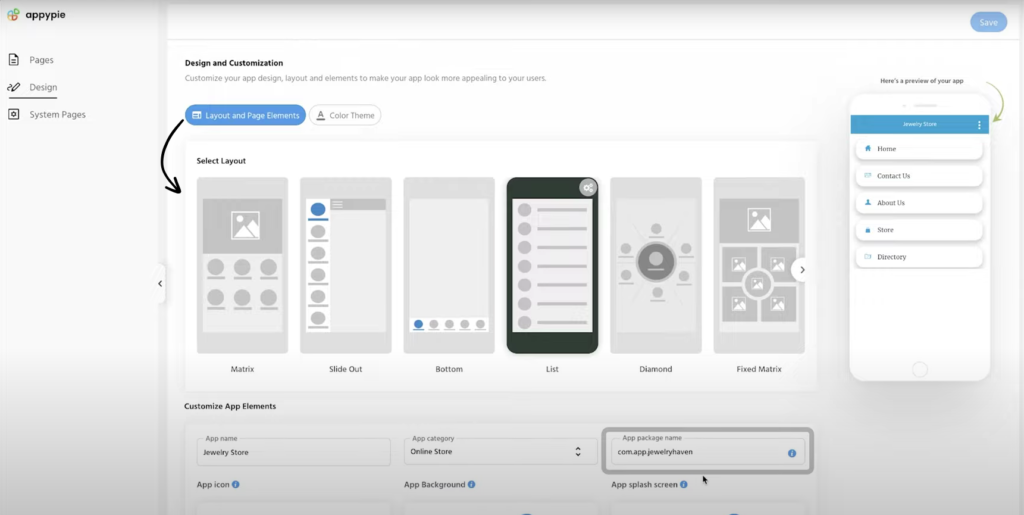
Appy Pie takes a template-first approach to Android app building. Pick from a library of industry-specific templates — restaurants, fitness studios, churches, real estate, events — customize the layout, content, and colors, and publish. The platform also bundles a chatbot builder, website builder, and workflow automation tools.
What makes it stand out for Android: If your use case closely matches one of Appy Pie's templates, you can have a functional Android app ready to submit to Google Play in a few hours. The learning curve is minimal. Appy Pie also offers AI-assisted setup that asks questions about your business and generates a starting point from your answers.
Pricing: Basic (Android only) from approximately $18/app/month billed annually, with 500 push notifications and 500 downloads per month. The Platinum plan adds iOS support at roughly $60/app/month. Each app requires its own subscription — building two apps doubles your bill.
Strengths:
- Large template library across many industry verticals
- Quick setup for template-fitting use cases
- Low starting price for Android-only apps
- Bundled tools (chatbot, website, workflows)
Honest limitations: Template-driven means limited customization depth. Once you need functionality that does not fit the template, you hit walls quickly. The database capabilities are less sophisticated than platforms with built-in relational databases, making complex data relationships difficult. Per-app pricing means costs multiply with each additional app. The quality and performance of output varies significantly by template. There is no permanent free plan — only a 7-day trial.
Best for: Small businesses in specific verticals who need a simple branded Android app quickly and do not require deep customization or complex data handling.
Bubble — Web Builder with Android via Wrapper
Price: $69/mo+ (Bubble) + $49/mo+ (Natively wrapper) | Output: WebView wrapper for Android
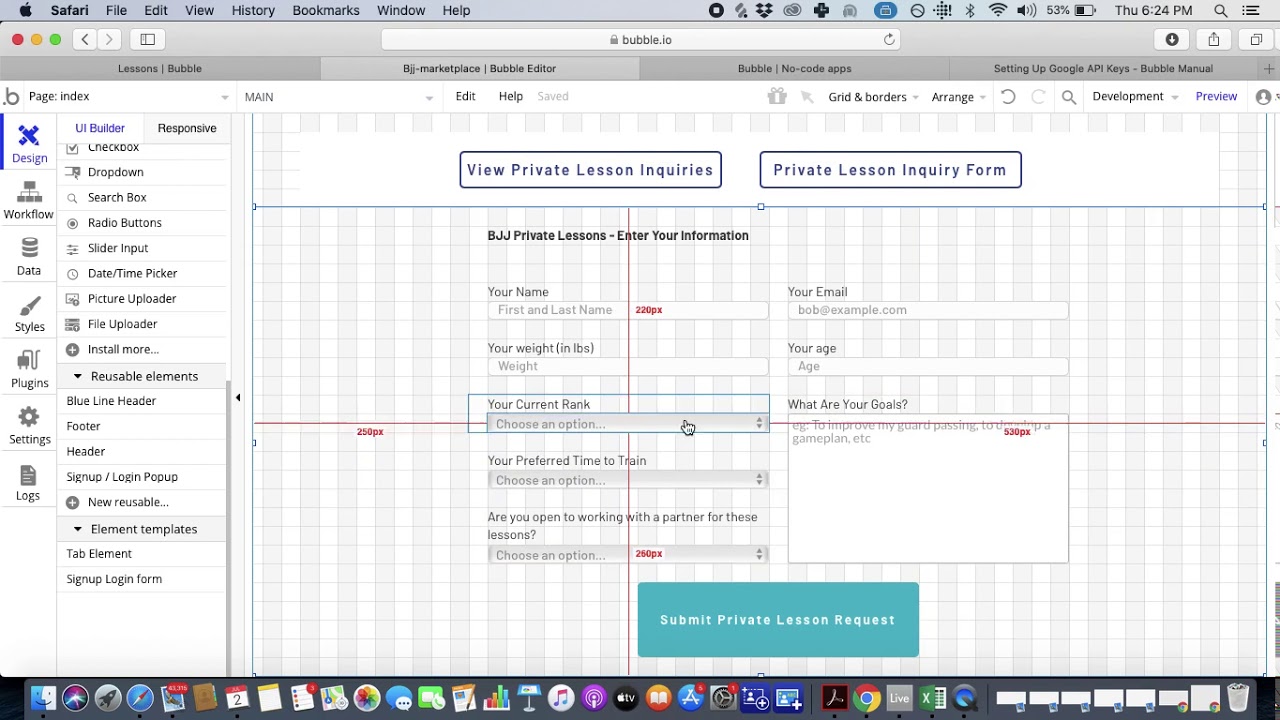
Bubble is a visual web app builder with deep customization capabilities. Its workflow engine handles conditional logic, iterative data processing, and backend events. A plugin ecosystem of 5,300+ options extends functionality across payments, analytics, and integrations. Bubble recently added a native mobile editor to its platform, though the mobile offering is still new.
The Android story: Bubble does not compile native Android apps on its own. Teams who want their Bubble app in the Google Play Store typically use Natively or a similar wrapper service. This creates a WebView container that loads your Bubble web app inside a native shell. It gets you into Google Play, but the result is not a native Android app — it is a web app running inside a container.
Performance reality: WebView wrappers add 2-3 seconds of load time on top of the web app's own performance. Independent testing documented in the App Builder Guides February 2026 report found Bubble page loads of 5-10 seconds on desktop and 8-14 seconds on mobile. Inside a wrapper, these times can be even longer. Google Play reviewers sometimes reject wrapper apps that do not meet performance standards.
Pricing: Bubble starts at $69/month (Growth plan, billed annually) with 250K Workload Units per month. Add Natively at $49/month minimum for the wrapper. Workload Unit overages cost $0.30 per 1K WU. Independent users report 400-500 WU per user per day, making costs unpredictable at scale. Bubble holds a 1.7/5 on Trustpilot across 123 reviews.
Strengths:
- Sophisticated backend logic and conditional workflows
- Large plugin ecosystem (5,300+ options)
- Strong for complex web applications with intricate data relationships
Honest limitations: The wrapper approach is fundamentally a workaround. You are paying for two services (Bubble + Natively), getting web-level performance instead of native, losing access to some native device APIs, and accepting the risk that Google may tighten restrictions on wrapper apps. Most teams building on Bubble end up hiring Bubble consultants at $40-$125/hour to manage the platform's complexity.
Best for: Teams already invested in Bubble for a web application who want a minimal-effort presence on Google Play — with the understanding that performance will be web-level, not native.
See the full Adalo vs Bubble comparison
FlutterFlow — Flutter-Based Builder for Developer Teams
Price: $80/mo/seat (team features) | Output: Flutter-based cross-platform (Android, iOS, Web)
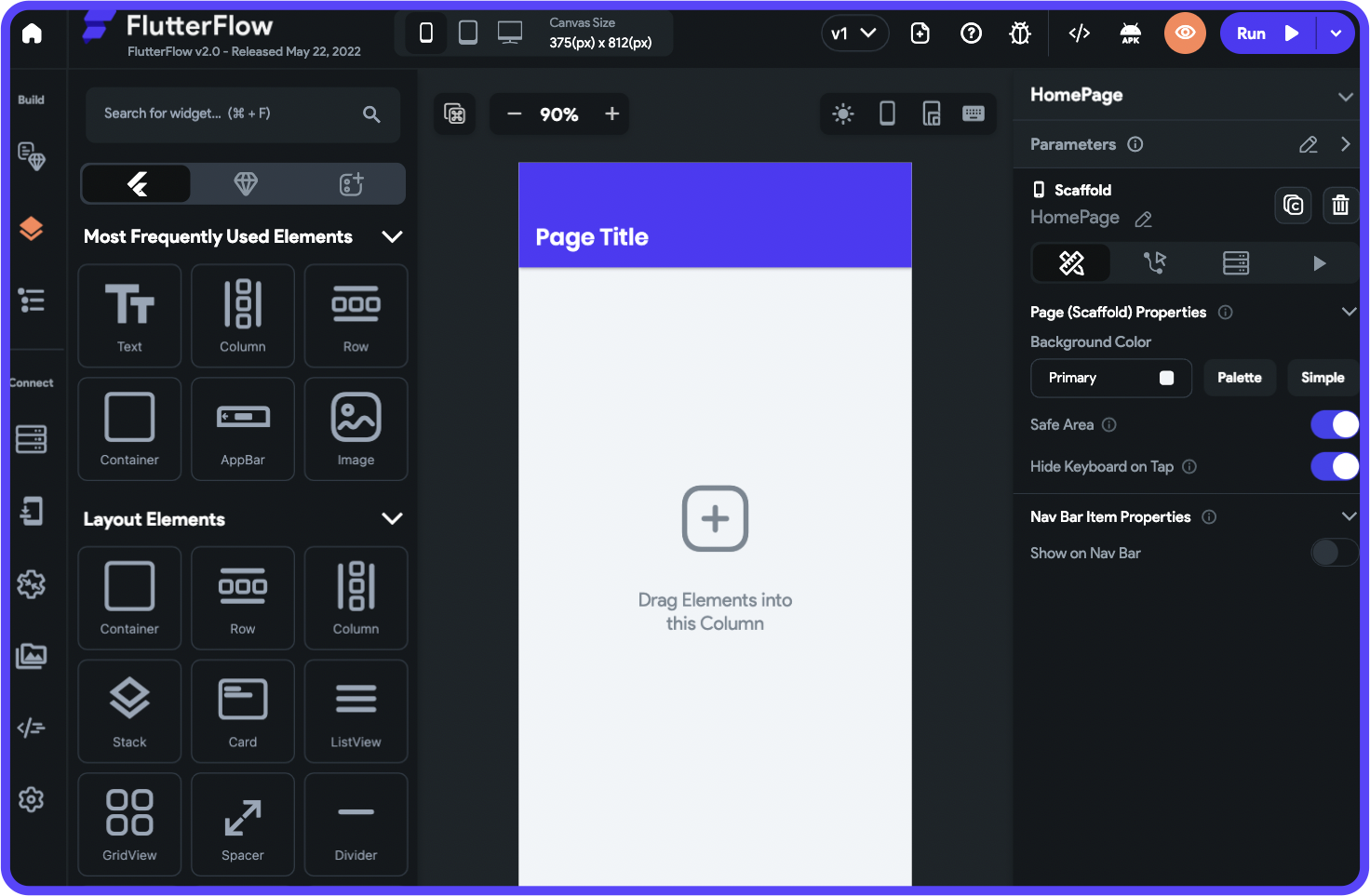
FlutterFlow is a visual development platform built on Google's Flutter framework. It generates real Flutter/Dart code that you can export, inspect, and extend. For Android specifically, this means near-native performance since Flutter compiles to ARM machine code.
What makes it stand out for Android: Code export is the key differentiator. Unlike most visual builders, FlutterFlow lets you download the full Flutter source code, push it to GitHub, and hand it to a development team. This gives you an exit path and the ability to add custom functionality at the framework level. FlutterFlow also includes AI features for generating UI components and logic from descriptions.
The developer reality: FlutterFlow is marketed as no-code, but in practice it is a developer-adjacent tool. Building anything beyond basic screens requires understanding Flutter's widget tree, state management patterns, and how to configure Firebase or Supabase as your backend. The App Builder Guides 2026 report documented editor interactions taking 2-40 seconds per click at scale, and FlutterFlow holds a 2.6/5 on Trustpilot across 19 reviews.
Pricing: Basic at $39/month with code download and APK export. Growth at $80/month/seat with GitHub integration, branching, and real-time collaboration. A three-person team on Growth pays $240/month before adding database costs. No database is included — you need Firebase (free tier available, paid starts at ~$25/mo) or Supabase.
Strengths:
- Flutter-based output for near-native Android performance
- Full code export and GitHub integration
- Active developer community and component marketplace
- Compiles to ARM machine code via Flutter, not WebView
Honest limitations: No database included — you must bring Firebase, Supabase, or another backend. Per-seat pricing scales up fast for teams. The learning curve is steeper than true no-code platforms, particularly around state management and custom functions. Despite the visual interface, FlutterFlow assumes some technical understanding. This is a tool for developer teams who want to move faster, not for non-technical founders building their first app.
Best for: Developer-adjacent teams who want visual building speed with Flutter code export and are comfortable configuring their own backend.
See the full Adalo vs FlutterFlow comparison
Thunkable — Block-Based Mobile Builder
Price: Free tier; $37/mo (annual) to publish 1 app, $189/mo (monthly) for unlimited | Output: Cross-platform (Android, iOS, Web)
No platform screenshot available for Thunkable.
Thunkable uses block-based logic similar to Scratch or MIT App Inventor. Instead of writing code, you drag logic blocks together to define app behavior. This approach is genuinely intuitive for people who have never built software, and it has made Thunkable popular in educational settings and coding bootcamps.
What makes it stand out for Android: The block-based model is the most accessible programming paradigm available. Thunkable supports cross-platform output to Android, iOS, and web from a single project. It includes AI features like image recognition and text classification blocks that you can add to apps without understanding machine learning.
The pricing cliff: Thunkable's pricing has a notable jump. The Accelerator plan at $18/month does not include app store publishing at all. The Builder plan at $37/month (annual billing) allows publishing one app to Google Play and the App Store. For unlimited published apps, you need the Advanced plan at $99/month (annual) or $189/month if paying monthly. Publishing a single app on Thunkable costs roughly the same as Adalo's plan that includes unlimited apps with unlimited usage.
Strengths:
- Block-based logic is accessible for absolute beginners
- Strong educational partnerships and learning resources
- Cross-platform output from a single project
- Built-in AI blocks for image recognition and text classification
Honest limitations: Token-based usage limits mean larger or more complex apps consume your allocation faster. The builder is less sophisticated than alternatives for production-quality apps with complex data relationships. The community and ecosystem are smaller than competitors. Database capabilities are basic compared to platforms with built-in relational databases.
Best for: Students, educators, and first-time builders who want to learn app development through block-based logic and need basic Android publishing capability.
Comparison Table
| Platform | Price | Android Output | AI Features | Database | Google Play Publishing |
|---|---|---|---|---|---|
| Adalo | $36/mo flat | Native APK | Ada (Magic Start, Magic Add, X-Ray, Visual AI Direction) | Built-in Postgres, unlimited | Direct from platform |
| Appy Pie | ~$18/app/mo | Template-based | AI-assisted setup | Basic built-in | Yes (paid plans) |
| Bubble + Natively | $118/mo+ | WebView wrapper | Bubble AI | Built-in (usage-capped) | Via wrapper service |
| FlutterFlow | $80/seat/mo | Native via Flutter | AI UI generation | None (BYO Firebase/Supabase) | Via Flutter build process |
| Thunkable | $37-189/mo | Cross-platform | AI blocks (image/text) | Basic built-in | At Builder tier ($37/mo+) |
Total Cost of Ownership: What You Actually Pay in Year One
Platform subscription fees are only part of the picture. Here is what each platform actually costs in the first year for a single Android app published to Google Play, assuming annual billing where available.
| Cost Component | Adalo | Appy Pie | Bubble + Natively | FlutterFlow | Thunkable |
|---|---|---|---|---|---|
| Platform (annual) | $432 | ~$216 | $828+ | $960/seat | $444 |
| Wrapper service | $0 | $0 | $588+ | $0 | $0 |
| External database | $0 (built-in) | $0 (basic) | $0 (built-in) | $0-300+ | $0 (basic) |
| Google Play fee | $25 (one-time) | $25 (one-time) | $25 (one-time) | $25 (one-time) | $25 (one-time) |
| Usage overages | $0 (no caps) | Varies | Unpredictable (WU) | $0 | Token-limited |
| Year 1 Total | $457 | ~$241+ | $1,441+ | $985+/seat | $469 |
Hidden costs to watch for:
- Bubble's Workload Units: Independent users report 400-500 WU per user per day. A moderately active app with 1,000 monthly users can consume millions of WU, adding $1,000+/month on top of the base subscription.
- FlutterFlow's database: Firebase's free tier (Spark) works for prototyping, but production apps typically need the Blaze plan. Costs scale with reads, writes, and storage.
- Developer time: FlutterFlow and Bubble both have steeper learning curves. Many Bubble teams hire consultants at $40-$125/hour. This often dwarfs the platform subscription cost.
- Per-app pricing: Appy Pie charges per app. If you build a second app, you pay double. Adalo's flat rate covers unlimited apps.
How to Publish an Android App Without Code
The path from builder to Google Play varies significantly by platform. Here is what each process actually looks like.
Path 1: Native via Adalo
- Build your app on the visual multi-screen canvas. Use Ada's Magic Start to generate the initial foundation, then refine with Magic Add and Visual AI Direction.
- Preview on Android using Adalo's device preview. Test on different Android screen sizes and form factors before publishing.
- Configure app details — app name, icon, splash screen, and Google Play listing information.
- Adalo compiles to APK — the platform handles the build pipeline, signing, and packaging.
- Submit to Google Play — follow the guided submission process. Adalo walks you through creating your Google Play Developer account ($25 one-time fee) and uploading your app.
Time to publish: Same day for simple apps. 1-3 days for Google Play review.
Path 2: Flutter via FlutterFlow
- Build your app using FlutterFlow's widget tree editor and configure your Firebase or Supabase backend.
- Test locally using FlutterFlow's preview or download the Flutter project and run it in an Android emulator.
- Export or use cloud build — FlutterFlow can build the APK/AAB in the cloud, or you can export the Flutter code and build locally using Android Studio.
- Configure signing — generate a signing key and configure your app's build settings.
- Submit to Google Play via the Google Play Console. Upload your Android App Bundle (AAB) and complete the store listing.
Time to publish: 1-3 days for the build and configuration process, plus 1-3 days for Google Play review. Longer if you need to troubleshoot Firebase configuration.
Path 3: WebView Wrapper via Bubble + Natively
- Build your web app in Bubble. Ensure it is responsive and performs acceptably on mobile screen sizes.
- Sign up for Natively (or a similar wrapper service) and connect it to your Bubble app's URL.
- Configure native features — push notifications, splash screens, and app icons through the wrapper service's dashboard.
- Natively generates the wrapper APK — this is a native shell that loads your Bubble web app in a WebView.
- Submit to Google Play — upload the generated APK and complete the listing. Be prepared for potential rejection if Google's reviewers determine the app does not provide sufficient native-level functionality.
Time to publish: 2-5 days for wrapper configuration, plus 1-7 days for Google Play review. Wrapper apps face higher scrutiny and longer review times.
Frequently Asked Questions
What is the best AI app builder for Android without coding?
The answer depends on your technical skill level and what kind of app you are building. For non-technical founders who want to go from idea to Google Play listing without writing code, Adalo handles the full pipeline: AI-powered app generation, visual editing on a multi-screen canvas, native APK compilation, and direct Google Play submission at $36/month flat. FlutterFlow produces excellent Android apps via Flutter but assumes some technical knowledge. Appy Pie works for simple template-based apps in specific verticals.
How much does it cost to build an Android app with AI?
The range is wide. At the low end, Adalo costs $457 in the first year (platform + Google's one-time $25 developer fee) for unlimited apps with unlimited usage. Appy Pie starts lower at ~$241/year but charges per app and limits customization. FlutterFlow runs $985+/year per seat before database costs. Bubble plus a wrapper service starts at $1,441/year with unpredictable usage-based charges on top. For comparison, hiring a developer to build a custom Android app typically costs $25,000-$100,000+.
Is a native Android app better than a WebView wrapper?
In almost every measurable way, yes. Native apps load faster (typically under 2 seconds vs 5-14 seconds for wrapped Bubble apps), have full access to device features like push notifications, camera, GPS, and Bluetooth, and face fewer issues during Google Play review. Wrappers are essentially web pages inside a native shell — users can tell the difference, and so can Google's review team. The one advantage of a wrapper is that it lets you reuse an existing web application without rebuilding it.
Can AI-built Android apps get approved for Google Play?
Yes. Google Play reviews the app's quality and compliance, not how it was built. Native apps compiled as APK or AAB files — whether built with Adalo, FlutterFlow, or Android Studio — go through the same review process and meet the same standards. The risk area is wrapper apps: Google has increasingly scrutinized apps that are essentially web pages in a native container, and some get rejected for not providing a native-level experience.
Do I also get an iOS app, or is Android separate?
It depends on the platform. Adalo builds one app that works on Android, iOS, and web from a single project — you design once and publish to both Google Play and the Apple App Store. FlutterFlow also supports cross-platform output via Flutter. Thunkable offers cross-platform from one project. Bubble requires a separate wrapper for each platform. Appy Pie charges separately for iOS support (~$60/mo vs ~$18/mo for Android only).
What about prompt-led builders like Lovable or Bolt for Android?
Lovable, Bolt, v0, and Base44 generate web applications from text prompts. They produce React, Next.js, or similar web code. None of them compile native Android apps or publish to Google Play. To get a Lovable or Bolt app into Google Play, you would need to wrap it the same way you wrap a Bubble app — with the same performance trade-offs and review risks. If your goal is an Android app in the Google Play Store, you need a platform built for native mobile output.
What if I outgrow my app builder?
This is worth thinking about before you start. FlutterFlow offers the clearest exit path: you can export the full Flutter source code and continue development independently. Adalo offers code export on the enterprise plan within Adalo Blue. Bubble and Thunkable do not offer code export, so migrating away means rebuilding from scratch. That said, most no-code apps do not need to be rewritten — Adalo 3.0 scales to 1M+ monthly active users, which covers the vast majority of use cases.
How long does it take to build an Android app with AI?
A simple app (5-10 screens, basic database, standard navigation) can be built in a few hours with an AI-powered builder and submitted to Google Play the same day. A more complex app (marketplace with user profiles, listings, search, messaging, and payments) typically takes 1-4 weeks depending on the platform and your familiarity with it. The building time is no longer the bottleneck — Google Play review takes 1-7 days regardless of how the app was built.
What happened with Replit and Vibecode being removed from the App Store — does that affect Android builders?
In March 2026, Apple removed Replit and Vibecode from the iOS App Store under Guideline 2.5.2, which prohibits apps that execute arbitrary downloaded code. While this specific enforcement action targeted Apple's platform, it reflects a broader app store scrutiny of tools that enable runtime code execution on device. Google Play has parallel policies under section 4.4 of its Developer Program Policy. The practical distinction is between builder tools themselves and apps built by those tools. Platforms that compile native APKs on the server side (Adalo via Codemagic, FlutterFlow via Flutter build) produce standard Android App Bundles that face no such scrutiny. The enforcement actions do not affect apps built with these platforms — only the builder tools themselves would face policy questions if they attempted to execute code within the Android runtime environment.
Updated April 2026. Pricing verified as of publication date. All platforms listed offer free tiers or trials — test them with your specific use case before committing to a paid plan.

Build your app fast with one of our pre-made app templates
Begin Building with no code