
Building one app that works across iOS, Android, and web saves time and money — but the quality of each output varies significantly between platforms. This guide compares the top AI cross-platform app builders and the trade-offs each one makes.
Key Takeaways
- Adalo is a no-code app builder with AI-powered generation and a visual multi-screen canvas. It ships native iOS (IPA), native Android (APK), and web apps from a single project — one editor, one codebase, one database. $36/mo flat with no usage caps. Published to the Apple App Store, Google Play Store, and web simultaneously. Built-in relational database with 500 records on the free plan.
- Appy Pie offers template-driven cross-platform building, but iOS and Android are priced separately. iOS + Android together costs ~$60/app/mo. Template-dependent quality with limited customization depth. Web output is available on lower tiers.
- Bubble is a web app builder. It does not produce native mobile apps. Reaching iOS and Android requires a third-party wrapper service like Natively ($49/mo on top of Bubble's $69/mo), which produces WebView containers — not native apps. Web + wrapped mobile is not true cross-platform.
- FlutterFlow generates cross-platform apps via Google's Flutter framework. Compiles to native iOS, Android, and web from one codebase. $80/mo/seat with no database included. Requires separate backend setup (Firebase or Supabase). More of a developer tool than a no-code platform.
- Thunkable uses block-based logic for cross-platform mobile and web apps. Publishing requires the $37/mo (annual) tier for a single app or $189/mo (monthly) for unlimited. Basic database capabilities.
Introduction
"Cross-platform" is the most misleading term in app building. Every platform claims it. Few deliver it. The word means different things depending on who is using it: some platforms mean "we build a web app that looks okay on a phone browser." Others mean "we generate separate builds for each platform from one codebase." A few mean "we wrap a web app in a native container and call it cross-platform." And a handful actually compile native binaries for iOS and Android alongside a web app, all from one editor and one database.
The distinction matters because users can tell — and so can app store reviewers. In March 2026, Apple removed Replit and Vibecode from the App Store under Guideline 2.5.2, its prohibition on apps that execute arbitrary downloaded code. Apple's review team has simultaneously tightened enforcement against wrapper apps under Guideline 4.2. A web app running in a WebView wrapper loads slower (8-14 seconds for Bubble mobile, per the App Builder Guides 2026 report), lacks access to native device features, and faces increasing rejection risk. Google Play has parallel quality policies. If "cross-platform" means "one project, three native outputs," only a few platforms actually deliver that.
This guide compares five platforms that claim cross-platform capabilities with AI assistance. We cut through the marketing to test what each one actually produces: genuine native iOS and Android apps alongside web, or some approximation that falls short. Every platform is profiled honestly, including what "cross-platform" actually means in their context and where the gaps are.
Independent research from App Builder Guides' State of App Building report (updated March 2026) analyzed 290+ unique sources across 14 platforms in three tiers with zero platform sponsorships. Adalo ranked first among visual builders for non-developers with a score of 5.94/10.
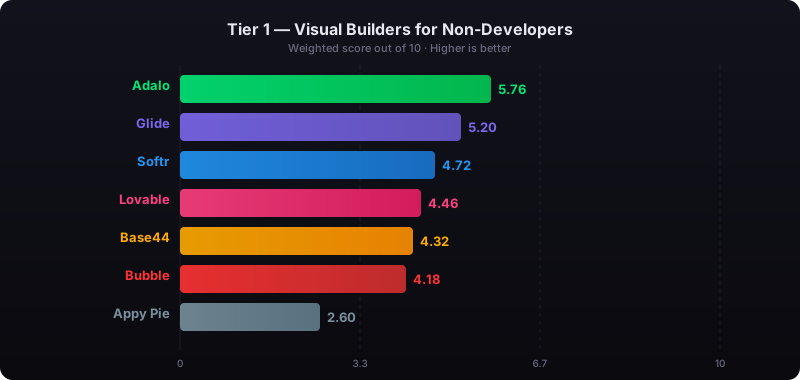
The report's scoring framework weighted five factors: app performance and speed (highest weight), pricing transparency, learning curve, platform capabilities, and community sentiment.
See also: Compare all no-code app builders | Mobile app builders compared | Adalo's web app builder
How We Evaluated
Every platform was assessed against criteria specific to true cross-platform development — shipping to iOS, Android, and web from a single project:
- Single codebase, three outputs: Can you build once and publish to iOS, Android, and web, or do you need separate builds, separate editors, or separate subscriptions per platform?
- Native output: Does each platform output compile to native iOS (IPA) and Android (APK), or does it use WebView wrappers that compromise performance?
- Shared database: Is there one database serving all three platforms, or do you need to set up and sync separate backends?
- AI capabilities: Can AI generate and iterate on your app across all platforms simultaneously?
- Consistent experience: Does the app look and work consistently across iOS, Android, and web, or do you need to customize each platform separately?
- Total cost: What does it actually cost to publish to all three platforms, including platform fees, app store fees, databases, and any per-platform charges?
- Learning curve: Can a non-technical person manage one app across three platforms, or does each platform require separate expertise?
Adalo — True Cross-Platform from One Editor, One Database, One Subscription
Price: Free plan available; $36/mo for app store publishing with unlimited usage | Output: Native IPA for iOS, native APK for Android, plus web — from one project
Ada, Adalo's AI builder, generates apps that work across all three platforms from the start. Describe what you want to build, and Magic Start creates a complete foundation — screens, navigation, database schema, and logic — that runs on iOS, Android, and web simultaneously. Magic Add lets you layer on features through natural language ("add push notifications," "add a shopping cart," "add user authentication"), and Visual AI Direction lets you point at elements on the multi-screen canvas and instruct changes directly. X-Ray identifies performance issues before they reach your users on any platform.
Adalo 3.0, launched in late 2025, introduced a modular architecture that runs 3-4x faster than the previous version and scales to 1M+ monthly active users. The platform compiles true native iOS IPA files and Android APK files — not WebView wrappers — alongside a web app, all from one visual editor and one relational database.
What "cross-platform" actually means in Adalo: You build once. One set of screens on the visual multi-screen canvas. One relational database powering all three platforms. One set of business logic. When you make a change, it applies to iOS, Android, and web simultaneously. You do not maintain three separate codebases, configure three separate backends, or pay three separate subscriptions. Preview your app on any device form factor — iPhone, Android phone, tablet, desktop — during development. When you publish, Adalo compiles a native IPA for Apple's App Store, a native APK for Google Play, and deploys a web app, all from the same project.
Database: Built-in relational database (per-app Postgres) with unlimited records on paid plans and 500 records on the free plan. One database serves all three platforms automatically. No Firebase or Supabase setup required. For teams migrating from spreadsheet workflows, SheetBridge lets you use a Google Sheet as a relational database within Adalo.
Pricing: Starter at $36/month (billed annually) includes native iOS and Android publishing plus web, unlimited database records, and zero usage caps — no per-user, per-action, or per-record charges. No per-platform pricing. No overage fees on any tier.
Strengths:
- True single-codebase cross-platform: native iOS (IPA) + native Android (APK) + web from one project
- One database, one editor, one subscription — no per-platform charges
- AI builder (Ada) with Magic Start, Magic Add, X-Ray, and Visual AI Direction
- Changes apply to all three platforms simultaneously
- Visual multi-screen canvas shows the entire app across all platforms
- $36/mo flat covers everything — both app stores plus web, unlimited usage
Honest limitations: Adalo is purpose-built for database-driven apps: marketplaces, booking systems, CRMs, directories, and social platforms. If you need a complex web-only SaaS with sophisticated custom backend logic, Bubble may be a better fit for the web portion. Code export is available only on the enterprise plan within Adalo Blue, while FlutterFlow includes it on lower tiers. Platform-specific customization (like iOS-only features or Android-only behaviors) is limited compared to native code approaches.
Best for: Founders and businesses who want to reach iOS, Android, and web users from one build with predictable flat pricing, without hiring separate development teams for each platform.
Learn more about Adalo's web app builder
Appy Pie — Template-Driven with Per-Platform Pricing
Price: ~$18/app/mo (Android only); ~$60/app/mo for iOS + Android | Output: Template-based apps across platforms
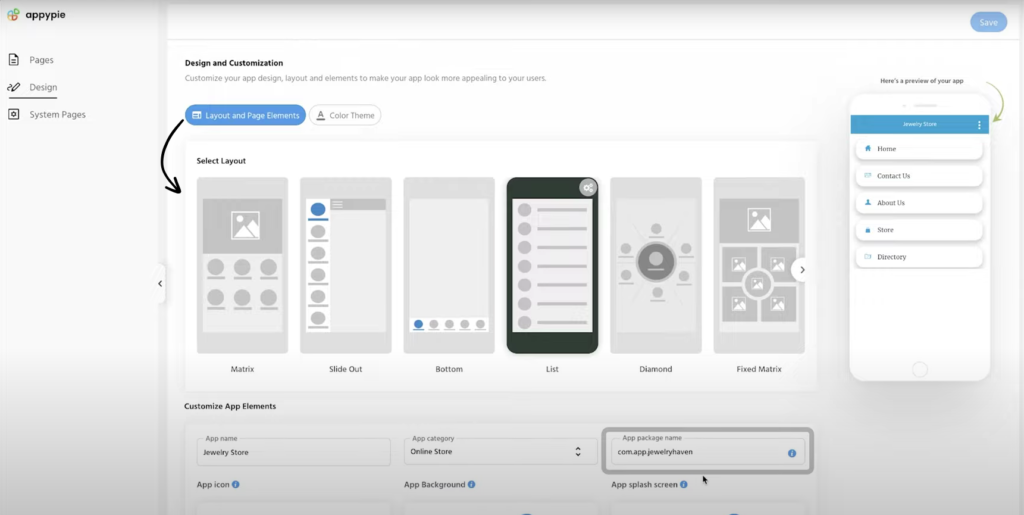
Appy Pie takes a template-first approach. Pick an industry-specific template, customize it, and publish. The platform supports web, iOS, and Android output, but the pricing structure separates mobile platforms — Android starts at ~$18/month, while iOS + Android requires the Platinum plan at ~$60/month. The platform bundles a chatbot builder, website builder, and workflow automation tools.
What "cross-platform" means in Appy Pie: You can build for web, iOS, and Android, but the cost structure encourages picking one mobile platform rather than both. The Platinum plan at ~$60/app/month gives you iOS + Android, but each app requires its own subscription. Two cross-platform apps means paying twice. The building experience is template-driven across all platforms, with limited ability to customize the app differently for each one.
The cross-platform trade-off: Templates make the initial build fast, but they also mean you get the same app across all platforms — which sounds good until you realize "the same" means the same limitations. Template-dependent quality means if the template works well on one platform, it will likely work similarly on others. But if the template is missing functionality you need, it is missing everywhere.
Pricing: Basic (Android only) from approximately $18/app/month billed annually. Platinum (iOS + Android) at roughly $60/app/month. Each app requires its own subscription. Plus Apple's $99/year developer fee and Google's $25 one-time fee. No permanent free plan — only a 7-day trial.
Strengths:
- Template library covers many industry verticals
- Quick setup for template-matching use cases across platforms
- Bundled tools (chatbot, website, workflows)
- AI-assisted setup from business descriptions
Honest limitations: Per-platform pricing means true cross-platform (iOS + Android + web) is expensive compared to flat-rate alternatives. Template-driven means limited customization. Per-app pricing scales poorly for multiple products. Database capabilities are basic. No permanent free plan.
Best for: Small businesses that need a simple branded app in a specific vertical deployed to both app stores, and whose requirements stay within template boundaries.
Bubble — Web Builder Marketed as Cross-Platform via Wrappers
Price: $69/mo+ (Bubble) + $49/mo+ per platform (Natively wrapper) | Output: Web app + WebView wrappers for mobile
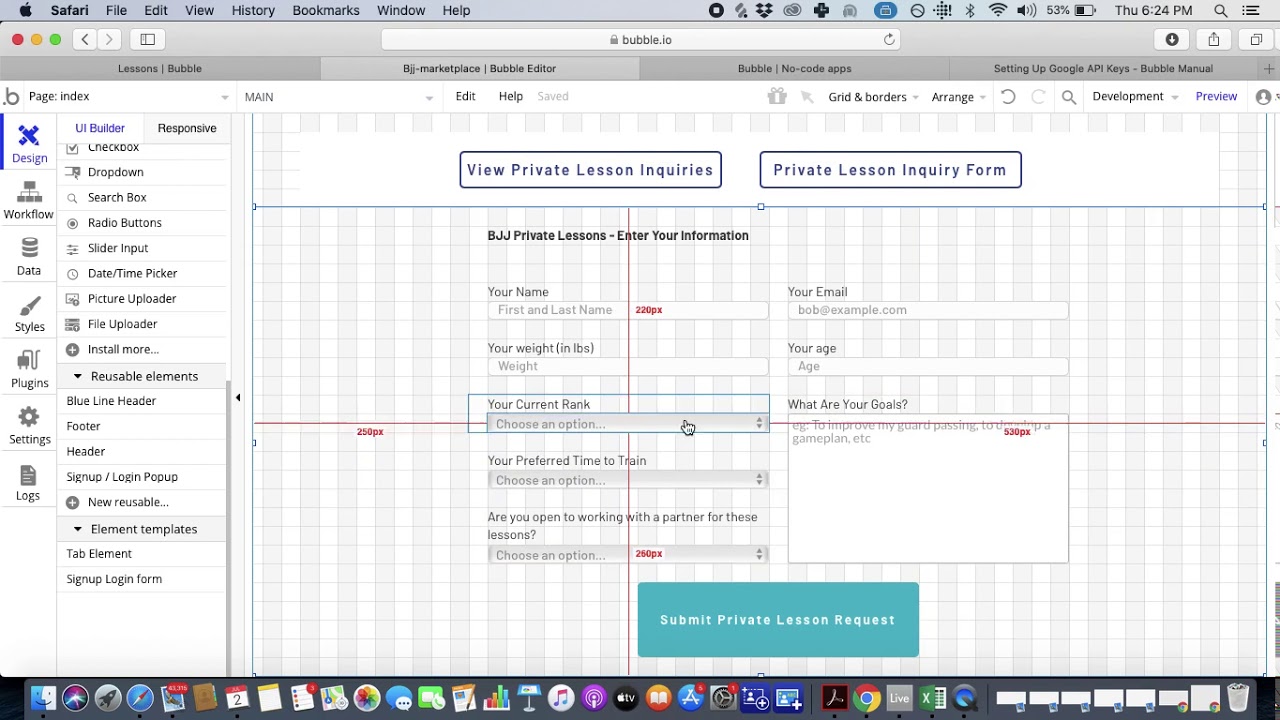
Bubble is a visual web app builder. It does not compile native mobile apps. For teams that want their Bubble app in the Apple App Store and Google Play, the path is through a wrapper service like Natively — which creates WebView containers that load the Bubble web app inside native shells. Bubble recently introduced a native mobile editor, though it is still new and limited.
What "cross-platform" actually means in Bubble: You build a web app. Then you wrap it for iOS. Then you wrap it for Android. The result is three versions of a web app — one running in a browser, two running inside WebView containers on mobile. This is not the same as three native outputs. The mobile versions inherit all the performance characteristics of the web version (5-10 second page loads documented by independent testing) plus the additional overhead of the wrapper (2-3 seconds). Users on iOS and Android get a slower, less capable experience than users on native apps.
The wrapper problem for cross-platform: Wrapper services charge per platform. Natively at $49/month minimum means iOS wrapping is $588/year and Android wrapping is another $588/year — on top of Bubble's $828+/year. And each wrapper needs to be configured and maintained separately, which is the opposite of "build once, deploy everywhere." Apple's guideline 4.2 on Minimum Functionality also creates inconsistent approval outcomes for wrapper apps.
Pricing: Growth plan at $69/month (billed annually) with 250K Workload Units per month. Natively at $49/month per platform for wrappers. WU overages cost $0.30 per 1K WU. Plus Apple's $99/year and Google's $25 one-time fee. Bubble holds a 1.7/5 on Trustpilot across 123 reviews.
Strengths:
- Most powerful workflow engine among visual builders
- Large plugin ecosystem (5,300+ options)
- Strong for complex web applications with intricate data relationships
Honest limitations: Not truly cross-platform — it is a web builder with wrapper workarounds. Mobile output is WebView containers, not native apps. Wrapper services add $588+/year per platform on top of Bubble's base cost. Performance on mobile is web-level (8-14 seconds documented). WU charges create unpredictable costs. Apple may reject wrapper apps. Most teams hire Bubble consultants at $40-$125/hour.
Best for: Teams building a primarily web-based application who want minimal-effort mobile presence — understanding that the mobile experience will be web-level performance inside a native shell, not a true native app.
See the full Adalo vs Bubble comparison
FlutterFlow — Developer-Grade Cross-Platform via Flutter
Price: $80/mo/seat (team features) | Output: Flutter-based native iOS, Android, and Web from one codebase
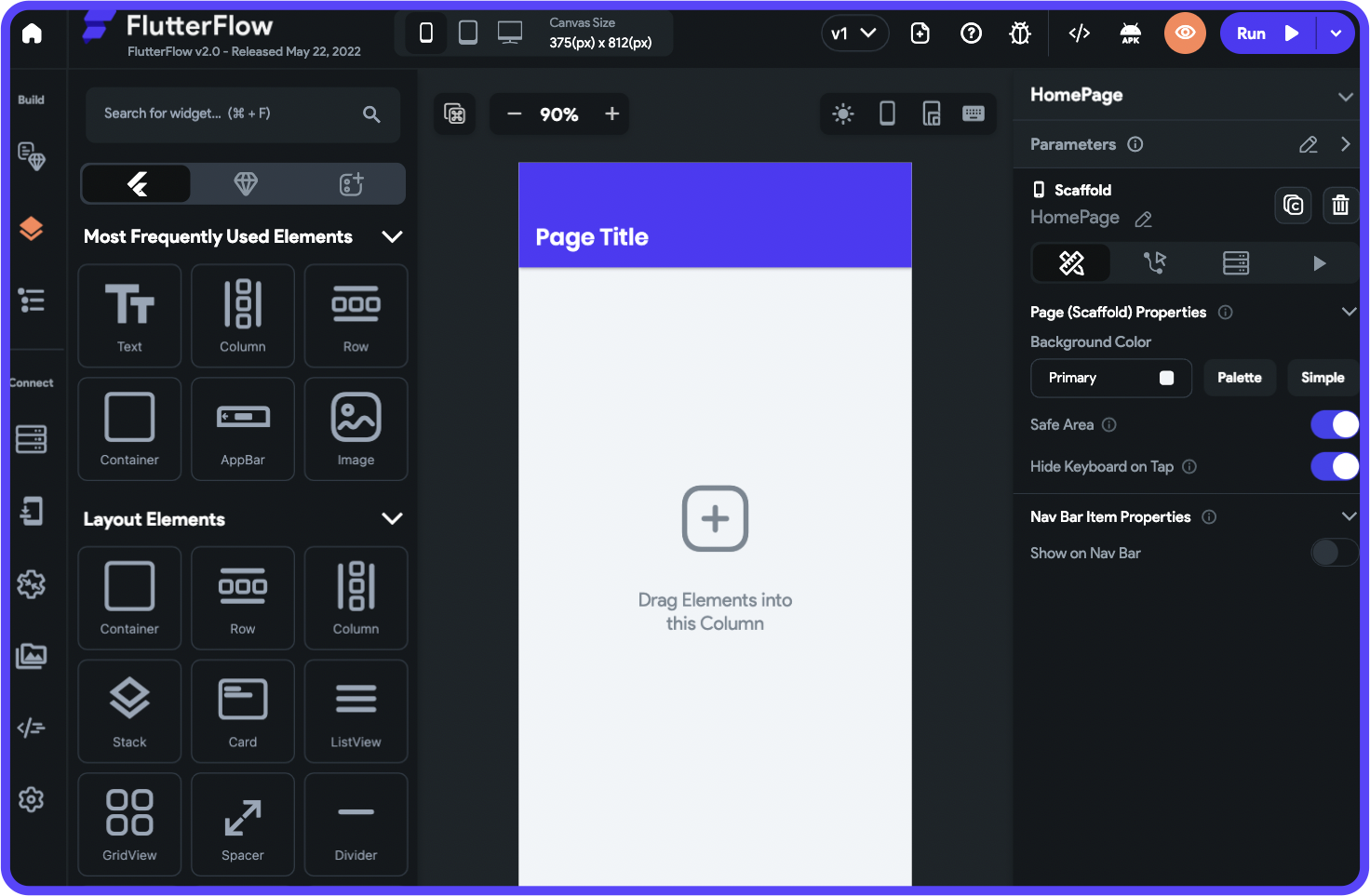
FlutterFlow is a visual development platform built on Google's Flutter framework. Flutter is purpose-built for cross-platform — one Dart codebase compiles to native iOS (via ARM), native Android, and web. FlutterFlow provides a visual layer on top of this, letting you build via drag-and-drop rather than writing Dart code directly. The output is genuine cross-platform: native mobile performance on both iOS and Android, plus a web version.
What "cross-platform" means in FlutterFlow: Flutter's cross-platform model is technically strong. One codebase produces genuinely native iOS and Android apps (compiled to ARM machine code, not WebView) alongside a web app. FlutterFlow adds AI features for generating UI components and logic from descriptions. You can export the full Flutter source code for continued development.
The cross-platform gap: FlutterFlow delivers native output on all three platforms, but it does not include a database. Each cross-platform project needs Firebase, Supabase, or another backend configured separately. This means setting up authentication, database schemas, and API connections — work that is non-trivial for non-technical builders. Per-seat pricing at $80/month also means a three-person team pays $240/month before database costs. The learning curve assumes some understanding of Flutter's widget tree and state management patterns.
Pricing: Basic at $39/month with code download. Growth at $80/month/seat with GitHub integration, branching, and collaboration. No database included — Firebase (free tier available, paid starts at ~$25/mo) or Supabase required. Plus Apple's $99/year and Google's $25 one-time fee. FlutterFlow holds a 2.6/5 on Trustpilot across 19 reviews.
Strengths:
- Genuine native cross-platform output via Flutter's ARM compilation
- Full code export for independent development
- Active developer community and component marketplace
- GitHub integration for version control
Honest limitations: No database included — BYO Firebase or Supabase for every project. Per-seat pricing scales up for teams. Learning curve assumes technical understanding of Flutter concepts. Editor performance documented at 2-40 seconds per interaction at scale. Not suited for non-technical founders. This is cross-platform for developer teams, not for everyone.
Best for: Developer-adjacent teams who want true native cross-platform output with code export, and who are comfortable configuring their own database and backend infrastructure.
See the full Adalo vs FlutterFlow comparison
Thunkable — Block-Based Cross-Platform Builder
Price: Free tier; $37/mo (annual) to publish 1 app, $189/mo (monthly) for unlimited | Output: Cross-platform (iOS, Android, Web)
No platform screenshot available for Thunkable.
Thunkable uses block-based logic similar to Scratch or MIT App Inventor. It supports cross-platform output to iOS, Android, and web from a single project. The building model is genuinely accessible — drag logic blocks together to define behavior, no code or Flutter knowledge required.
What "cross-platform" means in Thunkable: One project produces iOS, Android, and web output. The block-based logic applies across all platforms. Thunkable includes AI features like image recognition and text classification blocks. The cross-platform story is straightforward — what you build works on all three platforms without separate configuration.
The cross-platform pricing problem: Thunkable's Accelerator plan ($18/month) does not include app store publishing at all. To publish one cross-platform app to both the App Store and Google Play, you need the Builder plan at $37/month (annual billing). For unlimited published apps, you need the Advanced plan at $99/month (annual) or $189/month monthly. Publishing one cross-platform app on Thunkable costs roughly the same as Adalo's plan that includes unlimited cross-platform apps with unlimited usage.
Strengths:
- Block-based logic is accessible for absolute beginners
- Genuine cross-platform from one project without separate configuration
- Strong educational partnerships and learning resources
- Built-in AI blocks for image recognition and text classification
Honest limitations: Token-based usage limits on larger apps. Less sophisticated than alternatives for production-quality cross-platform apps. Smaller community and ecosystem. Database capabilities are basic. The pricing jump from "no publishing" to "one published app" is steep. Limited customization depth compared to Adalo or FlutterFlow.
Best for: Students, educators, and first-time builders who want to learn cross-platform app development through block-based logic and need basic publishing to all three platforms.
Comparison Table
| Platform | Price | Cross-Platform Output | AI Features | Database | True Single Codebase? |
|---|---|---|---|---|---|
| Adalo | $36/mo flat | Native iOS (IPA) + Android (APK) + Web | Ada (Magic Start, Magic Add, X-Ray, Visual AI Direction) | Built-in Postgres, unlimited | Yes — one editor, one DB |
| Appy Pie | ~$60/app/mo | Template-based iOS + Android | AI-assisted setup | Basic built-in | Per-platform pricing |
| Bubble + wrappers | $167/mo+ | Web + WebView wrappers | Bubble AI | Built-in (usage-capped) | No — web + separate wrappers |
| FlutterFlow | $80/seat/mo | Native iOS + Android + Web via Flutter | AI UI generation | None (BYO Firebase/Supabase) | Yes — via Flutter |
| Thunkable | $37-189/mo | Cross-platform (iOS + Android + Web) | AI blocks (image/text) | Basic built-in | Yes — one project |
Total Cost of Ownership: What True Cross-Platform Actually Costs in Year One
Cross-platform costs include both app store fees (Apple $99/year + Google $25 one-time) plus platform fees. Here is what each platform actually costs to publish one app to iOS, Android, and web over 12 months, assuming annual billing where available.
| Cost Component | Adalo | Appy Pie | Bubble + Wrappers | FlutterFlow | Thunkable |
|---|---|---|---|---|---|
| Platform (annual) | $432 | ~$720 | $828+ | $960/seat | $444 |
| Wrapper services (mobile) | $0 | $0 | $1,176+ (2 platforms) | $0 | $0 |
| External database | $0 (built-in) | $0 (basic) | $0 (built-in) | $0-300+ | $0 (basic) |
| App Store fees | $124 (Apple $99 + Google $25) | $124 | $124 | $124 | $124 |
| Usage overages | $0 (no caps) | Varies | Unpredictable (WU) | $0 | Token-limited |
| Year 1 Total | $556 | ~$844+ | $2,128+ | $1,084+/seat | $568 |
Hidden cross-platform costs:
- Bubble's per-platform wrappers: Natively charges per platform. iOS wrapping + Android wrapping costs $1,176+/year on top of Bubble's subscription. This makes "cross-platform" via Bubble one of the most expensive options — and the output is still WebView containers, not native.
- FlutterFlow's database per project: Every cross-platform project needs Firebase or Supabase configured. Free tiers work for prototyping, but production apps on three platforms generate more database traffic, pushing costs to paid tiers faster.
- Appy Pie's per-app model: Building a second cross-platform app doubles your bill. Adalo's flat rate covers unlimited cross-platform apps.
- Consistency maintenance: On platforms where cross-platform output requires separate configuration (Bubble + wrappers), maintaining consistency across three platforms adds ongoing work and cost.
Frequently Asked Questions
Which AI app builder ships to iOS, Android, and web from one project?
Adalo and FlutterFlow both produce native iOS, Android, and web output from a single codebase. Adalo does this with a visual multi-screen canvas and built-in database at $36/month flat — no usage caps, no per-platform charges. FlutterFlow does this via Flutter at $80/month per seat but requires a separate database (Firebase or Supabase). Thunkable also offers cross-platform from one project. Bubble requires separate wrapper services per mobile platform. Appy Pie supports multiple platforms but charges separately.
What does "cross-platform" actually mean in no-code builders?
It varies dramatically. True cross-platform means one codebase, one database, and native output on all target platforms. Adalo delivers this: build once on the visual canvas, and the platform compiles native iOS (IPA), native Android (APK), and web simultaneously. FlutterFlow does this via Flutter. Bubble's "cross-platform" means building a web app and wrapping it in native containers for mobile — the mobile output is web-level performance, not native. Always ask: does the platform compile native binaries, or does it wrap a web app?
Is Adalo the only platform that does web + native iOS + native Android from one editor?
Among no-code builders designed for non-technical users, Adalo is the only platform that produces native iOS (IPA), native Android (APK), and web output from one visual editor with one built-in database at a flat rate. FlutterFlow also produces native cross-platform output but requires Flutter knowledge, separate database setup, and charges per seat. Thunkable offers cross-platform output but with basic capabilities and steep publishing pricing. Each platform serves a different skill level and budget.
How much does it cost to publish one app to iOS, Android, and web?
Adalo costs $556 in year one ($432 platform + $99 Apple fee + $25 Google fee) for unlimited apps with unlimited usage. Thunkable costs $568 for one app. Appy Pie costs ~$844+ for one cross-platform app. FlutterFlow runs $1,084+/seat before database costs. Bubble with wrappers for both platforms starts at $2,128/year with unpredictable WU charges. For comparison, hiring developers to build a custom cross-platform app typically costs $50,000-$200,000+.
Can a non-technical person manage one app across three platforms?
On Adalo, yes — changes made on the visual canvas automatically apply to iOS, Android, and web. You manage one project, not three. On FlutterFlow, managing cross-platform output requires understanding Flutter's framework, which assumes technical knowledge. Bubble's wrapper approach requires managing the web app plus two separate wrapper configurations. Adalo is the only platform where a non-technical person can manage true cross-platform output from a single interface.
What about prompt-led builders like Lovable or Bolt for cross-platform?
Lovable, Bolt, v0, and Base44 generate web applications only. They produce React, Next.js, or similar web code. None of them compile native iOS or Android apps. To get a Lovable or Bolt app into app stores, you would need to wrap it the same way you wrap a Bubble app — with the same performance trade-offs and review risks. If your goal is true cross-platform (iOS + Android + web), you need a platform built for native mobile output.
Do all three versions of the app share the same database?
On Adalo, yes — one built-in Postgres database serves iOS, Android, and web automatically. A user creating an account on iOS can log in on web and see the same data. On FlutterFlow, the shared database depends on how you configure Firebase or Supabase — it works but requires manual setup. Bubble's web app has its own database; wrapper versions access it through the WebView, adding latency. Appy Pie and Thunkable include basic built-in databases that serve all platforms.
What if I only need two platforms now but might add the third later?
Adalo includes all three platforms (iOS, Android, web) in every paid plan at $36/month. There is no additional charge to enable a platform you are not using yet — turn it on when you are ready. FlutterFlow supports all three but charges per seat. Appy Pie charges per platform, so adding iOS later means upgrading to the Platinum tier. Bubble requires a new wrapper subscription per additional mobile platform. Planning for future platform expansion is cheapest with Adalo's flat-rate model.
Does the Replit and Vibecode App Store removal affect which cross-platform builder I should use?
It should factor into your platform risk assessment. Apple's March 2026 removal of Replit and Vibecode under Guideline 2.5.2 signals that Apple is actively scrutinizing the boundary between apps and development environments. Code-generation platforms that execute arbitrary code on device or produce WebView-wrapped apps face more scrutiny than platforms that compile native binaries through reproducible server-side pipelines. Adalo compiles native IPA and APK files via Codemagic on its own infrastructure — the compilation happens before the app reaches any device. That pipeline is structurally the same as how professional studios build apps and is not subject to the policy concerns that affected Replit. If platform longevity in the App Store matters to your product, the compilation architecture of your chosen builder is worth understanding before you commit.
Updated April 2026. Pricing verified as of publication date. All platforms listed offer free tiers or trials — test them with your specific use case before committing to a paid plan.

Build your app fast with one of our pre-made app templates
Begin Building with no code