


Your app store description is the first pitch most users will ever see—and it often determines whether they download or scroll past. A well-crafted description can boost conversions by up to 3.5%, making every word count.
Once you've perfected your description, you'll need to actually get your app into the stores. One streamlined approach is building with Adalo—a no-code app builder for database-driven web apps and native iOS and Android apps—one version across all three platforms, published to the Apple App Store and Google Play. This means your polished description can reach the widest possible audience fast, with push notifications to keep users engaged.
Below are five proven tips to help your app store listing convert browsers into loyal users.
Your app store description can make or break your downloads. Here’s a quick summary of how to write one that works:
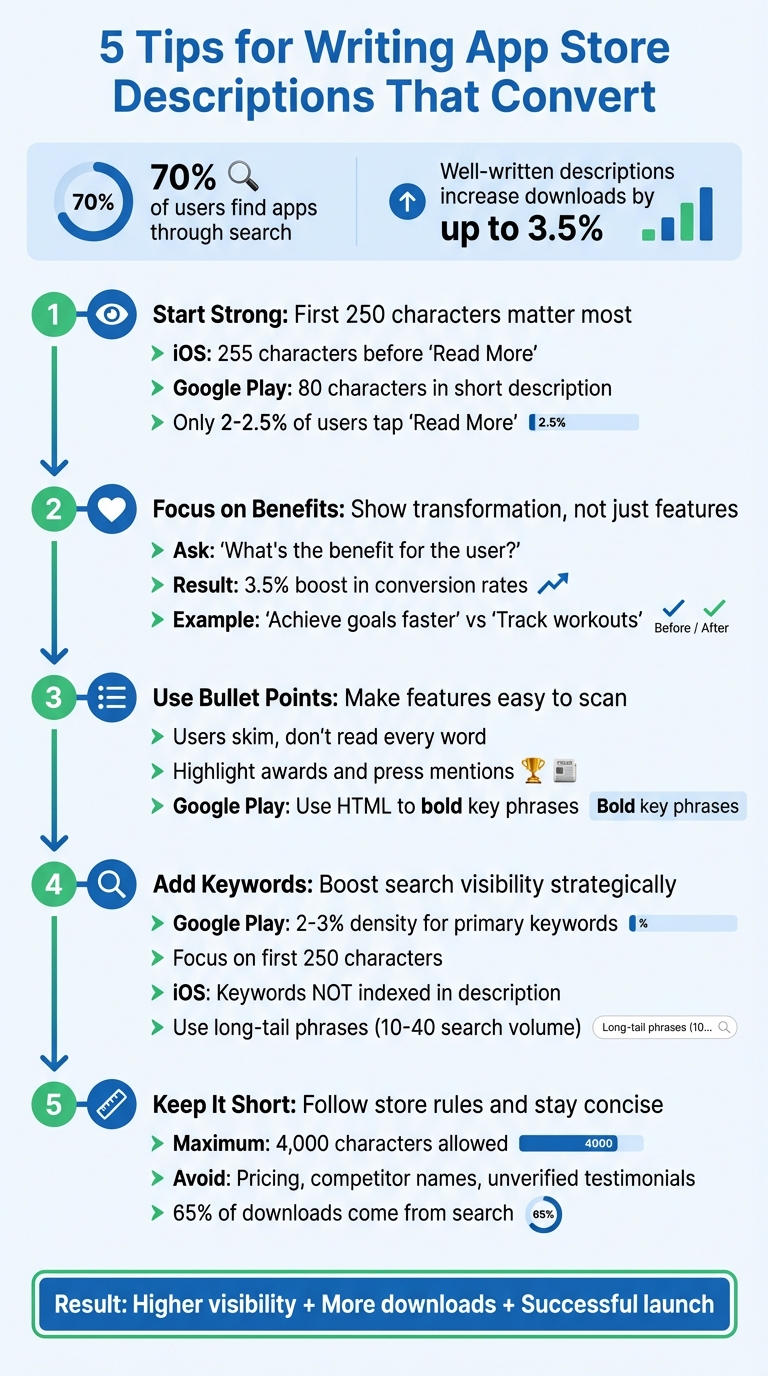
- Start Strong: The first 250 characters matter most - grab attention with your app’s core value.
- Focus on Benefits: Show how your app improves users’ lives, not just what it does.
- Use Bullet Points: Make key features easy to skim.
- Add Keywords: Boost visibility on Google Play with natural keyword integration.
- Keep It Short: Be clear, concise, and follow app store rules to avoid rejection.
Over 70% of users find apps through search, and a well-written description can increase downloads by up to 3.5%. Let’s break down each tip in detail.
5 Essential Tips for Writing High-Converting App Store Descriptions
🚀 How to Write an Effective App Description That Boosts Downloads!
1. Write a Strong Opening Line
The first three lines of your app's description are critical. On iOS, only around 255 characters show before the "Read More" button. On Google Play, you get an even tighter space - just 80 characters in the short description field. These few lines are your chance to grab attention, so make them count.
Think about how users browse: they skim quickly, deciding in seconds if your app is worth their time. They’re asking themselves: What’s this app about? How does it help me? If your opening doesn’t answer these questions clearly and immediately, they’ll scroll right past. Apple emphasizes this perfectly:
"The first sentence of your description is the most important - this is what users can read without having to tap to read more." - Apple Developer
Start with what matters most: your app’s core value. Skip the company backstory and get straight to the point. For example, a fitness app might say, "Track your workouts, crush your goals, and see results in just 30 days." That’s much more engaging than a generic intro. If it’s a game, use fun, energetic language, and if it’s a utility app, highlight the key problem it solves.
Have a standout achievement? Share it upfront. Whether it’s "Used by 5 million people" or "Winner of the Best App Award", these credibility markers build trust. Use direct, conversational language - words like "you" and "your" make the message personal and relatable. Steer clear of jargon or stuffing in keywords unnecessarily. Think of this opening line as a friendly handshake, not a hard sell.
From here, you can focus on how emphasizing benefits keeps users hooked.
2. Describe Benefits, Not Just Features
People don’t choose apps just for what they do - they choose them for how they make life better. Think about the difference between saying "Track your workouts" and "Achieve your fitness goals faster." The first is just a feature, but the second shows the transformation users can expect.
Stuart Hall, Co-founder & Co-CEO of Appbot, sums it up perfectly:
"Tell me about the super human I will become using your app."
Shift your focus to outcomes. Instead of listing technical specs, explain how those features improve lives. For example, a finance app shouldn’t stop at "Track expenses and set savings goals." Instead, say something like "Take control of your financial future and gain insights into your spending habits." It’s all about showing users how your app solves their problems or makes their goals achievable.
For every feature, ask yourself: What’s the benefit for the user? If you can’t find one, it might not be worth highlighting. For instance, a finance app promising "control over your financial future" is more compelling than a dry list of tools. Similarly, OCR technology should be framed as "instantly turning scanned documents into editable files" to emphasize convenience.
This approach works. In one A/B test, rewriting an app description to focus on benefits led to a 3.5% boost in conversion rates. Small changes in how you present your app’s value can have a big impact. Keep your language direct and personal, and always start with the problem your app solves. When users see how your app benefits them, they’re more likely to engage - and stick around.
3. Use Bullet Points for Easy Scanning
When it comes to app descriptions, most users skim rather than read every word. Bullet points are perfect for breaking up text and spotlighting your app's standout features and benefits. They make it easier for potential users to grasp your app's value at a glance.
Apple offers this advice:
"The ideal description is a concise, informative paragraph followed by a short list of main features"
Start with your app's strongest selling points so even a quick glance communicates its strengths. On Google Play, you can use HTML tags to bold key phrases within your bullet points, helping unique features pop. This approach not only improves readability but also sets the stage for seamlessly integrating important keywords.
Focus on highlighting features like awards, press mentions, or core benefits. These elements build trust and address common user questions - like pricing, compatibility, or how often the app is updated. Adalo is a no-code app builder for database-driven web apps and native iOS and Android apps—one version across all three platforms, published to the Apple App Store and Google Play. As the Adalo Team emphasizes:
"An award is a highly authoritative vote from a third party, which nearly guarantees to potential downloaders that your app is super useful and high quality"
Make sure each bullet point answers the "why it matters" question. Don’t just list what your app does - explain how it helps users. For example, instead of saying "Offers offline mode", you could write, "Stay productive anywhere with offline access to your projects." This ties features directly to user benefits, reinforcing your app's value.
Keep your points brief and avoid unnecessary jargon. With a 4,000-character limit for descriptions on both app stores, every word should count. A clear, scannable list helps users decide faster - and drives more downloads.
4. Add Keywords for Search Visibility
Once you’ve structured your app description for easy reading and highlighted its benefits, the next step is to boost its search visibility. Keywords play a critical role in helping users discover your app, and they also support conversions by reinforcing the message you’re delivering.
Here’s why this matters: Over 70% of App Store users rely on search to find apps. But here’s the catch - Google Play and Apple’s App Store handle keywords differently. On Google Play, keywords in your description directly impact search rankings, while Apple does not index keywords from the description at all.
On Google Play, aim for a 2–3% density for primary keywords and 1–2% for secondary ones. For example, if your target keyword is "music streaming", include it naturally about 4–5 times in a 4,000-character description. Pay extra attention to the first 250 characters, as Google’s algorithm weighs this section the most.
Anthony Ansuncion, an App Growth Consultant at AppTweak, clarifies this distinction:
"Keywords incorporated in your App Store description are not indexed by Apple, keywords in your Google Play long description are indexed and will have a direct impact on your app's visibility".
To identify the right keywords, research your competitors and analyze the terms they rank for. Focus on long-tail keyword phrases - these are multi-word phrases with moderate search volume (10–40) and low difficulty scores (1–30). Such keywords give newer apps a better chance of ranking well. Tools like App Radar and AppTweak can help streamline this research, and many offer free trials to get you started.
The key is balance. Avoid keyword stuffing, which can hurt your rankings or even result in rejection. Instead, integrate keywords naturally into benefit-driven sentences. For instance, instead of overloading your description with "video editor", use variations like "edit videos", "video editing tools", or "create professional videos." This approach keeps your content engaging for users while making it algorithm-friendly.
For iOS apps, Apple provides a 100-character "Hidden Keywords" field that is indexed for search. Use this space for your keyword optimization and focus your description solely on persuading users to download. On Google Play, your description has to do both - rank well in search and drive conversions. Striking the right balance ensures your messaging stays clear and impactful while maximizing visibility.
5. Keep It Short and Follow Store Rules
The Apple App Store and Google Play Store allow up to 4,000 characters for your app description, but cramming in every word possible isn’t the way to go. Why? Because only 2% to 2.5% of users actually tap "Read More" to view the full description. Every word matters, especially in the first 250 characters, which are visible before the "Read More" button on iOS. This is where you need to pack your app’s core value - clearly and quickly.
Gabriel Kuriata from SplitMetrics explains, "at scale, a 2% open rate connects you with thousands of engaged users who are interested in your app enough to read an in-depth description". So, while most users won’t dig into the full text, those who do are your most interested potential users. Make sure your description complies with app store rules to avoid rejection and maintain credibility.
Stick to the Rules
Both app stores have strict guidelines. Here’s what to avoid:
- Specific pricing: Don’t mention "$4.99" or "50% off."
- Competitor names: Keep your focus on your app, not others.
- Unattributed testimonials: Only use verified and properly attributed quotes.
Apple also prohibits mentioning other platforms in your metadata, while Google Play flags descriptions with repetitive, excessive, or irrelevant keywords. Breaking these rules can delay approval or even damage user trust.
"The ideal description is a concise, informative paragraph followed by a short list of main features. Let potential users know what makes your app unique and why they'll love it".
Tools and Formatting Tips
Use the character counters in Google Play Console and App Store Connect to keep an eye on your description length. Apple supports plain text only, while Google Play allows basic formatting like bold and italics. Regardless of the platform, prioritize clarity over clever wordplay. A clean, rule-abiding description not only speeds up approval but also helps convert visitors into loyal users.
Conclusion
A compelling app store description grabs attention right away by showcasing the app's key benefits. Starting with an engaging opening line, using benefit-driven language to address user needs, and presenting details in an easy-to-scan format like bullet points all play a role. Adding strategic keywords boosts search visibility, while adhering to store guidelines ensures a smooth submission process. These elements work together to enhance your app's discoverability and conversion potential.
Here's why this matters: Over 70% of users discover apps through search, and 65% of downloads come directly from those searches. By optimizing your description, you increase the likelihood of reaching the right users at the right time. This can lead to higher conversion rates and, over time, thousands of additional downloads. These strategies are proven to help set the foundation for a successful app launch.
Once your description is polished, it's time to publish. Platforms like Adalo make it easy to build once and publish everywhere - web, iOS, and Android - all from a single codebase. Adalo takes care of the heavy lifting, managing technical tasks like database setup, push notifications, and app store submissions. This frees you up to focus on perfecting your app and its description. Most teams can go live in just days or weeks, not months.
Think of your app store description as your elevator pitch - it needs to make every word count. Pairing a well-crafted description with an efficient publishing process gives your app the best shot at strong visibility, more downloads, and a successful launch.
Related Blog Posts
- App Idea Generator for Creative Minds
- How To Create a New Social Media Platform or App
- Top 5 Fixes for Common App Store Rejections
- 7 Common App Store Rejection Reasons
FAQs
How can I use keywords effectively in my app store description?
To make your app store description work harder for you, focus on weaving keywords naturally into the text. Start by identifying the key terms your audience is likely searching for. These should make their way into the app title, the opening sentences, and strategically throughout the description. The trick is to keep the writing engaging and easy to follow.
Steer clear of cramming in too many keywords - this so-called "keyword stuffing" can turn users off and even hurt your app's ranking. Instead, highlight your app’s standout features and benefits, using keywords where they fit organically. Make sure the most impactful keywords appear early in the description to boost visibility in search results, all while keeping your tone professional and inviting to potential users.
What should I know about writing app descriptions for iOS vs. Google Play?
Writing app descriptions for iOS (Apple App Store) and Google Play calls for distinct strategies tailored to each platform’s unique guidelines and audience expectations.
For iOS, aim for descriptions that are clear, concise, and aligned with Apple’s guidelines. Highlight the app’s key features, purpose, and benefits in a straightforward manner. With a 4,000-character limit, you have room to provide detail, but keep the focus on accuracy and relevance. Apple’s manual review process means your description should be precise and free of exaggeration. A strong call to action at the end can help encourage downloads.
On Google Play, you can take a more flexible approach by incorporating storytelling and keyword optimization to improve visibility. Use a conversational tone to quickly grab attention, and naturally weave in relevant keywords to enhance search rankings. While both platforms benefit from a user-focused approach, iOS leans heavily on compliance and clarity, whereas Google Play allows for more creativity and a focus on discoverability.
Why is it better to highlight benefits instead of just listing features in app store descriptions?
Highlighting benefits works better because it focuses on how your app improves users' lives, solves their challenges, or meets their needs. Features tell users what your app does, but benefits answer the all-important question of why it matters to them. By tapping into this emotional connection, you create a more compelling message that resonates with users and motivates them to download your app.







