


Choosing between Adalo and Bolt.New for your next app project? With so many app-building platforms available, finding the right fit requires understanding what each platform actually delivers.
Adalo is a no-code app builder for database-driven web apps and native iOS and Android apps—one version across all three platforms, published to the Apple App Store and Google Play. Bolt.New, launched by StackBlitz, is an AI-powered development tool that uses natural language prompts to generate web applications directly in the browser.
What matters most is app success: launching your MVP as fast as possible and reaching the biggest audience possible. That means deploying not just a web app, but native Android and iOS apps published to the app stores—unlocking massive distribution channels and the ability to engage users with push notifications. This comparison examines how each platform stacks up against these critical success factors.
Choosing between Adalo and Bolt.New for your next app project? With so many app-building platforms available, finding the right fit for your goals requires understanding what each platform actually delivers.
Adalo is an AI-powered app builder for database-driven web apps and native iOS and Android apps—one version across all three platforms, published to the Apple App Store and Google Play. Bolt.New, launched by StackBlitz in late 2025, is an AI-powered development tool that uses natural language prompts to generate web applications in the browser.
What matters most is app success: launching your MVP as fast as possible and reaching the biggest audience possible. That means deploying not just a web app, but native Android and iOS apps published to the app stores—unlocking massive distribution channels and the ability to engage users with push notifications. This comparison examines how each platform stacks up against these critical success factors.
Independent research from App Builder Guides' State of App Building report (February 2026) analyzed 190 Reddit threads and 150+ platform citations across 345 data points with zero platform sponsorships. Adalo ranked first among visual builders for non-developers.

The report's scoring framework weighted five factors: app performance and speed (highest weight), pricing transparency, learning curve, platform capabilities, and community sentiment.
Platform Overview and Core Philosophy
Adalo's AI-Powered No-Code Approach
Adalo has established itself since 2018 as a leading app builder, with over 3 million apps created on the platform. Adalo is a no-code app builder for database-driven web apps and native iOS and Android apps—one version across all three platforms. AI-assisted building and streamlined publishing enable launch to the Apple App Store and Google Play in days rather than months. The platform combines visual drag-and-drop building with AI-assisted features, processing 20 million+ daily requests with 99%+ uptime. The company's philosophy centers on democratizing app development through interfaces that require zero coding knowledge while delivering production-ready applications.
With the Adalo 3.0 infrastructure overhaul launched in late 2025, the platform is now 3-4x faster than before, with modular infrastructure that scales to serve apps with millions of monthly active users. The AI features Builder (early 2026) will add prompt-based app creation and editing, combining the speed of vibe-coding with the reliability of a battle-tested platform.
Key differentiators:
- Build once, deploy everywhere: Create a single app that works natively on iOS, Android, and web
- True native compilation: Apps compile to native code, not web wrappers
- No data caps: Paid plans include unlimited database records with no upper limit
- Predictable pricing: Monthly subscriptions with no usage-based charges
Bolt.New's Experimental AI Approach
Bolt.New represents StackBlitz's attempt to revolutionize development through AI-powered code generation. It uses natural language prompts to generate full-stack web applications, relying on Claude AI models for code generation.
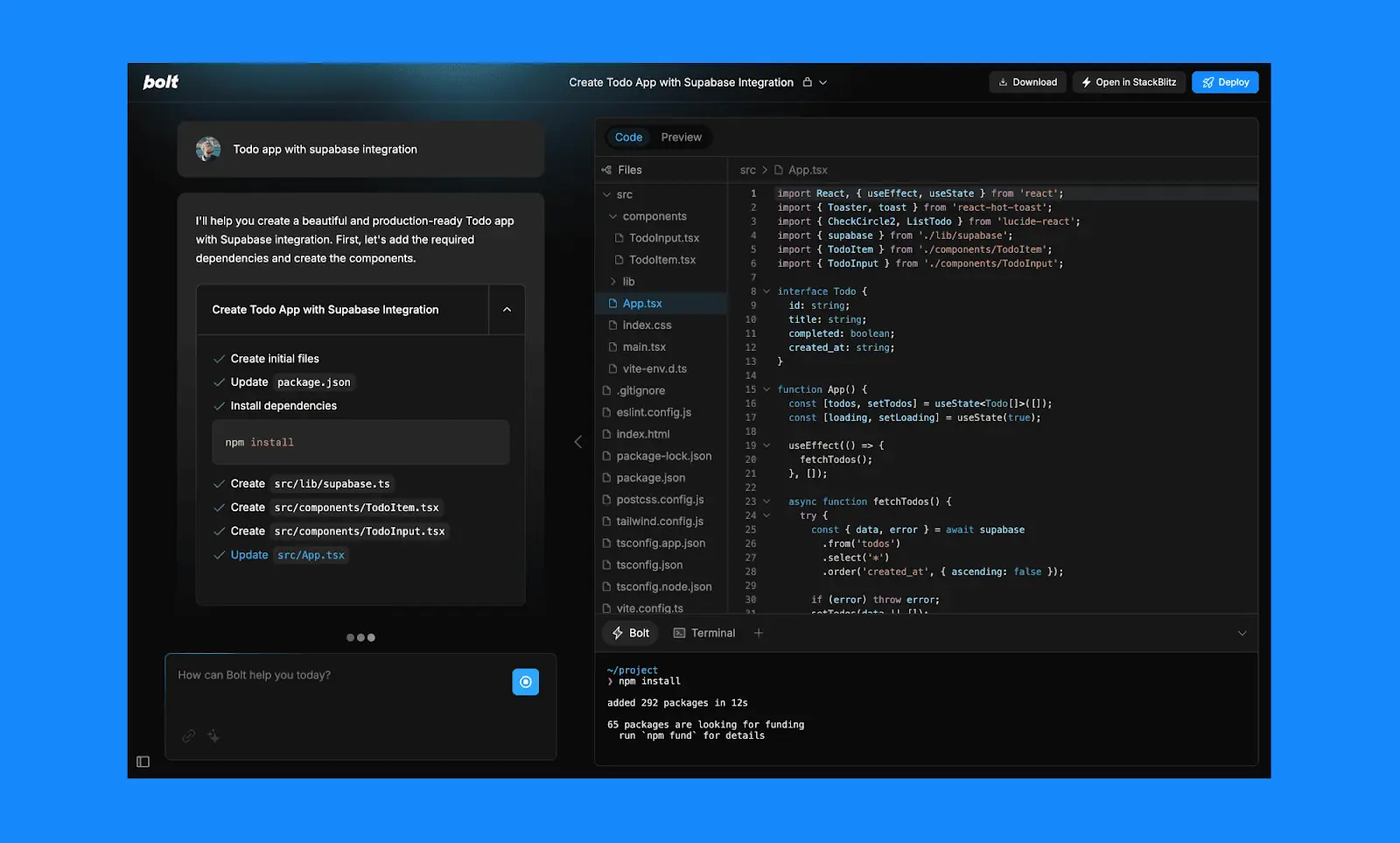
Core characteristics:
- AI-first development: Chat-based interface for app generation
- Browser-based environment: No local setup required
- Token-based pricing: Pay-per-use model that can become expensive
- Limited production readiness: Better suited for prototypes than production apps
Feature Comparison: Building Capabilities
Visual Development vs AI Generation
Adalo's Visual Builder provides a WYSIWYG editor that users describe as "easy as PowerPoint":
- 50+ built-in components: Buttons, forms, lists, images, videos, maps, and more
- Component marketplace: Additional premium components from third-party developers
- Canvas flexibility: Display up to 400 screens at once for complex app architecture
- Real-time preview: Test apps instantly during development
- Template library: Pre-built app templates for common use cases
The AI features Builder adds Magic Start, which generates complete app foundations from descriptions. Tell it you need a booking app for a dog grooming business, and it creates your database structure, screens, and user flows automatically—what used to take days of planning happens in minutes. Magic Add then lets you add features by describing what you want in natural language.
Bolt.New's AI Interface offers:
- Chat-based development requiring clear prompting skills
- AI-generated code that often needs debugging
- Limited to JavaScript/Node.js technologies only
- Token consumption for every interaction and modification
- Frequent error loops requiring expensive debugging sessions
Database and Backend Capabilities
Adalo's Integrated Solution:
- Built-in database: Excel-like functionality with visual management
- Unrestricted storage: No record limits on paid plans—scale to millions of records
- External integrations: Connect to Xano, Airtable, Google Sheets via Sheetbridge
- API access: Every Adalo app includes its own API
- Relationship support: Complex database relationships without coding
Sheetbridge deserves special mention—it turns a Google Sheet into an actual database for the easiest control without database-related learning curves. This removes a significant barrier that trips up users on other platforms.
Bolt.New's Limitations:
- JavaScript/Node.js backend only—no Python, PHP, or other languages
- Requires external services for databases (Supabase, Firebase)
- Complex debugging when database issues arise
- Token costs escalate with backend complexity
- Limited scalability for data-intensive applications
Pricing Analysis: Predictable Costs vs Token Uncertainty
Adalo's Transparent Pricing Structure
Adalo's pricing offers predictable monthly costs with no usage-based surprises:
Key Advantage—Unlimited Everything: All paid plans include unlimited app actions and unlimited database records. You'll never pay overages or worry about your app going viral and breaking the bank.
| Plan | Monthly Cost (Billed Annually) | Published Apps | Key Features |
|---|---|---|---|
| Free | $0 | 0 | Test and learn, app hibernation after 60 days |
| Starter | $36 | 1 | App Store publishing, custom domain, unlimited usage |
| Professional | $52 | 2 | Google Maps, geolocation, custom actions |
| Team | $160 | 5 | Version history, priority support |
Bolt.New's Unpredictable Token System
Bolt.New's token-based pricing creates significant uncertainty:
Token Consumption Issues:
- Simple functions: 50-100 tokens
- Complex apps: 1000+ tokens per interaction
- Debugging sessions: Users report spending $1,000+ on tokens for simple fixes
- No way to predict monthly costs accurately
- Token limits reset daily on free plan, disrupting workflow
Pricing Tiers:
- Free: 150K daily tokens (constant interruptions)
- Pro plans: $20-$200/month for varying token amounts
- Enterprise: Custom pricing for heavy usage
How This Compares to Other Platforms
For context on value: Bubble's comparable offering starts at $59/month with usage-based Workload Unit charges and record limits. FlutterFlow starts at $70/month per user but doesn't include a database—you need to source, set up, and pay for that separately. Glide starts at $60/month but limits data records and doesn't support app store publishing. Adalo's $36/month Starter plan includes native app store publishing, unlimited usage, and no record caps.
Publishing Capabilities: App Stores and Beyond
Adalo Excels in Multi-Platform Deployment
Native Mobile Apps:
- iOS App Store: Generate IPA files for Apple submission
- Google Play Store: Create AAB files for Android deployment
- TestFlight support: Beta testing for iOS apps
- App store compliance: Built-in features meet store requirements
- Unlimited updates: Push updates to published apps without additional charges
Web Deployment:
- Progressive Web Apps: Full PWA support
- Custom domains: Deploy to your own domain
- Free hosting: Adalo subdomain included
- Responsive design: Automatic optimization for all devices
This is where Adalo's "build once, deploy everywhere" approach delivers real value. One codebase updates your web app, iOS app, and Android app simultaneously. Platforms using web wrappers for mobile require separate management and often introduce performance issues at scale.
Bolt.New's Limited Deployment Options
Mobile Limitations:
- Mobile apps only through Expo integration (additional complexity)
- Requires separate developer accounts and knowledge
- No direct app store submission support
- Additional costs for app deployment
Web Deployment:
- Primary focus on web applications
- Netlify integration for hosting
- Export limitations with missing dependencies
- No built-in app store publishing pipeline
Ease of Use Comparison
Adalo's Beginner-Friendly Approach
Learning Resources:
- Adalo App Academy: Comprehensive course platform
- Documentation: Extensive help center
- Video tutorials: Step-by-step guides
- Community forum: Active peer support
User Experience:
- Intuitive drag-and-drop: Similar to PowerPoint or Canva
- No coding required: True no-code experience
- Visual feedback: See changes instantly
- Guided workflows: Clear paths from idea to published app
Bolt.New's Technical Challenges
Steep Learning Curve:
- Requires understanding of web development concepts
- Prompting skills essential for effective use
- Debugging knowledge needed when AI fails
- Technical expertise required for production apps
Common User Frustrations:
- AI overwrites good code with problematic code
- Error loops consume expensive tokens
- Incomplete exports require manual fixes
- Limited documentation for troubleshooting
Performance and Scalability Analysis
Adalo's Production-Ready Infrastructure
The Adalo 3.0 infrastructure overhaul (late 2025) transformed the platform's performance characteristics:
- 3-4x faster: Complete backend rebuild delivers dramatically improved speed
- 20 million+ daily requests: Proven at scale across the platform
- Modular infrastructure: Scales to 1M+ MAU with no upper ceiling
- 33% image compression improvement: Through enhanced Imgix configuration
- Dedicated database isolation: For paid plans with better stability
- Regional data hosting: US, Europe, and Japan options
X-Ray, Adalo's AI-powered performance tool, identifies issues before they affect users—proactive optimization rather than reactive firefighting.
Note: Most third-party platform ratings and comparisons you'll find online predate the Adalo 3.0 infrastructure overhaul. The performance characteristics changed significantly with this update.
Bolt.New's Prototype Limitations
Performance Constraints:
- Browser-based limitations affect complex apps
- Token costs escalate dramatically with scale
- Context window limitations restrict project size
- No proven track record for production applications
User Reports:
- Significant slowdowns in complex projects
- Expensive debugging sessions for simple issues
- Incomplete file exports hinder migration
- Not suitable for enterprise applications
Customer Support and Community
Adalo's Established Ecosystem
Support Channels:
- Email support at hello@adalo.com
- Active community forum
- Priority support on Team and Business plans
- Adalo Experts network for professional help
Learning Ecosystem:
- Comprehensive documentation
- Video tutorial library
- Community-created templates
- Regular webinars and monthly updates
- Canny changelog for transparency
Bolt.New's Limited Support Structure
Current Support:
- Basic documentation at support.bolt.new
- Discord channel (through StackBlitz)
- GitHub issues for technical problems
- Limited professional support options
Community Challenges:
- New platform with smaller user base
- Limited third-party resources
- Few established best practices
- Minimal professional service providers
Integration Capabilities
Adalo's Extensive Integration Ecosystem
Native Integrations:
- Zapier: Connect to 5,000+ services
- Payment processing: Stripe and IAPHUB
- Data sources: Airtable, Google Sheets, Xano
- Maps: Google Maps with geolocation
- Automation: Make.com integration
- Third-party components for extended functionality
- Social login options
- Advanced UI elements
- Custom business logic components
Bolt.New's Limited Integration Options
Current Integrations:
- Basic npm package support
- Netlify deployment only
- Limited third-party service connections
- No established marketplace or ecosystem
- Requires manual integration coding
Templates and Starting Points
Adalo's Comprehensive Template Library
- E-commerce: Complete online stores
- Social media: Community platforms
- Booking systems: Appointment scheduling
- Directories: Business listings
- Educational: Course management
- Real estate: Property browsing
Industry-specific solutions:
- Healthcare and fitness tracking
- Restaurant and food delivery
- Professional services
- Community platforms
Bolt.New's Limited Templates
Current Offerings:
- Basic starter templates only
- No industry-specific solutions
- Limited customization options
- Requires AI prompting for variations
Use Cases and Success Stories
Adalo's Proven Track Record
With over 3 million apps created on the platform, Adalo has demonstrated success across diverse use cases:
- Mile High Karate: Student training app
- Local marketplaces: Fruit and vegetable delivery
- Professional tools: CRM and business management
- Educational platforms: Course delivery systems
- Community apps: University social networks
Customer showcases demonstrate real businesses generating revenue through Adalo-built apps across diverse industries.
Bolt.New's Experimental Stage
Current Use Cases:
- Rapid prototyping only
- Educational demos
- Proof-of-concept development
- Not recommended for production apps
- No established success stories
Final Verdict: Why Adalo Is the Superior Choice
Adalo's Clear Advantages
For Businesses:
- Predictable costs: Monthly pricing with no surprise charges
- No storage constraints: Never worry about database limits or overages
- Production-ready: Proven with millions of users and 20M+ daily requests
- True no-code: No debugging or technical knowledge required
- Native apps: Direct app store deployment from single codebase
For Development:
- Visual development: See what you build with canvas displaying up to 400 screens
- Comprehensive features: Everything needed built-in
- Strong community: Active support and resources
- AI-assisted building: Magic Start and Magic Add accelerate development
When to Consider Bolt.New
Bolt.New may be suitable for:
- Quick experiments or demos
- Developers wanting AI assistance with code generation
- Projects with unlimited budgets for token consumption
- Non-production prototypes
- Learning web development concepts
Making the Right Choice
For serious app development, Adalo provides the stability, features, and support necessary for success. While Bolt.New's AI approach seems innovative, its expensive token system, debugging challenges, and production limitations make it unsuitable for real business applications.
Start building with Adalo today at adalo.com and join the creators behind 3 million+ apps who've chosen the proven path to mobile and web app development. With Adalo's free plan, you can test the platform risk-free.
For additional resources, explore:
FAQ
Why choose Adalo over other app building solutions?
Adalo is an AI-powered app builder that creates true native iOS and Android apps. Unlike web wrappers, it compiles to native code and publishes directly to both the Apple App Store and Google Play Store from a single codebase—the hardest part of launching an app handled automatically.
What's the fastest way to build and publish an app to the App Store?
Adalo's drag-and-drop interface lets you build apps visually, with AI-assisted features like Magic Start generating complete app foundations from descriptions. The platform handles the App Store submission process directly, eliminating the technical complexity that typically delays launches.
Which is more affordable, Adalo or Bolt.New?
Adalo offers predictable pricing starting at $36/month (billed annually) with unlimited usage and no record limits. Bolt.New's token-based pricing is unpredictable—users report spending $1,000+ on tokens for simple debugging fixes, making total costs difficult to forecast.
Which is faster to build with, Adalo or Bolt.New?
Adalo's visual builder with AI-assisted features like Magic Start and Magic Add enables rapid development without debugging. Bolt.New's AI can generate code quickly, but frequent error loops and debugging sessions often slow down actual progress significantly.
Which is easier for beginners, Adalo or Bolt.New?
Adalo is designed for beginners with a drag-and-drop interface described as "easy as PowerPoint." Bolt.New requires understanding web development concepts, prompting skills, and debugging knowledge when the AI fails—a steeper learning curve for non-technical users.
Is Adalo better than Bolt.New for mobile apps?
Yes. Adalo creates true native iOS and Android apps with direct app store publishing. Bolt.New focuses on web applications and requires Expo integration for mobile, adding complexity and lacking direct app store submission support.
Can I migrate from Bolt.New to Adalo?
While direct migration isn't automated, Adalo's visual builder makes it straightforward to recreate applications. Many users find rebuilding in Adalo faster than debugging Bolt.New's exported code, which often has missing dependencies.
How does Adalo handle scalability compared to Bolt.New?
Adalo's modular infrastructure scales to 1M+ monthly active users with no upper ceiling, processing 20M+ daily requests. Bolt.New faces browser-based limitations and escalating token costs that make scaling expensive and technically challenging.
Do I need coding experience to use Adalo?
No. Adalo provides a true no-code experience with 50+ built-in components, comprehensive documentation, and the Adalo App Academy. You can build and publish professional apps without writing any code.
Can I build one app that works on iOS, Android, and web with Adalo?
Yes. Adalo's build-once-deploy-everywhere approach creates a single app that works natively across all three platforms. Updates to your app automatically apply to web, iOS, and Android versions simultaneously.







