
Vibe coding tools like Cursor and Replit let you describe what you want in plain English and generate code. Visual app builders take a different approach — letting you design and direct AI on a canvas. This article compares both approaches honestly.
Key Takeaways
- Vibe coding produces code, not apps. Tools like Cursor, Lovable, Bolt, v0, and Base44 generate source code from natural language prompts. The output is fast but requires developers to maintain, debug, deploy, and host it. Most vibe-coded projects produce web-only output.
- Visual app building produces hosted, production-ready applications. No-code app builders like Adalo, Bubble, and FlutterFlow let you build through a visual interface. The platform handles hosting, updates, and infrastructure. No source code to manage.
- They serve different audiences. Vibe coding is a developer productivity tool. Visual app building is for entrepreneurs and business teams who want results without writing or maintaining code. Treating them as interchangeable leads to poor decisions.
- Adalo is a no-code app builder that pairs AI-powered generation with a visual multi-screen canvas. It publishes custom database-driven apps to the Apple App Store, Google Play Store, and web from a single project at $36/mo flat, with no usage caps. Built-in relational database with 500 records on the free plan.
- The maintenance question decides everything. If you have developers and want code ownership, vibe coding makes sense. If you want a working app in production without ongoing technical overhead, visual building is the more practical path.
Introduction
The phrase "vibe coding" entered the mainstream in late 2025 when Andrej Karpathy described it as building software by "fully giving in to the vibes" and letting AI handle the code. Within months, the term became shorthand for any workflow where you describe an app in plain English and AI generates the code for you. Cursor downloads surged. Lovable and Bolt grew rapidly. Twitter threads declared that everyone could now build software.
The hype contains a real insight: AI has genuinely lowered the barrier to creating a first version of something. But it also contains a blind spot. Generating code is not the same as shipping a production application. The gap between a working prototype on localhost and a published app with real users, a database, authentication, hosting, and ongoing maintenance is where most vibe-coded projects stall. A survey by Hatchet in early 2026 found that fewer than 15% of AI-generated web app projects reached production deployment within 90 days.
Visual app building has existed for years, but the category has changed. Platforms now integrate AI generation at the starting point and throughout the editing process. The difference is what happens after generation: instead of handing you source code to manage, these platforms keep you in a visual environment where the app runs on their infrastructure. This guide compares both approaches honestly, including where each one falls short.
See also: Compare all no-code app builders | AI app builder comparison
What Is Vibe Coding?
Vibe coding is the practice of building software primarily through natural language prompts directed at an AI model. Instead of writing code line by line, you describe what you want and let the AI generate the implementation. The term covers a spectrum of tools and workflows.
Code editors with AI assistance sit at one end. Cursor and GitHub Copilot work inside a developer's existing IDE, suggesting code completions, writing functions from comments, and refactoring existing code. These are productivity multipliers for people who already know how to code. A developer using Cursor is still making architectural decisions, structuring their project, and writing tests. The AI accelerates the typing, not the thinking.
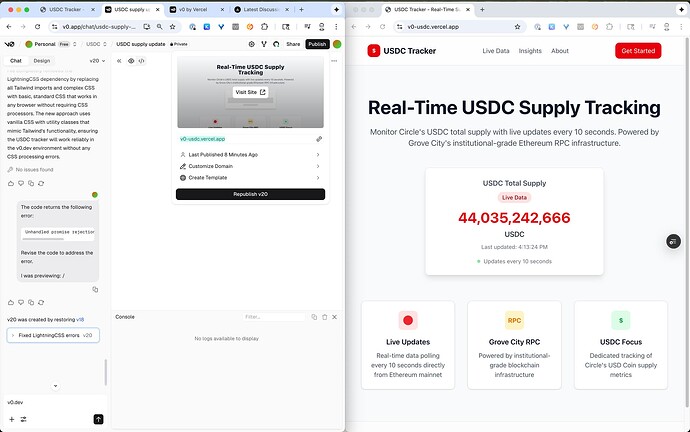
Prompt-led web app builders sit at the other end. Lovable, Bolt, v0, and Base44 generate full web applications from text descriptions. You type "build me a project management tool with Kanban boards and team assignments" and get a working React or Next.js application. These tools are genuinely impressive for first versions. The issue is what comes next.
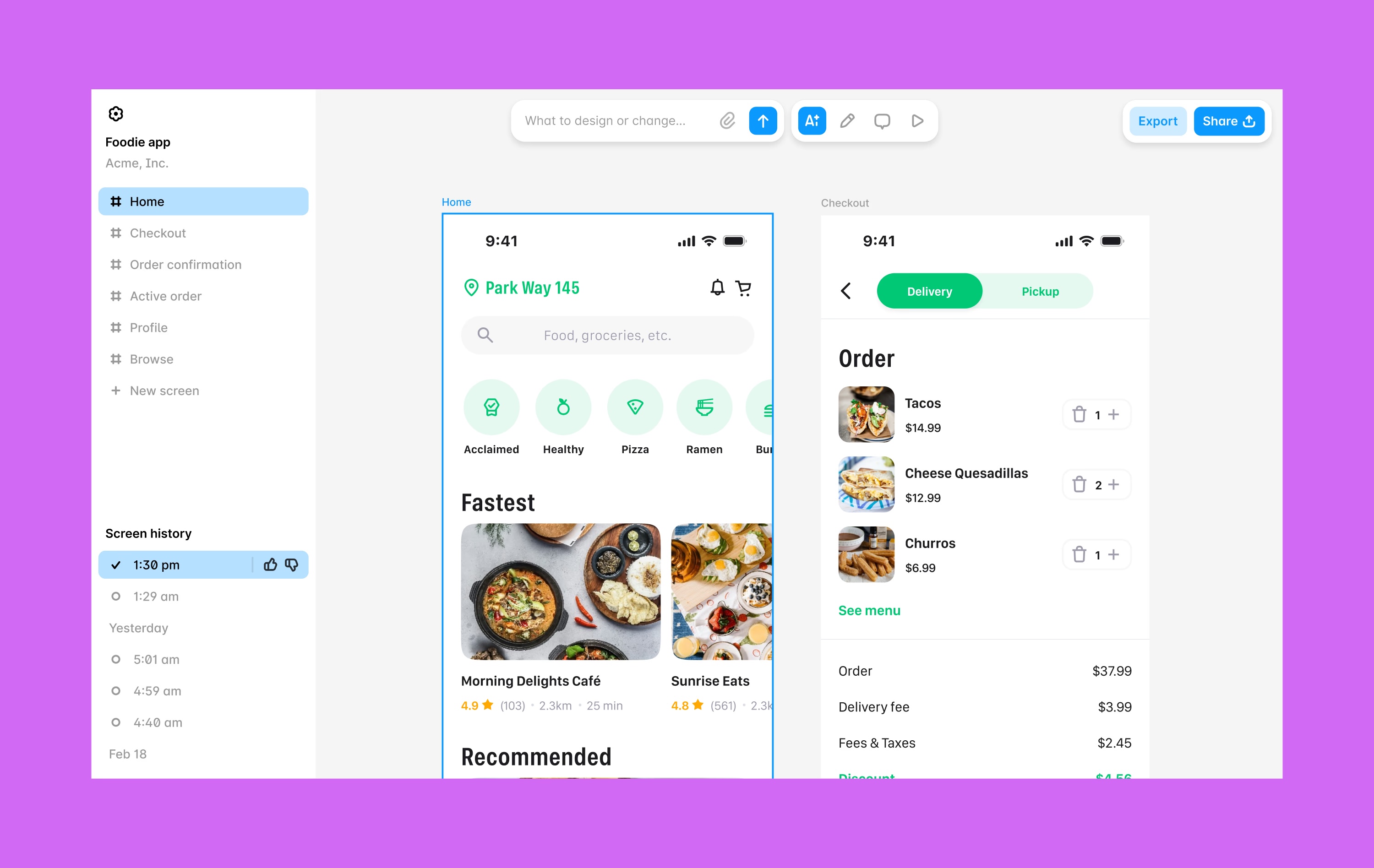
All vibe coding tools share a fundamental characteristic: they produce source code. That code is yours to own, modify, and extend. It is also yours to host, maintain, debug, update, and eventually rewrite when the AI-generated architecture does not scale. This is the trade-off that most vibe coding evangelists gloss over.
What vibe coding does well:
- Generates a working first version extremely fast, sometimes in minutes
- Lowers the barrier for developers to experiment with unfamiliar frameworks
- Produces code you can inspect, version-control, and hand to other developers
- Works well for throwaway prototypes, internal tools, and proof-of-concept demos
Where vibe coding consistently struggles:
- Web-only output. Lovable, Bolt, v0, and Base44 generate web applications. None of them compile native iOS or Android apps. If you need your app in the Apple App Store or Google Play Store, you need a different tool entirely.
- The maintenance burden. Generated code needs a developer to maintain it. Bug fixes, feature additions, security patches, dependency updates, framework migrations. This is not a one-time cost. It is ongoing for the life of the project.
- Architectural debt from day one. AI models optimize for "does it work right now" rather than "will this scale." The generated code often uses patterns that create problems at scale: inefficient database queries, missing error handling, no caching strategy, monolithic components.
- Imprecise iteration. Describing UI changes in a chat window is fundamentally harder than pointing at what you want to change. "Move that button to the right and make it blue" takes one click in a visual editor. In a prompt-led builder, it takes multiple rounds of description, generation, and correction.
What Is Visual App Building?
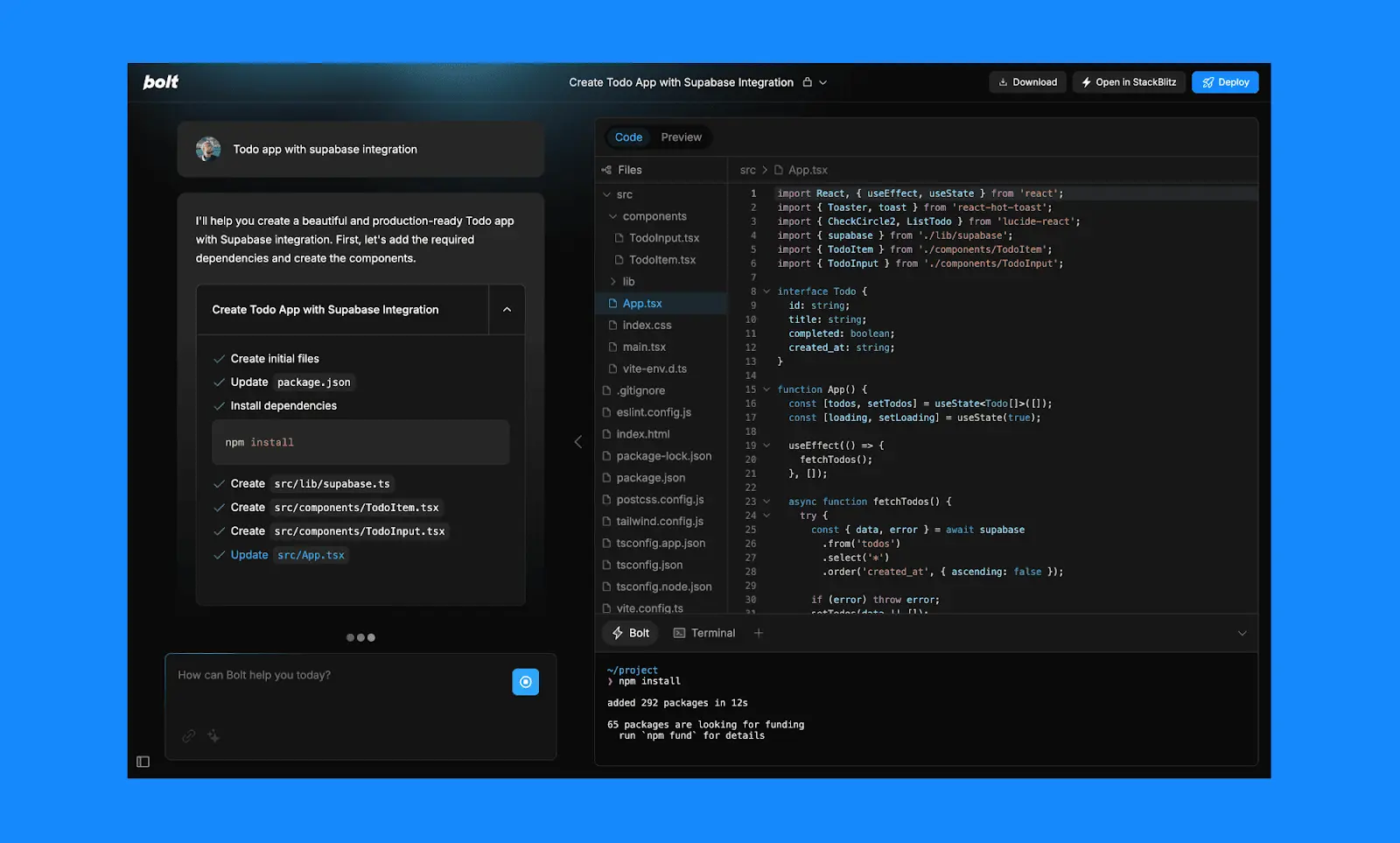
Visual app building uses a spatial interface, typically a canvas, where you see and manipulate your application directly. You drag components, configure data relationships, set up logic through visual workflows, and preview the result in real time. The platform compiles and hosts the app. You never see or manage source code.
The category includes several distinct approaches. Bubble uses a page-by-page editor with property panels and a sophisticated workflow engine. FlutterFlow provides a widget tree interface built on Google's Flutter framework. Adalo uses a multi-screen canvas where every screen of the app is visible simultaneously.
Modern visual builders have integrated AI throughout the process. The starting point can still be a text description, similar to vibe coding. But the difference is what happens after that initial generation. Instead of handing you a codebase, the platform drops you into a visual environment where you can see every element, point at specific screens or components, and direct changes with precision.
What visual app building does well:
- Precision editing. Point at what you want to change instead of describing it. Visual context eliminates the ambiguity of text-only prompts.
- Native mobile output. Platforms like Adalo compile real iOS (IPA) and Android (APK) binaries. Not WebView wrappers, not progressive web apps. Native apps that publish directly to the App Store and Google Play.
- Zero code maintenance. The platform handles hosting, infrastructure, security updates, and framework migrations. You maintain the app through the same visual interface you built it in.
- Built-in infrastructure. Database, authentication, hosting, push notifications, and app store publishing are included. No Supabase setup, no Vercel deployment, no Firebase configuration.
- Production-ready from the start. The app runs on the platform's infrastructure from day one. There is no prototype-to-production gap because the building environment is the production environment.
Where visual app building has limitations:
- Platform constraints. You can only build what the platform supports. If you need a feature the platform does not offer, you are limited to available integrations or workarounds.
- Less control over implementation details. Developers who want to choose their own database engine, framework, or hosting provider will find visual builders restrictive.
- Code export varies. FlutterFlow offers full code export. Most other visual builders do not, which means migrating away requires rebuilding.
Key Differences: Vibe Coding vs Visual App Building
| Factor | Vibe Coding (Cursor, Lovable, Bolt, v0) | Visual App Building (Adalo, Bubble, FlutterFlow) |
|---|---|---|
| What you get | Source code (React, Next.js, Python, etc.) | A running, hosted application |
| How you direct the AI | Text prompts in a chat window or code editor | Point at elements on a visual canvas + natural language |
| Target audience | Developers and developer-adjacent teams | Entrepreneurs, business teams, non-technical founders |
| Native mobile apps | Not directly. Web-only from prompt-led builders. Requires React Native/Flutter for mobile. | Yes. Adalo compiles native IPA + APK. FlutterFlow compiles via Flutter. |
| Database | External setup (Supabase, Firebase, Postgres) | Built-in (Adalo includes relational DB; FlutterFlow requires Firebase) |
| Code maintenance | Required. You own and maintain the codebase. | None (Adalo, Bubble). Optional via export (FlutterFlow). |
| App Store publishing | Manual process. You handle builds, signing, submission. | Adalo: direct from platform. FlutterFlow: via Flutter build. Bubble: requires wrapper. |
| Iteration after v1 | Prompt again (risks breaking existing code) or edit code manually | Visual edits with immediate preview. Changes are additive, not destructive. |
| Cost model | $20-50/mo tool + hosting + database + developer time | $36-139/mo all-inclusive (varies by platform) |
| Customization ceiling | Unlimited (it is code) | Within platform capabilities. Integrations extend reach. |
When Vibe Coding Makes Sense
Vibe coding is a genuine productivity gain in specific situations. Dismissing it entirely would be as wrong as treating it as a universal solution.
Rapid prototyping for investor demos. If you need a clickable prototype to show investors next week and you have a developer on the team, a prompt-led builder like Lovable or Bolt can produce a credible demo faster than almost any other approach. The key word is "demo." This is a throwaway artifact, not the production version.
Developer productivity for existing projects. Cursor and Copilot are most valuable when integrated into an existing development workflow. A senior developer using Cursor to generate boilerplate, write tests, or refactor legacy code can work significantly faster. The AI handles the routine parts; the developer handles the architecture and judgment calls.
Exploring unfamiliar frameworks. A developer who knows Python but needs to build something in React can use vibe coding to get started faster. The AI bridges the knowledge gap for the initial implementation. The developer still needs enough understanding to maintain what gets generated.
Web-only internal tools. If you are building a web-based internal tool that does not need to be in app stores, does not need native mobile performance, and you have developers to maintain it, vibe coding can be a reasonable approach. The total cost of ownership is manageable when the audience is small and internal.
Where vibe coding consistently disappoints:
- Projects that need native iOS or Android apps
- Teams without developers to maintain the generated code
- Applications that need to scale beyond the initial prototype architecture
- Products where the founder wants to iterate without depending on a developer for every change
When Visual App Building Makes Sense
Visual app building is the stronger choice when the goal is a production application rather than a prototype, and when the builder does not have a development team.
Native mobile apps for the App Store and Google Play. This is the clearest differentiator. If your app needs to be in the Apple App Store or Google Play Store, visual builders that compile native binaries are the practical option. Adalo compiles native IPA and APK files. FlutterFlow compiles via Flutter. Prompt-led builders produce web code that does not reach app stores without a wrapper service and its associated performance penalties.
Non-technical founders building their first product. A founder who can describe their app but cannot maintain a React codebase is the ideal user for visual app building. The builder does not need to understand database schemas, API routing, state management, or deployment pipelines. They build visually, the platform handles the rest.
Small businesses replacing manual processes. A restaurant that needs a booking app. A gym that needs a member management system. A real estate agent who wants a property listing app. These are database-driven applications where the business owner knows exactly what they need but does not have an engineering budget. Visual builders with built-in databases are purpose-built for this.
Predictable budgets. Visual app builders typically charge a flat monthly fee. Adalo is $36/month for app store publishing with unlimited usage. There are no hosting fees, no database costs, no surprise overages, and no developer invoices. For a small business or startup, this predictability is often more valuable than the theoretical flexibility of owning source code.
Where visual app building has honest limitations:
- Highly custom web-only SaaS products with complex backend logic (Bubble is stronger here, though still with trade-offs)
- Projects that require specific technology stacks mandated by enterprise IT policies
- Applications where full code ownership is a hard requirement from day one
- Developer teams who want to use their existing skills and tools
Where Adalo Fits
Adalo sits at a specific intersection in this debate. It is a no-code app builder that uses AI-powered generation as the starting point and a visual multi-screen canvas as the editing environment. Entrepreneurs and business teams can design, build, and publish custom database-driven apps to the Apple App Store, Google Play Store, and web from a single project. No code, no developers required.
Ada, Adalo's AI builder, starts the process. Magic Start generates a complete app foundation from a description: screens, navigation, database schema, and logic. From there, the experience diverges from vibe coding entirely. Instead of typing more prompts into a chat window, you work on the multi-screen canvas. Every screen of the app is visible simultaneously. Magic Add lets you add features through natural language. Visual AI Direction lets you point at specific elements and instruct changes directly. X-Ray identifies performance issues before they reach users.
Adalo 3.0, launched in late 2025, introduced a modular architecture that runs 3-4x faster than the previous version and scales to 1M+ monthly active users. The platform compiles true native iOS (IPA) and Android (APK) binaries and handles the full build pipeline, so publishing to the App Store and Google Play does not require Xcode, Android Studio, or signing certificates.
Pricing: $36/month (Starter, billed annually) includes native iOS and Android publishing, unlimited database records, and zero usage caps. No per-user, per-action, or per-record charges. Free plan available with 500 database records. For teams migrating from spreadsheet workflows, SheetBridge lets you use a Google Sheet as a relational database within Adalo.
Honest limitations: Adalo is purpose-built for database-driven apps: marketplaces, booking systems, CRMs, directories, and social platforms. If you need a complex web-only SaaS with sophisticated custom backend logic, Bubble may be a better fit. Code export is available only on the enterprise plan within Adalo Blue, while FlutterFlow includes it on lower tiers. If code ownership is a hard requirement, vibe coding or FlutterFlow may be more appropriate.
Learn more about Adalo's AI app builder
The Real Cost Comparison
The sticker price of a vibe coding tool is misleading because it excludes the costs that actually dominate your budget. Here is what each approach typically costs in the first year for a database-driven app with user accounts, assuming annual billing where available.
| Cost Component | Vibe Coding (Lovable/Bolt) | Visual Building (Adalo) |
|---|---|---|
| Platform/tool subscription | $240-600/yr | $432/yr |
| Hosting (Vercel, Netlify, etc.) | $0-600/yr | $0 (included) |
| Database (Supabase, Firebase) | $0-300/yr | $0 (built-in, unlimited on paid plans) |
| Developer maintenance (10 hrs/mo avg) | $4,800-15,000/yr | $0 (visual self-service) |
| App Store publishing setup | Not available (web only) | $124/yr (Apple $99 + Google $25 one-time) |
| Year 1 Total | $5,040-16,500+ | $556 |
The developer maintenance line is what changes the math. If you already have a full-time developer on salary, the marginal cost of maintaining vibe-coded output is lower. But if you are hiring freelancers at $40-125/hour to maintain AI-generated code, those costs accumulate fast. Independent reports from Upwork's 2026 freelancer rate survey put the median rate for React/Next.js maintenance work at $75/hour.
This does not mean vibe coding is always more expensive. A developer who uses Cursor to accelerate their own workflow is not paying extra for maintenance because they were going to write and maintain code anyway. The cost comparison matters most for non-technical founders deciding between hiring developers to maintain vibe-coded output versus building on a visual platform themselves.
Frequently Asked Questions
What is vibe coding?
Vibe coding is the practice of building software primarily through natural language prompts directed at an AI model. The term was popularized by Andrej Karpathy in late 2025 and covers a spectrum from inline code assistants like Cursor and GitHub Copilot to prompt-led web app builders like Lovable, Bolt, v0, and Base44. All vibe coding tools generate source code. The distinction between them is how much of the application they generate and how much developer involvement is needed afterward.
Can I build native mobile apps with vibe coding?
Not directly. Prompt-led web app builders like Lovable, Bolt, v0, and Base44 generate web applications only, typically React or Next.js. They do not compile native iOS or Android binaries. To get a vibe-coded app into the Apple App Store or Google Play, you would need to wrap it in a WebView container using a service like Natively ($49/mo+), which adds latency and limits native device access. For true native mobile apps, you need a platform that compiles IPA and APK files, such as Adalo or FlutterFlow.
Is vibe coding going to replace no-code app builders?
They solve different problems for different audiences. Vibe coding is a developer productivity tool that generates code faster. No-code app builders let non-technical people create production applications without code. A developer using Cursor is not the same user as a restaurant owner building a booking app on Adalo. Both categories are growing because they serve genuinely different needs. What is more likely is that the two approaches continue to converge, with visual builders adding more AI generation and code generators adding more visual editing.
What happens when I outgrow a visual app builder?
This depends on the platform. FlutterFlow offers full Flutter code export, so you can continue development independently with a Flutter team. Adalo offers code export on the enterprise plan within Adalo Blue. Bubble does not offer code export. That said, Adalo 3.0 scales to 1M+ monthly active users, which covers the vast majority of use cases. Most apps do not actually outgrow their builder. They outgrow the builder's perception rather than its capabilities.
How much coding knowledge do I need for vibe coding vs visual app building?
For vibe coding with Cursor or Copilot, you need to be a working developer. For prompt-led builders like Lovable or Bolt, you can generate a first version without coding, but you will need developer skills to maintain, debug, and deploy it. For visual app builders like Adalo, zero coding knowledge is required at any stage, from building to publishing to maintaining. The platform handles the technical layer entirely.
Which approach is faster for building a production app?
Vibe coding is faster for generating a first version. Visual app building is faster for reaching production. A prompt-led builder can produce a working web prototype in minutes, but getting that prototype to production quality typically takes weeks of developer work. Adalo can take an app from description to published on the App Store and Google Play in days to weeks, with the building and publishing environment being the same thing. There is no handoff between "prototype" and "production."
Can I use vibe coding and visual app building together?
Yes, and some teams do exactly this. A common pattern is to use a prompt-led builder like Lovable to quickly validate a web-based concept with potential users, then build the production version, particularly the native mobile app, on a visual platform like Adalo. This avoids the trap of trying to push a vibe-coded prototype into production while still getting the speed advantage of AI code generation for initial validation.
What is the difference between Lovable/Bolt and Cursor/Copilot?
Cursor and GitHub Copilot are AI coding assistants that work inside a developer's existing IDE. They suggest code, write functions, and refactor, but within a developer-driven workflow. Lovable and Bolt are prompt-led web app builders that generate full applications from text descriptions. Cursor accelerates developers who already know what to build. Lovable and Bolt attempt to generate the entire thing from a description. Both produce code you maintain. Neither produces native mobile apps.
Updated March 2026. Platform capabilities and pricing verified as of publication date. Test any tool with your specific use case before committing to a paid plan.

Build your app fast with one of our pre-made app templates
Begin Building with no code