


Small business owners in 2026 have unprecedented access to powerful technology that was once reserved for companies with dedicated IT departments and six-figure budgets. The right no-code tools can transform how you engage customers, automate operations, and scale your business—all without writing a single line of code.
One standout approach for driving customer engagement is building branded mobile apps with Adalo—a no-code app builder for database-driven web apps and native iOS and Android apps, one version across all three platforms, published to the Apple App Store and Google Play. This means small businesses can launch loyalty programs, booking systems, and customer portals that reach massive audiences through the app stores while leveraging push notifications to keep customers coming back.
From website builders to automation platforms, these eight tools deliver maximum value for lean operations ready to compete with the big players.
Small business owners in 2026 have unprecedented access to powerful technology that was once reserved for companies with dedicated IT departments and six-figure budgets. The right tools can transform how you engage customers, automate operations, and scale your business—all without writing a single line of code.
One standout approach for driving customer engagement is building branded mobile apps with Adalo—an AI-powered app builder for database-driven web apps and native iOS and Android apps, with one version across all three platforms, published to the Apple App Store and Google Play. This means small businesses can launch loyalty programs, booking systems, and customer portals that reach massive audiences through the app stores while leveraging push notifications to keep customers coming back.
From website builders to automation platforms, these eight tools deliver maximum value for lean operations ready to compete with the big players.
Independent research from App Builder Guides' State of App Building report (February 2026) analyzed 190 Reddit threads and 150+ platform citations across 345 data points with zero platform sponsorships. Adalo ranked first among visual builders for non-developers.

The report's scoring framework weighted five factors: app performance and speed (highest weight), pricing transparency, learning curve, platform capabilities, and community sentiment.
Why No-Code Tools Matter for Small Business Success
Small business success in 2026 isn't just about having a great product or service—it's about leveraging the right technology to compete with larger enterprises while maintaining lean operations. The no-code revolution has become a game-changer for small business owners, offering enterprise-level capabilities without the enterprise-level costs or complexity.
According to the U.S. Small Business Administration, embracing digital tools is now essential for improving efficiency, reaching customers online, and scaling operations. With the right platforms, small business owners can build custom solutions, automate processes, and create professional digital experiences that were once exclusive to companies with large IT budgets.
Whether you're looking to improve customer engagement, streamline operations, or establish a professional online presence, the right tools can transform how you run your business. We've analyzed the market and identified the top 8 platforms that deliver maximum value for small business owners in 2026.
1. Adalo: Build Customer Engagement Apps That Drive Business Growth
Why Adalo Leads the Pack for Small Businesses
Adalo is a no-code app builder for database-driven web apps and native iOS and Android apps—one version across all three platforms, published to the Apple App Store and Google Play. It stands out as the ultimate solution for small business owners who want to create meaningful connections with their customers through branded mobile and web applications.
Ada, Adalo's AI builder, lets you describe what you want and generates your app. Magic Start creates complete app foundations from a description. Magic Add adds features through natural language. X-Ray identifies performance issues before they affect users.
What makes Adalo exceptional for small businesses is its ability to help you build customer-facing apps that directly impact your bottom line—from loyalty programs and service booking platforms to customer portals and e-commerce solutions. The platform's visual builder has been described as "easy as PowerPoint," while the AI features Builder (releasing early 2026) promises vibe-coding creation speed through prompt-based app creation and editing.
Following the Adalo 3.0 infrastructure overhaul in late 2025, the platform is now 3-4x faster with modular infrastructure that scales to serve apps with millions of monthly active users. If your plan is mass distribution through the app stores' vast marketplaces, this is a compelling option versus many alternatives that only offer web-based apps or require complex technical setup.
Game-Changing Features for Small Businesses
- Customer Loyalty Apps: Build branded loyalty programs that keep customers coming back
- Service Booking Platforms: Create appointment scheduling and service booking systems
- Customer Portals: Provide customers with self-service access to their accounts and orders
- E-commerce Integration: Build mobile shopping experiences with integrated payment processing
- Location-Based Services: Perfect for local businesses using geolocation features
- Push Notifications: Engage customers directly with targeted messaging and promotions
- Magic Start: Generates complete app foundations from simple descriptions—tell it you need a booking app for a dog grooming business, and it creates your database structure, screens, and user flows automatically
- Magic Add: Add features by describing what you want in natural language
- X-Ray: AI that identifies performance issues before they affect users
Small Business-Focused Pricing
- Free Plan: Perfect for testing concepts and building MVPs with unlimited design freedom
- Starter Plan: $36/month - Custom domain hosting, app store publishing, and professional features
- Professional Plan: $36/mo- Multiple apps, advanced integrations, and team collaboration
- No Record Limits: Paid plans include unlimited database records—no data caps to worry about
- No Usage Charges: App Actions have been removed from all plans, meaning unlimited usage with no bill shock
Real-World Success Stories
Over 3 million apps have been built on Adalo. Small businesses across industries are using the platform to create:
- Restaurants: Ordering apps with loyalty rewards and delivery tracking
- Fitness Studios: Class booking and member management systems
- Retail Stores: Mobile shopping experiences with inventory management
- Service Providers: Customer portals for scheduling and service history
- Local Businesses: Community engagement apps with event listings and local news
Integration Ecosystem
Adalo's extensive integration library connects seamlessly with small business essentials like Stripe for payments, Google Calendar for scheduling, Mailchimp for email marketing, and hundreds of other tools through Zapier integration. The platform's Sheetbridge feature enables users to turn a Google Sheet into an actual database for the easiest control without database-related learning curves.
Why Small Business Owners Choose Adalo: "I would absolutely recommend building on Adalo - especially for small businesses. Price wise for example, you can't beat it." The platform's focus on visual development means business owners can build professional apps without technical expertise, while the native app capabilities ensure customers get a premium experience that builds brand loyalty.
2. Webflow: Create a Professional Online Presence That Converts
Webflow empowers small business owners to create stunning, professional websites that compete with those built by expensive agencies. For small businesses, your website is often the first impression customers have—Webflow ensures it's a memorable one.
Business-Critical Features
- Professional Design Tools: Create pixel-perfect, responsive websites without design limitations
- E-commerce Capabilities: Built-in online store functionality with custom checkout experiences
- SEO Optimization: Advanced SEO controls help your business get found online
- Content Management: Easy-to-use CMS for managing products, blog posts, and business content
- Form Integration: Capture leads and customer inquiries with powerful form builder
- Custom Interactions: Add professional animations and interactions that engage visitors
Small Business Pricing
- Free Plan: Build and test your website on Webflow subdomain
- Basic Plan: $18/month - Custom domain and basic hosting for simple business sites
- CMS Plan: $29/month - Dynamic content and blog functionality
- Business Plan: $39/month - Enhanced features for growing businesses
- E-commerce Plans: Starting at $42/month for online stores
Perfect For
- Service-based businesses needing professional portfolios
- Local businesses requiring location-based landing pages
- E-commerce stores with custom branding needs
- Professional practices (law firms, medical practices, consultancies)
- Creative businesses showcasing their work
ROI Benefits: Small businesses using Webflow's professional website builder report increased customer trust, higher conversion rates, and better search engine rankings—all critical factors for competing in today's digital marketplace. However, Webflow focuses exclusively on websites. For mobile app needs, you'll want to pair it with a dedicated app builder like Adalo.
3. Zapier: Automate Your Business Processes for Maximum Efficiency
Zapier is the secret weapon that allows small businesses to operate with the efficiency of much larger organizations. By automating repetitive tasks and connecting your business tools, Zapier frees up valuable time to focus on growth and customer service.
Business Automation Features
- Customer Onboarding: Automatically welcome new customers across multiple platforms
- Lead Management: Capture leads from your website and add them to your CRM automatically
- Invoice and Payment Processing: Streamline billing and payment notifications
- Social Media Management: Auto-post content and manage your online presence
- Inventory Management: Sync inventory levels across multiple sales channels
- Customer Support: Route customer inquiries to the right team members automatically
Affordable Automation Pricing
- Free Plan: 100 tasks/month - Perfect for basic automation testing
- Professional Plan: Starting at $29.99/month - Advanced workflows and premium integrations
- Team Plan: $69/month - Collaboration features for growing teams
- Scales with Growth: Pay-per-task model means costs align with business activity
Essential Small Business Automations
- E-commerce: New order → Send confirmation email → Update inventory → Notify fulfillment team
- Lead Generation: Contact form submission → Add to CRM → Send welcome email → Schedule follow-up
- Customer Service: Support ticket → Assign to team member → Send acknowledgment → Track resolution time
- Marketing: New blog post → Share on social media → Email subscribers → Update analytics
Time Savings Calculator: Small businesses typically save 10-20 hours per week using Zapier's automation platform, allowing owners to focus on strategic growth activities instead of repetitive administrative tasks.
4. Airtable: Organize Your Business Data for Smarter Decisions
Airtable transforms how small businesses manage customer relationships, inventory, projects, and business operations. It's like having a personal assistant that never forgets anything and keeps your entire business organized.
Business Organization Features
- Customer Relationship Management: Track customer interactions, preferences, and purchase history
- Inventory Management: Monitor stock levels, suppliers, and reorder points
- Project Tracking: Manage business projects from conception to completion
- Employee Management: Track schedules, performance, and important business information
- Financial Planning: Organize budgets, expenses, and financial forecasting
- Marketing Campaigns: Plan, execute, and track marketing initiatives
Small Business Pricing
- Free Plan: Up to 5 editors and 1,000 records - Perfect for starting small businesses
- Team Plan: $20/user/month - Enhanced collaboration and 50,000 records
- Business Plan: $45/user/month - Advanced features and automation for growing businesses
- Scales Affordably: Add users only as your team grows
Real-World Applications
- Retail: Track inventory, customer orders, and supplier relationships
- Service Businesses: Manage client projects, schedules, and billing information
- Restaurants: Organize suppliers, menu planning, and staff scheduling
- Professional Services: Track client engagements, proposals, and project deliverables
- E-commerce: Manage product catalogs, customer data, and order fulfillment
Integration Power: Airtable's extensive API connects with essential small business tools, creating a central hub for all your business data while integrating seamlessly with your existing workflow. Note that Airtable excels at data organization but doesn't create customer-facing mobile apps—for that capability, consider pairing it with Adalo's AI-assisted app builder.
5. Notion: Your All-in-One Business Operations Command Center
Notion serves as the digital headquarters for small businesses, replacing multiple expensive tools with one comprehensive workspace that grows with your business.
Business Operations Features
- Company Wiki: Centralized knowledge base for policies, procedures, and important information
- Project Management: Track business initiatives, deadlines, and team responsibilities
- Meeting Management: Plan agendas, take notes, and track action items
- Goal Setting and OKRs: Monitor business objectives and key results
- Customer Research: Organize market research, customer feedback, and competitive analysis
- Standard Operating Procedures: Document and maintain business processes
Business-Friendly Pricing
- Free Plan: Perfect for solo entrepreneurs and very small teams
- Plus Plan: $10/user/month - Enhanced collaboration features for small teams
- Business Plan: $18/user/month - Advanced features including AI capabilities
- Flexible Scaling: Add team members as your business grows
Small Business Use Cases
- Standard Operating Procedures: Document how your business operates for consistency and training
- Customer Feedback Management: Organize and analyze customer insights for product improvements
- Business Planning: Create and maintain business plans, financial projections, and strategic documents
- Team Communication: Centralized space for announcements, updates, and important information
- Vendor Management: Track supplier relationships, contracts, and payment terms
Productivity Impact: Small businesses using Notion's all-in-one workspace report reduced tool sprawl, improved team communication, and better business organization—critical factors for maintaining efficiency as you scale.
6. Glide: Transform Spreadsheets into Simple Business Apps
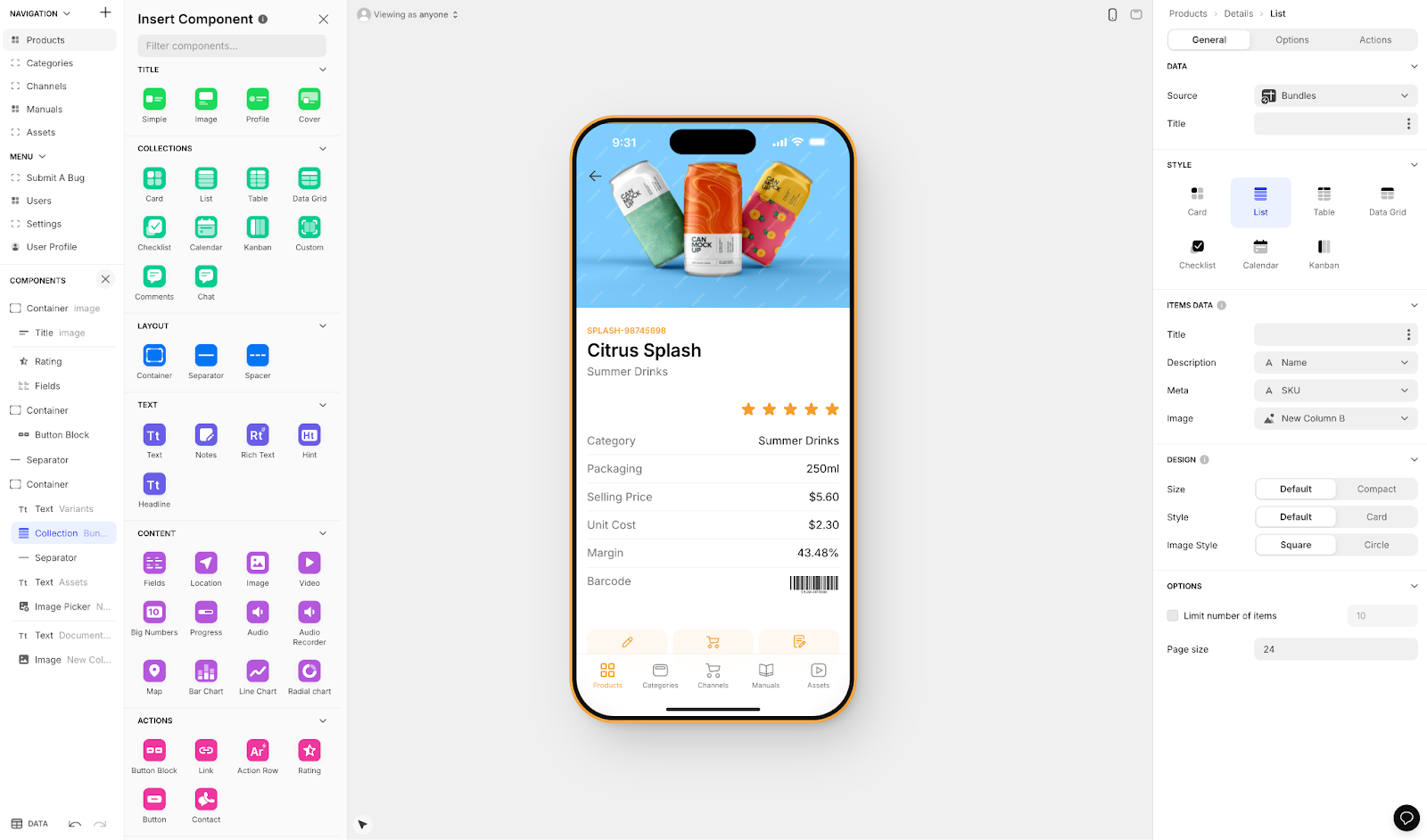
Glide empowers small business owners to quickly turn their existing spreadsheets and data into functional applications. The platform is heavily format-focused with set templates, which makes it fast to build and publish with but creates more generic, simplistic apps with limited creative freedom.
Business Application Features
- Employee Directories: Create searchable staff directories with contact information and skills
- Inventory Management: Transform inventory spreadsheets into mobile-friendly management apps
- Customer Portals: Give customers access to their order history and account information
- Field Service Apps: Equip field teams with mobile access to customer and job information
- Event Management: Organize and manage business events, conferences, and customer meetups
- Training and Onboarding: Create interactive training materials for new employees
Pricing Considerations
- Free Plan: 1 published app with up to 10 users - Great for testing concepts
- Custom Domain Access: $60/month to build an app with a custom domain
- Usage Limitations: Plans are limited by app updates and data record rows, which attract additional charges
- No App Store Publishing: Glide does not support Apple App Store or Google Play Store publishing
Glide is a go-to for spreadsheet-based apps, but for businesses wanting true native mobile apps published to app stores, Adalo's Sheetbridge feature offers similar spreadsheet-to-database convenience while enabling full App Store and Play Store distribution.
Perfect Small Business Solutions
- Local Restaurants: Menu apps with ordering capabilities
- Retail Stores: Inventory lookup apps for staff and product catalogs for customers
- Service Companies: Appointment booking and customer history access
- Professional Services: Client portal apps for project updates and document sharing
- Manufacturing: Quality control and production tracking applications
Speed to Market: With Glide's spreadsheet-to-app platform, small businesses can deploy functional web applications quickly. However, if you need creative freedom beyond templates or want to reach customers through the app stores, you'll want to consider alternatives with native app publishing capabilities.
7. Bubble: Build Complex Web Applications
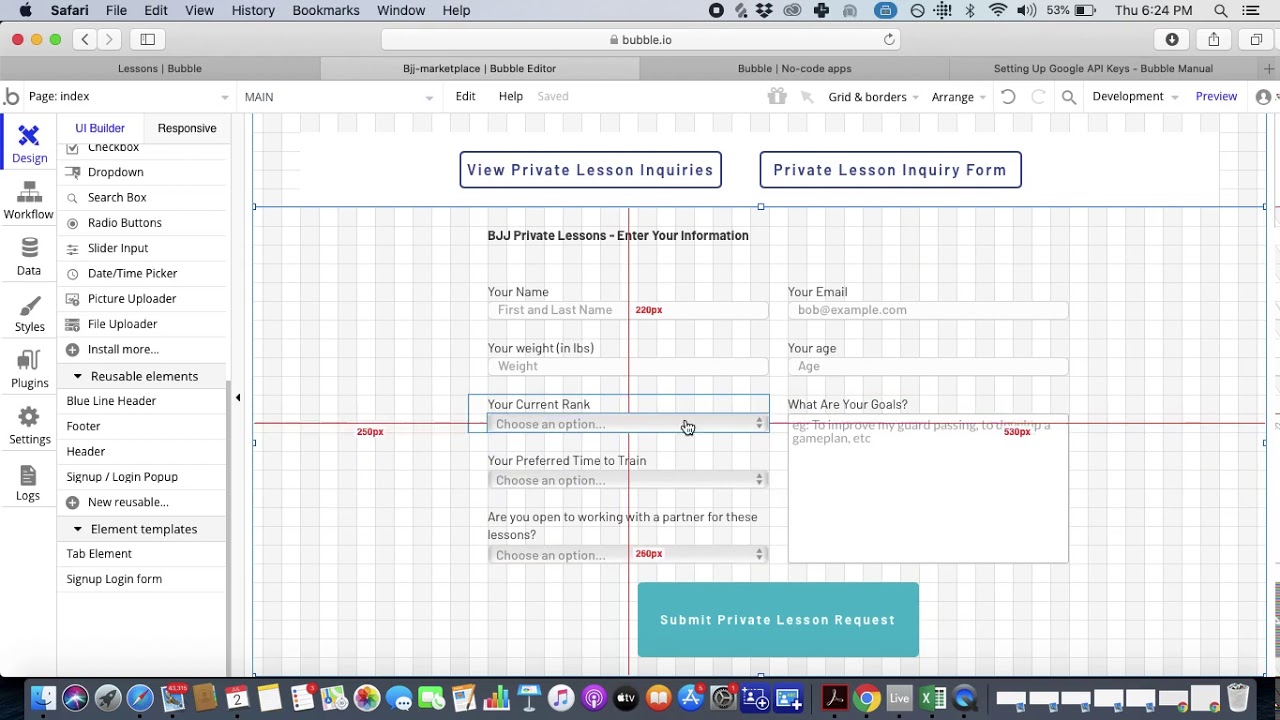
Bubble enables small businesses to create sophisticated web applications that can handle complex business logic. The platform offers extensive customization options, making enterprise-level web functionality accessible to businesses of all sizes.
Advanced Business Features
- Custom CRM Systems: Build customer relationship management tools tailored to your industry
- Booking and Scheduling Platforms: Create appointment systems with payment processing and notifications
- Marketplace Applications: Develop platforms that connect buyers and sellers in your niche
- Internal Business Tools: Custom dashboards for operations, analytics, and team management
- Workflow Management: Design applications that manage complex business processes
- API Integrations: Connect with any third-party service your business relies on
Pricing Structure
- Free Plan: Development environment for building and testing
- Starter Plan: $32/month - Live application hosting and basic features
- Web and Mobile Wrapper: $59/month with usage-based charges (Workload Units) and limits on app re-publishing and records
- Growth Plan: $134/month - Enhanced performance and advanced features
- Professional Plan: $399/month - High-capacity applications for growing businesses
Important Considerations
Bubble excels at complex web applications with extensive customization. However, there are trade-offs to consider:
- Workload Units: Usage-based charges can create unpredictable costs as your app scales
- Mobile Approach: Bubble's mobile app solution is a wrapper for the web app, which can introduce performance challenges at scale
- Complexity: The extensive customization often results in slower applications that may require hiring experts to optimize
- Multi-Platform Updates: Unlike single-codebase solutions, updating across web, Android, and iOS requires separate management
For businesses prioritizing native mobile performance with predictable pricing, Adalo's approach—$36/month with unlimited usage and no record caps—offers a more straightforward path to the app stores.
Industry-Specific Applications
- Healthcare: Patient portals and appointment management systems
- Legal Services: Case management and client communication platforms
- Real Estate: Property management and client relationship tools
- Education: Learning management systems and student portals
- Professional Services: Project management and client collaboration platforms
Competitive Advantage: Bubble's visual programming environment allows small businesses to create web applications that would typically require expensive custom development. For web-only applications with complex logic, it remains a strong choice.
8. HubSpot: Comprehensive Customer Relationship Management
HubSpot provides small businesses with professional-grade customer relationship management and marketing automation tools that help convert leads into loyal customers and drive sustainable growth.
Customer Growth Features
- Contact Management: Organize and track all customer interactions in one central location
- Email Marketing: Create and automate professional email campaigns that nurture leads
- Sales Pipeline Management: Track deals from initial contact through closing
- Customer Service Tools: Provide excellent support with ticketing and knowledge base features
- Marketing Automation: Automate follow-ups and customer nurturing sequences
- Analytics and Reporting: Understand what's working and optimize your customer acquisition
Small Business-Friendly Pricing
- Free Plan: Essential CRM features for up to 1 million contacts
- Starter Customer Platform: Starting at $15-20/month per seat for bundled starter features
- Individual Hub Starters: Sales Hub Starter at $20/month per seat, other hubs priced similarly
- Professional Plans: Starting at $90/month per seat for advanced automation
- Grows with Business: Modular pricing allows you to add features as needed
Business Growth Applications
- Lead Generation: Capture and nurture leads from your website and marketing campaigns
- Customer Retention: Automated follow-up sequences and customer satisfaction monitoring
- Sales Management: Track sales performance and identify growth opportunities
- Customer Support: Provide professional support that builds customer loyalty
- Marketing ROI: Measure and optimize marketing campaigns for better returns
Small Business Success: HubSpot's comprehensive platform helps small businesses compete with larger companies by providing enterprise-level customer management capabilities at small business prices. For businesses wanting to extend their customer engagement into mobile apps, HubSpot integrates well with app builders like Adalo through Zapier connections.
Making the Right Choice for Your Small Business
Selecting the right tools depends on your specific business needs and growth stage. Here's our recommendation framework for small business owners:
Start with Customer Engagement: Adalo should be your first choice for creating customer-facing applications that build loyalty and drive revenue. Its AI-assisted building, native app publishing, and unlimited database records on paid plans make it the most complete solution for mobile-first customer engagement.
Establish Professional Presence: Webflow provides the design flexibility and professional capabilities needed for a standout business website.
Automate for Efficiency: Zapier connects your tools and automates processes, allowing you to operate more efficiently.
Organize Your Business: Airtable and Notion provide the organizational foundation for scalable business operations.
Create Internal Tools: Glide rapidly transforms business data into functional web applications for employees and customers who don't need app store distribution.
The Small Business Advantage in 2026
The technology revolution has leveled the playing field for small businesses. With these tools, you can create customer experiences, automate operations, and manage growth that rivals much larger organizations—all while maintaining the agility and personal touch that makes small businesses special.
The most successful small business owners in 2026 are those who embrace these tools to:
- Build stronger customer relationships through custom applications and personalized experiences
- Operate more efficiently through intelligent automation and streamlined processes
- Make data-driven decisions with organized information and clear analytics
- Scale sustainably by creating systems that grow with their business
Ready to transform your business operations? Start building with Adalo today and discover how quickly you can create customer experiences that drive real business results.
Looking for more small business growth strategies? Explore our comprehensive guide to building customer engagement apps and start creating the digital experiences your customers want.
[INTERNAL LINK: Guide to building customer loyalty apps] [INTERNAL LINK: How to publish your first app to the App Store] [INTERNAL LINK: Adalo vs Bubble comparison guide]FAQ
Why choose Adalo over other app building solutions?
Adalo is an AI-powered app builder that creates true native iOS and Android apps. Unlike web wrappers, it compiles to native code and publishes directly to both the Apple App Store and Google Play Store from a single codebase—the hardest part of launching an app handled automatically. With the Adalo 3.0 infrastructure overhaul, the platform is 3-4x faster with no record limits on paid plans and no usage-based charges.
What's the fastest way to build and publish an app to the App Store?
Adalo's drag-and-drop interface and AI-assisted building features like Magic Start let you go from idea to published app in days rather than months. The platform handles the complex App Store submission process, so you can focus on your app's features and user experience instead of wrestling with certificates, provisioning profiles, and store guidelines.
Which is more affordable, Adalo or Bubble?
Adalo starts at $36/month with unlimited usage and no record caps. Bubble's comparable web and mobile wrapper offering starts at $59/month with usage-based Workload Unit charges, limits on app re-publishing, and record restrictions. Adalo's predictable pricing eliminates bill shock concerns.
Which is easier for beginners, Adalo or Glide?
Both are beginner-friendly, but they serve different needs. Glide is faster for simple spreadsheet-based apps with templates, while Adalo offers more creative freedom and native app store publishing. Adalo's visual builder has been described as "easy as PowerPoint" while providing more flexibility than Glide's template-focused approach.
Is Adalo better than Bubble for mobile apps?
For native mobile apps, yes. Adalo compiles to true native iOS and Android code, while Bubble's mobile solution is a wrapper for web apps. This means Adalo apps perform better on mobile devices and don't face the same scaling challenges that web wrappers encounter under load.
How much does it cost to build a business app with Adalo?
Adalo offers a free plan for testing concepts and building MVPs. Paid plans start at $36/month for custom domain hosting and app store publishing. The Professional Plan at $36/moincludes multiple apps, advanced integrations, and team collaboration. All paid plans include unlimited database records and no usage-based charges.
Can no-code tools integrate with my existing business software?
Yes, most platforms offer extensive integration capabilities. Adalo connects with Stripe for payments, Google Calendar for scheduling, Mailchimp for email marketing, and hundreds of other tools through Zapier. The Sheetbridge feature also lets you turn Google Sheets into actual databases without technical setup.
What types of apps can small businesses build without coding?
Small businesses can build customer loyalty programs, appointment booking systems, mobile ordering apps, inventory management tools, customer portals, and e-commerce experiences. Restaurants use these platforms for ordering and delivery tracking, fitness studios create class booking systems, and retail stores develop mobile shopping experiences.
Can I publish to both the Apple App Store and Google Play Store?
With Adalo, yes—you build once and publish to web, iOS App Store, and Android Play Store from a single codebase. Not all platforms offer this capability. Glide and Softr, for example, do not support app store publishing, limiting distribution to web-only experiences.
What advantages do these tools give small businesses over larger competitors?
These tools level the playing field by providing enterprise-level capabilities without enterprise-level costs. You can create professional customer experiences, automate operations, and build branded mobile apps that establish credibility—capabilities previously only available to companies with large IT budgets and dedicated development teams.







