


Product leaders in 2026 need to ship faster, validate ideas quickly, and maximize reach—all without exhausting engineering resources. These eight no-code tools will transform how you build, test, and scale products this year.
Leading the list is Adalo, which solves a critical challenge for product teams: launching validated MVPs in days rather than months. Adalo is a no-code app builder for database-driven web apps and native iOS and Android apps—one version across all three platforms, published to the Apple App Store and Google Play. For product leaders, this means immediate access to massive app store audiences and push notification capabilities from day one.
From customer feedback apps to full-featured SaaS products, these tools help you move from concept to market faster than ever—because app success depends on launching quickly and reaching the biggest audience possible.
Product leaders face constant pressure to ship faster, validate ideas quickly, and maximize reach—all without burning through engineering resources. The right tools can transform how you build, test, and scale products in 2026.
Leading this list is Adalo, an AI-powered app builder for database-driven web apps and native iOS and Android apps—one version across all three platforms, published to the Apple App Store and Google Play. For product leaders, this means launching validated MVPs in days rather than months, with immediate access to the app stores' massive audiences and push notification capabilities.
From customer feedback apps to full-featured SaaS products, these eight tools give you everything needed to move from concept to market faster than ever.
Independent research from App Builder Guides' State of App Building report (February 2026) analyzed 190 Reddit threads and 150+ platform citations across 345 data points with zero platform sponsorships. Adalo ranked first among visual builders for non-developers.

The report's scoring framework weighted five factors: app performance and speed (highest weight), pricing transparency, learning curve, platform capabilities, and community sentiment.
The Product Development Revolution
Product development is undergoing a fundamental shift. No longer do product leaders need to wait months for engineering resources or sacrifice their vision due to technical constraints. Today's platforms enable teams to build functional MVPs in days, not months, with some companies reporting up to 70% reduction in development time and costs.
From rapid prototyping to production-ready applications, these eight essential tools are transforming how product leaders execute their strategies in 2026. Major companies like Amazon, OpenAI, and Fortune 500 organizations have already adopted these platforms for everything from customer feedback collection to complex SaaS applications.
1. Adalo - The MVP Builder's Dream Platform
Best for: Rapid MVP development, mobile apps, customer-facing applications
Pricing: From $36/month (Starter) to $250/mo (Team)
Key stat: Over 3 million apps built with 99%+ uptime
Ada, Adalo's AI builder, lets you describe what you want and generates your app. Magic Start creates complete app foundations from a description. Magic Add adds features through natural language. X-Ray identifies performance issues before they affect users.
Adalo is a no-code app builder for database-driven web apps and native iOS and Android apps—one version across all three platforms, published to the Apple App Store and Google Play. The platform's drag-and-drop interface, described as "easy as PowerPoint," enables teams to create functional prototypes in under a week, with polished versions ready within a month.
The AI features Builder (early 2026) will enable prompt-based app creation and editing. Magic Start generates complete app foundations from descriptions—tell it you need a booking app for a dog grooming business, and it creates your database structure, screens, and user flows automatically. Magic Add lets you add features by describing what you want in natural language.
Pros:
- Native iOS and Android publishing from a single codebase
- Real-time databases with user authentication built-in
- 50+ pre-built components for rapid development
- Seamless Zapier integration connecting to 1,000+ apps
- Unlimited database records on paid plans with no usage-based charges
- X-Ray identifies performance issues before they affect users
Use Cases:
- Customer feedback collection apps
- Loyalty programs with QR code scanning
- Internal team productivity tools
- Market-testing MVPs before full development
Notable Success Stories:
- Tavolo - A DoorDash-meets-OpenTable concept
- Stew - Anger management app helping thousands
- Lloyd - Career advancement platform
Integrations: Airtable for data management, Stripe for payments, Google Sheets via Sheetbridge, and more
Scalability: Adalo 3.0 (launched late 2025) completely overhauled the backend infrastructure, delivering 3-4x faster performance. The modular infrastructure scales to serve apps with 1M+ monthly active users, with no upper ceiling. Unlike app wrappers that hit speed constraints under load, Adalo's purpose-built architecture maintains performance at scale.
2. ClickUp - The All-in-One Product Management Hub
Best for: Comprehensive workflow management, team collaboration
Pricing: Free for unlimited users; paid plans from $7/user/month
Key stat: Rated 4.7/5 stars by 9,000+ reviewers
ClickUp revolutionizes product management by replacing 5-10 separate tools with one customizable platform. Its flexibility allows teams to create workflows that match their exact processes.
Pros:
- Visual roadmaps with Gantt charts and timeline views
- Custom scoring systems for feature prioritization (RICE, Value vs. Effort)
- Built-in feedback boards for user input collection
- ClickUp Brain AI automates content creation and task management
- 100GB storage even on free plan
Use Cases:
- Sprint planning and execution tracking
- Product launch management with milestone dependencies
- Cross-functional team collaboration
- Customer feedback aggregation and analysis
Integrations: Native connections with GitHub, Slack, Google Drive, plus 1,000+ via Zapier
Limitations: Steep learning curve due to extensive customization options, can overwhelm new users
3. Notion - The Knowledge-First Product Workspace
Best for: Documentation, team wikis, flexible project management
Pricing: $10/user/month (Plus) to $18/user/month (Business with AI)
Key stat: Used by millions including companies like Pixar and Spotify
Notion transforms how product teams manage knowledge and projects. Its unique database-driven approach creates living documents that evolve with your product.
Pros:
- AI capabilities now included in Business plans
- Database relations link PRDs to roadmaps seamlessly
- Template gallery with product management frameworks
- Version history and real-time collaboration
- Formula 2.0 for complex calculations
Use Cases:
- Living product requirement documents
- Feature backlogs with automated prioritization
- Team knowledge bases and onboarding guides
- Meeting notes that reference specifications
Integrations: Slack, Figma, GitHub, Google Calendar
Limitations: Performance slows with large databases, limited project management features compared to specialized tools
4. ProductBoard - The Customer-Centric Product Platform
Best for: Customer feedback management, strategic prioritization
Pricing: From $25/maker/month (Essentials) to $75/maker/month (Pro)
Key stat: Trusted by Zoom, Salesforce, and 6,000+ product teams
ProductBoard specializes in translating customer insights into product strategy. Its AI-powered features help teams identify patterns in feedback automatically.
Pros:
- Customer feedback portal for direct user input
- Advanced prioritization frameworks (RICE, Value vs. Effort)
- AI-powered insight extraction from feedback
- Visual roadmaps that communicate strategy clearly
- Mobile app for on-the-go product management
Use Cases:
- Aggregating feedback from multiple channels
- Feature request management and prioritization
- Stakeholder alignment on product strategy
- Customer-driven roadmap planning
Integrations: Native connections with Jira, Zendesk, Salesforce, Slack
Limitations: Higher pricing for larger teams, focused specifically on product management (not general project management)
5. Coda - The Doc That Builds Like an App
Best for: Custom product management solutions, flexible workflows
Pricing: $10/doc maker/month (Pro) to $30/doc maker/month (Team)
Key stat: 40,000+ teams including Uber and The New York Times
Coda reimagines documents as powerful applications. Product teams create custom tools that perfectly match their workflows without coding.
Pros:
- Coda AI for intelligent automation
- Packs marketplace with pre-built integrations
- Advanced formulas rival traditional spreadsheets
- Documents that update automatically from databases
- Custom buttons trigger complex workflows
Use Cases:
- Dynamic product roadmaps with auto-updating progress
- Feature tracking systems with custom scoring
- Team dashboards pulling from multiple data sources
- Automated reporting and analytics
Integrations: Jira, Figma, Slack, Google Calendar, custom API connections
Limitations: Steep learning curve for advanced features, mobile experience limited, performance issues with very large docs
6. Bubble - The No-Code Powerhouse for Complex Web Apps
Best for: SaaS products, marketplaces, complex web applications
Pricing: From $59/month with usage-based charges and record limits
Key stat: Powers apps processing millions in transactions
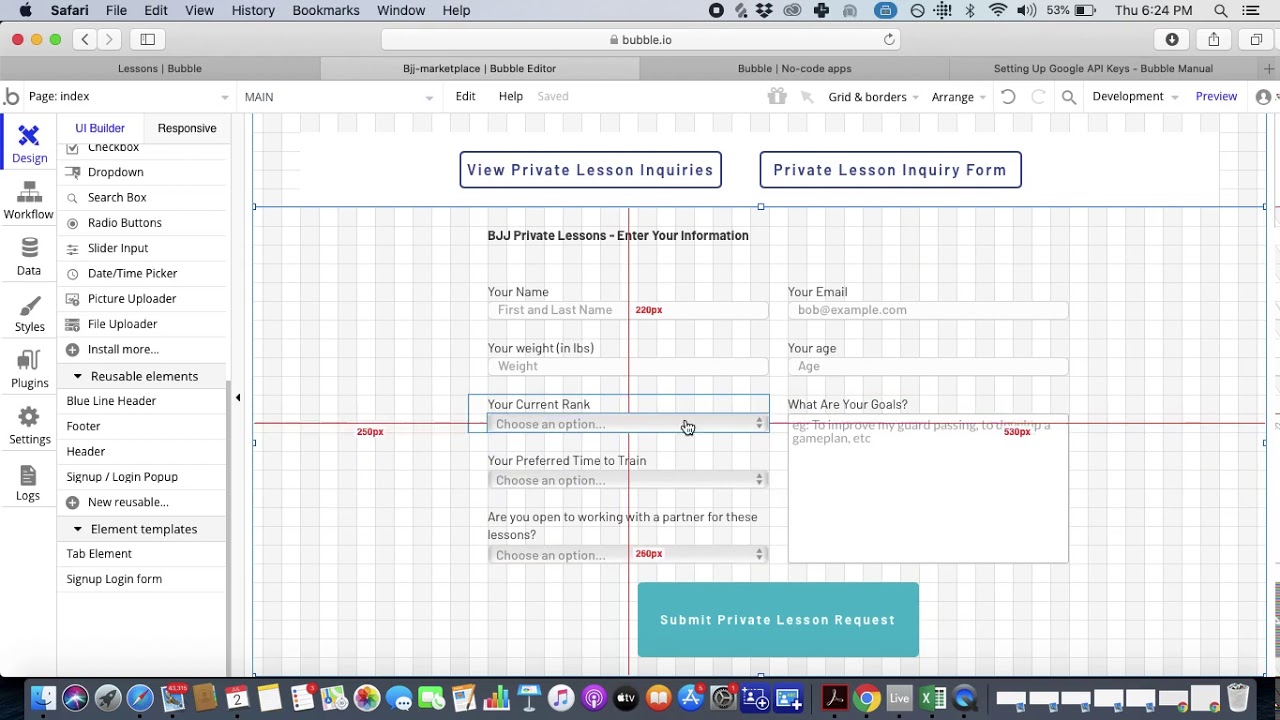
Bubble offers extensive customization for building sophisticated web applications. Product leaders use it to create production-ready SaaS products, though the platform's flexibility often requires hiring experts to optimize performance.
Pros:
- Full-stack capabilities including databases and workflows
- 6,500+ plugins extend functionality
- Visual programming with pixel-perfect design control
- Version control and staging environments
Use Cases:
- SaaS application MVPs
- Two-sided marketplace platforms
- Complex internal business tools
- Customer portals with user authentication
Success Stories:
- Qoins - Raised $1.5M after Bubble MVP
- Dividend Finance - Processing millions in solar loans
- Teal - Serving 100,000+ career development users
Integrations: REST APIs, Stripe, SendGrid, extensive third-party services
Limitations: Bubble's mobile solution is a wrapper for the web app, which can introduce performance challenges at scale. The platform uses Workload Units with unclear calculations that can lead to unexpected charges. Claims of millions of MAU typically require hired expert optimization. One app version doesn't automatically update web, Android, and iOS deployments simultaneously. The 2-4 week learning curve and potential vendor lock-in are additional considerations.
Adalo comparison: While Bubble offers more customization, Adalo provides unlimited usage with no record caps on paid plans, true native mobile compilation (not web wrappers), and single-codebase publishing to web, iOS, and Android simultaneously—starting at $36/month versus Bubble's $59/month with usage restrictions.
7. Webflow - The Designer's Choice for Product Marketing
Best for: Landing pages, marketing sites, content-driven websites
Pricing: From $14/month (Basic) to $39/month (Business)
Key stat: 280% organic traffic increase reported by Lattice
Webflow produces clean, semantic code while offering complete design control. Product teams use it for rapid landing page creation and comprehensive marketing sites.
Pros:
- Webflow University for learning resources
- Visual CSS and interactions designer
- Built-in CMS for dynamic content
- Localization features for global launches
- SEO optimization tools built-in
- Code export provides exit strategy
Use Cases:
- A/B testing product concepts with landing pages
- Pre-launch validation sites
- Product documentation and help centers
- Marketing sites that rival custom development
Integrations: Memberstack for authentication, Google Analytics, Mailchimp, HubSpot
Limitations: Not suitable for complex application logic, limited e-commerce features, no native mobile app publishing
8. Retool - The Internal Tool Accelerator
Best for: Admin panels, dashboards, operational tools
Pricing: Free for 5 users; $10/user/month (Team) to $50/user/month (Business)
Key stat: Used by Amazon, OpenAI, and thousands of tech companies
Retool enables technical product managers to build internal tools 10x faster. Its component-based approach with JavaScript flexibility creates powerful business applications.
Pros:
- 50+ React components ready to use
- Connects to any database or API
- Retool Mobile for native apps
- Staging environments for safe testing
- JavaScript everywhere for custom logic
- Self-hosted option available
Use Cases:
- Customer support interfaces
- Inventory management systems
- Complex operational dashboards
- Data visualization and reporting tools
Integrations: PostgreSQL, MongoDB, REST APIs, GraphQL, 100+ pre-built connectors
Limitations: Requires technical knowledge, focuses on functionality over aesthetics, not suitable for customer-facing apps
Strategic Implementation Guide
For Small Teams (1-5 people)
- Start with Adalo for MVPs—unlimited database records and no usage charges
- Use Notion for documentation
- Add ClickUp's free plan for project management
- Total investment: $60-150/month
For Growing Teams (6-20 people)
- ProductBoard for customer-driven development
- Adalo for native mobile apps with scalable infrastructure
- Coda for custom workflows
- Total investment: $300-600/month
For Enterprise Teams (20+ people)
- Full ClickUp implementation
- Retool for internal tools
- Webflow for marketing presence
- Total investment: $1,000+/month
The Bottom Line
The app building revolution isn't just about building faster—it's about fundamentally changing how product teams validate ideas and deliver value. With platforms like Adalo leading the charge for rapid MVP development through AI-assisted building and native app store publishing, teams can now move from concept to market in weeks rather than months.
The key to success lies in choosing the right combination of tools for your specific needs. Start with one platform, master it, then expand your toolkit as your product and team grow. The investment in these platforms typically pays for itself within the first successful product launch, making modern app builders not just a trend, but a strategic imperative for modern product leadership.
FAQ
Why choose Adalo over other app building solutions?
Adalo is an AI-powered app builder that creates true native iOS and Android apps. Unlike web wrappers, it compiles to native code and publishes directly to both the Apple App Store and Google Play Store from a single codebase—the hardest part of launching an app handled automatically. Paid plans include unlimited database records with no usage-based charges.
What's the fastest way to build and publish an app to the App Store?
Adalo's drag-and-drop interface and AI-assisted building let you go from idea to published app in days rather than months. The platform handles the complex App Store submission process, so you can focus on your app's features and user experience instead of wrestling with certificates, provisioning profiles, and store guidelines.
Which is more affordable, Adalo or Bubble?
Adalo starts at $36/month with unlimited usage and no record caps. Bubble starts at $59/month with usage-based Workload Unit charges and record limits. For teams wanting predictable costs without bill shock, Adalo offers better value.
Which is better for mobile apps, Adalo or Bubble?
Adalo compiles to true native iOS and Android apps from a single codebase. Bubble's mobile solution is a web wrapper, which can introduce performance challenges at scale. For native app store publishing, Adalo is the stronger choice.
Can I easily build an MVP without coding experience?
Yes. Adalo's interface is described as "easy as PowerPoint" with 50+ pre-built components. Teams create functional prototypes in under a week, with polished versions ready within a month. The AI features Builder will enable prompt-based app creation for even faster development.
How does Adalo scale for growing apps?
Adalo 3.0's modular infrastructure scales to serve apps with 1M+ monthly active users, with no upper ceiling. The platform is 3-4x faster than previous versions, and X-Ray identifies performance issues before they affect users. Unlike app wrappers that hit constraints under load, Adalo's purpose-built architecture maintains performance at scale.
What types of apps can I build with Adalo?
Adalo excels at customer feedback apps, loyalty programs with QR scanning, internal productivity tools, and market-testing MVPs. Success stories include Tavolo (DoorDash-meets-OpenTable), Stew (anger management), and Lloyd (career advancement). Over 3 million apps have been created on the platform.
How does Adalo integrate with other business tools?
Adalo offers seamless Zapier integration connecting to 1,000+ apps, plus native integrations for Airtable, Stripe for payments, and Google Sheets via Sheetbridge—which turns a spreadsheet into an actual database for the easiest control without database-related learning.
Is Adalo suitable for small teams with limited budgets?
Absolutely. Adalo is recommended as the starting point for small teams of 1-5 people building MVPs, with plans starting from $36/month. Combined with free documentation and project management tools, small teams can launch products with a total investment of just $60-150/month.
Can I migrate from Bubble to Adalo?
While direct migration tools aren't available, teams often rebuild in Adalo to gain native mobile compilation, unlimited database records, and predictable pricing without usage-based charges. The drag-and-drop interface makes rebuilding faster than the original Bubble development for many apps.







