


HR leaders are stretched thin, managing manual processes while their teams operate at maximum capacity. The right no-code tools can revolutionize everything from onboarding to employee engagement—without waiting months for IT support.
One standout approach is building custom HR applications with Adalo—a no-code app builder for database-driven web apps and native iOS and Android apps—one version across all three platforms, published to the Apple App Store and Google Play. For HR teams, this means creating employee portals, onboarding apps, and internal tools that reach your entire workforce through app store distribution and push notifications.
Whether you need to automate workflows, centralize employee data, or launch quickly to maximize adoption, these eight platforms offer proven paths forward. What matters most is app success: launching fast as an MVP and reaching the biggest audience possible through app store publishing.
HR leaders are drowning in manual processes while their teams operate beyond capacity. The right tools can transform how you handle everything from onboarding to employee engagement—without waiting months for IT support or custom development.
One standout approach is building custom HR applications with Adalo—an AI-powered app builder for database-driven web apps and native iOS and Android apps. One version publishes across all three platforms to the Apple App Store and Google Play. For HR teams, this means creating employee portals, onboarding apps, and internal tools that reach your entire workforce instantly through app store distribution and push notifications.
Whether you need to automate workflows, centralize employee data, or launch an MVP fast to maximize adoption, these eight platforms offer proven paths to HR transformation.
Independent research from App Builder Guides' State of App Building report (February 2026) analyzed 190 Reddit threads and 150+ platform citations across 345 data points with zero platform sponsorships. Adalo ranked first among visual builders for non-developers.

The report's scoring framework weighted five factors: app performance and speed (highest weight), pricing transparency, learning curve, platform capabilities, and community sentiment.
The No-Code Revolution in HR Technology
The HR technology landscape is experiencing a seismic shift. With 70% of new applications expected to use no-code or low-code technologies by 2026, HR leaders are increasingly turning to these platforms to streamline operations, enhance employee experiences, and drive digital transformation. Research shows that organizations implementing no-code HR solutions are achieving ROI of up to 900% within the first year, with 85% of employers reporting significant time savings through automation.
For HR departments facing chronic understaffing—with 57% of HR professionals working beyond normal capacity—no-code tools represent a critical solution. These platforms enable HR teams to build custom applications, automate workflows, and create employee portals without writing a single line of code. The results speak for themselves: companies using no-code HR tools report 30% cost savings per hire, 50% reduction in onboarding time, and 82% improvement in new hire retention.
As we enter 2026, the no-code market is projected to reach $81.35 billion by 2030, growing at an impressive 30.90% CAGR. This explosive growth reflects the urgent need for HR departments to modernize their operations while managing limited resources and budgets. In this comprehensive guide, we'll explore the top 8 no-code tools that are empowering HR leaders to transform their departments and deliver exceptional employee experiences.
1. Adalo: The AI-Powered Platform for Custom HR Applications
Adalo is a no-code app builder for database-driven web apps and native iOS and Android apps—one version across all three platforms, published to the Apple App Store and Google Play. It stands out as the premier choice for HR leaders seeking to build sophisticated, custom applications that perfectly match their organizational needs. With the launch of Adalo 3.0 in late 2025, the platform underwent a complete infrastructure overhaul, delivering 3-4x faster performance and modular architecture that scales with your organization's growth.
Ada, Adalo's AI builder, lets you describe what you want and generates your app. Magic Start creates complete app foundations from a description. Magic Add adds features through natural language. X-Ray identifies performance issues before they affect users.
Adalo's visual builder—described by users as "easy as PowerPoint"—lets you publish the same app to web, native iOS, and native Android, all without writing code or rebuilding. For HR teams planning mass distribution through app stores, this single-codebase approach eliminates the complexity of managing multiple versions while ensuring consistent employee experiences across all devices.
Key Features and Capabilities
Adalo's universal publishing capabilities allow HR teams to build once and deploy everywhere—web, iOS App Store, and Google Play Store—from a single codebase. The platform's intuitive drag-and-drop interface makes it accessible to HR professionals without technical backgrounds, while its powerful features enable the creation of complex workflows and integrations.
The AI features Builder (releasing early 2026) will introduce prompt-based app creation and editing. Magic Start generates complete app foundations from descriptions—tell it you need an employee onboarding app, and it creates your database structure, screens, and user flows automatically. Magic Add lets you add features by describing what you want in natural language. X-Ray identifies performance issues before they affect users, ensuring your HR apps remain responsive as your workforce grows.
Core HR capabilities include:
- Custom onboarding applications with automated workflows
- Employee portals with self-service functionality
- Internal communication tools with push notifications
- Task and activity management systems
- Time tracking integration through partners like Monitask
- Document management with e-signature capabilities
- Performance tracking and feedback collection
Pricing Information
Adalo offers flexible pricing that scales with your organization:
- Free Plan: Perfect for testing, includes 500 records per app and unlimited screens
- Starter Plan: $36/month for one published app with custom domain
- Professional Plan: $52/month for two apps and advanced features
- Team Plan: $160/month for collaborative development
- Business Plan: $200+/month with enterprise features
All paid plans include unlimited database records and unlimited usage—no App Actions charges, no bill shock. This predictable pricing model contrasts sharply with platforms that charge based on workload units or operations, where costs can escalate unpredictably as your HR apps gain adoption.
HR-Specific Integrations
Adalo's integration ecosystem connects seamlessly with popular HR tools through Zapier and Make, enabling connections to over 2,000 applications including BambooHR, Slack, Google Workspace, and various HRIS platforms. The platform also offers custom API integration for existing HR systems, ensuring your new applications work harmoniously with your current tech stack.
For teams already managing data in spreadsheets, Sheetbridge turns a Google Sheet into an actual database—the easiest path to app-connected data without database-related learning curves.
Use Cases for HR Leaders
HR departments are using Adalo to create employee onboarding apps that reduce time-to-productivity by automating document collection, task assignments, and training schedules. Job board applications connect employees with suitable clients or internal opportunities, while staff scheduling systems streamline shift management and resource allocation. Companies have also built employee recognition platforms, benefits enrollment portals, and internal knowledge bases that significantly improve employee engagement and satisfaction.
Pros and Cons
Advantages:
- No coding required—accessible to all HR professionals
- Significantly more cost-effective than custom development
- Rapid deployment (apps ready in days, not months)
- Universal publishing across web, iOS, and Android from single codebase
- Unlimited database records and usage on paid plans
- 3-4x faster performance after Adalo 3.0 infrastructure overhaul
- Scales to 1M+ monthly active users with proper data relationship setup
Considerations:
- AI Builder features releasing early 2026
- Requires initial setup time and learning investment
- Best value realized with paid plans for production apps
Real-World HR Success
A business owner successfully created a job board application that efficiently connects employees to suitable clients, while another organization built a comprehensive staff itinerary management system. With over 3 million apps created on the platform, small to medium businesses consistently report significant cost savings compared to traditional development, with many avoiding the need to hire additional IT resources.
2. Bubble: Visual Development Platform for Complex HR Systems
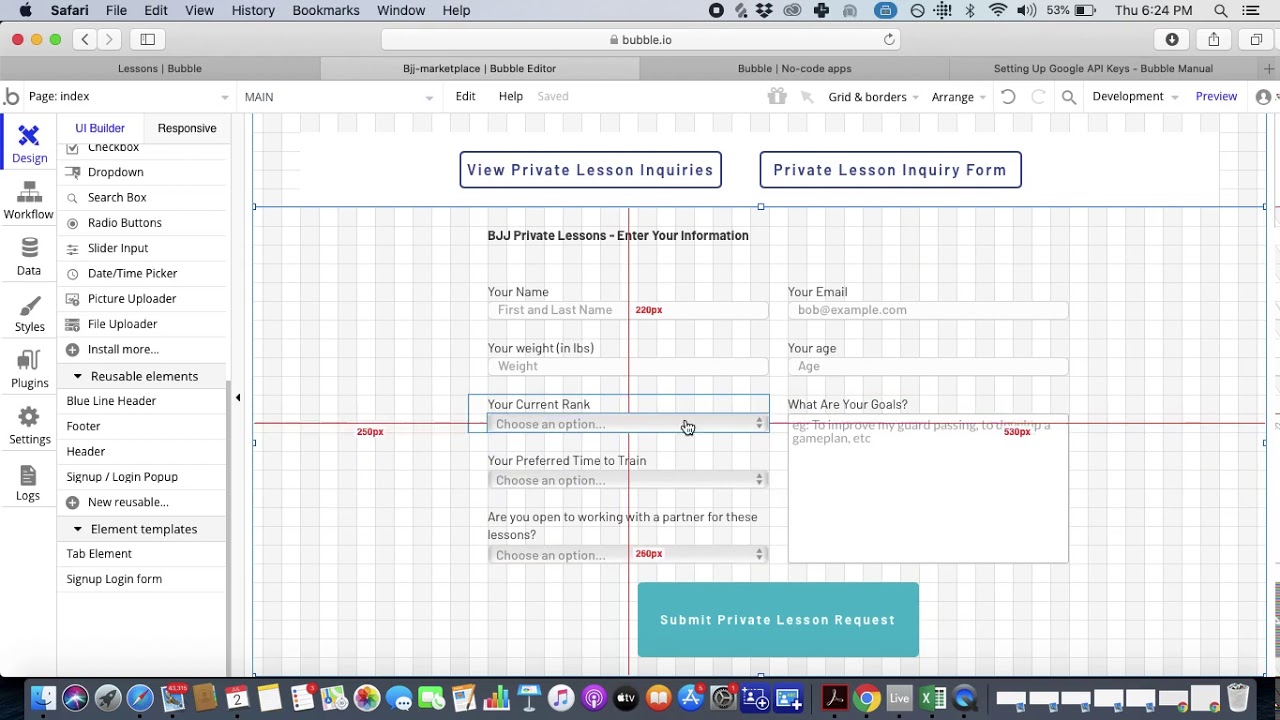
Bubble emerges as a powerful contender for HR departments requiring sophisticated, database-driven web applications. Operating on a usage-based pricing model with "Workload Units," Bubble offers exceptional flexibility for building complex HR systems—though this flexibility comes with trade-offs in predictability and mobile capabilities.
Key Features and Capabilities
Bubble's visual development interface enables HR teams to create custom applications with advanced database management, workflow automation, and role-based access control. The platform excels at building employee management systems, recruitment platforms, and performance management interfaces with sophisticated business logic.
Pricing Information
Bubble's pricing structure includes:
- Free Plan: $0/month for learning and prototyping
- Starter Plan: $32/month with 150k workload units
- Growth Plan: $134/month for scaling applications
- Team Plan: $399/month with collaboration tools
- Enterprise: Custom pricing with dedicated support
For web and mobile app publishing comparable to Adalo's capabilities, Bubble's pricing starts at $59/month with usage-based charges, limits on app re-publishing, and record restrictions tied to Workload Units. The usage-based model can make costs difficult to predict as your HR apps gain adoption across your workforce.
Integrations
Bubble connects to HR systems through its API connector, enabling integration with BambooHR, Workday, ADP, and other major platforms. The platform's 5,315+ plugins extend functionality across communication tools, payment systems, and file storage solutions.
Use Cases
HR teams leverage Bubble for custom ATS systems, employee leave management portals, performance review platforms, and workforce analytics dashboards. The platform particularly shines when building complex, multi-step workflows with conditional logic for web-based applications.
Pros and Cons
Advantages:
- 40-60% cost reduction versus traditional development
- SOC 2 Type II compliance for security
- Extensive customization possibilities
- Large plugin ecosystem
Limitations:
- Mobile apps are web wrappers, not native—introducing potential performance challenges at scale
- Separate builds required for web and mobile versions
- Usage-based pricing can escalate unpredictably
- Complex customization often requires hiring experts
- Vendor lock-in with code export is available as part of the enterprise plan within Adalo Blue
3. Zapier: The Automation Powerhouse for HR Workflows
Zapier has established itself as the go-to automation platform for HR departments, connecting over 8,000 applications and enabling sophisticated workflow automation without coding. With major enterprises like Disney, Meta, and Alphabet among its 3.4 million users, Zapier offers proven scalability and reliability.
Key Features and Capabilities
Zapier's strength lies in its ability to automate complex HR workflows across multiple systems. From recruitment automation that posts jobs across platforms to onboarding workflows that provision accounts and assign training, Zapier eliminates manual tasks and reduces errors.
Pricing Information
Zapier's pricing plans include:
- Free Plan: 100 tasks/month for testing
- Professional: Starting at $19.99/month for 750+ tasks
- Team Plan: $69/month with collaboration features
- Enterprise: Custom pricing with advanced security
HR Tool Integrations
Zapier offers the industry's most extensive integration library, including direct connections to BambooHR, Greenhouse, Lever, ADP, and virtually every major HR platform. Pre-built HR automation templates accelerate implementation for common HR workflows.
Use Cases
Companies like Remote.com achieved 97% reduction in manual HR processes using 580+ active Zaps. Common implementations include automated candidate screening, PTO request management, performance review cycles, and employee offboarding workflows.
Pros and Cons
Advantages:
- Largest integration ecosystem (8,000+ apps)
- No technical skills required
- Proven ROI with documented case studies
- AI integration for advanced automation
Limitations:
- Task-based pricing can become expensive at scale
- Limited mobile access for workflow creation
- Complex workflows require learning investment
4. Airtable: The Flexible Database for HR Operations
Airtable revolutionizes HR data management by combining the simplicity of spreadsheets with the power of databases. Despite significant price increases in 2026, it remains a cost-effective alternative to traditional HRIS systems for small to medium organizations.
Key Features and Capabilities
Airtable's strength lies in its flexibility and visual approach to data management. HR teams use custom fields, multiple view types (Grid, Kanban, Calendar), and powerful automations to manage employee databases, recruiting pipelines, and performance tracking systems.
Pricing Information
Airtable's 2026 pricing includes:
- Free Plan: 5 editors, 1,000 records per base
- Team Plan: $20/user/month with 50,000 records
- Business Plan: $45/user/month with advanced permissions
- Enterprise Scale: Custom pricing with unlimited workspaces
Integrations
While lacking direct HRIS integrations, Airtable connects through Zapier and Make to major HR systems. The platform's API enables custom integrations with proprietary tools.
Use Cases
Recruitment agencies report 75% cost reduction compared to traditional ATS systems. HR departments build custom onboarding checklists, employee directories, interview feedback systems, and compliance tracking databases.
Pros and Cons
Advantages:
- Highly customizable without rigid structures
- Real-time collaboration capabilities
- No setup fees or long-term contracts
- Complete data ownership and portability
Limitations:
- Record limits restrictive for large organizations
- No built-in HR compliance features
- Requires manual configuration
- Recent 67-87% price increases
5. Monday.com: Work OS with Built-In HR Capabilities
Monday.com Work OS has evolved beyond project management to offer comprehensive HR management capabilities. With 9+ HR-specific templates and robust automation features, it serves as both a work management system and specialized HR solution.
Key Features and Capabilities
Monday.com provides pre-built HR templates for recruitment and onboarding, employee engagement surveys, HR service requests, and performance management. Its visual interface with multiple views (Kanban, Timeline, Calendar) makes complex HR processes manageable.
Pricing Information
Monday.com's pricing structure includes:
- Basic Plan: $9/user/month with unlimited boards
- Standard Plan: $12/user/month with timeline views
- Pro Plan: $19/user/month (most popular) with advanced features
- Enterprise: Custom pricing with 250K automations/month
Integrations
Native integrations include BambooHR, Factorial HR, and connections to 7,000+ apps via Zapier. The platform's generous automation limits (25,000/month on Pro plan) enable sophisticated workflows.
Use Cases
Monday.com's own HR team successfully scaled from 350 to 550 employees (50% growth) in 6 months using the platform. Organizations use it for candidate pipeline management, automated leave approvals, cross-departmental collaboration, and HR analytics dashboards.
Pros and Cons
Advantages:
- Extensive HR template library
- Visual workflow management
- Strong collaboration features
- Scales from small teams to enterprise
Limitations:
- Higher cost than dedicated HR tools
- Can be overwhelming for simple needs
- Limited specialized HR functions
- Customer support response times
6. Notion: The All-in-One Workspace for HR Teams
Notion has emerged as a powerful no-code workspace solution for HR teams, offering unmatched flexibility at an affordable price point. With its 2026 pricing restructure bundling AI capabilities into business plans, Notion provides comprehensive functionality for modern HR operations.
Key Features and Capabilities
Notion excels at creating employee handbooks, onboarding workflows, knowledge bases, and performance management systems. Its database functionality with multiple views, real-time collaboration, and extensive HR template library makes it ideal for HR documentation and process management.
Pricing Information
Notion's 2026 pricing includes:
- Free Plan: Unlimited pages for individuals
- Plus Plan: $10/user/month for small teams
- Business Plan: $20/user/month including AI
- Enterprise: Custom pricing with advanced security
Integrations
While lacking direct HRIS integrations, Notion connects through Zapier to major HR platforms. Its API enables custom integrations, and embedded content supports multimedia documentation.
Use Cases
HR teams build comprehensive onboarding portals, policy documentation systems, recruitment pipelines, and employee directories. Remote teams particularly benefit from Notion's centralized information management capabilities.
Pros and Cons
Advantages:
- Extremely cost-effective for feature set
- Highly customizable to organizational needs
- Extensive template ecosystem
- All-in-one solution reduces tool sprawl
Limitations:
- Significant setup time required
- No direct HRIS integration
- Performance issues with large databases
- Limited offline functionality
7. Glide: Transform Spreadsheets into HR Apps
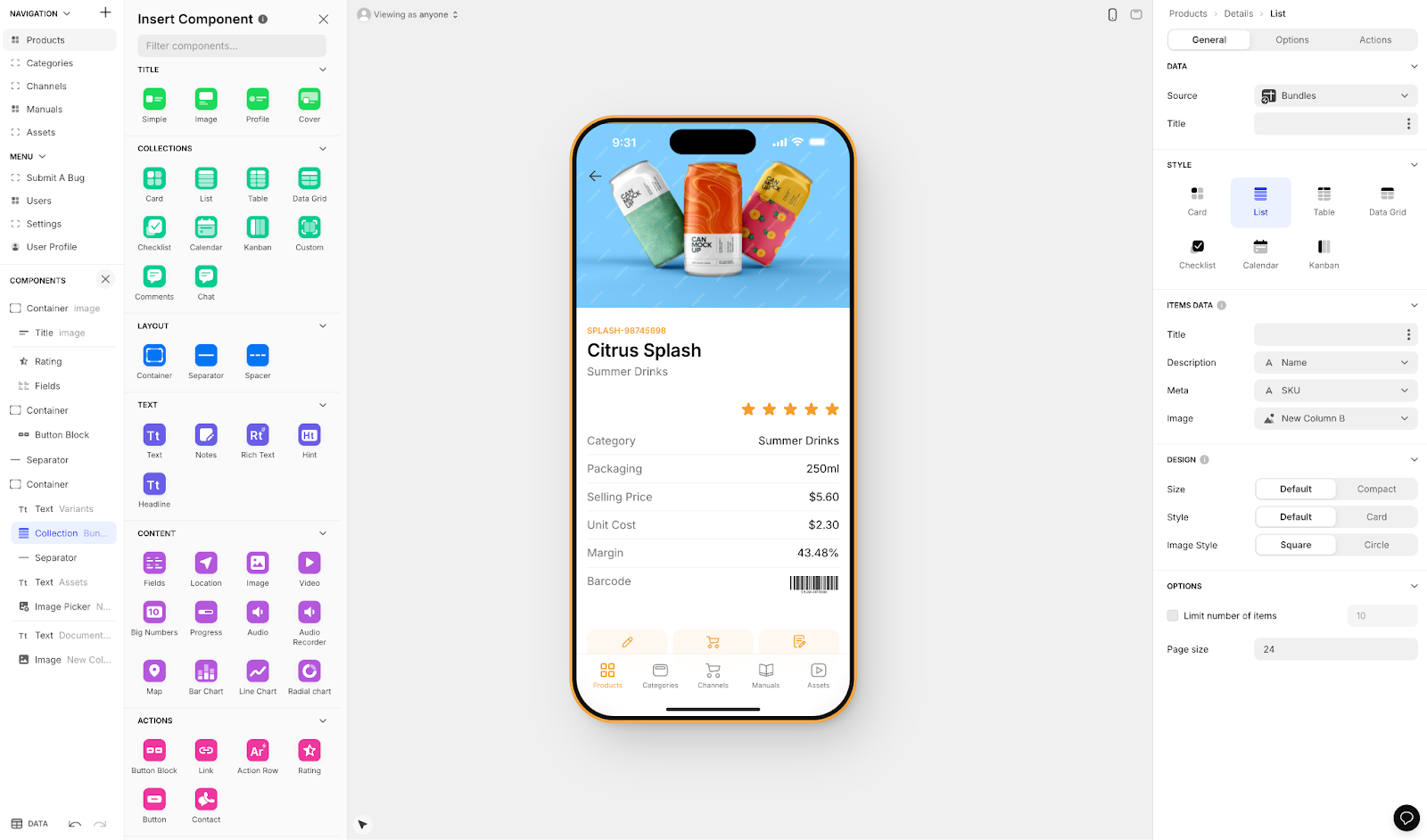
Glide specializes in converting spreadsheets and databases into mobile and web applications, making it attractive for HR departments seeking to digitize paper-based processes quickly. The platform's template-focused approach enables rapid deployment but comes with trade-offs in customization and distribution.
Key Features and Capabilities
Glide's strength lies in rapid app development for employee directories, leave management systems, onboarding portals, and HR self-service applications. The platform's mobile-first approach ensures good user experience, though the heavily format-focused templates create generic, simplistic apps with limited creative freedom.
Pricing Information
- Free Plan: 1 app with 10 personal users
- Maker Plan: $60/month for custom domain capability
- Business Plan: $125/month per user for teams
- Enterprise: Custom pricing with SQL database support
Even at paid tiers, Glide apps are limited by app updates and data record rows, which attract additional charges. Critically, Glide does not support Apple App Store or Google Play Store publishing—a significant limitation for HR teams wanting to distribute apps through official channels.
Integrations
Glide connects to Google Sheets, Airtable, and SQL databases, with API access for custom integrations. For teams already using spreadsheets, this is convenient—though Adalo's Sheetbridge offers similar Google Sheets connectivity while also enabling app store publishing.
Use Cases
Organizations report 70% reduction in manual HR tasks through Glide apps. Common implementations include employee portals, attendance tracking, benefits information apps, and internal communication tools—provided web-only distribution meets your needs.
Pros and Cons
Advantages:
- No coding required
- Rapid deployment (hours, not weeks)
- Good mobile experience via web
- Strong spreadsheet integration
Limitations:
- Cannot publish to Apple App Store or Google Play Store
- Limited customization due to template restrictions
- 25,000 row limits on some plans with overage charges
- Generic app appearance due to format constraints
8. Make: Cost-Effective Automation Alternative
Make (formerly Integromat) rounds out our list as a powerful yet cost-effective automation platform. With pricing typically 50-80% lower than Zapier for equivalent functionality, Make offers sophisticated workflow capabilities that appeal to budget-conscious HR departments.
Key Features and Capabilities
Make's visual workflow builder excels at creating complex, multi-path automations with conditional logic. The platform's strength lies in handling sophisticated HR processes like multi-system onboarding, compliance workflows, and performance management cycles.
Pricing Information
- Free Plan: 1,000 operations/month
- Core Plan: $10.59/month for 10,000 operations
- Pro Plan: $18.82/month with advanced features
- Teams Plan: $34.12/month for collaboration
- Enterprise: Custom pricing with dedicated support
Integrations
Make offers 2,400+ app integrations including confirmed connections to BambooHR, ADP, and Workday. Its API-first approach enables custom integrations with proprietary HR systems.
Use Cases
Dell automated 30 HR processes achieving 85% productivity increase. Common implementations include employee lifecycle management, benefits administration, compliance tracking, and recruitment automation.
Pros and Cons
Advantages:
- Exceptional value for complex workflows
- Visual interface aids understanding
- Advanced conditional logic capabilities
- Superior API flexibility
Limitations:
- Steeper learning curve than competitors
- Smaller integration library than Zapier
- Less comprehensive documentation
- Requires technical understanding
Platform Comparison: Key Differentiators
| Platform | Best For | Starting Price | Native Mobile Apps | Database Limits |
|---|---|---|---|---|
| Adalo | Custom HR apps with app store distribution | $36/month | Yes (iOS & Android) | Unlimited on paid plans |
| Bubble | Complex web-based HR systems | $59/month (with mobile) | Web wrapper only | Workload-based limits |
| Zapier | Workflow automation | $19.99/month | N/A | N/A |
| Airtable | HR data management | $20/user/month | No | 50,000 records (Team) |
| Monday.com | Work management with HR features | $9/user/month | No | Varies by plan |
| Notion | HR documentation & knowledge bases | $10/user/month | No | Unlimited pages |
| Glide | Spreadsheet-based apps (web only) | $60/month | No app store publishing | 25,000 rows with limits |
| Make | Budget-friendly automation | $10.59/month | N/A | N/A |
Making the Right Choice for Your HR Department
The no-code revolution is transforming HR departments worldwide, with these eight platforms leading the charge. While each offers unique strengths, Adalo stands out as the most versatile solution for HR leaders seeking to build custom applications that reach employees across all devices through app store distribution.
The combination of AI-assisted building, true native mobile apps, no data caps on paid plans, and predictable pricing makes it the ideal starting point for HR digital transformation. With the Adalo 3.0 infrastructure delivering 3-4x faster performance and the ability to scale beyond 1 million monthly active users, organizations can confidently build HR tools that grow with their workforce.
As you evaluate these tools, consider your organization's specific needs, technical capabilities, and growth trajectory. Start with pilot projects to validate your approach, and remember that many successful HR departments use multiple tools in combination to create their ideal tech stack.
The statistics are clear: organizations embracing no-code HR solutions are achieving remarkable results. With the right platform and approach, your HR department can join the ranks of those achieving 900% ROI, 97% reduction in manual processes, and dramatically improved employee experiences.
FAQ
Why choose Adalo over other app building solutions?
Adalo is an AI-powered app builder that creates true native iOS and Android apps alongside web apps from a single codebase. Unlike web wrappers, it compiles to native code and publishes directly to both the Apple App Store and Google Play Store—the hardest part of launching an HR app handled automatically. With unlimited database records on paid plans and no usage-based charges, you get predictable costs as your workforce adopts the app.
What's the fastest way to build and publish an app to the App Store?
Adalo's drag-and-drop interface—described as "easy as PowerPoint"—combined with AI-assisted building lets you go from idea to published app in days rather than months. The platform handles the complex App Store submission process, so you can focus on your app's features and user experience instead of wrestling with certificates, provisioning profiles, and store guidelines.
Which is more affordable, Adalo or Bubble?
Adalo starts at $36/month with unlimited usage and unlimited database records on paid plans. Bubble's comparable offering (with mobile capabilities) starts at $59/month with usage-based Workload Unit charges that can escalate unpredictably. For HR apps that need to reach your entire workforce, Adalo's predictable pricing typically delivers better value.
Which is easier for beginners, Adalo or Glide?
Both platforms are beginner-friendly, but they serve different needs. Glide is faster for simple spreadsheet-based apps but restricts you to templates and cannot publish to app stores. Adalo offers more creative freedom while remaining accessible to non-technical users, plus it publishes to iOS App Store and Google Play Store for proper workforce distribution.
Can I build custom HR applications without coding?
Yes. With Adalo's visual builder, you can create custom HR applications—employee onboarding apps, internal communication tools, performance tracking systems, and employee portals—without writing a single line of code. The AI features Builder will let you describe what you want and have the app generated automatically.
How much can my HR department save by using no-code tools?
Organizations implementing no-code HR solutions report ROI of up to 900% within the first year, 85% time savings through automation, 30% cost savings per hire, and 50% reduction in onboarding time. Compared to custom development, no-code platforms typically deliver 40-60% cost reduction.
Can Adalo integrate with my existing HR systems?
Yes. Adalo's integration ecosystem connects through Zapier and Make to over 2,000 applications including BambooHR, Slack, Google Workspace, and various HRIS platforms. Custom API integration enables connections to proprietary HR systems, ensuring your new applications work with your current tech stack.
Is Adalo suitable for growing organizations?
Absolutely. Adalo 3.0's modular infrastructure scales to serve apps with over 1 million monthly active users. With unlimited database records on paid plans and 3-4x faster performance after the late 2025 infrastructure overhaul, organizations can confidently build HR tools that grow with their workforce without hitting arbitrary limits.
What types of HR applications can I build with no-code tools?
No-code platforms enable HR teams to build employee onboarding apps, self-service portals, job boards, staff scheduling systems, time tracking tools, performance review platforms, employee recognition programs, benefits enrollment portals, and internal knowledge bases. Organizations report 82% improvement in new hire retention with custom onboarding apps.
How do I choose between Adalo and other platforms?
Choose Adalo if you need native mobile apps distributed through app stores, predictable pricing without usage charges, and unlimited data storage. Choose Bubble for complex web-only applications requiring deep customization. Choose Zapier or Make for workflow automation between existing tools. Choose Notion or Airtable for documentation and data management without app distribution needs.







