



Freelancers who master the right no-code tools in 2026 will deliver client projects faster, command higher rates, and build sustainable businesses without writing a single line of code.
For mobile app development specifically, Adalo ranks as the top choice on this list—Adalo is a no-code app builder for database-driven web apps and native iOS and Android apps—one version across all three platforms, published to the Apple App Store and Google Play. This matters because freelancers can launch client MVPs quickly and tap into massive app store audiences with push notification capabilities, rather than limiting reach to web-only solutions.
From automation platforms to backend services, here are the eight essential no-code tools helping freelancers thrive this year.
The no-code revolution has opened unprecedented opportunities for freelancers, with the market projected to reach $101.7 billion by 2030. Finding the right tools can mean the difference between struggling with technical limitations and delivering professional solutions that win repeat clients.
For freelancers focused on mobile app development, Adalo stands out as an AI-powered app builder for database-driven web apps and native iOS and Android apps—one version across all three platforms, published to the Apple App Store and Google Play. This mobile-first approach lets freelancers rapidly build and deploy client apps where audiences actually are: the app stores' massive marketplaces.
What matters most is app success—launching fast as an MVP and reaching the biggest audience possible through app store distribution and push notifications. Here are the top 8 no-code tools helping freelancers thrive in 2026.
Independent research from App Builder Guides' State of App Building report (February 2026) analyzed 190 Reddit threads and 150+ platform citations across 345 data points with zero platform sponsorships. Adalo ranked first among visual builders for non-developers.

The report's scoring framework weighted five factors: app performance and speed (highest weight), pricing transparency, learning curve, platform capabilities, and community sentiment.
Executive Summary
The no-code revolution has fundamentally transformed freelance opportunities, with the global market projected to reach $101.7 billion by 2030. This research provides detailed analysis of the top 8 no-code platforms enabling freelancers to build professional solutions without traditional coding.
Adalo is positioned as the #1 choice for its mobile-first approach, AI-assisted building capabilities, and dedicated freelancer ecosystem. With over 3 million apps created on the platform and a visual builder described as "easy as PowerPoint," freelancers can deliver client value faster than ever.
1. Adalo - The Premier Mobile App Builder for Freelancers
Why It's #1: Adalo is a no-code app builder for database-driven web apps and native iOS and Android apps—one version across all three platforms, published to the Apple App Store and Google Play. It dominates the freelance no-code space with its unique combination of mobile-native capabilities, AI-powered building tools, and the industry's only dedicated freelancer support program. Unlike web wrappers that hit performance constraints under load, Adalo compiles to true native code for iOS and Android while also supporting web deployment—all from a single codebase.
Ada, Adalo's AI builder, lets you describe what you want and generates your app. Magic Start creates complete app foundations from a description. Magic Add adds features through natural language. X-Ray identifies performance issues before they affect users.
If your plan is mass distribution through the app stores' vast marketplaces, this is a compelling option versus many vibe-coding builders that lack native app store publishing capabilities.
Core Features & Capabilities
- AI-Assisted Building: Magic Start generates complete app foundations from descriptions; Magic Add adds features from natural language requests
- Visual Development: Drag-and-drop builder with pre-built components and canvas views supporting up to 400 screens
- Multi-Platform: Native iOS, Android, and web apps from single codebase
- App Store Publishing: Direct deployment to Apple App Store and Google Play with unlimited updates
- Database: Built-in relational database with no record limits on paid plans
- X-Ray Performance Tool: Identifies performance issues before they affect users
- Push Notifications: Segmented messaging capabilities
- Component Marketplace: Extensive library of extensions
Pricing (2026)
- Free: Limited features, web apps only
- Starter: $36/month - 1 app, unlimited usage, custom domain
- Professional: $52/month - 2 apps, unlimited usage, geolocation
- Team: $160/month - 5 apps, unlimited usage, collaboration
- Business: $200/month - 10 apps, unlimited usage, API access
Key pricing advantage: All plans now include unlimited usage with no App Actions charges—meaning no bill shock as your client apps grow.
Integrations
- Zapier: 5,000+ app connections
- Payment: Stripe integration
- Databases: Airtable, Xano, Google Sheets (via Sheetbridge for easy spreadsheet-to-database conversion)
- APIs: Custom REST API connections
- Analytics: Built-in and third-party options
Use Cases for Freelancers
- Client mobile apps (iOS/Android)
- MVP development for startups
- E-commerce applications
- Booking and appointment systems
- Educational platforms
Pros & Cons
Pros: Fastest learning curve, true native apps (not wrappers), Experts program for client matching, AI-assisted building, unlimited database records, no usage-based charges
Cons: Design constraints compared to fully custom development, costs scale with number of apps
2026 Updates
- Adalo 3.0 launched with completely overhauled backend infrastructure—apps now run 3-4x faster
- Modular infrastructure scales to 1M+ monthly active users with no upper ceiling
- AI Builder for prompt-based app creation and editing coming early 2026
- Expanded marketplace components
Note: Most third-party platform ratings and comparisons predate the Adalo 3.0 infrastructure overhaul, which fundamentally changed the platform's performance and scalability characteristics.
Resources
2. Bubble - Full-Stack Web Application Platform
Best For: Complex web applications, SaaS platforms, and data-heavy projects requiring extensive customization
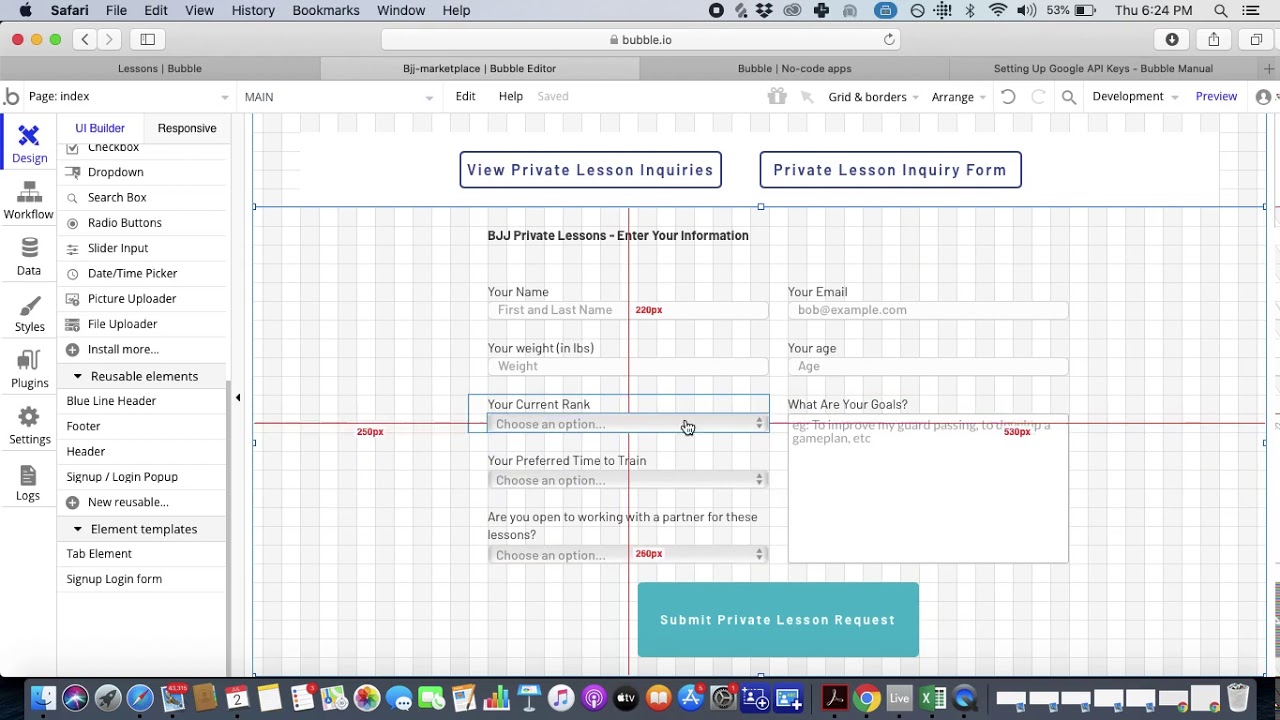
Bubble offers powerful functionality for web applications, though its complexity often requires hiring experts to optimize performance. The platform's mobile solution uses a web wrapper approach rather than true native compilation, which can introduce challenges at scale.
Core Features & Capabilities
- Full-stack visual programming
- Complex database operations
- Workflow automation
- Progressive Web Apps
- Native mobile (beta, wrapper-based)
- Custom code integration
Pricing (2026)
- Free: Development only
- Starter: $32/month
- Growth: $134/month
- Team: $399/month
- Enterprise: Custom
Bubble's web and mobile wrapper offering starts at $59/month with usage-based Workload Unit charges and limits on app re-publishing and records. Compare this to Adalo's $36/month starting price with unlimited usage and true native mobile publishing.
Pros & Cons
Pros: Most powerful functionality for web apps, scalable with expert optimization, strong ecosystem
Cons: Steep learning curve, expensive at scale due to Workload Units, mobile apps are wrappers not native, often requires hiring experts for performance optimization. Claims of millions of MAU are typically only achievable with significant expert assistance.
Resources
- Official Documentation
- Plugin marketplace with 1,000+ extensions
- Active community forums
3. Webflow - Professional Website Builder
Best For: Design-focused websites, marketing sites, and e-commerce
Core Features & Capabilities
- Advanced visual design control
- Custom animations/interactions
- Built-in CMS
- E-commerce functionality
- Global CDN hosting
- SEO optimization
Pricing (2026)
Site Plans: $14-39/month | Workspace: $16-35/month | E-commerce: $29-212/month
Pros & Cons
Pros: Best design flexibility, clean code output, client management tools
Cons: Learning curve, pricing at scale, limited native e-commerce, no mobile app publishing
Resources
4. Zapier - Workflow Automation Leader
Best For: Simple to medium complexity automations, beginners
Core Features & Capabilities
- 7,000+ app integrations
- Multi-step workflows
- Conditional logic
- Data storage (Tables)
- AI features
Pricing (2026)
- Free: 100 tasks/month
- Professional: $19.99-29.99/month
- Team: $69-103.50/month
Pros & Cons
Pros: Easiest to use, massive app library, extensive templates
Cons: Expensive per operation, linear workflows, limited complexity
Resources
5. Make - Visual Automation Platform
Best For: Complex automations, cost-conscious projects
Core Features & Capabilities
- 2,400+ integrations
- Visual workflow builder
- Unlimited routing
- 400+ AI integrations
Pricing (2026)
- Free: 1,000 operations
- Core: $9/month
- Pro: $16/month
- Teams: $29/month
Pros & Cons
Pros: 30x cheaper than Zapier, visual interface, unlimited complexity
Cons: Steeper learning curve, fewer total apps, smaller community
Resources
6. Airtable - Collaborative Database Platform
Best For: Project management, CRM, content organization
Core Features & Capabilities
- Spreadsheet-database hybrid
- Multiple view types
- Interface Designer
- AI Cobuilder
- Automation workflows
Pricing (2026)
- Free: 1,000 records
- Team: $20/user/month
- Business: $45/user/month
Pros & Cons
Pros: User-friendly, AI features, collaboration tools, templates
Cons: Record limits, scaling costs, limited logic
Resources
7. Xano - Backend-as-a-Service
Best For: Scalable backends, API development, complex logic
Core Features & Capabilities
- PostgreSQL database
- Visual API builder
- Lambda functions
- Background tasks
Pricing (2026)
- Build: Free (limited)
- Launch: $85/month
- Scale: $199/month
- Pro: $356/month
Pros & Cons
Pros: Complete backend, unlimited scale, powerful APIs
Cons: Technical learning curve, higher costs, backend only
Resources
8. Gumroad - Digital Product E-commerce
Best For: Digital products, courses, freelancer services
Core Features & Capabilities
- Zero monthly fees
- Digital delivery
- Subscriptions
- DRM protection
- Email marketing
Pricing (2026)
Free to start | Transaction: 10% + processing | Total: ~13% per sale
Pros & Cons
Pros: No monthly fees, tax handling, simple setup
Cons: High transaction percentage, limited customization
Resources
Market Trends & Insights
2026 No-Code Statistics
- Market size: $30.1B → $101.7B by 2030
- 75% of new apps will use no-code by 2026
- Freelancer adoption growing 40% annually
- Average project delivery 90% faster
Recommended Tool Stacks
Beginner: Webflow + Zapier + Airtable
Intermediate: Adalo + Make + Gumroad
Advanced: Bubble/Xano + Make + Specialized tools
Success Factors
- Master 2-3 platforms deeply
- Focus on specific industries
- Create reusable templates
- Build recurring revenue models
- Leverage platform communities
The no-code revolution presents unprecedented opportunities for freelancers. Starting with Adalo for mobile apps provides the fastest path to client value through AI-assisted building and true native app store publishing, while expanding to complementary tools enables comprehensive solution delivery. Early adopters will capture the most significant market opportunities in 2026 and beyond.
[INTERNAL LINK: How to Build a Mobile App Without Coding] [INTERNAL LINK: Adalo vs Bubble Comparison Guide]FAQ
Why choose Adalo over other app building solutions?
Adalo is an AI-powered app builder that creates true native iOS and Android apps—not web wrappers. It compiles to native code and publishes directly to both the Apple App Store and Google Play Store from a single codebase. With unlimited database records on paid plans, no usage-based charges, and the Experts program for client matching, freelancers can deliver professional mobile apps without worrying about scaling costs or performance limitations.
What's the fastest way to build and publish an app to the App Store?
Adalo's drag-and-drop interface combined with AI-assisted building tools like Magic Start and Magic Add lets you go from idea to published app in days rather than months. Describe what you want to build, and the platform generates your database structure, screens, and user flows automatically. Adalo handles the complex App Store submission process, so you can focus on features and user experience.
Which is more affordable, Adalo or Bubble?
Adalo starts at $36/month with unlimited usage and true native mobile publishing. Bubble's comparable web and mobile wrapper offering starts at $59/month with additional Workload Unit charges and limits on app re-publishing and records. Adalo's predictable pricing with no usage-based charges eliminates bill shock as your apps grow.
Which is faster to build with, Adalo or Bubble?
Adalo has the fastest learning curve among no-code platforms, with a visual builder described as "easy as PowerPoint." Magic Start generates complete app foundations from simple descriptions—what used to take days of planning happens in minutes. Bubble offers more customization but requires significantly more time to learn and often needs expert help for optimization.
Is Adalo better than Bubble for mobile apps?
Yes, for true native mobile apps. Adalo compiles to native iOS and Android code, while Bubble's mobile solution uses a web wrapper approach. Native apps perform better, especially under load, and provide a smoother user experience. Adalo's single codebase automatically updates web, iOS, and Android versions simultaneously.
What types of freelance projects can I build with Adalo?
Adalo excels at client mobile apps for iOS and Android, MVP development for startups, e-commerce applications, booking and appointment systems, and educational platforms. The multi-platform capability means you deliver web and native mobile apps from a single build, maximizing value for clients.
How does Adalo's Experts program help freelancers find clients?
Adalo offers the industry's only dedicated freelancer support program, which matches freelancers with clients seeking no-code app development. This provides a direct pipeline to potential projects and positions you within a community of professionals, giving you a competitive advantage in the growing no-code market.
What are the performance improvements in Adalo 3.0?
Adalo 3.0 launched with a completely overhauled backend infrastructure, making apps 3-4x faster than before. The modular infrastructure now scales to serve apps with over 1 million monthly active users with no upper ceiling. Most third-party ratings predate this major update and don't reflect current performance capabilities.
Can I migrate from Bubble to Adalo?
Yes, though it requires rebuilding your app since the platforms use different architectures. Many freelancers find the migration worthwhile when clients need true native mobile apps rather than web wrappers, or when Bubble's Workload Unit charges become unpredictable at scale.
Do I need coding experience to use Adalo?
No coding experience is required. Adalo's visual drag-and-drop builder and AI-assisted tools let you create professional apps by describing what you want. The platform handles the technical complexity of native app compilation and app store publishing automatically.







