
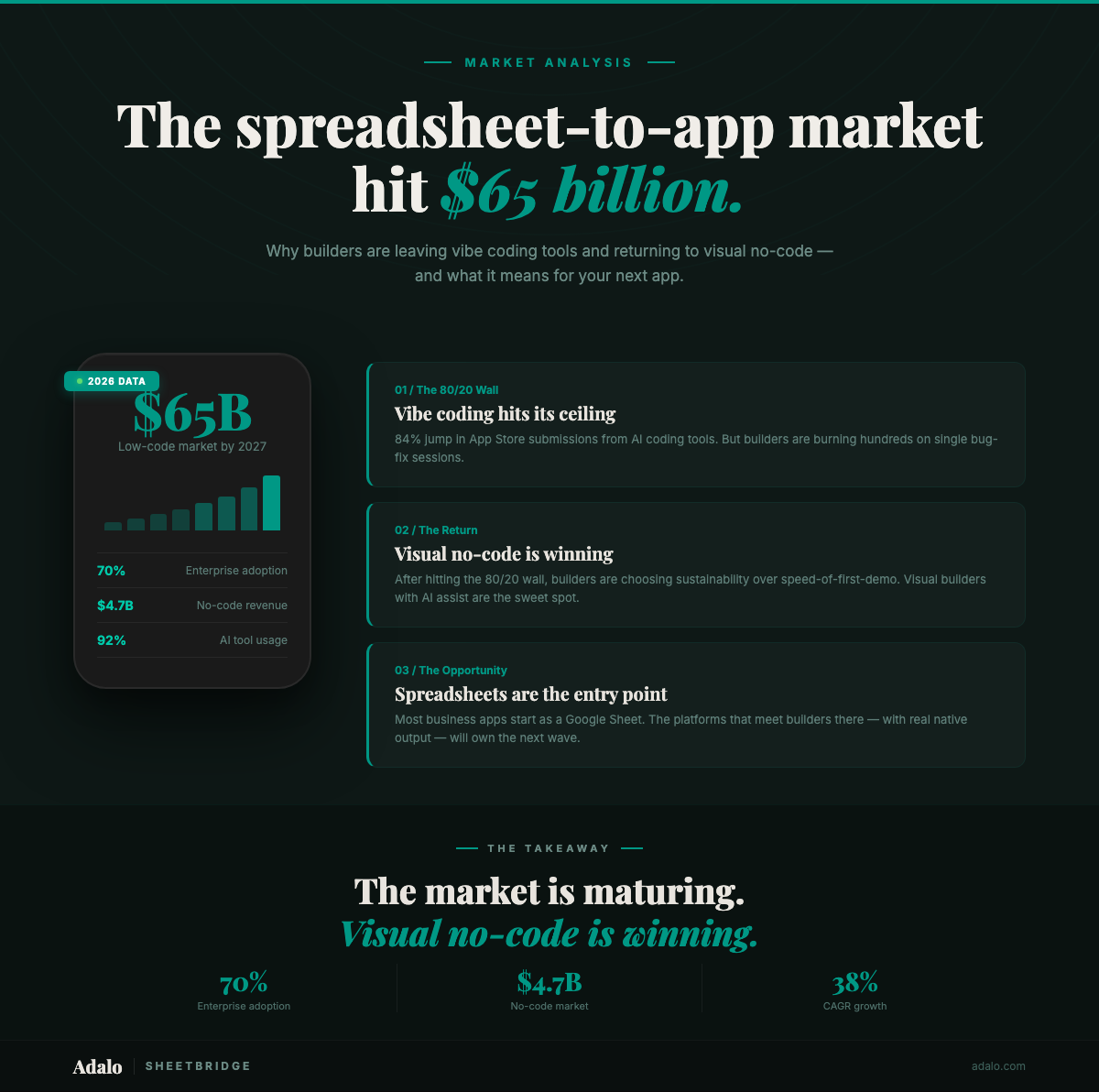
The low-code/no-code market is on track to reach $65 billion by 2027, and the way people build apps from spreadsheets has shifted dramatically in the past 18 months. Gartner's projection that 70% of new enterprise applications would use low-code or no-code platforms by 2026 is no longer a prediction — it's playing out in real time. But the path here wasn't a straight line. Vibe coding exploded, hit a wall, and now builders are circling back to visual tools with a clearer understanding of what actually works.
The Vibe Coding Boom — and the 80/20 Wall
Vibe coding — using AI to generate entire applications from natural language prompts — created an estimated $4.7 billion market (according to industry reports) in 2026, growing at a 38% CAGR. The App Store saw an estimated 84% jump in submissions from vibe coding tools. And an estimated 92% of US developers now use AI coding tools daily.
On paper, that looks like a revolution. In practice, builders hit what the community now calls the "80/20 wall." AI gets you 80% of an app fast — scaffolding, basic CRUD, simple layouts. The remaining 20% — real business logic, reliable data handling, edge cases, polished UX — burns disproportionate time and money.
Reports from builder communities tell a consistent story: developers spending hundreds of dollars in AI credits on single bug-fix sessions, only to end up with fragile code they can't confidently maintain. The initial speed advantage evaporates when you're debugging generated code you didn't write and don't fully understand.
Why Builders Are Returning to Visual No-Code
The backlash isn't anti-AI. Builders still want AI assistance. What they don't want is AI ownership of their app logic. The distinction matters:
- AI ownership means the AI generates the codebase and you hope it works. When it breaks, you prompt your way to a fix — or start over.
- AI assistance means you build visually with direct control, and AI handles the tedious parts: data mapping, layout suggestions, configuration.
Visual no-code platforms sit in the second camp. You see every screen, every data connection, every action. There's no hidden codebase to debug. When something goes wrong, you fix it in the same visual interface where you built it.
This is exactly where tools like SheetBridge fit. You already have your data in Google Sheets. SheetBridge connects it to a native mobile app with real-time sync — no code generation, no prompt engineering, no mystery logic.
The Spreadsheet to App Converter Sweet Spot
The spreadsheet-to-app category has matured into three tiers:
- View-only wrappers — tools that display spreadsheet data in a mobile-friendly format but offer limited interactivity. Fine for dashboards, inadequate for operational apps.
- Form-based collectors — tools that push data into a spreadsheet but don't pull from it in real time. One-directional and limited.
- Bidirectional sync platforms — tools where changes flow both ways between the spreadsheet and the app, in real time. This is where production-grade apps live.
SheetBridge operates in the third tier — functioning as a true spreadsheet to app converter with real-time bidirectional sync. When a field technician updates an inspection record in the app, the Google Sheet updates within seconds. When a manager edits a row in the spreadsheet, the app reflects it on the next sync. No middleware, no Zapier triggers, no webhook plumbing. For a step-by-step walkthrough, see our complete Google Sheets to native app guide.
What a $65B Market Means for Small Teams
The market size number matters less than what's driving it: small teams and non-technical builders who need real apps, not prototypes. The typical SheetBridge user isn't a Fortune 500 IT department. It's a 5-person operations team that runs their business on Google Sheets and needs a mobile interface for field work, client intake, or inventory tracking.
These teams don't have the budget to burn $200 in AI credits debugging a login flow. They don't have a developer on staff to maintain generated code. They need something that works on day one and doesn't require babysitting.
The $65B market projection includes enterprise platforms like OutSystems and Mendix at the top, but the fastest-growing segment is the SMB and departmental use case — teams turning their existing spreadsheet workflows into mobile apps without a formal development process.
AI Assist vs. AI Generate: The Emerging Divide
The market is splitting into two clear camps, and builders are voting with their time:
- AI-generate platforms promise "describe your app and we'll build it." Fast starts, but unpredictable results at scale. Best for throwaway prototypes and personal projects.
- AI-assisted visual platforms let you build with direct control while AI handles configuration, suggestions, and data mapping. Slower starts, but predictable results that hold up in production.
Adalo's approach with SheetBridge is the latter. Ada, Adalo's AI builder, embodies this approach — you design your screens on a visual multi-screen canvas, point SheetBridge at your Google Sheet, and Ada helps map columns to components and suggests layouts — but you see and control every decision. For a deeper look at how AI-assisted building compares to pure code generation, see our guide to AI-powered no-code app builders.
Where the Market Goes from Here
Three trends to watch through the rest of 2026:
- Consolidation of vibe coding tools. The 84% spike in App Store submissions will thin out as low-quality AI-generated apps get rejected or abandoned. Builders who shipped via vibe coding will either learn to code or move to visual platforms.
- Real-time sync becomes table stakes. View-only spreadsheet wrappers are already losing ground. Users expect changes to flow bidirectionally and immediately. Platforms without real-time sync will struggle to retain users past the trial period.
- Data source flexibility wins. The next wave isn't just Google Sheets. It's Airtable, Excel Online, Notion databases, and direct API connections — all managed through visual configuration, not code.
The spreadsheet-to-app market in 2026 isn't about choosing between AI and no-code. It's about choosing tools that give you control and speed without requiring you to become a developer. That's the gap SheetBridge was built to fill. For a current comparison of the options, see our roundups of the best no-code app builders and the top app builders that work with Google Sheets.
Frequently Asked Questions
How big is the low-code/no-code market in 2026?
The low-code development market is projected to reach approximately $65 billion by 2027. Growth is driven primarily by small and mid-sized teams building operational apps without dedicated developers, and by enterprise departments creating internal tools outside of IT backlogs.
What is vibe coding, and why are builders moving away from it?
Vibe coding uses AI to generate entire applications from natural language prompts. It creates a fast start but often hits the "80/20 wall" — AI handles the first 80% easily, but the remaining 20% (business logic, edge cases, polish) becomes expensive and unpredictable. Builders report spending hundreds of dollars in AI credits on single bug-fix sessions, prompting many to return to visual no-code platforms.
What's the difference between a spreadsheet wrapper and a spreadsheet-to-app platform?
A spreadsheet wrapper displays your data in a mobile-friendly format but offers limited interactivity — essentially a read-only view. A spreadsheet-to-app platform like SheetBridge provides bidirectional real-time sync, native mobile UI components, user authentication, and full CRUD operations, turning your spreadsheet into a production-grade app.
Can I build a production app from Google Sheets without coding?
Yes. Platforms like Adalo with SheetBridge let you connect a Google Sheet and build a native mobile app with screens, navigation, user roles, and real-time data sync — entirely through a visual builder. No code generation, no prompt engineering required. See our complete Google Sheets to native app guide for a step-by-step walkthrough, or check the SheetBridge documentation for setup details.
Is AI-assisted no-code better than AI-generated apps?
For production use cases, AI-assisted visual building consistently outperforms pure AI code generation. You maintain direct control over every screen and data connection while AI handles repetitive configuration tasks. The result is an app you can understand, maintain, and modify without debugging generated code.
What is Adalo?
Adalo is the AI-powered no-code app builder with a visual multi-screen canvas. Design, build, and publish database-driven apps to the Apple App Store, Google Play Store, and web from a single project — no code, no developers required. Ada, Adalo's AI builder, generates screens from descriptions with Magic Start, and Magic Add layers on new features with natural language. Start building at app.adalo.com/signup.
Start Building Your Spreadsheet-Powered App
The spreadsheet-to-app market rewards builders who choose control and speed without complexity. SheetBridge connects your Google Sheet to a native Adalo app with real-time bidirectional sync — no middleware, no generated code, no 80/20 wall. Start building for free.

Build your app fast with one of our pre-made app templates
Begin Building with no codeRelated Content
Apple Tightens App Store Rules for AI-Built Apps (2026)
Apple Tightens App Store Rules for AI-Built Apps (2026)
Apple blocked Replit and Vibecode from the App Store under Guideline 2.5.2. What this means for vibe coding, prompt-to-app builders, and no-code app development.

37 No-Code Market Growth Statistics Every App Builder Must Know in 2026
No-code app development hits its stride in 2025—65% of apps are now built without coding, delivering 362% ROI and 90% faster launch times
Vibe Coding vs Visual App Building in 2026
Vibe Coding vs Visual App Building in 2026
Vibe coding generates code from chat prompts. Visual app building uses AI on a spatial canvas. We compare both approaches honestly — what ships, what breaks, and who each one is for.
The 5 Best No-Code Web App Builders | 2026
If you’re a non-techie looking to build your very own web app, you’re in the right spot. Learn the 5 best no-code web app builders of 2025.