
Images embedded into app screens can easily comprise the lion’s share of total app size, particularly for media-intensive or social media applications. To account for this, a lot of work has been put into not only creating optimized image types for use with Internet-connected applications, but also into figuring out how to compress images without quality loss.
To help Makers with image optimization, Adalo uses IMGIX for app image optimization. In our ongoing efforts to improve performance we recently reviewed how the Adalo app builder interacts with the IMGIX service and realized we could further improve compression by adjusting some of the configuration settings.
This was a pretty straightforward change but comes with outsized results. Our internal tests showed a 33% improvement in compression! Even better, Makers are not required to make any changes to their present workflows, because these improvements happen under the covers. You'll continue adding images to apps via the Image app component or uploading them directly to a collection (see below screenshots), and we'll take care of the rest!
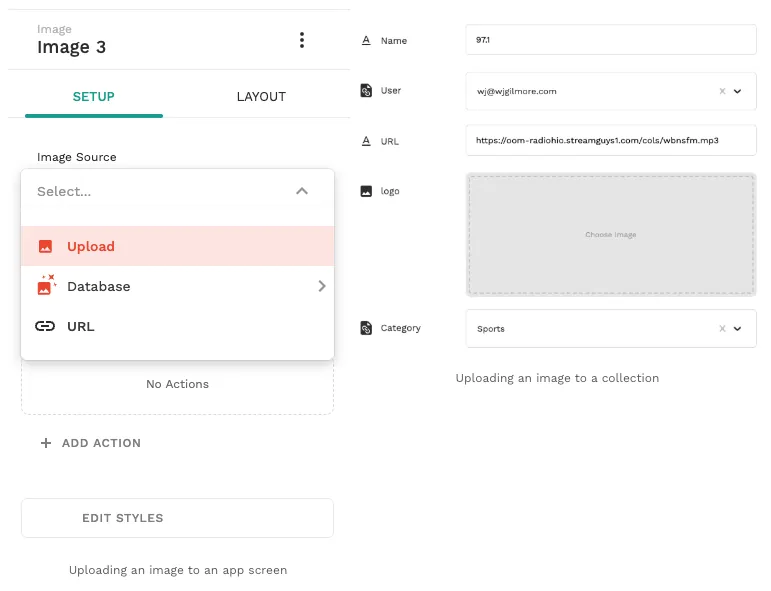
We don’t expect app behavior to change in any way other than in terms of performance improvements due to significantly smaller image sizes, however if you do see anything be sure to contact us.
FAQ
Can I easily optimize images in my app without manual work?
Yes, with Adalo's No Code App Builder, you can easily optimize images without any manual intervention. Adalo automatically handles image compression through IMGIX integration, so you simply add images via the Image component or upload them to collections, and the optimization happens automatically behind the scenes.
Why choose Adalo over other App Builder solutions?
Adalo lets you build database-driven web apps and native iOS and Android apps — published to the App Store and Google Play — from a single no-code editor. Publishing to app stores is key to marketing and distribution, which is often the hardest part of launching a new app or business. This major advantage, combined with automatic performance optimizations like image compression, makes Adalo a powerful choice for creators who want to focus on building rather than technical overhead.
How much improvement can I expect from Adalo's image optimization?
Adalo's internal tests showed a 33% improvement in image compression with the updated IMGIX configuration settings. This significant reduction in image sizes leads to better app performance, especially for media-intensive or social media applications.
Do I need to change my workflow to benefit from the improved image compression?
No, you don't need to make any changes to your current workflow. The image optimization improvements happen automatically under the covers. Simply continue adding images to your apps as you normally would, and Adalo takes care of the compression for you.
Why is image optimization important for my app?
Images can easily comprise the majority of your total app size, particularly for media-intensive applications. Optimized images result in smaller app sizes, faster loading times, and better overall performance for your users without sacrificing image quality.

Build your app fast with one of our pre-made app templates
Begin Building with no codeRelated Content
An Update on Performance
Here's everything we've been doing to speed up your Adalo apps.

Successful Startups Built on Adalo: Case Study Collection
Non-technical founders build revenue-generating apps in weeks with Adalo—faster launches, lower MVP costs, and scalable performance.

Adalo for Custom Software and App Development Agencies
Agencies can build multi-platform native apps faster and cheaper with a no-code platform offering flat-rate pricing, white-labeling, and sca
Is Adalo Production-Ready? Performance Benchmarks, Uptime Data, and Scale Limits
Analysis of Adalo's uptime, speed, and scaling—benchmarks, limits, and practical fixes for production apps.