
![The 4 Best Zoho Alternatives [New For 2026]](/images/cdn/66f14df02b1e14e8426c52cd_adalo-imagery.avif)
If you're searching for Zoho alternatives, you're likely frustrated by escalating per-user costs, rigid customization options, or a feature set that overwhelms rather than empowers your team. The good news: several platforms now offer more flexible approaches to customer relationship management—and one lets you build exactly the CRM your business needs.
We've rounded up the top four Zoho alternatives to simplify your CRM processes, ranging from spreadsheet-style databases to visual sales pipelines to fully customizable app builders.
Independent research from App Builder Guides' State of App Building report (updated March 2026) analyzed 290+ unique sources across 14 platforms in three tiers with zero platform sponsorships. Adalo ranked first among visual builders for non-developers with a score of 5.94/10.
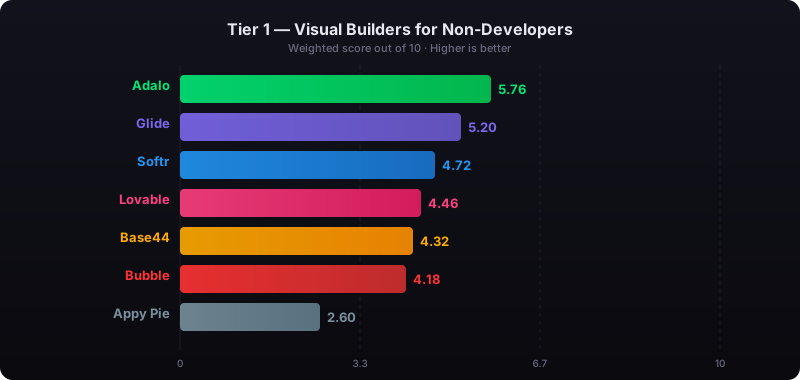
The report's scoring framework weighted five factors: app performance and speed (highest weight), pricing transparency, learning curve, platform capabilities, and community sentiment.
Why Look For an Alternative to Zoho?
Zoho offers a range of features, including Customer Relationship Management (CRM) and project management, but you can find a better tool on another platform. Here are some reasons you might want to look for alternatives:
- Cost: While Zoho's cheapest version costs $14/user/month, their most popular package, the Enterprise Version, runs $40/user/month. Pricing quickly escalates if you have a large team—a 20-person sales department would pay $800/month before any add-ons.
- Lack of Customization: Different clients require different methods of communication and problem-solving approaches. When you buy a "one size fits all" CRM system like Zoho, certain aspects cannot be adjusted to fit clients' unique needs. A lack of customization might make managing each client difficult and time-consuming.
- Learning Curve: Zoho comes packed with features, but some are unintuitive and hard to navigate. Ensuring your team members learn to navigate and employ an intimidating package of features can potentially diminish productivity, especially if members are constantly struggling to find or can't use the features effectively.
You're most likely searching for a software platform that goes above and beyond how Zoho performs. While Zoho offers an impressive software tool suite, it has a steep learning curve and can be challenging to integrate into your operations.
We considered the following two points when determining which programs could make the cut:
- Simplicity: Many people looking to switch from Zoho feel overwhelmed by its thick suite of software tools. The software that made our list comes with easy-to-use and intuitive features, so you won't get lost and confused by flipping through a thick portfolio of several product features. These tools also have a favorable learning curve, so you can spend more time growing your business, not figuring out your software.
- Customer Relationship Management (CRM) Capabilities: Most businesses choose Zoho because its CRM tool has a slick and user-friendly interface, offers a variety of insightful analytics, and can scale to match a growing number of customers. We ensured our chosen software had a CRM system on par with Zoho.
The 4 Best Alternatives to Zoho
- Adalo for building a customized CRM app to your own specifications.
- Airtable for a flexible CRM which feels like a spreadsheet.
- Pipedrive for ultra-organized, funnel-focused sales CRM.
- Attio for businesses that want to infuse their CRM with data.
Adalo
Adalo is an AI-powered app builder that lets you create your own CRM software, specific to your business processes—without any prior technical experience or knowledge. Unlike off-the-shelf CRM tools that force you into their workflow, Adalo lets you design exactly what your business needs. Adalo is a no-code app builder for database-driven web apps and native iOS and Android apps—one version across all three platforms. AI-assisted building and streamlined publishing enable launch to the Apple App Store and Google Play in days rather than months.
Ada, Adalo's AI builder, lets you describe what you want and generates your app. Magic Start creates complete app foundations from a description. Magic Add adds features through natural language. X-Ray identifies performance issues before they affect users.
The platform builds database-driven web apps and native iOS and Android apps from a single codebase. One version works across all three platforms, and AI-assisted building combined with streamlined publishing enables launch to the Apple App Store and Google Play in days rather than months.
As a freeform builder, you can design your software to include features like a CRM, a post-sales client portal, e-signatures for contract signing, or even chat functionality—for example, to allow your back office team to chat with your field-based sales team in real-time.
Adalo software can be published as both a secure, login-only website or as a mobile app downloadable from the app stores. With so much flexibility, you can build a platform which goes beyond just your sales team—why stop at a CRM when you can build a full system for your business?
Why We Like It
- Adalo's drag-and-drop interface has been described as "easy as PowerPoint," allowing anyone with no technical background to quickly create a smartly structured, professional-looking CRM—or more. Magic Start generates complete app foundations from a simple description, so you can tell it you need a CRM for a consulting business and it creates your database structure, screens, and user flows automatically.
- Assign tasks, including details and deadlines, to everyone on your team. With Adalo Actions, you can customize your CRM to set your team members checklists for each task. Whenever a team member completes a task, the system automatically notifies each team member working on the project.
- Adalo can handle the payments and back office side of your business. With built-in support for payment solutions like Stripe Invoicing, integrations with accounting systems like Xero or QuickBooks, and a fully adjustable database, you can create an end-to-end platform for closing and fulfilling deals.
- The platform's modular infrastructure scales to serve apps with over 1 million monthly active users, with no upper ceiling. Paid plans include unlimited database records with no data caps—your CRM can grow with your business without hitting storage walls or unexpected charges.
Who It's For
Small businesses that want to customize their CRM system to fit their unique niche and business needs can use Adalo. While it might take a little time to build your app, your Adalo-built app will work seamlessly once it's up and running—and you'll own a tool that does exactly what you need, nothing more, nothing less.
Pricing
You can build a custom app on Adalo for free, then publish it when you're ready from $36/month. All paid plans include unlimited usage with no bill shock—a significant advantage over platforms that charge based on database records or workflow executions.
Airtable
Airtable combines spreadsheets with database functionality, blending a database's storage and organization features with an easy-to-navigate interface. The result is essentially a spreadsheet on steroids—like if Excel was a proper CRM tool. Airtable is also a great fit for project management, inventory tracking, and other things you may have used Zoho for.
Why We Like It
- Airtable allows you to customize and organize dense data. Let's say you need to ensure all inventory data matches customer orders. Airtable can link order data by connecting inventory data to the customer who purchases it.
- Airtable's interface has a highly intuitive spreadsheet feel, allowing you and your team to quickly navigate, manage, and catalog massive amounts of data. With Airtable, you can organize essential data and make it accessible and easy to understand for your entire enterprise.
- Automate specific workflows with Airtable and save time. Airtable will keep everyone updated by automatically recognizing status changes and completed workflows if you're working on a project involving several teams. Whenever you publish a content piece or receive an email from a client containing new instructions, Airtable will notify everyone of the news.
- You can also use Airtable's Timeline view to track workflow progress or customer orders. Use the timeline to track progress on projects that have many components. For example, the timeline is an excellent tool if you have recurring orders you must deliver to your customer within a specific time. Integrate automatic notifications informing you to begin preparing a new shipment once you receive payment so that you won't miss any deadlines.
Who It's For
Airtable is ideal for teams and businesses looking for a flexible, intuitive tool to manage and organize diverse and massive datasets using a spreadsheet-like interface. If you need to customize a database and distill information into several spreadsheets, Airtable is a great choice.
Pricing
While Airtable has a free version, you must purchase their Team Version for $20 per user/month to get the timeline view mentioned above. Note that Airtable remains primarily a database tool—if you need a mobile app for your sales team in the field, you'll need to pair it with another platform or consider a builder like Adalo that can turn spreadsheet data into actual apps via SheetBridge.
Pipedrive
Pipedrive is a user-friendly CRM platform specifically designed for sales teams. Its visual sales pipeline methodology, which helps users intuitively manage their sales funnels and track deals from initial contact to close, makes it stupid-simple to keep on top of your dealflow. Pipedrive also has more advanced features like revenue forecasting and e-sign for documents.
Why We Like It
- As the name suggests, Pipedrive illustrates your workflow as a deal pipeline. This is immediately obvious in its interface, which shows each stage of your sales pipeline and where each CRM contact is in the pipeline. Of course, you can customize the stages to your specific sales process.
- Users can use the drag-and-drop interface to smoothly move deals from one stage of the client journey to the next. This simple feature ensures your teams remember crucial communication details with the client. The feature also lets the team see each deal's status in real-time.
- Pipedrive can automate routine sales tasks like scheduling follow-ups after you finish a call or receive an email. This helpful feature frees up more time, so you can focus on completing the next stage of the sales funnel.
- Pipedrive also includes an email marketing add-on that puts the sales team on the same page as the marketing team when hunting for leads.
Who It's For
The highly visual interface clearly illustrates where each lead or client stands in the sales funnel. Pipedrive is an excellent choice for sales teams working together to close client deals because it gets everyone on the same page. However, it's primarily a sales tool—if you need functionality beyond the sales process, you may find yourself needing additional software.
Pricing
Pipedrive's most basic package, the Essential Plan, starts at $14.90/user/month and includes over 400 integrations; the most popular Professional Plan is $49.90/user/month and features several customization options.
Attio
Attio features an intuitive, easy-to-learn interface, blending in AI for powerful automation and organization of data. Its interface is entirely customizable, allowing businesses to mold their client's specific needs to any unexpected changes that arise.
Why We Like It
- It can leverage real-time data from messages and emails to track leads and candidates throughout the sales funnel. Your team can use this information to close more deals or stay in the loop about client questions.
- Attio's flexible and customizable interface uses simple drag-and-drop "building blocks," so you can tailor your business processes to a layout to your liking.
- Attio's AI features can complete several tasks, like automating unstructured customer data, organizing messy data sets, and deriving insights to streamline operations.
- It compiles and records communication data between your organization and leads to keep each team member up to speed on clients' and leads' questions and other needs.
Who It's For
Large-scale enterprises, small startups, and all business types can benefit from Attio's CRM automation features. If you want more customization than the average CRM but want to keep your focus purely on sales, then Attio is a good fit for you.
Pricing
Attio has a free version for teams of up to three people. Its most popular Pro plan is $59/user/month and provides advanced data enrichment.
Quick Comparison: Zoho Alternatives at a Glance
| Platform | Best For | Starting Price | Mobile App | Customization Level |
|---|---|---|---|---|
| Adalo | Building custom CRM to exact specs | $36/month (flat) | Native iOS & Android | Unlimited |
| Airtable | Spreadsheet-style data management | $20/user/month | Limited | High (within templates) |
| Pipedrive | Visual sales pipeline tracking | $14.90/user/month | Yes | Moderate |
| Attio | AI-powered data organization | $59/user/month | Yes | High |
Which Tool Is the Right One for You?
Two of the biggest reasons people switch from Zoho is that they want the ability to customize their CRM or automate tasks associated with CRM. Unfortunately, one tool won't give you the best of both the automation and customization worlds out of the box, so you should determine which one appeals to you most.
- Want the most straightforward sales-focused CRM? Choose Pipedrive.
- Want the simplicity of Pipedrive, but the ability to do more than just sales? Choose Airtable.
- Happy to put up with a little complexity, for a lot of power and automation? Choose Attio.
Don't want to make any trade-offs?
Build your own CRM software with Adalo instead. The platform's drag-and-drop interface lets you construct your app effortlessly without technical knowledge—over 3 million apps have been built on Adalo by people who've never written code. With AI-assisted building through Magic Start and Magic Add, you can describe what you want and watch it come to life, then refine every detail to match your exact business processes.
Start building your app with Adalo for free.
FAQ
Why choose Adalo over other app building solutions?
Adalo is an AI-powered app builder that creates true native iOS and Android apps from a single codebase. Unlike web wrappers, it compiles to native code and publishes directly to both the Apple App Store and Google Play Store—the hardest part of launching an app handled automatically. With unlimited database records on paid plans and no usage-based charges, your costs stay predictable as you scale.
What's the fastest way to build and publish an app to the App Store?
Adalo's drag-and-drop interface combined with AI-assisted building through Magic Start lets you go from idea to published app in days rather than months. Describe what you want to build, and the platform generates your database structure, screens, and user flows automatically. Adalo handles the complex App Store submission process, so you can focus on your app's features instead of wrestling with certificates and provisioning profiles.
Can I easily build a customized CRM app without coding experience?
Yes, with Adalo's AI-powered app builder, you can create a customized CRM app without any coding experience. Using the drag-and-drop interface, you can build a CRM tailored to your specific business processes, including features like task assignments, payment integrations with Stripe, and connections to accounting systems like Xero or QuickBooks.
Why should I look for an alternative to Zoho CRM?
There are three main reasons to consider Zoho alternatives: cost (the Enterprise version is $40/user/month which adds up quickly for large teams), lack of customization options that can make it difficult to adapt to unique client needs, and a steep learning curve with unintuitive features that can diminish team productivity.
What's the difference between Adalo and other CRM tools like Pipedrive or Airtable?
While Pipedrive focuses on sales pipeline visualization and Airtable offers spreadsheet-like data management, Adalo lets you build a fully customized CRM app to your exact specifications. With Adalo, you're not limited to pre-built features—you can design your software to include CRM functionality, client portals, e-signatures, chat features, and more, all in one platform that works on web, iOS, and Android.
How much does it cost to build a CRM app with Adalo?
You can start building a custom CRM app on Adalo completely free. When you're ready to publish your app, plans start from $36/month with unlimited usage—no per-user pricing that escalates with team size. This is often more cost-effective than traditional CRM software, especially for growing teams.
Can Adalo handle payments and accounting integrations for my CRM?
Yes, Adalo supports built-in payment solutions like Stripe Invoicing and integrates with accounting systems like Xero and QuickBooks. This allows you to create an end-to-end platform for closing deals, processing payments, and managing the back-office side of your business all within your custom-built app.
Which is more affordable, Adalo or Zoho?
For teams of any size, Adalo's flat $36/month pricing is typically more affordable than Zoho's per-user model. A 10-person team on Zoho's Enterprise plan would pay $400/month, while Adalo remains $36/month regardless of team size. Plus, Adalo has no usage-based charges, so your costs stay predictable.
Can I publish my Adalo CRM app to the App Store?
Yes, Adalo publishes native apps directly to both the Apple App Store and Google Play Store from a single codebase. This is a key advantage over spreadsheet-based tools like Airtable or web-focused platforms—your sales team can access your custom CRM from their phones with a native app experience.
How does Adalo's database compare to Zoho's?
Adalo's paid plans include unlimited database records with no data caps, and the platform's modular infrastructure scales to serve apps with over 1 million monthly active users. Following the Adalo 3.0 infrastructure overhaul in late 2025, the platform is 3-4x faster and can scale infrastructure automatically with app needs.

Build your app fast with one of our pre-made app templates
Begin Building with no codeRelated Content
6 Best AppSheet Alternatives & Competitors in 2026
Find the top 6 best AppSheet alternatives and competitors in our comprehensive guide.
5 Best BuildFire Alternatives in 2026 (Expert Review)
Looking for a BuildFire alternative that perfectly suits your no-code app building needs? Here’s the top 5 I recommend.
The 5 Best FlutterFlow Alternatives | 2026
In this article, we’ll introduce you to our top 5 FlutterFlow alternatives.
![The 6 Best WYSIWYG App Builders 📱 [Updated 2026]](/images/cdn/66f13eed9d96650391f5a074_Adalo-imagery1.avif)
The 6 Best WYSIWYG App Builders 📱 [Updated 2026]
Here’s the top WYSIWYG app builders in 206, reviewed and ranked by a no-code expert. We’ve covered the top features and pricing.