
Best Calendly Alternatives for Appointment Scheduling in 2026
Are you tired of endless back-and-forth emails to lock down a meeting time between colleagues, potential customers, or key stakeholders? While Calendly has made scheduling a breeze for many, it's not the only option.
Whether you need more customization, a more budget-friendly or branded option, or specific features Calendly doesn't offer, there are numerous other scheduling apps and tools out there for streamlining scheduling processes. Let's explore the best Calendly alternatives that can take your scheduling to the next level—no back-and-forth required.
Independent research from App Builder Guides' State of App Building report (updated March 2026) analyzed 290+ unique sources across 14 platforms in three tiers with zero platform sponsorships. Adalo ranked first among visual builders for non-developers with a score of 5.94/10.
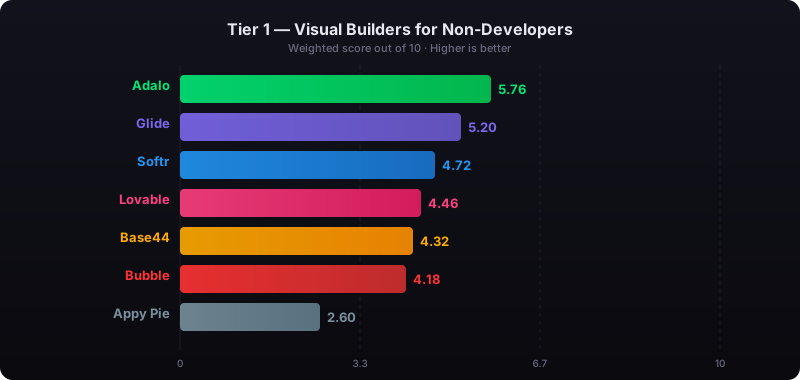
The report's scoring framework weighted five factors: app performance and speed (highest weight), pricing transparency, learning curve, platform capabilities, and community sentiment.
What is Calendly?
Calendly is an appointment scheduling tool for booking meetings and appointments. By connecting to your existing calendar (Google Calendar or Microsoft Outlook), you can set your availability and share scheduling links with others. No more back-and-forth coordinating meeting times.
Its platform features a custom booking page, automated reminders, group scheduling for group meetings, integrations with video conferencing platforms, and payment processors. It's designed for individuals, teams, and enterprises looking to simplify appointment scheduling.
Here are some of the strengths and weaknesses of Calendly's appointment scheduling software:
Strengths
- Calendly has a simple, easy-to-use interface, so you can set up and manage your appointment scheduling without any learning curve.
- It integrates with Google Calendar, Outlook, and iCloud, so your availability is always in real-time. To make it even more powerful, it integrates with Zoom, Salesforce, and Slack.
- Calendly, one of the most popular scheduling tools, automates tasks like sending reminders and follow-ups, so you don't have to do the work. That way, the chance of no-shows is reduced.
- Users can create multiple event types, set buffer times between meetings, and define availability windows for appointment scheduling according to individual or team needs.
Weaknesses
- The free plan has basic features but no multiple event types, integrations with certain apps, or customization options.
- Premium features require a subscription and can be expensive for individuals or small teams, especially with multiple users.
- Calendly has some customization, but users looking for extensive branding options or unique scheduling workflows might find it limited compared to other popular scheduling tools.
- Some users have reported that customer support could be faster or more responsive, which can be a problem if you need help quickly.
What Should You Look for in Appointment Scheduling Software?
When choosing the right appointment scheduling software, you will need to check the key features and capabilities to make sure it fits your needs. Here are the essential features to consider:
1. Ease of Use
Look for a tool with a simple and user-friendly interface to set up and manage your scheduling links and preferences. For example, an AI-powered app builder like Adalo provides easy-to-use templates for appointment scheduling that let you create custom booking systems without technical expertise.
2. Customization Options
Can you brand your scheduling or booking page with your logo, colors, and messaging? Consider flexible options like appointment types, buffer times, and customizable availability settings. The best tools let you create a scheduling experience that feels native to your brand.
3. Integrations
Choose a tool that integrates with your existing tech stack, calendar apps (Google Calendar, Outlook), CRM systems (HubSpot, Salesforce), and video conferencing platforms (Zoom, Microsoft Teams). Also consider integrations with email marketing, payment gateways, or productivity tools like Zapier for extended automation capabilities.
4. Automated Reminders and Notifications
Automated email or SMS reminders reduce no-shows and remind participants of upcoming appointments. Look for tools that offer customizable reminder options to control the timing and content of the notifications.
5. Time Zone Detection
Time zone detection is necessary for a smooth scheduling experience across different regions if you have international clients or team members. This feature eliminates confusion and ensures everyone shows up at the right time.
6. Team Scheduling Software
If you manage a team, look for scheduling for group meetings or round-robin functionality. Look for tools to assign bookings to team members or share a calendar view to manage everyone's availability efficiently.
7. Security and Compliance
Make sure the tool meets your security standards, mainly if you handle sensitive information. HIPAA or GDPR compliance may be required for healthcare or other regulated industries. Look for tools with secure data handling, customizable permissions, and secure payment processing.
8. Mobile Access
If you or your clients need to book on the go, a tool with a mobile-friendly interface or dedicated app is a big plus. Native mobile apps provide faster performance and better user experience than mobile web interfaces.
9. Customer Support and Uptime
Check for reviews and uptime, especially if your business relies on scheduling its own appointments. 99%+ uptime should be the minimum standard for any scheduling tool you consider.
10. Pricing and Scalability
Look at the pricing model (per user, monthly, annually) and see if the features match the cost. For growing businesses, choose a tool that can grow with your team's size and needs without unexpected usage charges or data limits.
Also, look for scheduling apps and tools that offer a free trial so you can take it for a test run to ensure it meets your needs.
What Are the Top Calendly Alternatives?
Here's a comprehensive look at the best Calendly alternatives that cater to various scheduling needs, from solo entrepreneurs to large teams.
1. Adalo - The Best AI-Powered Scheduling Platform for Custom Mobile and Web Apps
Adalo is a no-code app builder for database-driven web apps and native iOS and Android apps—one version across all three platforms. AI-assisted building and streamlined publishing enable launch to the Apple App Store and Google Play in days rather than months. Unlike standalone scheduling tools, Adalo lets you build a complete branded app with appointment booking as one of many integrated features—all without writing code.
Ada, Adalo's AI builder, lets you describe what you want and generates your app. Magic Start creates complete app foundations from a description. Magic Add adds features through natural language. X-Ray identifies performance issues before they affect users.
Adalo 3.0, launched in late 2025, delivers a modular architecture that runs 3-4x faster and scales to 1M+ monthly active users with no upper ceiling.
Best for: Individuals and businesses needing a custom app scheduling system. It's also suitable for those who want to create a complete branded experience for their clients, combining scheduling with payments, user accounts, and notifications in one native app.
Overview: Adalo features a visual interface where you can design and build apps through drag-and-drop components. With Magic Start, you can describe your scheduling app idea and get a complete foundation generated automatically—database structure, screens, and user flows created in minutes rather than days. The platform includes various templates and feature modules, including a highly popular appointment booking template.
Key Features:
A. Custom Scheduling with AI Assistance
Use Adalo's appointment booking feature template to build a scheduling system that matches your brand and operations. Magic Add lets you add features by simply describing what you want—tell it you need SMS reminders or payment collection, and it generates the functionality automatically.
Just drag and drop components to create an appointments app tailored to your business, or use natural language to describe what you need.
B. Powerful Integrations
Connect to external databases and services like Zapier, Gmail, or Stripe to supercharge your app. Adalo's Sheetbridge feature turns a Google Sheet into an actual database for the easiest control without database-related learning curves.
C. User and Customer Relationship Management
The platform features user authentication and profiles to manage client bookings and preferences. Build complete customer management systems that go beyond simple scheduling.
D. True Native Mobile Apps
Create your app with an easy, responsive design. Build apps that work across web, iOS, and Android from a single codebase—and publish directly to the Apple App Store and Google Play Store. This is crucial because distribution and marketing are often the hardest parts of launching a new app—having your scheduling app in the app stores gives you immediate access to millions of potential users.
Pros:
- Build a scheduling system that is fully customizable and fits your exact needs.
- Combine scheduling with other features like payments, user forums, live chat, and notifications all in one app.
- Provide a one-stop hub for your business's online presence to be more accessible to a broader audience.
- No record limits on paid plans—your database can scale with your business without hitting arbitrary caps.
- One build publishes to web, iOS App Store, and Android Play Store simultaneously.
- Over 3 million apps have been created on Adalo, with the visual builder described as "easy as PowerPoint."
Cons:
- Users should choose Adalo when they're looking to create a custom scheduling option in combination with a host of other user-friendly tools.
- If you're only looking for basic scheduling with nothing extra, the learning curve for Adalo is slightly higher than Calendly since you're building a complete app rather than just setting up a booking page.
Pricing:
- Free plan: Build and test apps with basic features.
- Paid plans: Start at $36/month and include custom domains, unlimited database records, and app store publishing with unlimited updates.
- No usage-based charges—all plans include unlimited usage, meaning no bill shock.
- Offers 14-day free trial
Adalo is one of the best Calendly alternatives if you need a customizable scheduling software solution within a native mobile app that you own and control.
2. Acuity Scheduling - The Best Calendly Alternative for Flexible Scheduling Software
Best for: Coaches, consultants, and small businesses looking for a customizable standalone scheduling solution.
Overview: Acuity Scheduling, now part of Squarespace, offers scheduling options with extensive customization. You can brand your scheduling page, embed it into your website, and create multiple appointment types. It's also ideal for teams that manage calendars with flexible availability settings.
Key Features:
- Customizable booking pages
- Integration with Zoom, Google Meet, and more
- Automated email and SMS reminders
- Group scheduling and recurring appointments
Pros:
- Acuity Scheduling has a simple setup process. Users can define availability and settings, and clients can self-book without fuss.
- Custom booking pages, intake forms, and automated reminders for a better client experience.
- Acuity integrates with Zoom, Google Calendar, and payment processors like Stripe and PayPal to create a smooth workflow.
- Scheduling app sends email and SMS reminders to clients to reduce no-shows.
- Businesses can accept payments when booking to simplify the payment process and reduce admin.
Cons:
- Free version has basic features, but multiple calendars and integrations require a paid plan.
- Basic setup is easy, but more complex features take some time to get used to.
- Some users have reported slow support responses, which can be a problem when you need help as soon as possible.
- Limited to web-based scheduling—no native mobile app for your clients.
Pricing:
- Starts at $16/month, with advanced plans for more features.
- Offers 7-day free trial
3. Doodle - Best for Scheduling Meeting Times Across Multiple Time Zones
Best for: Group scheduling and polls for meeting times across multiple time zones.
Overview: Doodle is one of the classic Calendly alternatives for coordinating meetings with multiple participants. Its polling feature allows attendees to vote on the best time, making it especially useful for teams with flexible schedules or clients in different time zones.
Key Features:
- Polling for group meetings
- Customizable branding on premium plans
- Integrates with popular calendar platforms
- Easy-to-use interface for both host and participants
Pros:
- Doodle has a super easy-to-use platform to create polls and schedule events, so individuals and teams with no tech expertise can use it.
- The polling feature allows participants to vote on times, so finding a time that works for everyone is a breeze, especially for large groups.
- Doodle integrates with Google Calendar, Outlook, and iCal, so you don't double book.
- With mobile apps for iOS and Android, you can manage your schedule and respond to polls on the go.
Cons:
- Free version has ads and doesn't have custom branding or extra admin controls, which are in the paid plans.
- Some users have reported that Doodle poll invites get blocked by recipients' email filters, making communication tricky.
- Users have reported that the time zone options are unclear, making scheduling across different regions tricky.
- Doodle has basic customization, but users looking for more branding options or custom workflows will find it limited compared to other tools.
Pricing:
- Free for basic features
- Premium plans start at $6.95/month.
4. Book Like A Boss - Best All-in-One Booking and Payment Solution
Best for: Entrepreneurs and small business owners needing an all-in-one booking and payment solution.
Overview: Book Like A Boss is one of the best Calendly alternatives to combine booking and payment processing into one platform, making it perfect for service-based businesses. You can showcase your services, link directly to your booking page, and accept payments through various providers.
Key Features:
- Customizable landing pages for services
- Payment integration with Stripe, PayPal, etc.
- Support for multiple appointment types and group bookings
- Integrations with major calendar apps and Zoom
Pros:
- BLAB has an easy setup process. You can define availability and preferences, and clients can self-book appointments without the hassle.
- Customizable booking pages, intake forms, and automated reminders for a better client experience.
- BLAB integrates with third-party apps like Zoom and Google Calendar and payment processors like Stripe and PayPal for a smooth workflow.
- Automated email and SMS reminders to clients to reduce no-shows and ensure timely attendance.
- Businesses can take payments when booking to simplify the payment process and reduce admin tasks.
Cons:
- Free version has basic features, but advanced features like multiple calendars and integrations require a paid plan.
- Basic setup is easy but more complex features will take time and effort to learn.
- Some users reported delays in getting support responses.
- Web-only solution without native mobile app capabilities.
Pricing:
- Starts at up to three users for $29.16 a month.
5. Setmore - Best Affordable, Scalable Solution
Best for: Small to medium-sized teams looking for affordable and scalable scheduling.
Overview: Setmore is an intuitive scheduling tool offering appointment management, team calendars for group events, and integrated payment options. It's ideal for teams that want a simple, scalable solution without breaking the bank.
Key Features:
- Team scheduling and calendar sharing
- Video meeting integrations with Teleport, Zoom, and more
- Customizable booking pages
- Integrates with Stripe for payments
Pros:
- Easy to set up and manage your schedule with no steep learning curve.
- Personalized booking pages, intake forms, and automated reminders for a better client experience.
- It integrates with third-party apps like Zoom and Google Calendar and payment processors like Stripe and PayPal for a seamless workflow.
- Sends automated emails and SMS to clients to reduce no-shows and ensure attendance.
- Businesses can take payment when booking to simplify the payment process and reduce admin tasks.
Cons:
- Free plan has basic features, but multiple calendars and integrations require a paid plan.
- Basic setup is easy, but more complex features will take some time to get used to.
- Expensive for extras.
Pricing:
- Free for basic features
- Premium plans start at $5/user/month.
6. YouCanBook.me - Best Online Scheduling App for Simplicity
Best for: Individuals and small teams focused on customer-facing roles.
Overview: YouCanBook.me is a straightforward appointment-online scheduling app and tool that syncs directly with Google or Microsoft calendars. It's known for its simplicity and robust customization to match your brand.
Key Features:
- Customizable booking pages with personal branding
- Automatic time zone detection
- Email and SMS reminders
- Integration with Google and Microsoft calendars
Pros:
- Simple setup process, define your availability and preferences, and clients can book appointments.
- Personalized booking pages, intake forms, and automated reminders for a better client experience.
- Integrates with 3rd party apps like Zoom and Google Calendar and payment processors like Stripe and PayPal.
- Sends automated emails and SMS to clients to reduce no-shows and ensure attendance.
- YouCanBook.me allows you to take payments at the time of booking and reduces admin tasks.
Cons:
- Free version has basic features, multiple calendars and integrations require a paid plan.
- Basic setup is easy, but learning more complex features takes time and effort.
Pricing:
- Free plan
- Paid plans start at $7.20/month.
7. SimplyBook.me - Best for Service-Based Businesses Needing Industry-Specific Booking Features
Best for: Service-based businesses needing industry-specific booking features.
Overview: SimplyBook.me is a highly versatile online scheduling tool tailored to various industries, from wellness to education. It allows businesses to manage bookings, accept payments, and customize their booking pages extensively.
Key Features:
- Industry-specific templates for booking pages
- Payment processing and invoicing
- Integration with Facebook, Instagram, and Google My Business
- SMS and email reminders
Pros:
- Customizable booking pages, automated reminders, sell products, gift cards, and service add-ons.
- Easy to set up and manage appointments, classes, and events.
- Integrates with Google Calendar, Facebook, Stripe, and PayPal.
- System sends automated emails and SMS to clients, reducing no-shows and late attendance.
- Allows you to make payments at the time of booking, simplifies the payment process, and reduces admin tasks.
Cons:
- Advanced features and higher plans are expensive and might not be suitable for small businesses or solo practitioners.
Pricing:
- Free basic plan
- Paid plans start at $8.25/month.
8. HubSpot Meetings - Best Meeting Scheduler for Integrating with CRM
Best for: HubSpot users looking to integrate scheduling with their CRM.
Overview: HubSpot Meetings is an integrated tool within the HubSpot CRM, allowing you to book meetings directly with your contacts. It's ideal for sales teams and customer support roles that want seamless scheduling within a CRM environment.
Key Features:
- Direct integration with HubSpot CRM
- Automated scheduling link and calendar syncing
- Customizable booking pages
- Integrates with Google and Office 365 calendars
- While it's not a standalone meeting booking tool, it still offers some great features for scheduling meetings as an alternative to Calendly.
Pros:
- As part of the HubSpot family, Meetings integrates with HubSpot CRM so meetings are logged automatically and synced with contact records.
- Simple setup process to define availability and preferences so clients can book appointments without the hassle.
- HubSpot Meetings offers customization options, including personalized booking pages, intake forms, and automated reminders, to enhance the client experience.
- It integrates with third-party apps like Zoom and Google Calendar and payment processors like Stripe and PayPal to make workflow seamless.
- Sends automated emails and SMS to clients to reduce no-shows and ensure attendance.
Cons:
- Free version has basic features, but advanced features like multiple calendars and integrations require a paid plan.
- Basic setup is easy, but more complex features take time to learn.
- Expensive for extras—requires HubSpot CRM subscription for full functionality.
Pricing:
- Free for HubSpot users
- Advanced features are available on paid CRM plans.
9. Microsoft Bookings - Best Meeting Scheduler for Microsoft Users
Microsoft Bookings is an online booking tool for businesses and individuals.
Best for: Microsoft Bookings is one of the best Calendly alternatives for small—to medium-sized businesses and professionals already using Microsoft 365. It is best for healthcare, education, financial services, and any service-based business that needs to schedule appointments.
Overview: Within the Microsoft 365 suite, Bookings is a centralized booking platform. It has a customizable booking page where clients can book at their convenience. Bookings sync with Outlook calendars to prevent double booking and keep availability up to date in real-time.
Key Features:
- Customizable booking page for a consistent client experience. Add your brand's logo and colors to the booking page
- Calendar integration that syncs with Outlook and other Microsoft 365 calendars to show real-time availability and prevent double booking
- Automated reminders and client confirmations, reducing no-shows and communication
- Staff management for assigning appointments to specific staff members based on availability and expertise
- Virtual appointments that support online meetings through Microsoft Teams integration for virtual consultations and services
Pros:
- Bookings integrate with Microsoft 365 apps like Outlook and Teams, so if you're already in the Microsoft ecosystem, you'll have a seamless experience.
- If you have a Microsoft 365 subscription, Bookings are included at no extra cost, making it a cost-effective scheduling solution.
- Easy setup, users can define availability and preferences, and clients can self-schedule appointments without the hassle.
- Bookings send automated emails to clients to reduce no-shows and ensure timely attendance.
- Users can customize their booking pages to match their brand.
Cons:
- Bookings may not have all the advanced features of dedicated scheduling tools.
- It integrates well within the Microsoft ecosystem but has limited native integrations with third-party apps outside of it.
- Some users find the customization options for booking pages and forms less flexible than those for other scheduling tools.
- No mobile app yet.
Pricing:
Microsoft Bookings is included with some Microsoft 365 plans. The pricing for these plans is:
- Microsoft 365 Business Basic: $6 per user/month. Web and mobile versions of Office apps, business email, and 1TB of OneDrive storage.
- Microsoft 365 Business Standard: $12.50 per user/month. All features of Business Basic plus desktop versions of Office apps and more.
- Microsoft 365 Business Premium: $22 per user/month. All features of Business Standard plus advanced security and device management.
How Do These Alternatives Compare for Building Custom Scheduling Apps?
While standalone scheduling tools like Calendly and Acuity work well for basic booking needs, businesses increasingly want scheduling integrated into their own branded apps. Here's how the app-building options compare:
| Platform | Starting Price | Native Mobile Apps | Database Limits | App Store Publishing |
|---|---|---|---|---|
| Adalo | $36/month | Yes (iOS & Android) | Unlimited on paid plans | Included |
| Glide | $60/month | No (PWA only) | Limited rows, extra charges | Not supported |
| Softr | $167/month | No (PWA only) | Limited per app/datasource | Not supported |
| FlutterFlow | $70/month + database | Yes | Depends on external DB | Requires setup |
Glide is heavily format-focused and restricted to set templates. This makes it fast to build and publish with, but creates generic, simplistic apps with limited creative freedom. Glide is a go-to for spreadsheet-based apps, but that still doesn't compare to the convenience of Adalo's Sheetbridge, which enables a user to turn a Google Sheet into an actual database for the easiest control without database-related learning.
FlutterFlow is "low-code," not "no-code," and is designed for technical users. FlutterFlow users also need to be prepared to manage and set up their own unrelated database, which requires significant learning complexity—especially when looking for scale, as anything less than optimal setup can create problems. Their builder is also limited in view (slow speed to see more than 2 screens at once), whereas Adalo can display up to 400 screens at a time on one canvas.
Softr is looked to for spreadsheet app building, provided the web app restrictions are met and the higher price point is acceptable. However, it doesn't support Apple App Store and Google Play Store publishing or native iOS and Android app creation.
Key Takeaways
- For standalone scheduling: Calendly, Acuity, and Setmore offer quick setup with standard booking features.
- For custom branded apps: Adalo lets you build scheduling into a complete native mobile app with no data caps and direct app store publishing.
- For Microsoft users: Microsoft Bookings provides seamless integration if you're already in the Microsoft 365 ecosystem.
Conclusion
Choosing the right scheduling tool can make a huge difference in managing time, meeting with clients and stakeholders, and growing your business. Whether you're a solo entrepreneur, a small business owner, or part of a larger team, there's a Calendly alternative tailored to fit your unique needs.
Consider your priorities—branding, customization, native mobile apps, or specific industry features—and start simplifying your scheduling process with one of these powerful tools today. For those wanting complete control over their scheduling experience within a custom app, Adalo offers the flexibility to build exactly what you need while publishing directly to the app stores.
Caryl Ramsey has years of experience assisting in bookkeeping, taxes, and customer service. She uses various accounting software to set up client information, reconcile accounts, code expenses, run financial reports, and prepare tax returns. She is also experienced in setting up corporations with the State Corporation Commission and the IRS and is a contributing writer to SUCCESS magazine.
FAQ
Why choose Adalo over other app building solutions?
Adalo is an AI-powered app builder that creates true native iOS and Android apps from a single codebase. Unlike web wrappers, it compiles to native code and publishes directly to both the Apple App Store and Google Play Store—the hardest part of launching an app handled automatically. With unlimited database records on paid plans and no usage-based charges, you won't face unexpected costs as your app grows.
What's the fastest way to build and publish an app to the App Store?
Adalo's drag-and-drop interface and AI-assisted building let you go from idea to published app in days rather than months. Magic Start generates complete app foundations from a simple description, and Adalo handles the complex App Store submission process so you can focus on your app's features instead of wrestling with certificates and store guidelines.
Which is more affordable, Adalo or Calendly?
Calendly's paid plans start at $10/month for basic scheduling features. Adalo starts at $36/month but gives you a complete custom app with scheduling, payments, user accounts, and native mobile apps—far more functionality for businesses wanting a branded experience rather than just a booking link.
Can I build a custom appointment scheduling app without coding?
Yes, with Adalo you can build a custom appointment scheduling app without any coding experience. Adalo offers a drag-and-drop interface and appointment booking templates that let you create a fully branded scheduling system that matches your business needs, complete with integrations for payments, notifications, and calendar syncing.
What features should I look for in appointment scheduling software?
Key features to consider include ease of use, customization options for branding, integrations with calendars and video conferencing tools, automated reminders, time zone detection, and secure payment processing. For growing businesses, scalability without data limits and mobile access are also important factors.
How does Adalo compare to standalone scheduling tools like Calendly?
While Calendly offers straightforward scheduling functionality, Adalo provides greater customization by letting you build a complete branded app with scheduling as one of many features. With Adalo, you can combine appointment booking with payments, user forums, live chat, and notifications—all within a single native mobile app that you own and control.
Can I accept payments when customers book appointments through my app?
Yes, Adalo integrates with payment processors like Stripe, allowing you to collect payments at the time of booking. This streamlines your workflow by combining scheduling and payment collection into one seamless experience, reducing administrative tasks and improving cash flow for your business.
Is Adalo suitable for teams or just individual users?
Adalo works for both individuals and teams looking to create custom scheduling solutions. You can build features for managing multiple team members' availability, assigning bookings to specific staff, and sharing calendar views—all within a single app that scales with your business needs.
Which is better for mobile apps, Adalo or Glide?
Adalo creates true native iOS and Android apps that can be published to the App Store and Play Store. Glide only creates Progressive Web Apps (PWAs) and doesn't support app store publishing. If having your scheduling app in the app stores is important for your business, Adalo is the better choice.
Do I need technical experience to use Adalo?
No, Adalo is designed for non-technical users. The visual builder has been described as "easy as PowerPoint," and over 3 million apps have been created on the platform. Magic Start can generate a complete app foundation from a simple description of what you want to build.

Build your app fast with one of our pre-made app templates
Begin Building with no codeRelated Content
10 Top Jobber Alternatives for Trade Pros
Find the ideal Jobber alternative for your trade or service business. Check out our top 10 picks.
Xano Review in 2026: Pros, Cons & Alternatives 📊👍
Xano is a top backend builder, but if you’re not a coder, it may be too difficult for you. Read on to see if the pricing is worth it.

5 Alternatives to Testflight for Android Users | 2026
Here’s the top 5 Testflight for Android platforms to help you test out your app before publishing it.
The 5 Best Backendless Alternatives in 2026
Looking for a Backendless alternative but can’t find one? You’ve come to the right place. We discusses the top 5 Backendless alternatives.