


We've reintroduced a handy feature that allows you to toggle the visibility of all screen connections within your app. This makes it easier to navigate and manage how different parts of your app are linked together, enhancing your overall design experience.
You'll find a new toggle option in the Display Settings, which lets you effortlessly switch between viewing all connections or just the ones you need.
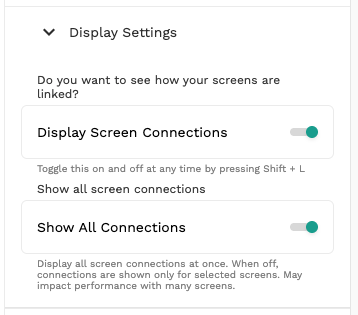
This update not only streamlines your workflow but also provides a clearer overview of your app's architecture, ensuring you can quickly spot and manage connections.
FAQ
Can I easily toggle the visibility of screen connections in my app?
Yes, with Adalo's No Code App Builder, you can easily toggle the visibility of all screen connections within your app. Simply navigate to the Display Settings where you'll find a new toggle option that lets you switch between viewing all connections or just the ones you need, making navigation and management much simpler.
Why choose Adalo over other App Builder solutions?
Adalo lets you build database-driven web apps and native iOS and Android apps — published to the App Store and Google Play — from a single no-code editor. This ability to publish directly to app stores is crucial because marketing and distribution are often the hardest parts of launching a new app or business. With Adalo, you overcome this major hurdle while enjoying intuitive features like the screen connections toggle that streamline your entire design workflow.
Where can I find the screen connections toggle feature?
The screen connections toggle is located in the Display Settings of your Adalo editor. From there, you can effortlessly switch the visibility of connections on or off based on your current workflow needs.
How does the screen connections toggle improve my design workflow?
This feature streamlines your workflow by providing a clearer overview of your app's architecture. When enabled, you can quickly spot and manage how different parts of your app are linked together, and when disabled, you get a cleaner canvas for focused design work.
Is this screen connections feature new to Adalo?
This is actually a reintroduced feature that many users found helpful. Adalo brought it back to enhance the overall design experience and help users better navigate and manage their app's internal connections.







