


A no-code web app builder is exactly what it sounds like. It's a tool that uses a PowerPoint-like building interface to create a web app. You don't need to know any programming language or have any technical skills to use one.
Build and publish with Adalo's web app builder.
If you can create a Facebook or Instagram account, you can use a no-code web app builder.
You'll sign into a no-code web app builder straight from your browser and create your web app with an internet connection. This means you won't need to worry about downloading any software directly to your computer—all your work will be done in the cloud.
Independent research from App Builder Guides' State of App Building report (February 2026) analyzed 190 Reddit threads and 150+ platform citations across 345 data points with zero platform sponsorships. Adalo ranked first among visual builders for non-developers.

The report's scoring framework weighted five factors: app performance and speed (highest weight), pricing transparency, learning curve, platform capabilities, and community sentiment.
What Can You Build With a No-Code Web App Builder?
There are two types of web apps: Web apps, which you access and use right from your phone, tablet, or desktop browser, and progressive web apps (PWAs), which you can download directly to your phone or tablet from a link.
You most likely use web apps every day, like when you sign into an account from a browser. They're a lot like websites, but have some interactive functionality like booking reservations and appointments, making payments, and more. Examples of web apps include online banking, Zillow, and a restaurant web app that offers online booking and ordering.
PWAs are more powerful than web apps because they're downloaded directly to your phone. In some cases, they can use your phone's processors, camera, GPS, and other physical hardware.
Many proprietary business apps, like CRM boards or inventory management tools, are PWAs that only employees can download from a private link.
It's important to note that in most cases, neither web apps nor PWAs can be published in the Apple App Store or Google Play Store. This limits their audience, as both app stores have billions of daily users. To reach those users, you need native mobile apps—which some platforms can build alongside web apps from a single codebase.
To avoid confusion, whenever I use the word "web app," I'm referring to both a web app and a PWA since all the no-code web app builders on my list can create both types.
What To Look For In a No-Code Web App Builder
When shopping for and comparing different types of no-code web app builders, ensure that they check each of the following boxes:
Robust Ecosystem: By ecosystem, I mean support, tutorials, tools, and templates. A standout web app-building platform will have:
- Hours of video tutorials that walk you through every part of the no-code web app-building platform
- Detailed help documentation for easy reference
- Dozens of templates to get your building started
- Tools and plugins made by developers
- A thriving forum where you can connect with fellow users
When a web app builder's ecosystem is strong, you'll be able to overcome many issues you encounter and have all the tools to build a super powerful web app.
Actually No-Code: Sometimes, you'll sign up for a no-code web app builder. When you get started, they'll ask you to "define parameters." Such a tool is a low-code platform, and it requires technical knowledge. But if you do have some technical skills, you might want to give a low-code platform a go, as building an app with one will fit your skillset.
Free Version or Free Trial: Before you commit your money to a no-code web app builder, you'll want to test it. Doing this will give you a feel of how that no-code web app builder works and if you can use it to build the exact kind of web app you want. A web app builder offering a free trial or free version lets you get a feel for the building interface, features, and functionality.
Can Build All The Parts of Your Web App: All web apps have three parts, and a good web app builder will allow you to construct each one:
- The Frontend: This is the part of a web app that you see and interact with. It includes the app's screens, pictures, text, buttons, and more.
- The Backend: Serving as a web app's brain, the backend receives user requests from the front end and retrieves information for the user, such as photos from a social network. The backend also connects to other apps and websites to gather data, such as up-to-date stock market information.
- The Database: Although the database is part of the backend, it functions like a storage box that retains information such as menu items for a restaurant app, products on an e-commerce app, etc. The backend will display database info that users request to the frontend.
Now, let's jump in!
#1 The Best Overall No-Code Web App Builder
Adalo
What is it?
Adalo is a no-code app builder for database-driven web apps and native iOS and Android apps—one version across all three platforms, published to the Apple App Store and Google Play. With over 3 million apps created on the platform, this AI-powered builder combines enough power, design freedom, and functionality to bring any app idea to life.
Ada, Adalo's AI builder, lets you describe what you want and generates your app. Magic Start creates complete app foundations from a description. Magic Add adds features through natural language. X-Ray identifies performance issues before they affect users.
Adalo 3.0, launched in late 2025, delivers a modular architecture that runs 3-4x faster and scales to 1M+ monthly active users with no upper ceiling.
Why do I like it?
There's a reason I selected Adalo as the best overall web app builder: While it's probably the easiest to use on this list—described by users as "easy as PowerPoint"—it's also one of the most powerful. When you use Adalo, you'll be able to start building right after you sign up.
The platform's AI capabilities accelerate development significantly. Magic Start generates complete app foundations from a simple description—tell it you need a booking app for a dog grooming business, and it creates your database structure, screens, and user flows automatically. What used to take days of planning happens in minutes. Magic Add lets you add features by describing what you want in plain language.
When it comes to the kinds of web apps you want to build, Adalo's got you covered. It doesn't matter if you want to make a CRM system with client profiles, a restaurant ordering app, or a social network for Yorkie owners—Adalo brings the power and design tools to build it.
Who is it best for?
Over the years, I've recommended Adalo more than any other tool or no-code web app-building platform. Adalo is flexible enough to meet the needs of any freelancer, entrepreneur, or small or medium business. The platform's modular infrastructure scales to serve apps with 1 million+ monthly active users, with no upper ceiling—so you won't outgrow it as your business expands.
Pricing
Get started with Adalo for $36/month. Unlike competitors that charge based on usage or limit database records, all Adalo paid plans include unlimited database records and unlimited usage—no surprise charges or bill shock.
Features
- Want to get your app in front of more eyes? Adalo lets you publish your app to the Apple App Store and Google Play Store. And you won't need to worry about reconfiguring your design because Adalo automatically converts your web app to a native mobile app from a single codebase.
- Choose from over 35 premade templates to kick-start building your web app. Adalo's pre-made app templates are packed with screens, text, databases, and more. All you need to do is reconfigure the designs and content to meet your needs.
- Juice up your web app's power with some of Adalo's integrations—Adalo integrates with over 5,500 third-party apps. Connect your QuickBooks account to use your revenue data or integrate with your MailChimp account to bring your marketing campaign data to your web app.
- X-Ray identifies performance issues before they affect users, helping you maintain speed as your app scales.
#2 A No-Code Web App Builder for Sleek-Looking Apps
Glide
What is it?
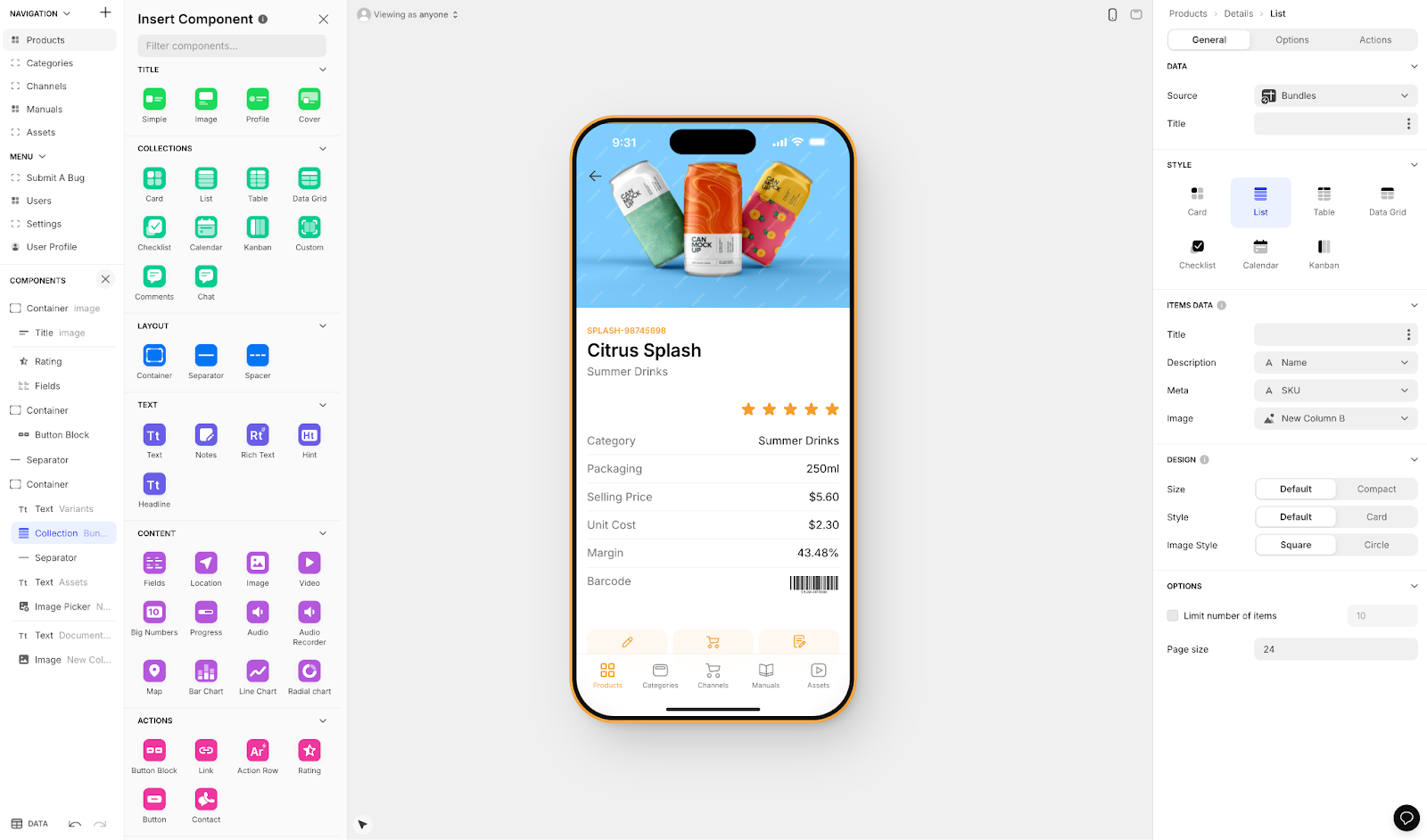
Glide is a no-code web app builder that puts a premium on app aesthetics and spreadsheet-based data.
Why do I like it?
Though it's not as customizable as Adalo or Bubble, Glide gives you the power to make seriously gorgeous, eye-catching apps. It also features an easy-to-use interface that makes building your web app a breeze, especially if you already have a pre-made database in a spreadsheet format.
For those without a database, you'll need to start with Glide's built-in database, Glide Tables, before you create your app's screens. While it may sound daunting, Glide Tables is very user-friendly.
However, Glide's template-focused approach means apps can feel generic with limited creative freedom. The platform excels at speed but sacrifices customization. It's worth noting that Glide does not support Apple App Store or Google Play Store publishing—your apps remain web-only.
Who is it best for?
Glide functions best for folks who want to create an internal business tool quickly from existing spreadsheet data. So, if you want to turn your database into a CRM Board, Accounting tool, or Quality Control App and don't need native mobile apps, Glide might be a good choice.
For those who want spreadsheet-based convenience with more flexibility, Adalo's Sheetbridge feature enables users to turn a Google Sheet into an actual database—providing the easiest control without database-related learning curves, while still allowing App Store publishing.
Pricing
Get Glide for $60/month (billed monthly) to build an app with a custom domain. You'll get over 35 integrations and Glide's powerful AI tools. However, this tier is limited by app updates and data record rows, which attract additional charges. If you need to make an app for a bigger organization, look no further than Glide's $125/month (billed monthly) version, which will allow for up to 20 logged-in users.
Features
- Glide has over 100 beautiful templates to help you get started on your app.
- When you get Glide, you also get a very powerful AI tool. This tool lets you summarize PDFs, read and organize written information and data from pictures, and more.
#3 The No-Code Web App Builder with The Biggest Ecosystem
Bubble
What is it?
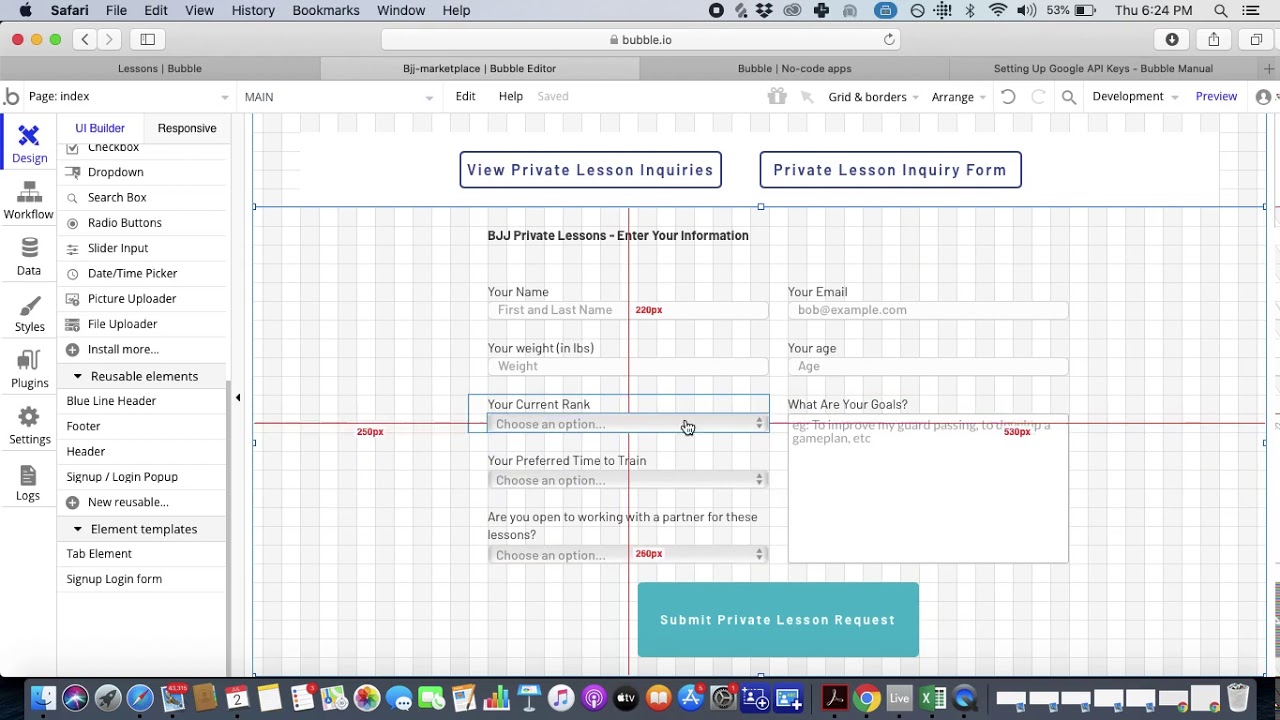
Bubble is a battle-tested, uber-powerful no-code web app builder with extensive customization options.
Why do I like it?
Bubble was one of the first movers in the no-code web app builder space, taking off in 2012. Since then, the Bubble Ecosystem has grown exponentially, and now Bubble offers nearly endless video tutorials, classes, documentation, plugins, and more.
Full caveat: Bubble comes with a tough learning curve that takes a few months to pin down. But the good news is that you'll be supported by Bubble's tutorials and help guides along the way.
When you build your app with Bubble, you'll have nearly unlimited power and flexibility. This allows you to make an app that executes almost any task you want done. However, that customization often results in slower applications that can suffer under increased load. Claims of millions of MAU are typically only achievable with hired expert help—the ecosystem is rich with consultants precisely because so many users need assistance optimizing their apps.
Who is it best for?
Bubble can make web apps for pretty much anything. Businesses of all sizes, from fresh startups to 150-year-old Fortune 500s, have used Bubble with stellar results. You just need to put in the time to learn Bubble's building interface—and potentially budget for expert help as you scale.
For mobile apps, Bubble's solution is a wrapper for the web app, which introduces potential challenges at scale. This also means one app version doesn't automatically update web, Android, and iOS apps deployed to their respective app stores—unlike Adalo's single-codebase approach that publishes true native apps.
Pricing
Bubble's web and mobile wrapper offering starts at $59/month with usage-based charges through Workload Units, plus limits on app re-publishing and records. The Workload Unit calculations can be unclear and create uncertain monthly costs. For only $32/month (billed monthly), you can build and launch your start-up app to a limited audience. If you want to harness more of Bubble's power, try Bubble's $134/month (billed monthly) version, as you'll be able to expand its functionalities and get better security features.
By comparison, Adalo's web and true-native mobile builder starts at $36/month with unlimited usage and App Store publishing with unlimited updates to apps once published.
Features
- Bubble offers over 400 templates, 100 plugins, and tools. Use these to start building a highly customized and powerful app.
#4 A No-Code Web App Builder for Business Tools
Noloco
What is it?
Noloco is a no-code web app builder that specifically caters to businesses of all sizes that want to create their own internal tools.
Why do I like it?
While Noloco doesn't have a free version or trial, it comes with community support and a chat function on the website. It's packed with webinars, tutorials, and guides that walk you through each tool on the building interface.
If you need to create multiple apps for your business, Noloco might be the way to go: Even Noloco's lowest pricing tier allows you to create an unlimited number of apps, including unique apps specialized for your accounting, sales, and operations teams.
Who is it best for?
Noloco is designed for creating internal business apps and tools. It's not meant to make public-facing apps like those for an e-commerce site or social media. So, businesses of all sizes looking to streamline their internal operations will be right at home with Noloco.
Pricing
Start using Noloco for $49/month (billed monthly), and you'll be able to enter 5,000 rows of data. If you need more space, try the $149/month (billed monthly) version, and you'll get 50,000 rows of data.
Features
- Noloco integrates with several database providers, making creating an app or tool easy from pre-existing data. You'll get integrations with Airtable, SmartSuite, Postgres, Google Sheets, and a few others.
- You'll be able to automate your workflows, saving your team time by running several actions simultaneously.
#5 A No-Code Web App Builder for Techies
Backendless
What is it?
Backendless is a low-code web app builder that lets technical people craft web apps to their precise needs.
Why do I like it?
While Backendless is specifically designed for tech enthusiasts, it features some no-code elements, like a drag-and-drop interface. You'll be able to use it to build your frontend fast.
Backendless also lets you build your own backend (hence the name). Techies will love Backendless because it allows you to customize your backend to your needs, which most no-code web app builders don't allow.
Who is it best for?
While you won't need to be fully fluent in a coding language, knowing the logic behind programming languages and how different database structures work will help you understand Backendless.
Pricing
Get Backendless for $15/month (billed monthly) with lots of security features and API keys. If you need more space (up to 50 database tables), go with the $40/month (billed monthly) version.
Features
- Backendless's free version is generous: It offers free API calls to gather data and is a great opportunity to learn the building interface.
- If you're a big enterprise, listen up: Backendless has an enterprise-level plan that lets you run your app on-prem (on your very own server), providing extra security, functionality, and a happy IT team.
Comparison Table: No-Code Web App Builders at a Glance
| Platform | Starting Price | Native Mobile Apps | Database Limits | Best For |
|---|---|---|---|---|
| Adalo | $36/month | Yes (iOS & Android) | Unlimited on paid plans | Web + native mobile from one codebase |
| Glide | $60/month | No | Row limits with overage charges | Spreadsheet-based internal tools |
| Bubble | $59/month | Wrapper only | Workload Unit limits | Highly customized web apps |
| Noloco | $49/month | No | 5,000-50,000 rows by tier | Internal business tools |
| Backendless | $15/month | Limited | Table limits by tier | Technical users wanting backend control |
Key Takeaways
- For most users, Adalo offers the best combination of ease-of-use, native mobile app publishing, and scalability with no data caps on paid plans.
- Bubble provides maximum customization but requires significant learning investment and often expert help to scale effectively.
- Glide and Noloco excel at specific use cases—spreadsheet apps and internal tools respectively—but lack App Store publishing capabilities.
FAQ
Why choose Adalo over other app building solutions?
Adalo is an AI-powered app builder that creates true native iOS and Android apps alongside web apps. Unlike web wrappers, it compiles to native code and publishes directly to both the Apple App Store and Google Play Store from a single codebase. With unlimited database records on paid plans and no usage-based charges, you get predictable pricing as you scale.
What's the fastest way to build and publish an app to the App Store?
Adalo's drag-and-drop interface combined with AI-assisted building through Magic Start and Magic Add lets you go from idea to published app quickly. The platform handles the complex App Store submission process, so you can focus on your app's features instead of wrestling with certificates and provisioning profiles.
Which is more affordable, Adalo or Bubble?
Adalo starts at $36/month with unlimited usage and database records. Bubble's comparable offering starts at $59/month with usage-based Workload Unit charges and record limits that can create unpredictable monthly costs. For native mobile apps, Adalo's single-codebase approach is also more cost-effective than Bubble's wrapper solution.
Which is faster to build with, Adalo or Glide?
Both are fast, but for different reasons. Glide's template-focused approach is quick for spreadsheet-based apps but limits customization. Adalo's Magic Start generates complete app foundations from descriptions, and its visual builder can display up to 400 screens at once for faster navigation of complex projects.
Which is easier for beginners, Adalo or Bubble?
Adalo is significantly easier for beginners—users describe it as "easy as PowerPoint." Bubble has a steep learning curve that typically takes months to master. While Bubble offers more customization, that flexibility comes with complexity that often requires hiring experts.
Is Adalo better than Glide for mobile apps?
Yes. Adalo creates true native iOS and Android apps that can be published to the App Store and Play Store. Glide does not support App Store publishing at all—apps remain web-only. If reaching the billions of daily app store users matters to your business, Adalo is the clear choice.
Can I migrate from Bubble to Adalo?
While there's no one-click migration, many users transition from Bubble to Adalo when they need true native mobile apps or want to escape usage-based pricing. Adalo's Magic Start can help recreate your app structure quickly, and the unlimited database records mean you won't hit data caps as you grow.
What's the difference between a web app and a progressive web app (PWA)?
Web apps are accessed directly through your browser and offer interactive features like booking and payments. PWAs are more powerful because they can be downloaded directly to your phone and may access hardware features like your camera and GPS. Adalo allows you to build both types alongside true native mobile apps.
Do I need coding experience to build an app with Adalo?
No coding experience is required. Adalo uses a visual drag-and-drop interface that anyone can learn. The AI-assisted features like Magic Start and Magic Add let you describe what you want in plain language, making app building accessible to complete beginners.
Can I connect my web app to other tools and services I already use?
Yes, Adalo integrates with over 5,500 third-party apps, allowing you to connect tools like QuickBooks, MailChimp, and many others. These integrations let you bring existing data and functionality into your web app, making it seamlessly connected to your business workflows.








