
Off-the-shelf project management tools rarely fit how your team actually works. This guide shows how to build a custom project management app with AI-powered no-code tools, tailored to your specific workflow.
Key Takeaways
- Adalo is a no-code app builder with AI-powered generation and a visual multi-screen canvas that lets you design custom project management workflows — task boards, team assignments, deadline tracking, and progress dashboards — with a built-in relational database. Publish to the Apple App Store, Google Play Store, and web from a single project at $36/mo flat with unlimited usage.
- Bubble can build sophisticated web-based project management tools with complex conditional workflows, but it produces web apps only. Mobile access for field teams requires a wrapper service that adds cost and limits performance. Usage-based pricing makes costs unpredictable for active teams.
- FlutterFlow generates cross-platform apps via Flutter with strong mobile performance. Good option for developer-adjacent teams who want to customize deeply, but requires configuring your own database and understanding Flutter concepts.
- Glide creates quick task-tracking apps from Google Sheets. Works for small teams with simple workflows, but lacks the relational depth for multi-project management with dependencies, sub-tasks, and team permissions. No app store publishing.
Introduction
Every team manages projects. The question is whether you use a tool designed for someone else's workflow or build one that matches how your team actually operates. Off-the-shelf project management tools like Asana, Monday.com, and Trello are good starting points, but they come with rigid structures. You adapt your workflow to the tool rather than the other way around. And their per-user pricing adds up: a 15-person team on Monday.com's Pro plan pays over $3,000/year, with feature gates that push you toward even more expensive tiers.
The teams that feel this most acutely are the ones with domain-specific workflows. A construction company tracks tasks differently than a marketing agency. A healthcare team managing clinical trial milestones has different requirements than a software team running sprints. A real estate development firm coordinating contractors, permits, and inspections needs a project structure that no generic tool offers out of the box. These teams either force their process into a generic tool, stitch together multiple tools with Zapier automations, or spend $50,000+ on custom software.
Building a custom project management app lets you design the exact workflow your team uses — your task statuses, your assignment rules, your reporting views, your notification triggers. The barrier has always been that custom development requires developers, time, and budget that most teams do not have. AI-powered no-code builders have lowered that barrier dramatically. This guide compares four platforms for building project management apps, explains the features and database structures you need, and walks through building one step by step.
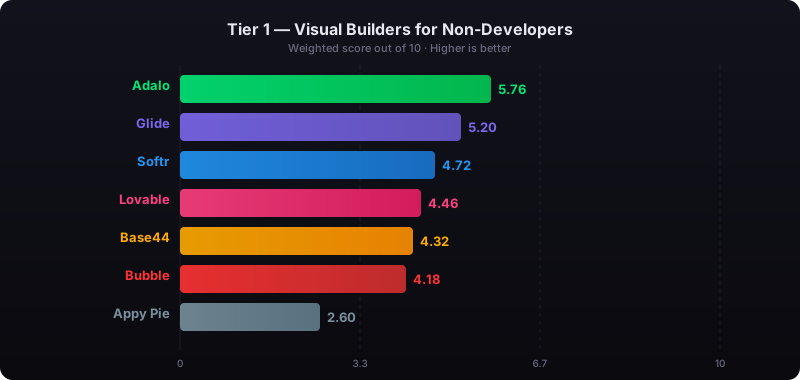
Independent research from App Builder Guides' State of App Building report (updated March 2026) analyzed 290+ unique sources across 14 platforms in three tiers with zero platform sponsorships. Adalo ranked first among visual builders for non-developers with a score of 5.94/10.
See also: Compare all no-code app builders | Business app builder
What Your Project Management App Needs
Project management apps vary widely in complexity, but certain foundational features separate a useful tool from a glorified to-do list. Think about these requirements before choosing a platform, because some are easy to add later and others depend on database architecture decisions you make at the start.
- Task management with statuses: The core of any PM app. Tasks need a title, description, assignee, due date, priority level, and a status field that reflects your workflow (e.g., Backlog, In Progress, Review, Complete). The status field drives everything else — views, filters, notifications, and reporting.
- Project hierarchy: Real projects have structure. A project contains phases or milestones. Milestones contain tasks. Tasks may have sub-tasks or checklists. Your database needs to model this parent-child hierarchy, which means self-referencing relationships or multiple linked collections.
- Team assignments and permissions: Assign tasks to team members, reassign when workloads shift, and control who can see what. Some team members should see only their tasks. Project leads should see everything in their project. Executives should see high-level progress across all projects. This requires role-based access at the database level.
- Deadline tracking and calendar views: Due dates are only useful if the app surfaces them proactively. Overdue task highlighting, upcoming deadline lists, and calendar views that show task distribution across time help teams stay ahead of deadlines rather than reacting to missed ones.
- File attachments: Tasks often need supporting documents — briefs, mockups, contracts, photos from a job site. The platform needs file upload and storage capabilities, with files linked to specific tasks so they stay organized.
- Progress reporting: Stakeholders want to know what percentage of the project is complete, which milestones are on track, and where bottlenecks are forming. This requires aggregating task status data across projects — counting completed vs. total tasks, calculating on-time completion rates, and surfacing blocked items.
- Notifications: Push notifications when a task is assigned, when a deadline approaches, when a status changes, or when someone comments on your task. Without notifications, the app becomes something people forget to check.
- Activity log: A record of who did what and when. Task status changed by Sarah at 2:14pm. File uploaded by Marcus at 3:30pm. Comment added by Lisa at 4:05pm. This provides accountability and context when reviewing project history.
Adalo — Visual Canvas for Custom PM Workflows
Price: Free plan available; $36/mo for app store publishing with unlimited usage | Output: Native iOS, Android, and web from one project
Ada, Adalo's AI builder, generates your project management app's foundation from a description. Tell Magic Start: "Build a project management app with projects, tasks, team members, due dates, status tracking, and a dashboard showing progress across all projects." It creates screens, navigation, database collections, and relationships. From there, Magic Add layers in features through natural language — "add a calendar view showing all tasks with due dates this week" — and Visual AI Direction lets you point at elements on the multi-screen canvas to refine layouts directly rather than describing changes in a chat window. X-Ray identifies performance issues before they affect your team.
The visual multi-screen canvas is where Adalo's approach to project management apps differs most from other builders. You can see every screen of your app simultaneously — the task board, the task detail view, the project dashboard, the team workload screen, the notification center — and understand the full user flow at a glance. When a project manager navigates from the dashboard to a specific project to a specific task, you see that navigation path visually on the canvas rather than clicking through screens one at a time in a preview.
Adalo's built-in relational database (per-app Postgres) handles the multi-layered relationships project management requires. Projects contain Tasks. Tasks link to Team Members. Tasks have Statuses. Tasks can have Comments and File Attachments. Comments link back to both the Task and the Team Member who wrote them. These relationships are straightforward to set up in Adalo's database editor without SQL or external configuration.
Adalo 3.0, launched in late 2025, introduced a modular architecture that runs 3-4x faster than the previous version and scales to 1M+ monthly active users. The platform compiles true native iOS and Android apps, which matters for project management because team members need reliable push notifications for task assignments and deadline reminders — native push notifications are more dependable than web-based alternatives.
Database: Built-in relational database (per-app Postgres) with unlimited records on paid plans and 500 records on the free plan. For teams migrating from spreadsheet-based project tracking, SheetBridge lets you use a Google Sheet as a relational database within Adalo.
Pricing: Starter at $36/month (billed annually) includes native iOS and Android publishing, unlimited database records, and zero usage caps. A 20-person team uses the same $36/month plan as a 3-person team — no per-user charges.
Strengths:
- Visual multi-screen canvas shows entire app flow — ideal for designing multi-view PM workflows
- Built-in relational database handles project-task-member relationships without external setup
- AI builder (Ada) with Magic Start, Magic Add, X-Ray, and Visual AI Direction
- One project produces Android, iOS, and web — field teams on mobile, managers on desktop
- Flat-rate pricing regardless of team size (no per-user fees)
Honest limitations: Adalo does not include Gantt chart components natively — you would need to build timeline views using list components with conditional formatting, or use a custom component. Real-time collaborative editing (multiple people editing the same task simultaneously, like Google Docs) is not built-in, though task updates sync in real time. If you need a web-only PM dashboard with deeply complex conditional workflows and branching automation, Bubble offers more sophisticated backend logic.
Best for: Teams that want a project management app tailored to their specific workflow, with native mobile apps for on-the-go task updates and a web interface for desktop management — all from one project, at a flat monthly cost regardless of team size.
Learn more about building business apps with Adalo
Bubble — Complex Web-Based Project Dashboards
Price: $69/mo+ (Bubble) + $49/mo+ (wrapper for mobile) | Output: Web app; mobile via third-party wrapper
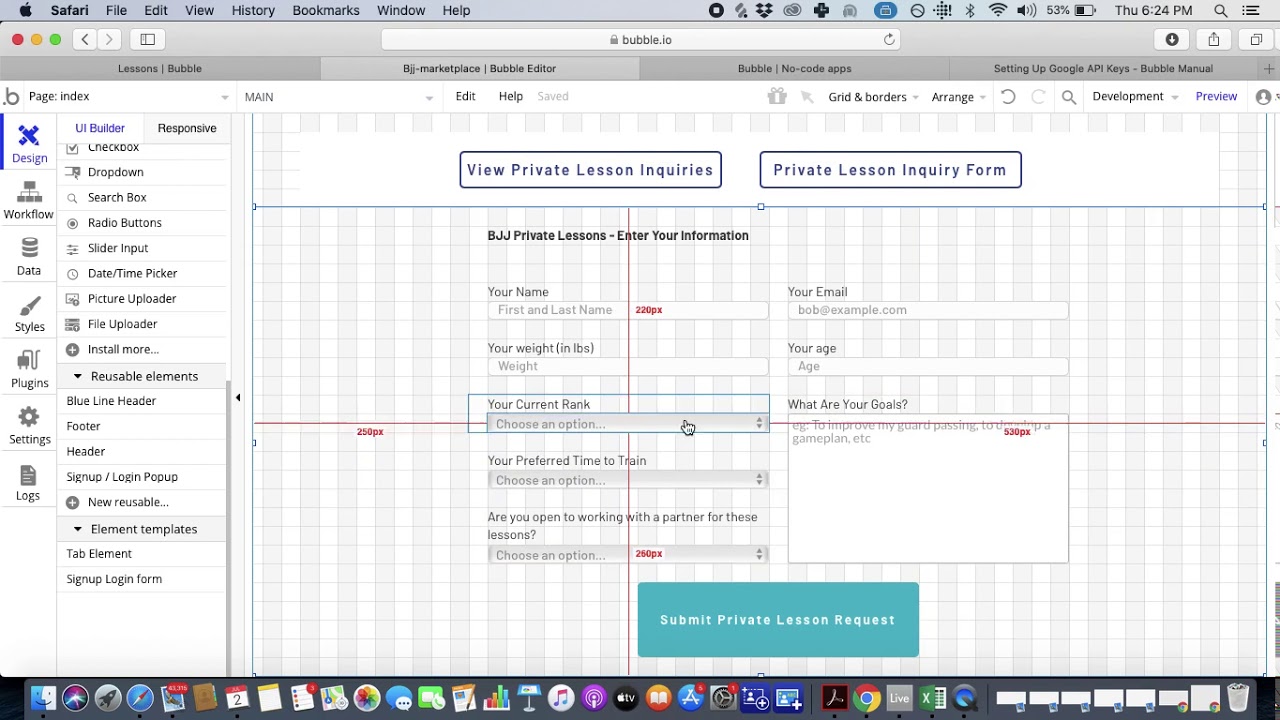
Bubble is a visual web app builder with a powerful workflow engine. For project management, its conditional logic can handle complex scenarios: automatically reassign tasks when a team member's workload exceeds a threshold, escalate overdue tasks to a project lead, trigger different notification chains based on task priority, or calculate project completion percentages with weighted milestone values. The plugin ecosystem (5,300+ options) includes Gantt chart components, calendar widgets, and reporting tools.
The mobile gap: Project management is increasingly mobile — team members update task statuses from job sites, meetings, and commutes. Bubble produces web apps only. Getting a mobile app into the App Store or Google Play requires a wrapper service like Natively ($49/mo on top of Bubble's subscription). The wrapper loads your web app inside a native container. Push notifications work through the wrapper, but the experience is noticeably slower than a native app — the App Builder Guides 2026 report found Bubble page loads of 5-10 seconds on desktop and 8-14 seconds on mobile. Quick task status updates become tedious when every screen transition takes several seconds.
Pricing: Growth plan at $69/month (billed annually) with 250K Workload Units per month. Project management apps generate significant WU consumption — every task list load, every status filter, every dashboard aggregation, every notification check burns Workload Units. An active 15-person team can exhaust the Growth plan's monthly WU allocation in two to three weeks. Overages cost $0.30 per 1K WU. Add a wrapper at $49/mo for mobile. Bubble holds a 1.7/5 on Trustpilot across 123 reviews, and most teams hire Bubble consultants at $40-$125/hour to build beyond basic applications.
Strengths:
- Sophisticated conditional workflow automation for complex PM logic
- Large plugin ecosystem with Gantt charts, calendars, and reporting widgets
- Strong for web-first project dashboards with advanced data manipulation
Honest limitations: Web-only output requires a wrapper for mobile access, adding cost and degrading performance. Usage-based pricing makes costs unpredictable for active teams. The learning curve is steep — most teams hire consultants. Quick mobile task updates suffer from multi-second load times through the wrapper.
Best for: Teams that primarily manage projects from desktop browsers and need complex automation logic, who can accept a slower mobile experience for on-the-go updates.
See the full Adalo vs Bubble comparison
FlutterFlow — Developer-Adjacent PM Apps via Flutter
Price: $80/mo/seat (team features) | Output: Flutter-based cross-platform (Android, iOS, Web)
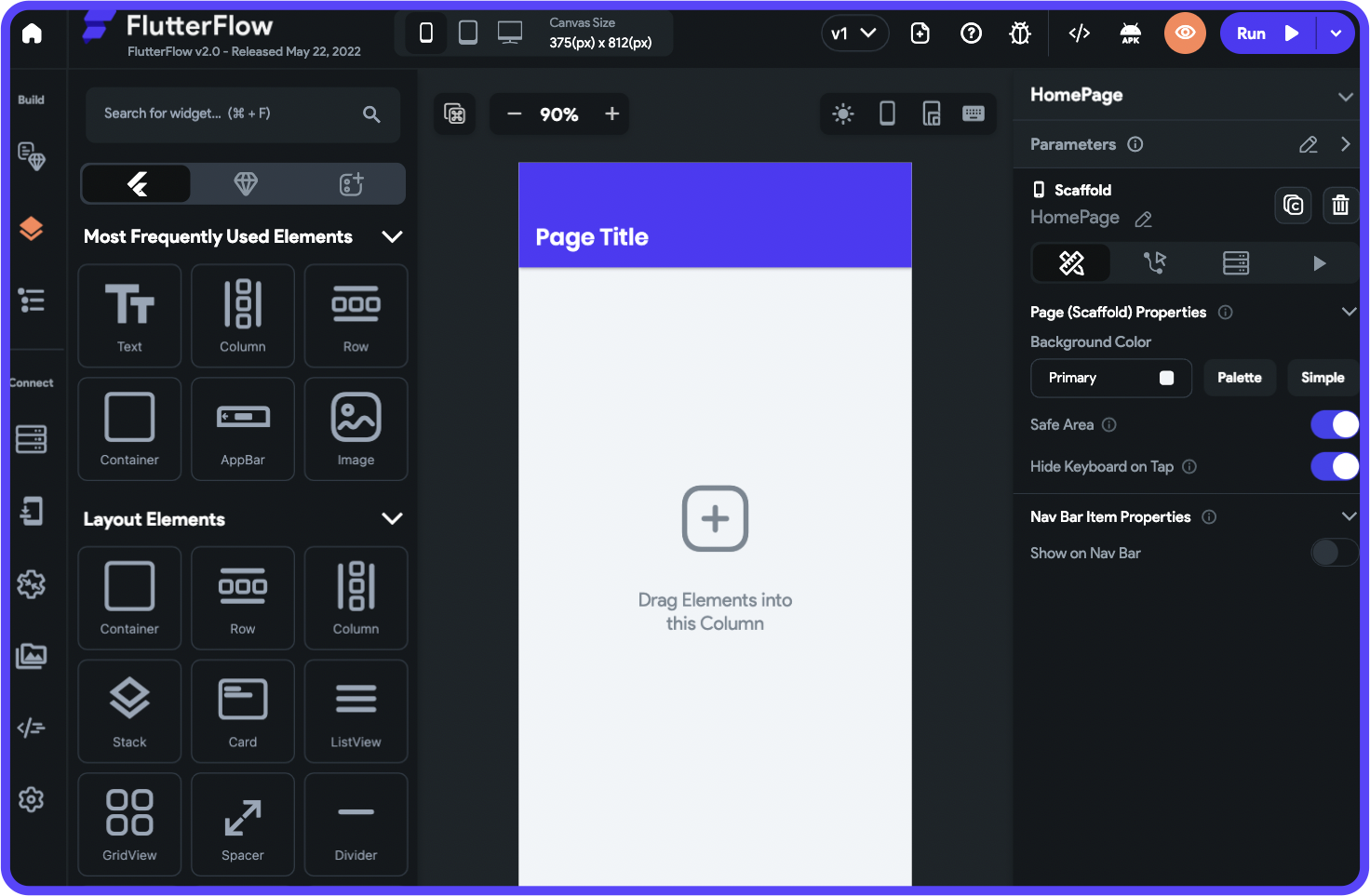
FlutterFlow is a visual development platform built on Google's Flutter framework. It generates real Flutter/Dart code that compiles to native ARM machine code, delivering smooth performance for task list scrolling, drag interactions, and transitions. For teams with developer resources who want a custom PM tool with the option to extend the codebase later, FlutterFlow offers a strong foundation. Its AI features generate UI components and logic from descriptions, and code export lets a development team take ownership of the full codebase.
The backend setup: FlutterFlow does not include a database. You must configure Firebase, Supabase, or another backend. For project management, this means designing your own schema for projects, tasks, team members, comments, and files — including the relationships between them. Firebase's document-based structure handles simple task lists well but gets complicated with nested project hierarchies and cross-collection queries (e.g., "show me all overdue tasks across all projects assigned to team members in the Marketing department"). Supabase (Postgres-based) is better suited for relational PM data but requires more setup. The App Builder Guides 2026 report documented editor interactions taking 2-40 seconds per click at scale.
Pricing: Basic at $39/month with code download. Growth at $80/month/seat with collaboration features. A five-person team building a shared PM tool on Growth pays $400/month before database costs — more than ten times Adalo's flat rate. Add Supabase Pro at $25/mo or Firebase Blaze (pay-as-you-go). FlutterFlow holds a 2.6/5 on Trustpilot across 19 reviews.
Strengths:
- Flutter-based output for smooth task list performance and transitions
- Full code export for developer teams who want to extend beyond the builder
- Cross-platform from a single Flutter codebase
Honest limitations: No database included — you configure and maintain your own backend. Per-seat pricing makes team use expensive. Building complex PM features (task dependencies, automated status flows, permission-based views) requires technical knowledge. The widget tree interface assumes familiarity with Flutter concepts.
Best for: Developer-adjacent teams who want native mobile performance with the option to export and extend the Flutter codebase, and who are comfortable managing their own database backend.
See the full Adalo vs FlutterFlow comparison
Glide — Quick Task Tracking from Spreadsheets
Price: Free tier available; $25/mo+ for custom domains | Output: Web app / PWA only

Glide turns Google Sheets into functional web apps. For teams already tracking tasks in spreadsheets — and many teams are — the migration is nearly instant. Your existing columns (Task Name, Assignee, Due Date, Status) become app fields automatically. Glide generates a usable task list interface, and you can add filters, detail views, and forms within minutes. AI-powered computed columns can calculate days until deadline, flag overdue items, or categorize tasks by status.
Where it falls short for PM: Project management gets complex quickly. A task board with status columns needs grouped, filtered views — straightforward. But sub-tasks, task dependencies, multi-project views, team workload balancing, and permission-based visibility push beyond what Google Sheets can model cleanly. Sheets lacks true relational structure. Linking a task to a project, an assignee, and a set of comments requires workaround patterns (comma-separated lists in cells, VLOOKUP chains, helper columns) that break as the data grows. A team of 15 people updating a shared Google Sheet through a Glide interface can hit concurrency issues and row limits.
No app store publishing: Glide produces web apps and PWAs. These can be pinned to a phone's home screen, but they are not native apps. Push notifications are limited compared to native platforms, which matters for task assignment alerts and deadline reminders. You cannot distribute a Glide app through the Apple App Store or Google Play.
Pricing: Free tier with limited features. Basic at $25/month with more rows and actions. Maker at $60/month for custom domains. Your PM app will show a Glide-branded URL unless you are on the $60/mo tier.
Strengths:
- Fastest path from an existing task spreadsheet to a working app
- Intuitive for teams comfortable with Google Sheets
- Low cost for basic task tracking
Honest limitations: No native mobile apps — web/PWA only, no app store publishing. Spreadsheet-based data model cannot handle relational PM complexity (sub-tasks, dependencies, multi-project hierarchies). Limited push notifications. Row and usage limits on lower tiers. Not suited for teams larger than 10-15 people or projects with more than a few hundred tasks.
Best for: Small teams (under 10 people) with straightforward task-tracking needs who already use Google Sheets and want a quick mobile-friendly interface without building a full application.
Step-by-Step: Building a Project Management App with Adalo
Step 1: Generate Your App Foundation with Magic Start
Open Adalo and describe your PM app to Ada. Be specific about your workflow: "Build a project management app with projects, milestones, tasks with status tracking (Backlog, In Progress, Review, Complete), team member assignments, due dates, file attachments, comments, and a dashboard showing progress across all active projects." Magic Start generates a foundation with screens, navigation, and a database schema.
Every screen appears on the visual canvas simultaneously — the project list, the task board, the task detail view, the team workload screen, the dashboard — so you see the full user flow before writing a single configuration.
Step 2: Design Your Database Structure
Project management is relational data. In Adalo's built-in database, design these core collections:
- Projects: Name, description, start date, target end date, status (Active, On Hold, Complete), owner (relationship to Team Members)
- Tasks: Title, description, status (your custom statuses), priority (High, Medium, Low), due date, estimated hours, parent project (relationship to Projects), assignee (relationship to Team Members), parent task (self-referencing relationship for sub-tasks)
- Team Members: Name, email, role (Admin, Lead, Member), department, avatar image
- Comments: Text, timestamp, author (relationship to Team Members), task (relationship to Tasks)
- Files: File upload field, name, upload date, task (relationship to Tasks), uploader (relationship to Team Members)
The key design decision: the Tasks collection has relationships pointing to Projects (which project does this task belong to?), Team Members (who is assigned?), and optionally to itself (parent task for sub-task hierarchy). This structure lets you build views like "all tasks in Project X grouped by status," "all tasks assigned to Sarah due this week," or "all overdue high-priority tasks across all projects."
Step 3: Refine with Visual AI Direction and Magic Add
Point at the task list screen and tell the AI: "Group these tasks by status — show columns for Backlog, In Progress, Review, and Complete." Point at the dashboard and say: "Show a progress bar for each active project based on the percentage of completed tasks." Use Magic Add for larger features: "Add a notification that fires when a task is assigned to a team member, including the task title, project name, and due date."
Build out team-specific views: "Add a My Tasks screen that shows only tasks assigned to the logged-in user, sorted by due date." Add a project-level view: "Create a project detail screen showing all milestones, task completion percentage, and recent activity."
Step 4: Preview and Test on Real Devices
Use Adalo's device preview to test the full workflow. Create a project, add tasks, assign them to team members, change statuses, and verify that the dashboard updates correctly. Test the mobile experience: can a team member quickly open the app, see their assigned tasks, mark one as complete, and add a comment — all within 30 seconds? That speed test reveals whether the app is practical for daily use. Test push notifications by assigning a task and confirming the notification arrives.
Step 5: Publish to App Stores and Web
Adalo compiles your project management app as a native iOS (IPA) file for the Apple App Store and a native Android (APK) file for Google Play. Team members in the field install the native app for quick task updates, status changes, and notifications. Project managers and stakeholders access the same app through the web version for dashboard views and reporting. One project, three platforms, one database.
Platform Comparison for Project Management Apps
| Requirement | Adalo | Bubble | FlutterFlow | Glide |
|---|---|---|---|---|
| Task boards with statuses | Custom status fields + grouped lists | Repeating groups with filters | ListView with query filters | Filtered views from Sheet tabs |
| Relational database | Built-in Postgres, unlimited records | Built-in (usage-capped) | BYO (Firebase or Supabase) | Google Sheets (not relational) |
| Team assignments | User relationships + role-based views | User data types + privacy rules | Firebase Auth + custom rules | Row-level user filtering |
| Push notifications | Native iOS + Android push | Via wrapper only | Firebase Cloud Messaging | Limited (web/PWA only) |
| File attachments | Built-in file/image upload | File upload element | Firebase Storage integration | Image upload (limited file types) |
| App store publishing | Direct (iOS + Android) | Via wrapper ($49/mo+) | Via Flutter build | No (web/PWA only) |
| AI builder | Ada (Magic Start, Magic Add, X-Ray, Visual AI Direction) | Bubble AI (chat-based) | AI UI generation | AI computed columns |
| Pricing model | $36/mo flat (any team size) | $69/mo + usage overages | $80/seat/mo | $25-60/mo (row limits) |
Cost Analysis: Building a Project Management App on Each Platform
Project management apps are used by teams, so per-user and usage-based pricing models hit harder than for single-user apps. A PM tool that costs $36/month for a solo founder costs very different amounts depending on whether you have 5 team members or 20.
| Cost Component | Adalo | Bubble + Wrapper | FlutterFlow (3 seats) | Glide |
|---|---|---|---|---|
| Platform (annual) | $432 | $828+ | $2,880 | $300-720 |
| Mobile wrapper | $0 (native included) | $588+ (Natively) | $0 (Flutter native) | N/A (no native option) |
| External database | $0 (built-in Postgres) | $0 (built-in, capped) | $0-300+ (Firebase/Supabase) | $0 (Google Sheets) |
| Usage overages | $0 (no caps) | $500-2,000+/yr (15-person team) | Varies by backend | Row limits may force upgrade |
| Consultant/dev help | Typically not needed | $2,000-5,000+ (common) | $1,000-3,000+ (if no dev on team) | Typically not needed |
| Year 1 Total | $432 | $3,900-6,400+ | $2,880-6,200+ | $300-720 |
Why per-seat pricing punishes PM apps: Project management tools are inherently multi-user. FlutterFlow at $80/seat/month means a 3-person build team pays $240/month just for the builder — before database costs, before app store fees, before any third-party integrations. That is $2,880/year compared to Adalo's $432/year. If you need 5 seats, FlutterFlow jumps to $4,800/year.
Why usage-based pricing punishes PM apps: Active teams generate constant database activity. Every time someone loads a task board, checks a project dashboard, updates a status, or receives a notification, it consumes Workload Units in Bubble. A 15-person team using the PM app throughout the workday generates a substantial WU load that regularly pushes past the Growth plan's 250K monthly allocation.
The Glide trade-off: Glide is cheapest, but you sacrifice native mobile apps, relational data modeling, and app store publishing. If your team's needs are genuinely simple — a shared task list with status updates for under 10 people — it works. Anything more complex and you will outgrow the spreadsheet architecture.
Compared to off-the-shelf PM tools: For reference, Monday.com Pro for a 15-person team costs approximately $3,600/year. Asana Business costs roughly $4,500/year. You get a polished product, but with rigid workflows. A custom Adalo-built PM app at $432/year gives you exactly the workflow you want, native mobile apps, and costs less than any off-the-shelf alternative at team scale.
Frequently Asked Questions
What is the best no-code platform for building a project management app?
For teams that need a custom PM workflow with both mobile and web access, Adalo handles the full stack — built-in relational database for task and project relationships, native iOS and Android apps for on-the-go updates, and a web interface for dashboard views, all from one project at $36/month regardless of team size. Bubble is stronger for web-only PM dashboards with complex automation logic. Glide works for simple task tracking from spreadsheets. FlutterFlow delivers strong mobile performance but requires technical resources and charges per seat.
Can I build something as good as Asana or Monday.com without code?
You can build something different, and for many teams, better. Off-the-shelf tools like Asana and Monday.com have years of polish and features you probably do not need. What they cannot do is match your specific workflow. A custom-built PM app has exactly the statuses, views, notification rules, and reporting that match how your team operates. You will not have Gantt chart sophistication on day one, but you will have an app that your team actually wants to use because it reflects their process, not a generic one.
How do I set up task boards with different status columns?
In Adalo, create a Status field on your Tasks collection with options matching your workflow (e.g., Backlog, In Progress, Review, Complete). Then build a task board screen with filtered lists — one list per status. Each list shows only tasks where the status matches that column. When a user taps a task and changes its status, the task moves to the appropriate column on the next screen refresh. This is the same data-driven approach that tools like Trello use under the hood.
How much does it cost to build a custom project management app?
With Adalo, $432/year ($36/month) for a complete PM app with native iOS and Android apps, web access, unlimited database records, and no per-user charges. A 5-person team and a 50-person team pay the same. For comparison, custom development of a PM tool typically costs $50,000-$200,000 and takes three to six months. Monday.com Pro for a 15-person team costs approximately $3,600/year. Adalo gives you custom workflows at a fraction of the cost of either alternative.
Can a no-code project management app handle a team of 20+ people?
Yes. Adalo 3.0's modular infrastructure scales to 1M+ monthly active users. The built-in database handles unlimited records on paid plans. A 20-person team generating tasks, comments, and status updates throughout the day is well within the platform's capacity. The flat-rate pricing means scaling from 5 to 50 team members does not change your bill. The key factor is database design — a well-structured schema with appropriate relationships handles team growth smoothly.
Do I need a native mobile app for project management, or is web enough?
It depends on where your team works. If everyone is at a desk, a web app is sufficient. If team members update tasks from job sites, client meetings, transit, or any location away from a desktop, a native mobile app makes a significant difference. Native push notifications reliably alert team members about new assignments and approaching deadlines. Native apps load faster and feel more responsive than web apps on mobile devices. A web app through a mobile browser is functional but noticeably slower — and that friction means people stop using it. Adalo gives you both from one project.
Can I add time tracking to a no-code project management app?
Yes. Create a Time Entries collection in your database with fields for start time, end time (or duration), linked task, and linked team member. Add a timer interface on the task detail screen — a start/stop button that records timestamps. Calculate total hours per task by summing time entries. This gives you basic time tracking without an external integration. For more advanced timesheet features (billable hours, overtime calculations, payroll export), you could connect to a third-party time tracking API through Adalo's integrations.
How long does it take to build a project management app with AI?
A basic task tracking app — projects, tasks, statuses, assignments, and a simple dashboard — can be built in a few hours with Adalo's Magic Start and published the same day. A more complete system with sub-tasks, file attachments, comments, team permissions, notifications, and progress reporting typically takes two to four weeks of part-time work. The database design and permission logic take the most planning; screen building and navigation go quickly once the data model is solid.
What about using Notion, Trello, or a spreadsheet instead?
These tools work for basic task management, and many teams use them successfully. The limitation is that they are someone else's workflow, not yours. Notion is flexible but produces web pages, not apps — no native mobile push notifications, no app store presence. Trello is simple but shallow — once you need reporting, sub-tasks, or custom statuses beyond their default columns, you hit limits. Spreadsheets break when multiple people edit simultaneously and cannot send push notifications. Building your own app makes sense when your workflow is specific enough that adapting to a generic tool costs more time than the tool saves.
Updated March 2026. Pricing verified as of publication date. All platforms listed offer free tiers or trials — test them with your specific project management requirements before committing to a paid plan.

Build your app fast with one of our pre-made app templates
Begin Building with no codeRelated Content
How to Build an Inventory Management App with AI in 2026
How to Build an Inventory Management App with AI in 2026
Step-by-step guide to building an inventory management app without code. Compare Adalo, Bubble, FlutterFlow, and Glide for stock tracking, barcode scanning, and multi-location inventory.

Step-by-Step Guide: Building a MyFitnessPal Clone with Adalo
Learn how to build a MyFitnessPal-style fitness tracking app in Adalo with this simple step-by-step guide, perfect for beginners and no-code

Step-by-Step Guide: Building an Eventbrite Clone with Adalo
Build your own Eventbrite-style event management and ticketing app using Adalo with this simple step-by-step no-code guide.

Step-by-Step Guide: Building a ClickUp Clone with Adalo
Guide to building a ClickUp-style productivity and task management app using Adalo' no-code platform