
Building a custom inventory management app used to mean hiring developers and waiting months for delivery. This guide walks through how to build one with AI-powered no-code tools and what to look for in a platform.
Key Takeaways
- Adalo is a no-code app builder with AI-powered generation and a visual multi-screen canvas that handles the relational database structure inventory apps demand — products linked to locations linked to stock levels — out of the box. Publish native iOS and Android apps for warehouse and field scanning to the Apple App Store, Google Play Store, and web from a single project at $36/mo flat with unlimited records.
- Bubble can build sophisticated web-based inventory dashboards with complex conditional logic, but it produces web apps only. Getting a mobile version for warehouse staff requires a third-party wrapper service, which adds cost and limits device access for barcode scanning.
- FlutterFlow generates cross-platform apps via Flutter with near-native performance, which is good for scanning speed. But it requires configuring your own database (Firebase or Supabase) and assumes enough technical knowledge to model inventory relationships yourself.
- Glide turns Google Sheets into simple apps quickly, making it a fast option for basic single-location inventory. It hits walls with complex multi-location stock tracking, and it produces web/PWA output only — no native app store publishing.
Introduction
Inventory management is one of those problems that looks simple on paper and gets complicated fast in practice. A single warehouse with fifty SKUs is manageable in a spreadsheet. But add a second location, seasonal stock fluctuations, supplier lead times, and a team of people who all need to update the same data from different devices, and the spreadsheet breaks down within months. Missed reorder points lead to stockouts. Manual counts drift from actual quantities. Nobody trusts the numbers anymore.
Off-the-shelf inventory software solves some of this, but it comes with its own trade-offs. Most SaaS inventory tools charge per user, per warehouse, or per SKU, and costs compound as your operation grows. The workflows are rigid — designed for a generic business, not yours. And when your team needs to check stock levels on the warehouse floor, they are often stuck using a clunky mobile web interface that was clearly built as an afterthought.
Building a custom inventory app gives you exactly the workflows your operation needs, with a mobile experience designed for how your team actually works — scanning barcodes, updating counts, and receiving reorder alerts on their phones. The barrier has always been cost and complexity. Custom development for an inventory system typically runs $40,000-$150,000 and takes four to eight months. AI-powered no-code builders have changed this math. This guide compares four platforms for building inventory apps, walks through the specific database structures and features you need, and shows you the step-by-step process to get from idea to a working app your team can use.
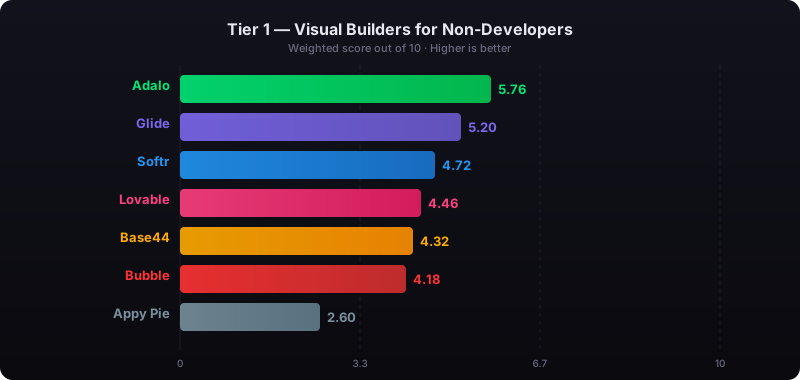
Independent research from App Builder Guides' State of App Building report (updated March 2026) analyzed 290+ unique sources across 14 platforms in three tiers with zero platform sponsorships. Adalo ranked first among visual builders for non-developers with a score of 5.94/10.
See also: Compare all no-code app builders | Inventory app builder
What Your Inventory App Needs
Not every inventory app needs every feature on day one, but you should understand the full landscape before choosing a platform. Some capabilities are easy to add later; others depend on foundational choices about your database and platform that are hard to change after launch.
- Product catalog with variants: A central registry of everything you stock. Each product needs fields for SKU, name, description, category, unit cost, and images. If you sell products with variants (sizes, colors, materials), you need a data model that handles a single product with multiple trackable variants — not just a flat list.
- Real-time stock levels: Every transaction — receiving shipments, fulfilling orders, adjusting for damage or loss — must update a single source of truth. Stale counts are the root cause of most inventory problems.
- Barcode and QR scanning: Warehouse staff should not be typing SKU numbers manually. A native mobile app with camera access can scan barcodes to look up products, receive shipments, and count stock. This is where native mobile apps outperform web-based tools — camera access is faster and more reliable in a native app than through a mobile browser.
- Reorder alerts: Automatic notifications when stock falls below a minimum threshold. This requires a combination of database triggers and push notifications. Some platforms handle this natively; others require connecting to third-party automation tools like Zapier or Make.
- Multi-location tracking: If you stock inventory across multiple warehouses, retail locations, or vehicles, you need location-aware stock levels — not just a global total. The database must track quantities per product per location, which means a junction table connecting products to locations.
- Supplier management: Track which suppliers provide which products, their lead times, pricing, and contact information. Link purchase orders to suppliers so you can see order history and assess vendor reliability over time.
- Reporting and history: Movement logs that show what changed, when, and who made the change. Stock valuation reports, turnover rates, and low-stock summaries help with purchasing decisions.
Adalo — Built-In Relational Database for Inventory Relationships
Price: Free plan available; $36/mo for app store publishing with unlimited usage | Output: Native iOS, Android, and web from one project
Ada, Adalo's AI builder, generates your inventory app's foundation from a description. Tell Magic Start you want "an inventory management app with products, locations, stock levels, and barcode scanning," and it creates screens, navigation, database collections, and relationships. From there, Magic Add lets you layer in features through natural language — "add a low-stock alert screen that shows all products below their reorder point" — and Visual AI Direction lets you point at elements on the multi-screen canvas to refine the layout without typing into a chat window. X-Ray scans your app for performance issues before it reaches your team.
What makes Adalo particularly strong for inventory apps is the built-in relational database. Inventory management is fundamentally about relationships: products belong to categories, stock exists at specific locations, transactions reference both a product and a location, suppliers provide specific products. Adalo's per-app Postgres database handles these relationships natively — you create collections for Products, Locations, Stock Levels, Suppliers, and Transactions, then link them with relationships. No Firebase configuration, no Supabase setup, no SQL.
Adalo 3.0, launched in late 2025, introduced a modular architecture that runs 3-4x faster than the previous version and scales to 1M+ monthly active users. The platform compiles true native iOS and Android apps — not WebView wrappers — which matters for inventory because native apps have direct camera access for barcode scanning, reliable push notifications for reorder alerts, and offline-tolerant performance in warehouse environments where connectivity can be spotty.
Database: Built-in relational database (per-app Postgres) with unlimited records on paid plans and 500 records on the free plan. For teams migrating from spreadsheet-based inventory tracking, SheetBridge lets you use a Google Sheet as a relational database within Adalo.
Pricing: Starter at $36/month (billed annually) includes native iOS and Android publishing, unlimited database records, and zero usage caps. No per-user, per-scan, or per-transaction charges.
Strengths:
- Built-in relational database handles product-location-stock relationships without external setup
- Native mobile apps with direct camera access for barcode scanning
- AI builder (Ada) with Magic Start, Magic Add, X-Ray, and Visual AI Direction
- One project produces Android, iOS, and web apps — warehouse staff on mobile, managers on desktop
- Flat-rate pricing regardless of team size, SKU count, or transaction volume
Honest limitations: Adalo does not include built-in barcode generation — you would need an integration or custom component for printing barcode labels. Complex reporting with charts and graphs is possible but requires more setup than platforms with dedicated reporting widgets. If you need a heavily customized web dashboard with pivot tables and advanced filtering, Bubble offers more sophisticated web-side capabilities.
Best for: Small-to-medium businesses that need a mobile-first inventory app with native barcode scanning for warehouse staff, plus a web interface for managers — all from one project, at a predictable monthly cost.
Learn more about building inventory apps with Adalo
Bubble — Complex Web Dashboards for Inventory Logic
Price: $69/mo+ (Bubble) + $49/mo+ (wrapper for mobile) | Output: Web app; mobile via third-party wrapper
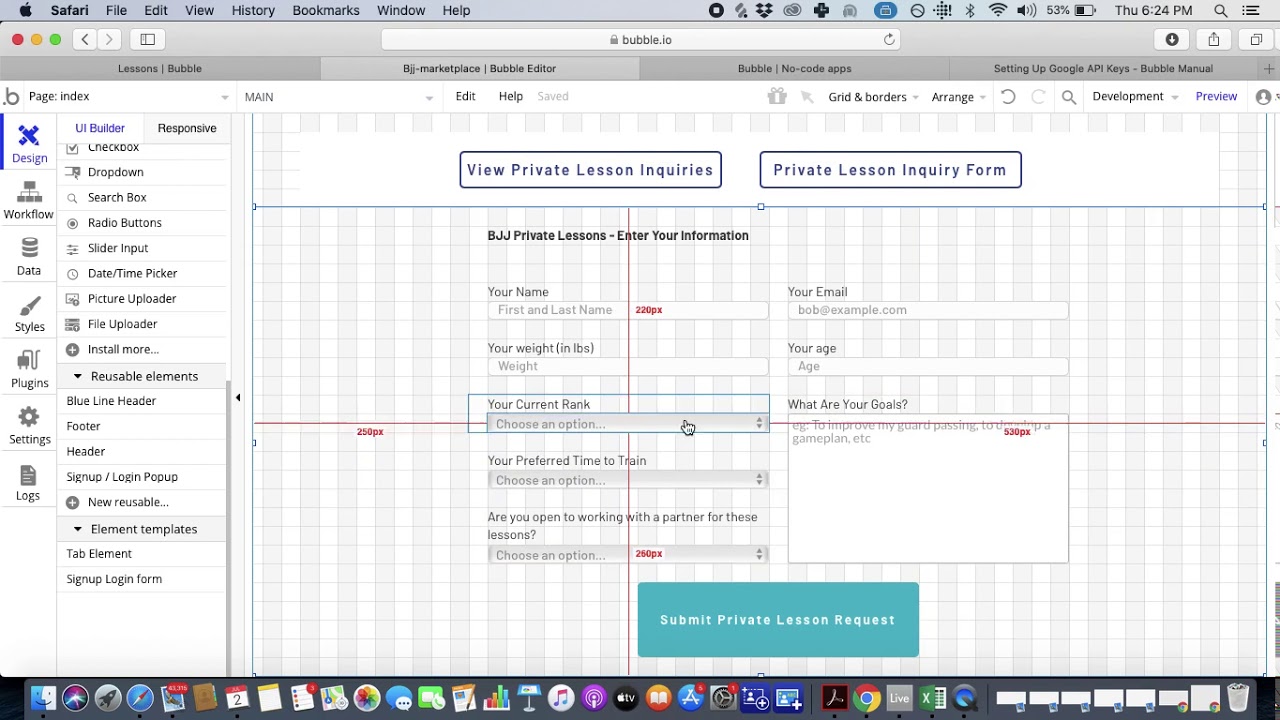
Bubble is a visual web app builder with powerful backend logic. Its workflow engine can handle complex inventory calculations — weighted average cost, FIFO valuation, automatic reorder quantity calculations based on lead time and demand velocity. A plugin ecosystem of 5,300+ options extends functionality with barcode scanning plugins, reporting tools, and ERP integrations. For teams whose primary interface is a desktop browser, Bubble can deliver a sophisticated inventory management dashboard.
The mobile problem: Inventory management almost always involves people in warehouses, stockrooms, or retail floors who need a mobile device in their hand. Bubble produces web apps. Getting a mobile version into Google Play or the App Store requires a wrapper service like Natively ($49/mo on top of Bubble's subscription). The wrapper creates a WebView container — your web app running inside a native shell. Barcode scanning through a WebView is slower and less reliable than through a native camera API, which matters when warehouse staff are scanning hundreds of items per shift.
Pricing: Bubble starts at $69/month (Growth plan, billed annually) with 250K Workload Units per month. Add a wrapper at $49/month minimum for mobile. Inventory apps with frequent database reads and writes (every stock update, every scan, every alert check) consume Workload Units faster than simpler applications. Independent users report 400-500 WU per user per day. A warehouse team of 10 people running scans and updates throughout the day can push WU consumption well past the Growth plan's allocation, triggering overage charges at $0.30 per 1K WU.
Strengths:
- Sophisticated conditional logic for complex inventory calculations
- Large plugin ecosystem with inventory-specific extensions
- Strong for web-first inventory dashboards with advanced data manipulation
Honest limitations: Web-only output means mobile inventory work requires a wrapper with degraded performance. Barcode scanning through WebView is noticeably slower than native camera access. Usage-based pricing makes costs unpredictable for high-transaction inventory operations. Most teams hire Bubble consultants at $40-$125/hour to build anything beyond basic CRUD. Bubble holds a 1.7/5 on Trustpilot across 123 reviews.
Best for: Teams that primarily manage inventory from desktop browsers and need complex backend calculations, who can accept a compromised mobile experience for warehouse floor work.
See the full Adalo vs Bubble comparison
FlutterFlow — Developer-Adjacent Inventory Apps via Flutter
Price: $80/mo/seat (team features) | Output: Flutter-based cross-platform (Android, iOS, Web)
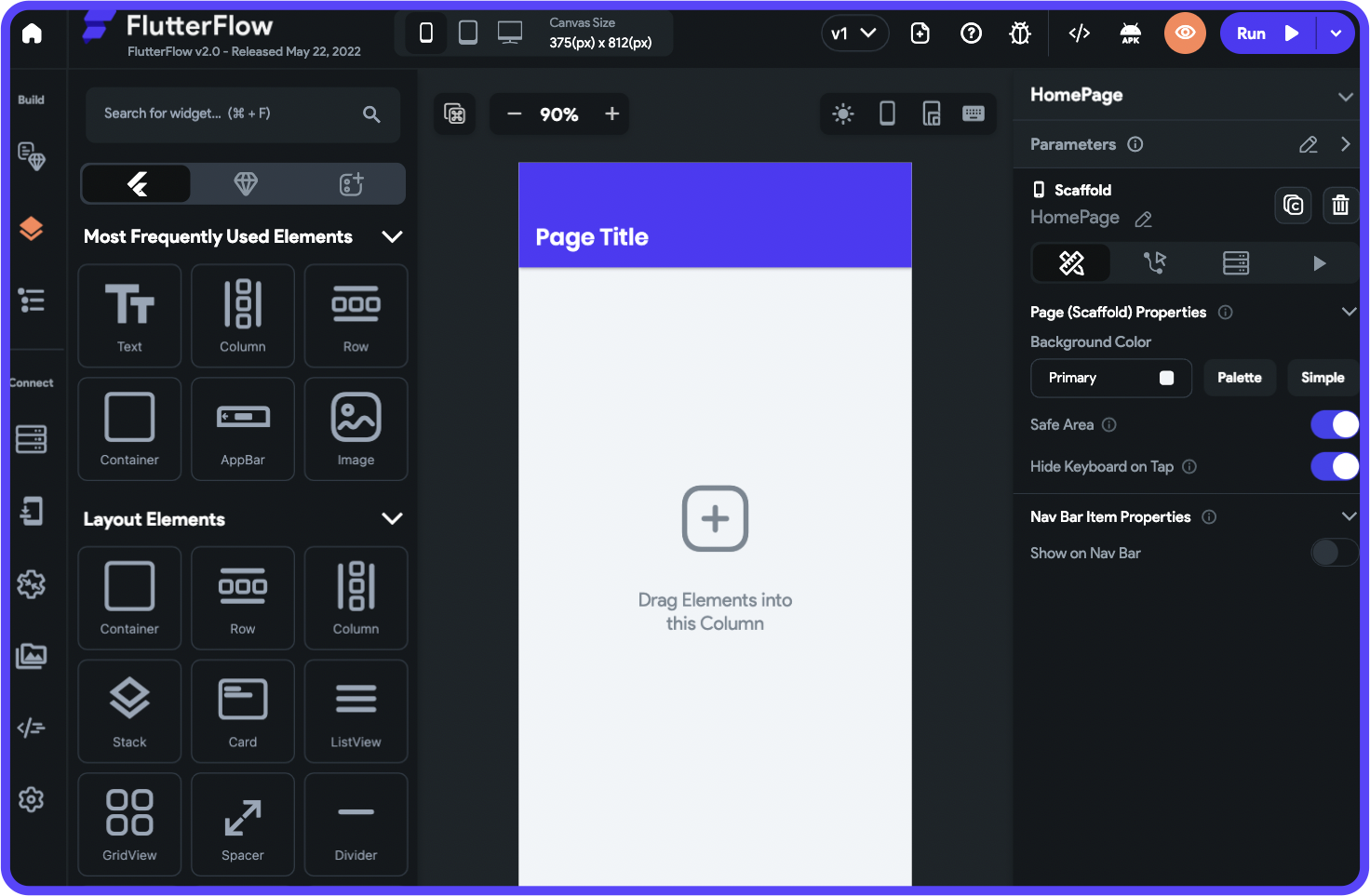
FlutterFlow is a visual development platform built on Google's Flutter framework. It generates real Flutter/Dart code, which compiles to native ARM machine code on Android and iOS. For inventory apps, this means fast barcode scanning performance and smooth list scrolling even with thousands of SKUs. FlutterFlow includes AI features for generating UI components and logic, and full code export lets a development team take over the codebase if needed.
The database challenge: FlutterFlow does not include a database. You must configure Firebase, Supabase, or another backend yourself. For inventory management, this means designing your own data schema for products, locations, stock levels, and transactions — including the junction tables that connect them. Firebase's document-based structure is not ideal for the relational queries inventory apps depend on (e.g., "show me all products at Location A where stock is below the reorder point"). Supabase (Postgres-based) is a better fit but requires more setup. The App Builder Guides 2026 report documented editor interactions taking 2-40 seconds per click at scale.
Pricing: Basic at $39/month with code download and APK export. Growth at $80/month/seat with collaboration features. A three-person inventory management team on Growth pays $240/month before database costs. Add Supabase Pro at $25/mo or Firebase Blaze (pay-as-you-go). FlutterFlow holds a 2.6/5 on Trustpilot across 19 reviews.
Strengths:
- Flutter-based output for near-native scanning and list performance
- Full code export — your development team can extend the app beyond the builder's limits
- Cross-platform from a single Flutter codebase
Honest limitations: No database included — you must configure and maintain your own backend. The widget tree interface assumes familiarity with Flutter concepts like state management and navigation stacks. Per-seat pricing adds up for multi-user teams. Building complex inventory logic (reorder calculations, stock transfer workflows, multi-location queries) requires more technical knowledge than true no-code platforms.
Best for: Technical teams or teams with developer support who want native mobile performance with the option to extend the codebase, and are comfortable configuring their own database backend.
See the full Adalo vs FlutterFlow comparison
Glide — Quick Inventory Tracking from Google Sheets
Price: Free tier available; $25/mo+ for custom domains | Output: Web app / PWA only

Glide turns Google Sheets into functional web apps. For teams already tracking inventory in spreadsheets, the transition is nearly instant — Glide reads your existing Sheet columns and generates an app interface automatically. Adding a product lookup, a stock count update form, or a simple reorder list takes minutes. Glide's AI features (column-based computed fields) can add calculated values like reorder status or stock value.
The complexity ceiling: Glide works well for simple, single-location inventory — a retail store tracking what is on shelves, a small warehouse with a few hundred SKUs, or an office supply closet. It starts struggling when you need relational complexity. Multi-location tracking requires awkward workarounds in Google Sheets (multiple tabs, VLOOKUP chains, or helper columns) because Sheets is not a relational database. Stock transfer between locations, purchase order management, and transaction histories with audit trails push beyond what the spreadsheet-based architecture handles cleanly.
No app store publishing: Glide produces web apps and PWAs (progressive web apps). These can be added to a phone's home screen and work reasonably well for occasional use, but they are not native apps. You cannot publish a Glide app to the Apple App Store or Google Play. For warehouse teams that need a dedicated scanning app with reliable push notifications and offline tolerance, this is a meaningful limitation.
Pricing: Free tier available with limited features. Maker plan at $60/month for custom domains and more rows. Glide charges based on row counts and usage, so a growing inventory database can push costs up. Custom domains require the $60/mo plan — your inventory app will show a Glide-branded URL on the free and $25/mo tiers.
Strengths:
- Fastest path from spreadsheet to working app for simple inventory
- Intuitive for teams already comfortable with Google Sheets
- Low starting cost for basic use cases
Honest limitations: No native mobile apps — web/PWA only, no app store publishing. Spreadsheet-based architecture limits relational data modeling for multi-location, multi-supplier inventory. No native barcode scanning — requires third-party integration. Row and usage limits on lower tiers. Not suited for complex inventory operations with transaction histories and audit trails.
Best for: Small businesses with simple, single-location inventory who already track stock in Google Sheets and want a quick mobile-friendly interface without the overhead of a full platform.
Step-by-Step: Building an Inventory App with Adalo
Step 1: Generate Your App Foundation with Magic Start
Open Adalo and describe your inventory app to Ada. Be specific about your use case: "Build an inventory management app for a warehouse with product tracking, stock levels across two locations, barcode scanning for receiving shipments, and low-stock reorder alerts." Magic Start generates a complete foundation — screens for product lists, stock detail views, scanning interfaces, and alert dashboards, plus a database schema with collections and relationships.
Every screen appears on the visual canvas simultaneously, so you immediately see the full flow: how a warehouse worker navigates from the scanning screen to the stock update screen, how a manager moves from the dashboard to the reorder list.
Step 2: Design Your Database Structure
Inventory management lives and dies by its database design. In Adalo's built-in relational database, you will want these core collections:
- Products: SKU, name, description, category, unit cost, reorder point, preferred supplier (relationship to Suppliers), images
- Locations: Name, address, type (warehouse, retail, vehicle)
- Stock Levels: The junction table that ties it all together — links to Product, links to Location, current quantity, last counted date. This is where multi-location tracking lives.
- Transactions: Type (received, shipped, adjusted, transferred), quantity, links to Product and Location, timestamp, user who made the change. This is your audit trail.
- Suppliers: Company name, contact info, lead time, linked products
The key relationship: Stock Levels connects Products to Locations with a quantity. When someone scans a barcode and receives 50 units at Warehouse A, the app creates a Transaction record and updates the Stock Level record for that product-location combination. This is standard relational database modeling, and Adalo handles it without SQL.
Step 3: Refine with Visual AI Direction and Magic Add
Point at the product list screen and tell the AI: "Add a filter for low-stock items — show only products where current quantity is below the reorder point." Point at the dashboard and say: "Show total stock value across all locations." Use Magic Add for larger features: "Add a stock transfer workflow where a user selects a product, a source location, a destination location, and a quantity, then updates both stock level records."
Step 4: Preview and Test on Real Devices
Use Adalo's device preview to test the scanning workflow on an actual phone. Walk through the full receiving process: open the app, tap Receive Shipment, scan a barcode, confirm the product, enter the quantity, select the location, and submit. Check that the stock level updates in real time and that a low-stock alert triggers correctly when inventory drops below the reorder point.
Step 5: Publish to App Stores and Web
Adalo compiles your inventory app as a native iOS (IPA) file for the Apple App Store and a native Android (APK) file for Google Play. Warehouse and field staff install the native app on their phones for scanning and stock updates. Managers and office staff access the same app through the web version for dashboards and reporting. One project, three outputs, one database.
Platform Comparison for Inventory Apps
| Requirement | Adalo | Bubble | FlutterFlow | Glide |
|---|---|---|---|---|
| Relational database | Built-in Postgres, unlimited records | Built-in (usage-capped) | BYO (Firebase or Supabase) | Google Sheets (not relational) |
| Native barcode scanning | Yes (native camera API) | Via plugin + wrapper | Yes (Flutter camera package) | Third-party integration |
| Multi-location tracking | Junction tables (native) | Custom data types | Manual schema design | Workarounds in Sheets |
| Reorder alerts | Native push notifications | Workflows + wrapper push | Firebase Cloud Messaging | Email only (no push) |
| App store publishing | Direct (iOS + Android) | Via wrapper ($49/mo+) | Via Flutter build | No (web/PWA only) |
| AI builder | Ada (Magic Start, Magic Add, X-Ray, Visual AI Direction) | Bubble AI (chat-based) | AI UI generation | AI computed columns |
| Technical skill required | None | Moderate (most hire consultants) | Moderate-high (Flutter concepts) | Low (spreadsheet familiarity) |
Cost Analysis: Building an Inventory App on Each Platform
The real cost of an inventory app includes more than the platform subscription. You need a database that can handle your SKU count and transaction volume, mobile access for warehouse staff, and potentially third-party services for features the platform does not include natively.
| Cost Component | Adalo | Bubble + Wrapper | FlutterFlow | Glide |
|---|---|---|---|---|
| Platform (annual) | $432 | $828+ | $960/seat | $300-720 |
| Mobile wrapper | $0 (native included) | $588+ (Natively) | $0 (Flutter native) | N/A (no native option) |
| External database | $0 (built-in Postgres) | $0 (built-in, capped) | $0-300+ (Firebase/Supabase) | $0 (Google Sheets) |
| Usage overages | $0 (no caps) | $1,000+/yr typical | Varies by backend | Row limits may force upgrade |
| Consultant/dev help | Typically not needed | $2,000-5,000+ (common) | $1,000-3,000+ (if no dev on team) | Typically not needed |
| Year 1 Total | $432 | $4,400+ | $960-4,200+ | $300-720 |
Why inventory apps cost more on Bubble: Inventory operations generate a high volume of database reads and writes. Every scan, every stock check, every reorder alert evaluation consumes Workload Units. A warehouse team of 5-10 people actively using the app throughout the day can burn through the Growth plan's 250K WU monthly allocation in the first two weeks. Overages at $0.30 per 1K WU add up quickly and unpredictably.
The Glide trade-off: Glide is the cheapest option, but you sacrifice native mobile apps, relational database structure, and app store publishing. If your team only needs a simple product lookup from a spreadsheet, it is a reasonable choice. If you need barcode scanning, multi-location tracking, or push notifications, you will outgrow it.
Frequently Asked Questions
What is the best no-code platform for building an inventory management app?
It depends on your operation's complexity and where your team works. For businesses that need mobile barcode scanning on the warehouse floor plus a web dashboard for managers, Adalo handles the full stack — built-in relational database, native mobile apps, and web output from one project at $36/month. Bubble is stronger for web-only inventory dashboards with complex calculation logic. Glide is fastest for simple single-location tracking from spreadsheets. FlutterFlow delivers strong mobile performance but requires configuring your own database.
Can a no-code inventory app handle barcode scanning?
Yes, but the implementation varies significantly. Platforms that compile native mobile apps (Adalo, FlutterFlow) can access the device camera directly, which means faster, more reliable scanning — important when warehouse staff scan hundreds of items per shift. Web-based platforms (Bubble, Glide) rely on the mobile browser's camera API or third-party scanning plugins, which add latency and can be unreliable. For high-volume scanning operations, native camera access is a meaningful advantage.
How do I structure a database for multi-location inventory?
You need a junction table — a collection that sits between Products and Locations and stores the quantity at each combination. In Adalo, create a "Stock Levels" collection with three fields: a relationship to the Product, a relationship to the Location, and a quantity number. When you receive 50 units of Product A at Warehouse B, you update (or create) the Stock Level record for that specific product-location pair. This pattern scales to any number of products and locations without restructuring your database.
How much does it cost to build a custom inventory app without hiring developers?
With Adalo, you can build and publish a full inventory management app — with barcode scanning, multi-location tracking, and reorder alerts — for $432/year ($36/month). That includes unlimited database records, native iOS and Android apps, and the web version. For comparison, custom development for a comparable inventory system typically costs $40,000-$150,000 and takes four to eight months. Even Bubble plus a mobile wrapper runs $4,400+ in the first year once you factor in Workload Unit overages and consultant fees.
Can a no-code inventory app scale as my business grows?
Adalo 3.0's modular infrastructure scales to 1M+ monthly active users with paid plans that include unlimited database records — no per-SKU or per-transaction caps. Your inventory can grow from 100 SKUs to 10,000 without changing plans or paying overages. Bubble scales well on the web side but costs escalate with usage. Glide's spreadsheet foundation has practical limits around a few thousand rows before performance degrades. FlutterFlow scales if your separately-managed database backend scales.
Should I build a mobile app or a web app for inventory management?
Most inventory operations need both. Warehouse staff and field teams need a mobile app for scanning, receiving shipments, and cycle counting. Managers and purchasing teams typically prefer a web dashboard for reporting, reorder management, and supplier communication. Adalo produces both from a single project — the same database, the same logic, different interfaces optimized for each context. Glide produces web-only output. Bubble produces web with an optional (degraded) mobile wrapper.
What about using a spreadsheet instead of building an app?
Spreadsheets work for very small, single-person operations. They break down when multiple people need to update inventory simultaneously (version conflicts), when you need real-time stock levels (manual refresh), when you need barcode scanning (no camera access), and when you need reorder alerts (no push notifications). If your team has more than two people or more than one location, the time spent maintaining spreadsheet accuracy typically exceeds the cost of an inventory app.
How long does it take to build an inventory app with AI?
A basic inventory app — product catalog, stock levels, and a simple receiving workflow — can be built in a few hours with Adalo's Magic Start and published the same day. A more complete system with multi-location tracking, barcode scanning, reorder alerts, supplier management, and reporting typically takes one to three weeks of part-time work. The database design takes the most thought; the screen building and logic go quickly once the data structure is solid.
Updated March 2026. Pricing verified as of publication date. All platforms listed offer free tiers or trials — test them with your specific inventory requirements before committing to a paid plan.

Build your app fast with one of our pre-made app templates
Begin Building with no codeRelated Content
How to Build a Project Management App with AI in 2026
How to Build a Project Management App with AI in 2026
Step-by-step guide to building a project management app without code. Compare Adalo, Bubble, FlutterFlow, and Glide for task boards, team assignments, and deadline tracking.
How to Build a Food Delivery App Without Code in 2026
Step-by-step guide to build a multi-platform food delivery app without code—design screens, add payments and tracking, test, and launch in w

Step-by-Step Guide: Building a MyFitnessPal Clone with Adalo
Learn how to build a MyFitnessPal-style fitness tracking app in Adalo with this simple step-by-step guide, perfect for beginners and no-code

Step-by-Step Guide: Building an Eventbrite Clone with Adalo
Build your own Eventbrite-style event management and ticketing app using Adalo with this simple step-by-step no-code guide.