



Building a mobile app sounds straightforward until you start. Most app builders force you to work screen by screen, so you never see the full picture of what you're creating. The platforms that do let you prototype often fall apart once real users show up: performance degrades past a hundred concurrent users, costs spike with usage-based billing, or you discover the platform can't actually publish to the Apple App Store or Google Play. That last step is the hardest, and the majority of tools simply can't do it.
This guide cuts through the noise. We tested and compared the 10 best free mobile app builders available in 2026 across real criteria: pricing transparency, native mobile capabilities, AI features, database approach, and production readiness. Each platform is profiled honestly, limitations included.
We also address where prompt-led web app builders like Lovable, Bolt, and Base44 fit into the picture, and where they fall short for anyone who needs an actual mobile app.
Independent research from App Builder Guides' State of App Building report (February 2026) analyzed 190 Reddit threads and 150+ platform citations across 345 data points with zero platform sponsorships. Adalo ranked first among visual builders for non-developers.

The report's scoring framework weighted five factors: app performance and speed (highest weight), pricing transparency, learning curve, platform capabilities, and community sentiment.
Key Points
- Adalo, a no-code app builder, is the only platform under $40/month offering native iOS (native) and Android (native) compilation with no usage caps and a built-in relational database.
- FlutterFlow is the strongest option for developer-adjacent teams who want Flutter code export, though per-seat pricing ($80/month/seat) and no included database increase total cost.
- Bubble handles complex cases well but typically requires specialist expertise. It recently added a mobile editor. It charges usage-based Workload Units starting at $59/month, with a 200-row database cap on free. Bubble holds a 1.7/5 on Trustpilot across 123 reviews.
- Prompt-led web app builders (Lovable, Bolt, Base44, v0) generate web code from prompts but produce no native mobile apps. They are not mobile app builders.
- Only 4 of the 10 platforms on this list compile true native iOS and Android apps: Adalo, FlutterFlow, Thunkable, and Bravo Studio.
- Free tiers exist on most platforms for prototyping, but app store publishing always requires a paid plan. The lowest cost path: Adalo at $36/month plus Apple's $99/year developer fee and Google's one-time $25 fee.
Solutions Covered
- Adalo is the no-code app builder for database-driven web apps and native iOS and Android apps. One version across all three platforms. See every screen on one canvas, preview on any device, and visually direct the AI to refine your app before publishing to the Apple App Store and Google Play.
- FlutterFlow is a Flutter-based visual development platform for teams that want code export and cross-platform native apps.
- Bubble is a visual web app builder for complex cases requiring specialist expertise and sophisticated backend logic.
- Glide is a spreadsheet-to-app builder for quick internal tools from Google Sheets or Excel data.
- Appy Pie is a template-driven app builder for simple vertical-specific apps across many industries.
- Thunkable is a cross-platform mobile builder with block-based logic, strong in education.
- Budibase is an open-source platform for building internal business tools on existing databases.
- Bravo Studio is a Figma-to-native pipeline for design teams converting mockups into mobile apps.
- Jotform Apps is a form-centric app builder for data collection, surveys, and payment workflows.
- Softr is an Airtable-based builder for client portals and internal tools from existing data.
How We Evaluated
Every platform was assessed across the same dimensions:
- Native mobile output: Does it compile real iOS and Android apps, or does it produce web apps that need wrappers to reach app stores?
- Free tier usefulness: Can you build something meaningful before paying, or is the free plan too limited to evaluate properly?
- Pricing transparency: What does it actually cost at scale? Per-user, per-seat, usage-based, and per-app models produce very different bills as your app grows.
- Database capabilities: Is a relational database included, or do you need to configure Firebase, Supabase, or Airtable separately?
- AI features: Does the platform offer AI-assisted building, and how deeply is it integrated into the workflow?
- Learning curve: Can a non-technical founder use this, or does it assume developer experience?
We prioritized platforms that can take you from idea to published app, not just prototype. Independent data sources include the App Builder Guides February 2026 State of App Building report (190 Reddit threads, 150+ platform citations, zero sponsorships) and verified Trustpilot ratings.
1. Adalo — Best no-code app builder for Prompt to App Store Publishing
Price: Free plan available; $36/mo for app store publishing with unlimited usage | Platforms: Web, iOS (native), and Android (native) — one app version across all three
Ada, Adalo's AI builder, lets you describe what you want and generates your app. Magic Start creates complete app foundations from a description. Magic Add adds features through natural language. X-Ray identifies performance issues before they affect users.
Adalo 3.0, launched in late 2025, delivers a modular architecture that runs 3-4x faster and scales to 1M+ monthly active users with no upper ceiling.
Adalo's no-code app builder lets you see every screen on one canvas, preview on any device form factor, and visually direct the AI to make changes. Describe what you want to build, and its AI Builder generates your database structure, screens, and logic. Then publish native iOS and Android apps to the Apple App Store and Google Play from a single codebase.
What makes it stand out: Adalo is one of the few platforms where a non-technical founder can go from idea to a published App Store listing without touching code or hiring a developer. Magic Start generates complete app foundations from a description. Magic Add lets you add features by explaining what you need in plain language. Visual AI Direction lets you point at elements on the canvas to instruct changes, rather than typing into a chat window.
Free tier: Full access to the visual builder and AI features. Build, prototype, and test your app before committing to a paid plan. Publishing to app stores requires a paid plan.
Paid plans: Starter at $36/month (billed annually) includes native iOS and Android publishing, unlimited database records, and zero usage caps. Professional at $52/month. Team plans from $160/month. No overage fees on any tier.
Strengths:
- Native compilation for iOS (IPA) and Android (APK), not WebView wrappers
- AI Builder with Magic Start, Magic Add, X-Ray, and Visual AI Direction
- Unlimited database records on paid plans with no action or storage caps
- Predictable flat-rate pricing with no per-user or usage-based charges
- Modular infrastructure built to scale to 1M+ monthly active users
Honest limitations: Adalo is purpose-built for database-driven apps: marketplaces, booking systems, CRMs, directories, and social platforms. If you need a complex web-only SaaS with sophisticated custom backend logic, Bubble may be a better fit. If your team has Flutter developers who want code export, FlutterFlow is worth considering. Adalo offers code export, but only as part of the enterprise plan within Adalo Blue.
Best for: Founders, small businesses, and teams who want to build and publish native mobile apps without hiring developers, and who value predictable pricing over usage-based billing.
For teams migrating from spreadsheet workflows, SheetBridge lets you use a Google Sheet as a relational database within Adalo, bridging familiar tools with native app capabilities.
2. FlutterFlow — Best for Developer-Adjacent Teams
Price: Free tier available; $39/mo basic, $80/mo/seat for team features | Platforms: Web, iOS, Android (via Flutter)
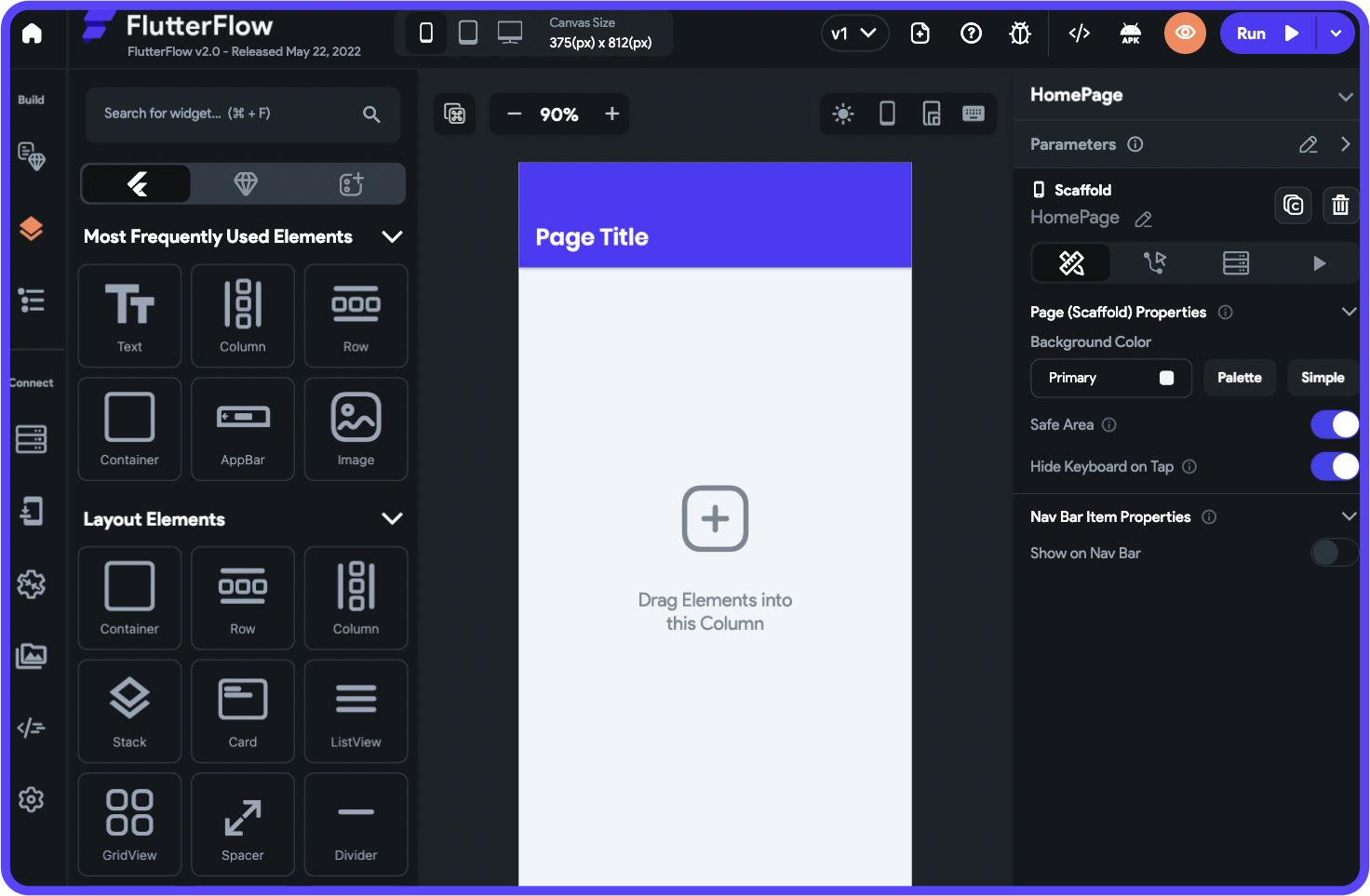
FlutterFlow, a visual development platform built on Google's Flutter framework, bridges the gap between visual building and traditional development. It generates real Flutter/Dart code that you can export, inspect, and extend.
What makes it stand out: Code export is the differentiator. Unlike most visual builders, FlutterFlow lets you download full source code, push to GitHub, and hand it to a development team. This gives you an exit path that most platforms don't offer.
Free tier: Includes the visual builder, templates, API integrations, web publishing, and up to two projects.
Paid plans: Basic at $39/month with code download and APK export. Growth at $80/month/seat with GitHub integration, branching, and real-time collaboration. Business from $150/month/seat.
Strengths:
- Flutter-based output for true cross-platform native performance
- Full code export and GitHub integration
- Active developer community and growing component marketplace
Honest limitations: FlutterFlow does not include a database. You need to bring Firebase, Supabase, or another backend. Per-seat pricing adds up: a three-person team on the Growth plan pays $240/month before database costs. The learning curve is steeper than most visual builders, particularly around state management and custom functions. FlutterFlow holds a 2.6/5 on Trustpilot across 19 reviews, with complaints about instability and support. App Builder Guides' 2026 report documented editor interactions taking 2-40 seconds per click at scale.
Best for: Developer-adjacent teams who want visual building speed with the option to export Flutter code and customize at the framework level.
3. Bubble — Best for Complex Cases Requiring Specialist Expertise
Price: $59/mo+ (Workload Units add usage-based charges) | Platforms: Web, with mobile editor now included
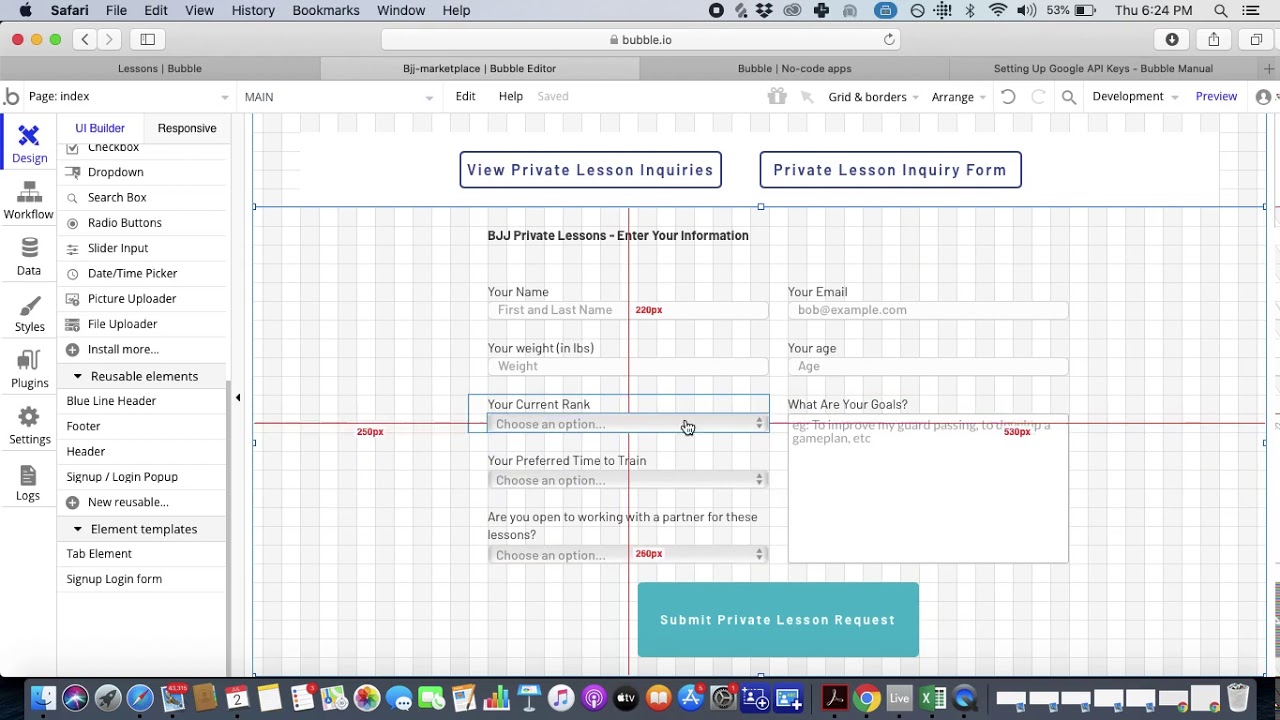
Bubble, a visual web app builder, offers deep customization for complex cases requiring specialist expertise. Its workflow engine handles conditional logic, iterative data processing, and backend events. A plugin ecosystem with 5,300+ options extends functionality across payments, analytics, and third-party services.
What makes it stand out: For teams building intricate web-only SaaS products with complex data relationships and advanced conditional workflows, Bubble provides more granular control than most visual builders. Bubble has also added a native mobile editor to its platform, though mobile builds require a paid plan.
Free tier: Bubble's free plan is development-only. You get the full editor, API connector, native mobile editor, mobile debugger, and on-device testing. But you cannot go live: zero builds, zero live versions, no custom domain, no live website. The database is capped at 200 things (rows) with 0.5 GB file storage and 50K Workload Units/month. It's a genuine sandbox for learning and prototyping, but you can't ship anything to users without upgrading.
Paid plans: Starter at $59/month (billed annually) with 175K WU/month and mobile build submissions. Growth at $209/month with 250K WU. Team at $549/month. All paid plans charge $0.30 per 1K WU in overages once you exceed your quota.
Strengths:
- Sophisticated backend logic and conditional workflow automation
- Large plugin ecosystem (5,300+ plugins)
- Strong for complex internal tools and web-first SaaS
Honest limitations: Bubble's mobile offering is still new, and its web-first architecture means mobile apps inherit web performance characteristics. Bubble holds a 1.7/5 on Trustpilot across 123 reviews, with the majority citing billing and cancellation issues. App Builder Guides' February 2026 report, which analyzed 190 Reddit threads with zero platform sponsorships, documented Bubble page loads of 5-10 seconds on desktop and 8-14 seconds on its mobile beta. Workload Unit consumption is unpredictable: independent users report 400-500 WU per user per day, with one scheduling app burning 700,000 WU. Most teams end up hiring Bubble consultants at $40-$125/hour.
Best for: Teams building complex web-only applications with sophisticated backend requirements, who have the budget for expert development.
Not best for: Anyone who needs predictable monthly costs or proven native mobile performance.
4. Glide — Best for Quick Apps from Spreadsheets
Price: Free tier available; $25/mo+ | Platforms: Web only
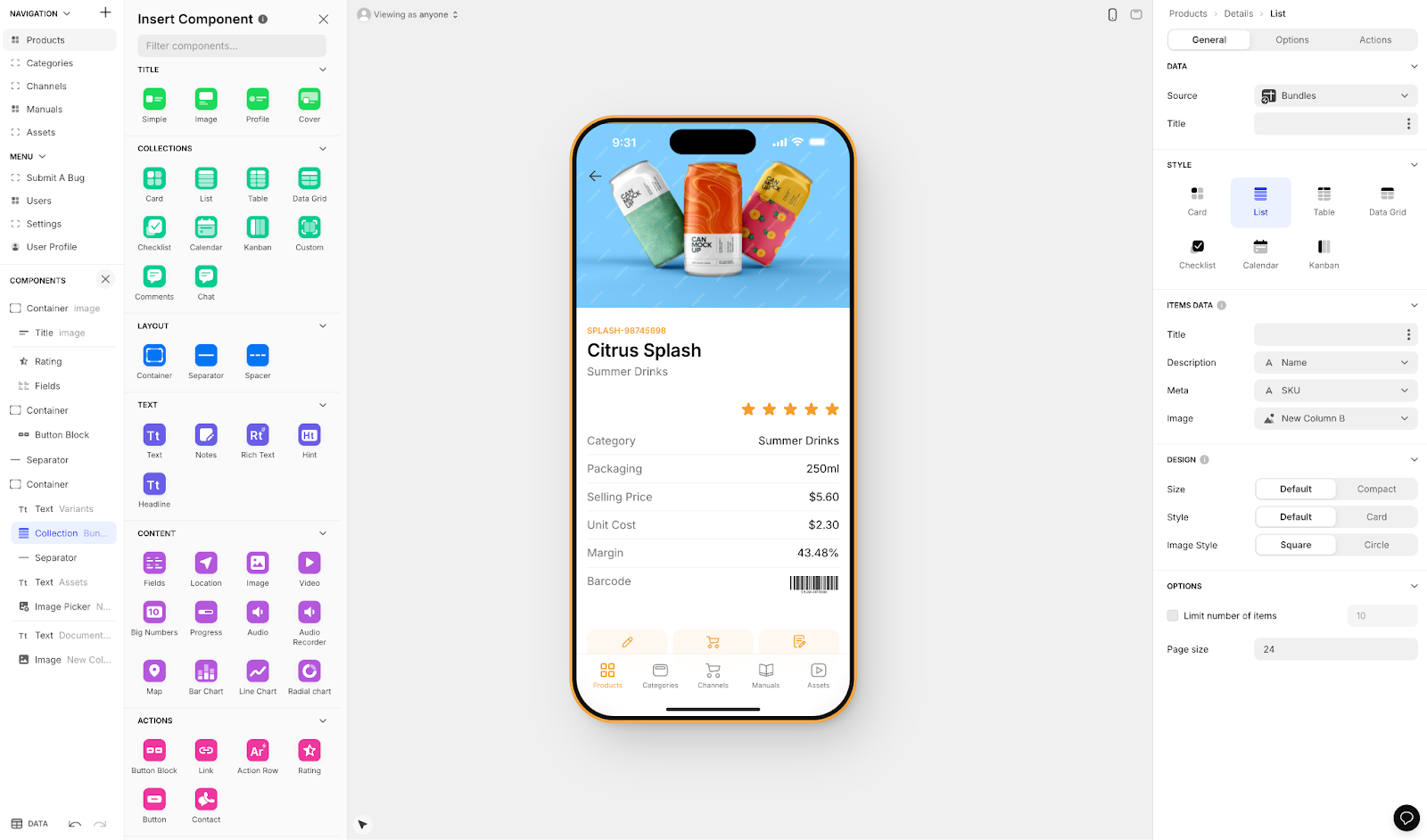
Glide, a spreadsheet-to-app builder, turns Google Sheets, Excel files, and Airtable bases into functional web apps in minutes. It's the fastest path from "I have data in a spreadsheet" to "I have a working app my team can use."
What makes it stand out: Speed of deployment. If you have structured data in a spreadsheet, Glide generates a usable interface in under an hour. The learning curve is nearly flat for anyone comfortable with spreadsheets.
Free tier: Lets you explore the builder and create basic apps for personal use.
Paid plans: Explorer at $25/month for small projects. Maker at $60/month adds Glide AI, workflows, custom domains, and third-party integrations. Business at $249/month for unlimited apps with 30 users and 100,000 rows.
Strengths:
- Near-zero learning curve for spreadsheet-literate users
- Very fast time-to-prototype for data-centric apps
- Glide AI features for smart app enhancements
Honest limitations: Glide builds web apps, not native mobile apps. Your app runs in a browser, not from the App Store. Spreadsheet-based architecture means limited relational data modeling, and performance degrades with large datasets. The Business tier at $249/month is steep for what remains a spreadsheet-powered tool.
Best for: Non-technical teams who need to quickly turn existing spreadsheet data into simple internal apps for inventory tracking, employee directories, or project management.
5. Appy Pie — Best for Template-Based Simple Apps
Price: ~$18/app/mo (Android); ~$60/app/mo for iOS + Android | Platforms: Web, iOS, Android
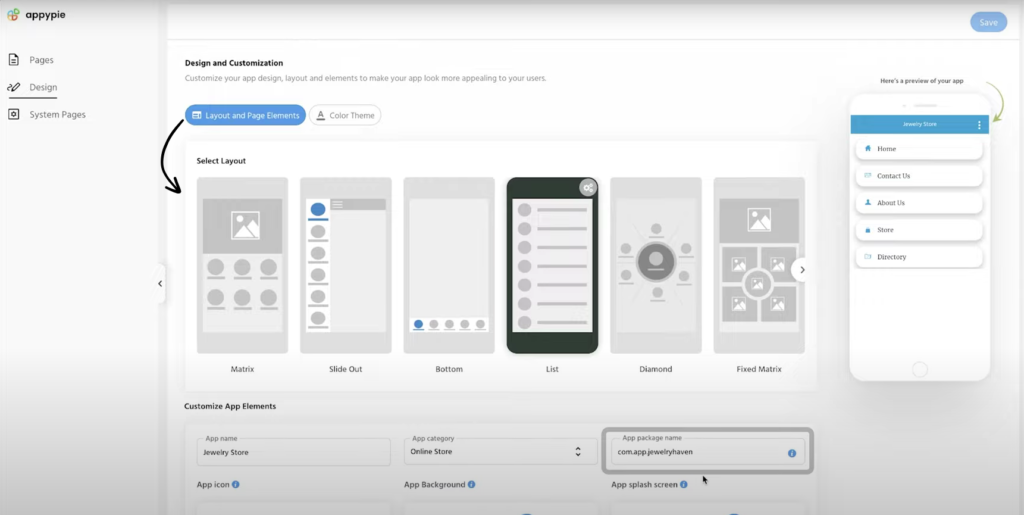
Appy Pie, a template-driven app builder, covers an unusually broad range of verticals: restaurants, fitness, churches, real estate, events, and more. Pick a template, customize the layout and content, and publish.
What makes it stand out: Breadth of templates. If your use case matches one of Appy Pie's industry templates, you can have a functional app in a few hours. The platform also offers a chatbot builder, website builder, and workflow automation tools bundled together.
Free tier: Appy Pie offers a 7-day free trial only. There is no permanent free plan for app building (though the website builder has one). After the trial, your app is locked until you subscribe.
Paid plans: Basic (Android only) from approximately $18/app/month billed annually, with 500 push notifications and 500 downloads per month. The Platinum plan adds iOS support at roughly $60/app/month. Each app requires its own subscription, so building two apps doubles your bill.
Strengths:
- Large template library across many industry verticals
- Quick setup for simple, template-fitting apps
- Bundled tools (chatbot, website, workflows)
Honest limitations: Template-driven means limited customization depth. Once you need functionality that doesn't fit the template, you hit walls. Database capabilities are less sophisticated than platforms with built-in relational databases. Per-app pricing means building multiple apps multiplies your costs. The quality of output varies significantly by template.
Best for: Small businesses in specific verticals (restaurants, churches, fitness studios) who need a simple branded app quickly and don't require deep customization.
6. Thunkable — Best for Educational Projects
Price: Free tier available; $37/mo (annual) to publish 1 app | Platforms: Web, iOS, Android
Thunkable, a cross-platform mobile app builder, uses block-based logic similar to Scratch or MIT App Inventor. Drag logic blocks together instead of writing code. This makes it accessible for beginners and popular in educational settings.
What makes it stand out: The block-based programming model is genuinely intuitive for people who've never built anything. Educational institutions use Thunkable to teach app development concepts. It supports cross-platform output to web, iOS, and Android from a single project.
Free tier: Permanent free plan with up to 3 public projects (no private projects), 5 screens per project, 2,000 AI tokens, and 100 MB storage. You get live testing and 2 test downloads per month. However, you cannot publish to app stores, save screens, or access push notifications on the free plan. It's enough to learn the platform and build small prototypes.
Paid plans: Accelerator at $18/month (no publishing). Builder at $37/month (annual) allows publishing 1 app to iOS and Android with 25 distribution downloads/month. For unlimited published apps, the Advanced plan costs $99/month (annual) or $189/month monthly. Even publishing a single app costs more than what some competitors charge for unlimited publishing.
Strengths:
- Block-based logic is accessible for absolute beginners
- Strong educational partnerships and learning resources
- Cross-platform output (web, iOS, Android)
Honest limitations: While basic publishing starts at $37/month (annual), unlimited app publishing jumps to $99/month (annual) or $189/month if paying monthly. Token-based usage limits mean larger or more complex apps consume your allocation faster. The builder is less sophisticated than alternatives for production-quality apps. The community and ecosystem are smaller than competitors.
Best for: Students, educators, and first-time builders who want to learn app development concepts through a visual, block-based interface.
7. Budibase — Best for Internal Business Tools
Price: Free (self-hosted); $50/mo + $5/user (cloud) | Platforms: Web only
Budibase, an open-source platform for building internal tools, is designed for IT teams and operations departments. It connects directly to existing databases (PostgreSQL, MySQL, MongoDB, REST APIs) and generates CRUD interfaces automatically.
What makes it stand out: If you already have data infrastructure and need a better front-end for it, Budibase eliminates weeks of development. Self-hosting the open-source edition gives you full control with no user limits.
Free tier: Self-host the open-source edition for free with no user limits, or use Budibase Cloud's free trial.
Paid plans: Premium at $50/month per creator plus $5/month per app user. Enterprise pricing is custom. Per-user pricing can escalate: a tool used by 50 employees costs $300/month on top of creator seats.
Strengths:
- Open-source with self-hosting option
- Direct database connectors for existing data sources
- Auto-generated CRUD interfaces save significant setup time
Honest limitations: Budibase creates responsive web applications, not native iOS or Android apps. It will not appear in the App Store. Its strength is operational tools, not consumer-facing products.
Best for: IT teams building internal dashboards, admin panels, and operational tools on top of existing databases.
8. Bravo Studio — Best for Figma-First Design Teams
Price: Free trial; ~$18/mo+ | Platforms: iOS (native), Android (native)
Bravo Studio takes a design-first approach. You design your app screens in Figma, connect them to Bravo's backend or your own API, and Bravo renders them as native mobile apps. Your Figma file is the front-end.
What makes it stand out: For design teams already working in Figma, Bravo eliminates the handoff gap. The app looks exactly like the design because it literally is the design.
Free tier: 30-day free trial on any plan. No permanent free tier.
Paid plans: Solo at approximately $18/month (billed annually). Interactive apps at $19/month with unlimited projects. Pro apps at $19/app/month with custom branding.
Strengths:
- Figma-to-native pipeline with pixel-perfect design fidelity
- Real native iOS and Android output from design files
- Affordable for individual designers
Honest limitations: Bravo requires Figma expertise before you start. Complex business logic, database relationships, and custom workflows require significant API work. Best for apps with simple data flows (portfolios, content apps, event guides) and struggles with database-driven applications.
Best for: Design-focused teams and agencies who prototype in Figma and want to convert those designs into native mobile apps.
9. Jotform Apps — Best for Form-Centric Experiences
Price: Free tier available; $34/mo+ | Platforms: Web (PWA only)
Jotform, used by over 25 million people for forms, expanded into app building with Jotform Apps. Assemble mobile-friendly interfaces from pre-built widgets: forms, payment processors, calendars, document signers, and more.
What makes it stand out: If your "app" is essentially a collection of forms, surveys, and payment flows, Jotform Apps gets you there faster than any general-purpose builder.
Free tier: Up to 5 forms, 100 monthly submissions, and 100 MB of storage.
Paid plans: Bronze at $34/month (annual billing). Gold at $99/month with higher limits and optional HIPAA compliance. Nonprofits and educational institutions receive 50% off.
Strengths:
- Massive widget library for data collection workflows
- Strong payment integrations (Stripe, PayPal, Square)
- HIPAA-compliant tier for healthcare
Honest limitations: Jotform Apps creates progressive web apps, not native mobile apps. You cannot publish to the App Store or Google Play. The experiences feel like enhanced mobile forms rather than full applications. If you need more than forms and widgets, you'll outgrow it quickly.
Best for: Businesses needing mobile-friendly data collection, event check-in apps, patient intake forms, or field service reporting.
10. Softr — Best for Airtable-Powered Apps
Price: Free tier available; $49/mo+ | Platforms: Web only
Softr, an Airtable-based app builder, turns existing Airtable bases into client portals, internal tools, and business applications. If your team already manages data in Airtable, Softr provides a polished front-end without migrating to a new system.
What makes it stand out: The Airtable connection is nearly instant. Point Softr at your existing bases, choose a template, configure permissions, and you have a working application. Built-in user authentication and role-based access controls make it practical for client-facing portals.
Free tier: Permanent free plan with 1 published app, 10 app users, 5,000 database records (1,000 per table), and 7 supported data sources (Softr DB, Airtable, Google Sheets, Notion, SmartSuite, Xano, Coda). You get 1 custom domain, 500 workflow actions/month, and 500 AI credits/month. Basic building blocks (lists, grids, tables, forms) are included. Locked behind paid plans: charts, calendars, Kanban views, custom code, conditional logic in forms, and CSV/PDF export.
Paid plans: Basic at $49/month (annual). Professional at $89/month. Business at $167/month for PWA output and higher user/record limits.
Strengths:
- Fast setup from existing Airtable data
- Client portals and internal tools with built-in auth
- Clean, professional-looking templates
Honest limitations: Softr is entirely dependent on Airtable for data, meaning Airtable's own record limits and pricing apply on top of Softr's fees. It produces web apps and PWAs only: no native iOS or Android apps, no App Store publishing. Customization beyond template structures is limited.
Best for: Teams with existing Airtable data who need client portals or internal tools quickly without rebuilding their data layer.
What About Prompt-Led Web Builders?
A new wave of prompt-led web app builders gained significant traction in 2025-2026. Lovable, Bolt, Base44, and v0 let you describe an app in plain English and receive a generated web application in minutes. They're impressive for web prototypes and internal dashboards.
The critical limitation for anyone reading an article about mobile app builders: none of them produce native iOS or Android apps. Lovable outputs React code, Bolt generates web projects, and v0 produces React/Next.js components. To get any of these into app stores, you'd need a third-party wrapper, adding latency, losing native device features, and introducing code you need to maintain.
| Capability | Prompt-Led Web Builders | no-code app builders (Adalo, FlutterFlow) |
|---|---|---|
| **Web apps** | Strong | Yes |
| **Native iOS/Android** | No | Yes (platform dependent) |
| **App Store publishing** | Requires wrapper | Built-in (on some platforms) |
| **Push notifications** | Limited or none | Native support |
| **Offline functionality** | Limited PWA support | Native capabilities |
If you need a web application or internal prototype quickly, prompt-led builders deserve a look. But if your goal is a mobile app in the App Store and Google Play, you need a platform built for that purpose.
Quick Comparison: All 10 Platforms
| Platform | Free Tier | Paid Start | Native Mobile | App Store Publishing | Database | Pricing Model |
|---|---|---|---|---|---|---|
| **Adalo** | Yes | $36/mo | iOS (native) + Android (native) | Yes | Built-in, unlimited | Flat rate, no caps |
| **FlutterFlow** | Yes | $39/mo | Via Flutter | Yes (Basic+) | No (BYO Firebase) | Per seat |
| **Bubble** | Yes (dev only) | $59/mo | Mobile editor (new) | Yes (Starter+) | Built-in, 200 free | Usage-based (WU) |
| **Glide** | Yes | $25/mo | No (web only) | No | Spreadsheet-based | Row/usage limits |
| **Appy Pie** | 7-day trial | ~$18/app/mo | Yes (template-based) | Yes (Platinum) | Basic | Per app |
| **Thunkable** | Yes (3 projects) | $37/mo (1 app) | Yes | Yes (Builder+) | Basic | Token limits |
| **Budibase** | Yes (self-host) | $50/mo + $5/user | No (web only) | No | Connects to existing | Per creator + user |
| **Bravo Studio** | Trial | ~$18/mo | Yes (via Figma) | Yes | No (API required) | Per app |
| **Jotform Apps** | Yes | $34/mo | No (PWA only) | No | Form-based | Submission limits |
| **Softr** | Yes | $49/mo | No (web only) | No | Airtable-dependent | User limits |
How to Choose the Right Free App Builder
The best builder depends entirely on what you're building and who's building it.
Do you need native mobile apps? If your app needs to be in the Apple App Store or Google Play, your real options are Adalo, FlutterFlow, Thunkable, and Bravo Studio. The rest produce web apps or PWAs. Among those four, Adalo offers the lowest publishing cost ($36/month) with no usage caps and a built-in database.
What's your technical skill level? Adalo, Glide, Jotform Apps, and Softr require zero coding knowledge. FlutterFlow benefits from Flutter familiarity. Budibase is designed for IT teams. Thunkable's block-based logic is beginner-friendly but the builder is less sophisticated for production apps.
What's your budget model? Per-user pricing (Budibase, Softr, Power Apps), per-seat pricing (FlutterFlow), usage-based pricing (Bubble), and per-app pricing (Appy Pie) all produce very different costs at scale. Flat-rate pricing (Adalo) is the most predictable. Calculate your total cost of ownership, not just the starting price.
Prototype or production? Prompt-led builders and Glide excel at rapid prototyping. Adalo, FlutterFlow, and Bubble are designed to take you from idea to production. Bravo Studio works well for design-driven apps with simple backends.
Frequently Asked Questions
What is the best free app builder for iPhone and Android?
For native apps that publish to both the Apple App Store and Google Play, Adalo and FlutterFlow are the strongest options with free tiers. Adalo offers a visual AI-powered builder with native compilation from a single codebase at $36/month with no overage fees. FlutterFlow generates Flutter code for cross-platform deployment but requires a separate backend and charges per seat. Both let you prototype for free before committing to a paid plan.
Can prompt-led builders like Lovable or Bolt build mobile apps?
Not natively. Lovable, Bolt, and Base44 generate web applications using React and similar frameworks. These run in browsers but cannot be compiled into native iOS or Android binaries. To get them into app stores, you'd need a third-party wrapper service, which introduces performance trade-offs, limited device API access, and ongoing maintenance complexity.
How much does it really cost to build a mobile app without coding?
You can prototype for free on most platforms. Publishing a native mobile app to stores typically requires a paid plan: Adalo charges a flat $36/month with no caps on actions, users, or records. FlutterFlow starts at $39/month per seat (plus separate database costs), and Thunkable requires $37/month (annual) to publish a single app or $99/month for unlimited. Bubble starts at $59/month but charges usage-based Workload Units — a moderately active app with 1,000 monthly active users can consume around 5 million WU. By the pricing guide on Bubble.io's website, this would add at least $1,000/month on top of the base subscription. Beyond platform fees, Apple charges a $99/year developer account fee, and Google charges a one-time $25 registration fee. Total first-year cost with Adalo: approximately $531 (platform + Apple + Google).
Do I need to know how to code to use these app builders?
It depends on the platform. Adalo, Glide, Jotform Apps, and Softr require zero coding knowledge. Appy Pie's template approach is also non-technical. FlutterFlow and Budibase are more technical, particularly around custom functions and API configurations. Thunkable's block-based logic is beginner-friendly but less sophisticated for complex apps.
What is the difference between a native app and a web app?
A native app is compiled specifically for iOS or Android, installed from the App Store or Google Play, and has full access to device features like push notifications, camera, Bluetooth, and offline storage. A web app runs in a mobile browser, can sometimes be added to a home screen as a PWA, but has limited device access and cannot appear in app store search results. Native apps generally load faster and feel more polished. Of the platforms on this list, Adalo, FlutterFlow, Thunkable, and Bravo Studio produce native apps.
Which free app builder is best for building a marketplace or booking app?
Database-driven apps like marketplaces and booking systems need relational data modeling (users, listings, bookings, reviews all connected). Adalo includes a built-in relational database with unlimited records, making it the strongest fit. FlutterFlow can handle this with an external database like Firebase, though setup is more complex. Bubble works for web-only marketplaces but doesn't produce mobile apps. Spreadsheet-based builders like Glide lack the relational depth these apps require.
Is Bubble good for mobile apps?
Bubble recently added a native mobile editor to its platform, so it now offers mobile app building alongside its established web builder. However, Bubble's mobile offering is new, and independent reports have cited significant lag in Bubble.io's apps. Bubble's own website carefully states that speed is dependent on data relationships being set up correctly for scale. This may mean engaging with Bubble Experts is required to ensure Bubble's complexity does not result in significant latency for a non-sophisticated user. For mobile-first projects where performance and native feel are priorities, platforms with established native compilation track records may be a more proven path.
What can't Adalo do?
Adalo offers code export, but only as part of the enterprise plan within Adalo Blue (FlutterFlow includes it on lower tiers). It's less suited for complex web-only dashboards with deeply nested conditional logic (Bubble handles this better). Its plugin ecosystem is smaller than Bubble's 5,300+ options, and projects requiring heavy custom backend logic or code-level control may find other platforms a better starting point. Adalo is strongest for database-driven native mobile apps built by non-technical teams.
Updated February 2026. Pricing verified as of publication. All platforms listed offer free tiers or trials. Test them with your specific use case before committing to a paid plan.








